change time MERCEDES-BENZ SPRINTER 2016 MY16 Operator’s Manual
[x] Cancel search | Manufacturer: MERCEDES-BENZ, Model Year: 2016, Model line: SPRINTER, Model: MERCEDES-BENZ SPRINTER 2016Pages: 290, PDF Size: 6.44 MB
Page 170 of 290
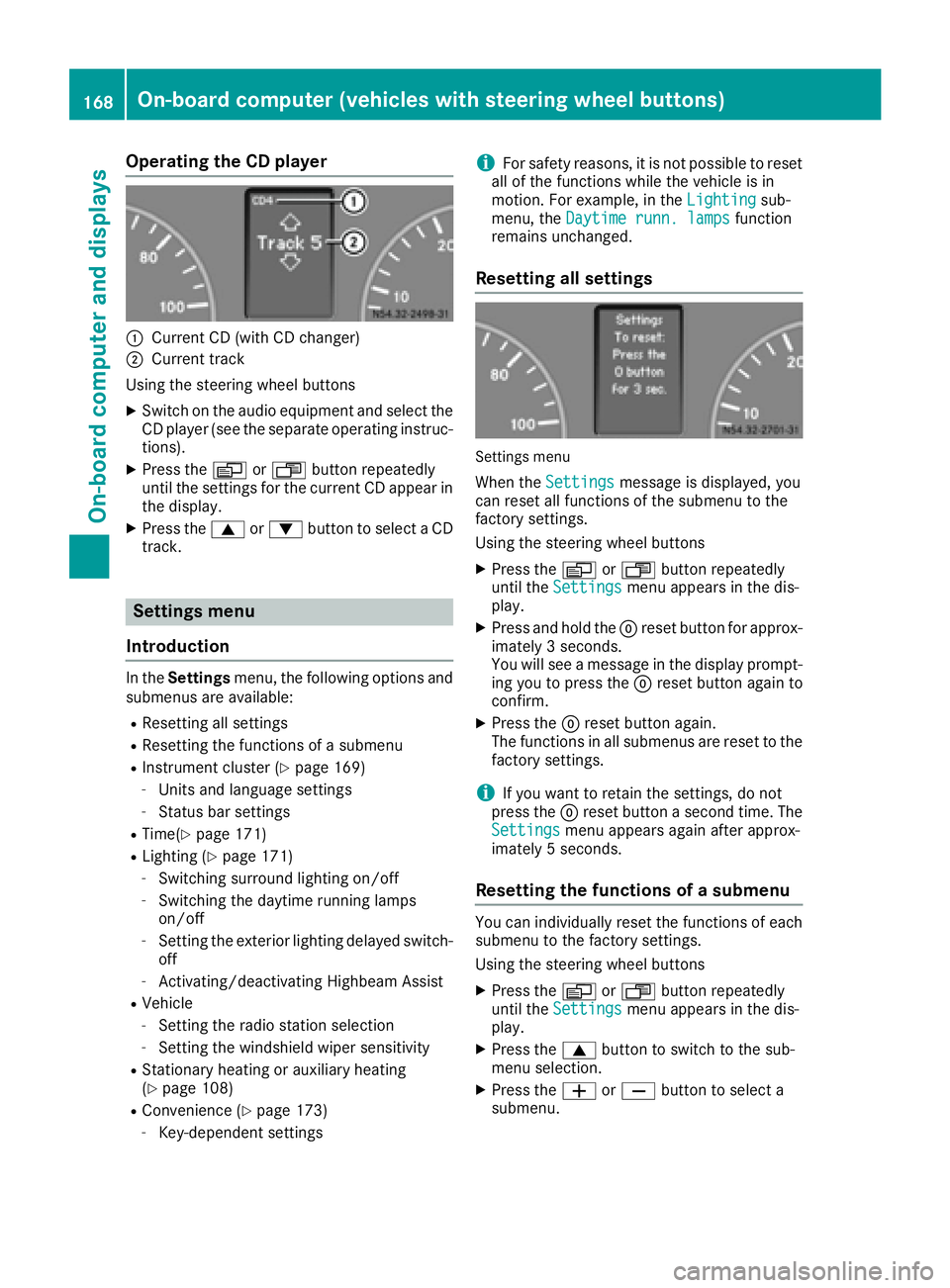
Operating the CD player
:Current CD (with CD changer)
;Current track
Using the steering wheel buttons
XSwitch on the audio equipment and select the
CD player (see the separate operating instruc-
tions).
XPress the VorU button repeatedly
until the settings for the current CD appear in
the display.
XPress the 9or: button to select a CD
track.
Settings menu
Introduction
In the Settings menu, the following options and
submenus are available:
RResetting all settings
RResetting the functions of a submenu
RInstrument cluster (Ypage 169)
-Units and language settings
-Status bar settings
RTime(Ypage 171)
RLighting (Ypage 171)
-Switching surround lighting on/off
-Switching the daytime running lamps
on/off
-Setting the exterior lighting delayed switch-
off
-Activating/deactivating Highbeam Assist
RVehicle
-Setting the radio station selection
-Setting the windshield wiper sensitivity
RStationary heating or auxiliary heating
(Ypage 108)
RConvenience (Ypage 173)
-Key-dependent settings
iFor safety reasons, it is not possible to reset
all of the functions while the vehicle is in
motion. For example, in the Lighting
sub-
menu, the Daytime runn. lampsfunction
remains unchanged.
Resetting all settings
Settings menu
When the Settingsmessage is displayed, you
can reset all functions of the submenu to the
factory settings.
Using the steering wheel buttons
XPress the VorU button repeatedly
until the Settingsmenu appears in the dis-
play.
XPress and hold the 9reset button for approx-
imately 3 seconds.
You will see a message in the display prompt-
ing you to press the 9reset button again to
confirm.
XPress the 9reset button again.
The functions in all submenus are reset to the
factory settings.
iIf you want to retain the settings, do not
press the 9reset button a second time. The
Settings
menu appears again after approx-
imately 5 seconds.
Resetting the functions of a submenu
You can individually reset the functions of each
submenu to the factory settings.
Using the steering wheel buttons
XPress the VorU button repeatedly
until the Settingsmenu appears in the dis-
play.
XPress the 9button to switch to the sub-
menu selection.
XPress the WorX button to select a
submenu.
168On-board computer (vehicles with steering wheel buttons)
On-board computer and displays
Page 171 of 290
XPress and hold the9reset button for approx-
imately 3 seconds.
You will see a message in the display prompt-
ing you to press the 9reset button again to
confirm.
XPress the 9reset button again.
All functions in the submenu are reset to the
factory settings.
iIf you want to retain the settings, do not
press the 9reset button a second time. The
Settings
menu appears again after approx-
imately 5 seconds.
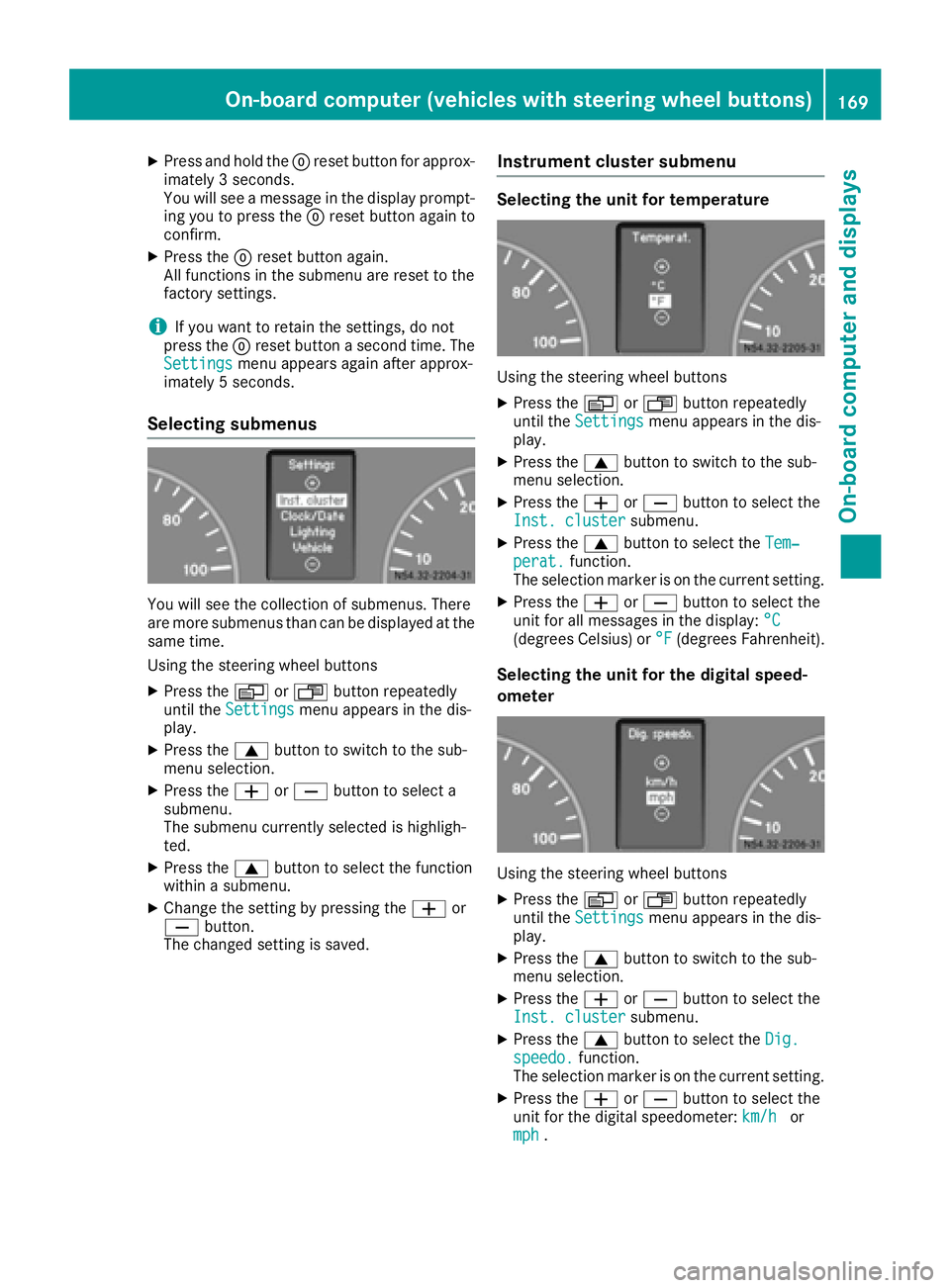
Selecting submenus
You will see the collection of submenus. There
are more submenus than can be displayed at the
same time.
Using the steering wheel buttons
XPress the VorU button repeatedly
until the Settingsmenu appears in the dis-
play.
XPress the 9button to switch to the sub-
menu selection.
XPress the WorX button to select a
submenu.
The submenu currently selected is highligh-
ted.
XPress the 9button to select the function
within a submenu.
XChange the setting by pressing the Wor
X button.
The changed setting is saved.
Instrument cluster submenu
Selecting the unit for temperature
Using the steering wheel buttons
XPress the VorU button repeatedly
until the Settingsmenu appears in the dis-
play.
XPress the 9button to switch to the sub-
menu selection.
XPress the WorX button to select the
Inst. clustersubmenu.
XPress the 9button to select the Tem‐perat.function.
The selection marker is on the current setting.
XPress the WorX button to select the
unit for all messages in the display: °C
(degrees Celsius) or°F(degrees Fahrenheit).
Selecting the unit for the digital speed-
ometer
Using the steering wheel buttons
XPress theVorU button repeatedly
until the Settingsmenu appears in the dis-
play.
XPress the 9button to switch to the sub-
menu selection.
XPress the WorX button to select the
Inst. clustersubmenu.
XPress the 9button to select the Dig.speedo.function.
The selection marker is on the current setting.
XPress the WorX button to select the
unit for the digital speedometer: km/hor
mph.
On-board computer (vehicles with steering wheel buttons)169
On-board computer and displays
Z
Page 173 of 290
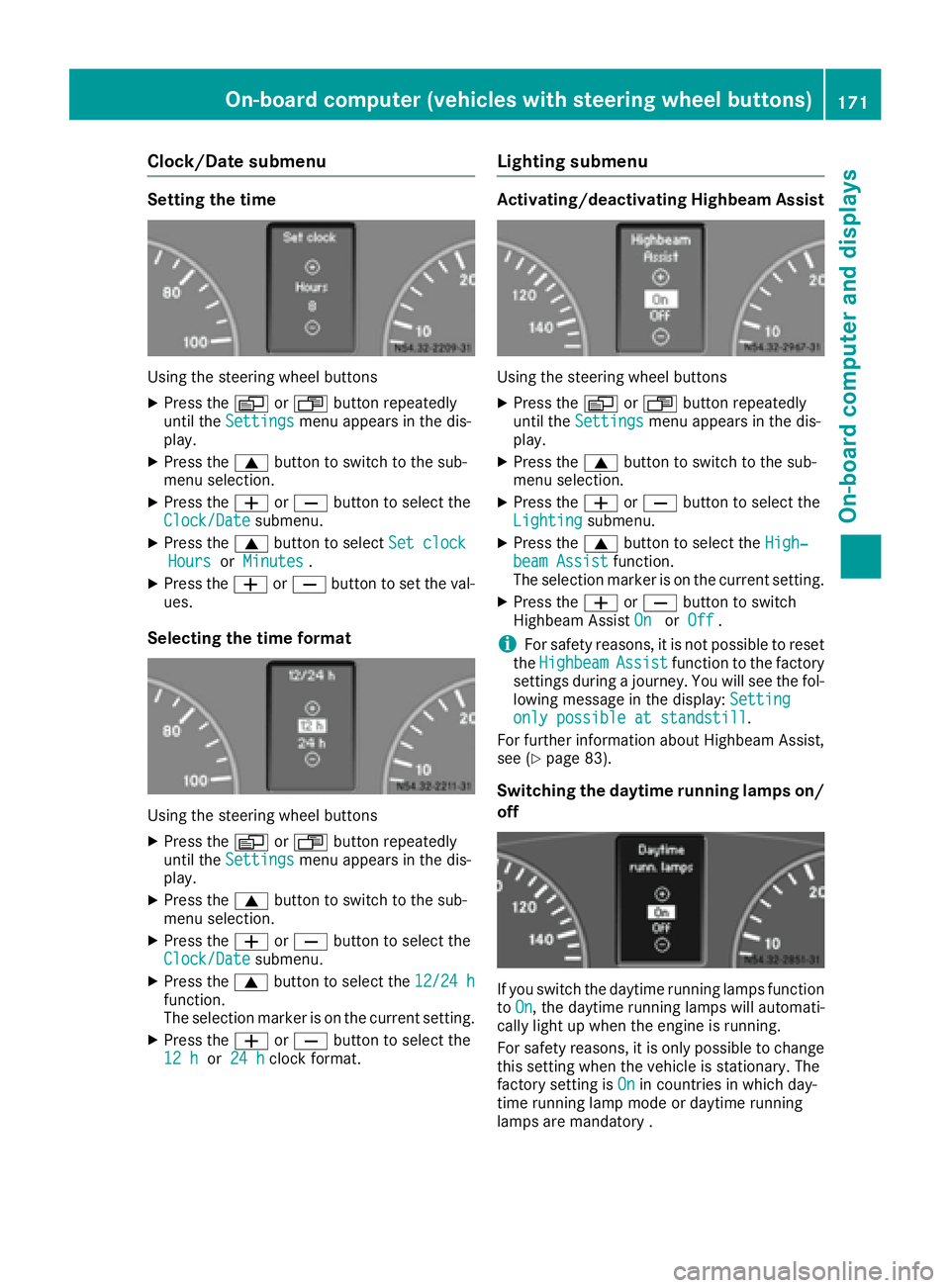
Clock/Date submenu
Setting the time
Using the steering wheel buttons
XPress theVorU button repeatedly
until the Settingsmenu appears in the dis-
play.
XPress the 9button to switch to the sub-
menu selection.
XPress the WorX button to select the
Clock/Datesubmenu.
XPress the 9button to select Set clockHoursorMinutes.
XPress the WorX button to set the val-
ues.
Selecting the time format
Using the steering wheel buttons
XPress the VorU button repeatedly
until the Settingsmenu appears in the dis-
play.
XPress the 9button to switch to the sub-
menu selection.
XPress the WorX button to select the
Clock/Datesubmenu.
XPress the 9button to select the 12/24 hfunction.
The selection marker is on the current setting.
XPress theWorX button to select the
12 hor 24 hclock format.
Lighting submenu
Activating/deactivating Highbeam Assist
Using the steering wheel buttons
XPress the VorU button repeatedly
until the Settingsmenu appears in the dis-
play.
XPress the 9button to switch to the sub-
menu selection.
XPress the WorX button to select the
Lightingsubmenu.
XPress the 9button to select the High‐beam Assistfunction.
The selection marker is on the current setting.
XPress the WorX button to switch
Highbeam Assist OnorOff.
iFor safety reasons, it is not possible to reset
the HighbeamAssistfunction to the factory
settings during a journey. You will see the fol-
lowing message in the display: Setting
only possible at standstill.
For further information about Highbeam Assist,
see (
Ypage 83).
Switching the daytime running lamps on/
off
If you switch the daytime running lamps function
to On, the daytime running lamps will automati-
cally light up when the engine is running.
For safety reasons, it is only possible to change
this setting when the vehicle is stationary. The
factory setting is On
in countries in which day-
time running lamp mode or daytime running
lamps are mandatory .
On-board computer (vehicles with steering wheel buttons)171
On-board computer and displays
Z
Page 214 of 290
Useful information
This Operator's Manual describes all models as
well as standard and optional equipment of your
vehicle that were available at the time of going
to print. Country-specific variations are possi-
ble. Note that your vehicle may not be equipped
with all of the described functions. This also
applies to systems and functions relevant to
safety.
Read the information on qualified specialist
workshops (
Ypage 26).
Loading guidelines
Important safety notes
GWARNING
As a result of improperly placed or unevenly
distributed loads, the center of gravity of the
load being transported may be too high or too
far back. This can significantly impair handling
as well as steering and braking characteris-
tics. There is a risk of an accident.
Always make sure that the center of gravity of
the load is:
Rbetween the axles
and
Ras low as possible, near the rear axle.
GWARNING
When objects are unsecured or inadequately
secured, they can slip, turn over or be thrown
about, striking vehicle occupants. This also
applies to:
Rluggage or loads
Ra rear bench seat which has been removed
and is being transported in the vehicle in an
exceptional case.
There is a risk of injury, particularly in the
event of braking maneuvers or abrupt
changes in direction.
Always stow objects in such a way that they
cannot be tossed about. Before traveling,
secure objects, luggage or loads to prevent
them slipping or tipping over. If you remove a
rear bench seat, it is advisable to store it out- side the vehicle.
GWARNING
When the permissible wheel loads, axle loads
and/or the maximum permissible gross vehi-
cle weight are exceeded, driving safety is
compromised. The handling as well as steer-
ing and braking characteristics may be signif-
icantly impaired. Overloaded tires may over-
heat, causing them to burst. There is a risk of
an accident.
When transporting a load, always observe the
permissible wheel loads, axle loads and the
maximum permissible gross vehicle weight
for the vehicle (including occupants).
GWARNING
When you load the roof, the center of gravity
of the vehicle rises and the driving character-
istics change. If you exceed the maximum roof
load, the driving characteristics, as well as
steering and braking, will be greatly impaired.
There is a risk of an accident.
Never exceed the maximum roof load and
adjust your driving style.
!If you are using a roof carrier, observe the
maximum roof load and maximum roof carrier
load.
You will find information about the maximum
roof load in the "Technical data" section
(
Ypage 286) and information about roof carri-
ers in the "Carrier systems" section
(
Ypage 216).
RDo not stack luggage or loads higher than the
backrests.
RStow objects preferably in the cargo com-
partment.
RWhen transporting luggage, always use the
cargo tie-down rings and a parcel net, if pres-
ent.
RUse cargo tie-down rings and fasteners which
are suitable for the weight and size of the
load.
Always observe the operating instructions of the respective manufacturer when using suitable
load securing aids or tie downs. In particular, the
information on service life.
212Loading guidelines
Transporting loads
Page 216 of 290
Load distribution
General notes
!
Excessive loads on individual points of the
cargo floor or on the load surface impair vehi-
cle handling characteristics and could cause
damage to the floor covering.
The overall center of gravity of the load should
always be as low as possible, centered and
between the axles near the rear axle.
On Cargo Vans and Passenger Vans:
XAlways transport loads in the cargo compart-
ment.
XAlways place the load against the backrests of the rear bench seat.
XMove large and heavy loads as far towards the
front of the vehicle as possible against the
rear bench seat. Stow the load flush with the
rear bench seat.
XAlways additionally secure the load with suit-
able load-securing aids or tie downs.
Observe the following notes:
RDo not stack loads higher than the upper edge
of the backrests.
RTransport loads behind seats that are not
occupied.
RIf the rear bench seat is not occupied, insert
the seat belts crosswise into the buckle of the
opposite seat belt.
Securing loads
Important safety notes
GWARNING
If you attach the tie-down incorrectly when
securing the load, the following may occur in
the event of abrupt changes in direction, brak- ing maneuvers or an accident:
Rthe cargo tie-down rings may become
detached or the tie-down may tear if the
permissible load is exceeded
Rthe load may not be restrained.
This may cause the load to slip, tip over or be
tossed about, striking vehicle occupants.
There is a risk of an accident and injury.
Always tension the tie-downs in the proper
manner and only between the described
cargo tie-down rings. Always use tie-downs
designed specifically for the loads.
GWARNING
You may not transport anyone in the cargo
compartment or on the load surface. Never let more people ride in the vehicle than there are
seat belts available. Make sure everyone rid-
ing in the vehicle is correctly restrained with a
separate seat belt. Never use a seat belt for
more than one person at a time.
!Observe the information on the maximum
loading capacity of the individual cargo tie-
down points.
If you use several cargo tie-down points to
secure a load, you must always take the max-
imum loading capacity of the weakest cargo
tie-down point into account.
If you brake hard, for example, the forces act-
ing could be up to several times the weight
force of the load. Always use multiple cargo
tie-down points in order to distribute the force
absorption. Load the anchorages evenly.
Spread the load evenly between the cargo tie-
down points or tie-down rings.
Please also refer to the notes about qualified
specialist workshops (
Ypage 26).
Always observe the operating instructions or the
notes of the lashing strap manufacturer for the
operation of the lashing strap.
Information about the maximum loading capa-
city of the cargo tie-down points can be found in
the "Technical data" section (
Ypage 285).
As the driver, you are responsible for ensuring
that:
RThe load is secured against slipping, tipping,
rolling or falling off. This applies both in nor-
mal traffic conditions and if the vehicle must
swerve to avoid an obstacle, in the event of
full brake application and on poor road surfa-
ces.
RThe applicable requirements and guidelines
relating to load-securing practices must be
met.
If this is not the case, this may constitute a
punishable offense, depending on local legis-
lation and any ensuing consequences.
214Securing loads
Transporting loads
Page 251 of 290
RDo not drive with tires which have too little
tread depth, as this significantly reduces the
traction on wet roads (hydroplaning).
RReplace the tires after 6 years at the latest,
regardless of wear. This also applies to the
spare wheel.
Operation in winter
General notes
Have your vehicle winterproofed at a qualified
specialist workshop at the onset of winter.
Prior to the onset of winter, ensure that snow
chains are stowed in the vehicle (
Ypage 249).
Also observe the notes in the "Changing a
wheel" section (
Ypage 266).
Driving with summer tires
At temperatures below 45 ‡ (+7 †), summer
tires lose elasticity and therefore traction and
braking power. Change the tires on your vehicle
to M+S tire. Using summer tires at very cold
temperatures could cause tears to form,
thereby damaging the tires permanently. We
cannot accept responsibility for this type of
damage.
M+S tires
GWARNING
Wheel and tire dimensions as well as the type of tire can vary between the spare wheel and
the wheel to be replaced. When the spare
wheel is mounted, driving characteristics may be severely affected. There is a risk of an acci-
dent.
In order to reduce risks:
Ryou should therefore adapt your driving
style and drive carefully.
Rnever mount more than one spare wheel
that differs from the wheel to be replaced.
Ronly use a spare wheel that differs from the
wheel to be replaced for a short time.
Rdo not deactivate ESP®.
Rhave a spare wheel that differs from the
wheel that has been changed replaced at
the nearest qualified specialist workshop.
You must observe the correct wheel and
tire dimensions as well as the wheel type.
GWARNING
M+S tires with a tire tread depth of less than
ã in (4 mm) are not suitable for use in winter
and do not provide sufficient traction. There is
a risk of an accident.
M+S tires with a tread depth of less than ãin
(4 mm) must be replaced immediately.
Use winter tires or all-season tires at tempera-
tures below 45 ‡ (+7 †). Both types of tire are
identified by the M+S marking.
Only winter tires bearing the isnowflake
symbol in addition to the M+S marking provide
the best possible grip in wintry road conditions.
Only these tires will allow driving safety systems
such as ABS and ESP
®to function optimally in
winter. These tires have been developed specif-
ically for driving in snow.
For safe driving, use M+S tire sof the same make
and tread pattern on all wheels.
Always observe the maximum permissible
speed specified for the M+S tires you have
mounted.
If you mount M+S tires that have a lower maxi-
mum permissible speed than that of the vehicle,
affix a corresponding warning label in the driv-
er's field of vision. You can obtain this at a quali-
fied specialist workshop.
Once you have mounted the winter tires:
XCheck the tire pressure (Ypage 250).
XReactivate the tire pressure moni-
tor* (
Ypage 255).
Snow chains
GWARNING
If you drive too fast with snow chains moun-
ted, they may snap. As a result, you could
injure others and damage the vehicle. There is
a risk of an accident.
Operation in winter249
Wheels and tires
* optionalZ
Page 268 of 290
Load bearing index
The load bearing index (also load index) is a code
that contains the maximum load bearing capa-
city of a tire.
Traction
Traction is the result of friction between the tires
and the road surface.
TWR (permissible trailer drawbar load)
The TWR is the maximum permissible weight
that may act on the ball coupling of the trailer
tow hitch.
Wear indicator
Narrow bars (tread wear bars) that are distrib-
uted over the tire tread. If the tire tread is level
with the bars, the wear limit ofáin(1.6 mm )
ha sbeen re ached.
Distribution of the vehicle occupants
The distribution of vehicle occupants over des-
ignated seat positions in a vehicle.
Maximum permissible payload weight
Nominal load and goods/luggage load plus
68 kg (150 lbs) multiplied by the number of
seats in the vehicle.
Flat tire
General notes
If your vehicle is equipped with a spare wheel,
the spare wheel is under the rear of the vehicle
(
Ypage 272).
Information about installing a wheel can be
found in the "Wheel change" section
(
Ypage 267).
Changing wheels
Rotating the wheels
GWARNING
Interchanging the front and rear wheels may
severely impair the driving characteristics if
the wheels or tires have different dimensions. The wheel brakes or suspension components
may also be damaged. There is a risk of acci-
dent.
Rotate front and rear wheels only if the wheels and tires are of the same dimensions.
!On vehicles equipped with a tire pressure
monitor, electronic components are located
in the wheel.
Tire-mounting tools should not be used near
the valve. This could damage the electronic
components.
Only have tires changed at a qualified spe-
cialist workshop.
Always observe the instructions and safety
notes in the "Mounting a wheel" section
(
Ypage 267).
The wear patterns on the front and rear tires
differ, depending on the operating conditions.
Rotate the wheels before a clear wear pattern
has formed on the tires. Front tires typically
wear more on the shoulders and the rear tires in
the center.
If your vehicle's tire configuration allows, you
can rotate the wheels according to the intervals
in the tire manufacturer's warranty book in your
vehicle documents. If no warranty book is avail-
able, the tires should be rotated every 3,000 to
6,000 miles (5,000 to 10,000 km), or earlier if
tire wear requires. Do not change the direction
of rotation.
Clean the contact surfaces of the wheel and the brake disc thoroughly every time a wheel is rota-
ted.
Check the tire pressure and reactivate the tire
pressure monitor if necessary.
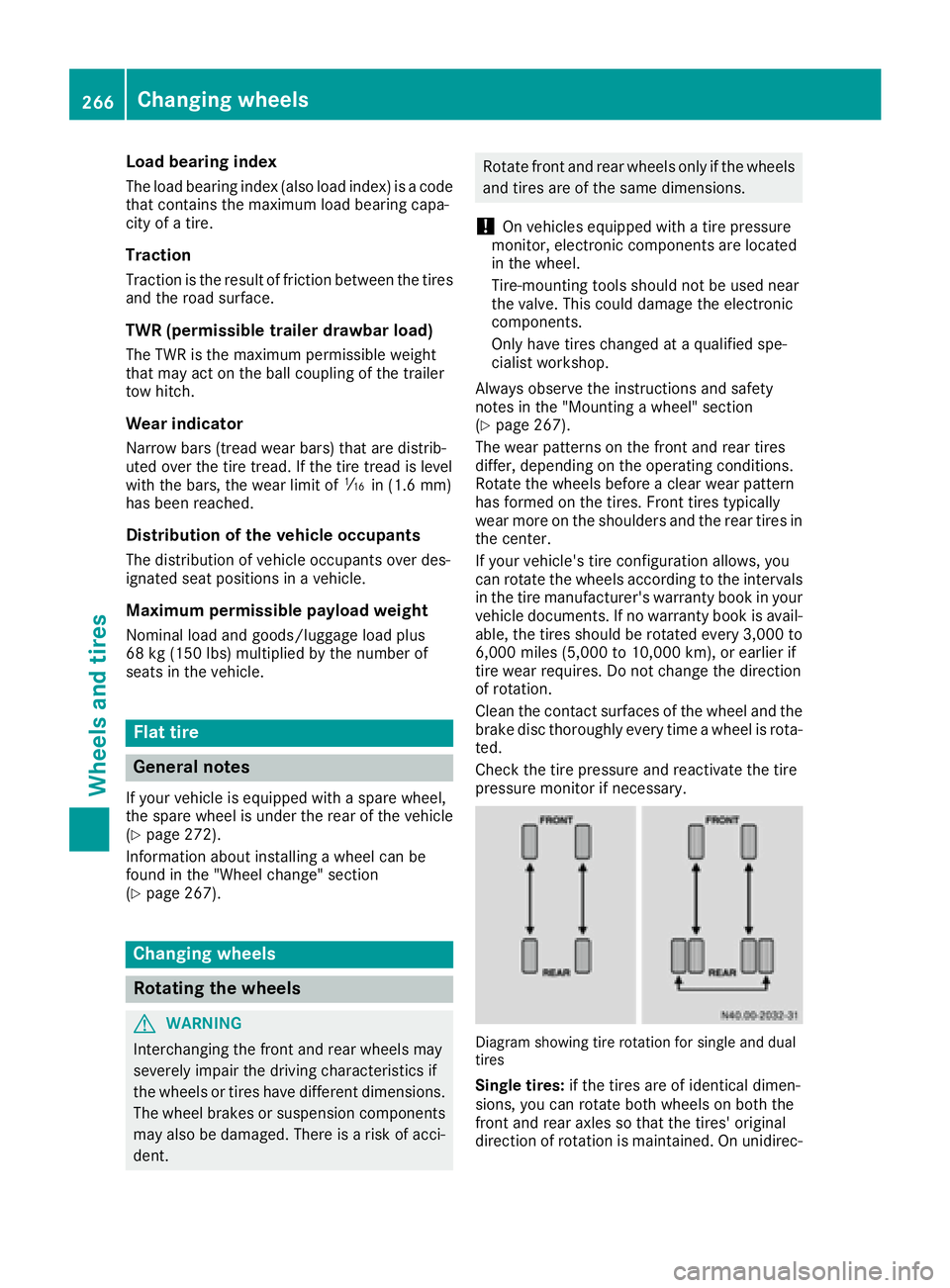
Diagram showing tire rotation for single and dual
tires
Single tires: if the tires are of identical dimen-
sions, you can rotate both wheels on both the
front and rear axles so that the tires' original
direction of rotation is maintained. On unidirec-
266Changing wheels
Wheels and tires
Page 269 of 290
tional tires, an arrow on the sidewall shows the
prescribed direction of rotation of the tire.
Twin rear tires:if the tires are of identical
dimensions, you can rotate the wheels on the
front axle and the inner wheels on the rear axle
in pairs such that the original direction of tire
rotation is retained. With unidirectional tires,
you may rotate the outside wheels at the rear
axle from one side to the other.
Direction of rotation
Tires with a specified direction of rotation have
additional benefits, e.g. if there is a risk of hydro-
planing. You will only gain these benefits if the
correct direction of rotation is observed.
An arrow on the sidewall of the tire indicates its
correct direction of rotation.
You may mount a spare wheel against the direc-
tion of rotation. Observe the time restriction on
use as well as the speed limitation specified on
the spare wheel.
Storing wheels
Store wheels that are not being used in a cool,
dry and preferably dark place. Protect the tires
from contact with oil, grease and fuel.
Mounting a wheel
Vehicle preparation
XStop the vehicle as far away as possible from
traffic and on a level, firm and non-slip sur-
face.
XIf your vehicle poses a risk to approaching
traffic, switch on the hazard warning lamps.
XApply the parking brake.
XTurn the front wheels to the straight-ahead
position.
XMove the selector lever of the automatic
transmission to position P.
XSwitch off the engine.
XPassengers should leave the vehicle. Make
sure that the passengers are not endangered
as they do so.
XMake sure that no one is near the danger area
while the wheel is being changed. Anyone
who is not directly assisting in the wheel change should, for example, stand behind the
barrier.
XPlace the warning triangle or warning lamp at
a suitable distance.
Observe legal requirements.
XSecure the vehicle to prevent it from rolling
away.
iObserve the safety notes on parking in the
section on "Driving and parking"
(
Ypage 130).
XOn level terrain: place chocks or other suit-
able objects under the front and rear of the
wheel that is diagonally opposite the wheel to
be changed.
XOn slight inclines: place chocks or other
suitabl e objects under the wheels on the front
and rear axles opposite the wheel to be
changed.
XTake the vehicle tool kit and the jack from the
footwell on the front-passenger side
(
Ypage 240).
XRemove the spare wheel from the spare wheel
bracket (Ypage 273). Observe the safety
notes in the "Spare wheel" section
(
Ypage 272).
XOn wheels with wheel bolts, remove the hub
caps.
XAssemble the lug wrench extension using the
middle rod and the rod with the largest diam-
eter from the three-piece jack pump lever.
XStarting with the middle rod, slide the lug
wrench extension as far as it will go onto the
lug wrench.
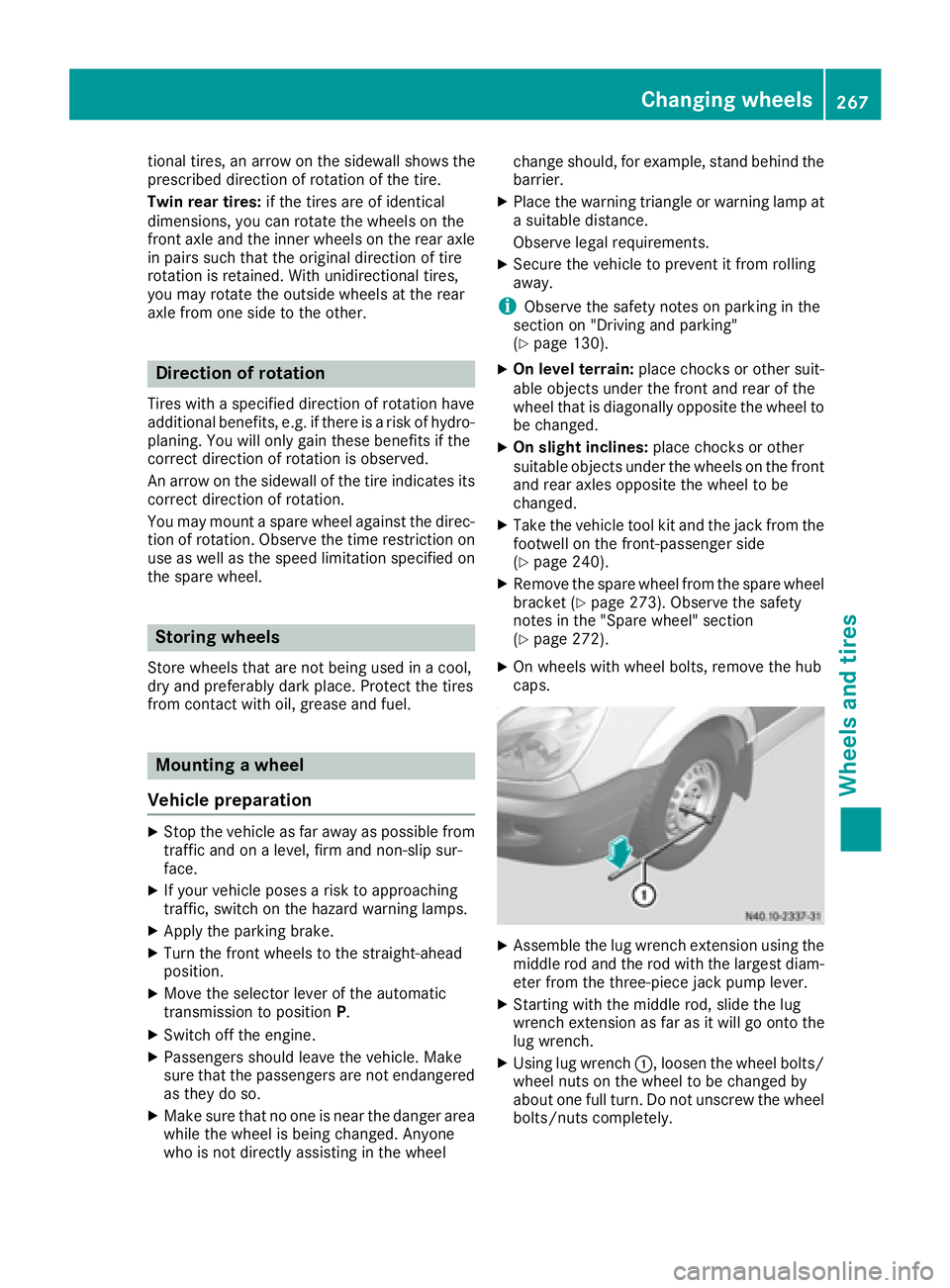
XUsing lug wrench :, loosen the wheel bolts/
wheel nuts on the wheel to be changed by
about one full turn. Do not unscrew the wheel bolts/nuts completely.
Changing wheels267
Wheels an d tires
Z
Page 270 of 290
Raising the vehicle
GWARNING
If you do not position the jack correctly at the
appropriate jacking point of the vehicle, the
jack could tip over with the vehicle raised.
There is a risk of injury.
Only position the jack at the appropriate jack-
ing point of the vehicle. The base of the jack
must be positioned vertically, directly under
the jacking point of the vehicle.
GWARNING
On uphill and downhill slopes, the jack could
tip over with the vehicle raised. There is a risk
of injury.
Do not change wheels on uphill or downhill
gradients. Notify a qualified specialist work-
shop.
!Only position the jack on the jacking points
intended for this purpose. You could other-
wise damage the vehicle.
Observe the following when raising the vehicle:
RWhen raising the vehicle, only use the jack
which Mercedes-Benz has specifically
approved for your vehicle.
RThe vehicle's jack is intended only to raise the
vehicle for a short time when changing a
wheel. It is not suited for performing mainte-
nance work under the vehicle.
RAvoid changing the wheel on uphill and down- hill slopes.
RBefore raising the vehicle, secure it from roll-
ing away by applying the parking brake and
inserting wheel chocks. Never disengage the
parking brake while the vehicle is raised.
RThe jack must be placed on a firm, flat and
non-slip surface. On a loose surface, a large,
load-bearing underlay must be used. On a
slippery surface, a non-slip underlay must be
used, e.g. rubber mats.
RMake sure that the distance between the
underside of the tires and the ground does not
exceed 1.2 in(3 cm).
RNever place your hands or feet under the
ra
ised vehicle.
RNever lie under the raised vehicle.
RNever start the engine when the vehicle is
raised.
RNever open or close a door when the vehicle
is raised.
RMake sure that no persons are present in the
vehicle when the vehicle is raised.
!Only use the jack pump lever middle rod and
the rod with the largest diameter as a lug
wrench extension. Only slide the middle rod
as far as it will go onto the lug wrench. The
rods may otherwise bend and be distorted to
such an extent that they can no longer be
used as a pump lever for the jack.
!Do not place the jack on the leaf spring or
the differential case.
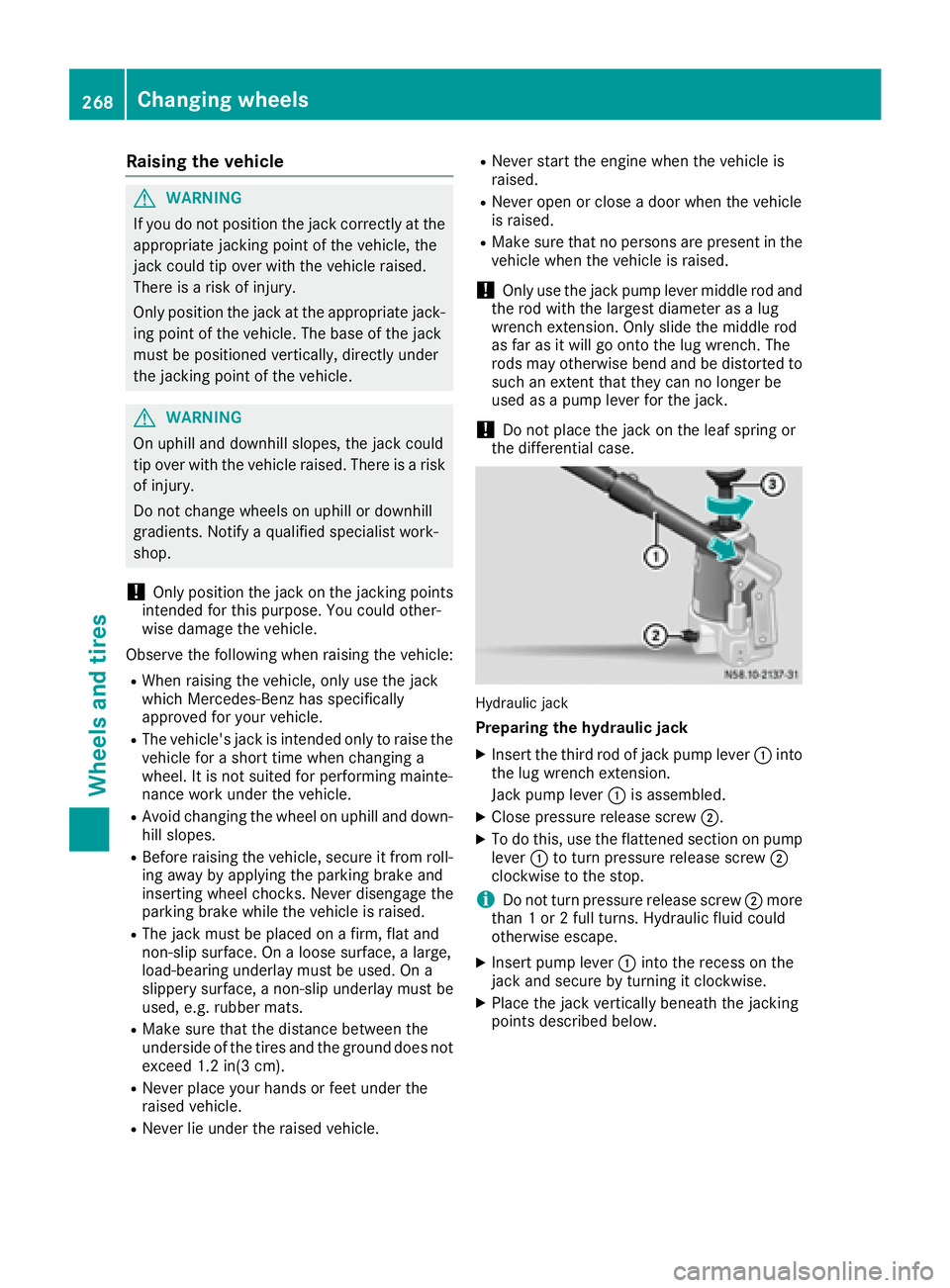
Hydraulic jack
Preparing the hydraulic jack
XInsert the third rod of jack pump lever :into
the lug wrench extension.
Jack pump lever :is assembled.
XClose pressure release screw ;.
XTo do this, use the flattened section on pump
lever:to turn pressure release screw ;
clockwise to the stop.
iDo not turn pressure release screw ;more
than 1 or 2 full turns. Hydraulic fluid could
otherwise escape.
XInsert pump lever :into the recess on the
jack and secure by turning it clockwise.
XPlace the jack vertically beneath the jacking
points described below.
268Changing wheels
Wheels and tires
Page 274 of 290
Make sure the hub cap retaining catches
engage on the steel wheel.
XWheel with central hub cap: position the
retaining lugs of the central hub cap over the
wheel bolts.
XHit the middle of the hub cap to engage it on
the wheel.
XSecure the faulty wheel in the spare wheel
bracket (Ypage 273).
XVehicles with Super Single tires: transport the
defective rear wheel in the load area. The rear
wheel is too large for the spare wheel bracket.
XCheck the tire pressure of the newly mounted
wheel and adjust it if necessary.
Observe the recommended tire pressure
(
Ypage 250).
XRetighten the wheel bolts or wheel nuts to the
specified tightening torque after the vehicle
has been driven for 30 miles (50 km).
When using a wheel or spare wheel with a new or
newly painted wheel rim, have the wheel bolts or
nuts retightened again after approximately 600
to 3,000 miles (1,000 to 5,000 km). Observe the
specified tightening torque.
iVehicles with the tire pressure monitor sys-
tem: all mounted wheels must be equipped
with functioning sensors.
Wheel and tire combination
General notes
!
Retreaded tires are neither tested nor rec-
ommended for Sprinter vehicles, since previ-
ous damage cannot always be detected on
retreaded tires. We can therefore not guar-
antee driving safety. Do not mount used tires if you have no information about their previ-
ous usage.
The recommended tire pressures can be found:
Ron the Tire and Loading Information placard9
on the B-pillar on the driver's side
Ron the tire pressure table on the B-pillar on the driver's side
The recommended tire pressure can also be
found in the "Tire pressure table" section in this
Operator's Manual (
Ypage 257). The wheel/tire
combination for your vehicle can be found on the tire pressure table. Further information on
wheel/tire combination can be obtained at any
qualified specialist workshop.
Check tire pressures regularly and only when
the tires are cold. Observe the notes on the rec-
ommended tire pressure (
Ypage 250).
Follow the maintenance recommendations in
the tire manufacturer's warranty book in your
vehicle documents.
Notes on the vehicle equipment – always equip
the vehicle:
Rwith tires of the same size across an axle (left
and right)
Rwith the same type of tires on all wheels at a
given time (summer tires, winter tires)
Tires that have been specially designed and
approved for your vehicle are marked with MO
(Mercedes-Benz Original). You can find this
identification on the tires themselves and in the
following table.
iNot all wheel/tire combinations can be
installed at the factory in all countries.
Spare wheel
Important safety notes
GWARNING
Wheel and tire dimensions as well as the type of tire can vary between the spare wheel and
the wheel to be replaced. When the spare
wheel is mounted, driving characteristics may be severely affected. There is a risk of an acci-
dent.
In order to reduce risks:
Ryou should therefore adapt your driving
style and drive carefully.
Rnever mount more than one spare wheel
that differs from the wheel to be replaced.
Ronly use a spare wheel that differs from the
wheel to be replaced for a short time.
Rdo not deactivate ESP®.
Rhave a spare wheel that differs from the
wheel that has been changed replaced at
the nearest qualified specialist workshop.
9Only for vehicles with a gross weight of less than 10,000 lbs (4,536 kg).
272Spare wheel
Wheels and tires