warning lights MERCEDES-BENZ SPRINTER 2016 MY16 Operator’s Manual
[x] Cancel search | Manufacturer: MERCEDES-BENZ, Model Year: 2016, Model line: SPRINTER, Model: MERCEDES-BENZ SPRINTER 2016Pages: 290, PDF Size: 6.44 MB
Page 85 of 290
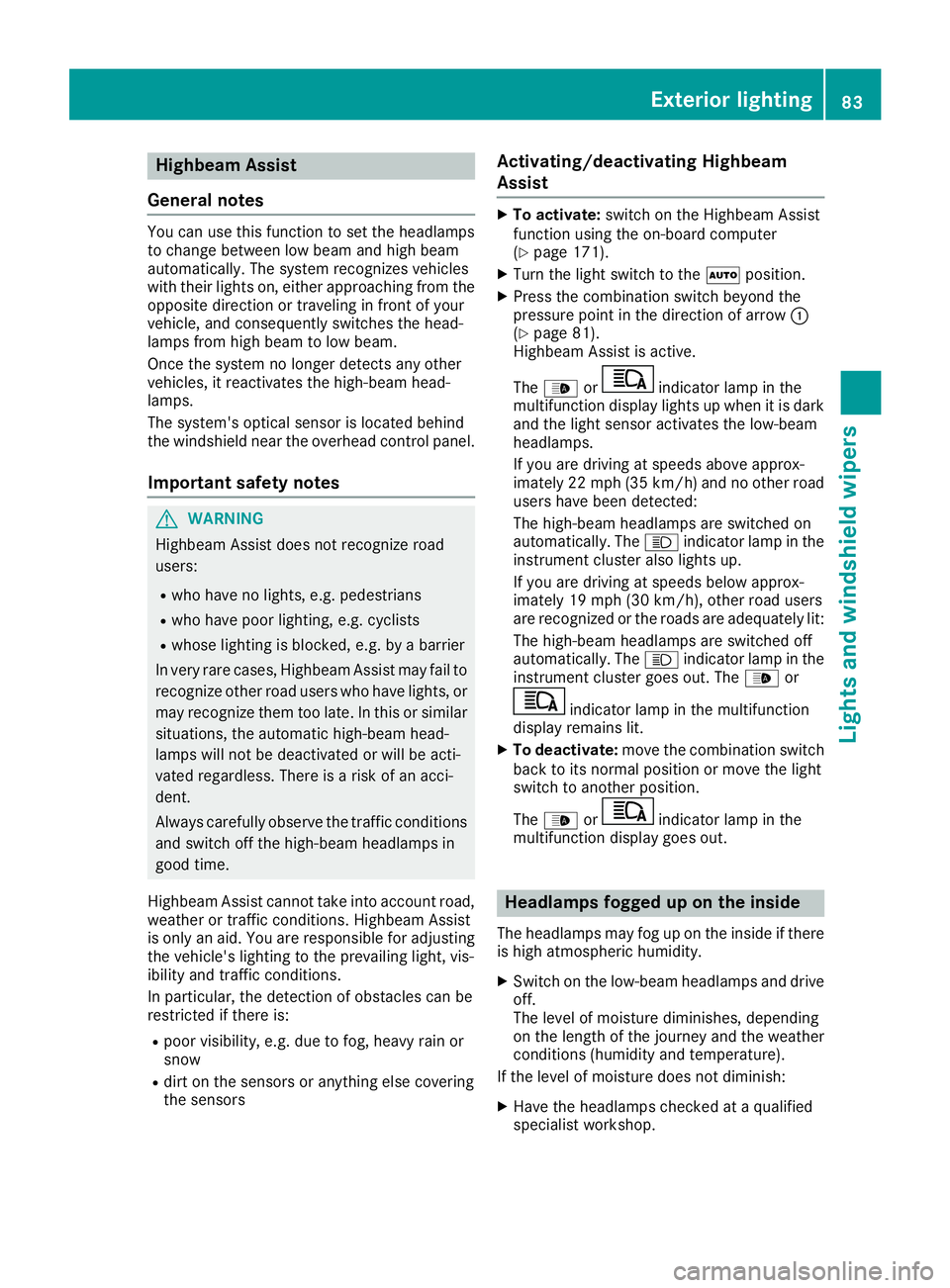
Highbeam Assist
General notes
You can use this function to set the headlamps
to change between low beam and high beam
automatically. The system recognizes vehicles
with their lights on, either approaching from the
opposite direction or traveling in front of your
vehicle, and consequently switches the head-
lamps from high beam to low beam.
Once the system no longer detects any other
vehicles, it reactivates the high-beam head-
lamps.
The system's optical sensor is located behind
the windshield near the overhead control panel.
Important safety notes
GWARNING
Highbeam Assist does not recognize road
users:
Rwho have no lights, e.g. pedestrians
Rwho have poor lighting, e.g. cyclists
Rwhose lighting is blocked, e.g. by a barrier
In very rare cases, Highbeam Assist may fail to
recognize other road users who have lights, or
may recognize them too late. In this or similar situations, the automatic high-beam head-
lamps will not be deactivated or will be acti-
vated regardless. There is a risk of an acci-
dent.
Always carefully observe the traffic conditions
and switch off the high-beam headlamps in
good time.
Highbeam Assist cannot take into account road,
weather or traffic conditions. Highbeam Assist
is only an aid. You are responsible for adjusting
the vehicle's lighting to the prevailing light, vis-
ibility and traffic conditions.
In particular, the detection of obstacles can be
restricted if there is:
Rpoor visibility, e.g. due to fog, heavy rain or
snow
Rdirt on the sensors or anything else covering
the sensors
Activating/deactivating Highbeam
Assist
XTo activate: switch on the Highbeam Assist
function using the on-board computer
(
Ypage 171).
XTurn the light switch to the Ãposition.
XPress the combination switch beyond the
pressure point in the direction of arrow :
(
Ypage 81).
Highbeam Assist is active.
The _ or
indicator lamp in the
multifunction display lights up when it is dark
and the light sensor activates the low-beam
headlamps.
If you are driving at speeds above approx-
imately 22 mph (35 km/h) and no other road
users have been detected:
The high-beam headlamps are switched on
automatically. The Kindicator lamp in the
instrument cluster also lights up.
If you are driving at speeds below approx-
imately 19 mph (30 km/h), other road users
are recognized or the roads are adequately lit:
The high-beam headlamps are switched off
automatically. The Kindicator lamp in the
instrument cluster goes out. The _or
indicator lamp in the multifunction
display remains lit.
XTo deactivate: move the combination switch
back to its normal position or move the light
switch to another position.
The _ or
indicator lamp in the
multifunction display goes out.
Headlamps fogged up on the inside
The headlamps may fog up on the inside if there is high atmospheric humidity.
XSwitch on the low-beam headlamps and drive
off.
The level of moisture diminishes, depending
on the length of the journey and the weather
conditions (humidity and temperature).
If the level of moisture does not diminish:
XHave the headlamps checked at a qualified
specialist workshop.
Exterior lighting83
Lights and windshield wipers
Z
Page 87 of 290
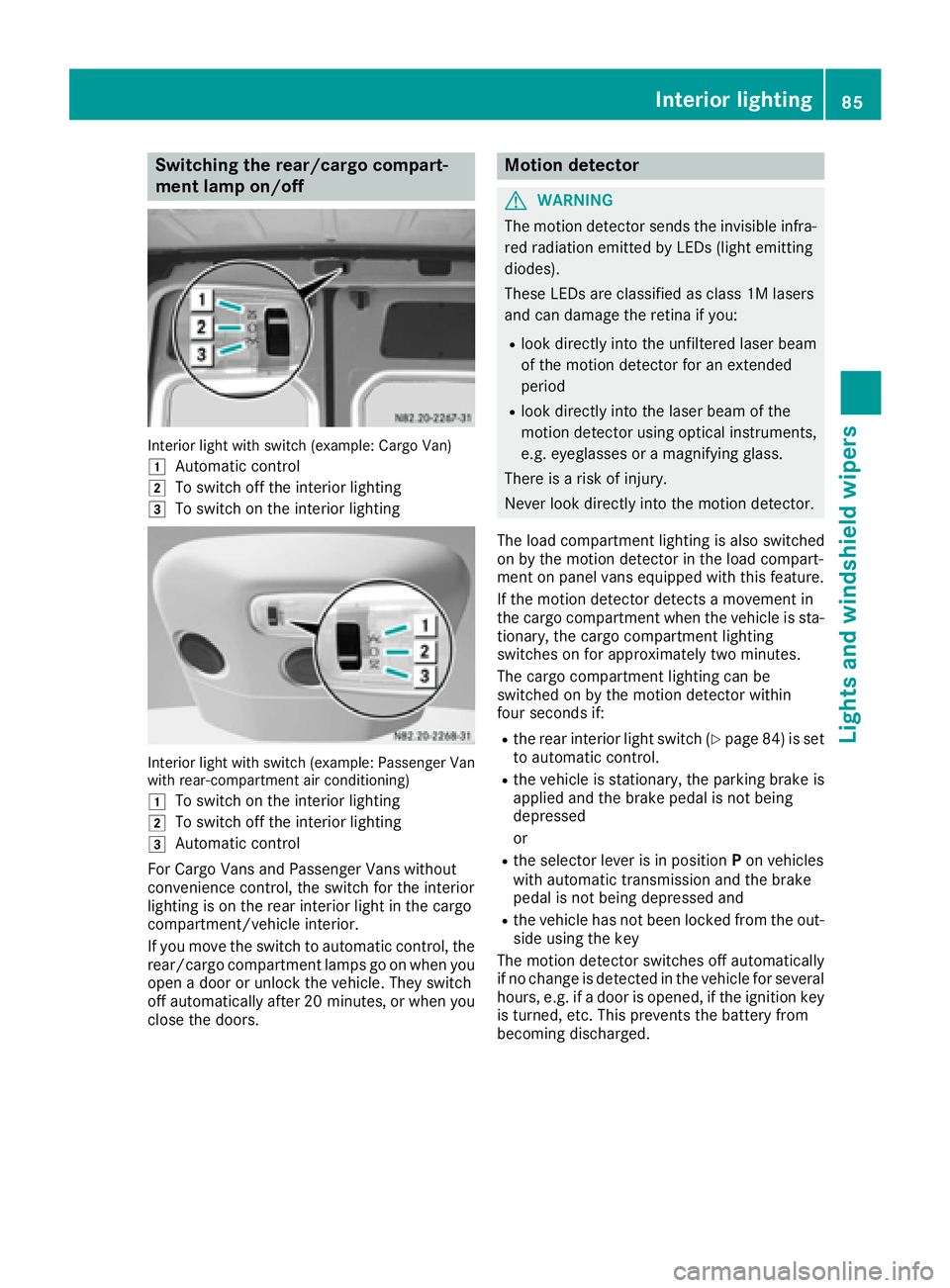
Switching the rear/cargo compart-
ment lamp on/off
Interior light with switch (example: Cargo Van)
1
Automatic control
2To switch off the interior lighting
3To switch on the interior lighting
Interior light with switch (example: Passenger Van
with rear-compartment air conditioning)
1
To switch on the interior lighting
2To switch off the interior lighting
3Automatic control
For Cargo Vans and Passenger Vans without
convenience control, the switch for the interior
lighting is on the rear interior light in the cargo
compartment/vehicle interior.
If you move the switch to automatic control, the
rear/cargo compartment lamps go on when you
open a door or unlock the vehicle. They switch
off automatically after 20 minutes, or when you
close the doors.
Motion detector
GWARNING
The motion detector sends the invisible infra- red radiation emitted by LEDs (light emitting
diodes).
These LEDs are classified as class 1M lasers
and can damage the retina if you:
Rlook directly into the unfiltered laser beam
of the motion detector for an extended
period
Rlook directly into the laser beam of the
motion detector using optical instruments,
e.g. eyeglasses or a magnifying glass.
There is a risk of injury.
Never look directly into the motion detector.
The load compartment lighting is also switched
on by the motion detector in the load compart-
ment on panel vans equipped with this feature.
If the motion detector detects a movement in
the cargo compartment when the vehicle is sta-
tionary, the cargo compartment lighting
switches on for approximately two minutes.
The cargo compartment lighting can be
switched on by the motion detector within
four seconds if:
Rthe rear interior light switch (Ypage 84) is set
to automatic control.
Rthe vehicle is stationary, the parking brake is
applied and the brake pedal is not being
depressed
or
Rthe selector lever is in position Pon vehicles
with automatic transmission and the brake
pedal is not being depressed and
Rthe vehicle has not been locked from the out-
side using the key
The motion detector switches off automatically
if no change is detected in the vehicle for several
hours, e.g. if a door is opened, if the ignition key
is turned, etc. This prevents the battery from
becoming discharged.
Interior lighting85
Lights and windshield wipers
Z
Page 88 of 290
Changing bulbs
Important safety notes
GDANGER
Xenon bulbs carry a high voltage. You can get an electric shock if you remove the cover of
the Xenon bulb and touch the electrical con-
tacts. There is a risk of fatal injury.
Never touch the parts or the electrical con-
tacts of the Xenon bulb. Always have work on
the Xenon bulbs carried out at a qualified spe-
cialist workshop.
GWARNING
Bulbs, lamps and connectors can get very hot
when operating. If you change a bulb, you
could burn yourself on these components.
There is a risk of injury.
Allow these components to cool down before
changing a bulb.
!Make sure the bulbs are always securely
installed.
If your vehicle is equipped with Bi-Xenon bulbs,
you can recognize this by the following: the cone
of light from the Xenon bulbs moves from the
top to the bottom and back again when you start
the engine. For this to be observed, the low-
beam headlamps must be switched on before
starting the engine.
The bulbs and lamps are an essential compo-
nent of vehicle safety. You must therefore make
sure that these function correctly at all times.
Have the headlamp setting checked regularly.
RAlways switch off the vehicle's lighting sys-
tem before changing a bulb.
This will prevent a short circuit.
RDo not touch the glass tube of new bulbs with your bare hands. Always use a clean, lint-free
cloth or only touch the base of the bulb when
installing.
Even minor contamination can burn into the
glass surface and reduce the service life of the
bulbs.
RDo not use a bulb that has been dropped or
that has scratches on its glass tube.
The bulb could explode.
ROnly use bulbs in closed lamps which have
been designed for this purpose.
ROnly use spare bulbs of the same type and
with the prescribed voltage
RProtect the bulbs from moisture when in use.
If the new bulb still does not light up, consult a
qualified specialist workshop.
RHave the LEDs and bulbs of the following
lamps changed at a qualified specialist work-
shop:
-the additional turn signals in the exterior
mirrors
-the high-mounted brake lamp
-LED daytime running lamps (Bi-Xenon
headlamps)
-Bi-Xenon lamps (Bi-Xenon headlamps)
-front fog lamps
If you require assistance changing bulbs, con-
sult a qualified specialist workshop.
Front bulbs
Overview of bulb replacement – bulb
types
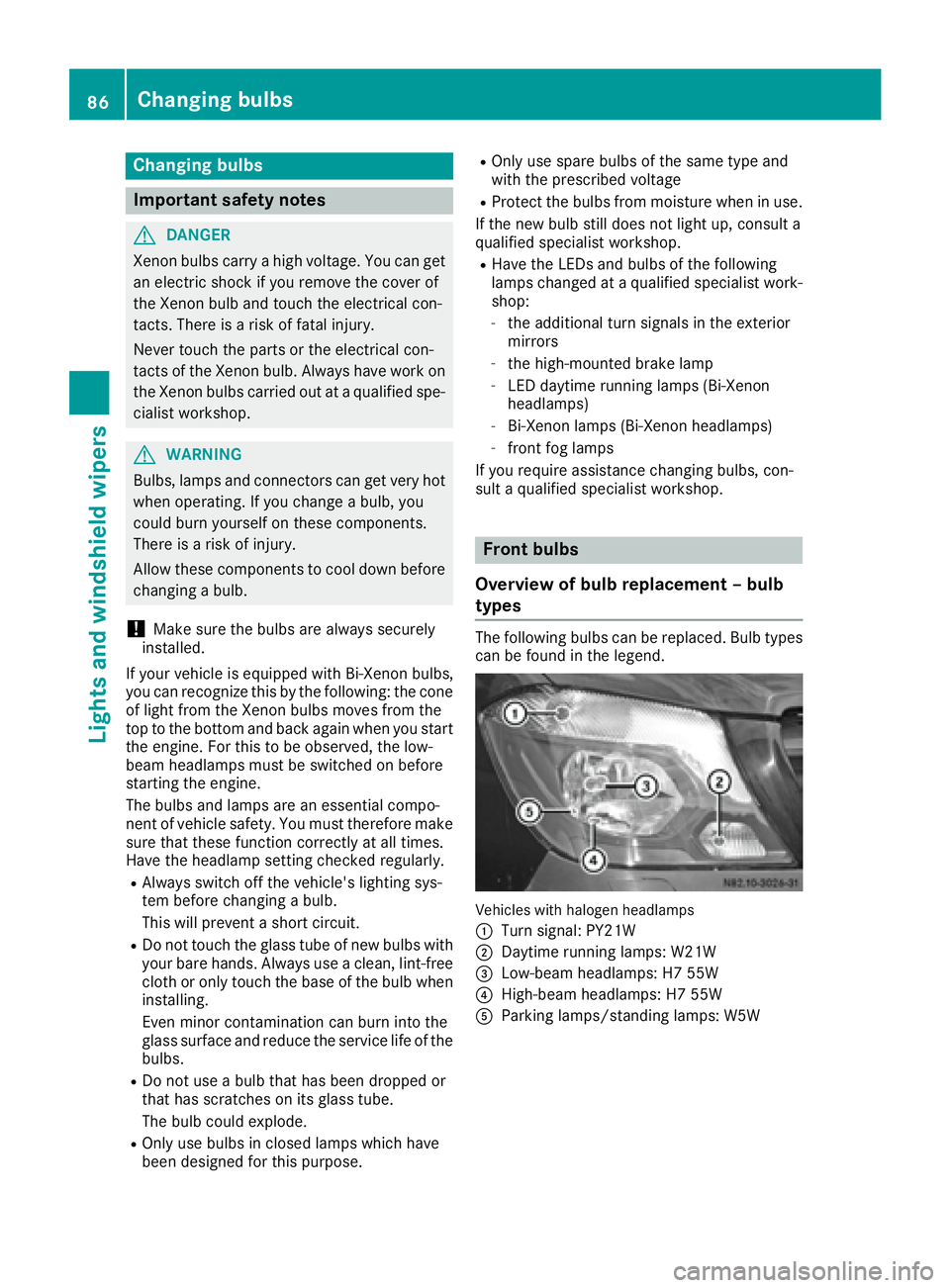
The following bulbs can be replaced. Bulb types can be found in the legend.
Vehicle swit hhalogen headlamps
:
Turn signal: PY21W
;Daytime running lamps: W21W
=Low-beam headlamps: H7 55W
?High-beam headlamps: H7 55W
AParking lamps/standing lamps: W5W
86Changing bulbs
Lights and windshield wipers
Page 96 of 290
iCanada only:
If the wind shield wiper s areswitched on and
you stop the veh icle, the windshield wiper
speed isreduced. For example, ifyou have
selected level IIand stop the veh icle,wipin g
continues with intermittent wipe whilethe
veh icle is stationary. Ifintermittent wipe is
selected, the intervals become longer.
Vehicles with a rain and light sensor: you
can use level Ias the universal setting. The
rain and light sensor sets the appropriate wip-
ing frequency automatically, according to the
intensity of the rain. When you stop the veh i-
cle, leve lsIII and IIare swit ched down to
level Iautomatically.
The wind shield wiper will return to the original
level when you drive faster than 5 mph
(8 km/h).
You can adjust the sensitivit y of the rain and
light sensor using the on-board computer
(
Ypage 173).
In formation on checking the washer fluid level
can befound inthe "Maintenance and care"
section (
Ypage 224).
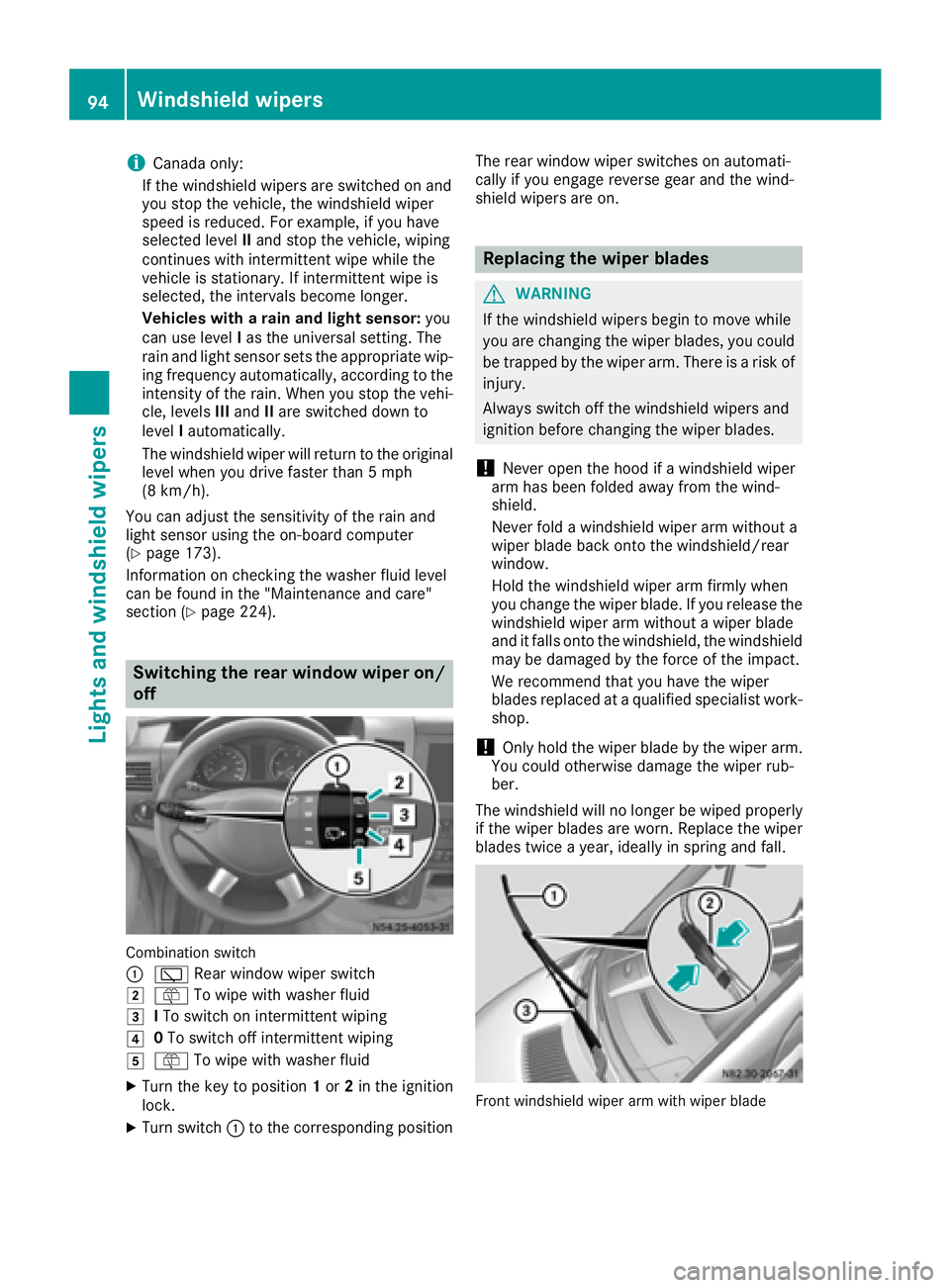
Switching the rear window wiper on/
off
Combination switch
:
è Rearwindowwiper swit ch
2ôTowipe wit h washer fluid
3ITo swit ch on intermittent wiping
40To swit ch off intermittent wiping
5ô Towipe wit h washer fluid
XTurn the key to position 1or 2in the ignition
lock.
XTurn switch: to the corresponding position The rear
window wiper switches on automati-
cally ifyou engage reverse gear and the wind-
shield wipers are on.
Replacing the wiper blades
GWARNING
If the wind shield wipers begin to move while
you are changing the wiperblades, you could
be trapped by the wiper arm. There is a risk of
injury.
Alwa ysswit ch off the windshield wipers and
ignition before changing the wiper blades.
!Never open the hood if a windshield wiper
arm has been folded away from the wind-
shield.
Never fold a windshield wiper armwithout a
wiper blade back onto the windshield/rear
window.
Hold the windshield wiper arm firmly when
you change the wiperblade. Ifyou release the
windshield wiper arm without a wiperblade
and it falls onto the windshield, the windshield
may bedamaged by the force of the impact.
We recommend that you have the wiper
blades replaced at a qualified specialist work-
shop.
!Only hold the wiper blade by the wiper arm.
You could otherwise damage the wiper rub-
ber.
The windshield will no longer be wiped properly
if the wiper blades are worn. Replace the wiper
blades twice a year, ideally in spring and fall.
Frontwindshield wiper arm wit hwiper blade
94Windshield wipers
Lights and windshield wipers
Page 107 of 290
Heating and air-conditioning system
Air-recirculation mode switches off automati-
cally after about 10 to 30 minutes, depending on
the outside temperature.
XSwitch on climate control (Ypage 101).
XTo activate/deactivate:press theebut-
ton.
If the indicator lamp in the ebutton lights
up, air-recirculation mode is activated.
Rear-compartment heating and rear-
compartment air-conditioning system
On vehicles with rear-compartment heating and
a rear-compartment air-conditioning system,
you can activate or deactivate air-recirculation
mode for the rear-compartment climate control.
XSwitch on climate control (Ypage 101).
XTo activate: set the temperature control of
rear-compartment heating =(Ypage 100) or
rear-compartment air conditioning system ;
(
Ypage 101) to the center position.
Only one of the two climate control systems in
the rear compartment is activated and is in
air-recirculation mode.
XTo deactivate: turn the temperature control
of rear-compartment heating =(Ypage 100)
or rear-compartment air-conditioning sys-
tem ;(
Ypage 101) clockwise or counter-
clockwise. Only change the temperature in
small increments.
Adjusting the air vents
Important safety notes
GWARNING
Very hot or very cold air can flow from the air
vents. This could result in burns or frostbite in
the immediate vicinity of the air vents. There
is a risk of injury.
Make sure that all vehicle occupants always
maintain a sufficient distance to the air out-
lets. If necessary, redirect the airflow to
another area of the vehicle interior.
The center and side air vents are adjustable. On vehicles with a rear-compartment air-condi-
tioning system, you can also adjust the air vents
in the roof duct.
iFor virtually draft-free ventilation, adjust the
sliders of the center air vents to the center
position.
In order to ensure the direct flow of fresh air
through the air vents into the vehicle interior,
please observe the following notes:
Rkeep the air inlet grille on the hood free of
blockages, such as ice, snow or leaves.
Rnever cover the vents or the ventilation grilles
in the vehicle interior.
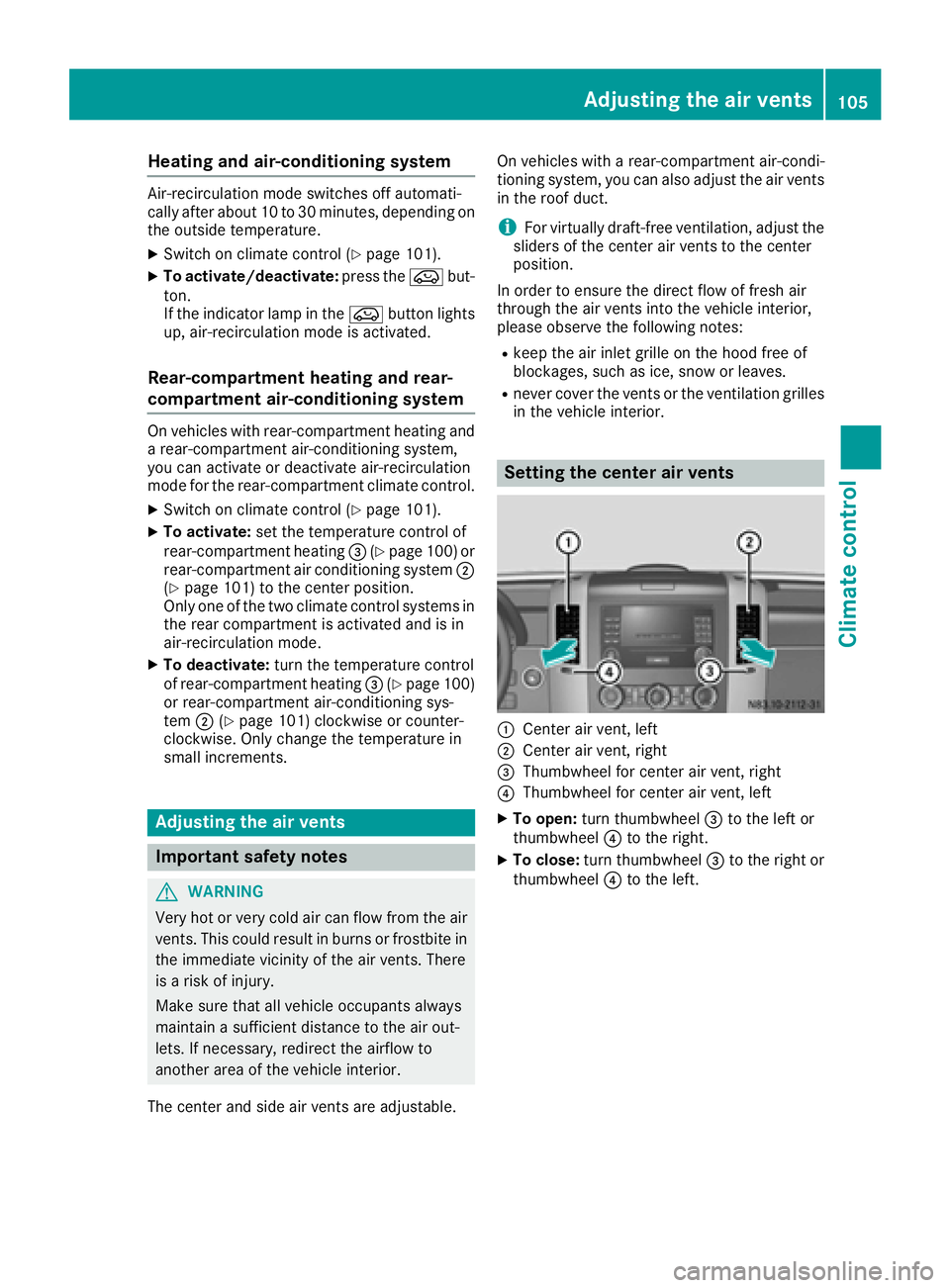
Setting the center air vents
:Center air vent, left
;Center air vent, right
=Thumbwheel for center air vent, right
?Thumbwheel for center air vent, left
XTo open: turn thumbwheel =to the left or
thumbwheel ?to the right.
XTo close: turn thumbwheel =to the right or
thumbwheel ?to the left.
Adjusting the air vents105
Climate control
Z
Page 113 of 290
ing time is synchronized. The indicator lamp in
they auxiliary heating button goes out.
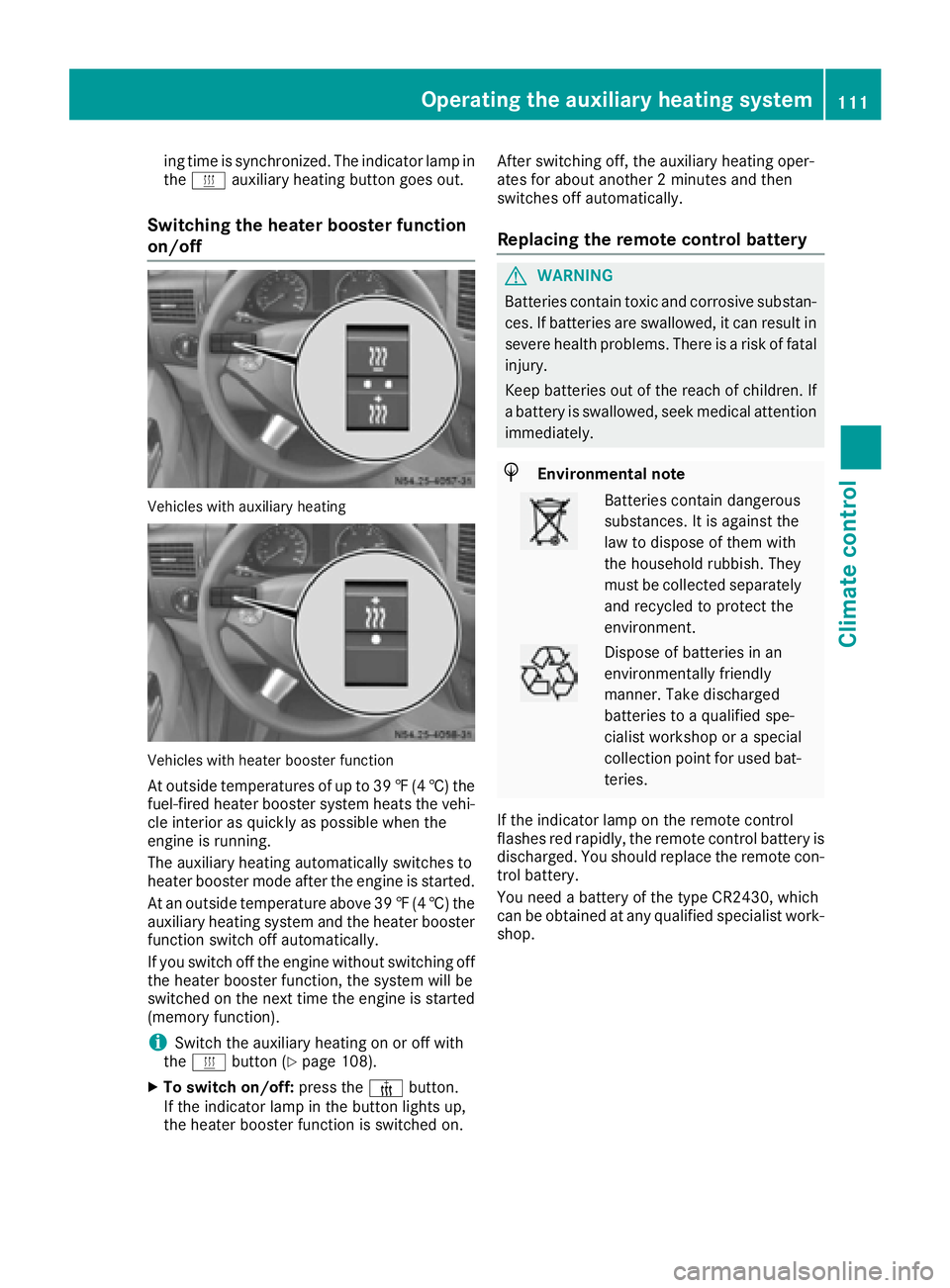
Switching the heater booster function
on/off
Vehicles with auxiliary heating
Vehicles with heater booster function
At outside temperatures of up to 39 ‡(4 †) the
fuel-fired heater booster system heats the vehi-
cle interior as quickly as possible when the
engine is running.
The auxiliary heating automatically switches to
heater booster mode after the engine is started.
At an outside temperature above 39 ‡(4 †) the
auxiliary heating system and the heater booster
function switch off automatically.
If you switch off the engine without switching off
the heater booster function, the system will be
switched on the next time the engine is started (memory function).
iSwitch the auxiliary heating on or off with
the y button (Ypage 108).
XTo switch on/off: press the¢button.
If the indicator lamp in the button lights up,
the heater booster function is switched on. After switching off, the auxiliary heating oper-
ates for about another 2 minutes and then
switches off automatically.
Replacing the remote control battery
GWARNING
Batteries contain toxic and corrosive substan- ces. If batteries are swallowed, it can result in
severe health problems. There is a risk of fatalinjury.
Keep batteries out of the reach of children. If
a battery is swallowed, seek medical attention
immediately.
HEnvironmental note
Batteries contain dangerous
substances. It is against the
law to dispose of them with
the household rubbish. They
must be collected separately and recycled to protect the
environment.
Dispose of batteries in an
environmentally friendly
manner. Take discharged
batteries to a qualified spe-
cialist workshop or a special
collection point for used bat-
teries.
If the indicator lamp on the remote control
flashes red rapidly, the remote control battery is
discharged. You should replace the remote con-
trol battery.
You need a battery of the type CR2430, which
can be obtained at any qualified specialist work-
shop.
Operating the auxiliary heating system111
Climate control
Z
Page 123 of 290
Rall the doors are closed.
Rall the vehicle occupants are wearing their
seat belts correctly.
Rthe parking brake is applied.
iIf you depress the brake pedal before start-
ing the engine, the pedal travel is short and
pedal resistance is high.
If you depress the brake pedal again after
starting the engine, pedal travel and resist-
ance will be back to normal again.
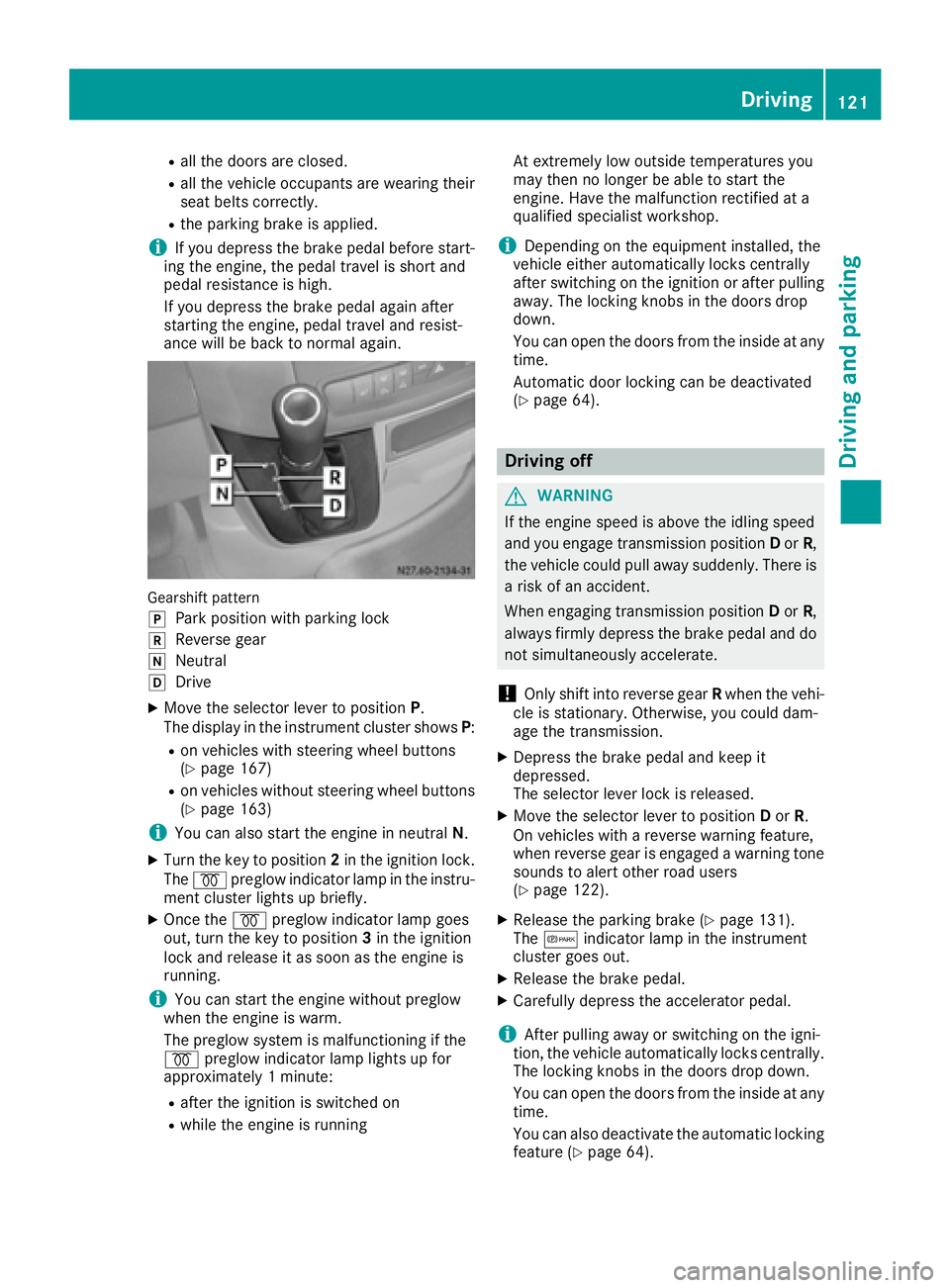
Gearshift pattern
j
Park position with parking lock
kReverse gear
iNeutral
hDrive
XMove the selector lever to position P.
The display in the instrument cluster shows P:
Ron vehicles with steering wheel buttons
(Ypage 167)
Ron vehicles without steering wheel buttons
(Ypage 163)
iYou can also start the engine in neutral N.
XTurn the key to position 2in the ignition lock.
The % preglow indicator lamp in the instru-
ment cluster lights up briefly.
XOnce the %preglow indicator lamp goes
out, turn the key to position 3in the ignition
lock and release it as soon as the engine is
running.
iYou can start the engine without preglow
when the engine is warm.
The preglow system is malfunctioning if the
% preglow indicator lamp lights up for
approximately 1 minute:
Rafter the ignition is switched on
Rwhile the engine is running At extremely low outside temperatures you
may then no longer be able to start the
engine. Have the malfunction rectified at a
qualified specialist workshop.
iDepending on the equipment installed, the
vehicle either automatically locks centrally
after switching on the ignition or after pulling
away. The locking knobs in the doors drop
down.
You can open the doors from the inside at any
time.
Automatic door locking c
an be deactivated
(Ypage 64).
Driving off
GWARNING
If the engine speed is above the idling speed
and you engage transmission position Dor R,
the vehicle could pull away suddenly. There is
a risk of an accident.
When engaging transmission position Dor R,
always firmly depress the brake pedal and do not simultaneously accelerate.
!Only shift into reverse gear Rwhen the vehi-
cle is stationary. Otherwise, you could dam-
age the transmission.
XDepress the brake pedal and keep it
depressed.
The selector lever lock is released.
XMove the selector lever to position Dor R.
On vehicles with a reverse warning feature,
when reverse gear is engaged a warning tone
sounds to alert other road users
(
Ypage 122).
XRelease the parking brake (Ypage 131).
The c indicator lamp in the instrument
cluster goes out.
XRelease the brake pedal.
XCarefully depress the accelerator pedal.
iAfter pulling away or switching on the igni-
tion, the vehicle automatically locks centrally.
The locking knobs in the doors drop down.
You can open the doors from the inside at any
time.
You can also deactivate the automatic locking
feature (
Ypage 64).
Driving121
Driving and parking
Z
Page 131 of 290
Problems with the fuel and fuel tank
If your vehicle is losing fuel, the fuel lines or thefuel tank are defective.
XTurn the key immediately to position 0in the
ignition lock and remove it.
XDo not restart the engine under any circum-
stances.
XConsult a qualified specialist workshop.
If the fuel tank has been run dry, after refueling
carry out the following steps:
XBefore starting the engine: switch on the igni-
tion three or four times.
XTurn the key to position 2in the ignition lock
(Ypage 119).
The % preglow indicator lamp in the instru-
ment cluster lights up briefly.
XOnce the %preglow indicator lamp goes
out, turn the key to position 3in the ignition
lock and release it as soon as the engine is
running.
You can start the diesel engine without preglow
when the engine is warm.
Diesel Exhaust Fluid (DEF)
Important safety notes
!Only use DEF in accordance with
ISO 22241. Never mix DEF with additives or
thin it with tap water. The exhaust gas after-
treatment may otherwise be damaged.
Observe the MB Specifications for Service
Products, Sheet 352.0.
Damage that results from the use of additives
or tap water leads to the loss of the New
Vehicle Limited Warranty.
!If DEF comes into contact with a painted or
aluminum surface, wash the surface off
immediately with plenty of water.
!DEF is not a diesel additive and must not be
mixed with fuel in the tank. Even small
amounts of DEF can cause engine damage.
Damage that results from the blending of DEF
will not be covered by the New Vehicle Limi-
ted Warranty.
iIf the outside temperature is below 12 ‡
( Ò 11 †) it may be difficult to top up. If the DEF
is frozen and there is an active warning indi- cator, topping up may not be possible. Park
the vehicle in a warm place, e.g. in a garage,
until the DEF has become liquid again. Top-
ping up is then possible again. Alternatively,
have the DEF tank refilled at a qualified spe-
cialist workshop.
iIf you add DEF at temperatures below 12 ‡
( Ò 11 †) it is possible that the level is not
shown correctly due to the frozen DEF.
Drive for at least 20 minute s(heating phase in
the tank activated) and then st
op the vehicle
for at least 30 seconds. The level is then
shown correctly.
You will find further information on DEF in the
"Service products" section (
Ypage 277).
Refueling procedure
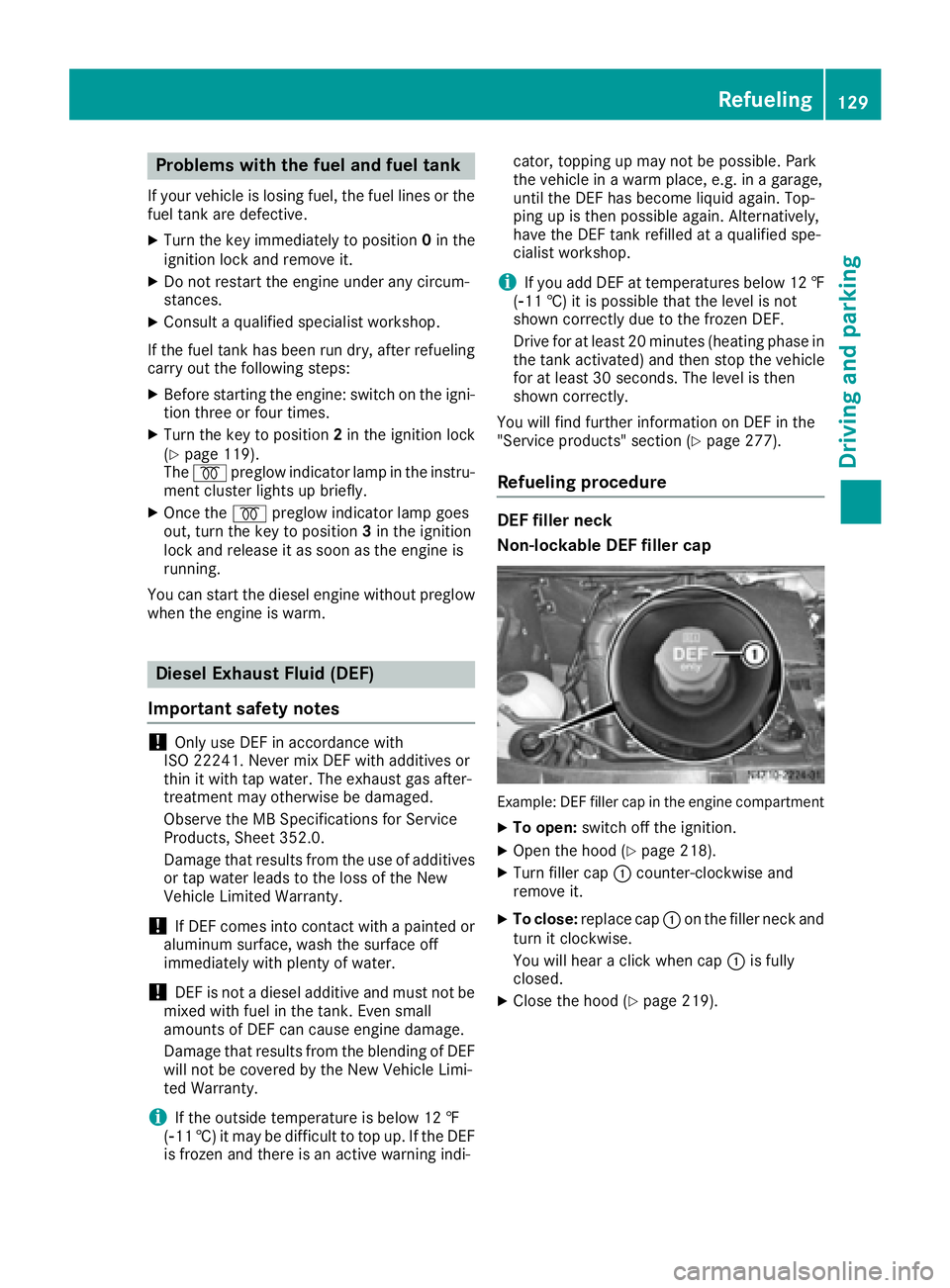
DEF filler neck
Non-lockable DEF filler cap
Example: DEF filler cap in the engine compartment
XTo open: switch off the ignition.
XOpen the hood (Ypage 218).
XTurn filler cap :counter-clockwise and
remove it.
XTo close: replace cap :on the filler neck and
turn it clockwise.
You will hear a click when cap :is fully
closed.
XClose the hood (Ypage 219).
Refueling129
Driving and parking
Z
Page 133 of 290
Always park your vehicle safely and according to
legal requirements and secure it against rolling
away.
To ensure that the vehicle is properly secured
against rolling away unintentionally:
Rthe parking brake must be firmly applied
Rthe selector lever must be in positionPand
the key must be removed from the ignition
lock
Ron steep uphill or downhill gradients, the front
wheels must be turned towards the curb
Rthe rear axle must be secured, e.g. with a
wheel chock, on steep uphill or downhill gra-
dients
Use the wheel chock (
Ypage 132) to do so.
If you leave the vehicle parked for more than
three weeks:
Rconnect the batteries to a trickle charger or
Rdisconnect the vehicle's starter battery or
Rswitch off the electrical system using the bat-
tery main switch (Ypage 118) and
Rdisconnect the vehicle's auxiliary battery
Otherwise, you need to check the battery's con-
dition of charge every three weeks, since
standby power consumption can drain the bat-
tery. If the battery voltage is lower than 12.2 V,
the battery must be charged. Otherwise, the
battery may be damaged by exhaustive dis-
charging.
Be sure to observe the notes on disconnecting
and chargi ng th
e batteries under "Bat-
tery“ (Ypage 227). You can obtain information
about trickle chargers from a qualified specialist
workshop.
Parking brake
GWARNING
If you leave children unsupervised in the vehi-
cle, they could set it in motion by, for example:
Rrelease the parking brake.
Rshift the automatic transmission out of the
parking position P.
Rstart the engine.
In addition, they may operate vehicle equip-
ment and become trapped. There is a risk of
an accident and injury.
When leaving the vehicle, always take the
SmartKey with you and lock the vehicle. Never
leave children unsupervised in the vehicle.
GWARNING
If you must brake the vehicle with the parking brake, the braking distance is considerably
longer and the wheels could lock. There is an
increased danger of skidding and accidents.
Only use the parking brake to brake the vehi-
cle when the service brake is faulty. Do not
apply the parking brake too firmly. If the
wheels lock, release the parking brake until
the wheels begin turning again.
The brake lamps are not illuminated when you
brake the vehicle using the parking brake.
As a rule, you may only apply the parking brake
when the vehicle is stationary.
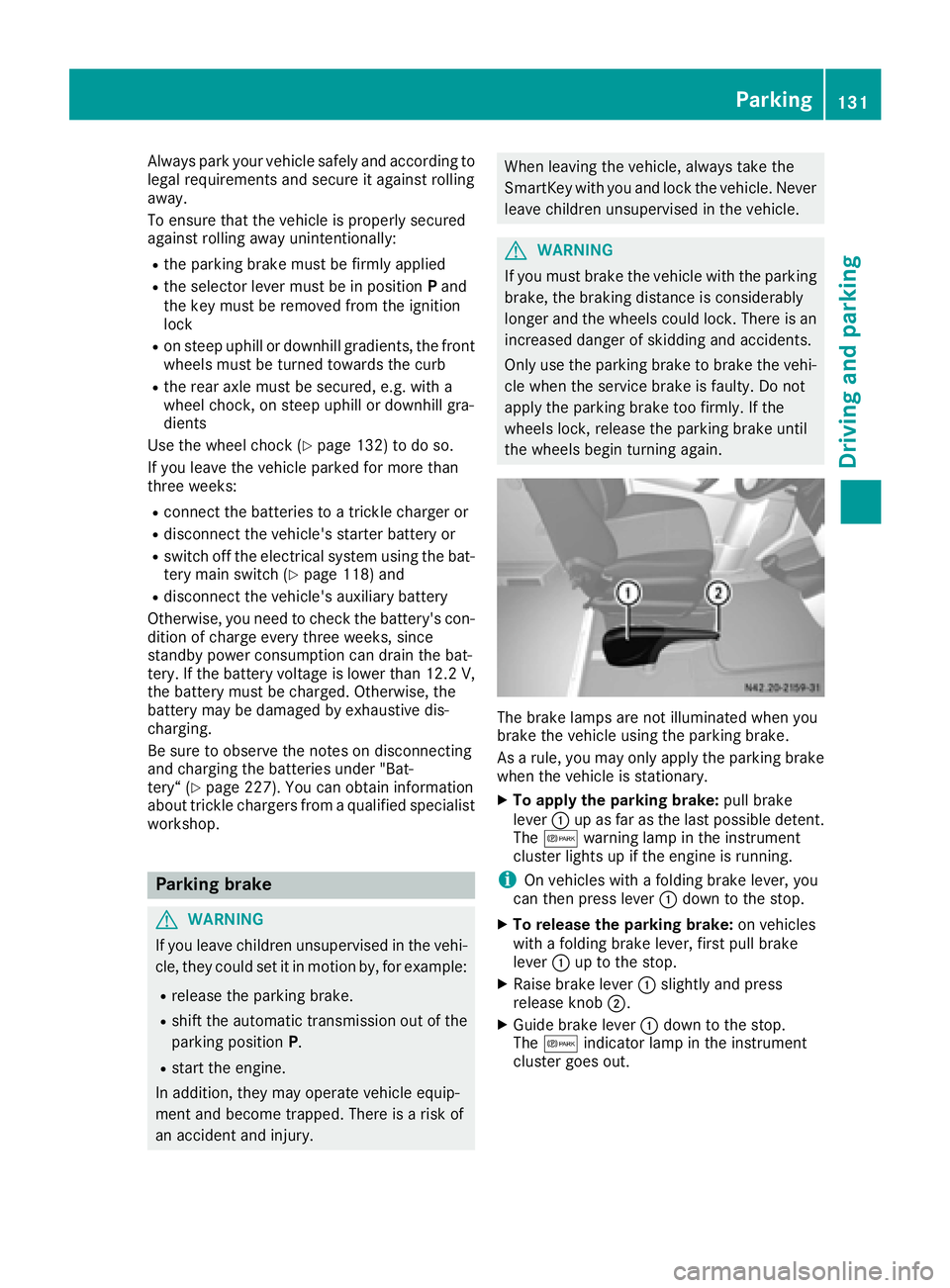
XTo apply the parking brake: pull brake
lever :up as far as the last possible detent.
The c warning lamp in the instrument
cluster lights up if the engine is running.
iOn vehicles with a folding brake lever, you
can then press lever :down to the stop.
XTo release the parking brake: on vehicles
with a folding brake lever, first pull brake
lever :up to the stop.
XRaise brake lever :slightly and press
release knob ;.
XGuide brake lever :down to the stop.
The c indicator lamp in the instrument
cluster goes out.
Parking131
Driving an d parking
Z
Page 143 of 290
Storing and maintaining the current
speed
XAccelerate the vehicle to the desired speed
above 20 mph (30 km/h).
XBriefly push the cruise control lever up:or
down ?.
XRelease the accelerator pedal.
Cruise control is activated. The current speed
is stored.
The display shows the Vsymbol and the
stored speed.
Resuming the stored speed
GWARNING
If you call up the stored speed and it differs
from the current speed, the vehicle acceler-
ates or decelerates. If you do not know the
stored speed, the vehicle could accelerate or brake unexpectedly. There is a risk of an acci-
dent.
Pay attention to the road and traffic condi-
tions before calling up the stored speed. If you
do not know the stored speed, store the
desired speed again.
XBriefly pull the cruise control lever towards
you =.
XRelease the accelerator pedal.
Cruise control is activated and resumes the
vehicle's speed to the last speed stored.
The display shows the Vsymbol and the
stored speed.
iWhen you pull the cruise control level
towards you for the first time after starting the
engine, cruise control adopts the current
speed.
Setting the speed
It may be a moment before the vehicle starts to
accelerate or brake to the set speed. Take this
delay into account when setting the speed.
XBriefly push the cruise control lever up :to
increase the speed or down =to reduce the
speed.
The last stored speed increases or decreases
in 1 mph increments (1 km/h increments).
or
XPress and hold the cruise control lever up :
or down =until the desired speed has been
reached.
XRelease the cruise control lever.
The current speed is stored.
The display shows the Vsymbol and the
stored speed.
iCruise control is not deactivated if you
depress the accelerator pedal. If you acceler-
ate briefly to overtake, for example, cruise
control resumes the vehicle’s speed to the
last speed stored after you have finished over-
taking.
Deactivating cruise control
There are various ways to deactivate cruise con- trol:
XBriefly press the cruise control lever for-
wards ?.
or
XApply the brakes.
The last speed set remains stored. The last
speed stored is deleted when you switch off the
engine.
Cruise control is deactivated automatically
when:
Ryou apply the brakes
Ryou apply the parking brake and the c
indicator lamp in the instrument cluster lights
up
Ryou are driving slower than 20 mph (30 km/h)
Ryou shift the automatic transmission to neu-
tral position Nwhile the vehicle is in motion
RESP®or ASR intervenes
Rthere is a malfunction in the ESP®, ASR or ABS
system
Driving systems141
Driving and parking
Z