air conditioning MERCEDES-BENZ SPRINTER 2016 MY16 Operator’s Manual
[x] Cancel search | Manufacturer: MERCEDES-BENZ, Model Year: 2016, Model line: SPRINTER, Model: MERCEDES-BENZ SPRINTER 2016Pages: 290, PDF Size: 6.44 MB
Page 5 of 290
1, 2, 3 ...
4ETS (Electronic Traction System).... 55
12 V socket ........................................ 210
A
ABS (Anti-lock Braking System)
Display message ............................ 181
Function/notes ................................ 53
Important safety notes .................... 53
Indicator lamp ................................ 195
Access step in the bumper
Cleaning .........................................2 37
Activating/deactivating cooling
with air dehumidification ................. 102
Activating/deactivating the roof
ventilator ...........................................1 17
Adaptive Brake Assist
Function/notes .............................1 43
ADAPTIVE ESP
®
see ESP®(Electronic Stability Program)
Add-on equipment ............................... 27
Additional indicators
Replacing bulbs ............................... 88
Replacing bulbs (roof) ......................9 1
Additives
Diesel ............................................ 279
Engine oil ...................................... .281
Adjusting the headlamp range ........... 81
ADR (working speed governor) ........154
Air bags
Deployment ..................................... 45
Front air bag (driver, front
passenger) ....................................... 44
Important safety notes .................... 43
Introduction ..................................... 43
Side impact air bag .......................... 45
Window curtain air bag .................... 45
Air filter
Indicator lamp ................................ 201
Air pressure
see Tire pressure
Air vents
Adjusting for the passenger com-
partment ........................................ 106
Adjusting on the roof ..................... 106
Importa nt sa
fety notes .................. 105 Setting the center air vents ........... 105
Setting the side air vents ...............1
06
Air-conditioning system
Refrigerant ..................................... 284
see Climate control
Air-recirculation mode
Important safety notes .................. 104
Switching on/off ........................... 104
Alarm system
see ATA (Anti-Theft Alarm system)
All-wheel drive
Engaging/disengaging ................... 148
Important safety notes .................. 147
LOW RANGE transmission ratio ..... 148
Anti-lock Braking System
see ABS (Anti-lock Braking System)
Anti-Theft Alarm system
see ATA (Anti-Theft Alarm system)
Anti-theft system
Interior motion sensor ..................... 57
Armrests .............................................. 76
Ashtray ............................................... 209
ASR (acceleration skid control)
Activating/deactivating ................... 53
Display message ............................ 182
Function/notes ................................ 53
Important safety notes .................... 53
Indicator lamp ................................ 195
ATA (Anti-Theft Alarm system)
Activating/deactivating ................... 56
Switching off the alarm .................... 56
Authorized workshop
see Qualified specialist workshop
Automatic car wash (care) ...............233
Automatic climate control
see Climate control
Automatic headlamp mode ................ 80
Automatic locking ............................... 64
Automatic transmission
Accelerator pedal position ............. 126
Changing gear ............................... 125
Changing gear yourself .................. 125
Driving tips .................................... 126
Emergency running mode .............. 127
Important safety notes .................. 124
Kickdown ....................................... 126
Maneuvering .................................. 126
Index3
Page 8 of 290
Central lockingAutomatic locking ............................ 64
Important safety notes .................... 64
Locking/unlocking (buttons) ........... 64
Locking/unlocking (SmartKey) ........ 59
Locking/unlocking manually ............ 64
Central locking system
see Central locking
Changing bulbs
Additional indicators (roof) .............. 91
Additional turn signals ..................... 88
Backup lamp (Chassis Cab) ............. 90
Backup lamps .................................. 89
Bi-Xenon bulbs ................................. 86
Brake lamps ..................................... 89
Brake lamps (Chassis Cab) .............. 90
Cornering lamps .............................. 87
Courtesy lights ................................. 91
Daytime running lamps (halogen
headlamps) ...................................... 87
Display message ............................ 185
Front interior light ............................ 92
High-beam headlamps ..................... 87
Interior light ..................................... 92
Interior lighting ................................ 92
License plate lamp ........................... 90
License plate lamp (Chassis Cab) .... 90
Low-beam headlamps ...................... 87
Overview of lamp types (front
bulbs) ............................................... 86
Overview of lamp types (rear
bulbs, Cargo Van/Passenger
Van) ................................................. 89
Overview of lamp types (rear
bulbs, Chassis Cab) ......................... 90
Parking lamps .................................. 87
Perimeter lamp .......................... 90, 91
Rear fog lamp .................................. 89
Rear fog lamp (Chassis Cab) ............ 90
Rear interior light ............................. 92
Standing lamps (rear, Chassis
Cab) ................................................. 90
Standing lamps (rear) ...................... 89
Tail lamps ........................................ 89
Tail lamps (Chassis Cab) .................. 90
Turn signals (front) ........................... 88
T
urn signals (rear, Chassis Cab) ....... 90
Turn signals (rear) ............................ 89 Warning and indicator lamps ......... 203
see Replacing bulbs
Changing bulbs
see Replacing bulbs
Checklist
Before driving off-road ................... 138
Child
Restraint system .............................. 48
Child seat
Forward-facing restraint system ...... 51
LATCH-type (ISOFIX) child seat
anchors ............................................ 49
On the front-passenger seat ............ 51
Rearward-facing restraint system .... 51
Top Tether ....................................... 50
Child-proof locks
Important safety notes .................... 51
Rear door ......................................... 52
Children
Special seat belt retractor ............... 48
Chock ................................................. 132
Cigarette lighter ................................ 209
Cleaning
Mirror turn signal ........................... 236
Trailer tow hitch ............................. 237
Climate control
Air conditioning in the rear com-
partment ........................................ 101
Air-conditioning system ................... 99
Auxiliary heating ............................ 106
Checking/cleaning the air filter
(rear-compartment air condition-
ing) ................................................ 225
Cooling with air dehumidification .. 102
Defrosting the windows ................. 103
Heating ............................................ 98
Heating in the rear compartment ... 100
Important safety notes .................... 97
Operating the cargo compartment
air vents ......................................... 117
Overview of systems ........................ 97
Problem with the rear window
defroster ........................................ 104
Problems with the windshield
heating .......................................... 104
Rear-compartment air condition-
ing ................................................. 101
Rear-compartment heating ............ 100
6Index
Page 37 of 290
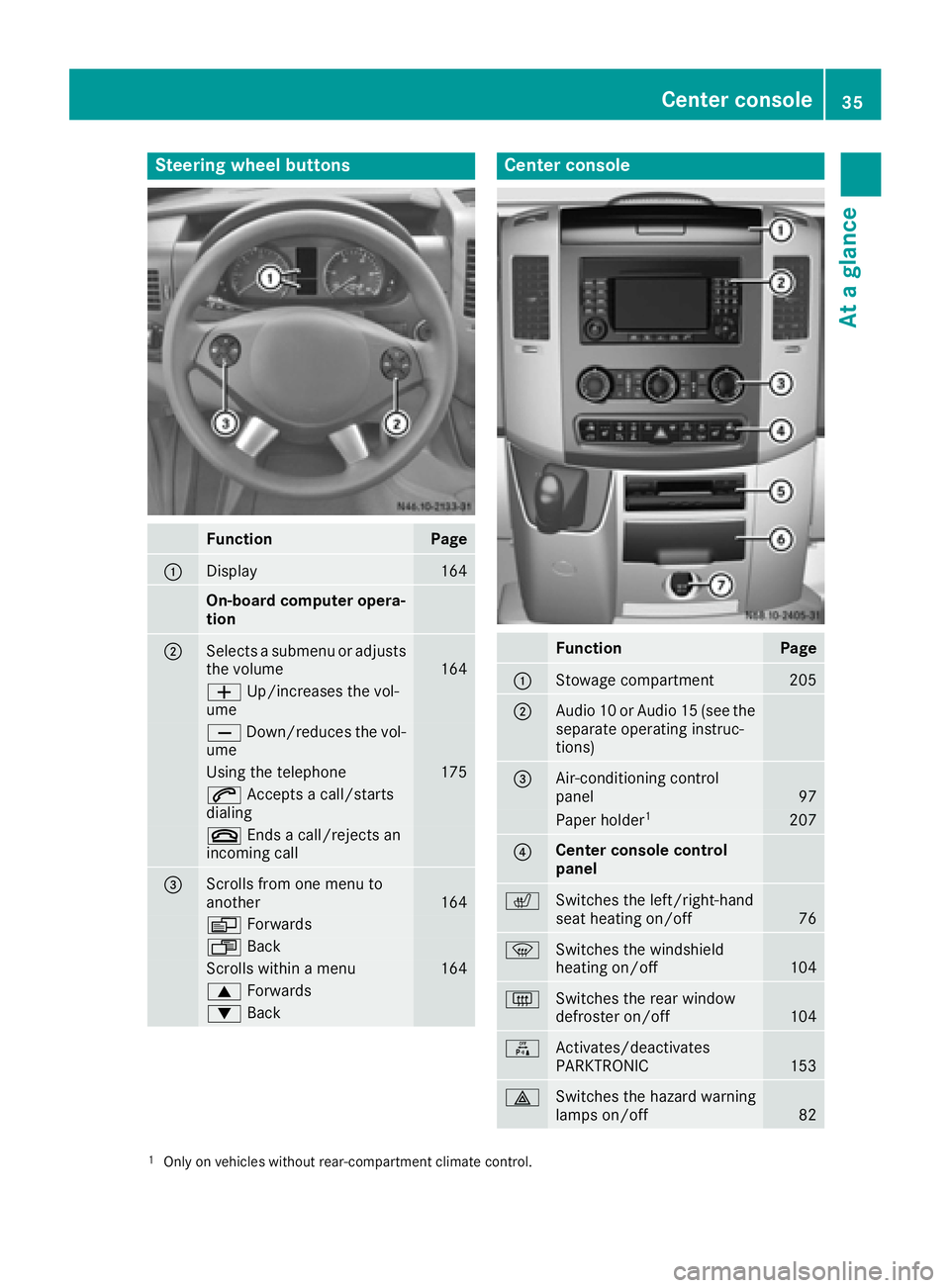
Steering wheel buttons
FunctionPage
:Display164
On-board computer opera-
tion
;Selects a submenu or adjusts
the volume164
WUp/increases the vol-
ume
X Down/reduces the vol-
ume
Using the telephone175
6 Accepts a call/starts
dialing
~ Ends a call/rejects an
incoming call
=Scrolls from one menu to
another164
V Forwards
UBack
Scrolls within a menu164
9Forwards
:Back
Center console
FunctionPage
:Stowage compartment205
;Audio 10 or Audio 15 (see the
separate operating instruc-
tions)
=Air-conditioning control
panel97
Paper holder1207
?Center console control
panel
cSwitches the left/right-hand
seat heating on/off76
zSwitches the windshield
heating on/off104
|Switches the rear window
defroster on/off104
fActivates/deactivates
PARKTRONIC153
£Switches the hazard warning
lamps on/off82
1Only on vehicles without rear-compartment climate control.
Center console35
At a glance
Page 87 of 290
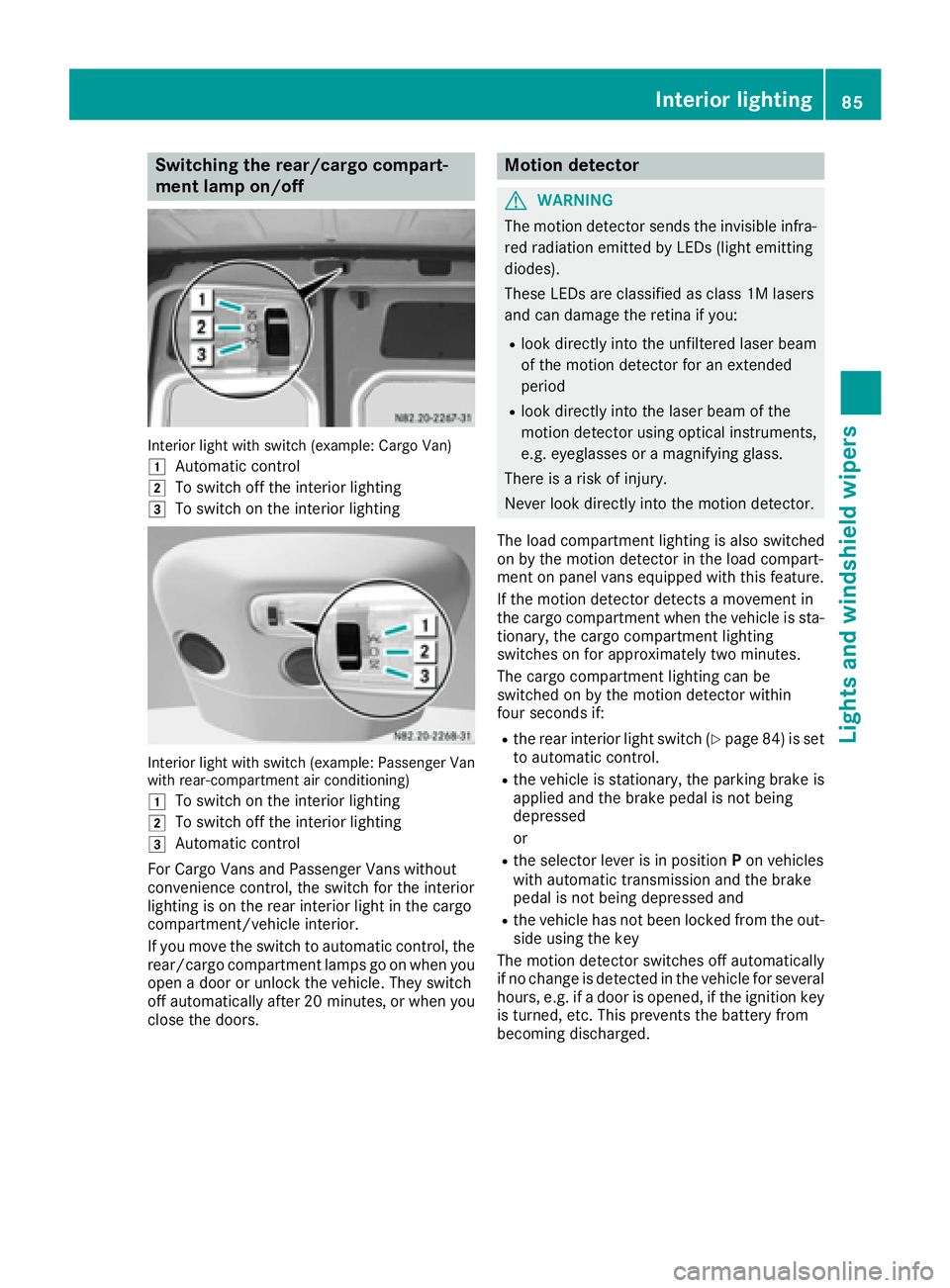
Switching the rear/cargo compart-
ment lamp on/off
Interior light with switch (example: Cargo Van)
1
Automatic control
2To switch off the interior lighting
3To switch on the interior lighting
Interior light with switch (example: Passenger Van
with rear-compartment air conditioning)
1
To switch on the interior lighting
2To switch off the interior lighting
3Automatic control
For Cargo Vans and Passenger Vans without
convenience control, the switch for the interior
lighting is on the rear interior light in the cargo
compartment/vehicle interior.
If you move the switch to automatic control, the
rear/cargo compartment lamps go on when you
open a door or unlock the vehicle. They switch
off automatically after 20 minutes, or when you
close the doors.
Motion detector
GWARNING
The motion detector sends the invisible infra- red radiation emitted by LEDs (light emitting
diodes).
These LEDs are classified as class 1M lasers
and can damage the retina if you:
Rlook directly into the unfiltered laser beam
of the motion detector for an extended
period
Rlook directly into the laser beam of the
motion detector using optical instruments,
e.g. eyeglasses or a magnifying glass.
There is a risk of injury.
Never look directly into the motion detector.
The load compartment lighting is also switched
on by the motion detector in the load compart-
ment on panel vans equipped with this feature.
If the motion detector detects a movement in
the cargo compartment when the vehicle is sta-
tionary, the cargo compartment lighting
switches on for approximately two minutes.
The cargo compartment lighting can be
switched on by the motion detector within
four seconds if:
Rthe rear interior light switch (Ypage 84) is set
to automatic control.
Rthe vehicle is stationary, the parking brake is
applied and the brake pedal is not being
depressed
or
Rthe selector lever is in position Pon vehicles
with automatic transmission and the brake
pedal is not being depressed and
Rthe vehicle has not been locked from the out-
side using the key
The motion detector switches off automatically
if no change is detected in the vehicle for several
hours, e.g. if a door is opened, if the ignition key
is turned, etc. This prevents the battery from
becoming discharged.
Interior lighting85
Lights and windshield wipers
Z
Page 101 of 290
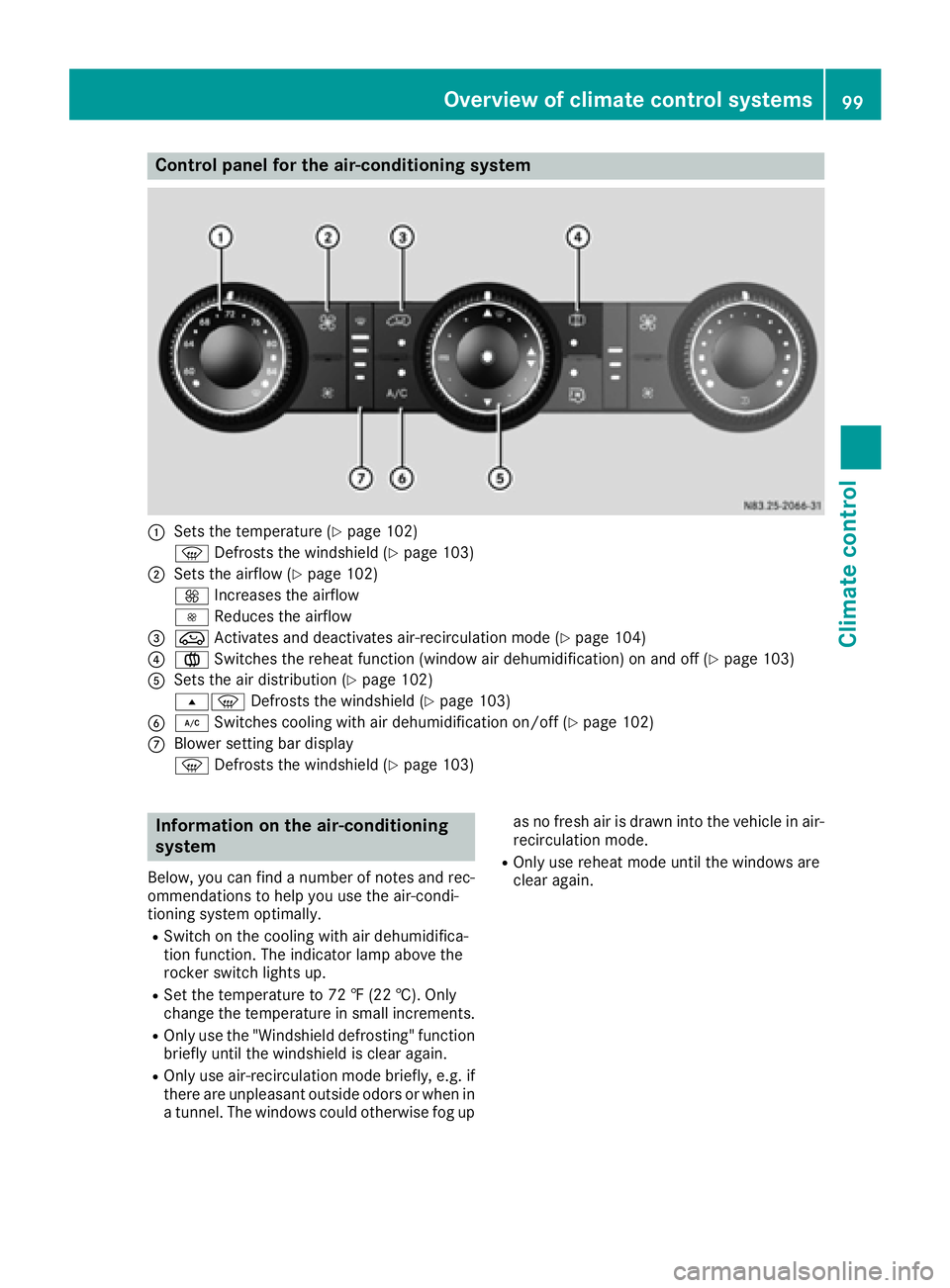
Control panel for the air-conditioning system
:Sets the temperature (Ypage 102)
z Defrosts the windshield (
Ypage 103)
;Sets the airflow (Ypage 102)
K Increases the airflow
I Reduces the airflow
=eActivates and deactivates air-recirculation mode (Ypage 104)
?xSwitches the reheat function (window air dehumidification) on and off (Ypage 103)
ASets the air distribution (Ypage 102)
sz Defrosts the windshield (
Ypage 103)
B¿Switches cooling with air dehumidification on/off (Ypage 102)
CBlower setting bar display
zDefrosts the windshield (
Ypage 103)
Information on the air-conditioning
system
Below, you can find a number of notes and rec-
ommendations to help you use the air-condi-
tioning system optimally.
RSwitch on the cooling with air dehumidifica-
tion function. The indicator lamp above the
rocker switch lights up.
RSet the temperature to 72 ‡ (22 †). Only
change the temperature in small increments.
ROnly use the "Windshield defrosting" function
briefly until the windshield is clear again.
ROnly use air-recirculation mode briefly, e.g. if
there are unpleasant outside odors or when in
a tunnel. The windows could otherwise fog up as no fresh air is drawn into the vehicle in air-
recirculation mode.
ROnly use reheat mode until the windows are
clear again.
Overview of climate control systems99
Climate control
Page 103 of 290
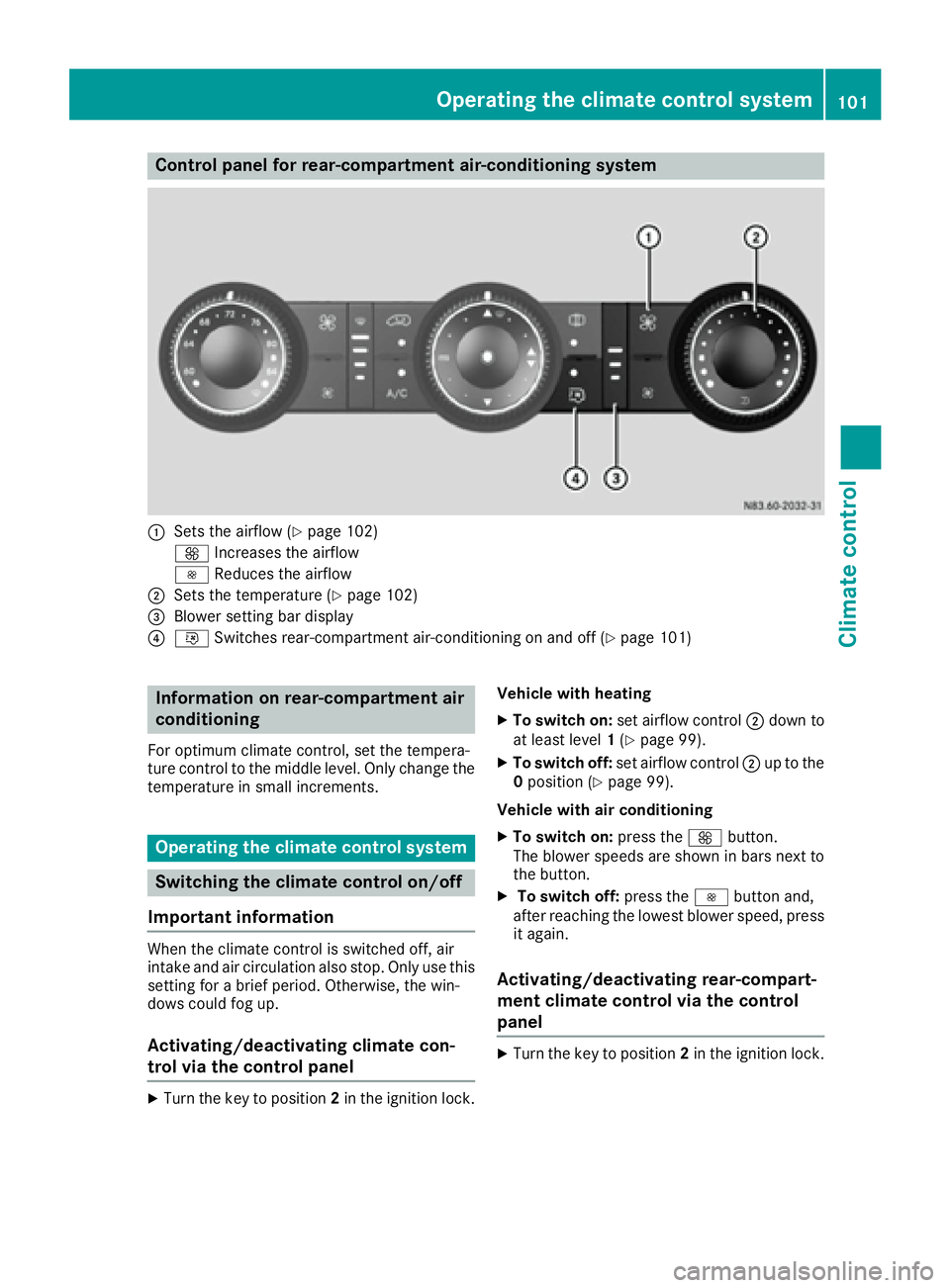
Control panel for rear-compartment air-conditioning system
:Sets the airflow (Ypage 102)
K Increases the airflow
I Reduces the airflow
;Sets the temperature (Ypage 102)
=Blower setting bar display
?iSwitches rear-compartment air-conditioning on and off (Ypage 101)
Information on rear-compartment air
conditioning
For optimum climate control, set the tempera-
ture control to the middle level. Only change the
temperature in small increments.
Operating the climate control system
Switching the climate control on/off
Important information
When the climate control is switched off, air
intake and air circulation also stop. Only use this
setting for a brief period. Otherwise, the win-
dows could fog up.
Activating/deactivating climate con-
trol via the control panel
XTurn the key to position 2in the ignition lock. Vehicle with heating
XTo switch on:
set airflow control ;down to
at least level 1(Ypage 99).
XTo switch off: set airflow control ;up to the
0 position (Ypage 99).
Vehicle with air conditioning
XTo switch on: press theKbutton.
The blower speeds are shown in bars next to
the button.
XTo switch off: press theIbutton and,
after reaching the lowest blower speed, press
it again.
Activating/deactivating rear-compart-
ment climate control via the control
panel
XTurn the key to position 2in the ignition lock.
Operating the climate control system101
Climate control
Page 104 of 290
Vehicle with rear-compartment heating/
rear-compartment air conditioning
XTo switch on/off:press theiswitch.
If the indicator lamp in the button lights up,
the rear-compartment heating/rear-com-
partment air conditioning is switched on.
Switching the cooling with air dehu-
midification function on/off
Important information
If you switch off the "Cooling with air dehumid-
ification" function, the air inside the vehicle will
not be cooled (in warm weather) or dehumidi-
fied. The windows could fog up more quickly.
The cooling with air dehumidification function is
only available when the engine is running. The
air inside the vehicle is cooled and dehumidified
according to the temperature selected.
Condensation may appear on the underside of
the vehicle when in cooling mode. This is normal
and not a sign that there is a malfunction.
Switching on and off
Vehicle with air conditioning
XPress the ¿button.
If the indicator lamp in the button lights up,
cooling with air dehumidification is switched
on.
Setting the temperature
Increasing and reducing temperature in
the front compartment via the control
panel
Only change the temperature in small incre-
ments. Start at the center position, or at 72 ‡
(22 †).
XSwitch on climate control (Ypage 101).
XTurn temperature control :clockwise to
increase or counterclockwise to reduce the
temperature (
Ypage 99).
Increasing and reducing temperature in
the rear compartment via the control
panel
Only change the temperature in small incre-
ments.
XSwitch on climate control (Ypage 101).
XTurn rear-compartment temperature control
= (Ypage 100) or rear-compartment air-
conditioning system ;(Ypage 101) clock-
wise to increase or counterclockwise to
reduce the temperature.
iVehicles with additional air conditioning and
heating in the rear compartment: if you set
the temperature control to the center posi-
tion, only one of the two climate control sys-
tems works in the rear compartment and in
air-recirculation mode (
Ypage 104).
Setting the air distribution
Air distribution settings
The air distribution symbols have the following
meanings:
m Directs air through the center and side
air vents
s
z Directs air to the windshield and the air
vents
q Directs air to the windshield, the air
vents and into the footwell
r Directs air to the air vents and into the
footwell
Adjusting
XSwitch on climate control (Ypage 101).
XSet air-distribution control ?for the heating
(Ypage 98) or air-conditioning system A
(Ypage 99) to the corresponding symbol.
Setting the airflow
XSwitch on climate control (Ypage 101).
XVehicle with heating/rear-compartment
heating: set airflow control ;of the heating
(
Ypage 98) or of the rear-compartment heat-
ing (Ypage 100) to the desired level.
XVehicle with air conditioning/rear-com-
partment air conditioning: press theI
102Operating the climate control system
Climate control
Page 105 of 290
button to reduce or theKbutton to
increase the airflow.
The blower speeds are shown in bars next to
the buttons.
Defrosting the windows
You can use the "defrosting" function to defrost
the windshield or to demist the inside of the
windshield and the side windows.
Only use the following settings until the win-
dows are clear again.
XVehicle with window heating: switch on the
front (Ypage 104) and/or rear window
defroster (Ypage 104) .
XSwitch on climate control (Ypage 101).
Vehicle with heating
XSet temperature control :and airflow con-
trol ;toz (Ypage 98).
XSet air-distribution control ?tosz
(Ypage 98).
XClose the center air vents (Ypage 105) and
the air outlets for the headroom and the rear compartment (
Ypage 106).
XDirect the side air vents towards the side win-dows and open the defroster vents for the
side windows (
Ypage 106).
Vehicle with air conditioning
XSet temperature control :to
z (Ypage 99).
XPress the Kbutton until the maximum
blower output is reached.
All bars in the display next to the button light up.
XSet air-distribution control Atosz
(Ypage 99).
XClose the center air vents (Ypage 105) and
the air outlets for the headroom and the rear compartment (
Ypage 106).
XDirect the side air vents towards the side win-dows and open the defroster vents for the
side windows (
Ypage 106).
Clearing condensation from the win-
dows
Windows fogged up on the inside
You should only select this setting until the win-
dows are clear again.
XVehicle with window heating: switch on the
front (Ypage 104) and/or rear window
defroster (Ypage 104) .
XSwitch on climate control (Ypage 101).
XSwitch off air-recirculation mode
(Ypage 104).
Vehicle with heating
XSet temperature control :to a higher tem-
perature (Ypage 98).
XSet airflow control ;to a higher blower set-
ting. It should be set at least to level two
(
Ypage 98).
XSet air-distribution control ?tosz
(Ypage 98).
iIf the windows still fog up, set the control as
described for defrosting (Ypage 103).
Vehicle with air conditioning
XActivate cooling with air dehumidification
(Ypage 102).
XPress the ¨button (Ypage 99).
Reheat mode is activated. The indicator lamp
in the switch lights up.
To deactivate reheat mode, press the ¨
button again. The indicator lamp in the button
goes out.
Windows fogged up on the outside
You should only select this setting until the
windshield is clear again.
XSwitch on the windshield wipers (Ypage 93).
XSwitch on climate control (Ypage 101).
XAdjust air distribution to the footwell
(Ypage 102).
XClose the air vents (Ypage 105).
Operating the climate control system103
Climate control
Page 107 of 290
Heating and air-conditioning system
Air-recirculation mode switches off automati-
cally after about 10 to 30 minutes, depending on
the outside temperature.
XSwitch on climate control (Ypage 101).
XTo activate/deactivate:press theebut-
ton.
If the indicator lamp in the ebutton lights
up, air-recirculation mode is activated.
Rear-compartment heating and rear-
compartment air-conditioning system
On vehicles with rear-compartment heating and
a rear-compartment air-conditioning system,
you can activate or deactivate air-recirculation
mode for the rear-compartment climate control.
XSwitch on climate control (Ypage 101).
XTo activate: set the temperature control of
rear-compartment heating =(Ypage 100) or
rear-compartment air conditioning system ;
(
Ypage 101) to the center position.
Only one of the two climate control systems in
the rear compartment is activated and is in
air-recirculation mode.
XTo deactivate: turn the temperature control
of rear-compartment heating =(Ypage 100)
or rear-compartment air-conditioning sys-
tem ;(
Ypage 101) clockwise or counter-
clockwise. Only change the temperature in
small increments.
Adjusting the air vents
Important safety notes
GWARNING
Very hot or very cold air can flow from the air
vents. This could result in burns or frostbite in
the immediate vicinity of the air vents. There
is a risk of injury.
Make sure that all vehicle occupants always
maintain a sufficient distance to the air out-
lets. If necessary, redirect the airflow to
another area of the vehicle interior.
The center and side air vents are adjustable. On vehicles with a rear-compartment air-condi-
tioning system, you can also adjust the air vents
in the roof duct.
iFor virtually draft-free ventilation, adjust the
sliders of the center air vents to the center
position.
In order to ensure the direct flow of fresh air
through the air vents into the vehicle interior,
please observe the following notes:
Rkeep the air inlet grille on the hood free of
blockages, such as ice, snow or leaves.
Rnever cover the vents or the ventilation grilles
in the vehicle interior.
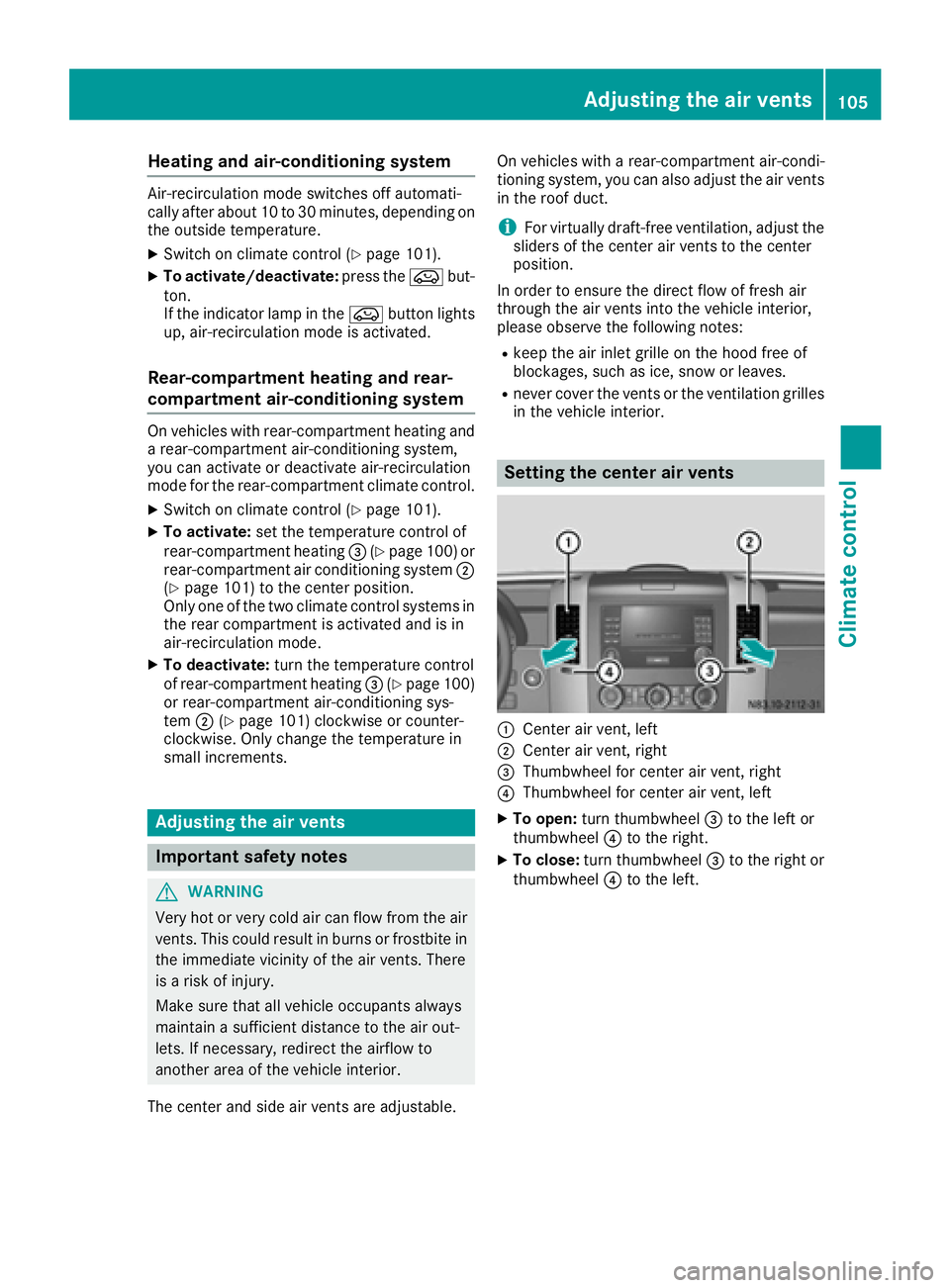
Setting the center air vents
:Center air vent, left
;Center air vent, right
=Thumbwheel for center air vent, right
?Thumbwheel for center air vent, left
XTo open: turn thumbwheel =to the left or
thumbwheel ?to the right.
XTo close: turn thumbwheel =to the right or
thumbwheel ?to the left.
Adjusting the air vents105
Climate control
Z
Page 108 of 290
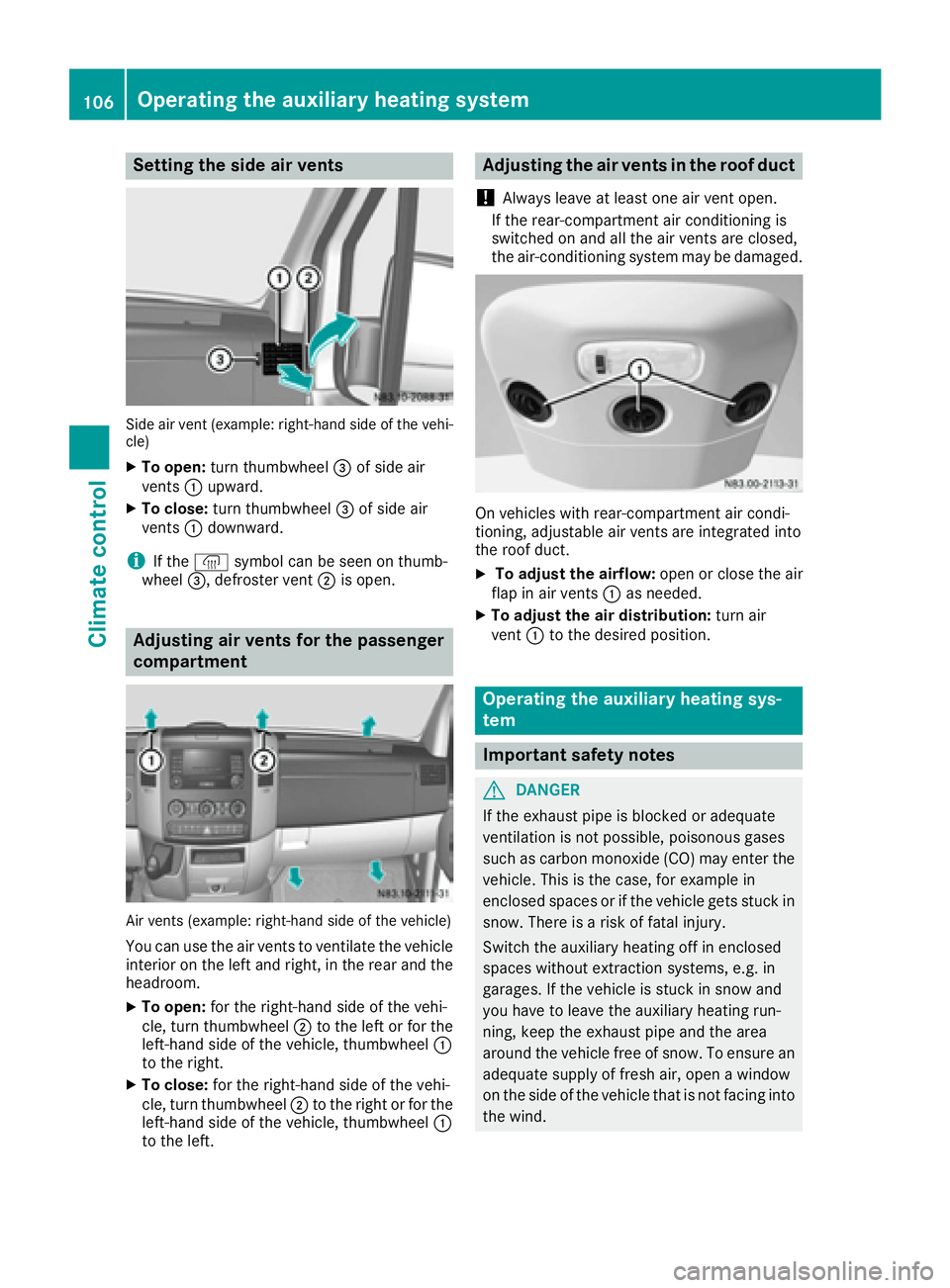
Setting the side air vents
Side air vent (example: right-hand side of the vehi-
cle)
XTo open:turn thumbwheel =of side air
vents :upward.
XTo close: turn thumbwheel =of side air
vents :downward.
iIf the ® symbol can be seen on thumb-
wheel =, defroster vent ;is open.
Adjusting air vents for the passenger
compartment
Air vents (example: right-hand side of the vehicle)
You can use the air vents to ventilate the vehicle
interior on the left and right, in the rear and the
headroom.
XTo open: for the right-hand side of the vehi-
cle, turn thumbwheel ;to the left or for the
left-hand side of the vehicle, thumbwheel :
to the right.
XTo close: for the right-hand side of the vehi-
cle, turn thumbwheel ;to the right or for the
left-hand side of the vehicle, thumbwheel :
to the left.
Adjusting the air vents in the roof duct
!
Always leave at least one air vent open.
If the rear-compartment air conditioning is
switched on and all the air vents are closed,
the air-conditioning system may be damaged.
On vehicles with rear-compartment air condi-
tioning, adjustable air vents are integrated into
the roof duct.
XTo adjust the airflow: open or close the air
flap in air vents :as needed.
XTo adjust the air distribution: turn air
vent :to the desired position.
Operating the auxiliary heating sys-
tem
Important safety notes
GDANGER
If the exhaust pipe is blocked or adequate
ventilation is not possible, poisonous gases
such as carbon monoxide (CO) may enter the vehicle. This is the case, for example in
enclosed spaces or if the vehicle gets stuck in
snow. There is a risk of fatal injury.
Switch the auxiliary heating off in enclosed
spaces without extraction systems, e.g. in
garages. If the vehicle is stuck in snow and
you have to leave the auxiliary heating run-
ning, keep the exhaust pipe and the area
around the vehicle free of snow. To ensure anadequate supply of fresh air, open a window
on the side of the vehicle that is not facing into
the wind.
106Operating the auxiliary heating system
Climate control