bulb MERCEDES-BENZ SPRINTER 2017 MY17 Operator’s Manual
[x] Cancel search | Manufacturer: MERCEDES-BENZ, Model Year: 2017, Model line: SPRINTER, Model: MERCEDES-BENZ SPRINTER 2017Pages: 286, PDF Size: 4.36 MB
Page 17 of 286
Operating safetyLimited Warranty ............................. 23
Operating safety and vehicle
approval
Attachments and bodies .................. 28
Changing the engine power out-
put ................................................... 27
Correct use ...................................... 25
Declaration of conformity ................ 27
Equipment and conversions ............. 28
Important safety notes .................... 26
Information about body/equip-
ment mounting directives ................ 28
Notes on operating the vehicle ........ 26
Qualified specialist workshop .......... 27
Registering your vehicle ................... 28
Operating system
see On-board computer
Operator's Manual
General notes .................................. 23
Vehicle equipment ........................... 23
Outline lamp
Replacing bulbs ............................... 92
Outside temperature display ........... 159
Overhead control panel ...................... 37
Overrevving range ............................. 159
Overrun cutoff ................................... 130
P
Paintwork (cleaning instructions) ... 231
Paper holder ...................................... 203
Parking ............................................... 127
Important safety notes .................. 127
Parking brake ................................ 128
Wheel chock .................................. 129
see PARKTRONIC
Parking aid
see PARKTRONIC
Parking assistance
see PARKTRONIC
Parking brake
Display message ............................ 181
Notes/function .............................. 128
Parking brake
see Parking brake
Parking lamps
Replacing bulbs ............................... 88 PARKTRONIC
Deactivating/activating ................. 150
Driving system ............................... 148
Function/notes ............................. 148
Important safety notes .................. 148
Problem (malfunction) ................... 151
Range of the sensors ..................... 148
Roll-back warning .......................... 150
Trailer towing ................................. 150
Warning display ............................. 149
Partition sliding door
Important safety notes .................... 69
Opening/closing .............................. 69
Passenger compartment air-condi-
tioning system
see Climate control
Passenger compartment heating
see Climate control
Perimeter lamp
Replacing bulbs ............................... 91
Pets in the vehicle ............................... 52
Plastic trim (cleaning instruc-
tions) .................................................. 234
Power assistance for the steering
Display message ............................ 189
Warning lamp ................................. 199
Power supply
Battery isolating switch ................. 116
Switching off .................................. 117
Switching on .................................. 117
Power take-off
Engine speed setting ..................... 151
Power washers .................................. 230
Power windows
see Side windows
Preparing for a journey
Checks in the vehicle ..................... 118
Visual check of the vehicle exte-
rior ................................................. 118
Protection of the environment
General notes .................................. 25
Pulling away ...................................... 119
Q
QR code
Rescue card ..................................... 30
Qualified specialist workshop ........... 27
Index15
Page 18 of 286
R
Radiator cover..................................... 29
Radio
Changing stations (vehicles with
steering wheel buttons) ................. 164
see separate operating instructions
Radio-wave reception/transmis-
sion in the vehicle
Declaration of conformity ................ 27
Rain and light sensor
Setting the sensitivity (vehicles
with steering wheel buttons) ......... 170
Windshield wiper .............................. 94
Range (vehicles with steering
wheel buttons) .................................. 171
Rear bench seat
Installing/removing (Passenger
Van) ................................................. 75
Stowage compartment (crewcab) .. 203
Rear compartment
Activating/deactivating climate
control ........................................... 100
Setting the air vents ...................... 105
Rear door
Child-proof locks .............................. 52
Important safety notes .................... 67
Opening/closing .............................. 67
Opening/closing from inside ........... 69
Rear fog lamp
Replacing bulbs ............................... 90
Switching on/off .............................. 81
Rear fog lamp (Chassis Cab)
Replacing bulbs ............................... 91
Rear interior light
Replacing bulbs ............................... 93
Rear lamps
see Lights
Rear rack
Notes ............................................. 212
Rear view camera
Cleaning instructions ..................... 232
Important safety notes .................. 151
Switching on .................................. 151
Rear window defroster
Problem (malfunction) ................... 103
Switching on/off ........................... 103 Rear window wiper
............................. 95
Switching on/off .............................. 95
Rear-compartment air-condition-
ing system
see Climate control
Rear-compartment heating
see Climate control
Rear-view mirror
Anti-glare mode ............................... 78
Refilling
DEF filler neck ............................... 126
Important safety notes (Diesel
Exhaust Fluid – DEF) ...................... 126
Refilling procedure (Diesel
Exhaust Flu id – DEF) ...................... 126
Re
frigerant ......................................... 281
Refueling
Fuel filler flap ................................. 125
Fuel gauge ..................................... 159
Important safety notes (fuel) ......... 124
Refueling procedure (fuel) ............. 125
see Fuel
Releasing the parking lock man-
ually (automatic transmission) ........ 124
Remote control
Changing the operating duration
(auxiliary heating) .......................... 109
Replacing the battery (auxiliary
heating ) ........................................ 110
Switching on/off (auxiliary heat-
ing) ................................................ 109
Synchronizing (auxiliary heating) ... 109
Replacing bulbs
Important safety notes .................... 87
Replacing the battery (auxiliary
heating remote control) .................... 110
Replacing the fuel filter .................... 198
Reporting safety defects .................... 28
Rescue card ......................................... 30
Restraint system
Introduction ..................................... 40
Warning lamp (function) .......... 40, 194
Reverse warning feature .................. 119
Roadside Assistance (breakdown) .... 24
Roof carrier
Maximum payload .......................... 282
Notes ............................................. 212
16Index
Page 20 of 286
Checking the battery .......................61
Display message ............................ 189
Door central locking/unlocking ....... 59
Important safety notes .................... 59
Loss ................................................. 62
Problem (malfunction) ..................... 62
SmartKey positions (ignition lock) .. 117
Snow chains ...................................... 246
Sockets .............................................. 206
Spare wheel
General notes ................................ 268
Important safety notes .................. 268
Removing/mounting ...................... 269
Special seat belt retractor .................. 48
Specialist workshop ............................ 27
Speed, controlling
see Cruise control
Speedometer
Digital (vehicles with steering
wheel buttons) ............................... 167
Digital (vehicles without steering
wheel buttons) ............................... 160
Selecting display unit (vehicles
with steering- wheel buttons) ........ 167
see Instrument cluster
Sprinter dealer
see Qualified specialist workshop
Standing lamps
Replacing bulbs ............................... 88
Replacing bulbs (rear) ...................... 90
Standing lamps (Chassis Cab)
Replacing bulbs (rear) ...................... 91
Start-off assist
Display message ............................ 179
Starting (engine) ................................ 118
Station
see Radio
Steering wheel
Adjusting ......................................... 77
Button overview ............................... 36
Cleaning ......................................... 234
Step
see Electrical step
Stickers
General safety notes ........................ 25 Stowage spaces
see Stowage spaces and stowage
compartments
Stowage spaces and stowage com-
partments
Eyeglasses compartment ............... 201
Glove box ....................................... 200
Important safety notes .................. 200
Paper holder .................................. 203
Stowage co
mpartment above the
windshield ..................................... 202
Stowage compartment in the cen-
ter console ..................................... 202
Stowage compartment in the
dashboard ...................................... 201
Stowage space above the head-
liner ............................................... 202
Stowage space under the rear
bench seat ..................................... 203
Stowage space under the twin co-
driver's seat ................................... 202
Summer tires ..................................... 245
Switch unit
see Control panel
Switching off the alarm (ATA) ............ 57
Switching the heater booster func-
tion on/off ......................................... 110
Switching the surround lighting
on/off (on-board computer) ............. 169
Swivel seat ........................................... 73
T
Tachometer ........................................ 159
Tail lamps
Changing ......................................... 91
Replacing bulbs ............................... 90
see Lights
Tail lamps (Chassis Cab)
Replacing bulbs ............................... 91
Tank content
Fuel gauge ..................................... 159
Range (vehicles with steering
wheel buttons) ............................... 171
Reserve fuel warning lamp ............. 196
Technical data
Capacities ...................................... 273
Cargo tie-down points .................... 281
18Index
Page 23 of 286
Trip computer (on-board com-
puter).................................................. 171
Trip meter
see Trip odometer
Trip odometer
Display (vehicles with steering
wheel buttons) ............................... 164
Display (vehicles without steering
wheel buttons) ............................... 160
Resetting ....................................... 159
see Trip computer (on-board computer)
Turn signals
Replacing bulbs (front) ..................... 89
Replacing bulbs (rear) ...................... 90
Switching on/off .............................. 82
Turn signals (Chassis Cab)
Replacing bulbs (rear) ...................... 91
Twin front-passenger seat
Stowage compartment .................. 202
Two-way radios
Type approval/frequency .............. 271
TWR (Tongue Weight Rating) (defi-
nition) ................................................. 261
U
Unlocking
From inside the vehicle (central
unlocking button) ............................. 63
USB port ............................................. 207
V
Vehicle
Data acquisition ............................... 30
Display message ............................ 189
Electronics ..................................... 271
Equipment ....................................... 23
Individual settings (vehicles with
steering wheel buttons) ................. 165
Limited Warranty ............................. 23
Loading .......................................... 254
Locking (SmartKey) .......................... 59
Lowering ........................................ 267
Maintenance .................................... 24
Operating safety .............................. 26
Parking for a long period ................ 129
Pulling away ................................... 119 Raising ........................................... 263
Registration ..................................... 28
Reporting problems ......................... 28
Securing from rolling away ............ 127
Towing away .................................. 239
Transporting .................................. 242
Unlocking (SmartKey) ...................... 59
Vehicle battery
see Battery (vehicle)
Vehicle bodies ..................................... 28
Body/equipment mounting direc-
tives for trucks ................................. 28
Vehicle data ....................................... 281
Vehicle identification number .......... 272
Vehicle identification plate .............. 272
Vehicle tool kit .................................. 236
Voltage supply
Fuses ............................................. 242
W
WarningStickers ........................................... 25
Warning and indicator lamp
Power assistance for the steering .. 199
Warning and indicator lamps
Brakes ........................................... 192
Check Engine ................................. 196
Coolant .......................................... 195
Diesel Exhaust Fluid (DEF) ............. 193
Electrical step ................................ 199
ESP
®.............................................. 190
ESP®function ................................ 194
Overview .......................................... 34
Seat belt ........................................ 198
Warning lamp .................................... 237
Warning triangle ................................ 237
Warning- and indicator lamps
ABS ................................................ 191
Air filter .......................................... 197
ASR ................................................ 190
BAS ................................................ 191
Battery charge ............................... 194
Brake wear .................................... 194
Bulbs .............................................. 198
Doors ............................................. 198
Engine oil level ............................... 195
Preglow .......................................... 197
Index21
Page 37 of 286
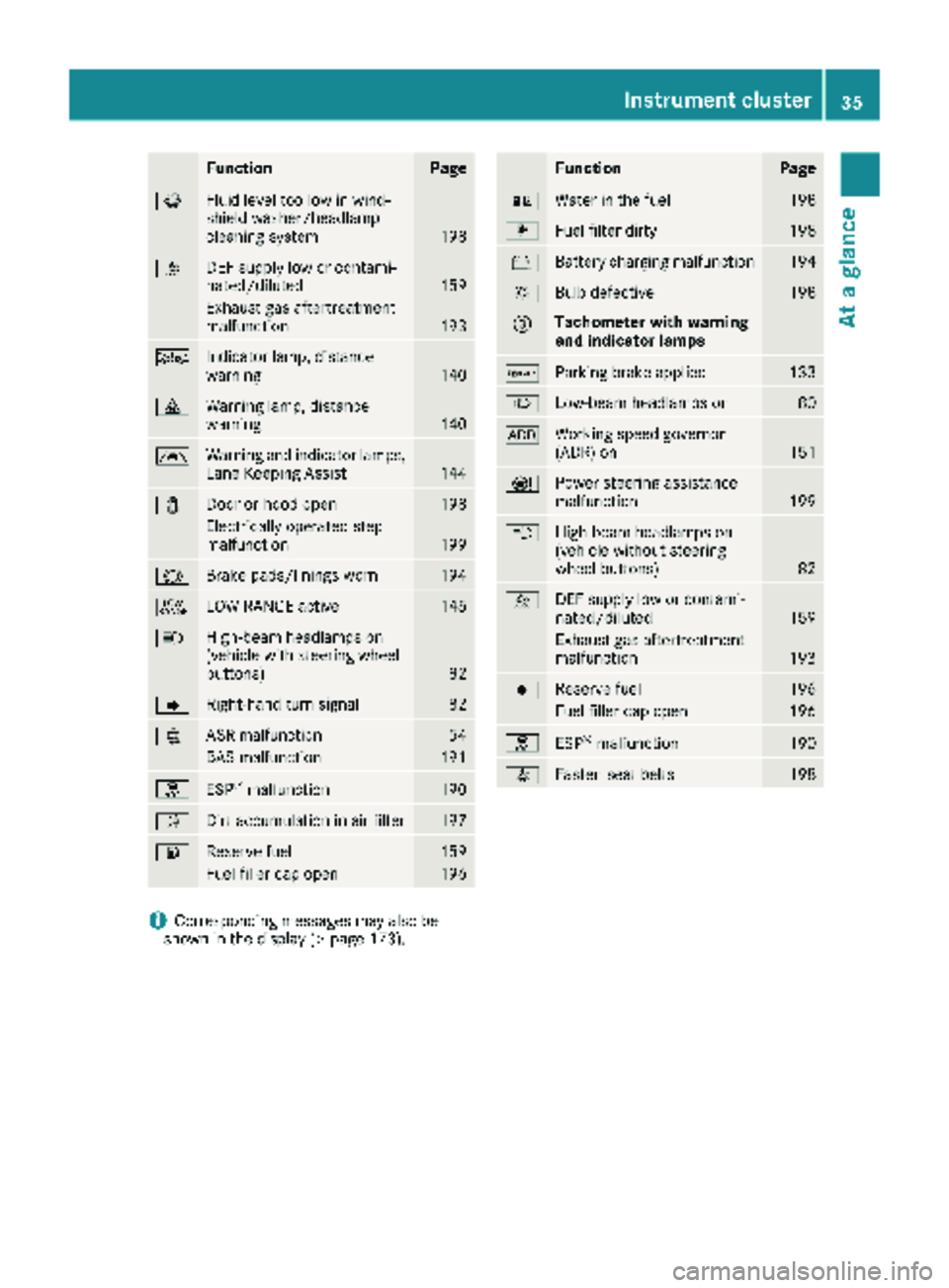
FunctionPage
¦Fluid level too low in wind-
shield washer/headlamp
cleaning system
198
åDEF supply low or contami-
nated/diluted159
Exhaust gas aftertreatment
malfunction193
ÄIndicator lamp, distance
warning140
·Warning lamp, distance
warning140
ÃWarning and indicator lamps,
Lane Keeping Assist144
1Door or hood open198
Electrically operated step
malfunction199
#Brake pads/linings worn194
+LOW RANGE active145
KHigh-beam headlamps on
(vehicle with steering wheel
buttons)
82
JRight-hand turn signal82
:ASR malfunction54
BAS malfunction191
hESP®malfunction190
ÈDirt accumulation in air filter197
6Reserve fuel159
Fuel filler cap open196
FunctionPage
:Water in the fuel198
mFuel filter dirty198
#Battery charging malfunction194
bBulb defective198
=Tachometer with warning
and indicator lamps
cParking brake applied133
LLow-beam headlamps on80
KWorking speed governor
(ADR) on151
ÐPower steering assistance
malfunction199
KHigh-beam headlamps on
(vehicle without steering
wheel buttons)
82
åDEF supply low or contami-
nated/diluted159
Exhaust gas aftertreatment
malfunction193
|Reserve fuel196
Fuel filler cap open196
hESP®malfunction190
7Fasten seat belts198
iCorresponding messages may also be
shown in the display (Ypage 173).
Instrument cluster35
At a glance
Page 82 of 286
Useful information
This Operator's Manual describes all models as
well as standard and optional equipment of your
vehicle that were available at the time of going
to print. Country-specific variations are possi-
ble. Note that your vehicle may not be equipped
with all of the described functions. This also
applies to systems and functions relevant to
safety.
Read the information on qualified specialist
workshops (
Ypage 27).
Exterior lighting
Important safety notes
For reasons of safety, we recommend that you
drive with the lights switched on even during the
daytime. There may be differences in operation
due to legal requirements and voluntary recom-
mendations in some countries.
Bulb failure indicator
The bulb failure indicator is only an aid. You are
responsible for the proper functioning of the
vehicle lighting. Insufficient or non-functioning
vehicle lighting puts the operating safety of the
vehicle at risk.
For this reason, check the condition and func-
tion of your vehicle's lighting system and, if nec-
essary, that of the trailer before each journey.
The bulb failure indicator monitors all of the
exterior lighting lamps, except the perimeter
lamp and the trailer lighting. If a bulb fails, either
the b(
Ypage 34) indicator lamp lights up, or
you will see a corresponding message in the
display (
Ypage 182).
iDepending on the equipment, the bulb fail-
ure indicator can fail for all lamps with the
exception of the turn signal lamps.
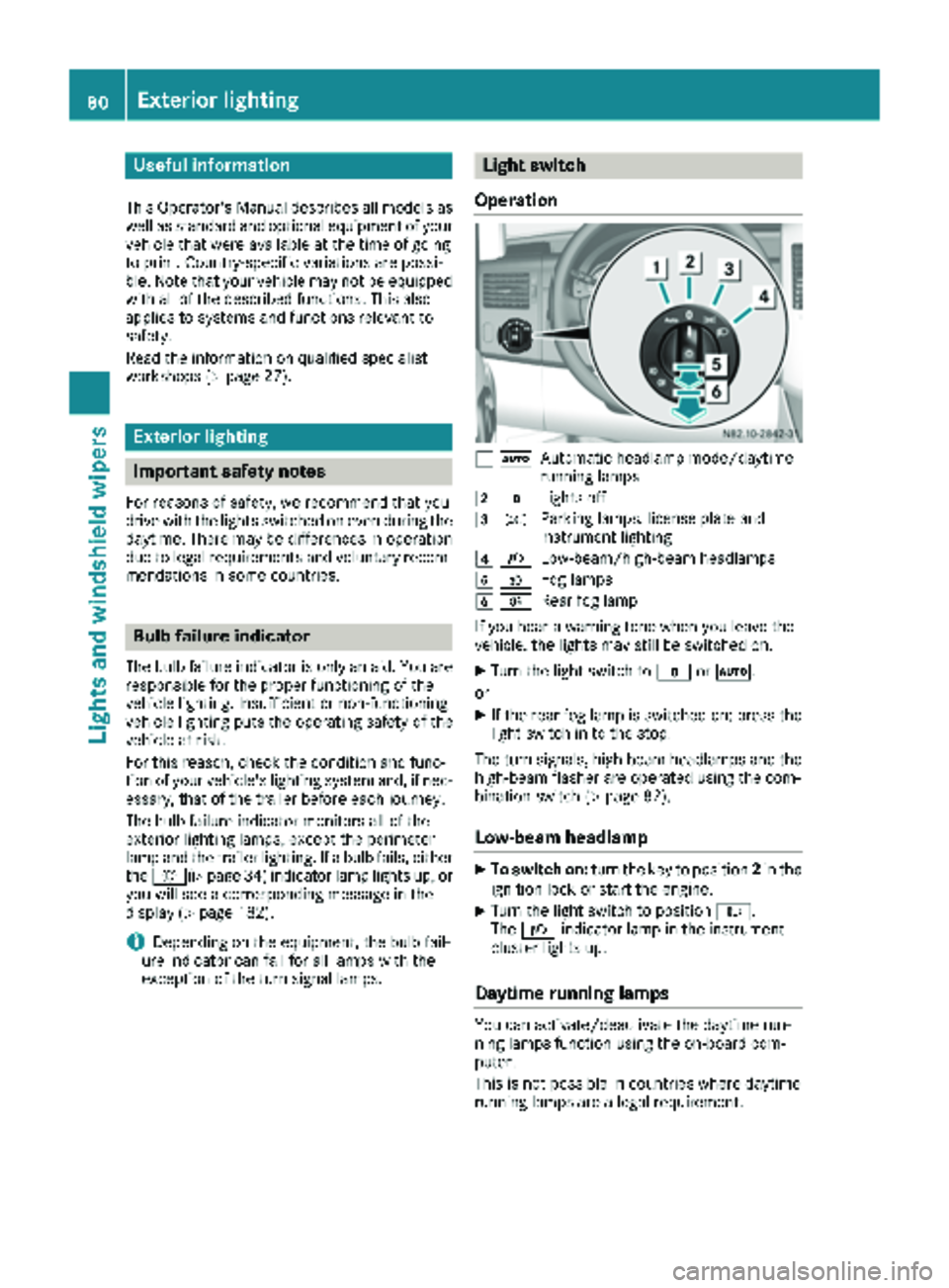
Light switch
Operation
1 ÃAutomatic headlamp mode/daytime
running lamps
2$Lights off
3TParking lamps, license plate and
instrument lighting
4LLow-beam/high-beam headlamps
5NFog lamps
6RRear fog lamp
If you hear a warning tone when you leave the
vehicle, the lights may still be switched on.
XTurn the light switch to $orÃ.
or
XIf the rear fog lamp is switched on: press the
light switch in to the stop.
The turn signals, high-beam headlamps and the
high-beam flasher are operated using the com-
bination switch (
Ypage 82).
Low-beam headlamp
XTo switch on: turn the key to position 2in the
ignition lock or start the engine.
XTurn the light switch to position L.
The L indicator lamp in the instrument
cluster lights up.
Daytime running lamps
You can activate/deactivate the daytime run-
ning lamps function using the on-board com-
puter.
This is not possible in countries where daytime
running lamps are a legal requirement.
80Exterior lighting
Lights and windshield wipers
Page 89 of 286
Changing bulbs
Important safety notes
GDANGER
Xenon bulbs carry a high voltage. You can get an electric shock if you remove the cover of
the Xenon bulb and touch the electrical con-
tacts. There is a risk of fatal injury.
Never touch the parts or the electrical con-
tacts of the Xenon bulb. Always have work on
the Xenon bulbs carried out at a qualified spe-
cialist workshop.
GWARNING
Bulbs, lamps and connectors can get very hot
when operating. If you change a bulb, you
could burn yourself on these components.
There is a risk of injury.
Allow these components to cool down before
changing a bulb.
!Make sure the bulbs are always securely
installed.
If your vehicle is equipped with Bi-Xenon bulbs,
you can recognize this by the following: the cone
of light from the Xenon bulbs moves from the
top to the bottom and back again when you start
the engine. For this to be observed, the low-
beam headlamps must be switched on before
starting the engine.
The bulbs and lamps are an essential compo-
nent of vehicle safety. You must therefore make
sure that these function correctly at all times.
Have the headlamp setting checked regularly.
RAlways switch off the vehicle's lighting sys-
tem before changing a bulb.
This will prevent a short circuit.
RDo not touch the glass tube of new bulbs with your bare hands. Always use a clean, lint-free
cloth or only touch the base of the bulb when
installing.
Even minor contamination can burn into the
glass surface and reduce the service life of the
bulbs.
RDo not use a bulb that has been dropped or
that has scratches on its glass tube.
The bulb could explode.
ROnly use bulbs in closed lamps which have
been designed for this purpose.
ROnly use spare bulbs of the same type and
with the prescribed voltage
RProtect the bulbs from moisture when in use.
If the new bulb still does not light up, consult a
qualified specialist workshop.
RHave the LEDs and bulbs of the following
lamps changed at a qualified specialist work-
shop:
-the additional turn signals in the exterior
mirrors
-the high-mounted brake lamp
-LED daytime running lamps (Bi-Xenon
headlamps)
-Bi-Xenon lamps (Bi-Xenon headlamps)
-front fog lamps
If you require assistance changing bulbs, con-
sult a qualified specialist workshop.
Front bulbs
Overview of bulb replacement – bulb
types
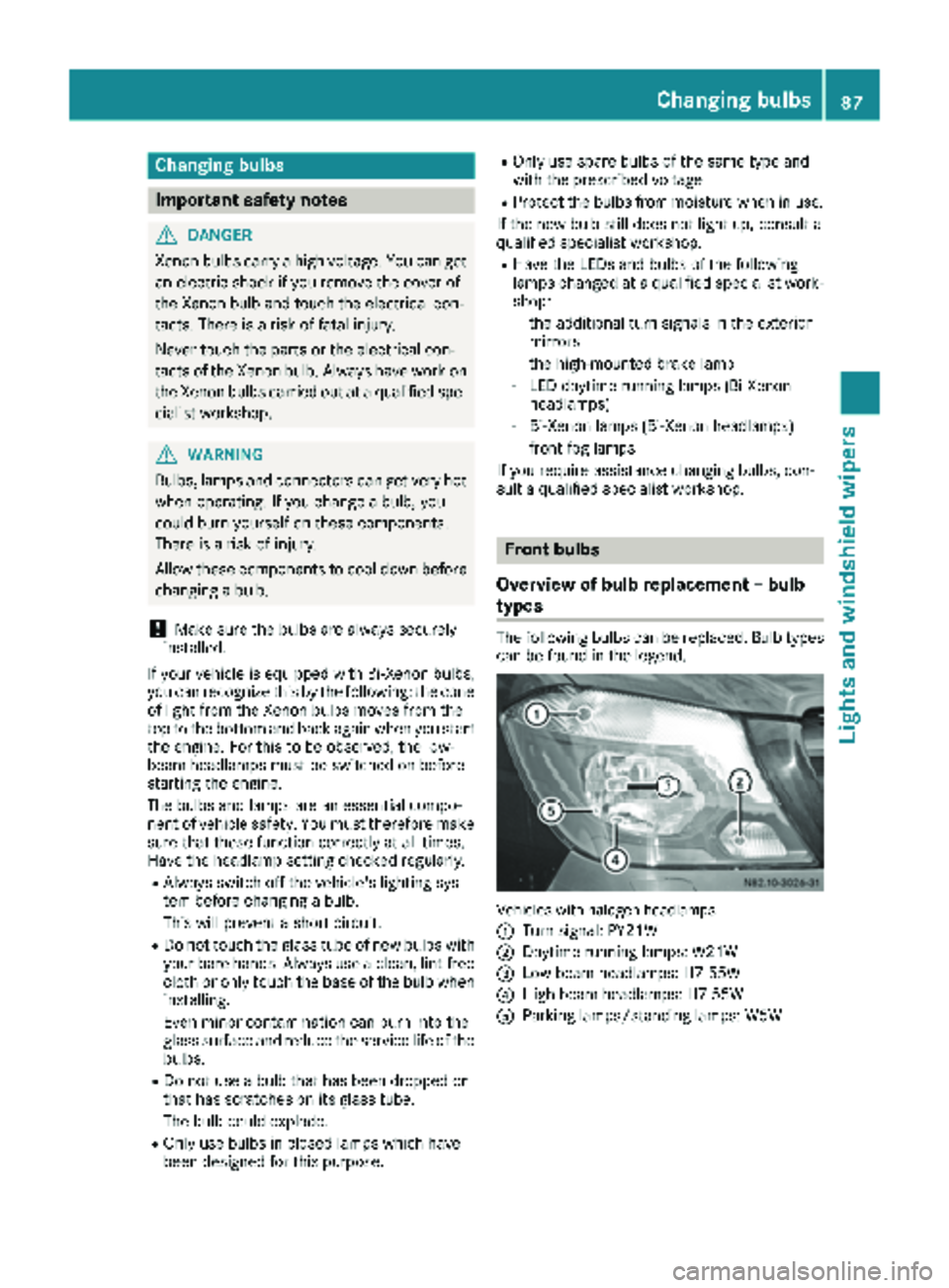
The following bulbs can be replaced. Bulb types can be found in the legend.
Vehicle swit hhalogen headlamps
:
Turn signal: PY21W
;Daytime running lamps: W21W
=Low-beam headlamps: H7 55W
?High-beam headlamps: H7 55W
AParking lamps/standing lamps: W5W
Changing bulbs87
Lights and windshield wipers
Z
Page 90 of 286
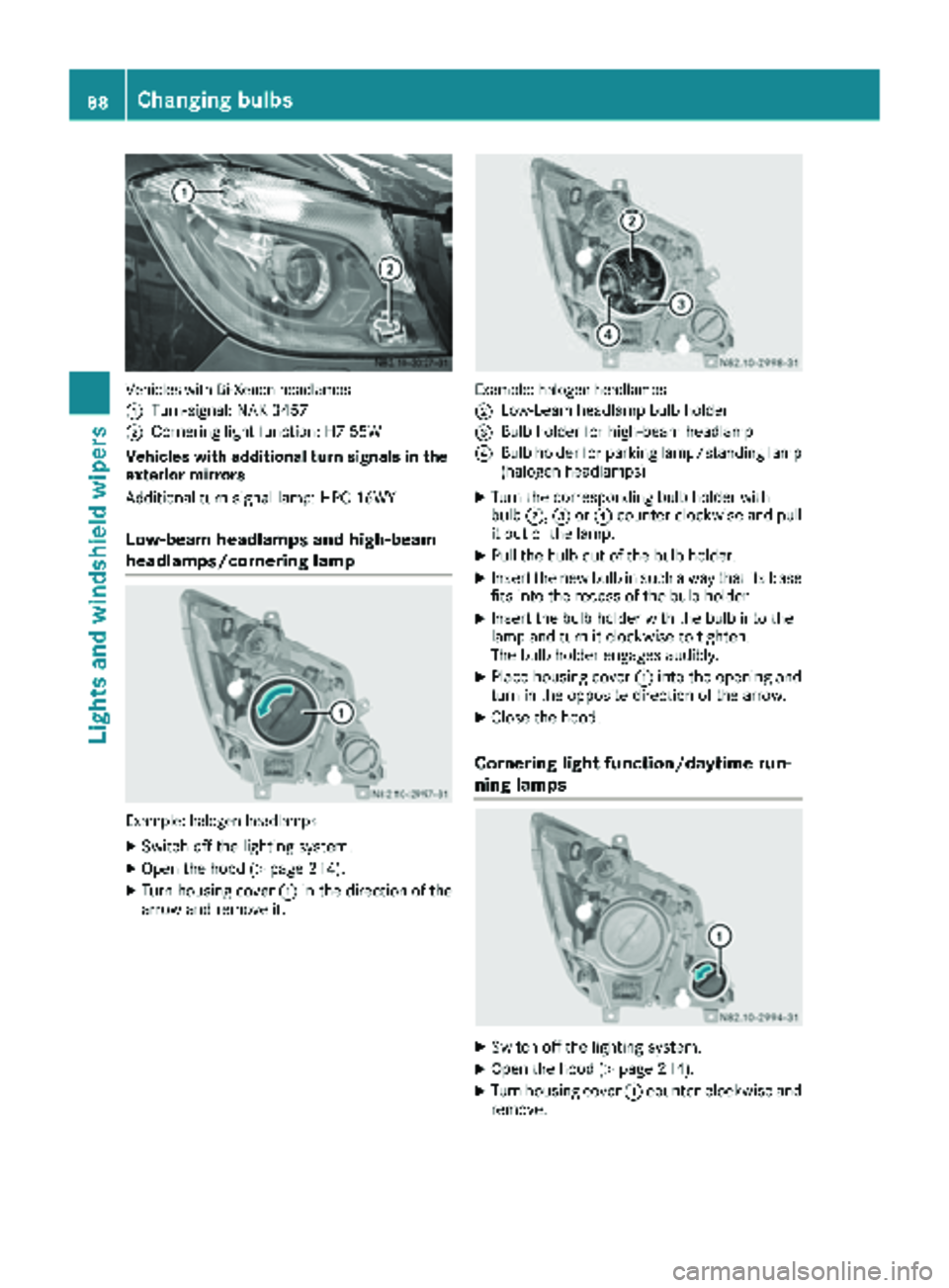
Vehicles with Bi-Xenon headlamps
:
Turn-signal: NAK 3457
;Cornering light function: H7 55W
Vehicles with additional turn signals in the
exterior mirrors
Additional turn signal lamp: HPC 16WY
Low-beam headlamps and high-beam
headlamps/cornering lamp
Example: halogen headlamps
XSwitch off the lighting system.
XOpen the hood (Ypage 214).
XTurn housing cover :in the direction of the
arrow and remove it.
Example: halogen headlamps
;
Low-beam headlamp bulb holder
=Bulb holder for high-beam headlamp
?Bulb holder for parking lamp/standing lamp
(halogen headlamps)
XTurn the corresponding bulb holder with
bulb ;,=or? counter-clockwise and pull
it out of the lamp.
XPull the bulb out of the bulb holder.
XInsert the new bulb in such a way that its base fits into the recess of the bulb holder.
XInsert the bulb holder with the bulb into the
lamp and turn it clockwise to tighten.
The bulb holder engages audibly.
XPlace housing cover :into the opening and
turn in the opposite direction of the arrow.
XClose the hood.
Cornering light function/daytime run-
ning lamps
XSwitch off the lighting system.
XOpen the hood (Ypage 214).
XTurn housing cover :counter-clockwise and
remove.
88Changing bulbs
Lights and windshield wipers
Page 91 of 286
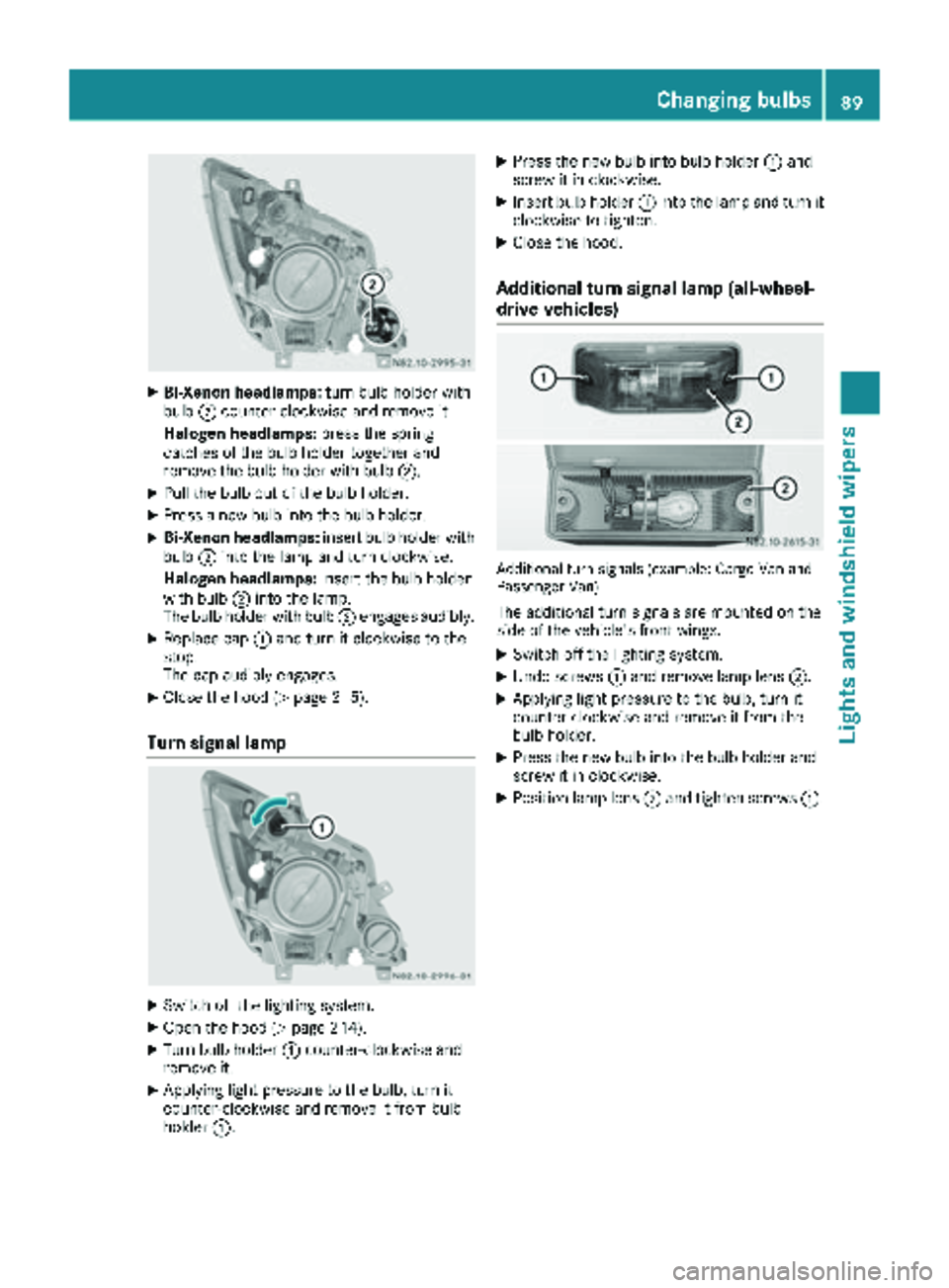
XBi-Xenon headlamps:turn bulb holder with
bulb ;counter-clockwise and remove it.
Halogen headlamps: press the spring
catches of the bulb holder together and
remove the bulb holder with bulb ;.
XPull the bulb out of the bulb holder.
XPress a new bulb into the bulb holder.
XBi-Xenon headlamps:insert bulb holder with
bulb ;into the lamp and turn clockwise.
Halogen headlamps: insert the bulb holder
with bulb ;into the lamp.
The bulb holder with bulb ;engages audibly.
XReplace cap :and turn it clockwise to the
stop.
The cap audibly engages.
XClose the hood (Ypage 215).
Turn signal lamp
XSwitch off the lighting system.
XOpen the hood (Ypage 214).
XTurn bulb holder :counter-clockwise and
remove it.
XApplying light pressure to the bulb, turn it
counter-clockwise and remove it from bulb
holder :.
XPress the new bulb into bulb holder :and
screw it in clockwise.
XInsert bulb holder :into the lamp and turn it
clockwise to tighten.
XClose the hood.
Additional turn signal lamp (all-wheel-
drive vehicles)
Additional turn signals (example: Cargo Van and
Passenger Van)
The additional turn signals are mounted on the
side of the vehicle's front wings.
XSwitch off the lighting system.
XUndo screws :and remove lamp lens ;.
XApplying light pressure to the bulb, turn it
counter-clockwise and remove it from the
bulb holder.
XPress the new bulb into the bulb holder and
screw it in clockwise.
XPosition lamp lens;and tighten screws :.
Changing bulbs89
Lights and windshield wipers
Z
Page 92 of 286
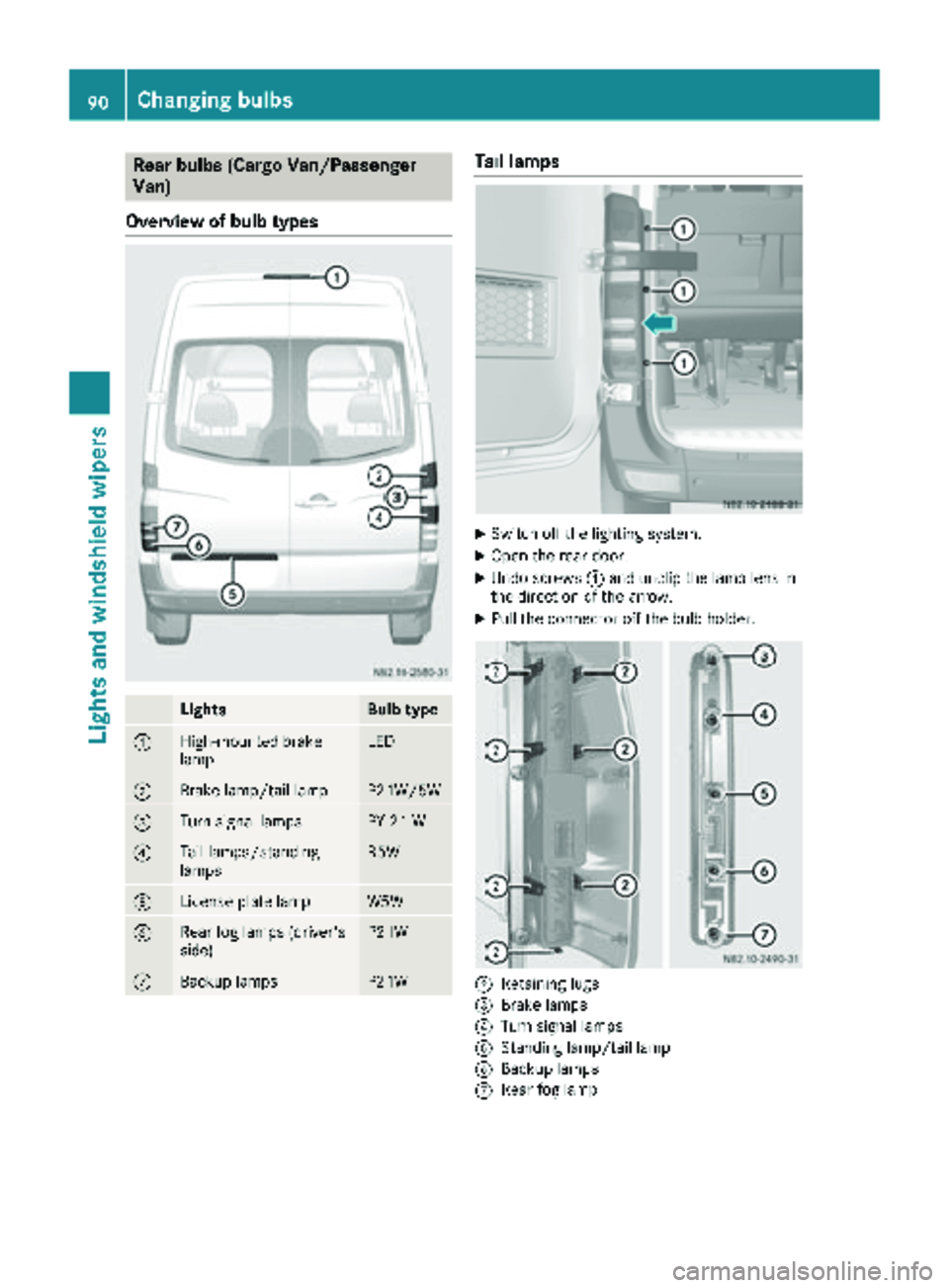
Rear bulbs (Cargo Van/Passenger
Van)
Overview of bulb types
LightsBulb type
:High-mounted brake
lampLED
;Brake lamp/tail lampP21W/5W
=Turn signal lampsPY 21 W
?Tail lamps/standing
lampsR5W
ALicense plate lampW5W
BRear fog lamps (driver's
side)P21W
CBackup lampsP21W
Tail lamps
XSwitch off the lighting system.
XOpen the rear door.
XUndo screws :and unclip the lamp lens in
the direction of the arrow.
XPull the connector off the bulb holder.
;Retaining lugs
=Brake lamps
?Turn signal lamps
AStanding lamp/tail lamp
BBackup lamps
CRear fog lamp
90Changing bulbs
Lights and windshield wipers