phone MERCEDES-BENZ SPRINTER 2017 MY17 Operator’s Manual
[x] Cancel search | Manufacturer: MERCEDES-BENZ, Model Year: 2017, Model line: SPRINTER, Model: MERCEDES-BENZ SPRINTER 2017Pages: 286, PDF Size: 4.36 MB
Page 164 of 286
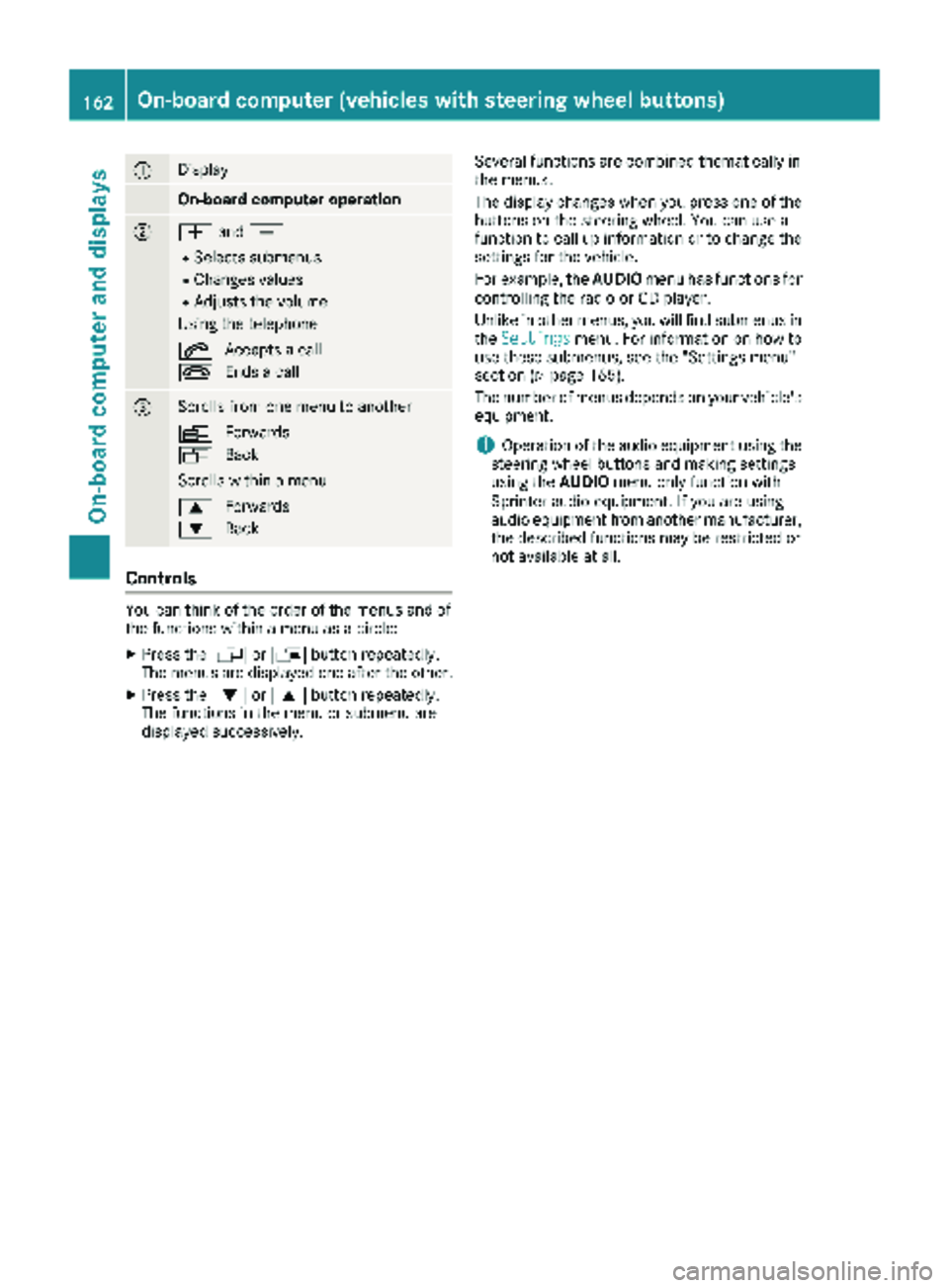
:Display
On-board computer operation
;WandX
RSelects submenus
RChanges values
RAdjusts the volume
Using the telephone
6 Accepts a call
~ Ends a call
=Scrolls from one menu to another
V Forwards
U Back
Scrolls within a menu
9 Forwards
: Back
Controls
You can think of the order of the menus and of
the functions within a menu as a circle:
XPress the VorU button repeatedly.
The menus are displayed one after the other.
XPress the :or9 button repeatedly.
The functions in the menu or submenu are
displayed successively. Several functions are combined thematically in
the menus.
The display changes when you press one of the
buttons on the steering wheel. You can use a
function to call up information or to change the
settings for the vehicle.
For example, the
AUDIOmenu has functions for
controlling the radio or CD player.
Unlike in other menus, you will find submenus in
the Settings
menu. For information on how to
use these submenus, see the "Settings menu"
section (
Ypage 165).
The number of menus depends on your vehicle's
equipment.
iOperation of the audio equipment using the
steering wheel buttons and making settings
using the AUDIOmenu only function with
Sprinter audio equipment. If you are using
audio equipment from another manufacturer,
the described functions may be restricted or
not available at all.
162On-board computer (vehicles withsteering whee lbu ttons)
On-board computer and displays
Page 165 of 286
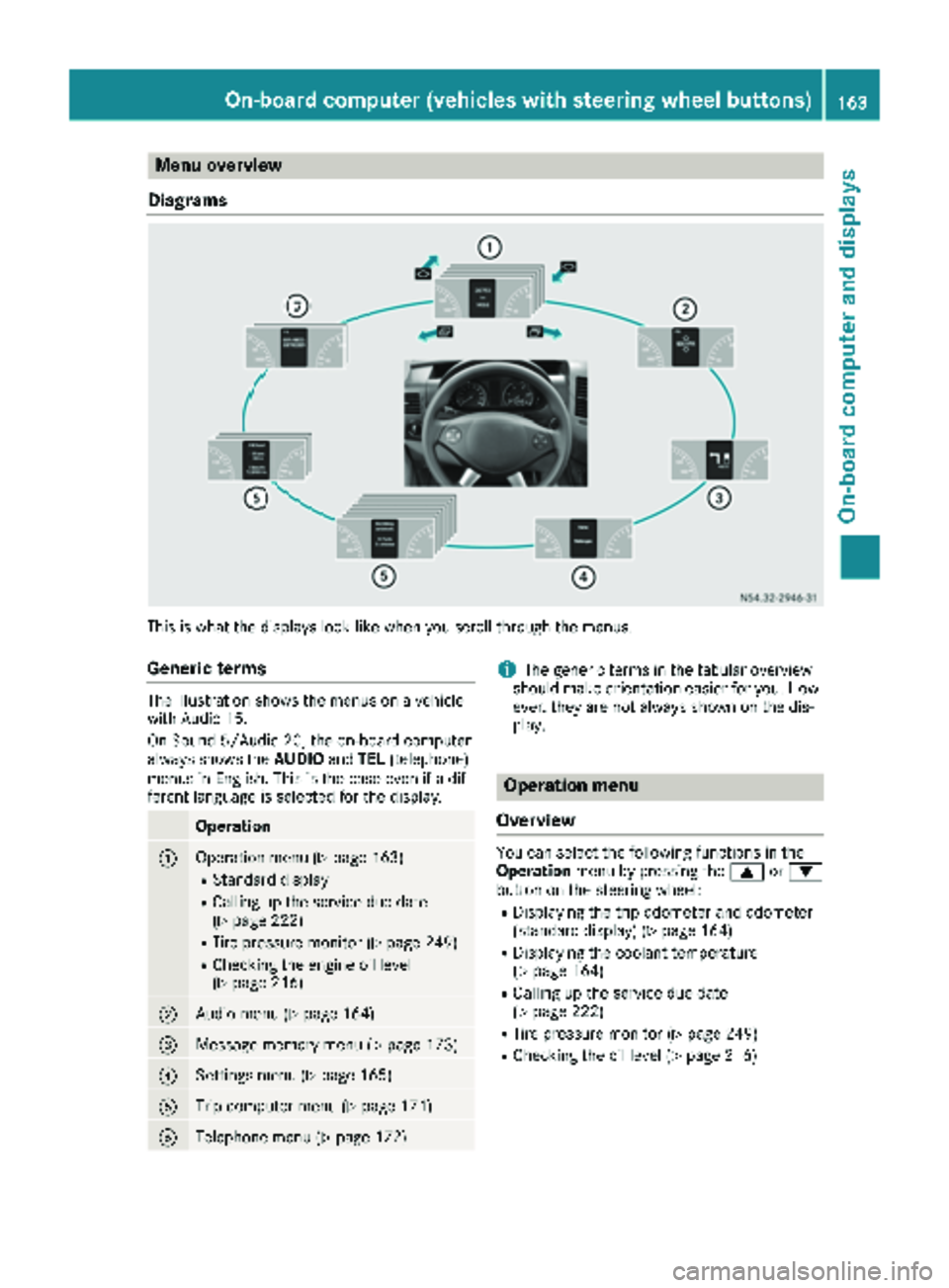
Menu overview
Diagrams
This is what the displays look like when you scroll through the menus.
Generic terms
The illustration shows the menus on a vehicle
with Audio 15.
On Sound 5/Audio 20, the on-board computer
always shows the AUDIOandTEL (telephone)
menus in English. This is the case even if a dif-
ferent language is selected for the display.
Operation
:Operation menu (Ypage 163)
RStandard display
RCalling up the service due date
(Ypage 222)
RTire pressure monitor (Ypage 249)
RChecking the engine oil level
(Ypage 216)
;Audio menu (Ypage 164)
=Message memory menu (Ypage 173)
?Settings menu (Ypage 165)
ATrip computer menu (Ypage 171)
BTelephone menu (Ypage 172)
iThe generic terms in the tabular overview
should make orientation easier for you. How-
ever, they are not always shown on the dis-
play.
Operation menu
Overview
You can select the following functions in the
Operation menu by pressing the 9or:
button on the steering wheel:
RDisplaying the trip odometer and odometer
(standard display) (Ypage 164)
RDisplaying the coolant temperature
(Ypage 164)
RCalling up the service due date
(Ypage 222)
RTire pressure monitor (Ypage 249)
RChecking the oil level (Ypage 216)
On-board computer (vehicles with steering wheel buttons)163
On-board computer and displays
Z
Page 174 of 286
Telephone menu
Introduction
GWARNING
If you operate information systems and com-
munication equipment integrated in the vehi-
cle while driving, you will be distracted from
traffic conditions. You could also lose control
of the vehicle. There is a risk of an accident.
Only operate the equipment when the traffic
situation permits. If you are not sure that this
is possible, park the vehicle paying attention
to traffic conditions and operate the equip-
ment when the vehicle is stationary.
You must observe the legal requirements of the
country in which you are currently driving when
operating a mobile phone in the vehicle. If it is
permitted to operate a mobile phone while the
vehicle is in motion, only operate it when road
and traffic conditions permit.
If you have connected a mobile phone to the
Sprinter hands-free system, you can operate it
using the functions in the TEL
menu.
XSwitch on the mobile phone (see the separate
operating instructions).
XSwitch on the audio equipment (see the sep-
arate operating instructions).
XEstablish a Bluetooth®connection between
the mobile phone and the audio equipment
(see the separate operating instructions).
XPress the VorU button on the steering
wheel to select the TELmenu.
XWhenPlease enter PIN:appears in the
display, enter the PIN using the mobile phone
or audio equipment.
The mobile phone will search for a network.
The display remains blank during this time.
You will see the mobile phone operational
readiness display once the mobile phone has
found a network.
iYou can obtain further information about
suitable mobile phones and connecting
mobile phones via Bluetooth
®at any qualified
specialist workshop.
iIf the mobile phone operational readiness
symbol goes out, your vehicle is outside of the
transmission and reception range.
Accepting a call
XPress the 6button on the steering wheel
to accept an incoming call.
The display shows the call duration.
Rejecting or ending a call
XPress ~button on the steering wheel to
reject or end a call.
The caller then hears the engaged tone.
The display shows the mobile phone opera-
tional readiness symbol again.
Dialing a number from the phone book
You can enter new telephone numbers into the
phone book via the mobile phone (see the sep-
arate operating instructions). If your mobile
phone is able to receive calls, you can search for
and dial a number from the phone book.
Using the steering wheel buttons
XUse the VorU button to select the TELmenu.
The display shows the mobile phone opera-
tional readiness symbol.
XPress the9or: button to switch to
the phone book.
The on-board computer reads the phone book
stored on the SIM card or in the mobile phone.
This may take more than a minute.
When the message is no longer displayed,
reading has ended.
XPress the 9or: button to select the
desired name.
or
XTo start rapid scrolling: press and hold the
9 or: button longer than 1 second.
Rapid scrolling stops when you release the
button or reach the end of the list.
Using the steering wheel buttons
XTo start dialing: press the6button.
The on-board computer dials the correspond-
ing phone number.
When a connection is established, the name
of the other person and/or the call duration
appear in the display.
XTo exit the phone book: press the~but-
ton.
172On-board computer (vehicles withsteering whee lbu ttons)
On-board computer and displays
Page 175 of 286
Redialing
The on-board computer saves the last names or
numbers dialed in the redial memory.
Using the steering wheel buttons
XUse theVorU button to select the TELmenu.
The display shows the mobile phone opera-
tional readiness symbol.
XPress the6button.
The display shows the most recently dialed
numbers or names in the redial memory.
XPress the 9or: button to select the
desired name or number.
XTo start dialing: press the6button.
The on-board computer dials the correspond-
ing phone number.
When a connection is established, the name
of the other person and/or the call duration
appear in the display.
or
XTo exit the redial memory: press the~
button.
Display messages
Notes on display messages
Important safety notes
GWARNING
No information will be displayed if either the
instrument cluster or the display is inopera-
tive.
As a result, you will not be able to see warning
and indicator lamps or information about the
driving conditions, such as speed or outside
temperature. Driving characteristics may be
impaired. Adjust your driving style and vehicle
speed accordingly.
Contact a qualified specialist workshop
immediately.
GWARNING
If service work is not carried out correctly, the operating safety of your vehicle may be affec-
ted. This could cause you to lose control of
your vehicle and cause an accident. More-
over, the safety systems may no longer be
able to protect you or others as they are
designed to do.
Always have service work carried out at a
qualified specialist workshop.
iIf you turn the key to position 2in the igni-
tion, a display check is performed. All warning
and indicator lamps (except the turn signal
indicator lamps) and the display are activa-
ted. Before starting the journey, check that
the warning and indicator lamps are operating
correctly.
Vehicles without steering wheel but-
tons
Warnings, malfunctions or additional informa-
tion may also be shown in the display. The fol-
lowing tables show all the display messages. A
warning tone sounds with certain display mes-
sages.
Vehicles with steering wheel buttons
The on-board computer shows warnings, mal-
functions or additional information in the dis-
play. A warning tone sounds with certain display
messages. Display messages of a high priority
are shown in red.
Please respond in accordance with the display
messages and follow the additional notes in this Operator's Manual.
You can hide low-priority display messages by
pressing the V,U,9or: button
on the steering wheel or the 9reset button.
You cannot hide display messages of the highest
priority. These messages will continue to be
shown in the display until their cause has been
eliminated.
The on-board computer stores certain display
messages in the message memory
(
Ypage 173).
Message memory
The on-board computer only records and shows
malfunctions and warnings from certain sys-
tems. Therefore, make sure that your vehicle is
safe to use. You could otherwise cause an acci-
dent by driving an unsafe vehicle.
Display messages173
On-board computer and displays
Z
Page 191 of 286
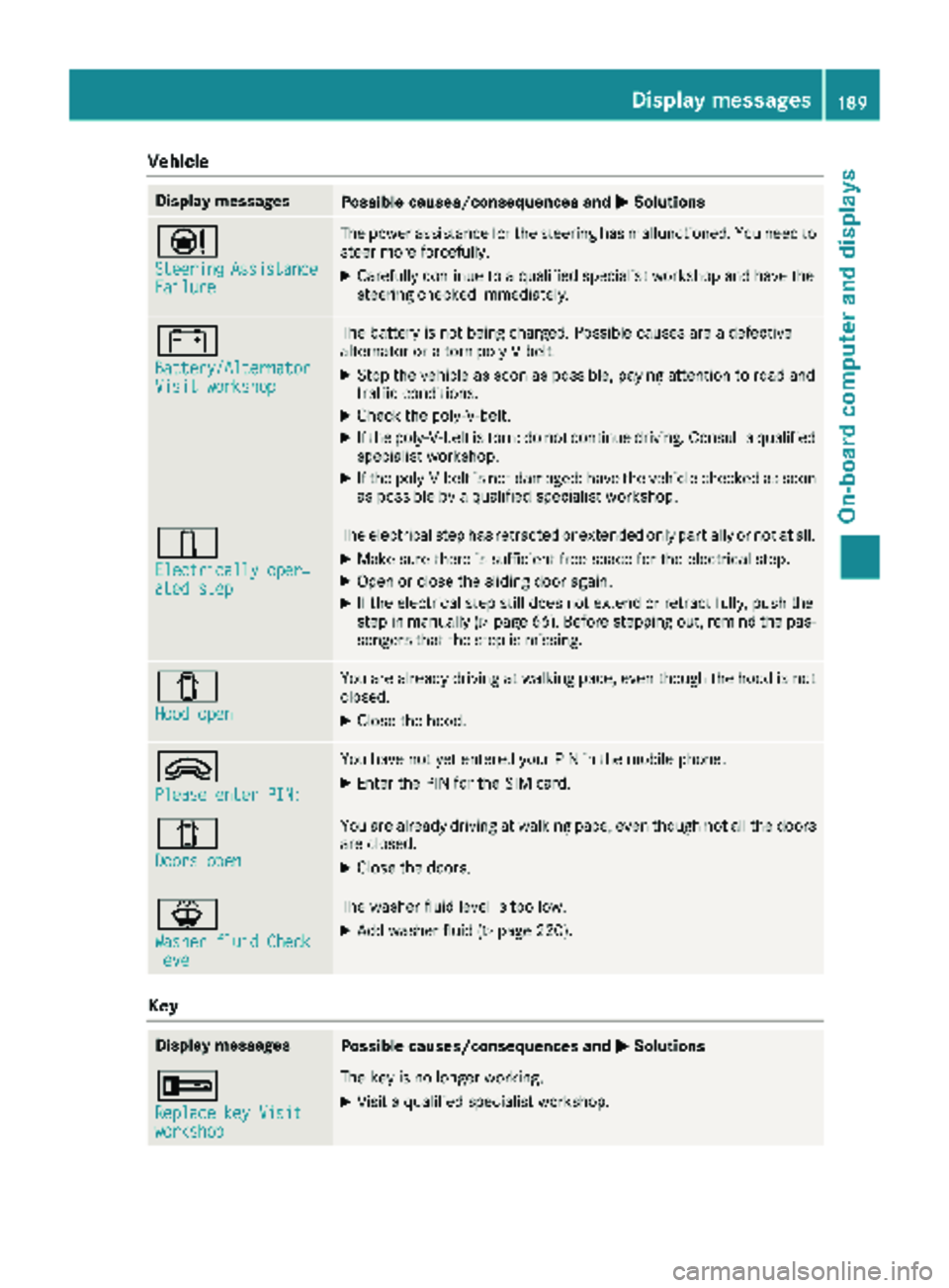
Vehicle
Display messagesPossible causes/consequences andMSolutions
Ð
SteeringAssistanceFailure
The power assistance for the steering has malfunctioned. You need to
steer more forcefully.
XCarefully continue to a qualified specialist workshop and have the
steering checked immediately.
#
Battery/AlternatorVisit workshop
The battery is not being charged. Possible causes are a defective
alternator or a torn poly-V-belt.
XStop the vehicle as soon as possible, paying attention to road and
traffic conditions.
XCheck the poly-V-belt.
XIf the poly-V-belt is torn: do not continue driving. Consult a qualified
specialist workshop.
XIf the poly-V-belt is not damaged: have the vehicle checked as soon
as possible by a qualified specialist workshop.
÷
Electrically oper‐ated step
The electrical step has retracted or extended only partially or not at all.
XMake sure there is sufficient free space for the electrical step.
XOpen or close the sliding door again.
XIf the electrical step still does not extend or retract fully, push the
step in manually (Ypage 66). Before stepping out, remind the pas-
sengers that the step is missing.
1
Hood open
You are already driving at walking pace, even though the hood is not
closed.
XClose the hood.
9
Please enter PIN:
You have not yet entered your PIN in the mobile phone.
XEnter the PIN for the SIM card.
1
Doors open
You are already driving at walking pace, even though not all the doors
are closed.
XClose the doors.
¦
Washer fluid Checklevel
The washer fluid level is too low.
XAdd washer fluid (Ypage 220).
Key
Display messagesPossible causes/consequences and MSolutions
+
Replace key Visitworkshop
The key is no longer working.
XVisit a qualified specialist workshop.
Display messages189
On-board computer and displays
Z
Page 202 of 286
Useful information
This Operator's Manual describes all models as
well as standard and optional equipment of your
vehicle that were available at the time of going
to print. Country-specific variations are possi-
ble. Note that your vehicle may not be equipped
with all of the described functions. This also
applies to systems and functions relevant to
safety.
Read the information on qualified specialist
workshops (
Ypage 27).
Stowage spaces and stowage com-
partments
Important safety notes
GWARNING
If objects in the passenger compartment are
stowed incorrectly, they can slide or be
thrown around and hit vehicle occupants. In
addition, cupholders, open stowage spaces
and mobile phone brackets cannot always
retain all objects they contain. There is a risk of injury, particularly in the event of sudden
braking or a sudden change in direction.
RAlways stow objects so that they cannot be
thrown around in such situations.
RAlways make sure that objects do not pro-
trude from stowage spaces, parcel nets or
stowage nets.
RClose the lockable stowage spaces before
starting a journey.
RAlways stow and secure heavy, hard, poin-
ted, sharp-edged, fragile or bulky objects in
the trunk.
In addition, observe the information in the
"Loading guidelines" section (
Ypage 208).
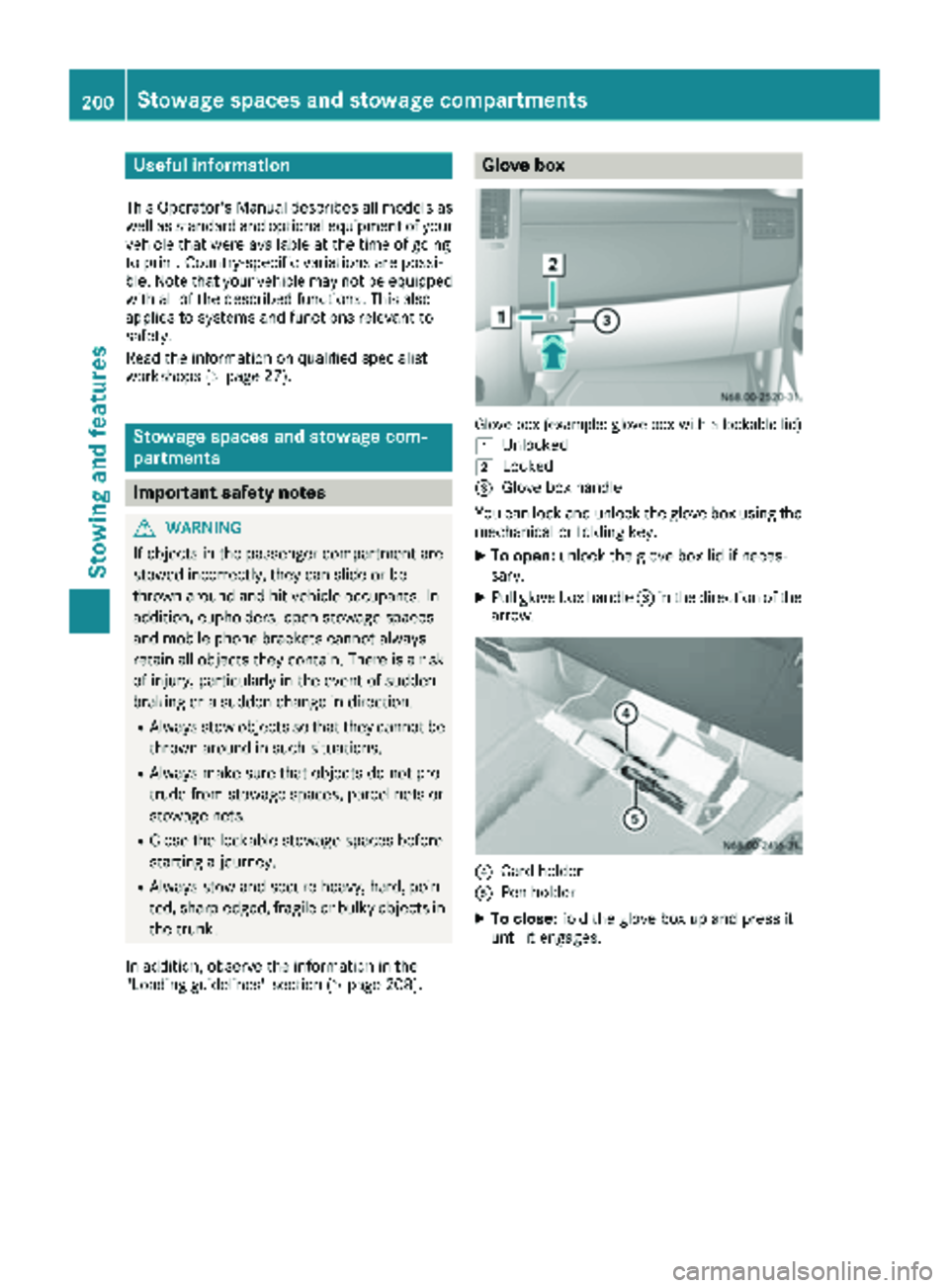
Glove box
Glove box (example: glove box with a lockable lid)
1
Unlocked
2Locked
=Glove box handle
You can lock and unlock the glove box using the mechanical or folding key.
XTo open: unlock the glove box lid if neces-
sary.
XPull glove box handle =in the direction of the
arrow.
?Card holder
APen holder
XTo close: fold the glove box up and press it
until it engages.
200Stowage spaces and stowage compartments
Stowing and features
Page 203 of 286
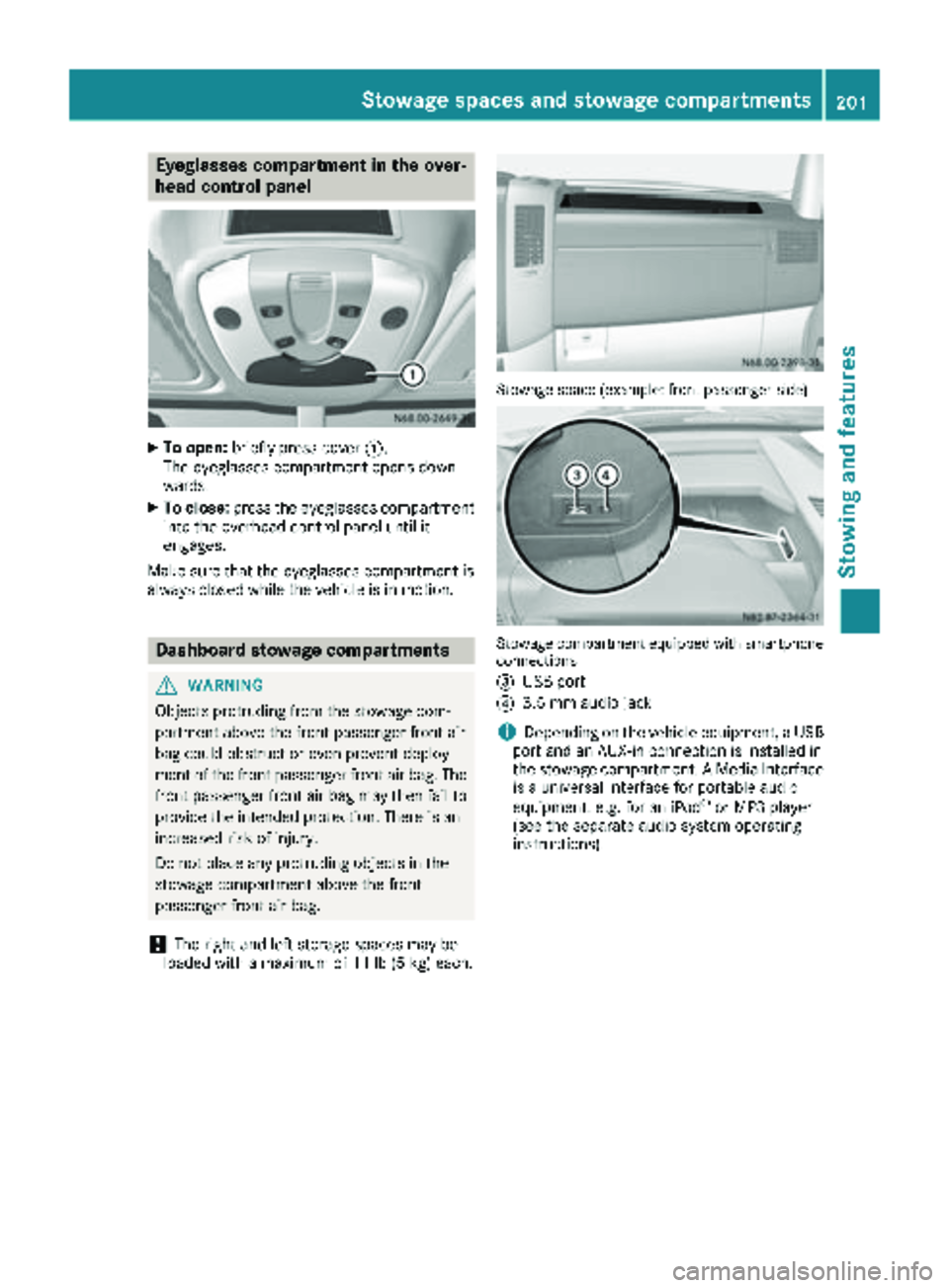
Eyeglasses compartment in the over-
head control panel
XTo open:briefly press cover :.
The eyeglasses compartment opens down-
wards.
XTo close: press the eyeglasses compartment
into the overhead control panel until it
engages.
Make sure that the eyeglasses compartment is
always closed while the vehicle is in motion.
Dashboard stowage compartments
GWARNING
Objects protruding from the stowage com-
partment above the front passenger front air
bag could obstruct or even prevent deploy-
ment of the front passenger front air bag. The front passenger front air bag may then fail to
provide the intended protection. There is an
increased risk of injury.
Do not place any protruding objects in the
stowage compartment above the front
passenger front air bag.
!The right and left storage spaces may be
loaded with a maximum of 11 lb (5 kg) each.
Stowage space (example: front passenger side)
Stowage compartment equipped withsmartphone
connections
=
USB port
?3.5 mm audio jack
iDepending on the vehicle equipment, a USB
port and an AUX-in connection is installed in
the stowage compartment. A Media Interface
is a universal interface for portable audio
equipment, e.g. for an iPod
®or MP3 player
(see the separate audio system operating
instructions).
Stowage spaces and stowage compartments201
Stowing and features
Z
Page 208 of 286
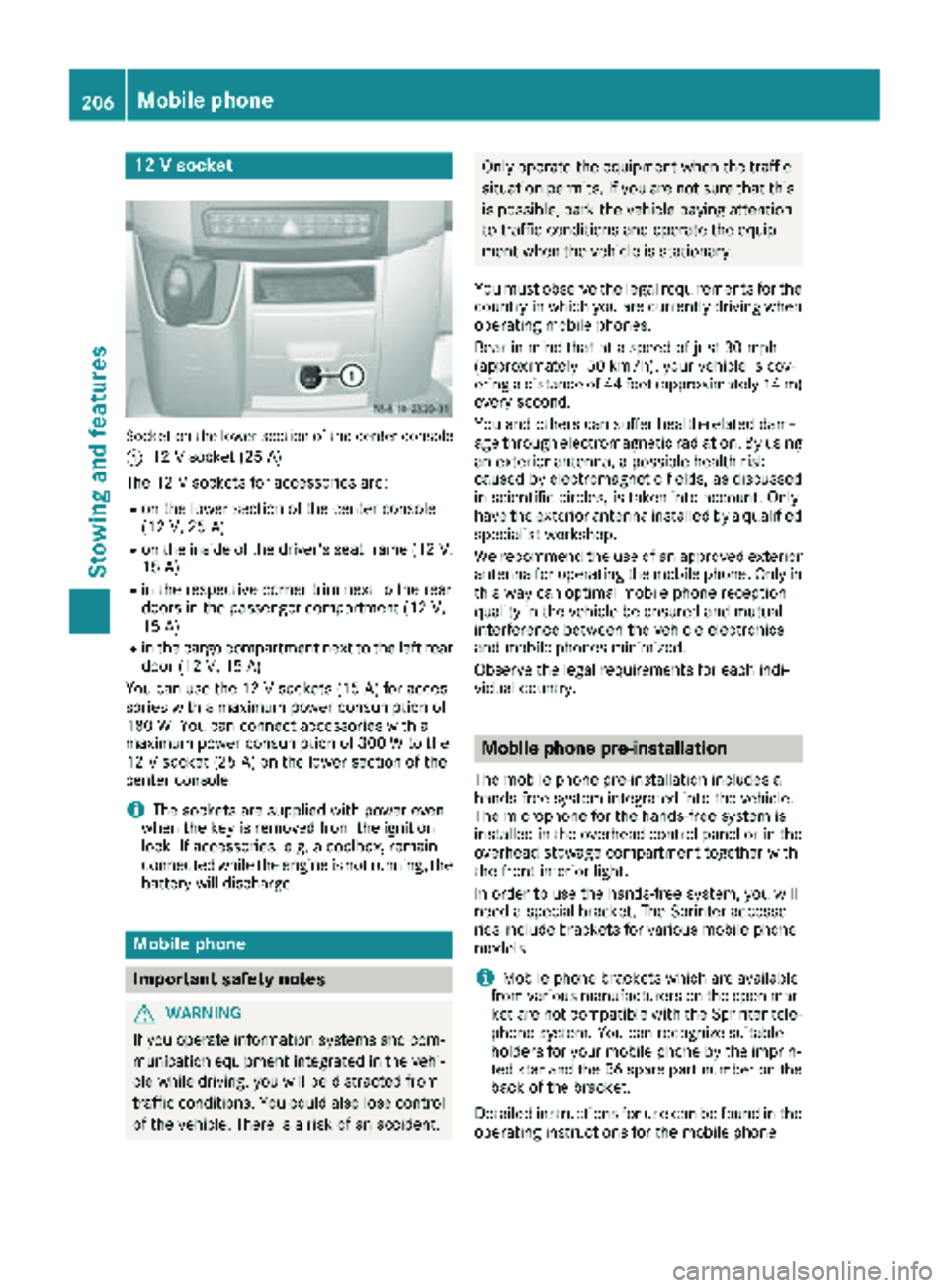
12 V socket
Socket on the lower section of the center console
:
12 V socket (25 A)
The 12 V sockets for accessories are:
Ron the lower section of the center console
(12 V, 25 A)
Ron the inside of the driver's seat frame (12V,
15 A)
Rin the respective corner trim next to the rear
doors in the passenger compartment (12 V,
15 A)
Rin the cargo compartment next to the left rear door (12 V,15 A)
You can use the 12 V sockets (15 A) for acces-
sories with a maximum power consumption of
180 W. You can connect accessories with a
maximum power consumption of 300 W to the
12 V socket (25 A) on the lower section of the
center console.
iThe sockets are supplied with power even
when the key is removed from the ignition
lock. If accessories, e.g. a coolbox, remain
connected while the engine is not running, the
battery will discharge.
Mobile phone
Important safety notes
GWARNING
If you operate information systems and com-
munication equipment integrated in the vehi-
cle while driving, you will be distracted from
traffic conditions. You could also lose control
of the vehicle. There is a risk of an accident.
Only operate the equipment when the traffic
situation permits. If you are not sure that this is possible, park the vehicle paying attention
to traffic conditions and operate the equip-
ment when the vehicle is stationary.
You must observe the legal requirements for the
country in which you are currently driving when
operating mobile phones.
Bear in mind that at a speed of just 30 mph
(approximately 50 km/h), your vehicle is cov-
ering a distance of 44 feet (approximately 14 m)
every second.
You and others can suffer health-related dam-
age through electromagnetic radiation. By using
an exterior antenna, a possible health risk
caused by electromagnetic fields, as discussed
in scientific circles, is taken into account. Only
have the exterior antenna installed by a qualified
specialist workshop.
We recommend the use of an approved exterior
antenna for operating the mobile phone. Only in
this way can optimal mobile phone reception
quality in the vehicle be ensured and mutual
interference between the vehicle electronics
and mobile phones minimized.
Observe the legal requirements for each indi-
vidual country.
Mobile phone pre-installation
The mobile phone pre-installation includes a
hands-free system integrated into the vehicle.
The microphone for the hands-free system is
installed in the overhead control panel or in the
overhead stowage compartment together with
the front interior light.
In order to use the hands-free system, you will
need a special bracket. The Sprinter accesso-
ries include brackets for various mobile phone
models.
iMobile phone brackets which are available
from various manufacturers on the open mar- ket are not compatible with the Sprinter tele-
phone system. You can recognize suitable
holders for your mobile phone by the imprin-
ted star and the B6 spare part number on the back of the bracket.
Detailed instructions for use can be found in the
operating instructions for the mobile phone
206Mobile phone
Stowing and features
Page 209 of 286
bracket and in the separate operating instruc-
tions for the mobile phone pre-installation.
iThe mobile phone battery is charged
depending on the condition of charge and the
position of the key in the ignition lock. The
mobile phone display indicates the charging
process.
Additional communications equip-
ment
Important safety notes
GWARNING
If you operate mobile communication equip-
ment while driving, you will be distracted from traffic conditions. You could also lose control
of the vehicle. There is a risk of an accident.
Only operate this equipment when the vehicle
is stationary.
You must observe the legal requirements for the
country in which you are currently driving when
operating mobile communication equipment.
Please remember, a navigation system does not
supply information on the load-bearing capacity of bridges or the overhead clearance of under-
passes. The driver remains responsible for
safety at all times.
You and others can suffer health-related dam-
age through electromagnetic radiation. By using
an exterior antenna, a possible health risk
caused by electromagnetic fields, as discussed
in scientific circles, is taken into account. Only
have the exterior antenna installed by a qualified
specialist workshop.
You will find information on installing electrical
or electronic equipment in the “Vehicle elec-
tronics” section (
Ypage 271).
Installation for PND mobile navigation
devices
You can secure a personal navigation device
(Personal Navigation Device PND) using a com-
mercially available adapter.
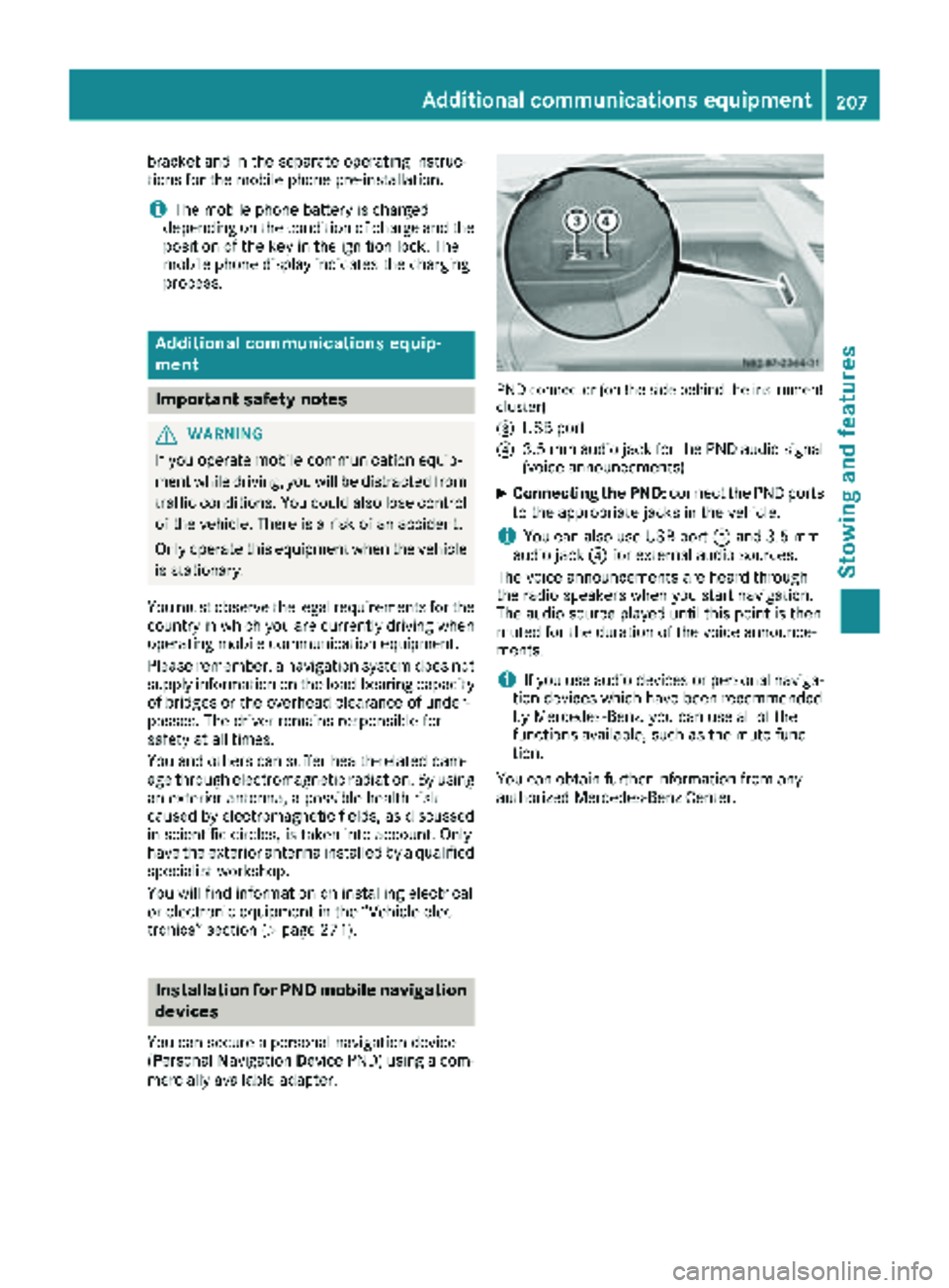
PND connector (on the side behind the instrument
cluster)
=
USB port
?3.5 mm audio jack for the PND audio signal
(voice announcements)
XConnecting the PND: connect the PND ports
to the appropriate jacks in the vehicle.
iYou can also use USB port =and 3.5 mm
audio jack ?for external audio sources.
The voice announcements are heard through
the radio speakers when you start navigation.
The audio source played until this point is then
muted for the duration of the voice announce-
ments.
iIf you use audio devices or personal naviga-
tion devices which have been recommended
by Mercedes-Benz, you can use all of the
functions available, such as the mute func-
tion.
You can obtain further information from any
authorized Mercedes-Benz Center.
Additional communications equipment207
Stowing and features
Z
Page 220 of 286
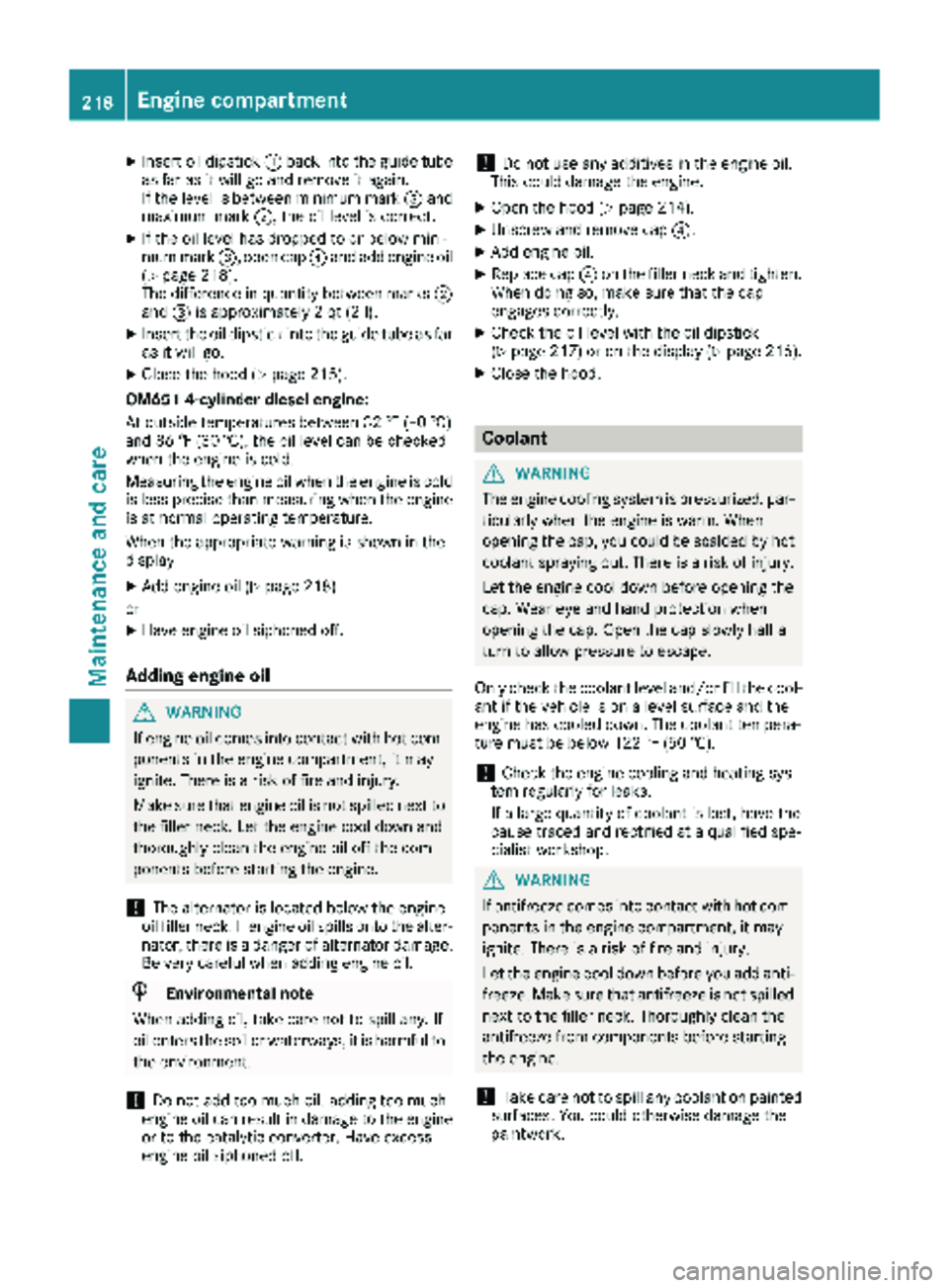
XInsert oil dipstick:back into the guide tube
as far as it will go and remove it again.
If the level is between minimum mark =and
maximum mark ;, the oil level is correct.
XIf the oil level has dropped to or below mini-
mum mark=, open cap ?and add engine oil
(
Ypage 218).
The difference in quantity between marks ;
and =is approximately 2 qt (2 l).
XInsert the oil dipstick into the guide tube as far
as it will go.
XClose the hood (Ypage 215).
OM651 4-cylinder diesel engine:
At outside temperatures between 32 ‡ (–0 †)
and 86 ‡ (30 †), the oil level can be checked
when the engine is cold.
Measuring the engine oil when the engine is cold
is less precise than measuring when the engine
is at normal operating temperature.
When the appropriate warning is shown in the
display
XAdd engine oil (Ypage 218)
or
XHave engine oil siphoned off.
Adding engine oil
GWARNING
If engine oil comes into contact with hot com- ponents in the engine compartment, it may
ignite. There is a risk of fire and injury.
Make sure that engine oil is not spilled next to
the filler neck. Let the engine cool down and
thoroughly clean the engine oil off the com-
ponents before starting the engine.
!The alternator is located below the engine
oil filler neck. If engine oil spills onto the alter-
nator, there is a danger of alternator damage.
Be very careful when adding engine oil.
HEnvironmental note
When adding oil, take care not to spill any. If
oil enters the soil or waterways, it is harmful to
the environment.
!Do not add too much oil. adding too much
engine oil can result in damage to the engine
or to the catalytic converter. Have excess
engine oil siphoned off.
!Do not use any additives in the engine oil.
This could damage the engine.
XOpen the hood (Ypage 214).
XUnscrew and remove cap ?.
XAdd engine oil.
XReplace cap?on the filler neck and tighten.
When doing so, make sure that the cap
engages correctly.
XCheck the oil level with the oil dipstick
(Ypage 217) or on the display (Ypage 216).
XClose the hood.
Coolant
GWARNING
The engine cooling system is pressurized, par-
ticularly when the engine is warm. When
opening the cap, you could be scalded by hot
coolant spraying out. There is a risk of injury.
Let the engine cool down before opening the
cap. Wear eye and hand protection when
opening the cap. Open the cap slowly half a
turn to allow pressure to escape.
Only check the coolant level and/or fill the cool-
ant if the vehicle is on a level surface and the
engine has cooled down. The coolant tempera-
ture must be below 122 ‡ (50 †).
!Check the engine cooling and heating sys-
tem regularly for leaks.
If a large quantity of coolant is lost, have the
cause traced and rectified at a qualified spe-
cialist workshop.
GWARNING
If antifreeze comes into contact with hot com- ponents in the engine compartment, it may
ignite. There is a risk of fire and injury.
Let the engine cool down before you add anti-
freeze. Make sure that antifreeze is not spilled
next to the filler neck. Thoroughly clean the
antifreeze from components before starting
the engine.
!Take care not to spill any coolant on painted
surfaces. You could otherwise damage the
paintwork.
218Engine compartment
Maintenance and care