climate control MERCEDES-BENZ SPRINTER 2017 MY17 Operator’s Manual
[x] Cancel search | Manufacturer: MERCEDES-BENZ, Model Year: 2017, Model line: SPRINTER, Model: MERCEDES-BENZ SPRINTER 2017Pages: 286, PDF Size: 4.36 MB
Page 109 of 286
Outside tempera-
tureEngine runtime
Above 32 ‡ (0 †)at least 10 minutes
32 ‡ (0 †) to 14 ‡
(Ò10 †)at least 15 minutes
Below 14 ‡ (Ò10 †)at least 20 minutes
Before switching on
XCheck the fuel level and top up if necessary.
The auxiliary heating is operated directly
using the vehicle's fuel. The tank must be at
least a quarter full to ensure that the auxiliary
heating functions.
XSwitch on climate control (Ypage 100).
XSet the temperature control to the desired
temperature (Ypage 101).
XSet the air distribution as required
(Ypage 101).
XOpen the center (Ypage 104) and side air
vents (Ypage 105) and set them to the middle
position.
iThe auxiliary heating automatically switches
to heater booster mode after the engine is
started.
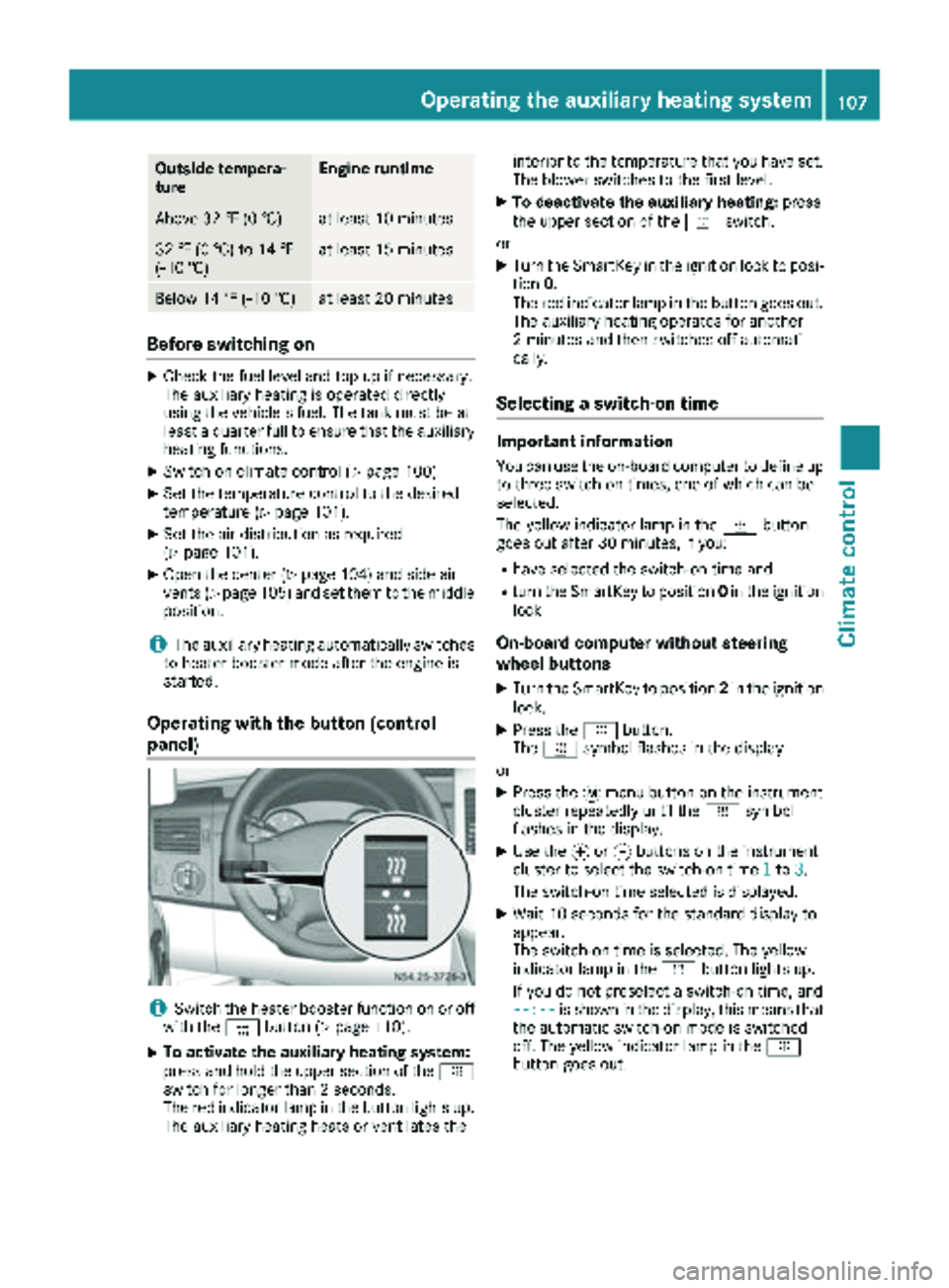
Operating with the button (control
panel)
iSwitch the heater booster function on or off
with the ¢button (Ypage 110).
XTo activate the auxiliary heating system:
press and hold the upper section of the y
switch for longer than 2 seconds.
The red indicator lamp in the button lights up.
The auxiliary heating heats or ventilates the interior to the temperature that you have set.
The blower switches to the first level.
XTo deactivate the auxiliary heating:
press
the upper section of the yswitch.
or
XTurn the SmartKey in the ignition lock to posi-
tion 0.
The red indicator lamp in the button goes out.
The auxiliary heating operates for another
2 minutes and then switches off automati-
cally.
Selecting a switch-on time
Important information
You can use the on-board computer to define up
to three switch-on times, one of which can be
selected.
The yellow indicator lamp in the ybutton
goes out after 30 minutes, if you:
Rhave selected the switch-on time and
Rturn the SmartKey to position 0in the ignition
lock
On-board computer without steering
wheel buttons
XTurn the SmartKey to position 2in the ignition
lock.
XPress the ybutton.
The y symbol flashes in the display.
or
XPress the 4menu button on the instrument
cluster repeatedly until the ysymbol
flashes in the display.
XUse the forg buttons on the instrument
cluster to select the switch-on time 1to3.
The switch-on time selected is displayed.
XWait 10 seconds for the standard display to
appear.
The switch-on time is selected. The yellow
indicator lamp in the ybutton lights up.
If you do not preselect a switch-on time, and
--:--
is shown in the display, this means that
the automatic switch-on mode is switched
off. The yellow indicator lamp in the y
button goes out.
Operating the auxiliary heating system107
Climate control
Z
Page 110 of 286
On-board computer with steering wheel
buttons
XTurn the SmartKey to position2in the ignition
lock.
XPress the ybutton.
The Aux. heatsubmenu is shown in the dis-
play.
If no switch-on time has been selected, the
selected switch-on time is highlighted or
Timer off
is highlighted.
iYou can also access the Aux. heat.sub-
menu via the Settings(Ypage 165) menu.
XUse theWorX button on the steering
wheel to select the desired switch-on time.
Use the Timer off
setting to deactivate
automatic switch-on.
XPress the Vbutton on the steering wheel.
The switch-on time is selected. The yellow
indicator lamp in the ybutton lights up.
Setting the switch-on time
XUse the same method to select a switch-on
time as described in the "Preselecting a
switch-on time" section.
On-board computer without steering wheel
buttons
XPress the 9reset button on the instrument
cluster.
The hour display flashes.
XUse the fand gbuttons on the instrument
cluster to set the hours.
XPress the 9reset button
The minute display flashes.
XUse the fand gbuttons to set the minutes.
The switch-on time is set and selected.
On-board computer with steering wheel but-
tons
XPress the 9button on the steering wheel.
The display shows the Hoursmenu.
XUse theWandX buttons on the steer-
ing wheel to set the hours.
XPress the 9button.
The display shows the Minutesmenu.
XUse theWandX buttons to set the
minutes.
XPress the Vbutton.
The switch-on time is set and selected.
Operation with the remote control
Important information
You can switch the auxiliary heating on/off and
set the operating duration using the remote con-
trol. You can use up to 4 remote control units on
the vehicle. These must be synchronized for the
receiver in your vehicle (
Ypage 109).
The remote control has a maximum range of
approximately 600 meters. This range is
reduced by:
Rsources of interference
Rsolid objects between the remote control and
the vehicle
Rthe remote control being in an unfavorable
position in relation to the vehicle
Rtransmitting from an enclosed space
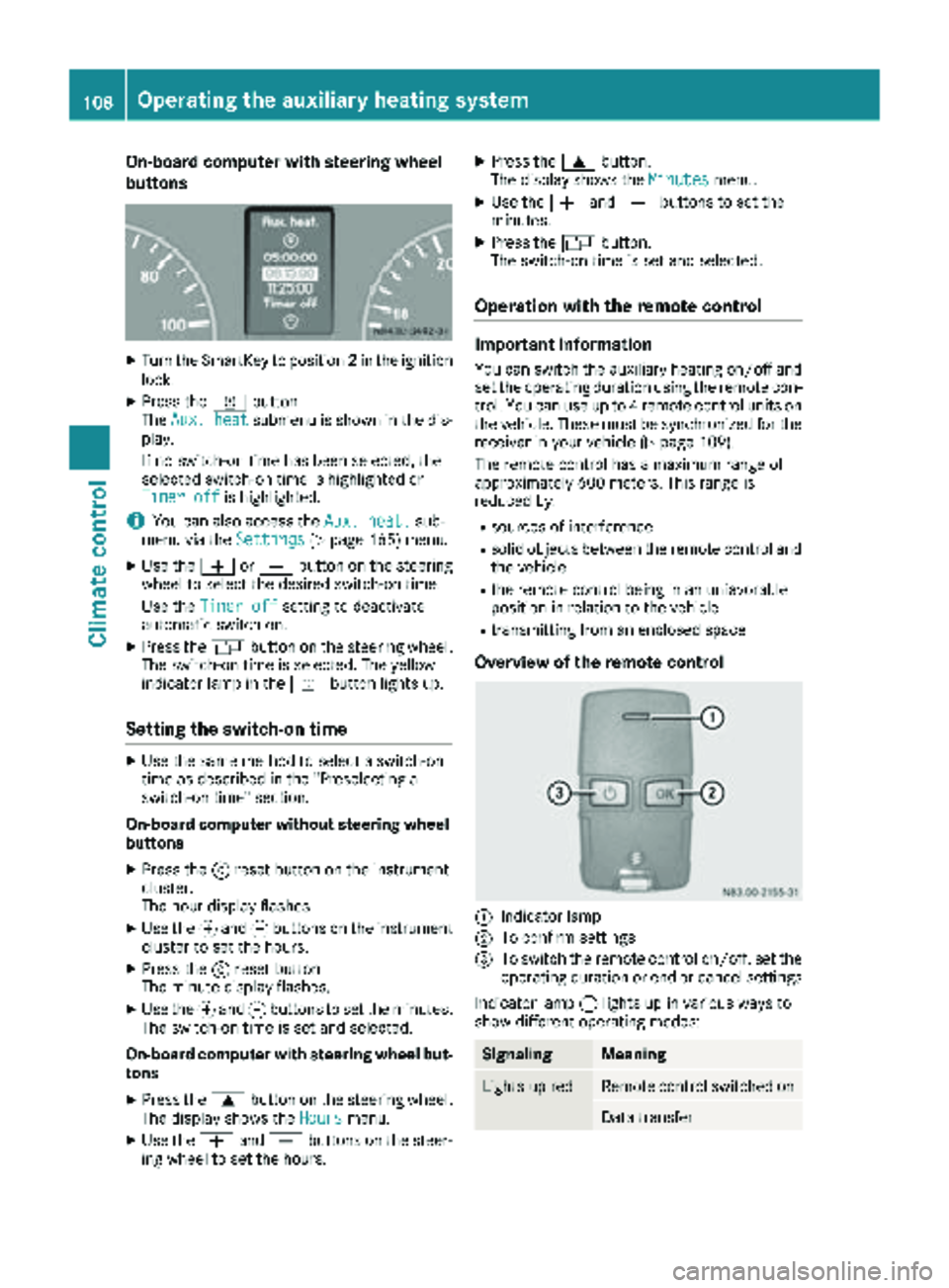
Overview of the remote control
:Indicator lamp
;To confirm settings
=To switch the remote control on/off, set the operating duration or end or cancel settings
Indicator lamp :lights up in various ways to
show different operating modes:
SignalingMeaning
Lights up redRemote control switched on
Data transfer
108Operating the auxiliary heating system
Climate control
Page 111 of 286
SignalingMeaning
Flashes redAuxiliary heating switched
off
Lights up
greenAuxiliary heating switched
on
Flashes greenChange operating duration
active
Flashes alter-
nately red and
greenRemote control in synchro-
nizing mode
iWhen the remote control battery is weak,
indicator lamp :flashes red rapidly. Replace
the remote control battery (
Ypage 110).
You can find information on further lamp sta-
tuses in the "Problems with the hot-water aux-
iliary heater" section (
Ypage 111).
Switching the remote control on/off
The remote control switches to standby mode
after 10 seconds. Indicator lamp :goes out.
XTo switch on: press and hold the Übutton
until indicator lamp :lights up red.
If a connection between the remote control
and the receiver in the vehicle has been estab-
lished and indicator lamp ::
Rflashes red, the auxiliary heating is switched
off.
Rlights up green, the auxiliary heating is
switched on.
XTo switch off:press and hold the Übut-
ton until indicator lamp :goes out.
Switching the auxiliary heating on/off
XSwitch on the remote control.
XTo switch on: when indicator lamp :flashes
red, press the bbutton.
During data transmission, indicator lamp :
lights up red.
When indicator lamp :lights up green, the
auxiliary heating is switched on.
XTo switch off: when indicator lamp :lights
up green, press the bbutton.
During data transmission, indicator lamp :
lights up red.
When indicator lamp :flashes red, the aux-
iliary heating is switched off.
Changing the operating duration
XSwitch on the remote control.
XWhen indicator lamp :flashes red, press
Ü andb simultaneously.
Indicator lamp :flashes green.
XPress the Übutton repeatedly until the
desired operating duration is shown.
R20 minutes
Indicator lamp :flashes green twice.
R30 minutes
Indicator lamp :flashes green three
times.
R40 minutes
Indicator lamp :flashes green four times.
XPress the bbutton.
During data transmission, indicator lamp :
lights up red.
If indicator lamp :emits two long, green
flashes, the selected operating duration is
stored.
iIf no adjustment is made, indicator lamp :
flashes six times and the remote control goes
into standby mode.
Synchronizing the remote control
XPress the yauxiliary heating button in the
control panel (Ypage 107) for longer than
10 seconds.
When you press and hold the ybutton, the
red indicator lamp lights up in the butt
on.
When the red indicator lamp in the ybut-
ton flashes, the receiver in the vehicle is ready
for synchronizing.
XPress and hold the Üremote control but-
ton until indicator lamp :lights up red.
If there is an active connection between the
remote control and the receiver, indicator
lamp :flashes alternately red and green.
The remote control is in synchronizing mode.
iIf you press the Übutton again on the
remote control after starting synchronization,
you will only synchronize this remote control
unit with the receiver. Any other remote con-
trol units that were synchronized will be
cleared. Indicator lamp :flashes alternately
red and green (very slowly).
XPress the bbutton on the remote control.
During data transmission, indicator lamp :
lights up red.
When remote control indicator lamp :emits
two long green flashes, the selected operat-
Operating the auxiliary heating system109
Climate control
Z
Page 112 of 286
ing time is synchronized. The indicator lamp in
they auxiliary heating button goes out.
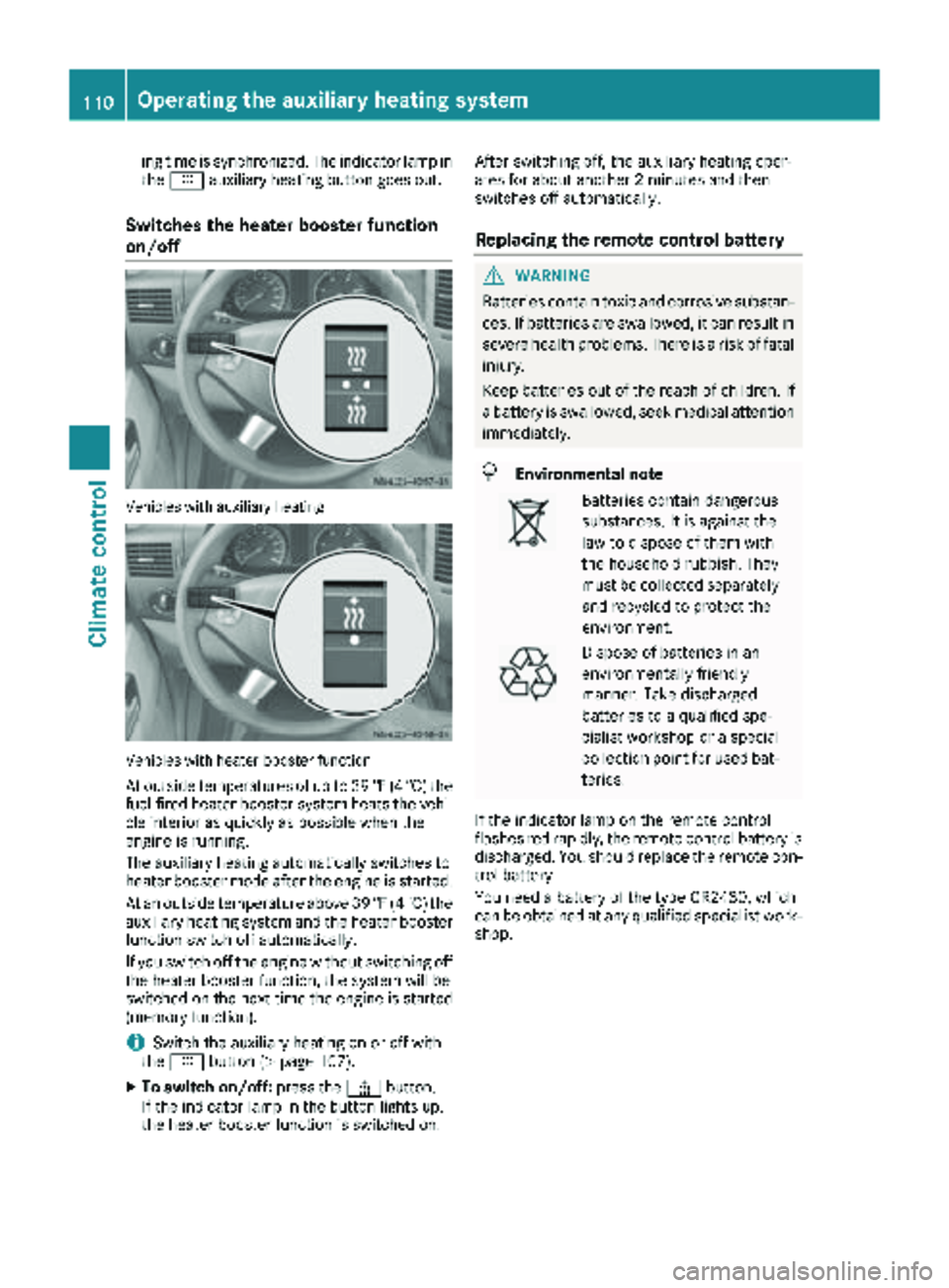
Switches the heater booster function
on/off
Vehicles with auxiliary heating
Vehicles with heater booster function
At outside temperatures of up to 39 ‡(4 †) the
fuel-fired heater booster system heats the vehi-
cle interior as quickly as possible when the
engine is running.
The auxiliary heating automatically switches to
heater booster mode after the engine is started.
At an outside temperature above 39 ‡(4 †) the
auxiliary heating system and the heater booster
function switch off automatically.
If you switch off the engine without switching off
the heater booster function, the system will be
switched on the next time the engine is started (memory function).
iSwitch the auxiliary heating on or off with
the y button (Ypage 107).
XTo switch on/off: press the¢button.
If the indicator lamp in the button lights up,
the heater booster function is switched on. After switching off, the auxiliary heating oper-
ates for about another 2 minutes and then
switches off automatically.
Replacing the remote control battery
GWARNING
Batteries contain toxic and corrosive substan- ces. If batteries are swallowed, it can result in
severe health problems. There is a risk of fatalinjury.
Keep batteries out of the reach of children. If
a battery is swallowed, seek medical attention
immediately.
HEnvironmental note
Batteries contain dangerous
substances. It is against the
law to dispose of them with
the household rubbish. They
must be collected separately and recycled to protect the
environment.
Dispose of batteries in an
environmentally friendly
manner. Take discharged
batteries to a qualified spe-
cialist workshop or a special
collection point for used bat-
teries.
If the indicator lamp on the remote control
flashes red rapidly, the remote control battery is
discharged. You should replace the remote con-
trol battery.
You need a battery of the type CR2430, which
can be obtained at any qualified specialist work-
shop.
110Operating the auxiliary heating system
Climate control
Page 113 of 286
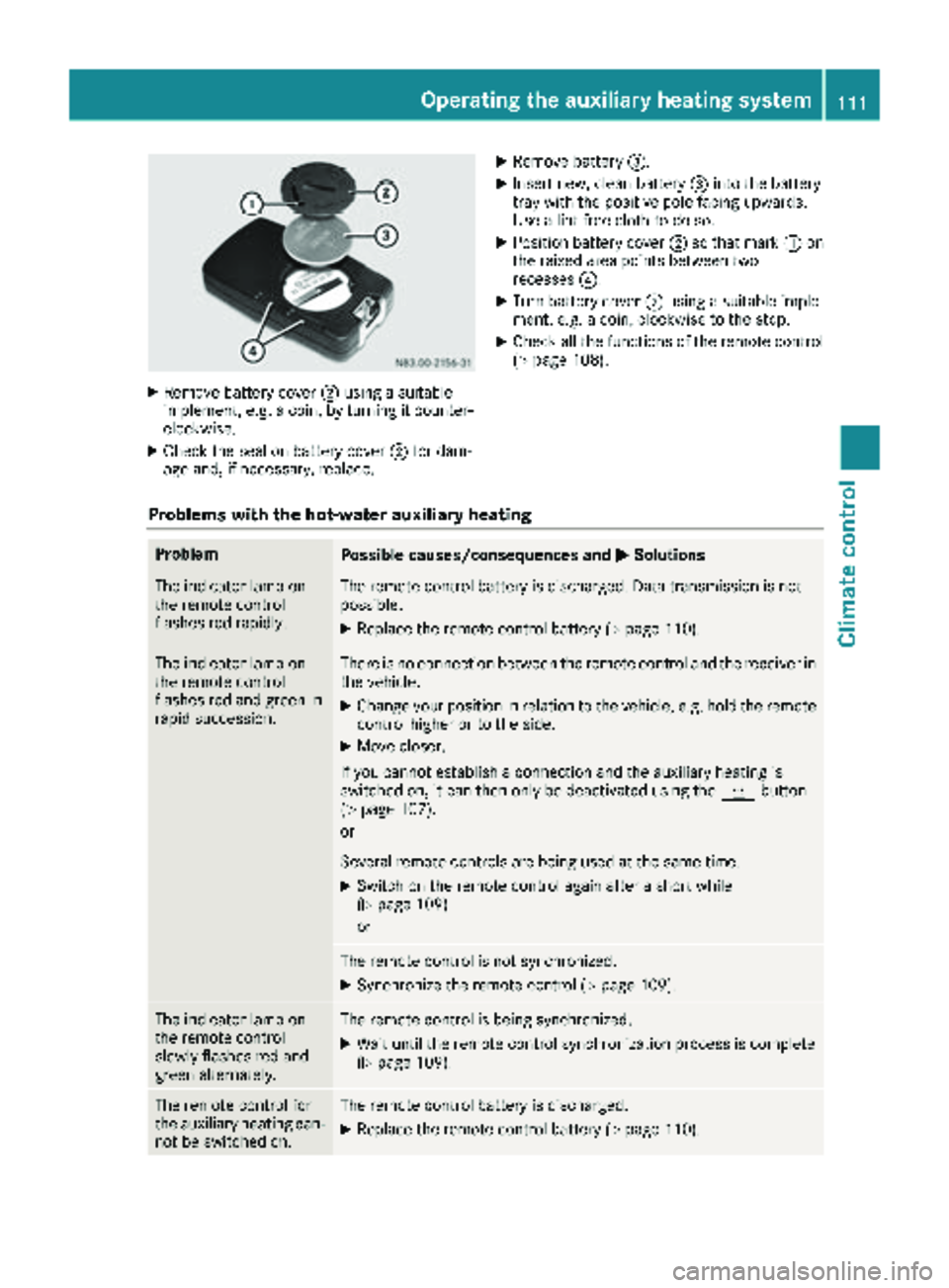
XRemove battery cover;usin g asuitable
implement ,e.g. acoin, by turnin git counter-
clockwise.
XChec kth eseal on battery cover ;for dam-
age and ,if necessary, replace .
XRemove battery=.
XInsertnew, clean battery =intoth ebattery
tray wit hth epositive pole facing upwards.
Use alint-free cloth to do so.
XPosition battery cover ;so that mar k: on
th eraised area points between two
recesses ?.
XTurn battery cover ;usin g asuitable imple-
ment, e.g. acoin, clockwise to th estop.
XChec kall th efunction sof th eremot econtrol
(Ypage 108).
Problems with the hot-water auxiliary heating
ProblemPossible causes/consequences and MSolutions
The indicator lamp on
theremot econtrol
flashes red rapidly.The remot econtrol battery is discharged. Dat atransmission is no t
possible.
XReplac eth eremot econtrol battery (Ypage 110).
The indicator lamp on
theremot econtrol
flashes red and green in
rapi dsuccession.There is no connection between th eremot econtrol and th ereceiver in
th evehicle.
XChange your position in relation to th evehicle, e.g. hold th eremot e
control higher or to th eside .
XMov ecloser .
If you canno testablis h aconnection and th eauxiliary heating is
switched on ,it can then only be deactivated usin gth ey button
(
Ypage 107).
or
Several remot econtrol sare bein gused at th esam etime.
XSwitc hon th eremot econtrol again after ashort while
(Ypage 109).
or
The remot econtrol is no tsynchronized.
XSynchroniz eth eremot econtrol (Ypage 109).
The indicator lamp on
theremot econtrol
slowly flashes red and
green alternately.The remot econtrol is bein gsynchronized.
XWait until th eremot econtrol synchronization process is complete
(Ypage 109).
The remot econtrol for
th eauxiliary heating can -
no tbe switched on .The remotecontrol battery is discharged.
XReplac eth eremot econtrol battery (Ypage 110).
Operating the auxiliary heating system111
Climate control
Z
Page 114 of 286
ProblemPossible causes/consequences andMSolutions
The auxiliary heating
does not switch on.The outside temperature is above 39 ‡ (4 †). The auxiliary heating
switches off automatically.
The auxiliary heating
switches off automati-
cally and/or cannot be
switched on.The fuel tank is less thanÕfull. The auxiliary heating switches off
automatically.
XRefuel at the nearest gas station.
XThen, start the auxiliary heating several times until the fuel lines are
full.
or
The low-voltage protection system integrated in the control unit
switches off the auxiliary heating because the on-board voltage is less
than 10 V.
XHave the alternator and battery checked.
or
The fuse is blown.
XReplace the fuse; see the "Fuse allocation" supplement.
XHave the cause of the blown fuse determined at a qualified spe-
cialist workshop.
or
A malfunction has occurred.
XSwitch the ignition on and off twice.
If the auxiliary heating still cannot be switched on, the heating device
is faulty.
XHave the auxiliary heating checked at a qualified specialist work-
shop.
The auxiliary heating is
overheated.The coolant level is too low.
XCheck the coolant level and add more coolant if necessary
(Ypage 218).
Auxiliary warm-air heater
Operation with the timer
Important safety notes
GDANGER
If a switch-on time has been selected, the
auxiliary heating switches on automatically.
RIf the ventilation is insufficient, poisonous
exhaust gases can collect, in particular car-
bon monoxide. This is the case in enclosed
spaces, for example. There is a risk of fatal injuries.
RIf highly flammable substances or flamma-
ble materials are nearby, there is a risk of a
risk of fire and explosion.
Always deactivate the preselected switch-on
times if you stop the vehicle in such or similar situations.
112Operating the auxiliary heating system
Climate control
Page 115 of 286
Use the timer to:
Ractivate and deactivate immediate heating
mode
Rset up to three switch-on times
Rset the operating duration to between 10 and
120 minutes or to continuous operation
Rset the heating level (preselected tempera-
ture) to a range between 10 and 30
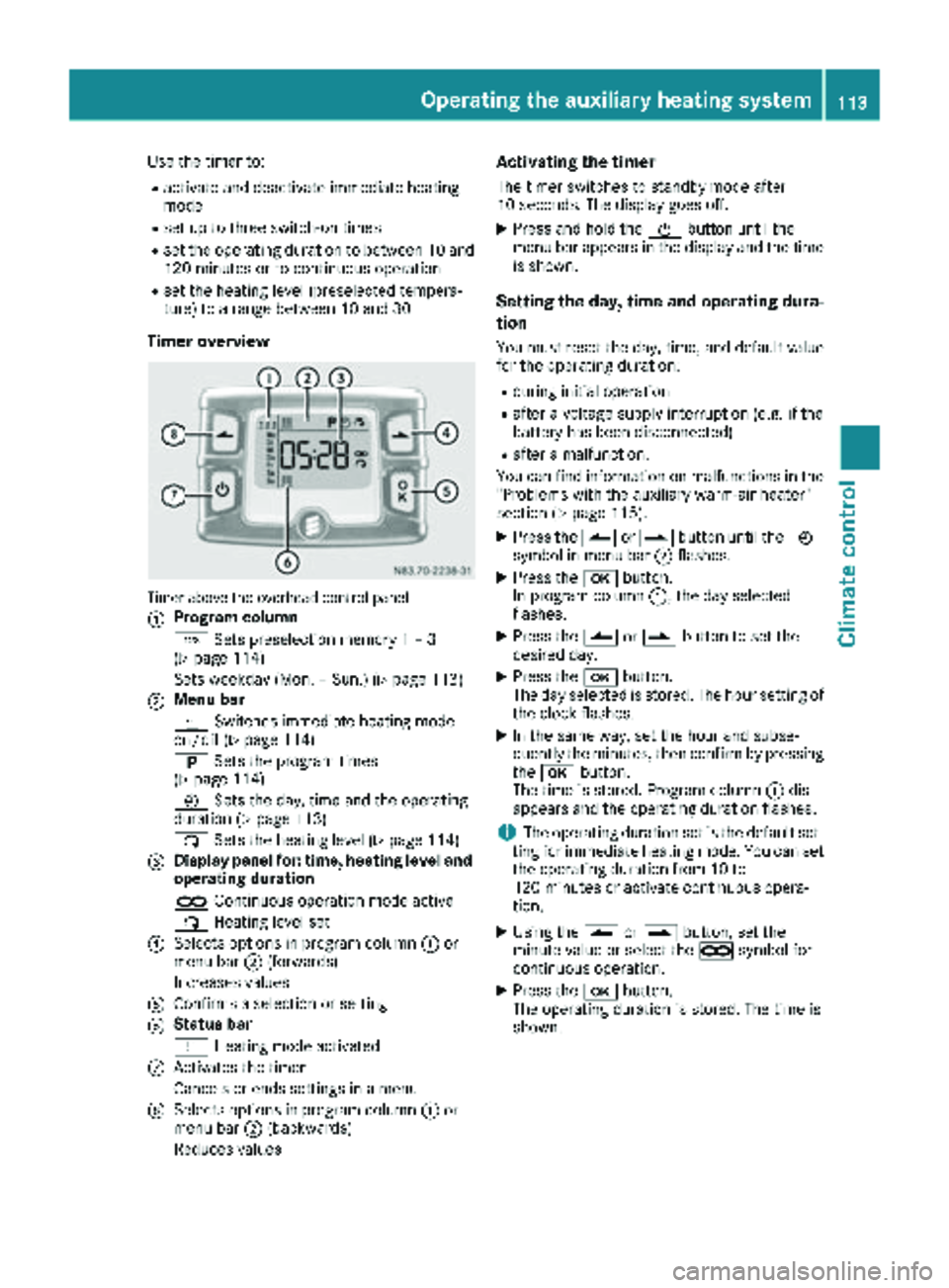
Timer overview
Timer above the overhead control panel
:
Program column
GSets preselection memory 1 – 3
(
Ypage 114)
Sets weekday (Mon. – Sun.) (
Ypage 113)
;Menu bar
y Switches immediate heating mode
on/off (
Ypage 114)
B Sets the program times
(
Ypage 114)
Ñ Sets the day, time and the operating
duration (
Ypage 113)
ß Sets the heating level (
Ypage 114)
=Display panel for: time, heating level and
operating duration
àContinuous operation mode active
ß Heating level set
?Selects options in program column :or
menu bar ;(forwards)
Increases values
AConfirms a selection or setting
BStatus bar
y Heating mode activated
CActivates the timer
Cancels or ends settings in a menu
DSelects options in program column :or
menu bar ;(backwards)
Reduces values
Activating the timer
The timer switches to standby mode after
10 seconds. The display goes off.
XPress and hold the Übutton until the
menu bar appears in the display and the time
is shown.
Setting the day, time and operating dura-
tion
You must reset the day, time, and default value
for the operating duration:
Rduring initial operation
Rafter a voltage supply interruption (e.g. if the
battery has been disconnected)
Rafter a malfunction.
You can find information on malfunctions in the
"Problems with the auxiliary warm-air heater"
section (
Ypage 115).
XPress the Ûorâ button until the Ñ
symbol in menu bar ;flashes.
XPress the bbutton.
In program column :, the day selected
flashes.
XPress the Ûorâ button to set the
desired day.
XPress the bbutton.
The day selected is stored. The hour setting of
the clock flashes.
XIn the same way, set the hour and subse-
quently the minutes, then confirm by pressing
the b button.
The time is stored. Program column :dis-
appears and the operating duration flashes.
iThe operating duration set is the default set-
ting for immediate heating mode. You can set
the operating duration from 10 to
120 minutes or activate continuous opera-
tion.
XUsing the Ûorâ button, set the
minute value or select the àsymbol for
cont
inuous operation.
XPress the bbutton.
The operating duration is stored. The time is
shown.
Operating the auxiliary heating system113
Climate control
Z
Page 116 of 286
Switching immediate heating mode
on/off
XTo switch on:press theÛorâ button
until the ysymbol in the menu bar flashes.
XPress the bbutton.
The operation duration flashes in the display.
iYou can preset the default value that is
shown (Ypage 113).
XUsing the Ûorâ button, set the
minute value (10 to 120) or select the à
symbol for continuous operation.
XPress the bbutton.
Immediate heating mode is activated. The
time and the ysymbol appear.
XTo switch off: press theÛorâ button
until the ysymbol flashes in the menu bar,
and then press the bbutton.
Immediate heating mode is deactivated. The
y symbol disappears.
The auxiliary heating operates for another
2 minutes and then switches off automati-
cally.
iIf you switch off the ignition during immedi-
ate heating (operating duration 10 to
120 minutes), you also switch off the imme-
diate heating mode. The auxiliary heating
operates for another two minutes and then
switches off automatically.
If you have set continuous operation as the
operating duration and you switch off the igni-
tion, the auxiliary heating switches off auto-
matically after about 15 minutes. If, in the
remaining time, the ignition is switched on
again, continuous operation of the auxiliary
heating continues.
Setting the preselection time
You can set three preselection times using the
timer.
After a malfunction or if the battery has been
disconnected, you must set the preselection
times again. You can find information on mal-
functions in the "Problems with the auxiliary
warm-air heater" section (
Ypage 115).
XPress the Ûorâ button until the B
symbol in the menu bar flashes.
XPress the bbutton.
In the program column, the Gpreselection
memory numbers appear. The selected pre-
selection memory flashes.
XPress the Ûorâ button to select the
desired preselection memory.
XPress the bbutton.
The preselection memory is selected. The
days are shown.
XSet the day and time as described in the "Set-
ting the day, time and operating duration"
section (
Ypage 113).
The preselection time is stored. The program
column disappears. In the display panel, the
on
message and the ysymbol appear.
XPress the bbutton.
The operating duration flashes.
XPress the Ûorâ button to set the
minute value (10 to 120).
XPress the bbutton.
The operating duration for the preselection
time is saved. The time and number of the
selected preselection memory are shown.
iThe preselection memory that will be acti-
vated next is underlined. Additionally, the day
that is set appears.
Deactivating the preselection time
XCarry out the steps as described in the "Set-
ting the preselection time" section.
If the y symbol in the status bar is shown:
XPress the Ûorâ button until the offmessage in the display panel is shown.
XPress thebbutton.
The preselection time is deactivated. The time
is shown.
Setting the heating level
You can set the heating level to a range between 10 and 30.
The heating level corresponds to a preselection
temperature for the vehicle interior. This is a
guide value and may, depending on the outside
temperature, differ from the interior tempera-
ture.
XPress the Ûorâ button until the ß
symbol in the menu bar flashes.
XPress the bbutton.
The heating level display flashes.
XUsing the Ûandâ buttons, set the
desired heating level to a range between 10
and 30.
XPress the bbutton.
The heating level is set and the ysymbol
appears.
114Operating the auxiliary heating system
Climate control
Page 117 of 286
Problems with the auxiliary warm-air heater
ProblemPossible causes/consequences andMSolutions
The auxiliary heating
does not switch on.The outside temperature is above 39 ‡ (4 †). The auxiliary heating
switches off automatically.
The auxiliary heating
switches off automati-
cally and/or cannot be
switched on.The fuel tank is less thanÕfull. The auxiliary heating switches off
automatically.
XRefuel at the nearest gas station.
XThen, start the auxiliary heating several times until the fuel lines are
full.
or
The low-voltage protection system integrated in the control unit
switches off the auxiliary heating because the on-board voltage is less
than 10 V.
XHave the alternator and battery checked.
or
The fuse is blown.
XReplace the fuse; see the "Fuse allocation" supplement.
XHave the cause of the blown fuse determined at a qualified spe-
cialist workshop.
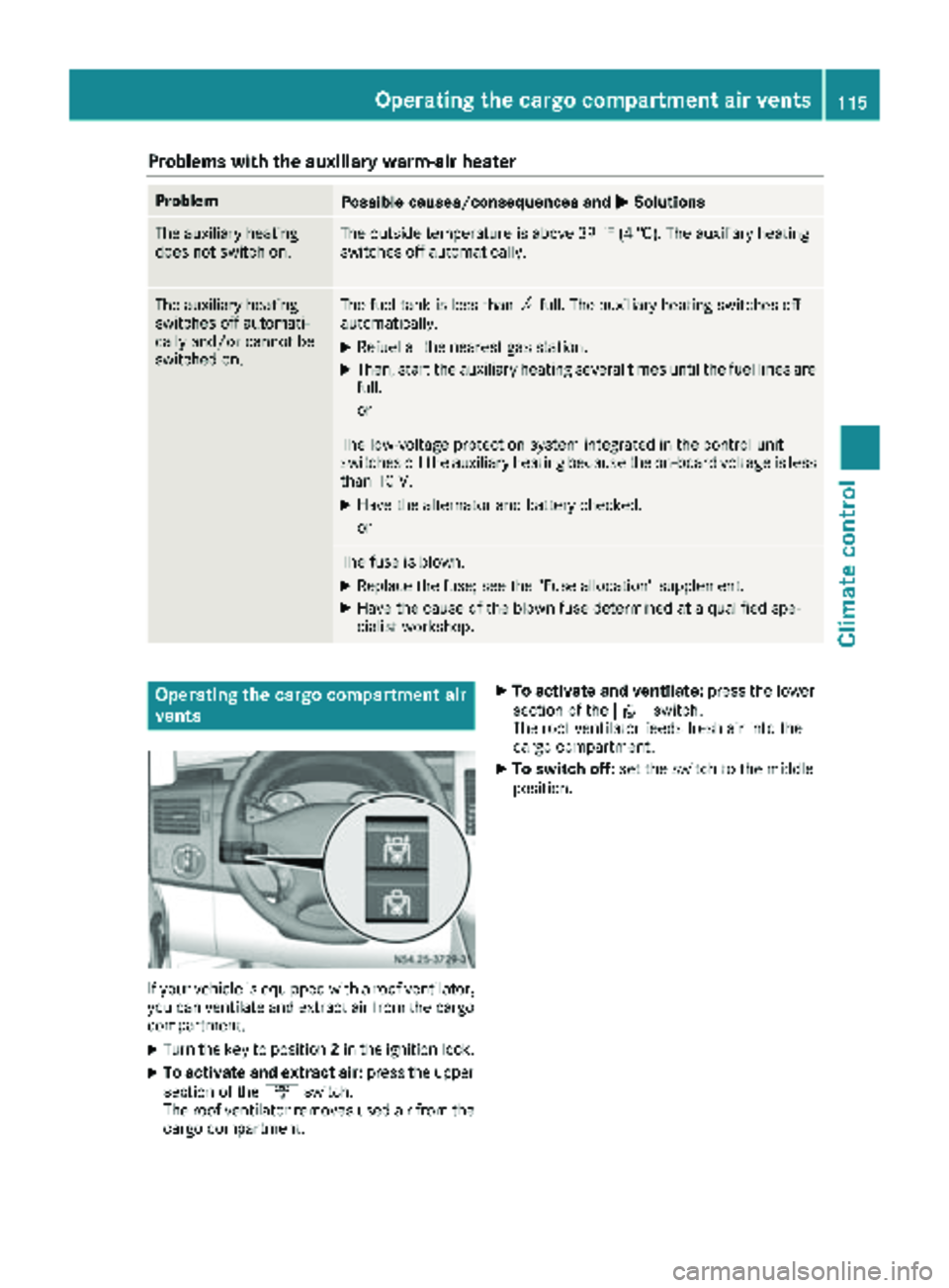
Operating the cargo compartment air
vents
If your vehicle is equipped with a roof ventilator,
you can ventilate and extract air from the cargo
compartment.
XTurn the key to position 2in the ignition lock.
XTo activate and extract air: press the upper
section of the ´switch.
The roof ventilator removes used air from the
cargo compartment.
XTo activate and ventilate: press the lower
section of the ·switch.
The roof ventilator feeds fresh air into the
cargo compartment.
XTo switch off: set the switch to the middle
position.
Operating the cargo compartment air vents115
Climate control
Z
Page 232 of 286
!Make sure that:
Rthe side windows and the roof are com-
pletely closed
Rthe climate control blower is switched off
Rthe windshield wiper switch is at position0
The vehicle could otherwise be damaged.
You can wash the vehicle in an automatic car
wash from the very start.
Wash off excess dirt before cleaning the vehicle
in an automatic car wash.
After putting the vehicle through an automatic
car wash, wipe off wax from:
Rthe rear view camera lens (Ypage 232)
Rthe windshield
Rthe windshield wiper blades
This will prevent smears and reduce wiping
noises caused by residue on the windshield.
Washing by hand
In some countries, washing by hand is only
allowed at specially equipped washing bays.
Observe the legal requirements of the country
you are currently in when washing by hand.
XDo not use hot water and do not wash the
vehicle in direct sunlight.
XUse a soft car sponge.
XUse a mild cleaning agent, e.g. a car shampoo
approved for use with Sprinter vehicles.
XThoroughly hose down the vehicle with a gen-
tle jet of water.
XDo not point the water jet directly towards the
air inlets.
XUse plenty of water and rinse out the sponge
frequently.
XRinse the vehicle with clean water and dry
thoroughly with a chamois.
XDo not let the cleaning agents dry on the
paintwork.
When using the vehicle in winter, remove all
traces of road salt deposits carefully and as
soon as possible.
Power washers
GWARNING
The water jet from a circular jet nozzle (dirt
blasters) can cause invisible exterior damage
to the tires or chassis components. Compo-
nents damaged in this way may fail unexpect-
edly. There is a risk of an accident.
Do not use power washers with circular jet
nozzles to clean the vehicle. Have damaged
tires or chassis components replaced imme-
diately.
!Under no circumstances use power washers
in the vehicle interior. The pressurized water
and associated spray produced by the power washer could cause extensive damage to the
vehicle.
!Observe the minimum distance to be main-
tained between the nozzle of the high-pres-
sure cleaner and the object to be cleaned:
Rapproximately 2.2 ft(70 cm) when using
round-jet nozzles
Rapproximately 1 ft (30 cm) when using 25°
flat-spray jets and concentrated-power jets
Keep the water jet moving while cleaning. To
avoid causing damage, do not point the water jet directly at:
Rdoor joints
Rbrake hoses
Relectrical components
Relectrical connections
Rseals
Rdrive train, especially not at the intermedi-
ate bearing of the propeller shaft
Rrear view camera
Keep a minimum distance of 1.6 ft(50 cm).
Cleaning the engine
!Water must not enter intake or ventilation
openings. When cleaning with high pressure
water or steam cleaners, the spray must not
be aimed directly at electrical components or
the terminals of electrical lines.
Preserve the engine after the engine has been
cleaned. Protect the belt drive system from
exposure to the preservative agent.
Also observe the information under "Power
washers" (
Ypage 230).
230Care
Maintenance and care