display MERCEDES-BENZ SPRINTER 2017 MY17 Operator’s Manual
[x] Cancel search | Manufacturer: MERCEDES-BENZ, Model Year: 2017, Model line: SPRINTER, Model: MERCEDES-BENZ SPRINTER 2017Pages: 286, PDF Size: 4.36 MB
Page 38 of 286
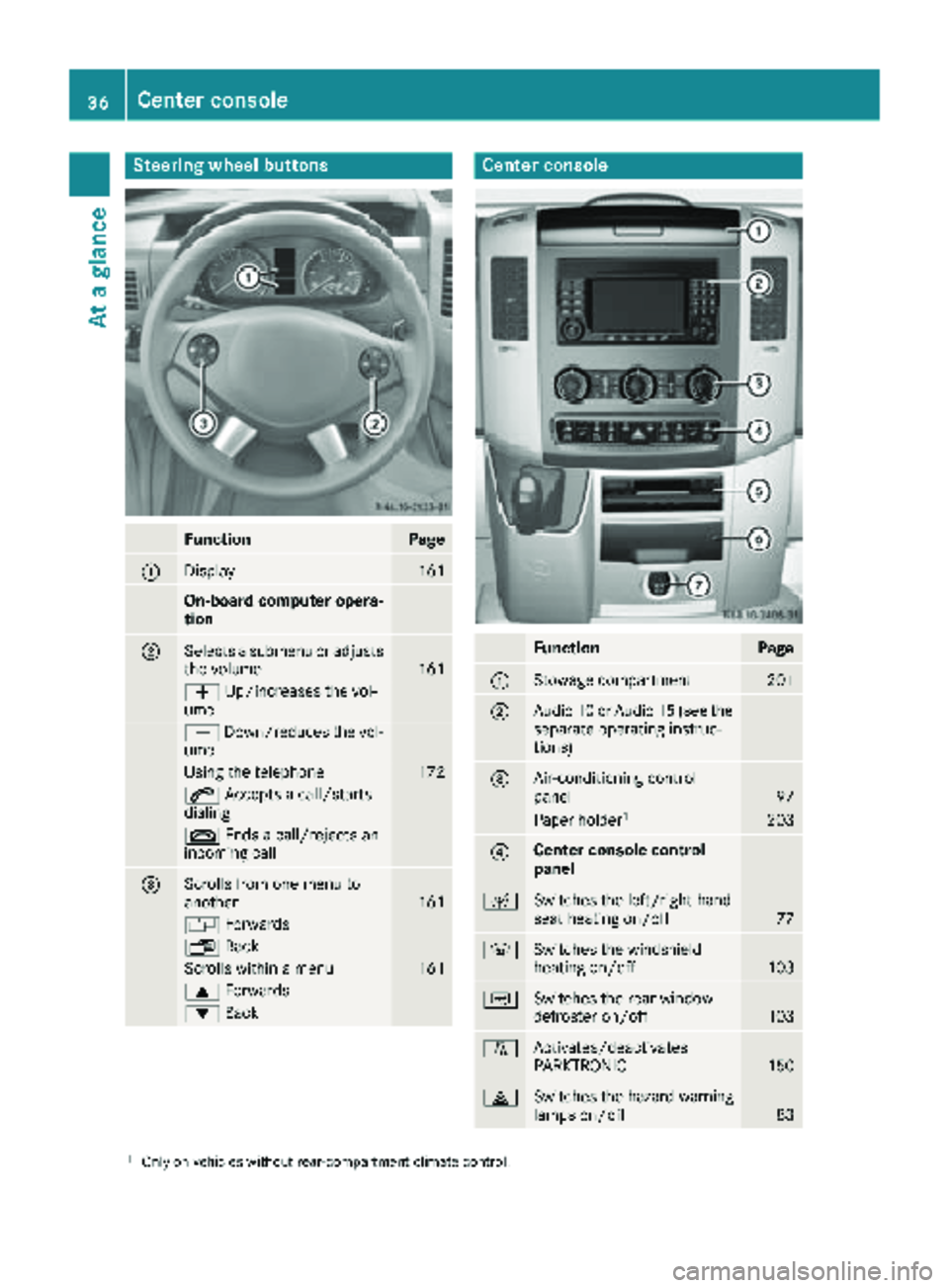
Steering wheel buttons
FunctionPage
:Display161
On-board computer opera-
tion
;Selects a submenu or adjusts
the volume161
WUp/increases the vol-
ume
X Down/reduces the vol-
ume
Using the telephone172
6 Accepts a call/starts
dialing
~ Ends a call/rejects an
incoming call
=Scrolls from one menu to
another161
V Forwards
UBack
Scrolls within a menu161
9Forwards
:Back
Center console
FunctionPage
:Stowage compartment201
;Audio 10 or Audio 15 (see the
separate operating instruc-
tions)
=Air-conditioning control
panel97
Paper holder1203
?Center console control
panel
cSwitches the left/right-hand
seat heating on/off77
zSwitches the windshield
heating on/off103
|Switches the rear window
defroster on/off103
fActivates/deactivates
PARKTRONIC150
£Switches the hazard warning
lamps on/off83
1Only on vehicles without rear-compartment climate control.
36Center console
At a glance
Page 58 of 286
Crosswind Assist is operational again as soon as
the driving conditions return to normal.
Cros swind Assist detects strong crosswind
gusts that can impair the road holding of your
veh icle when driving straight ahead. Cros swind
Assist intervenes dependin g on thedirection
and strength of the crosswind .
A stabiliz ing brake application helps you to keep
the veh icleon track.
In formation appears inthe instrument cluster In
the event that Cros swind Assist intervenes
noticeably.
On vehicles without steering wheel buttons:
the d indicator lamp inthe instrument clus-
ter flashes.
On vehicles with steering wheel buttons: the
d indicator lamp inthe instrument cluster
flashes and the message Crosswind Assist
Activeappearsinthe multifunction display.
Cros swind Assist isactive above a veh iclespeed
of 50 mph (80 km/h) when the veh icle is driving
straight ahead or cornering gently.
Emergency exit
Emergency exit window
GWAR NING
The emergency exit wind ow cannotbelocked
in plac e. You risk injury ifyou exit the vehicle
through the emergency exit wind ow.
RMake sure that nobodybecomes tr apped,
both when closing and when opening the
emergency exit wind ow.
RThe opened emergency exit wind ow must
be held in plac eby another person.
Pay attention to traff icconditions.
GWAR NING
If the emergency exit wind owisunlocked
while driv ing,itcould open and slam shut and
consequently fall down. There isa risk of an
acc iden t and injury.
Before starting off, make sure that the emer-
gency exit wind owislocked and the locking
pin s are undamage d.
!Make sure there issuff icient clearance
when opening the emergency exit wind ow.Hold the open window in position. You could
otherwise damage the emergency exit win-
dow.
The emergency exit wind
owisintended for use
in an emergency only and must not be opened
unless the vehicle isstationary. The emergency
exit window isthe first window behind the driv-
er's seat on the driver's side. It is marked by the
"Emergency Exit" label.
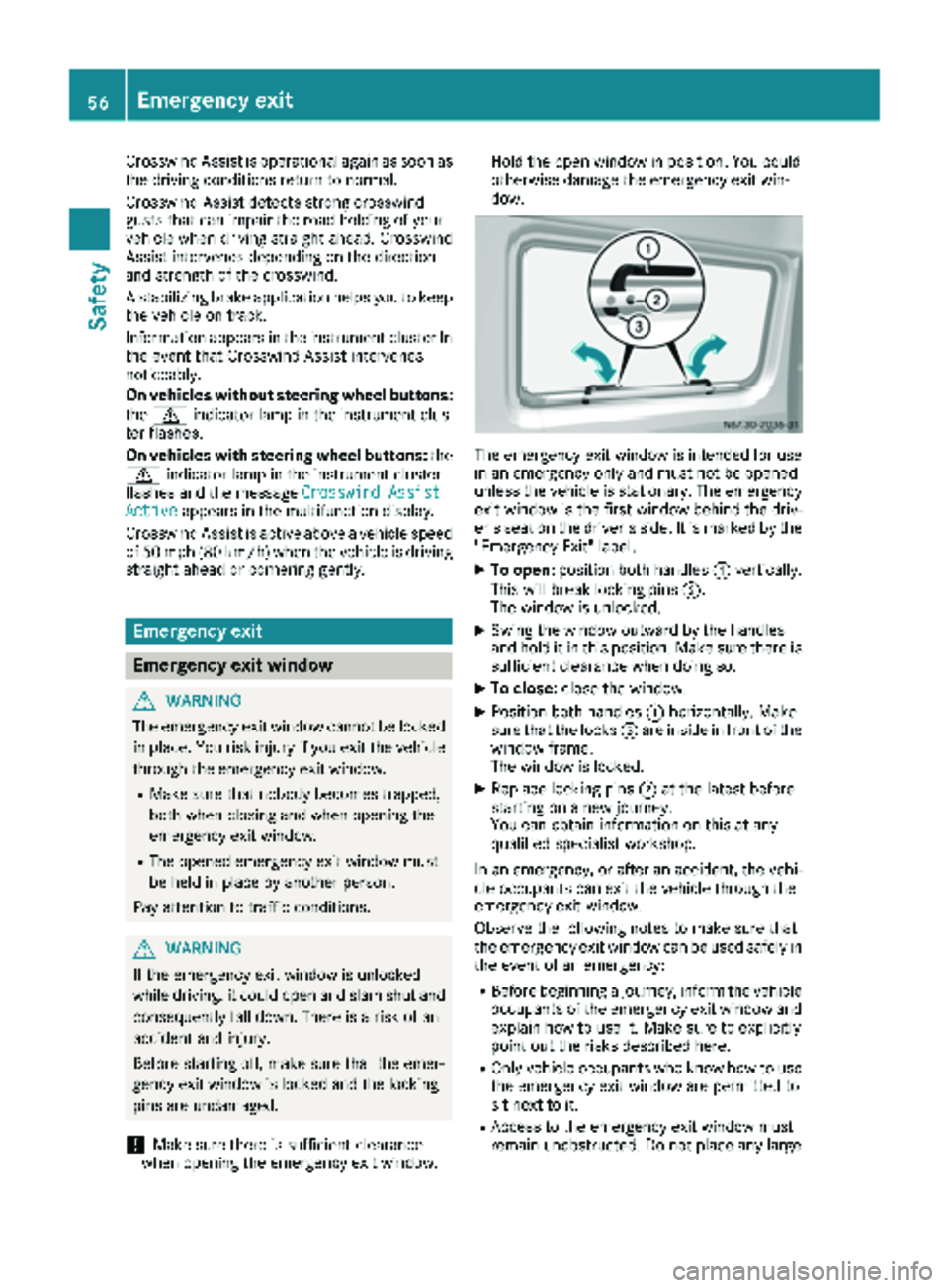
XTo open: position both handles :vertically.
This willbreak locking pins ;.
The wind ow is unlocked.
XSwin g the window outward by the handles
and hold it in this position. Make sure there is
sufficient clearance when doing so.
XTo close: close the window.
XPosition both handles :horizontally. Make
sure that the locks =are inside infront of the
window frame.
The wind ow is locked.
XReplace locking pins ;at the latest before
starting on a new journey.
You can obtain information on this at any
qualif ied specialist workshop.
In an emergency, or after an accident, the vehi-
cle occupants can exit the vehicle through the
emergency exit wind ow.
Observe the foll owing notes to make sure that
the emergency exit window can be used safely in
the event of an emergency:
RBefore beginning a journey, inform the vehicle
occupants of the emergency exit wind ow and
explain how to use it. Make sure to explicitly
poin t out the risks describe d here.
ROnlyvehicle occupants who know how to use
the emergency exit wind ow are permitted to
sit next to it.
RAccess to the emergency exit wind ow must
remain unobstructed. Do not place any large
56Emergency exit
Safety
Page 82 of 286
Useful information
This Operator's Manual describes all models as
well as standard and optional equipment of your
vehicle that were available at the time of going
to print. Country-specific variations are possi-
ble. Note that your vehicle may not be equipped
with all of the described functions. This also
applies to systems and functions relevant to
safety.
Read the information on qualified specialist
workshops (
Ypage 27).
Exterior lighting
Important safety notes
For reasons of safety, we recommend that you
drive with the lights switched on even during the
daytime. There may be differences in operation
due to legal requirements and voluntary recom-
mendations in some countries.
Bulb failure indicator
The bulb failure indicator is only an aid. You are
responsible for the proper functioning of the
vehicle lighting. Insufficient or non-functioning
vehicle lighting puts the operating safety of the
vehicle at risk.
For this reason, check the condition and func-
tion of your vehicle's lighting system and, if nec-
essary, that of the trailer before each journey.
The bulb failure indicator monitors all of the
exterior lighting lamps, except the perimeter
lamp and the trailer lighting. If a bulb fails, either
the b(
Ypage 34) indicator lamp lights up, or
you will see a corresponding message in the
display (
Ypage 182).
iDepending on the equipment, the bulb fail-
ure indicator can fail for all lamps with the
exception of the turn signal lamps.
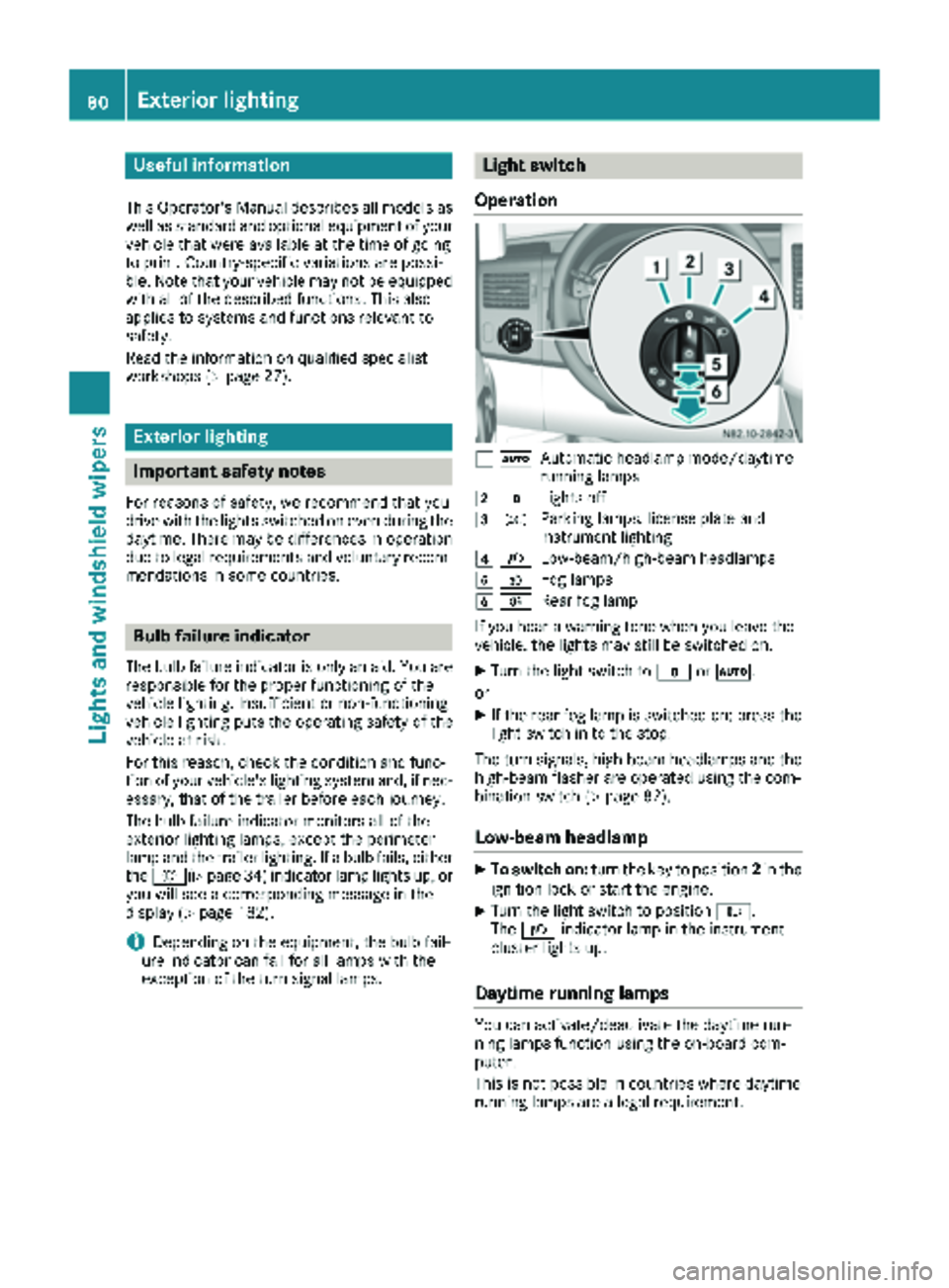
Light switch
Operation
1 ÃAutomatic headlamp mode/daytime
running lamps
2$Lights off
3TParking lamps, license plate and
instrument lighting
4LLow-beam/high-beam headlamps
5NFog lamps
6RRear fog lamp
If you hear a warning tone when you leave the
vehicle, the lights may still be switched on.
XTurn the light switch to $orÃ.
or
XIf the rear fog lamp is switched on: press the
light switch in to the stop.
The turn signals, high-beam headlamps and the
high-beam flasher are operated using the com-
bination switch (
Ypage 82).
Low-beam headlamp
XTo switch on: turn the key to position 2in the
ignition lock or start the engine.
XTurn the light switch to position L.
The L indicator lamp in the instrument
cluster lights up.
Daytime running lamps
You can activate/deactivate the daytime run-
ning lamps function using the on-board com-
puter.
This is not possible in countries where daytime
running lamps are a legal requirement.
80Exterior lighting
Lights and windshield wipers
Page 86 of 286
Highbeam Assist
General notes
You can use this function to set the headlamps
to change between low beam and high beam
automatically. The system recognizes vehicles
with their lights on, either approaching from the
opposite direction or traveling in front of your
vehicle, and consequently switches the head-
lamps from high beam to low beam.
Once the system no longer detects any other
vehicles, it reactivates the high-beam head-
lamps.
The system's optical sensor is located behind
the windshield near the overhead control panel.
Important safety notes
GWARNING
Highbeam Assist does not recognize road
users:
Rwho have no lights, e.g. pedestrians
Rwho have poor lighting, e.g. cyclists
Rwhose lighting is blocked, e.g. by a barrier
In very rare cases, Highbeam Assist may fail to
recognize other road users who have lights, or
may recognize them too late. In this or similar situations, the automatic high-beam head-
lamps will not be deactivated or will be acti-
vated regardless. There is a risk of an acci-
dent.
Always carefully observe the traffic conditions
and switch off the high-beam headlamps in
good time.
Highbeam Assist cannot take into account road,
weather or traffic conditions. Highbeam Assist
is only an aid. You are responsible for adjusting
the vehicle's lighting to the prevailing light, vis-
ibility and traffic conditions.
In particular, the detection of obstacles can be
restricted if there is:
Rpoor visibility, e.g. due to fog, heavy rain or
snow
Rdirt on the sensors or anything else covering
the sensors
Activating/deactivating Highbeam
Assist
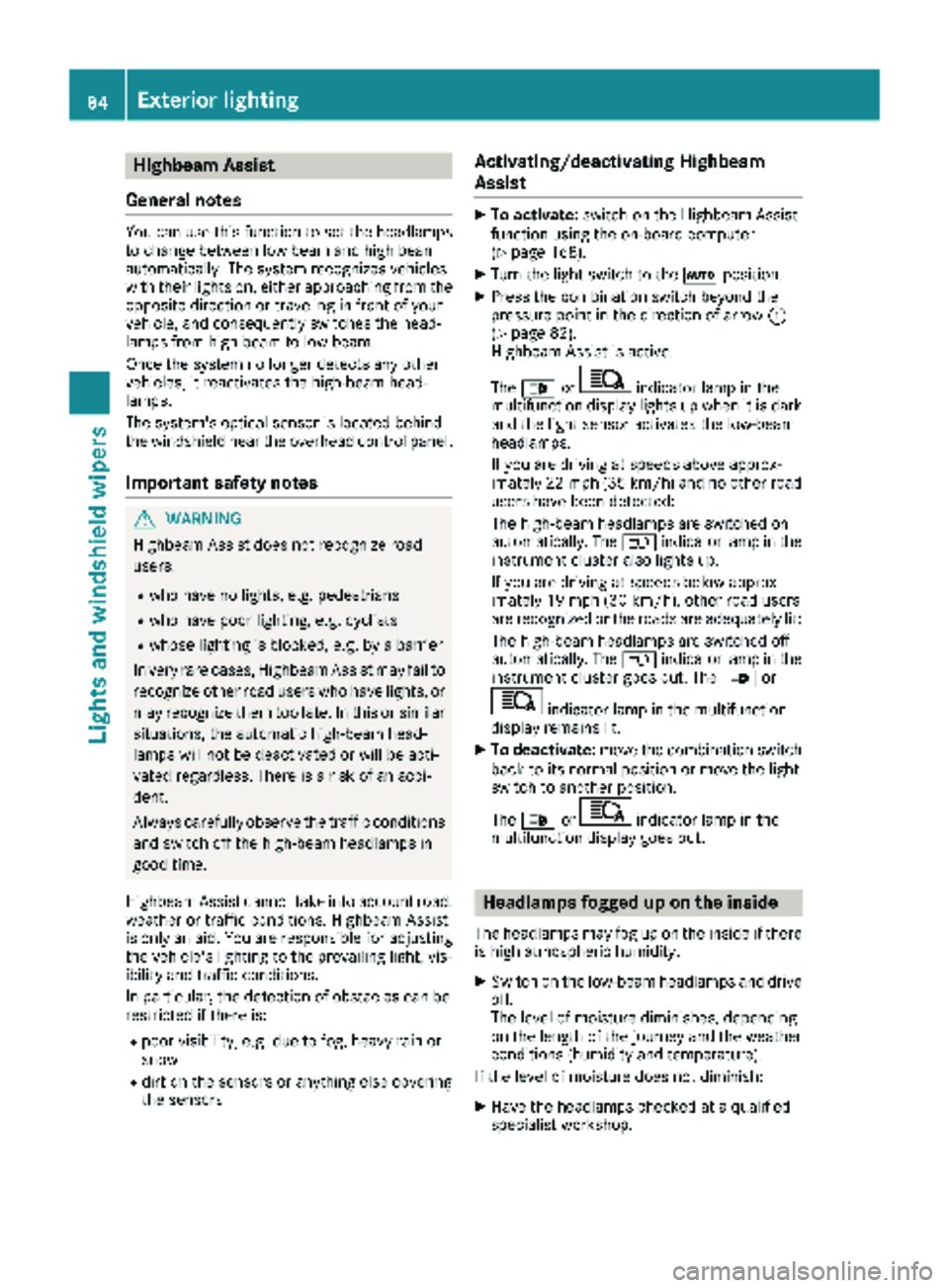
XTo activate: switch on the Highbeam Assist
function using the on-board computer
(
Ypage 168).
XTurn the light switch to the Ãposition.
XPress the combination switch beyond the
pressure point in the direction of arrow :
(
Ypage 82).
Highbeam Assist is active.
The _ or
indicator lamp in the
multifunction display lights up when it is dark
and the light sensor activates the low-beam
headlamps.
If you are driving at speeds above approx-
imately 22 mph (35 km/h) and no other road
users have been detected:
The high-beam headlamps are switched on
automatically. The Kindicator lamp in the
instrument cluster also lights up.
If you are driving at speeds below approx-
imately 19 mph (30 km/h), other road users
are recognized or the roads are adequately lit:
The high-beam headlamps are switched off
automatically. The Kindicator lamp in the
instrument cluster goes out. The _or
indicator lamp in the multifunction
display remains lit.
XTo deactivate: move the combination switch
back to its normal position or move the light
switch to another position.
The _ or
indicator lamp in the
multifunction display goes out.
Headlamps fogged up on the inside
The headlamps may fog up on the inside if there is high atmospheric humidity.
XSwitch on the low-beam headlamps and drive
off.
The level of moisture diminishes, depending
on the length of the journey and the weather
conditions (humidity and temperature).
If the level of moisture does not diminish:
XHave the headlamps checked at a qualified
specialist workshop.
84Exterior lighting
Lights and windshield wipers
Page 100 of 286
?Sets the air distribution (Ypage 101)
sz Defrosts the windshield (
Ypage 102)
Information on heating
Below, you can find a number of notes and rec-
ommendations to help you use the heating opti-
mally.
RSet the temperature control to the middle
level. Only change the temperature in small
increments.
If you wish to heat up the vehicle interior as
quickly as possible, set the temperature con-
trol to thezmaximum setting. When the
desired interior temperature has been reached, turn the temperature control back
down in small steps.
ROnly use the settings for defrosting the wind-
shield briefly, until the windshield is clear
again.
ROnly use air-recirculation mode briefly, e.g. if
there are unpleasant outside odors or when in
a tunnel. The windows could otherwise fog up
as no fresh air is drawn into the vehicle in air-
recirculation mode. The indicator lamp in the
h button comes on when the function is
switched on.
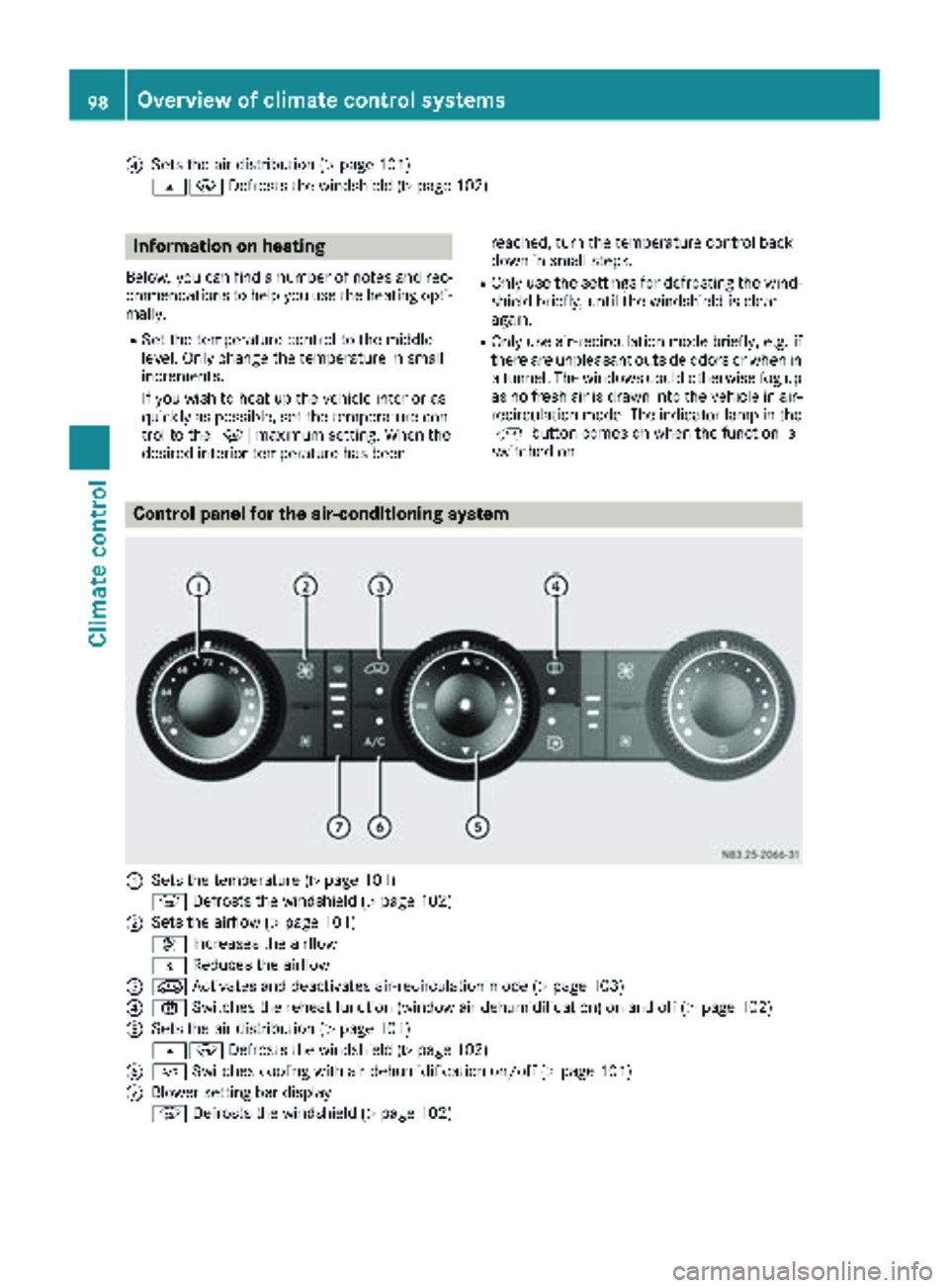
Control panel for the air-conditioning system
:Sets the temperature (Ypage 101)
z Defrosts the windshield (
Ypage 102)
;Sets the airflow (Ypage 101)
K Increases the airflow
I Reduces the airflow
=eActivates and deactivates air-recirculation mode (Ypage 103)
?xSwitches the reheat function (window air dehumidification) on and off (Ypage 102)
ASets the air distribution (Ypage 101)
sz Defrosts the windshield (
Ypage 102)
B¿Switches cooling with air dehumidification on/off (Ypage 101)
CBlower setting bar display
zDefrosts the windshield (
Ypage 102)
98Overview of climate control systems
Climate control
Page 102 of 286
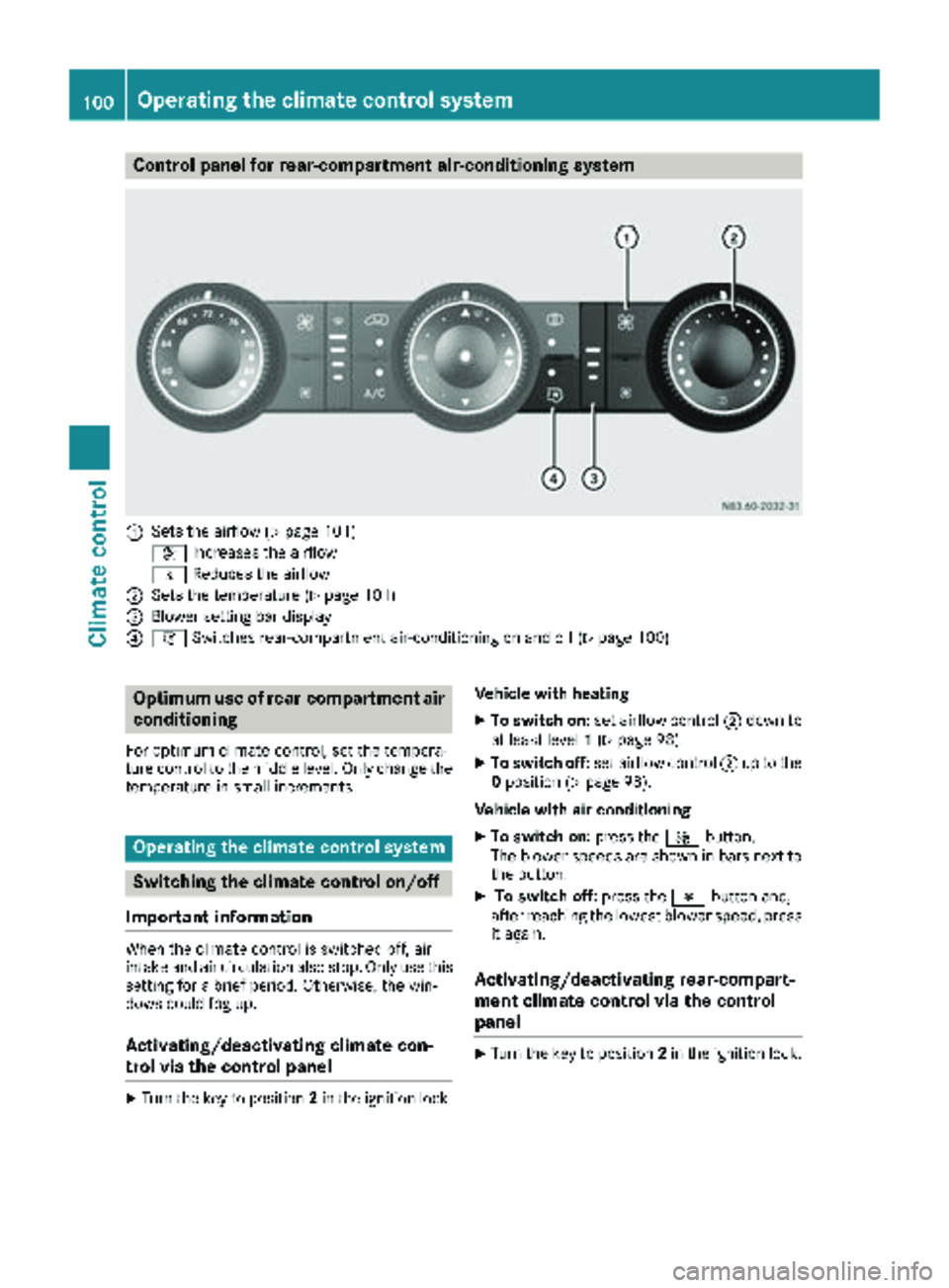
Control panel for rear-compartment air-conditioning system
:Sets the airflow (Ypage 101)
K Increases the airflow
I Reduces the airflow
;Sets the temperature (Ypage 101)
=Blower setting bar display
?iSwitches rear-compartment air-conditioning on and off (Ypage 100)
Optimum use of rear-compartment air
conditioning
For optimum climate control, set the tempera-
ture control to the middle level. Only change the
temperature in small increments.
Operating the climate control system
Switching the climate control on/off
Important information
When the climate control is switched off, air
intake and air circulation also stop. Only use this
setting for a brief period. Otherwise, the win-
dows could fog up.
Activating/deactivating climate con-
trol via the control panel
XTurn the key to position 2in the ignition lock. Vehicle with heating
XTo switch on:
set airflow control ;down to
at least level 1(Ypage 98).
XTo switch off: set airflow control ;up to the
0 position (Ypage 98).
Vehicle with air conditioning
XTo switch on: press theKbutton.
The blower speeds are shown in bars next to
the button.
XTo switch off: press theIbutton and,
after reaching the lowest blower speed, press
it again.
Activating/deactivating rear-compart-
ment climate control via the control
panel
XTurn the key to position 2in the ignition lock.
100Operating the climate control system
Climate control
Page 104 of 286
button to reduce or theKbutton to
increase the airflow.
The blower speeds are shown in bars next to
the buttons.
Defrosting the windows
You can use the "defrosting" function to defrost
the windshield or to demist the inside of the
windshield and the side windows.
Only use the following settings until the win-
dows are clear again.
XVehicle with window heating: switch on the
front (Ypage 103) and/or rear window
defroster (Ypage 103) .
XSwitch on climate control (Ypage 100).
Vehicle with heating
XSet temperature control :and airflow con-
trol ;toz (Ypage 97).
XSet air-distribution control ?tosz
(Ypage 97).
XClose the center air vents (Ypage 104) and
the air outlets for the headroom and the rear compartment (
Ypage 105).
XDirect the side air vents towards the side win-dows and open the defroster vents for the
side windows (
Ypage 105).
Vehicle with air conditioning
XSet temperature control :to
z (Ypage 98).
XPress the Kbutton until the maximum
blower output is reached.
All bars in the display next to the button light up.
XSet air-distribution control Atosz
(Ypage 98).
XClose the center air vents (Ypage 104) and
the air outlets for the headroom and the rear compartment (
Ypage 105).
XDirect the side air vents towards the side win-dows and open the defroster vents for the
side windows (
Ypage 105).
Clearing condensation from the win-
dows
Windows fogged up on the inside
You should only select this setting until the win-
dows are clear again.
XVehicle with window heating: switch on the
front (Ypage 103) and/or rear window
defroster (Ypage 103) .
XSwitch on climate control (Ypage 100).
XSwitch off air-recirculation mode
(Ypage 103).
Vehicle with heating
XSet temperature control :to a higher tem-
perature (Ypage 97).
XSet airflow control ;to a higher blower set-
ting. It should be set at least to level two
(
Ypage 97).
XSet air-distribution control ?tosz
(Ypage 97).
iIf the windows still fog up, set the control as
described for defrosting (Ypage 102).
Vehicle with air conditioning
XActivate cooling with air dehumidification
(Ypage 101).
XPress the ¨button (Ypage 98).
Reheat mode is activated. The indicator lamp
in the switch lights up.
To deactivate reheat mode, press the ¨
button again. The indicator lamp in the button
goes out.
Windows fogged up on the outside
You should only select this setting until the
windshield is clear again.
XSwitch on the windshield wipers (Ypage 94).
XSwitch on climate control (Ypage 100).
XAdjust air distribution to the footwell
(Ypage 101).
XClose the air vents (Ypage 104).
102Operating the climate control system
Climate control
Page 109 of 286
Outside tempera-
tureEngine runtime
Above 32 ‡ (0 †)at least 10 minutes
32 ‡ (0 †) to 14 ‡
(Ò10 †)at least 15 minutes
Below 14 ‡ (Ò10 †)at least 20 minutes
Before switching on
XCheck the fuel level and top up if necessary.
The auxiliary heating is operated directly
using the vehicle's fuel. The tank must be at
least a quarter full to ensure that the auxiliary
heating functions.
XSwitch on climate control (Ypage 100).
XSet the temperature control to the desired
temperature (Ypage 101).
XSet the air distribution as required
(Ypage 101).
XOpen the center (Ypage 104) and side air
vents (Ypage 105) and set them to the middle
position.
iThe auxiliary heating automatically switches
to heater booster mode after the engine is
started.
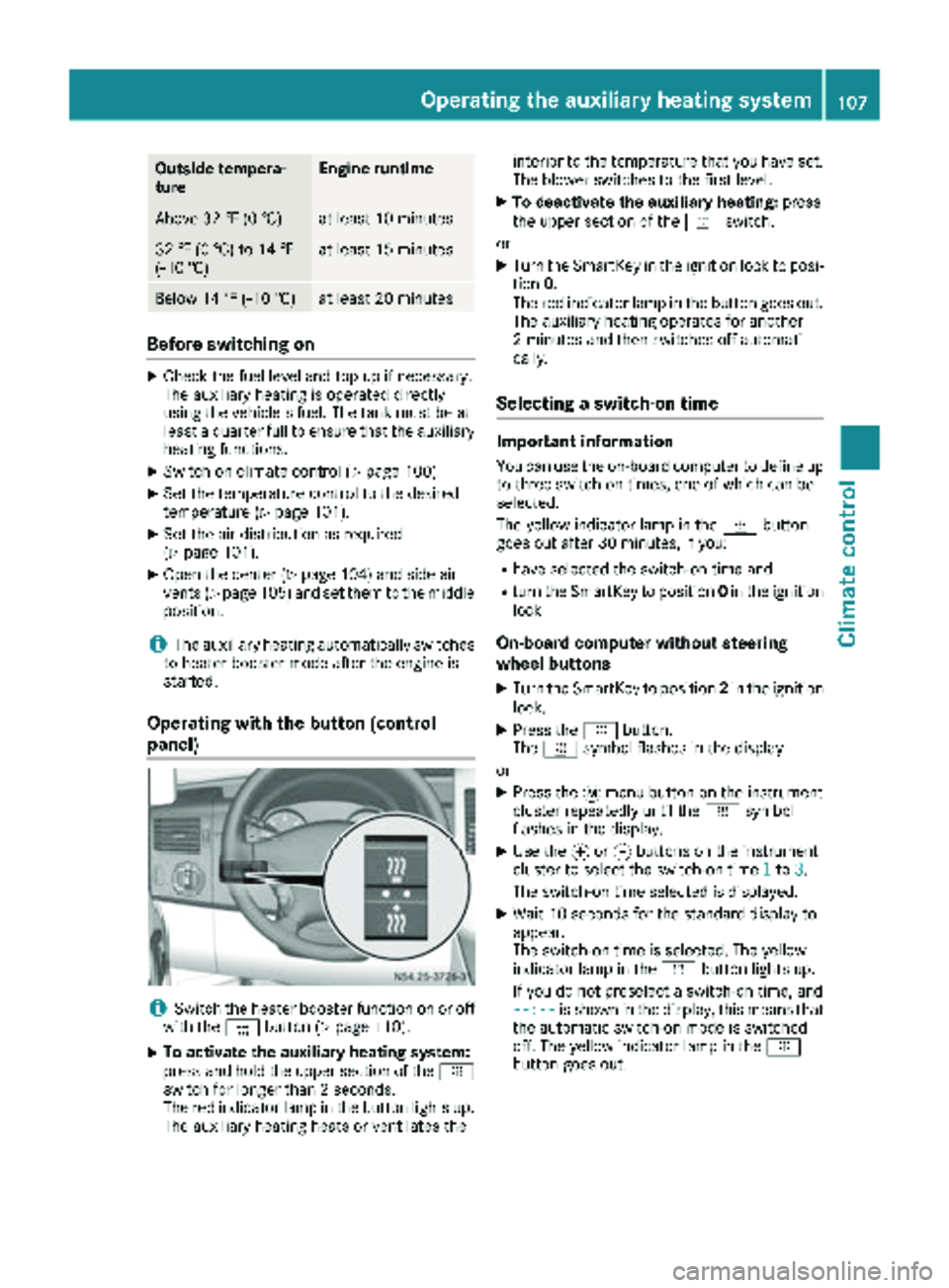
Operating with the button (control
panel)
iSwitch the heater booster function on or off
with the ¢button (Ypage 110).
XTo activate the auxiliary heating system:
press and hold the upper section of the y
switch for longer than 2 seconds.
The red indicator lamp in the button lights up.
The auxiliary heating heats or ventilates the interior to the temperature that you have set.
The blower switches to the first level.
XTo deactivate the auxiliary heating:
press
the upper section of the yswitch.
or
XTurn the SmartKey in the ignition lock to posi-
tion 0.
The red indicator lamp in the button goes out.
The auxiliary heating operates for another
2 minutes and then switches off automati-
cally.
Selecting a switch-on time
Important information
You can use the on-board computer to define up
to three switch-on times, one of which can be
selected.
The yellow indicator lamp in the ybutton
goes out after 30 minutes, if you:
Rhave selected the switch-on time and
Rturn the SmartKey to position 0in the ignition
lock
On-board computer without steering
wheel buttons
XTurn the SmartKey to position 2in the ignition
lock.
XPress the ybutton.
The y symbol flashes in the display.
or
XPress the 4menu button on the instrument
cluster repeatedly until the ysymbol
flashes in the display.
XUse the forg buttons on the instrument
cluster to select the switch-on time 1to3.
The switch-on time selected is displayed.
XWait 10 seconds for the standard display to
appear.
The switch-on time is selected. The yellow
indicator lamp in the ybutton lights up.
If you do not preselect a switch-on time, and
--:--
is shown in the display, this means that
the automatic switch-on mode is switched
off. The yellow indicator lamp in the y
button goes out.
Operating the auxiliary heating system107
Climate control
Z
Page 110 of 286
On-board computer with steering wheel
buttons
XTurn the SmartKey to position2in the ignition
lock.
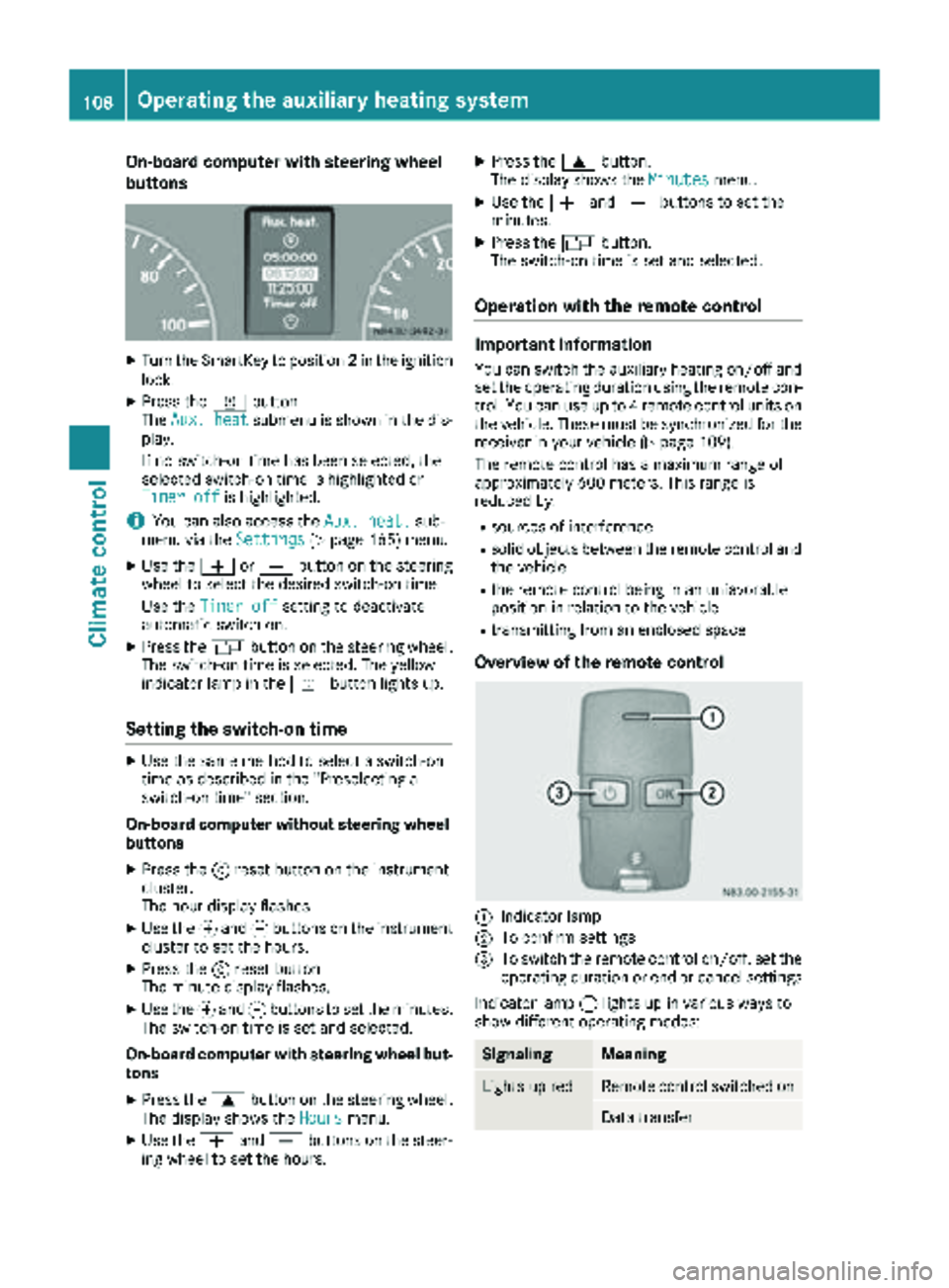
XPress the ybutton.
The Aux. heatsubmenu is shown in the dis-
play.
If no switch-on time has been selected, the
selected switch-on time is highlighted or
Timer off
is highlighted.
iYou can also access the Aux. heat.sub-
menu via the Settings(Ypage 165) menu.
XUse theWorX button on the steering
wheel to select the desired switch-on time.
Use the Timer off
setting to deactivate
automatic switch-on.
XPress the Vbutton on the steering wheel.
The switch-on time is selected. The yellow
indicator lamp in the ybutton lights up.
Setting the switch-on time
XUse the same method to select a switch-on
time as described in the "Preselecting a
switch-on time" section.
On-board computer without steering wheel
buttons
XPress the 9reset button on the instrument
cluster.
The hour display flashes.
XUse the fand gbuttons on the instrument
cluster to set the hours.
XPress the 9reset button
The minute display flashes.
XUse the fand gbuttons to set the minutes.
The switch-on time is set and selected.
On-board computer with steering wheel but-
tons
XPress the 9button on the steering wheel.
The display shows the Hoursmenu.
XUse theWandX buttons on the steer-
ing wheel to set the hours.
XPress the 9button.
The display shows the Minutesmenu.
XUse theWandX buttons to set the
minutes.
XPress the Vbutton.
The switch-on time is set and selected.
Operation with the remote control
Important information
You can switch the auxiliary heating on/off and
set the operating duration using the remote con-
trol. You can use up to 4 remote control units on
the vehicle. These must be synchronized for the
receiver in your vehicle (
Ypage 109).
The remote control has a maximum range of
approximately 600 meters. This range is
reduced by:
Rsources of interference
Rsolid objects between the remote control and
the vehicle
Rthe remote control being in an unfavorable
position in relation to the vehicle
Rtransmitting from an enclosed space
Overview of the remote control
:Indicator lamp
;To confirm settings
=To switch the remote control on/off, set the operating duration or end or cancel settings
Indicator lamp :lights up in various ways to
show different operating modes:
SignalingMeaning
Lights up redRemote control switched on
Data transfer
108Operating the auxiliary heating system
Climate control
Page 115 of 286
Use the timer to:
Ractivate and deactivate immediate heating
mode
Rset up to three switch-on times
Rset the operating duration to between 10 and
120 minutes or to continuous operation
Rset the heating level (preselected tempera-
ture) to a range between 10 and 30
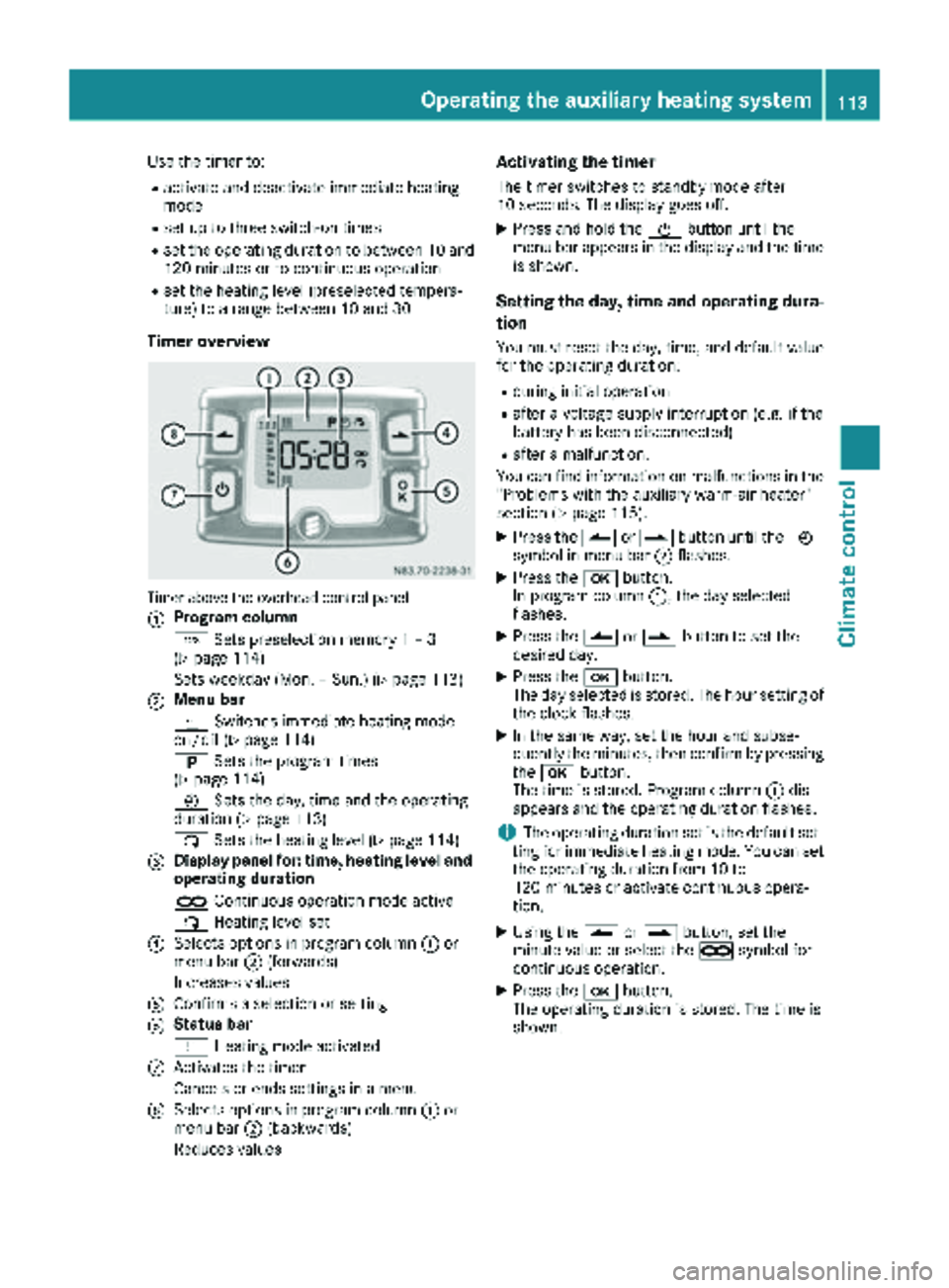
Timer overview
Timer above the overhead control panel
:
Program column
GSets preselection memory 1 – 3
(
Ypage 114)
Sets weekday (Mon. – Sun.) (
Ypage 113)
;Menu bar
y Switches immediate heating mode
on/off (
Ypage 114)
B Sets the program times
(
Ypage 114)
Ñ Sets the day, time and the operating
duration (
Ypage 113)
ß Sets the heating level (
Ypage 114)
=Display panel for: time, heating level and
operating duration
àContinuous operation mode active
ß Heating level set
?Selects options in program column :or
menu bar ;(forwards)
Increases values
AConfirms a selection or setting
BStatus bar
y Heating mode activated
CActivates the timer
Cancels or ends settings in a menu
DSelects options in program column :or
menu bar ;(backwards)
Reduces values
Activating the timer
The timer switches to standby mode after
10 seconds. The display goes off.
XPress and hold the Übutton until the
menu bar appears in the display and the time
is shown.
Setting the day, time and operating dura-
tion
You must reset the day, time, and default value
for the operating duration:
Rduring initial operation
Rafter a voltage supply interruption (e.g. if the
battery has been disconnected)
Rafter a malfunction.
You can find information on malfunctions in the
"Problems with the auxiliary warm-air heater"
section (
Ypage 115).
XPress the Ûorâ button until the Ñ
symbol in menu bar ;flashes.
XPress the bbutton.
In program column :, the day selected
flashes.
XPress the Ûorâ button to set the
desired day.
XPress the bbutton.
The day selected is stored. The hour setting of
the clock flashes.
XIn the same way, set the hour and subse-
quently the minutes, then confirm by pressing
the b button.
The time is stored. Program column :dis-
appears and the operating duration flashes.
iThe operating duration set is the default set-
ting for immediate heating mode. You can set
the operating duration from 10 to
120 minutes or activate continuous opera-
tion.
XUsing the Ûorâ button, set the
minute value or select the àsymbol for
cont
inuous operation.
XPress the bbutton.
The operating duration is stored. The time is
shown.
Operating the auxiliary heating system113
Climate control
Z