sensor MERCEDES-BENZ SPRINTER 2017 MY17 Operator’s Manual
[x] Cancel search | Manufacturer: MERCEDES-BENZ, Model Year: 2017, Model line: SPRINTER, Model: MERCEDES-BENZ SPRINTER 2017Pages: 286, PDF Size: 4.36 MB
Page 150 of 286
and accelerator pedals or the cruise control
lever.
XBrake or accelerate the vehicle to the
required speed on the downhill gradient.
XRelease the brake or accelerator pedal. The
current speed is stored.
or
XBriefly push the cruise control lever up :to
increase the speed or down =to reduce the
speed.
The last speed stored is increased or reduced
incrementally.
XRelease the cruise control lever. The current
speed is stored.
or
XPress and hold the cruise control lever up :
or down =until the desired speed has been
reached.
XRelease the cruise control lever.
The current speed is stored.
iIt may take a moment before the vehicle
brakes to the set speed. Take this delay into
account when setting the speed with the
cruise control lever.
Deactivating DSR
XBriefly press the cruise control lever
forward ?.
or
XAccelerate and drive faster than 28 mph
(45 km/h).
DSR deactivates automatically if:
Ryou are driving faster than 28 mph (45 km/h).
Ryou disengage th eLOW RANGE transmission
ratio.
Rthere is amalfunction in th eES P®or AB Ssys-
tem.
PARKTRONIC
Gene ral notes
PARKTRONI Cis an electronic parkin gaid. The
system is equipped wit hultrasonic sensor sin
th efron tand rear bumpers to monitor th earea
around your vehicle. PARKTRONI Cindicate svis -
ually and audibl yth edistanc ebetween your
vehicl eand an object.
Your vehicl efeatures tw oseparat esoun demit-
ters wit hdifferen tfrequencie sfor th ewarnin gtones. The warnin
granges in fron tof and behind
th evehicl eare indicate dby differen twarnin g
tones.
PARKTRONI Cis activated automatically when
you:
Rtur nth eke yto position 2in th eignition loc k
Rrelease theparkin gbrak eand
Rmov eth eselector lever to D,Nor R.
PARKTRONI Cis deactivated at speeds abov e
11 mph (18 km/h). PARKTRONI Cis reactivated
at speeds belo w10 mph (16 km/h).
Impor tant safety notes
PARKTRONI Cis only an aid. It canno treplac e
your own awareness of th eimmediat esurround-
ings. You are responsibl efor saf emaneuvering,
parkin gand pullin gaway. Whe nmaneuvering,
parkin gand pullin gaway, mak esur ethat there
are no persons, animals or objects in th emaneu-
verin garea .
!Pay particular attention to obstacles abov e
or belo wthesensor swhen parking, suc has
flower pot sor trailer towbars. PARKTRONI C
does no trecogniz esuc hobjects when they
are in th eimmediat evicinit yof th evehicle.
You could damage th evehicl eor objects .
PARKTRONI Ccan suffer interferenc efrom:
Rultrasonic source ssuc has atruck's
compressed-air brakes, an automati ccar
wash or apneumati cdrill
Rattachments to th evehicle, e.g. rear moun -
te dracks
Rnumber plates (vehicle license plates) that
are no taffixe dflat against th ebumper
Rdirty or icy sensor s
Remove adetachable trailer couplin gif it is no
longer required. PARKTRONI Cmeasures th e
minimum detection range to an obstacle from
th ebumper, no tth eball coupling.
Range ofthe sensor s
PARKTRONI Cdoes no taccoun tfor obstacles
that are:
Rbeneat hits detection range, e.g. persons, ani -
mals or objects
Rabov eits detection range, e.g. overhangin g
loads ,overhang sor truck loading ramps
148Driving systems
Driving and parking
Page 151 of 286
The sensors must be free of dirt, ice or slush.
Otherwise, they cannot function correctly.
Clean the sensors regularly, taking care not to
scratch or damage them (
Ypage 232).
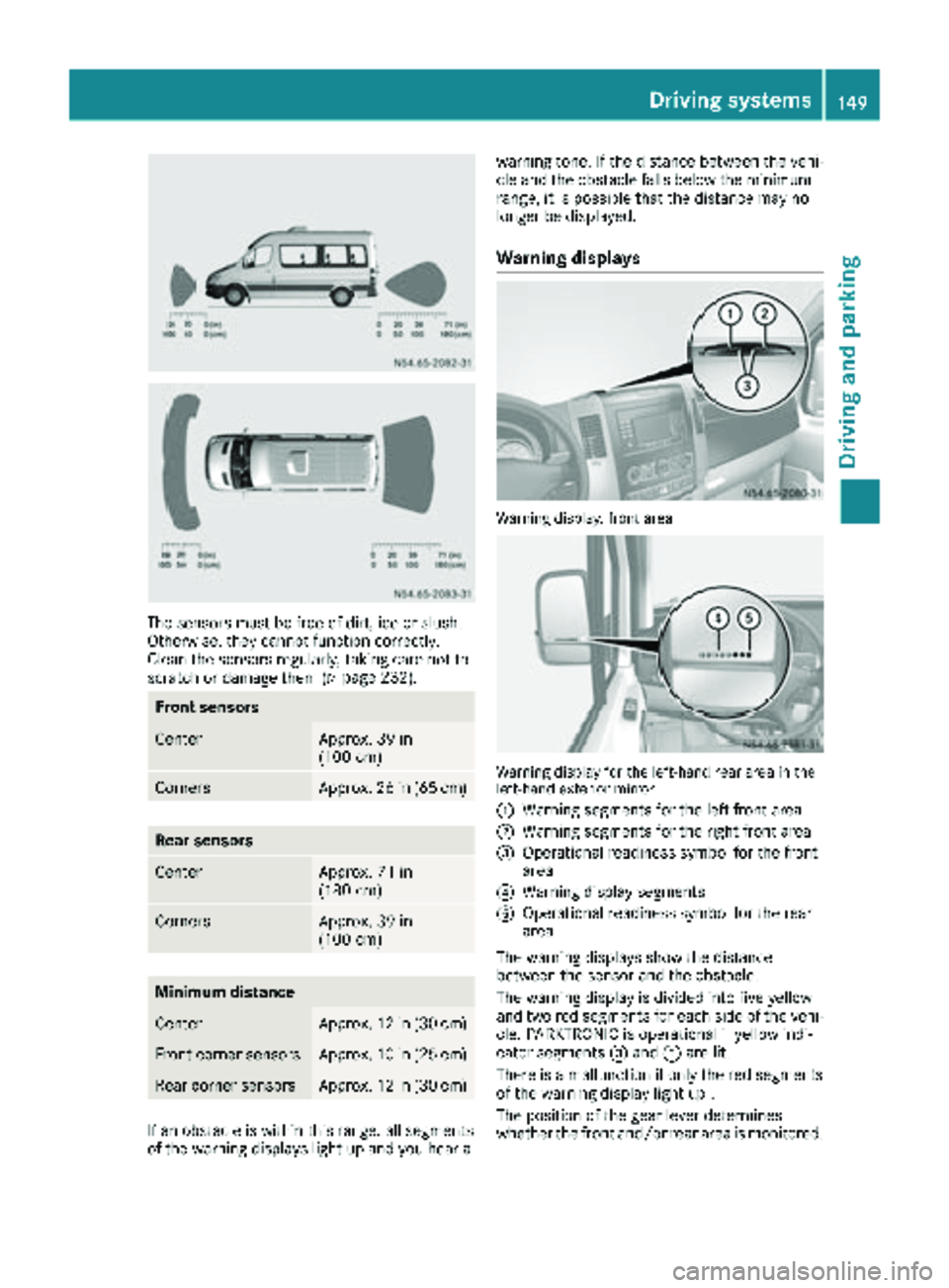
Front sensors
CenterApprox. 39 in
(100 cm)
CornersApprox. 26 in (65 cm)
Rear sensors
CenterApprox. 71 in
(180 cm)
CornersApprox. 39 in
(100 cm)
Minimum distance
CenterApprox. 12 in (30 cm)
Front corner sensorsApprox. 10 in (25 cm)
Rear corner sensorsApprox. 12 in (30 cm)
If an obstacle is within this range, all segments
of the warning displays light up and you hear awarning tone. If the distance between the vehi-
cle and the obstacle falls below the minimum
range, it is possible that the distance may no
longer be displayed.
Warning displays
Warning display, front area
Warning display for the left-hand rear area in the
left-hand exterior mirror
:
Warning segments for the left front area
;Warning segments for the right front area
=Operational readiness symbol for the front
area
?Warning display segments
AOperational readiness symbol for the rear
area
The warning displays show the distance
between the sensor and the obstacle.
The warning display is divided into five yellow
and two red segments for each side of the vehi- cle. PARKTRONIC is operational if yellow indi-
cator segments =and Aare lit.
There is a malfunction if only the red segments
of the warning display light up .
The position of the gear lever determines
whether the front and/or rear area is monitored.
Driving systems149
Driving and parking
Z
Page 153 of 286
Problems with PARKTRONIC
ProblemPossible causes/consequences andMSolutions
Only the red segments in
the PARKTRONIC warn-
ing displays are lit.
In addition, a warning
tone sounds for approx.
two seconds
PARKTRONIC is deacti-
vated after approx-
imately 20 seconds.
The indicator lamp of the
f button lights up
and the red segments in
the PARKTRONIC warn-
ing display go out.PARKTRONIC has malfunctioned and has switched itself off.
XIf problems persist, have PARKTRONIC checked at a qualified spe- cialist workshop.
The PARKTRONIC warn-
ing displays implausible
distances.
For example, all the seg-
ments may be lit even
though there is no obsta-
cle present.The PARKTRONIC sensors are dirty or iced up.
XClean the PARKTRONIC sensors (Ypage 232).
XTurn the key to position 2in the ignition lock.
The license plate or other parts attached near the sensors may not be
secured correctly.
XCheck the license plate and attachment parts near the sensors for
correct seating.
An external radio or ultrasonic source may be causing interference.
XCheck PARKTRONIC functions in a different location.
Rear view camera
Important safety notes
The rear view camera is only an aid. It cannot
replace your own awareness of the immediate
surroundings. You are responsible for safe
maneuvering, parking and pulling away. When
maneuvering, parking and pulling away, make
sure that there are no persons, animals or
objects in the maneuvering area.
The rear view camera is a visual parking aid.
Information on operation can be found in the
separate Audio 15 supplement.
The camera is in the middle of the roof above the
high-mounted brake lamp (
Ypage 232).
You can find information on cleaning the camera
in the "Maintenance and care" section
(
Ypage 232).
Working mode
ADR (working speed governor)
General notes
When activated, ADR automatically increases
the engine speed to a preset speed or a speed
you have set.
iAfter a cold start, the idling speed of the
engine is increased automatically. If the pre-
set working speed is lower than the increased idling speed, the working speed is only
reached once the engine has completed the
warm-up phase.
It is only possible to activate ADR with the
vehicle stationary and the parking brake
applied.
The selector lever of the automatic transmis-
sion must be in position P.
Working mode151
Driving and parking
Z
Page 172 of 286
Vehicle submenu
Setting the windshield wiper sensitivity
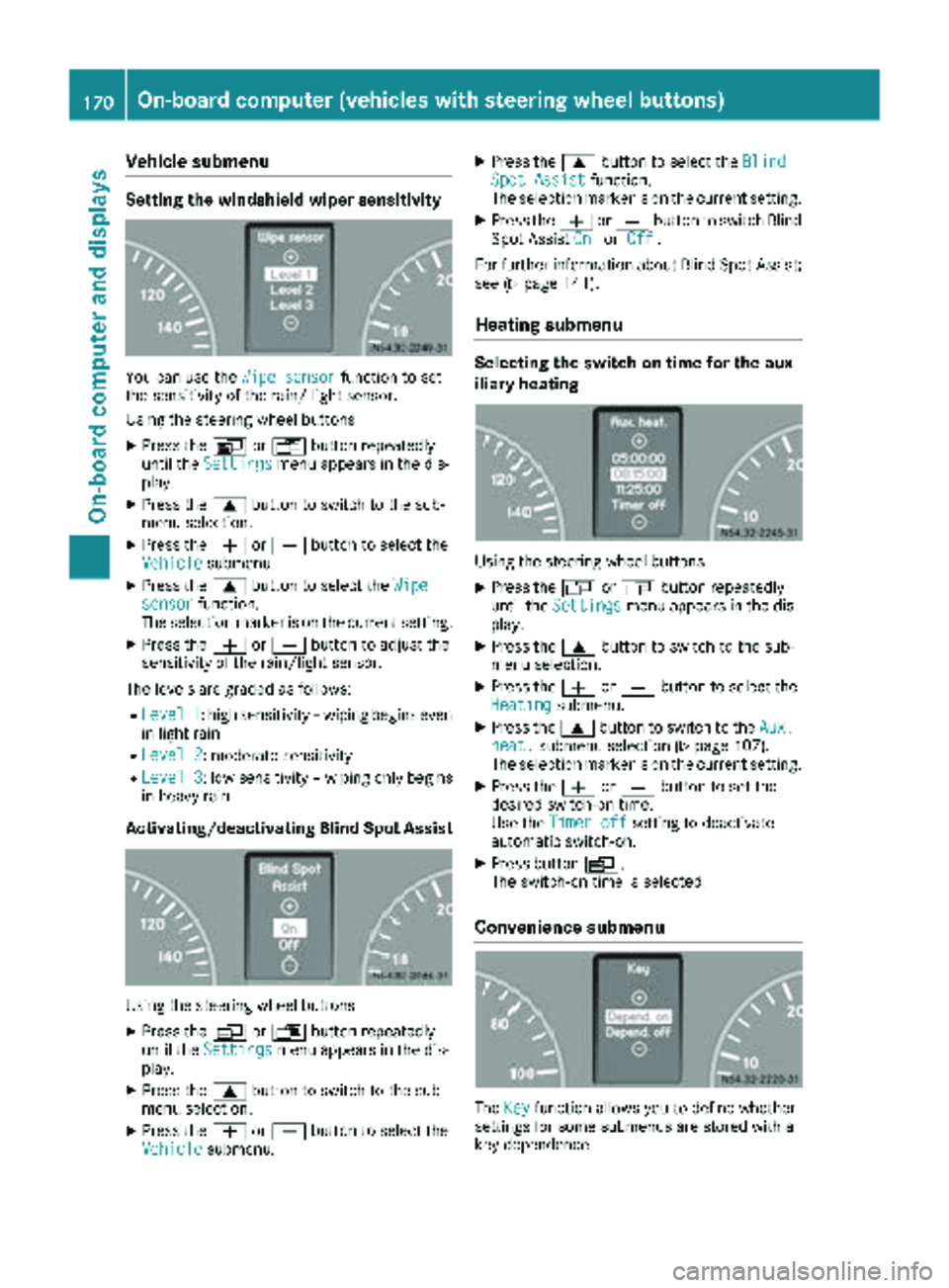
You can use theWipe sensorfunction to set
the sensitivity of the rain/ light sensor.
Using the steering wheel buttons
XPress the VorU button repeatedly
until the Settingsmenu appears in the dis-
play.
XPress the 9button to switch to the sub-
menu selection.
XPress the WorX button to select the
Vehiclesubmenu.
XPress the 9button to select the Wipesensorfunction.
The selection marker is on the current setting.
XPress the WorX button to adjust the
sensitivity of the rain/light sensor.
The levels are graded as follows:
RLevel 1: high sensitivity – wiping begins even
in light rain
RLevel 2: moderate sensitivity
RLevel 3: low sensitivity – wiping only begins
in heavy rain
Activating/deactivating Blind Spot Assist
Using the steering wheel buttons
XPress the VorU button repeatedly
until the Settingsmenu appears in the dis-
play.
XPress the 9button to switch to the sub-
menu selection.
XPress the WorX button to select the
Vehiclesubmenu.
XPress the 9button to select the BlindSpot Assistfunction.
The selection marker is on the current setting.
XPress the WorX button to switch Blind
Spot Assist OnorOff.
For further information about Blind Spot Assist;
see (
Ypage 141).
Heating submenu
Selecting the switch-on time for the aux-
iliary heating
Using the steering wheel buttons
XPress the VorU button repeatedly
until the Settingsmenu appears in the dis-
play.
XPress the 9button to switch to the sub-
menu selection.
XPress the WorX button to select the
Heatingsubmenu.
XPress the 9button to switch to the Aux.heat.submenu selection (Ypage 107).
The selection marker is on the current setting.
XPress the WorX button to set the
desired switch-on time.
Use the Timer off
setting to deactivate
automatic switch-on.
XPress button V.
The switch-on time is selected.
Convenience submenu
The Keyfunction allows you to define whether
settings for some submenus are stored with a
key dependence.
170On-board computer (vehicles with steering wheel buttons)
On-board computer and displays
Page 188 of 286
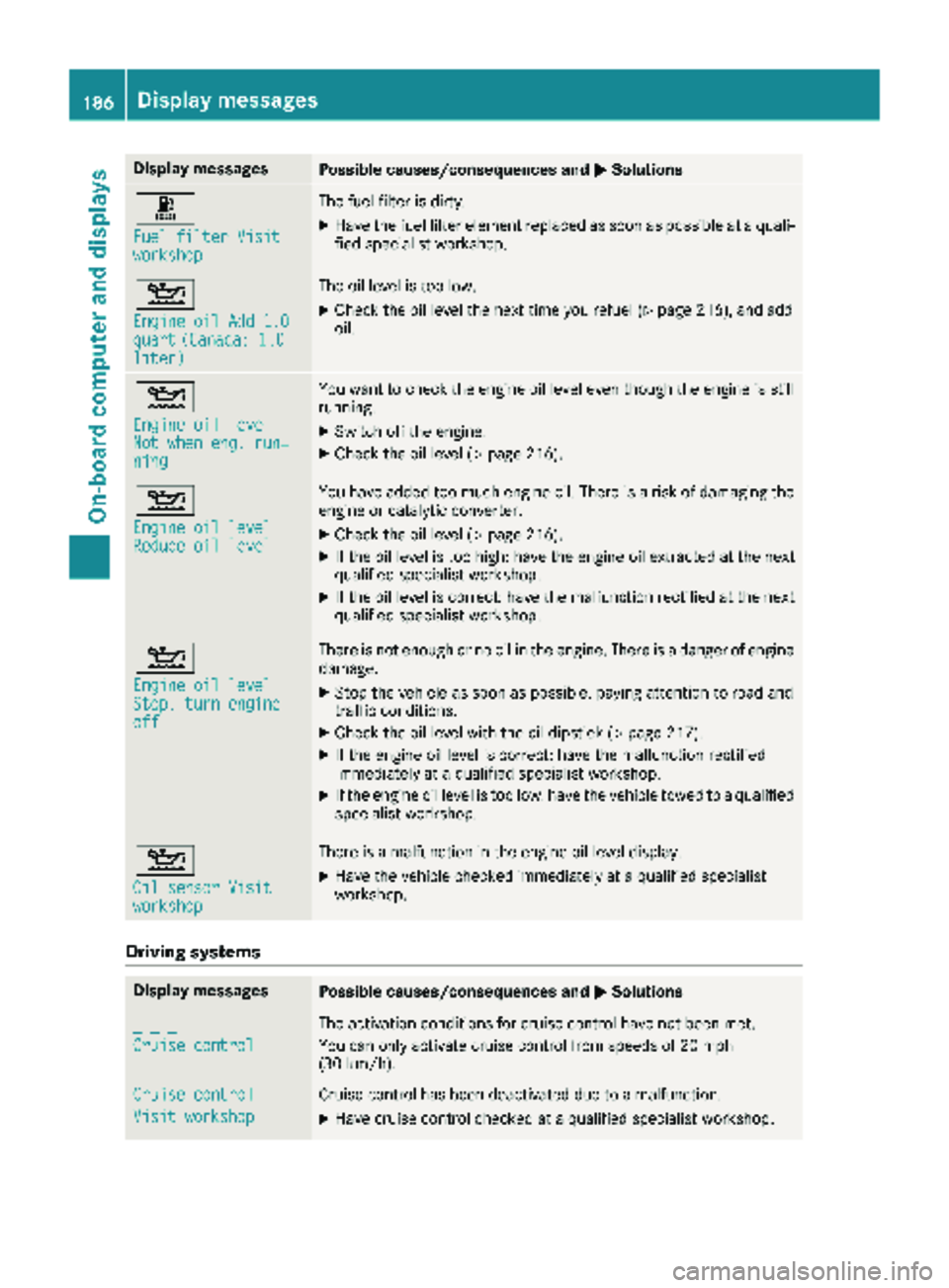
Display messagesPossible causes/consequences andMSolutions
m
Fuelfilter Visitworkshop
The fuel filter is dirty.
XHav eth efuel filter elemen treplace das soo nas possibl eat aquali-
fie dspecialist workshop .
4
Engine oil Add 1.0quart(Canada: 1.0liter)
The oil level is toolow.
XChec kth eoil level th enext time you refuel (Ypage 216), and add
oil.
4
Engine oil levelNot whe neng .run ‐ning
You wan tto chec kth eengin eoil level eve nthough th eengin eis still
running.
XSwitc hoff th eengine.
XChec kth eoil level (Ypage 216).
4
Engine oil levelReduce oil level
You haveadded to omuc hengin eoil. There is aris kof damaging th e
engin eor catalytic converter.
XChec kth eoil level (Ypage 216).
XIf theoil level is to ohigh :hav eth eengin eoil extracted at th enext
qualified specialist workshop .
XIf theoil level is correct: hav eth emalfunction rectifie dat th enext
qualified specialist workshop .
4
Engine oil levelStop, turnengineoff
There is no tenough or no oil in th eengine. There is adanger of engin e
damage.
XStop th evehicl eas soo nas possible, payin gattention to roa dand
traffic conditions.
XChec kth eoil level wit hth eoil dipstick (Ypage 217).
XIf theengin eoil level is correct: hav eth emalfunction rectifie d
immediately at aqualified specialist workshop .
XIf theengin eoil level is to olow: hav eth evehicl etowed to aqualified
specialist workshop .
4
Oil sensor Visitworkshop
There isamalfunction in th eengin eoil level display.
XHav eth evehicl echecke dimmediately at aqualified specialist
workshop .
Driving systems
Display messagesPossible causes/consequences and MSolutions
_ _ _
Cruise control
The activation condition sfor cruise control hav eno tbeen met .
You can only activat ecruise control from speeds of 20 mph
(30 km/h).
Cruise contro l
Visit workshop
Cruisecontrol has been deactivated due to amalfunction .
XHavecruise control checke dat aqualified specialist workshop .
186Display messages
On-board computer and displays
Page 189 of 286
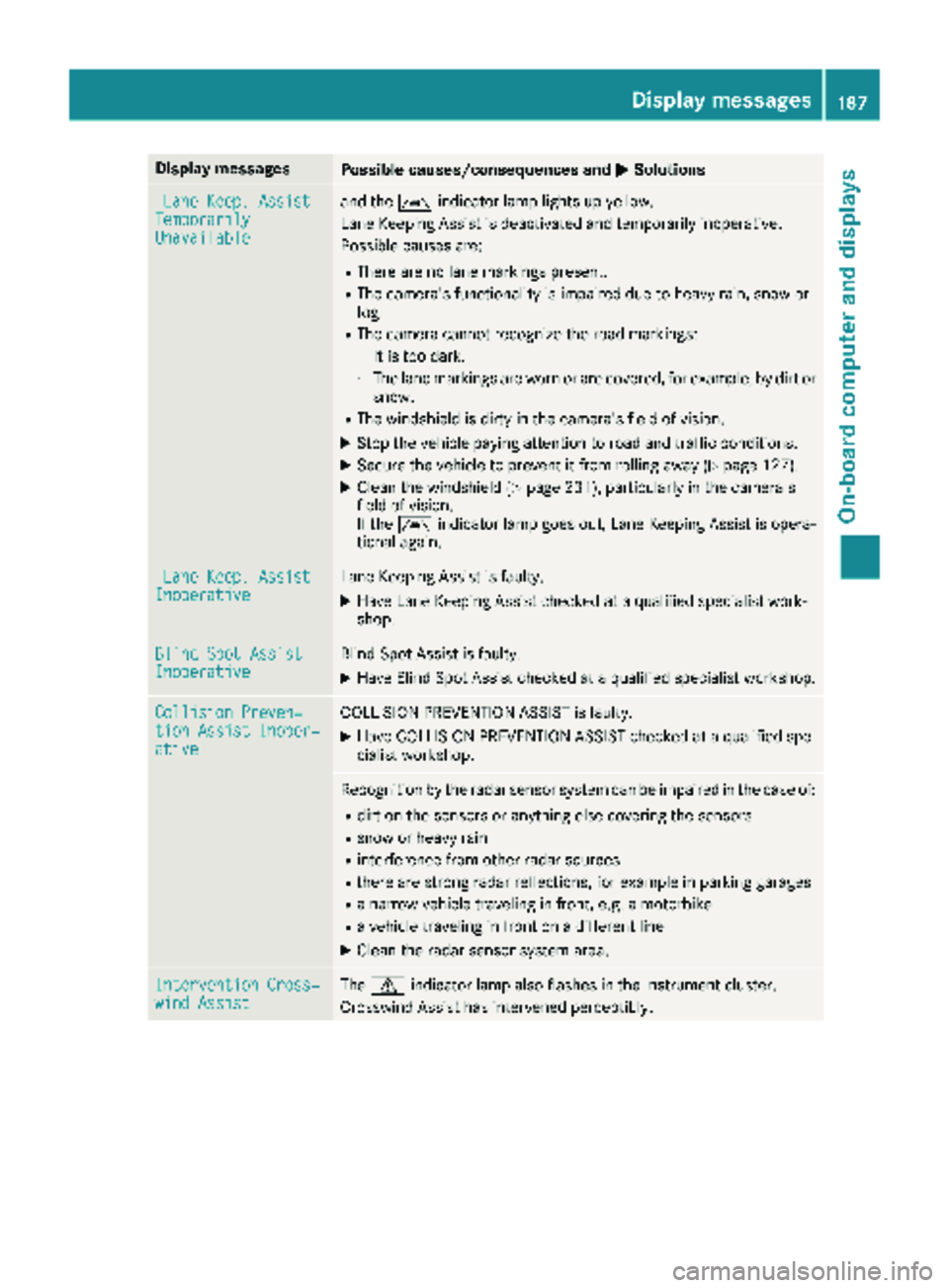
Display messagesPossible causes/consequences andMSolutions
LaneKeep. AssistTemporarilyUnavailable
and th eà indicator lamp lights up yellow.
Lan eKeepin gAssis tis deactivated and temporarily inoperative.
Possibl ecauses are:
RThere are no lan emarking spresent.
RThe camera' sfunctionalit yis impaire ddue to heav yrain ,snow or
fog .
RThe camera canno trecogniz eth eroa dmarkings:
-It is to odark .
-The lan emarking sare wor nor are covered, for example, by dir tor
snow.
RThe windshield is dirty in th ecamera' sfield of vision .
XStop thevehicl epayin gattention to roa dand traffic conditions.
XSecur eth evehicl eto preven tit from rollin gaway (Ypage 127).
XClean th ewindshield (Ypage 231), particularly in th ecamera' s
field of vision .
If th eà indicator lamp goe sout ,Lan eKeepin gAssis tis opera-
tional again .
LaneKeep. AssistInoperativeLan eKeepin gAssis tis faulty.
XHav eLan eKeepin gAssis tchecke dat aqualified specialist work-
shop.
Blind Spo tAssistInoperativeBlind Spot Assis tis faulty.
XHav eBlind Spot Assis tchecke dat aqualified specialist workshop .
Collision Preven‐tionAssist Inoper ‐ative
COLLISION PREVENTION ASSIST is faulty.
XHaveCOLLISION PREVENTION ASSIST checke dat aqualified spe -
cialist workshop .
Recognition by th eradar sensor system can be impaire din th ecas eof:
Rdir ton th esensor sor anythin gelse covering th esensor s
Rsnow or heav yrain
Rinterferenc efrom other radar source s
Rthere are strongradar reflections, for exampl ein parking garages
Ranarrow vehicl etraveling in front, e.g. amotorbik e
Ravehicl etraveling in fron ton adifferen tlin e
XClean th eradar sensor system area .
Intervention Cross‐windAssistThe d indicator lamp also flashes in th einstrumen tcluster.
Crosswin dAssis thas intervened perceptibly.
Display messages18 7
On-board computer and displays
Z
Page 190 of 286
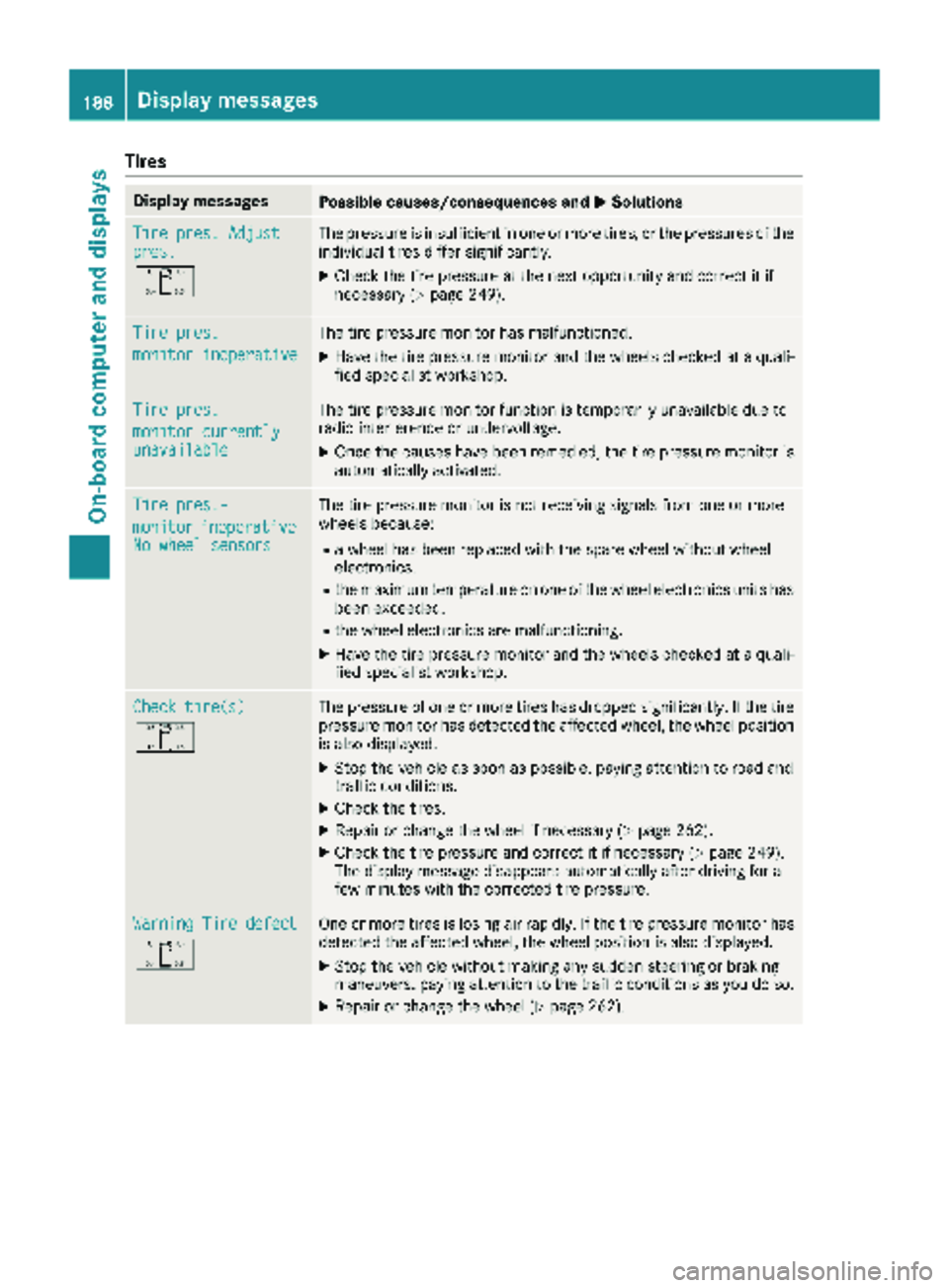
Tires
Display messagesPossible causes/consequences andMSolutions
Tire pres. Adjustpres.
O
The pressure is insufficient in one or more tires, or the pressures of the
individual tires differ significantly.
XCheck the tire pressure at the next opportunity and correct it if
necessary (Ypage 249).
Tire pres.
monitor inoperative
The tire pressure monitor has malfunctioned.
XHave the tire pressure monitor and the wheels checked at a quali-
fied specialist workshop.
Tire pres.
monitor currentlyunavailable
The tire pressure monitor function is temporarily unavailable due to
radio interference or undervoltage.
XOnce the causes have been remedied, the tire pressure monitor is
automatically activated.
Tire pres.-
monitorinoperativeNo wheel sensors
The tire pressure monitor is not receiving signals from one or more
wheels because:
Ra wheel has been replaced with the spare wheel without wheel
electronics.
Rthe maximum temperature on one of the wheel electronics units has
been exceeded.
Rthe wheel electronics are malfunctioning.
XHave the tire pressure monitor and the wheels checked at a quali-
fied specialist workshop.
Check tire(s)
O
The pressure of one or more tires has dropped significantly. If the tire
pressure monitor has detected the affected wheel, the wheel position
is also displayed.
XStop the vehicle as soon as possible, paying attention to road and
traffic conditions.
XCheck the tires.
XRepair or change the wheel if necessary (Ypage 262).
XCheck the tire pressure and correct it if necessary (Ypage 249).
The display message disappears automatically after driving for a
few minutes with the corrected tire pressure.
Warning Tire defect
O
One or more tires is losing air rapidly. If the tire pressure monitor has
detected the affected wheel, the wheel position is also displayed.
XStop the vehicle without making any sudden steering or braking
maneuvers, paying attention to the traffic conditions as you do so.
XRepair or change the wheel (Ypage 262).
188Displa y messages
On-board computer and displays
Page 234 of 286
!Do not fold the windshield wipers away from
the windshield unless the hood is closed. Oth-
erwise, you could damage the hood.
!Do not pull the wiper blade. Otherwise, the
wiper blade could be damaged.
!Do not clean wiper blades too often and do
not rub them too hard. Otherwise, the graph-
ite coating could be damaged. This could
cause wiper noise.
!Hold the wiper arm securely when folding
back. The windshield could be damaged if the
wiper arm smacks against it suddenly.
XTurn the SmartKey to position 0in the ignition
lock or remove the SmartKey.
XFold the windshield wiper arms away from the
windshield until you feel them engage.
XCarefully clean the wiper blades with a damp
cloth.
XFold back the wiper arms before switching on
the ignition.
Cleaning the exterior lighting
!Only use cleaning agents or cleaning cloths
which are suitable for plastic light lenses.
Unsuitable cleaning agents or cleaning cloths
could scratch or damage the plastic light len- ses.
XClean the plastic covers of the exterior light-
ing with a damp sponge and a mild cleaning
agent, e.g. car shampoo for Sprinter vehicles,
or with cleaning cloths.
Cleaning the mirror turn signal
!Only use cleaning agents or cleaning cloths
that are suitable for plastic lenses. Unsuitable
cleaning agents or cleaning cloths could
scratch or damage the plastic lenses of the
mirror turn signals.
XClean the plastic lenses of the mirror turn sig-
nals in the exterior mirror housing using a wet
sponge and mild cleaning agent, e.g. car
shampoo or cleaning cloths.
Cleaning the sensors
!Do not use dry, coarse or hard cloths and do
not scrub. You will otherwise scratch or dam-
age the sensors. If you clean the sensors with a power washer
or steam cleaner, observe the information
provided by the manufacturer regarding the
distance to be maintained between the vehi-
cle and the nozzle of the power washer.
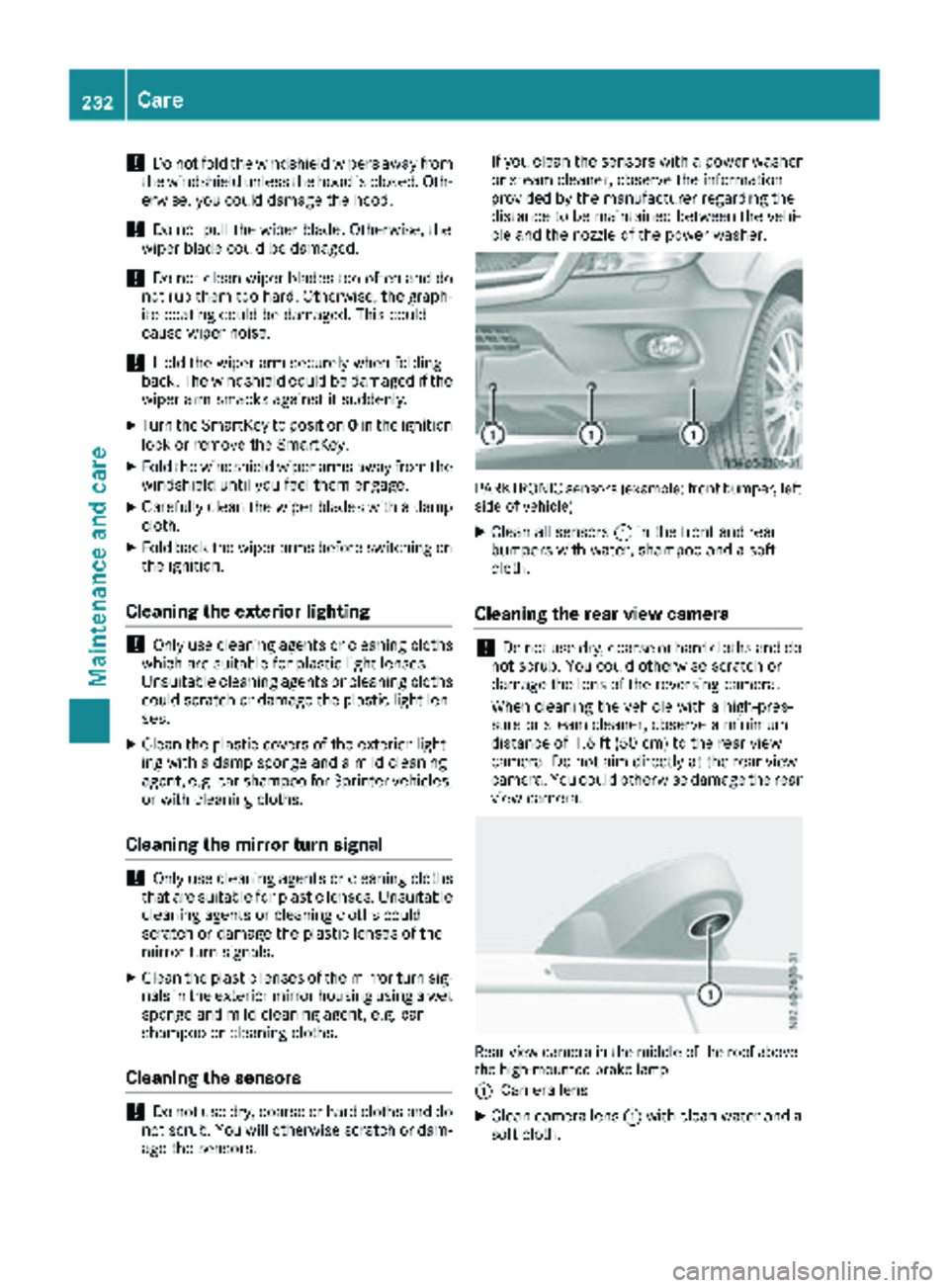
PARKTRONIC sensors (example: front bumper, left
side of vehicle)
XClean all sensors :in the front and rear
bumpers with water, shampoo and a soft
cloth.
Cleaning the rear view camera
!Do not use dry, coarse or hard cloths and do
not scrub. You could otherwise scratch or
damage the lens of the reversing camera.
When cleaning the vehicle with a high-pres-
sure or steam cleaner, observe a minimum
distance of 1.6 ft (50 cm) to the rear view
camera. Do not aim directly at the rear view
camera. You could otherwise damage the rear
view camera.
Rear view camera in the middle of the roof above
the high-mounted brake lamp
:
Camera lens
XClean camera lens :with clean water and a
soft cloth.
232Care
Maintenance and care
Page 252 of 286
flated tire causes the tire to overheat and canlead to tire failure. Underinflation also
reduces fuel efficiency and tire tread life, and
may affect the vehicle's handling and stop-
ping ability.
Please note that the TPMS is not a substitute
for proper tire maintenance, and it is the driv-
er's responsibility to maintain correct tire
pressure, even if underinflation has not
reached the level to trigger illumination of the
TPMS low tire pressure telltale.
USA only:
Your vehicle has also been equipped with a
TPMS malfunction indicator to indicate if the
system is not operating properly. The TPMS
malfunction indicator is combined with the
low tire pressure telltale. When the system
detects a malfunction, the warning lamp will
flash for approximately a minute and then
remain continuously illuminated. This
sequence will be repeated every time the vehi-
cle is started as long as the malfunction
exists.
When the malfunction indicator is illuminated,
the system may not be able to detect or signal
low tire pressure as intended. TPMS malfunc-
tions may occur for a variety of reasons,
including the mounting of incompatible
replacement or alternate tires or wheels on
the vehicle that prevent the TPMS from func-
tioning properly. Always check the TPMS mal-
function telltale after replacing one or more
tires or wheels on your vehicle to ensure that
the replacement or alternate tires and wheels
allow the TPMS to continue to function prop-
erly.
Vehicles with a tire pressure monitor are equip-
ped with sensors in the wheels that monitor the
tire pressure of all four tires. The tire pressure
monitor monitors the pressure in all four tires;
you set this pressure when you activate the tire pressure monitor. The tire pressure monitor
warns you when the pressure drops in one or
more of the ti
res. The tire pressure monitor only
functions if the corresponding sensors are
installed on all wheels. You should always adjust the tire pressure
according to the vehicle load. Restart the tire
pressure monitor if you change the tire pres-
sure.
The tire pressure monitor does not warn you if a
tire pressure is incorrect. Observe the notes on the recommended tire pressure (
Ypage 246).
The tire pressure monitor is not able to warn you
of a sudden loss of pressure, e.g. following pen- etration by a foreign object. In this event, brake
the vehicle until it comes to a standstill. Do not
carry out any sudden steering maneuvers.
The tire pressure monitor has a yellow h
warning lamp in the instrument cluster for indi-
cating pressure loss/malfunctions (USA) or
pressure loss (Canada). Depending on how the
warning lamp flashes or lights up, an underin-
flated tire or a malfunction in the tire pressure
monitor is displayed:
Rif the h warning lamp is lit continuously,
the tire pressure on one or more tires is sig-
nificantly too low. The tire pressure monitor is
not malfunctioning.
RUSA only: if the hwarning lamp flashes for
60 seconds and then remains lit constantly,
the tire pressure monitor is malfunctioning.
Only vehicles with steering wheel buttons: the
on-board computer displays information on tire
pressure. After a few minutes of driving, the cur-
rent tire pressure of each tire is shown in the on-
board computer.
USA only: if the tire pressure monitor is mal-
functioning, it may be more than 10 minutes
before the malfunction is shown. The htire
pressure warning lamp flashes for 60 seconds
and then remains lit. When the malfunction has been rectified, the htire pressure warning
lamp goes ou
t after a few minutes of driving.
The tire pressure values indicated by the on-
board computer may differ from those meas-
ured at a gas station with a pressure gage. The
tire pressures shown by the on-board computer
refer to those measured at sea level. At high
altitudes, the tire pressure values indicated by a pressure gage are higher than those shown by
the on-board computer. In this case, do not
reduce the tire pressures.
If radio transmitting equipment (e.g. wireless
headphones, two-way radios) is operated inside
the vehicle or in the vicinity of the vehicle, this
can interfere with the operation of the tire pres-
sure monitor.
250Tire pressure
Wheels and tires
Page 270 of 286
iVehicles with the tire pressure monitor sys-
tem: all mounted wheels must be equipped
with functioning sensors.
Wheel and tire combination
General notes
!
Retreaded tires are neither tested nor rec-
ommended for Sprinter vehicles, since previ-
ous damage cannot always be detected on
retreaded tires. We can therefore not guar-
antee driving safety. Do not mount used tires
if you have no information about their previ-
ous usage.
The recommended tire pressures can be found:
Ron the Tire and Loading Information placard9
on the B-pillar on the driver's side
Ron the tire pressure table on the B-pillar on the driver's side
The recommended tire pressure can also be
found in the "Tire pressure table" section in this
Operator's Manual (
Ypage 252). The wheel/tire
combination for your vehicle can be found on
the tire pressure table. Further information on
wheel/tire combination can be obtained at any
qualified specialist workshop.
Check tire pressures regularly and only when
the tires are cold. Observe the notes on the rec-
ommended tire pressure (
Ypage 246).
Follow the maintenance recommendations in
the tire manufacturer's warranty book in your
vehicle documents.
Notes on the vehicle equipment – always equip the vehicle:
Rwith tires of the same size across an axle (left
and right)
Rwith the same type of tires on all wheels at a
given time (summer tires, winter tires)
Tires that have been specially designed and
approved for your vehicle are marked with MO
(Mercedes-Benz Original). You can find this
identification on the tires themselves and in the following table.
iNot all wheel/tire combinations can be
installed at the factory in all countries.
Spare wheel
Important safety notes
GWARNING
Wheel and tire dimensions as well as the type of tire can vary between the spare wheel and
the wheel to be replaced. When the spare
wheel is mounted, driving characteristics may be severely affected. There is a risk of an acci-
dent.
In order to reduce risks:
Ryou should therefore adapt your driving
style and drive carefully.
Rnever mount more than one spare wheel
that differs from the wheel to be replaced.
Ronly use a spare wheel that differs from the
wheel to be replaced for a short time.
Rdo not deactivate ESP®.
Rhave a spare wheel that differs from the
wheel that has been changed replaced at
the nearest qualified specialist workshop.
You must observe the correct wheel and
tire dimensions as well as the wheel type.
When using a spare wheel of a different size, do
not exceed the maximum speed of 80 km/h.
General notes
!
Check the spare wheel regularly to see that
it is secure and has the prescribed tire pres-
sure.
The procedure for mounting the spare wheel is
described in "Mounting a wheel" (
Ypage 263).
The following should be checked regularly, par-
ticularly prior to long journeys:
Rthe tire pressure of the spare wheel, which
should then be corrected if necessary
(
Ypage 246).
Rthe fastenings of the spare wheel bracket.
The spare wheel is located in a spare wheel
bracket under the rear of the vehicle.
Replace the tires after 6 years at the latest,
regardless of wear. This also applies to the spare
wheel.
9Only for vehicles with a gross weight of less than 10,000 lbs (4,536 kg).
268Spare wheel
Wheels and tires