check engine light MERCEDES-BENZ SPRINTER 2018 MY18 Operator’s Manual
[x] Cancel search | Manufacturer: MERCEDES-BENZ, Model Year: 2018, Model line: SPRINTER, Model: MERCEDES-BENZ SPRINTER 2018Pages: 294, PDF Size: 4.36 MB
Page 91 of 294
Changing bulbs
Important safety notes
GDANGER
Xenon bulbs carry a high voltage. You can get an electric shock if you remove the cover of
the Xenon bulb and touch the electrical con-
tacts. There is a risk of fatal injury.
Never touch the parts or the electrical con-
tacts of the Xenon bulb. Always have work on
the Xenon bulbs carried out at a qualified spe-
cialist workshop.
GWARNING
Bulbs, lamps and connectors can get very hot
when operating. If you change a bulb, you
could burn yourself on these components.
There is a risk of injury.
Allow these components to cool down before
changing a bulb.
!Make sure the bulbs are always securely
installed.
If your vehicle is equipped with Bi-Xenon bulbs,
you can recognize this by the following: the cone
of light from the Xenon bulbs moves from the
top to the bottom and back again when you start
the engine. For this to be observed, the low-
beam headlamps must be switched on before
starting the engine.
The bulbs and lamps are an essential compo-
nent of vehicle safety. You must therefore make
sure that these function correctly at all times.
Have the headlamp setting checked regularly.
RAlways switch off the vehicle's lighting sys-
tem before changing a bulb.
This will prevent a short circuit.
RDo not touch the glass tube of new bulbs with your bare hands. Always use a clean, lint-free
cloth or only touch the base of the bulb when
installing.
Even minor contamination can burn into the
glass surface and reduce the service life of the
bulbs.
RDo not use a bulb that has been dropped or
that has scratches on its glass tube.
The bulb could explode.
ROnly use bulbs in closed lamps which have
been designed for this purpose.
ROnly use spare bulbs of the same type and
with the prescribed voltage
RProtect the bulbs from moisture when in use.
If the new bulb still does not light up, consult a
qualified specialist workshop.
RHave the LEDs and bulbs of the following
lamps changed at a qualified specialist work-
shop:
-the additional turn signals in the exterior
mirrors
-the high-mounted brake lamp
-LED daytime running lamps (Bi-Xenon
headlamps)
-Bi-Xenon lamps (Bi-Xenon headlamps)
-front fog lamps
If you require assistance changing bulbs, con-
sult a qualified specialist workshop.
Front bulbs
Overview of bulb replacement – bulb
types
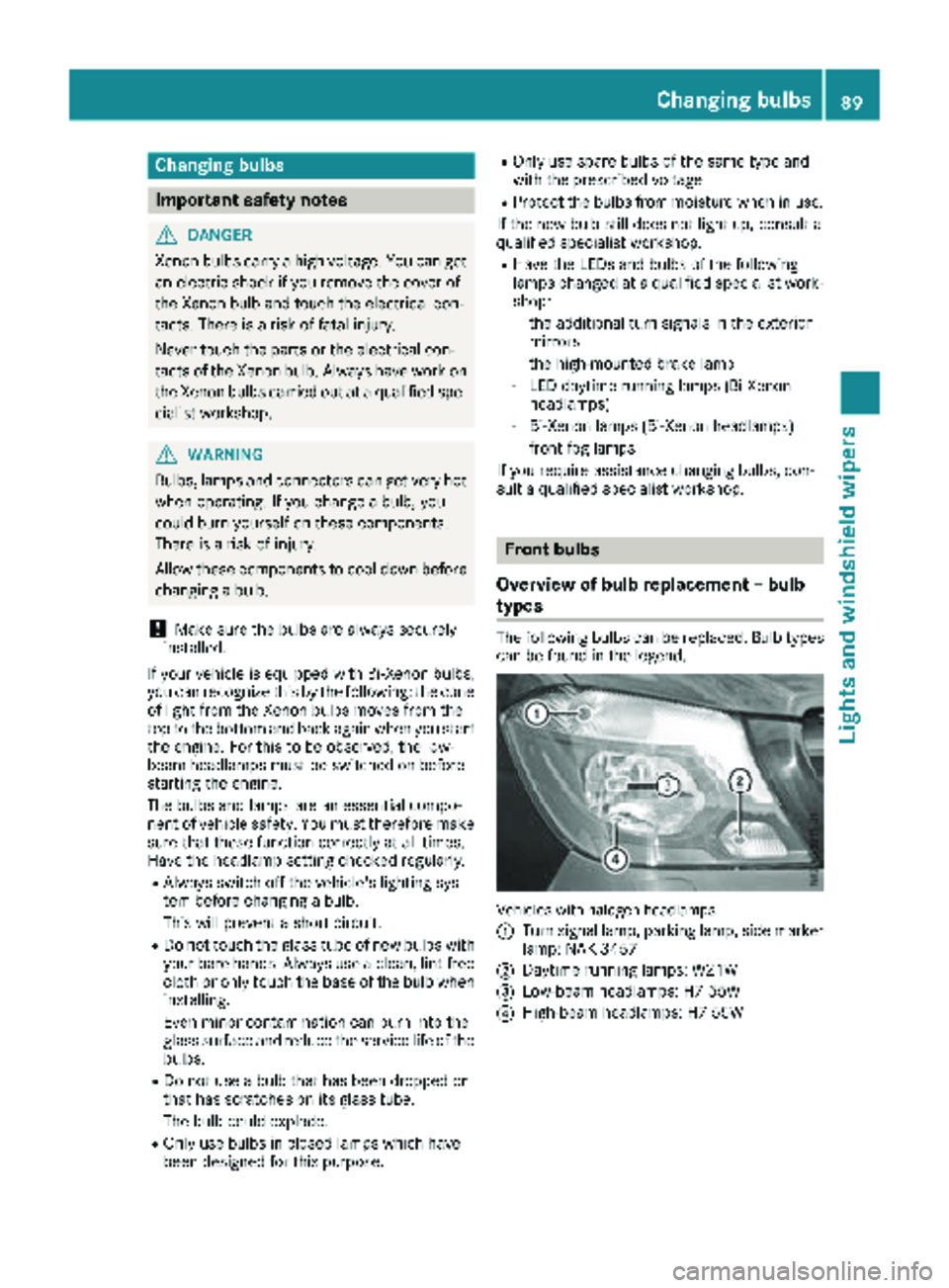
The following bulbs can be replaced. Bulb types can be found in the legend.
Vehicle swit hhalogen headlamps
:
Turn signal lamp, parking lamp, side marker
lamp: NAK 3457
;Daytime running lamps: W21W
=Low-beam headlamps: H7 55W
?High-beam headlamps: H7 55W
Changing bulbs89
Lights and windshield wipers
Z
Page 111 of 294
Outside tempera-
tureEngine runtime
Above 32 ‡ (0 †)at least 10 minutes
32 ‡ (0 †) to 14 ‡
(Ò10 †)at least 15 minutes
Below 14 ‡ (Ò10 †)at least 20 minutes
Before switching on
XCheck the fuel level and top up if necessary.
The auxiliary heating is operated directly
using the vehicle's fuel. The tank must be at
least a quarter full to ensure that the auxiliary
heating functions.
XSwitch on climate control (Ypage 102).
XSet the temperature control to the desired
temperature (Ypage 103).
XSet the air distribution as required
(Ypage 103).
XOpen the center (Ypage 106) and side air
vents (Ypage 107) and set them to the middle
position.
iThe auxiliary heating automatically switches
to heater booster mode after the engine is
started.
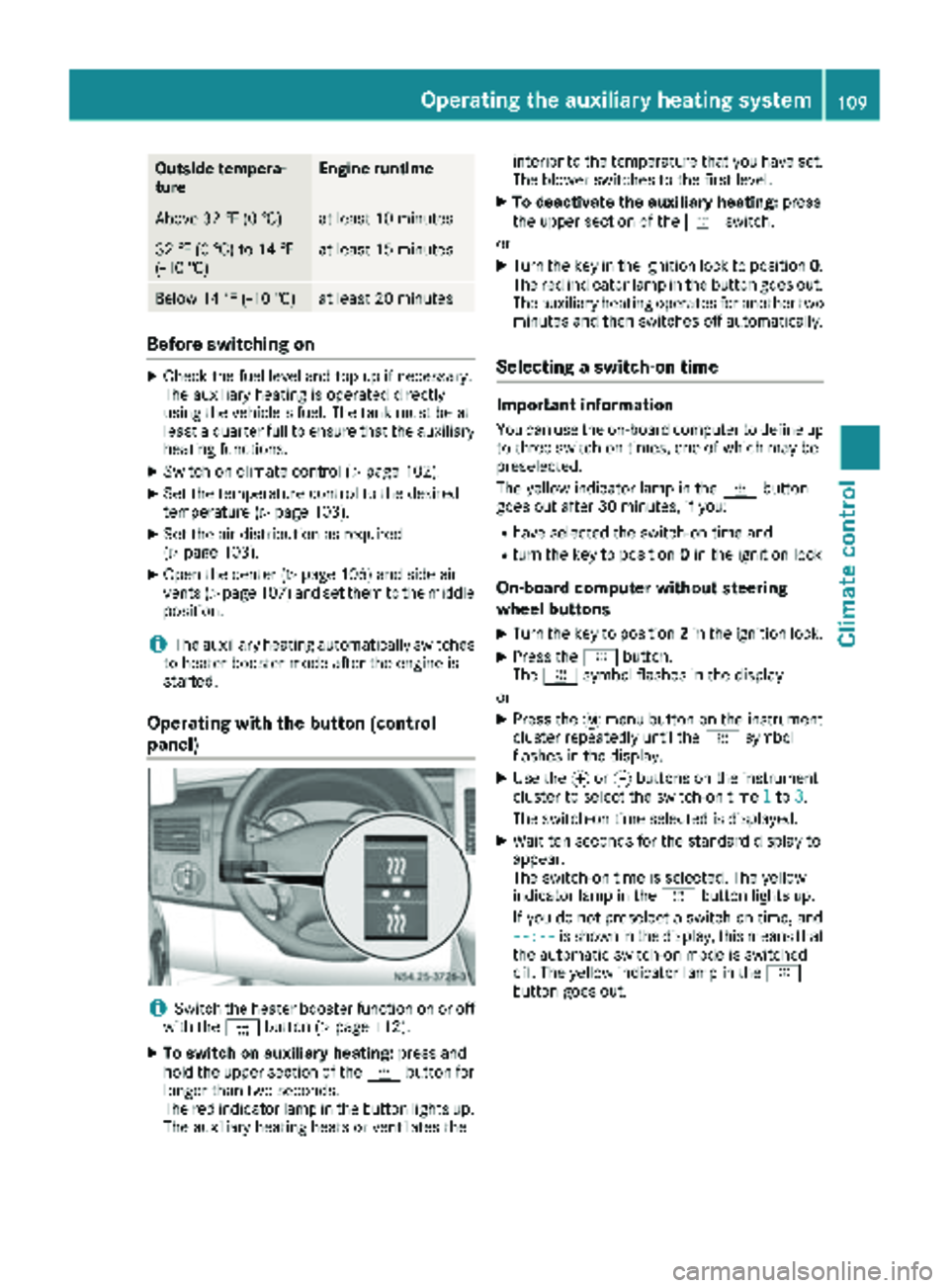
Operating with the button (control
panel)
iSwitch the heater booster function on or off
with the ¢button (Ypage 112).
XTo switch on auxiliary heating: press and
hold the upper section of the ybutton for
longer than two seconds.
The red indicator lamp in the button lights up.
The auxiliary heating heats or ventilates the interior to the temperature that you have set.
The blower switches to the first level.
XTo deactivate the auxiliary heating:
press
the upper section of the yswitch.
or
XTurn the key in the ignition lock to position 0.
The red indicator lamp in the button goes out.
The auxiliary heating operates for another two
minutes and then switches off automatically.
Selecting a switch-on time
Important information
You can use the on-board computer to define up
to three switch-on times, one of which may be
preselected.
The yellow indicator lamp in the ybutton
goes out after 30 minutes, if you:
Rhave selected the switch-on time and
Rturn the key to position 0in the ignition lock
On-board computer without steering
wheel buttons
XTurn the key to position 2in the ignition lock.
XPress the ybutton.
The y symbol flashes in the display.
or
XPress the 4menu button on the instrument
cluster repeatedly until the ysymbol
flashes in the display.
XUse the forg buttons on the instrument
cluster to select the switch-on time 1to3.
The switch-on time selected is displayed.
XWait ten seconds for the standard display to
appear.
The switch-on time is selected. The yellow
indicator lamp in the ybutton lights up.
If you do not preselect a switch-on time, and
--:--
is shown in the display, this means that
the automatic switch-on mode is switched
off. The yellow indicator lamp in the y
button goes out.
Operating the auxiliary heating system109
Climate control
Z
Page 122 of 294
Preparing for a journey
Visual check of the vehicle exterior
XIn particular, check the following components
on the vehicle, and on the trailer as necessary:
Rlicense plates, vehicle lighting, turn signals,
brake lamps and wiper blades for dirt and
damage
Rtires and wheels for firm seating, correct
tire pressure and general condition
Rtrailer tow hitch for play and security
The trailer coupling is one of the most
important vehicle parts with regard to road safety. The separate instructions issued by
the manufacturer pertaining to operation,
care and maintenance should be observed.
Rthat contour markings on attachments and
bodies are in good condition
XRectify any noticeable defects before com-
mencing the journey.
Checks in the vehicle
Emergency equipment and first-aid kit
XCheck the equipment to make sure that it is
accessible, complete and ready for use.
The first aid and breakdown assistance equip-
ment is in the front door stowage compartments
and behind the driver's seat.
Vehicle lighting
XTurn the key to position 2in the ignition lock.
XCheck the lighting system with the aid of a
second person.
XReplace defective bulbs (Ypage 89).
Before driving off
GWARNING
Objects in the driver's footwell may restrict
the clearance around the pedals or block a
depressed pedal. This jeopardizes the oper-
ating and road safety of the vehicle. There is a risk of an accident.
Stow all objects securely in the vehicle so that
they do not get into the driver's footwell.
When using floormats or carpets, make sure
that they are properly secured so that they do
not slip or obstruct the pedals. Do not place
several floormats or carpets on top of one
another.
GWARNING
Unsuitable footwear can hinder correct usage of the pedals, e.g.:
Rshoes with thick soles
Rshoes with high heels
Rslippers
There is a risk of an accident.
Wear suitable footwear to ensure correct
usage of the pedals.
XSecure the load as per the loading guidelines
(Ypage 213).
XStow luggage items securely. Secure the load
as per the loading guidelines (Ypage 213).
XMake sure that the floormats and carpets are
properly secured so that they cannot slip and
obstruct the pedals.
XClose all doors.
Starting the engine
GWARNING
Combustion engines emit poisonous exhaust
gases such as carbon monoxide. Inhaling
these exhaust gases leads to poisoning. There
is a risk of fatal injury. Therefore never leave
the engine running in enclosed spaces with-
out sufficient ventilation.
!Do not depress the accelerator pedal when
starting the engine.
XBefore starting the engine, make sure that:
Rall the doors are closed.
Rall the vehicle occupants are wearing their
seat belts correctly.
Rthe parking brake is applied.
iIf you depress the brake pedal before start-
ing the engine, the pedal travel is short and
pedal resistance is high.
If you depress the brake pedal again after
starting the engine, pedal travel and resist-
ance will be back to normal again.
120Driving
Driving and parking
Page 125 of 294
ProblemPossible causes/consequences andMSolutions
The vehicle cannot be
driven at a speed
exceeding 5 mph
(8 km/h).
The yellow;Check
Engine lamp and the yel-
low å DEF indicator
lamp
2light up.
The exhaust gas aftertreatment system is defective or an emissions-
relevant malfunction has occurred.
This malfunction or defect can damage the exhaust gas aftertreat-
ment.
XObserve the messages in the display:
Ron vehicles without steering-wheel buttons (Ypage 177)
Ron vehicles with steering wheel buttons (Ypage 187).
The engine does not
start.
The starter motor cannot
be heard.The battery isolating switch is switched off.
XSwitch on the power supply (Ypage 119).
The engine does not
start.
The starter motor cannot
be heard.The on-board voltage is too low. The battery is too weak or discharged.
XJump-start the vehicle (Ypage 243).
If the engine cannot be jump-started, the starter motor is faulty.
XConsult a qualified specialist workshop.
The engine does not
start.
The starter motor cannot
be heard.The battery is discharged or faulty.
XCheck the battery for damage.
XCharge the battery (Ypage 233).
Automatic transmission
Important safety notes
GWARNING
If the engine speed is above the idling speed
and you engage transmission position Dor R,
the vehicle could pull away suddenly. There is
a risk of an accident.
When engaging transmission position Dor R,
always firmly depress the brake pedal and do not simultaneously accelerate.
!Vehicles with automatic transmission may
roll only briefly in the neutral position N. Pro-
longed rolling of the wheels, e.g. when being
towed, will result in transmission damage.
Towing (
Ypage 244)
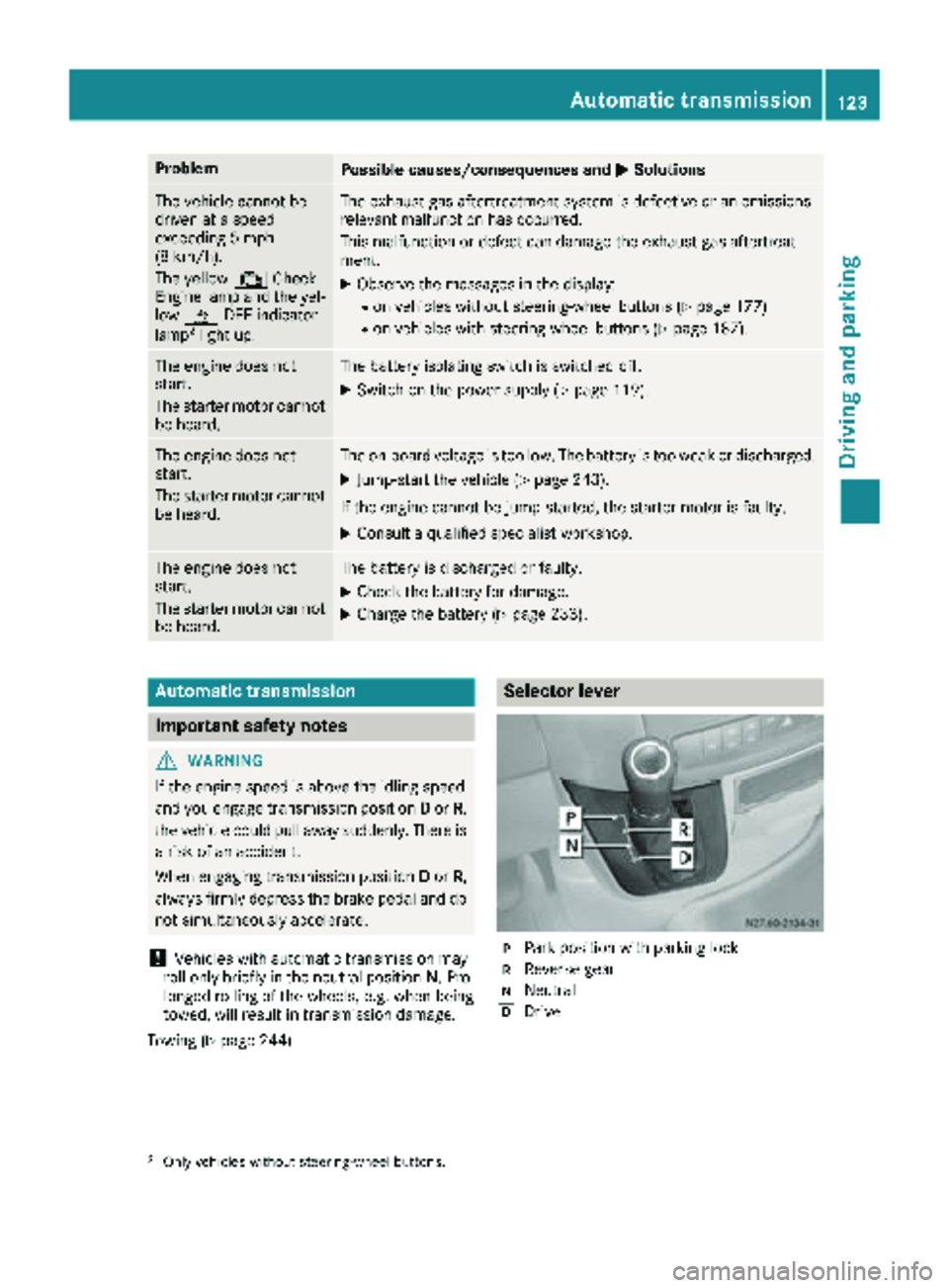
Selector lever
jPark position with parking lock
kReverse gear
iNeutral
hDrive
2Only vehicles without steering-wheel buttons.
Automatic transmission123
Driving and parking
Z
Page 132 of 294
Always park your vehicle safely and according to
legal requirements and secure it against rolling
away.
To ensure that the vehicle is properly secured
against rolling away unintentionally:
Rthe parking brake must be firmly applied
Rthe selector lever must be in positionPand
the key must be removed from the ignition
lock
Ron steep uphill or downhill gradients, the front
wheels must be turned towards the curb
Rthe rear axle must be secured, e.g. with a
wheel chock, on steep uphill or downhill gra-
dients
Use the wheel chock (
Ypage 131) to do so.
If you leave the vehicle parked for more than
three weeks:
Rconnect the batteries to a trickle charger or
Rdisconnect the vehicle's starter battery or
Rswitch off the electrical system using the bat-
tery main switch (Ypage 118) and
Rdisconnect the vehicle's auxiliary battery
Otherwise, you need to check the battery's con-
dition of charge every 3 weeks, since standby
power consumption can drain the battery. If the
battery voltage is lower than 12.2 V,the battery
must be charged. Otherwise, the battery may be damaged by exhaustive discharging.
Be sure to observe the notes on disconnecting
and charging the batte
ries under "Bat-
tery“ (Ypage 228). You can obtain information
about trickle chargers from a qualified specialist
workshop.
Parking brake
GWARNING
If you leave children unsupervised in the vehi-
cle, they could set it in motion by, for example:
Rrelease the parking brake.
Rshift the automatic transmission out of the
parking position P.
Rstart the engine.
In addition, they may operate vehicle equip-
ment and become trapped. There is a risk of
an accident and injury.
When leaving the vehicle, always take the
SmartKey with you and lock the vehicle. Never
leave children unsupervised in the vehicle.
GWARNING
If you must brake the vehicle with the parking brake, the braking distance is considerably
longer and the wheels could lock. There is an
increased danger of skidding and accidents.
Only use the parking brake to brake the vehi-
cle when the service brake is faulty. Do not
apply the parking brake too firmly. If the
wheels lock, release the parking brake until
the wheels begin turning again.
The brake lamps are not illuminated when you
brake the vehicle using the parking brake.
As a rule, you may only apply the parking brake
when the vehicle is stationary.
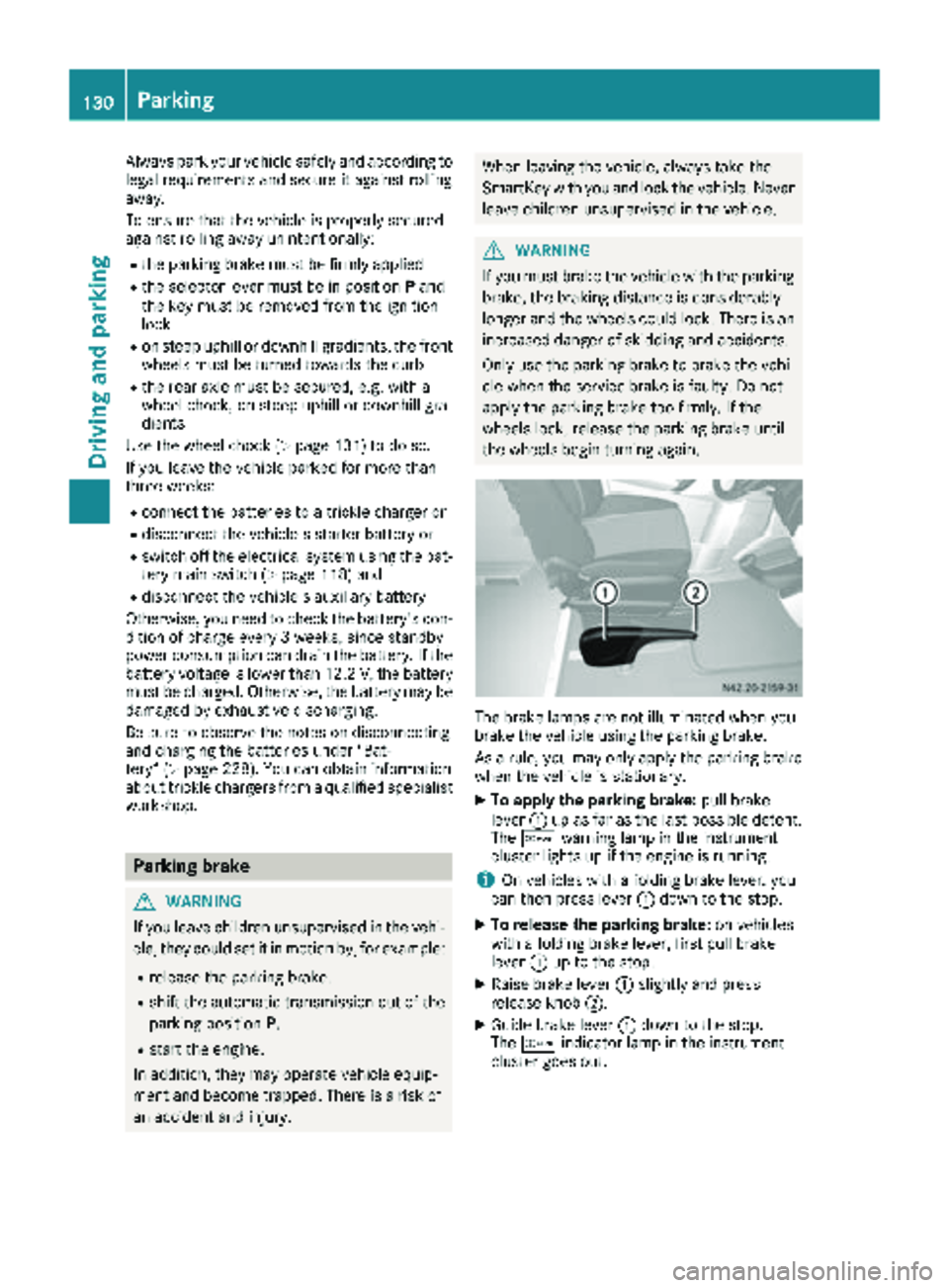
XTo apply the parking brake: pull brake
lever :up as far as the last possible detent.
The c warning lamp in the instrument
cluster lights up if the engine is running.
iOn vehicles with a folding brake lever, you
can then press lever :down to the stop.
XTo release the parking brake: on vehicles
with a folding brake lever, first pull brake
lever :up to the stop.
XRaise brake lever :slightly and press
release knob ;.
XGuide brake lever :down to the stop.
The c indicator lamp in the instrument
cluster goes out.
130Parking
Driving an d parking
Page 144 of 294
XBrake immediately in order to increase the
distance from the vehicle in front.
or
XTake evasive action provided it is safe to do
so.
If you want the distance warning function to
assist you, the function must be activated and
operational.
Due to the nature of the system, particularly
complicated driving conditions may cause the
system to display an unnecessary warning.
With the help of the radar sensor system, the
distance warning function can detect obstacles
that are in the path of your vehicle for an exten-
ded period of time.
Up to a speed of 45 mph (70 km/h), the distance
warning function can also react to stationary
obstacles, such as stopped or parked vehicles.
If you approach an obstacle and the distance
warning function detects a risk of a collision, the
system will alert you both visually and acousti-
cally.
In particular, the detection of obstacles can be
impaired in the case of:
Rdirt, ice or anything else covering the sensors
Rsnow or heavy rain
Rinterference from other radar sources
Rthere are strong radar reflections, for exam-
ple in parking garages
Ra narrow vehicle traveling in front, e.g. a
motorbike
Ra vehicle traveling in front on a different line
Following damage to the front end of the vehicle,
have the configuration and operation of the
radar sensor checked at a qualified specialist
workshop. This also applies to collisions at slow
spe eds w
here there is no visible damage to the
front of the vehicle.
Activating/deactivating the distance
warning function
When you switch on the engine, the distance
warning function switches on after a few sec-
onds.
XTo deactivate: press theæbutton
(Ypage 37).
Vehicles without steering wheel buttons:
the Ä warning lamp in the instrument clus-
ter lights up and the OFF
message flashes. The
message then disappears and the Äindi-
cator lamp remains lit. Vehicles with steering wheel buttons:
the
Ä warning lamp in the instrument cluster
flashes and the Distance
WarningSystemDeactivatedmessage appears .The mes-
sage then disappears and the Äwarning
lamp remains lit.
XTo activate: press theæbutton again
(Ypage 37).
Vehicles without steering wheel buttons:
the Ä warning lamp in the instrument clus-
ter lights up and the on
message flashes. The
message then disappears and the Äindi-
cator lamp goes out.
Vehicles with steering wheel buttons: the
Ä warning lamp in the instrument cluster
flashes and the Distance
WarningSystemActivatedmessage appears in the multi-
function display. The message then disap-
pears and the indicator lamp Ägoes out.
Adaptive Brake Assist
iObserve the "Important safety notes" sec-
tion for driving safety systems (Ypage 54).
GWARNING
Adaptive Brake Assist cannot always clearly
identify objects and complex traffic situa-
tions.
In such cases, Adaptive Brake Assist can:
Rintervene unnecessarily
Rnot intervene
There is a risk of an accident.
Always pay careful attention to the traffic sit- uation and be ready to brake. Terminate the
intervention in a non-critical driving situation.
GWARNING
Adaptive Brake Assist does not react:
Rto people or animals
Rto oncoming vehicles
Rto crossing traffic
Rto stationary obstacles
Rwhen cornering
As a result, the Adaptive Brake Assist may not
intervene in all critical conditions. There is a
risk of an accident.
142Driving systems
Driving and parking
Page 155 of 294
Problems with PARKTRONIC
ProblemPossible causes/consequences andMSolutions
Only the red segments in
the PARKTRONIC warn-
ing displays are lit.
In addition, a warning
tone sounds for approx.
two seconds
PARKTRONIC is deacti-
vated after approx-
imately 20 seconds.
The indicator lamp of the
f button lights up
and the red segments in
the PARKTRONIC warn-
ing display go out.PARKTRONIC has malfunctioned and has switched itself off.
XIf problems persist, have PARKTRONIC checked at a qualified spe- cialist workshop.
The PARKTRONIC warn-
ing displays implausible
distances.
For example, all the seg-
ments may be lit even
though there is no obsta-
cle present.The PARKTRONIC sensors are dirty or iced up.
XClean the PARKTRONIC sensors (Ypage 237).
XTurn the key to position 2in the ignition lock.
The license plate or other parts attached near the sensors may not be
secured correctly.
XCheck the license plate and attachment parts near the sensors for
correct seating.
An external radio or ultrasonic source may be causing interference.
XCheck PARKTRONIC functions in a different location.
Rear view camera
Important safety notes
The rear view camera is only an aid. It cannot
replace your own awareness of the immediate
surroundings. You are responsible for safe
maneuvering, parking and pulling away. When
maneuvering, parking and pulling away, make
sure that there are no persons, animals or
objects in the maneuvering area.
The rear view camera is a visual parking aid.
Information on operation can be found in the
separate Audio 15 supplement.
The camera is in the middle of the roof above the
high-mounted brake lamp (
Ypage 237).
You can find information on cleaning the camera
in the "Maintenance and care" section
(
Ypage 237).
Working mode
ADR (working speed governor)
General notes
When activated, ADR automatically increases
the engine speed to a preset speed or a speed
you have set.
iAfter a cold start, the idling speed of the
engine is increased automatically. If the pre-
set working speed is lower than the increased idling speed, the working speed is only
reached once the engine has completed the
warm-up phase.
It is only possible to activate ADR with the
vehicle stationary and the parking brake
applied.
The selector lever of the automatic transmis-
sion must be in position P.
Working mode153
Driving and parking
Z
Page 159 of 294
ing to. Information is available from the police
and local authorities.
Observe the following when towing a trailer:
RPractice driving around bends, stopping and
backing up at a place where there is no traffic.This enables you to gain experience and get
used to the new handling characteristics.
RBefore driving, check:
-that the trailer tow hitch and ball coupling
are secure
-that the safety switch for a braked trailer is
functioning properly
-that the safety chains are secure and not
damaged
-that the electrical connections are secure
-that the lights are working
-that the wheels are in good order and the
tire pressure is correct
RAdjust the exterior mirrors to provide an
unobstructed view of the rear section of the
trailer.
RIf the trailer is equipped with an individual
braking system, check before each journey
whether the brakes are functioning correctly.
RIf the trailer has electronically controlled
brakes, pull the vehicle/trailer combination
away carefully. Brake manually using the
brake controller and check that the brakes
are working.
RSecure the load on the trailer according to the
applicable specifications and current stand-
ards on securing loads (
Ypage 215).
RWhen driving with a trailer, check at regular
intervals that the load is secured and that the
brakes and lights are working.
RBear in mind that the handling will be less
stable when towing a trailer than when driving
without one. Avoid sudden steering move-
ments.
RThe vehicle/trailer combination is heavier,
accelerates more slowly and has a decreased
gradient climbing capability and a long er
brak
ing distance.
It is more susceptible to crosswinds and
requires cautious steering.
RIf possible, do not brake suddenly, but rather
moderately at first so that the trailer can acti-
vate its brakes. Then increase the force on the
brake pedal.
RIf the automatic transmission repeatedly
shifts between gears when driving on inclines, restrict the shift range. Select shift range
4,3,
2 or 1.
Driving in a low gear and at a low speed
reduces the risk of damaging the engine.
RWhen driving on a downhill gradient, shift to a
low gear and take advantage of the engine's
braking effect.
Avoid continuous brake application as this
may overheat the vehicle brakes and, if instal-
led, the trailer brakes.
RIf the coolant temperature increases dramat-
ically while the air-conditioning system is
switched on, switch off the air-conditioning
system.
Coolant heat can also be dissipated by
switching the airflow and the temperature of
the heater/air conditioning to the maximum
level. Open the windows if necessary.
RWhen overtaking, pay particular attention to
the extended length of your vehicle/trailer
combination.
Due to the length of your vehicle/trailer com-
bination you need an additional distance
before you can return to your original lane.
Uncoupling a trailer
GWARNING
If you uncouple a trailer with the overrun
brake engaged, you could trap your hand
between the vehicle and the trailer drawbar.
There is a risk of injury.
Do not uncouple a trailer if the overrun brake
is engaged.
!Do not disconnect a trailer with an engaged
overrun brake. Otherwise, your vehicle could
be damaged by the rebounding of the overrun
brake.
XMake sure the selector lever of the automatic
transmission is in position P.
XApply the parking brake of the vehicle.
XClose all doors.
XApply the parking brake of the trailer.
XIn addition, secure the trailer against rolling
away with a wheel chock or similar object.
XRemove the trailer cable and safety chains
and decouple the trailer.
Towing a trailer157
Driving and parking
Z
Page 162 of 294
Useful information
This Operator's Manual describes all models as
well as standard and optional equipment of your
vehicle that were available at the time of going
to print. Country-specific variations are possi-
ble. Note that your vehicle may not be equipped
with all of the described functions. This also
applies to systems and functions relevant to
safety.
Read the information on qualified specialist
workshops (
Ypage 27).
Important safety notes
GWARNING
If you are driving and reach through the steer- ing wheel to operate the adjustment knob,
you could lose control of the vehicle. There is
a risk of an accident and injury.
Only operate the adjustment knobs when thevehicle is stationary. Do not reach through the
steering wheel when driving.
GWARNING
If you operate information systems and com-
munication equipment integrated in the vehi-
cle while driving, you will be distracted from
traffic conditions. You could also lose control
of the vehicle. There is a risk of an accident.
Only operate the equipment when the traffic
situation permits. If you are not sure that this
is possible, park the vehicle paying attention
to traffic conditions and operate the equip-
ment when the vehicle is stationary.
GWARNING
If the instrument cluster has failed or mal-
functioned, you may not recognize function
restrictions in systems relevant to safety. The
operating safety of your vehicle may be
impaired. There is a risk of an accident.
Drive on carefully. Have the vehicle checked
at a qualified specialist workshop immedi-
ately. You must observe the legal requirements for the
country in which you are currently driving when
operating the on-board computer.
The on-board computer display only shows mes-
sages and warnings from certain systems. You
should therefore make sure your vehicle is oper-
ating safely at all times. If the operating safety of
your vehicle is impaired, stop the vehicle as
soon as possible, paying attention to road and
traffic conditions. Then consult a qualified spe-
cialist workshop.
Instrument cluster
Overview
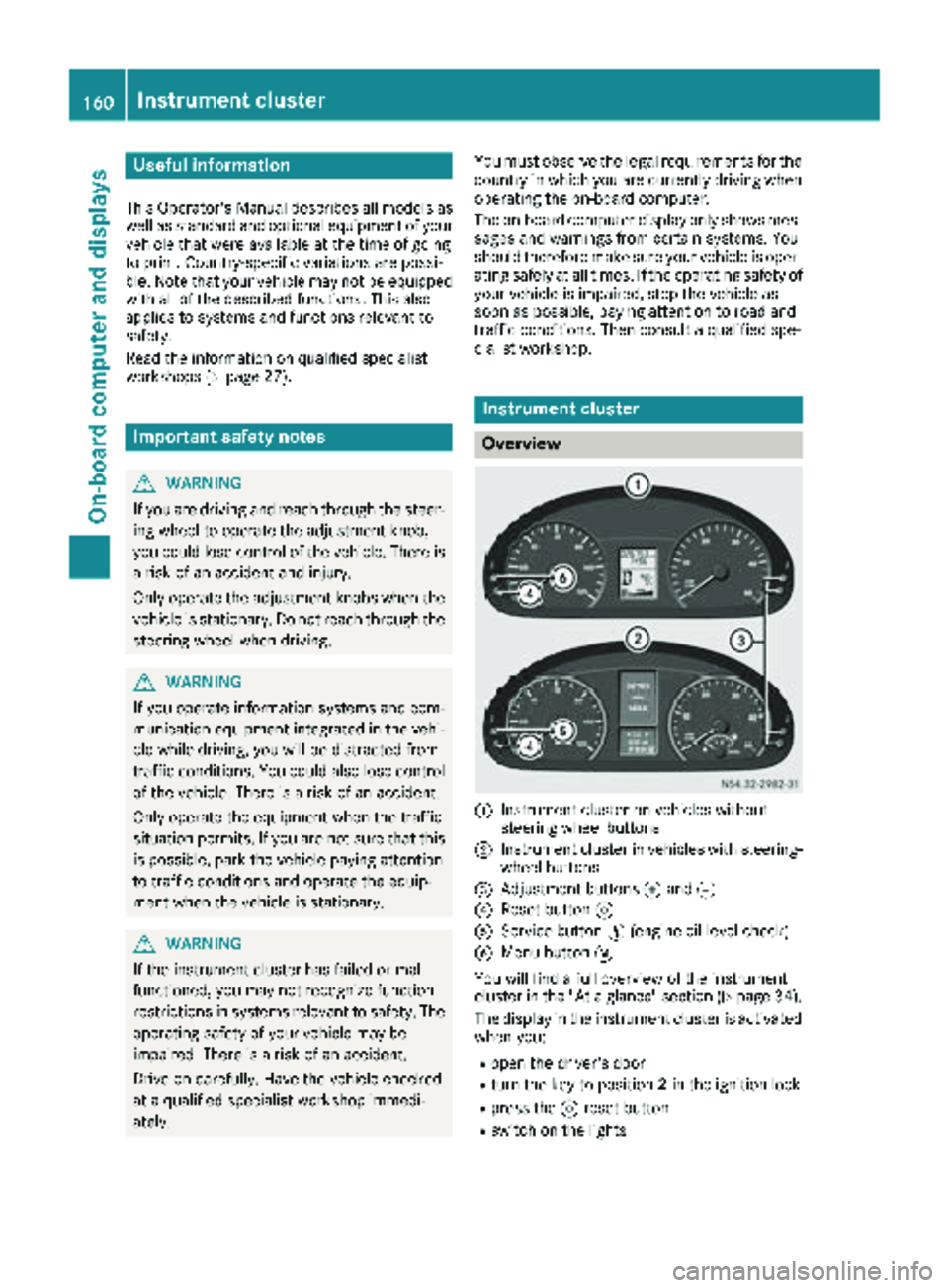
:Instrument cluster on vehicles without
steering wheel buttons
;Instrument cluster in vehicles with steering-
wheel buttons
=Adjustment buttons fand g
?Reset button 9
AService button Ë(engine oil level check)
BMenu button 4
You will find a full overview of the instrument
cluster in the "At a glance" section (
Ypage 34).
The display in the instrument cluster is activated when you:
Ropen the driver's door
Rturn the key to position 2in the ignition lock
Rpress the 9reset button
Rswitch on the lights
160Instrument cluster
On-board computer and displays
Page 164 of 294
If the supply of DEF falls below the reserve range
of 0.8 US gal (3.0l)the StArtS RExxmessage
appears in the display. Also, the yellow å
DEF indicator lamp lights up in the instrument
cluster and three warning tones sound.
In the display, xx
corresponds to the number of
possible remaining engine starts ( 16to0).
When the display shows that the number of
remaining starts is 0
, theStArtSIdLEmessage
appears in the display and three warning tones
sound.
In addition, the yellow åDEF indicator lamp
and the ;Check Engine indicator lamp light
up in the instrument cluster and three warning
tones sound.
The engine management only allows speeds of
up to 5 mph (8 km/h).
Add at least 1.5 US gal (5.5 l) of DEF
(
Ypage 128).
The display message only disappears when the
vehicle is stationary, at the latest after
20 second s, as soon as yo uswit ch on the igni-
tion or start the engine after refueling.
Vehicles with steering wheel buttons
If the supply of DEF is less than 1.5 US gal
(5.5 l),the Check Diesel Exhaust Fluid
See Operator's Manualmessage appears in
the display.
If the supply of DEF falls below the reserve range
of 0.8 US ga l(3.0 l),the XX
startsremainingmessage is displayed.
Three short warning tones also sound.
In the display, xx
corresponds to the number of
possible remaining engine starts ( 16to0).
When the display shows that the number of
remaining starts is 0
, theStArtSIdLEmessage
appears in the display.
The yellow ;Check Engine indicator lamp
also lights up and three short warning tones
sound.
The engine management only allows speeds of
up to 5 mph (8 km/h).
Add at least 1.5 US gal (5.5 l) of DEF
(
Ypage 128).
The display message only disappears when the
vehicle is stationary, at the latest after
20 seconds, as soon as you switch on the igni-
tion or start the engine after refueling.
On-board computer (vehicles without
steering wheel buttons)
Operating the on-board computer
General notes
The on-board computer is activated as soon as
you turn the key to position 1in the ignition lock.
The on-board computer shows vehicle informa-
tion and settings in the display.
You can control the display and the settings in
the on-board computer using the adjustment
buttons on the instrument cluster.
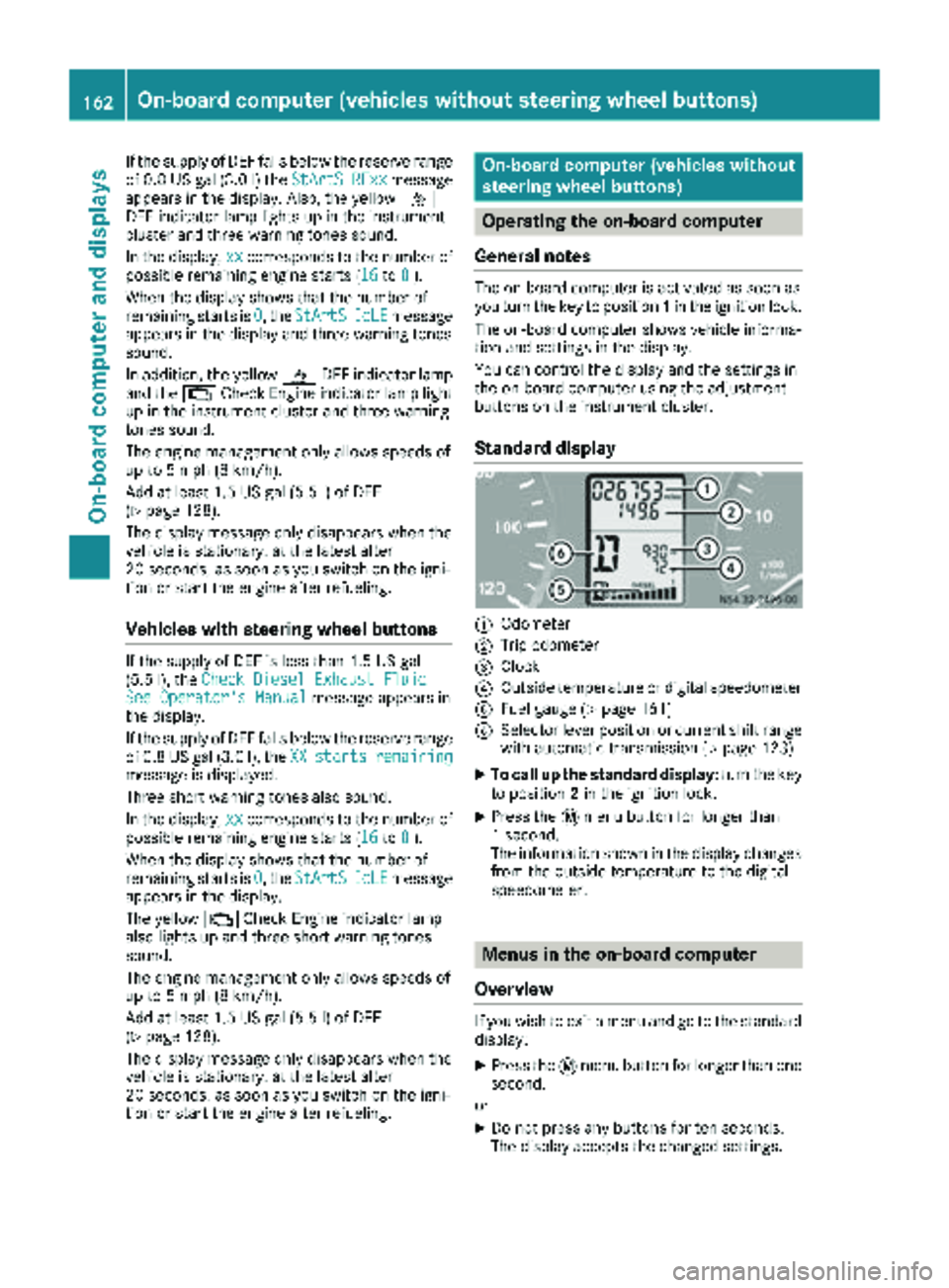
Standard display
:Odometer
;Trip odometer
=Clock
?Outside temperature or digital speedometer
AFuel gauge (Ypage 161)
BSelector lever position or current shift range
with automatic transmission (Ypage 123)
XTo call up the standard display: turn the key
to position 2in the ignition lock.
XPress the 4menu button for longer than
1 second.
The information shown in the display changes
from the outside temperature to the digital
speedometer.
Menus in the on-board computer
Overview
If you wish to exit a menu and go to the standard display:
XPress the 4menu button for longer than one
second.
or
XDo not press any buttons for ten seconds.
The display accepts the changed settings.
162On-board computer (vehicles without steering wheel buttons)
On-board computer and displays