oil level MERCEDES-BENZ SPRINTER 2018 MY18 Operator’s Manual
[x] Cancel search | Manufacturer: MERCEDES-BENZ, Model Year: 2018, Model line: SPRINTER, Model: MERCEDES-BENZ SPRINTER 2018Pages: 294, PDF Size: 4.36 MB
Page 165 of 294
Using thef,g,4or9 buttons you can
select the following functions:
RCalling up the service due date
(Ypage 227)
RChecking the oil level (Ypage 221)
RChecking the DEF level (Ypage 161)
RPreselecting/setting the auxiliary heating
switch-on time (Ypage 109)
RTire pressure monitor(Ypage 254)
RSetting the time (Ypage 163)
RActivating/deactivating Highbeam Assist
(Ypage 170)
RSetting the daytime running lamps
(Ypage 82)
Setting the time
XTurn the key to position 2in the ignition lock.
XPress the 4menu button repeatedly until the
hours figure flashes.
XPress the forg button to set the hour.
XPress the 9reset button.
The minute display flashes.
XPress the forg button to set the minute.
iIf you keep the forg button pressed, the
value will change continuously.
Activating/deactivating Highbeam
Assist
XTurn the key to position 2in the ignition lock.
XPress the 4menu button repeatedly until the
_ indicator lamp flashes and the onorOFFmessage appears in the display.
XUse the forg button to switch Highbeam
Assist on/off.
Switching the daytime running lamps
on/off
If you switch the daytime running lamps on, the
daytime running lamps will automatically light
up when the engine is running.
For safety reasons, it is only possible to change
this setting when the vehicle is stationary. The
factory setting is on
in countries in which day-
time running lamp mode or daytime running
lamps are mandatory.
XTurn the key to position 2in the ignition lock.
XPress the 4menu button repeatedly until the
L indicator lamp flashes and the onorOFFmessage appears in the display.
XPress the forg button to activate or deac-
tivate the daytime running lamps.
iUSA only:
If you turn the light switch to TorL,
the corresponding light switches on. If you
turn the light switch to Ã, the daytime
running lamps remain switched on.
Canada only:
If you turn the light switch to L, the low-
beam headlamps switch on. If you turn the
light switch to TorÃ, the daytime run-
ning lamps remain switched on.
On-board computer (vehicles with
steering wheel buttons)
Operating the on-board computer
Overview
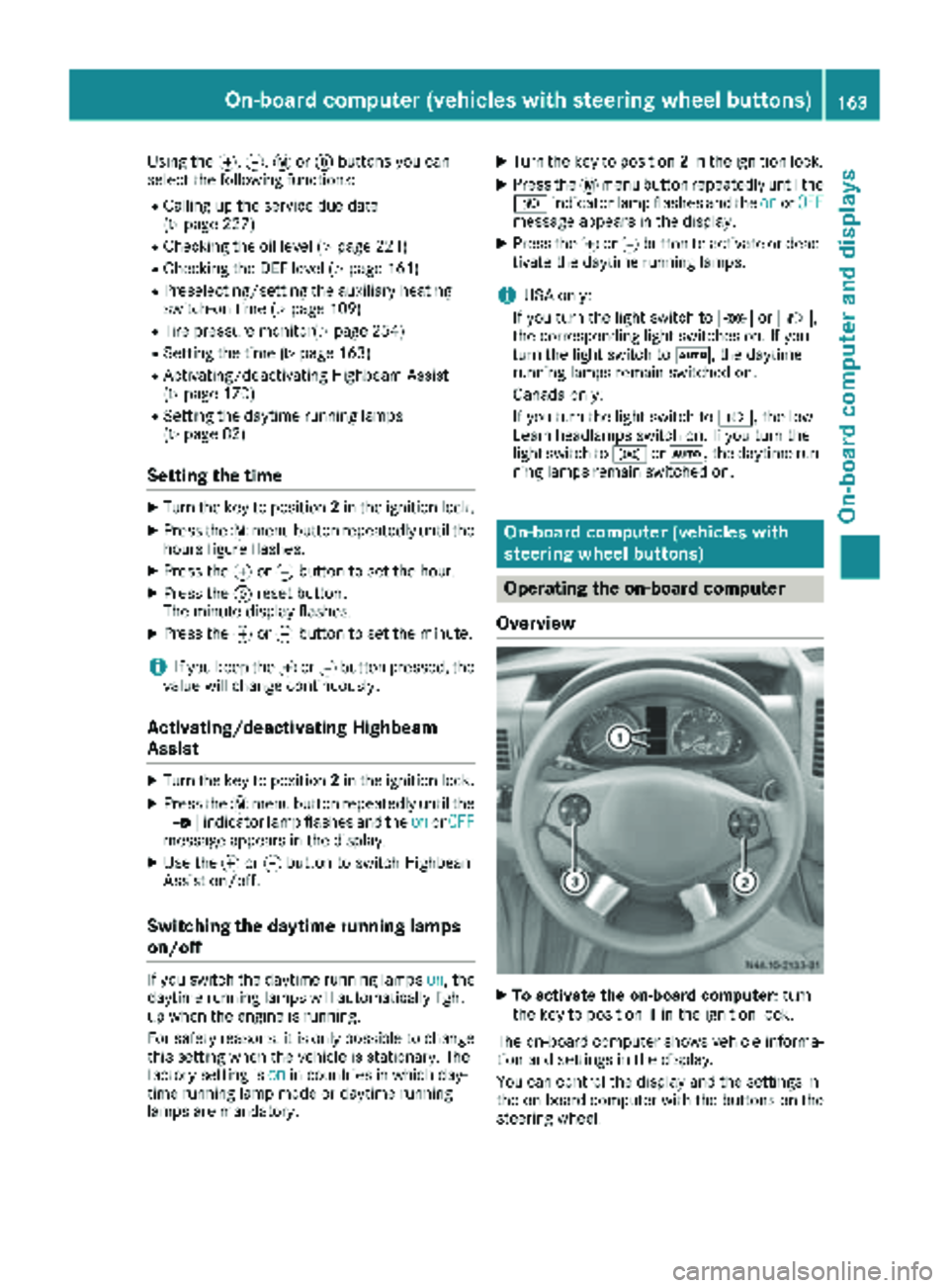
XTo activate the on-board computer: turn
the key to position 1in the ignition lock.
The on-board computer shows vehicle informa-
tion and settings in the display.
You can control the display and the settings in
the on-board computer with the buttons on the
steering wheel.
On-board computer (vehicles with steering wheel buttons)163
On-board computer and displays
Z
Page 167 of 294
Menu overview
Diagrams
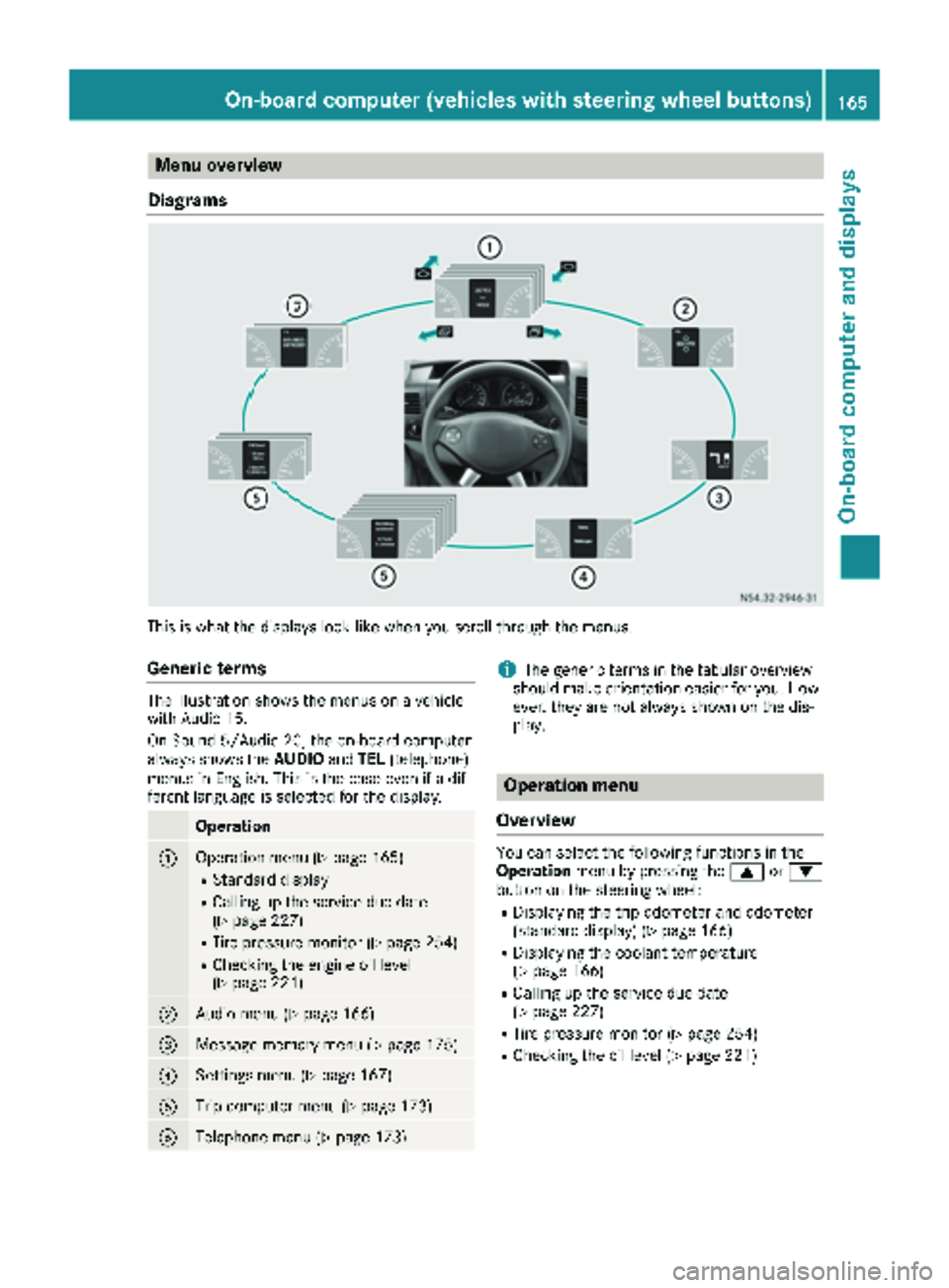
This is what the displays look like when you scroll through the menus.
Generic terms
The illustration shows the menus on a vehicle
with Audio 15.
On Sound 5/Audio 20, the on-board computer
always shows the AUDIOandTEL (telephone)
menus in English. This is the case even if a dif-
ferent language is selected for the display.
Operation
:Operation menu (Ypage 165)
RStandard display
RCalling up the service due date
(Ypage 227)
RTire pressure monitor (Ypage 254)
RChecking the engine oil level
(Ypage 221)
;Audio menu (Ypage 166)
=Message memory menu (Ypage 175)
?Settings menu (Ypage 167)
ATrip computer menu (Ypage 173)
BTelephone menu (Ypage 173)
iThe generic terms in the tabular overview
should make orientation easier for you. How-
ever, they are not always shown on the dis-
play.
Operation menu
Overview
You can select the following functions in the
Operation menu by pressing the 9or:
button on the steering wheel:
RDisplaying the trip odometer and odometer
(standard display) (Ypage 166)
RDisplaying the coolant temperature
(Ypage 166)
RCalling up the service due date
(Ypage 227)
RTire pressure monitor (Ypage 254)
RChecking the oil level (Ypage 221)
On-board computer (vehicles with steering wheel buttons)165
On-board computer and displays
Z
Page 192 of 294
Engine
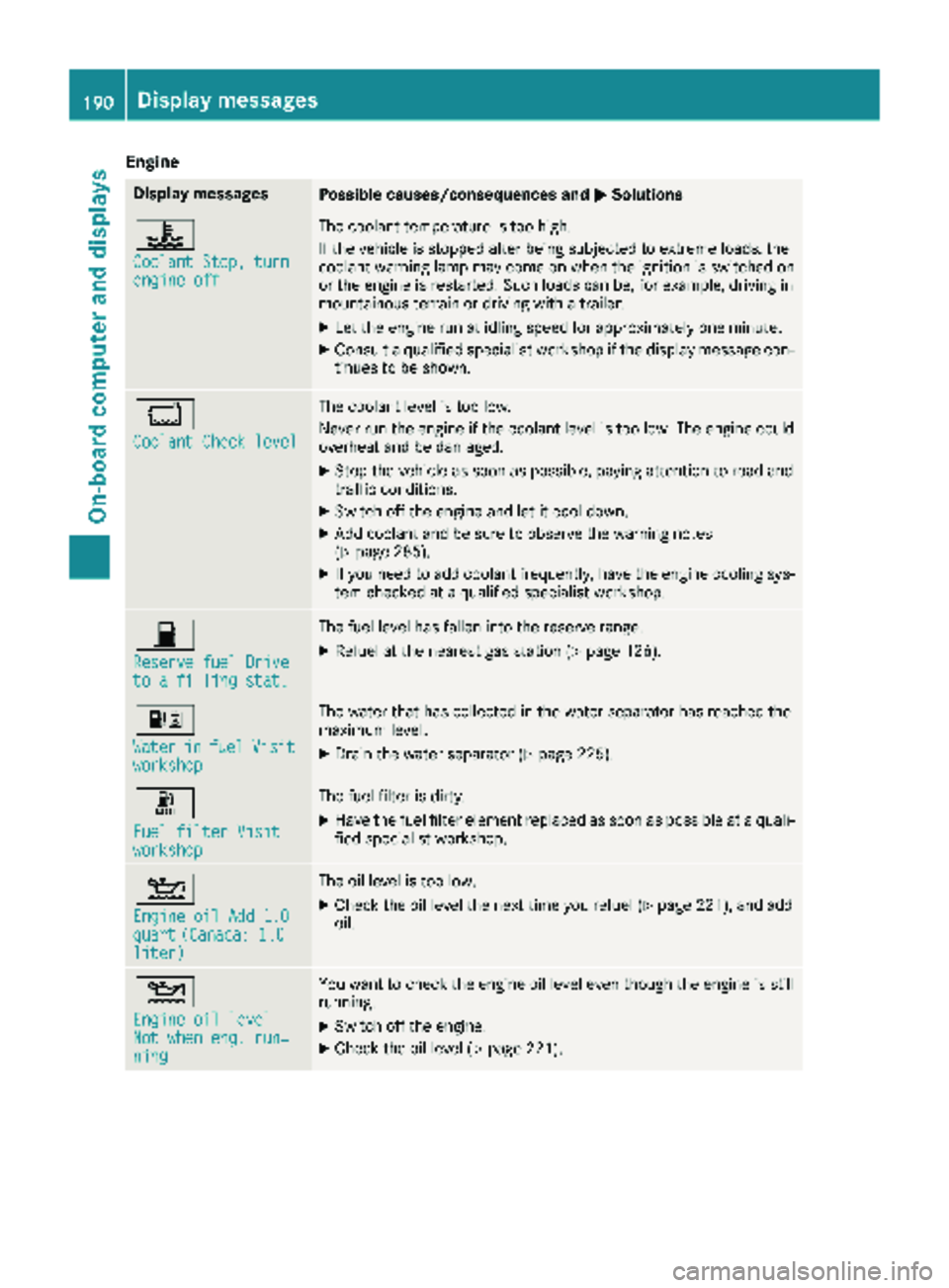
Display messagesPossible causes/consequences andMSolutions
?
Coolant Stop, turnengine off
The coolant temperature is too high.
If the vehicle is stopped after being subjected to extreme loads, the
coolant warning lamp may come on when the ignition is switched on
or the engine is restarted. Such loads can be, for example, driving in
mountainous terrain or driving with a trailer.
XLet the engine run at idling speed for approximately one minute.
XConsult a qualified specialist workshop if the display message con-
tinues to be shown.
*
Coolant Check level
The coolant level is too low.
Never run the engine if the coolant level is too low. The engine could
overheat and be damaged.
XStop the vehicle as soon as possible, paying attention to road and
traffic conditions.
XSwitch off the engine and let it cool down.
XAdd coolant and be sure to observe the warning notes
(Ypage 285).
XIf you need to add coolant frequently, have the engine cooling sys-
tem checked at a qualified specialist workshop.
7
Reserve fuel Driveto a filling stat.
The fuel level has fallen into the reserve range.
XRefuel at the nearest gas station (Ypage 126).
:
WaterinfuelVisitworkshop
The water that has collected in the water separator has reached the
maximum level.
XDrain the water separator (Ypage 225).
m
Fuel filter Visitworkshop
The fuel filter is dirty.
XHave the fuel filter element replaced as soon as possible at a quali-
fied specialist workshop.
4
Engine oil Add 1.0quart(Canada: 1.0liter)
The oil level is too low.
XCheck the oil level the next time you refuel (Ypage 221), and add
oil.
4
Engine oil levelNot when eng. run‐ning
You want to check the engine oil level even though the engine is still
running.
XSwitch off the engine.
XCheck the oil level (Ypage 221).
190Display messages
On-board computer and displays
Page 193 of 294
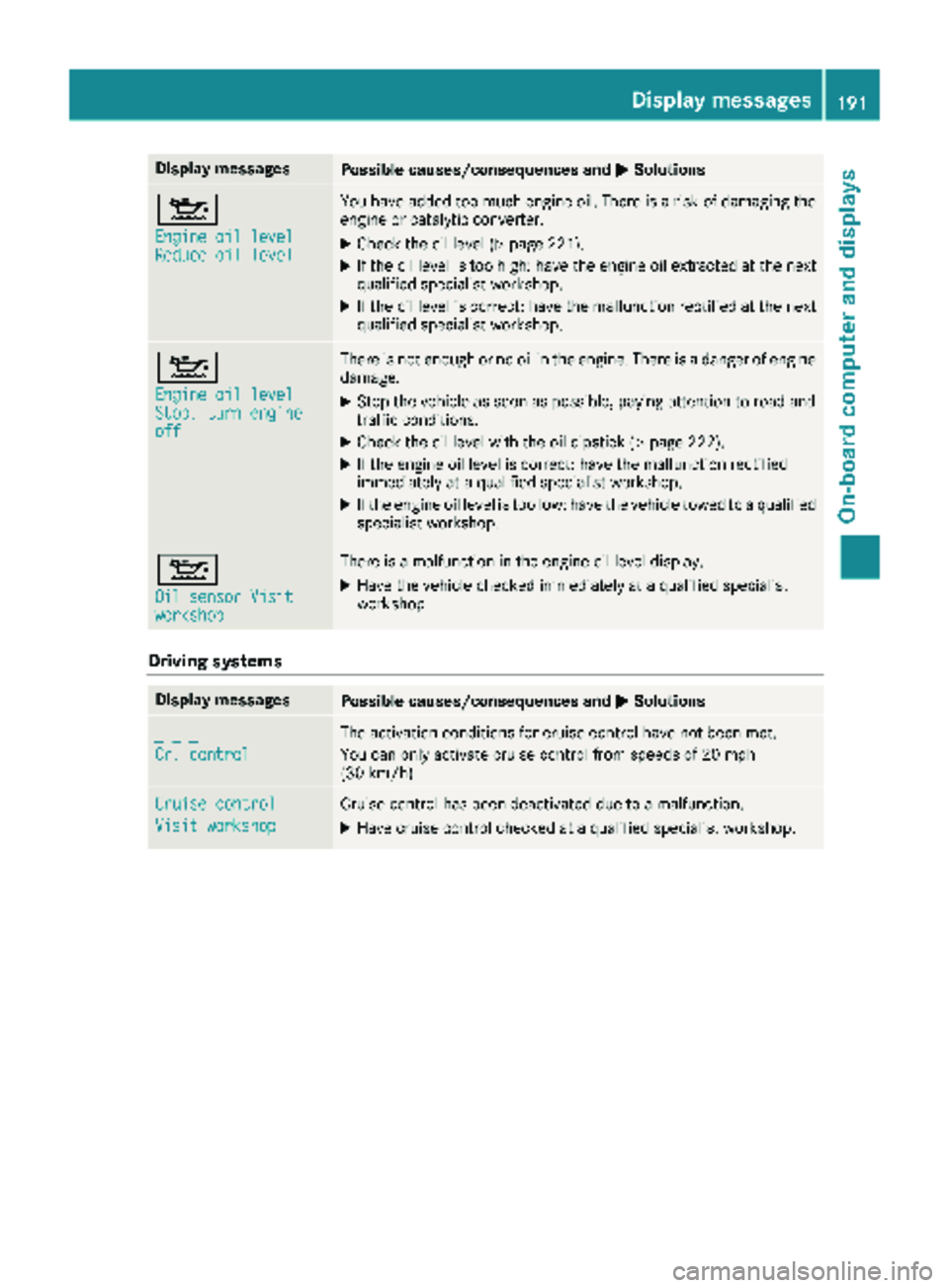
Display messagesPossible causes/consequences andMSolutions
4
Engine oil levelReduce oil level
You haveadded to omuc hengin eoil. There is aris kof damaging th e
engin eor catalytic converter.
XChec kth eoil level (Ypage 221).
XIf theoil level is to ohigh :hav eth eengin eoil extracted at th enext
qualified specialist workshop .
XIf theoil level is correct: hav eth emalfunction rectifie dat th enext
qualified specialist workshop .
4
Engine oil levelStop, turnengineoff
There is no tenough or no oil in th eengine. There is adanger of engin e
damage.
XStop th evehicl eas soo nas possible, payin gattention to roa dand
traffic conditions.
XChec kth eoil level wit hth eoil dipstick (Ypage 222).
XIf theengin eoil level is correct: hav eth emalfunction rectifie d
immediately at aqualified specialist workshop .
XIf theengin eoil level is to olow: hav eth evehicl etowed to aqualified
specialist workshop .
4
Oil sensor Visitworkshop
There isamalfunction in th eengin eoil level display.
XHav eth evehicl echecke dimmediately at aqualified specialist
workshop .
Driving systems
Display messagesPossible causes/consequences and MSolutions
_ _ _
Cr. control
The activation condition sfor cruise control hav eno tbeen met .
You can only activat ecruise control from speeds of 20 mph
(30 km/h).
Cruise contro l
Visit workshop
Cruisecontrol has been deactivated due to amalfunction .
XHavecruise control checke dat aqualified specialist workshop .
Display messages191
On-board computer and displays
Z
Page 202 of 294
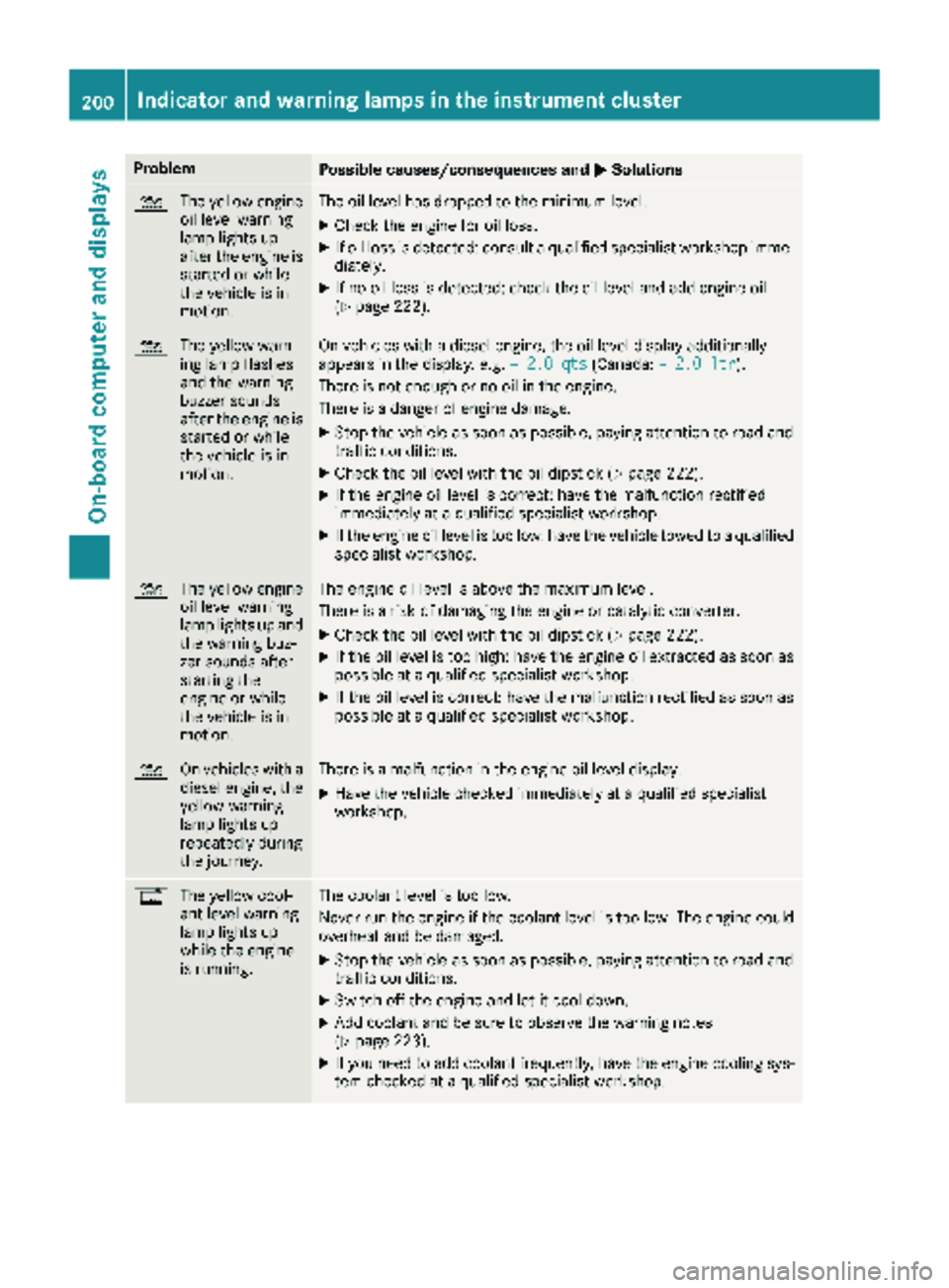
ProblemPossible causes/consequences andMSolutions
4
The yellow engine
oil level warning
lamp lights up
after the engine is
started or while
the vehicle is in
motion.The oil level has dropped to the minimum level.
XCheck the engine for oil loss.
XIf oil loss is detected: consult a qualified specialist workshop imme-
diately.
XIf no oil loss is detected: check the oil level and add engine oil
(Ypage 222).
4 The yellow warn-
ing lamp flashes
and the warning
buzzer sounds
after the engine is
started or while
the vehicle is in
motion.On vehicles with a diesel engine, the oil level display additionally
appears in the display, e.g. – 2.0 qts(Canada:– 2.0 ltr).
There is not enough or no oil in the engine.
There is a danger of engine damage.
XStop the vehicle as soon as possible, paying attention to road and
traffic conditions.
XCheck the oil level with the oil dipstick (Ypage 222).
XIf the engine oil level is correct: have the malfunction rectified
immediately at a qualified specialist workshop.
XIf the engine oil level is too low: have the vehicle towed to a qualified
specialist workshop.
4 The yellow engine
oil level warning
lamp lights up and
the warning buz-
zer sounds after
starting the
engine or while
the vehicle is in
motion.The engine oil level is above the maximum level.
There is a risk of damaging the engine or catalytic converter.
XCheck the oil level with the oil dipstick (Ypage 222).
XIf the oil level is too high: have the engine oil extracted as soon as
possible at a qualified specialist workshop.
XIf the oil level is correct: have the malfunction rectified as soon as
possible at a qualified specialist workshop.
4 On vehicles with a
diesel engine, the
yellow warning
lamp lights up
repeatedly during
the journey.There is a malfunction in the engine oil level display.
XHave the vehicle checked immediately at a qualified specialist
workshop.
%The yellow cool-
ant level warning
lamp lights up
while the engine
is running.The coolant level is too low.
Never run the engine if the coolant level is too low. The engine could
overheat and be damaged.
XStop the vehicle as soon as possible, paying attention to road and
traffic conditions.
XSwitch off the engine and let it cool down.
XAdd coolant and be sure to observe the warning notes
(Ypage 223).
XIf you need to add coolant frequently, have the engine cooling sys-
tem checked at a qualified specialist workshop.
200Indicator and warning lamps in the instrument cluster
On-board computer and displays
Page 223 of 294
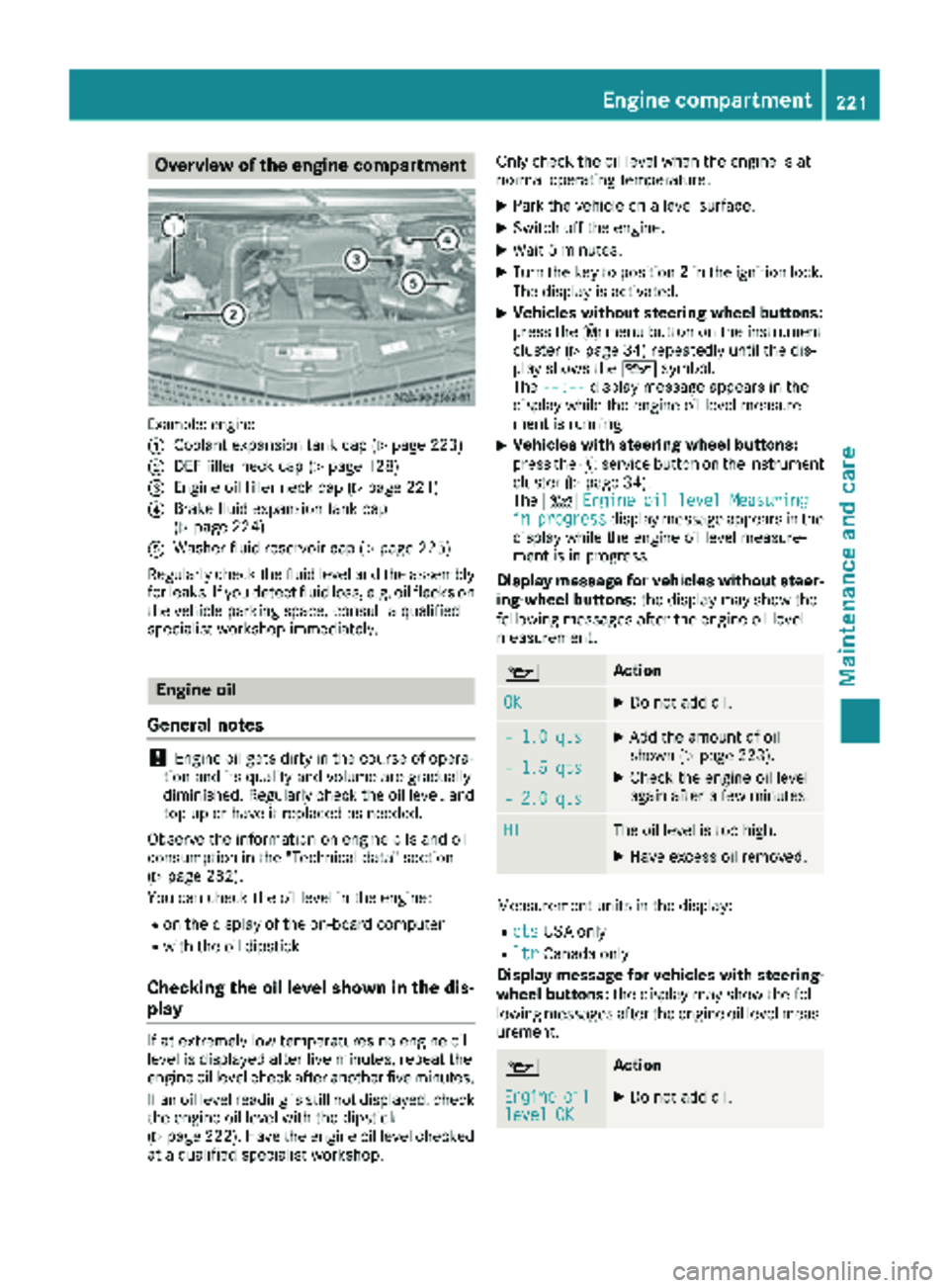
Overview of the engine compartment
Example: engine
:
Coolant expansion tank cap (Ypage 223)
;DEF filler neck cap (Ypage 128)
=Engine oil filler neck cap (Ypage 221)
?Brake fluid expansion tank cap
(Ypage 224)
AWasher fluid reservoir cap (Ypage 225)
Regularly check the fluid level and the assembly
for leaks. If you detect fluid loss, e.g. oil flecks on
the vehicle parking space, consult a qualified
specialist workshop immediately.
Engine oil
General notes
!Engine oil gets dirty in the course of opera-
tion and its quality and volume are gradually
diminished. Regularly check the oil level, and
top up or have it replaced as needed.
Observe the information on engine oils and oil
consumption in the "Technical data" section
(
Ypage 282).
You can check the oil level in the engine:
Ron the display of the on-board computer
Rwith the oil dipstick
Checking the oil level shown in the dis-
play
If at extremely low temperatures no engine oil
level is displayed after five minutes, repeat the
engine oil level check after another five minutes.
If an oil level reading is still not displayed, check
the engine oil level with the dipstick
(
Ypage 222). Have the engine oil level checked
at a qualified specialist workshop. Only check the oil level when the engine is at
normal operating temperature.
XPark the vehicle on a level surface.
XSwitch off the engine.
XWait 5 minutes.
XTurn the key to position
2in the ignition lock.
The display is activated.
XVehicles without steering wheel buttons:
press the 4menu button on the instrument
cluster (
Ypage 34) repeatedly until the dis-
play shows the 1symbol.
The --:--
display message appears in the
display while the engine oil level measure-
ment is running.
XVehicles with steering wheel buttons:
press the Ëservice button on the instrument
cluster (
Ypage 34).
The 4 Engine oil level Measuring
inprogressdisplay message appears in the
display while the engine oil level measure-
ment is in progress.
Display message for vehicles without steer-
ing-wheel buttons: the display may show the
following messages after the engine oil level
measurement.
1Action
OKXDo not add oil.
– 1.0 qtsXAdd the amount of oil
shown (Ypage 223).
XCheck the engine oil level
again after a few minutes.– 1.5 qts
– 2.0 qts
HIThe oil level is too high.
XHave excess oil removed.
Measurement units in the display:
RqtsUSA only
RltrCanada only
Display message for vehicles with steering- wheel buttons: the display may show the fol-
lowing messages after the engine oil level meas-
urement.
1Action
Engineoillevel OKXDo not add oil.
Engine compartment221
Maintenance and care
Z
Page 224 of 294
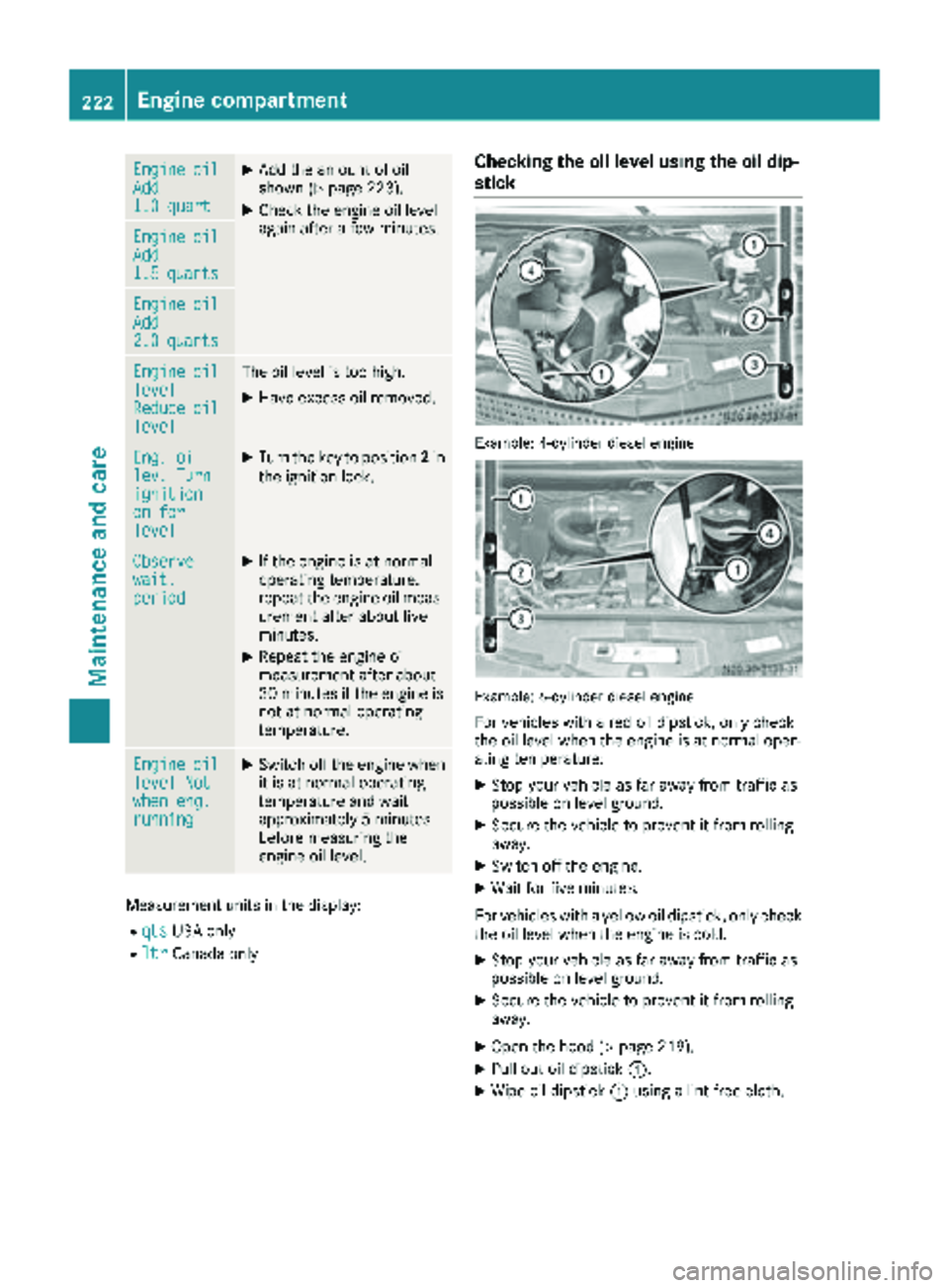
EngineoilAdd1.0 quart
XAdd the amount of oil
shown (Ypage 223).
XCheck the engine oil level
again after a few minutes.
EngineoilAdd1.5quarts
EngineoilAdd2.0quarts
EngineoillevelReduceoillevel
The oil level is too high.
XHave excess oil removed.
Eng. oillev. Turnignitionon forlevel
XTurn the key to position2in
the ignition lock.
Observewait.period
XIf the engine is at normal
operating temperature,
repeat the engine oil meas-
urement after about five
minutes.
XRepeat the engine oil
measurement after about
30 minutes if the engine is
not at normal operating
temperature.
Engineoillevel Notwhen eng.running
XSwitch off the engine when it is at normal operating
temperature and wait
approximately 5 minutes
before measuring the
engine oil level.
Measurement units in the display:
RqtsUSA only
RltrCanada only
Checking the oil level using the oil dip-
stick
Example: 4-cylinder diesel engine
Example: 6-cylinder diesel engine
For vehicles with a red oil dipstick, only check
the oil level when the engine is at normal oper-
ating temperature:
XStop your vehicle as far away from traffic as
possible on level ground.
XSecure the vehicle to prevent it from rolling
away.
XSwitch off the engine.
XWait for five minutes.
For vehicles with a yellow oil dipstick, only check
the oil level when the engine is cold.
XStop your vehicle as far away from traffic as
possible on level ground.
XSecure the vehicle to prevent it from rolling
away.
XOpen the hood (Ypage 219).
XPull out oil dipstick :.
XWipe oil dipstick:using a lint-free cloth.
222Engine compartment
Maintenance and care
Page 225 of 294
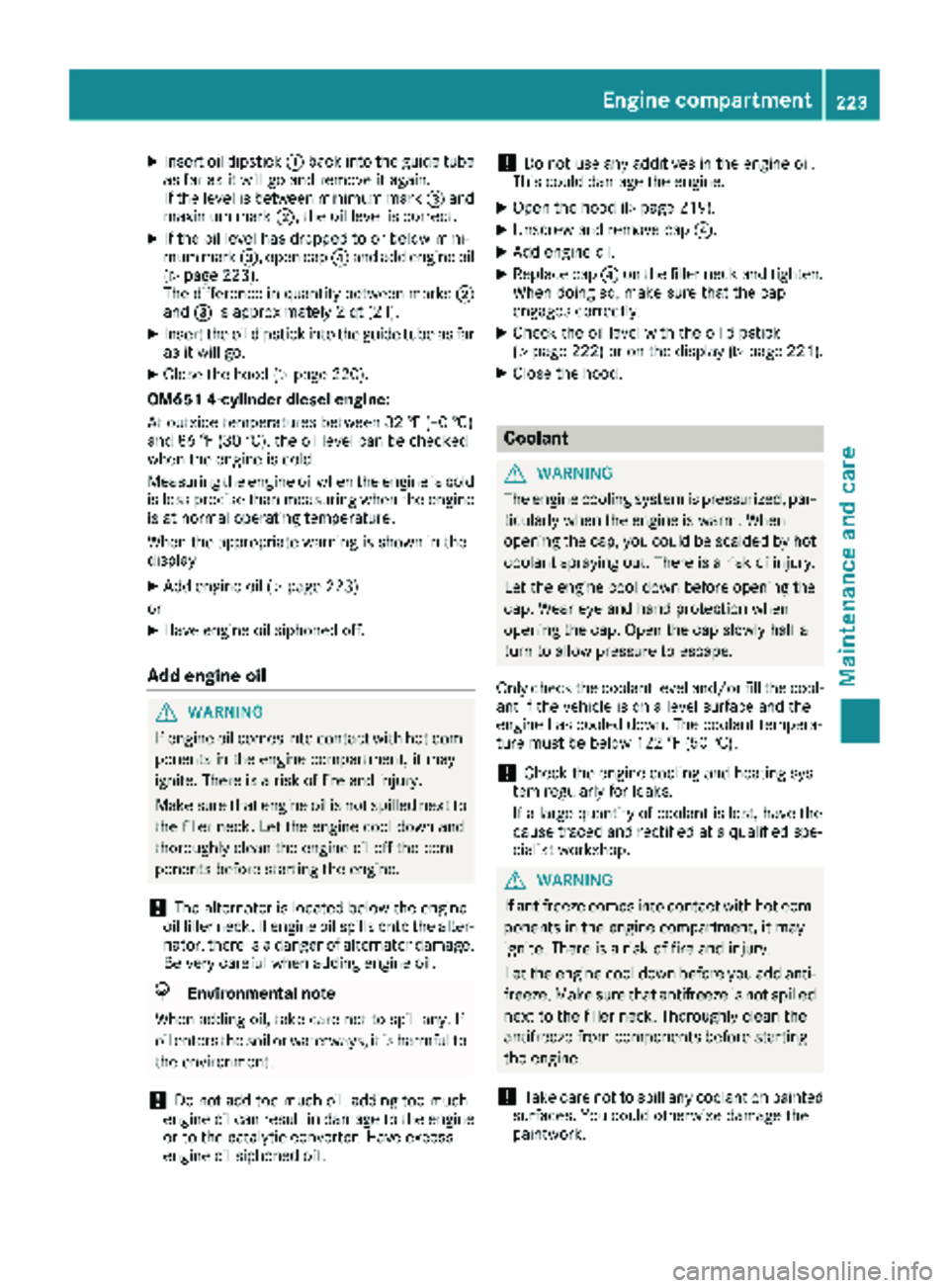
XInsert oil dipstick:back into the guide tube
as far as it will go and remove it again.
If the level is between minimum mark =and
maximum mark ;, the oil level is correct.
XIf the oil level has dropped to or below mini-
mum mark=, open cap ?and add engine oil
(
Ypage 223).
The difference in quantity between marks ;
and =is approximately 2 qt (2 l).
XInsert the oil dipstick into the guide tube as far
as it will go.
XClose the hood (Ypage 220).
OM651 4-cylinder diesel engine:
At outside temperatures between 32 ‡ (–0 †)
and 86 ‡ (30 †), the oil level can be checked
when the engine is cold.
Measuring the engine oil when the engine is cold
is less precise than measuring when the engine
is at normal operating temperature.
When the appropriate warning is shown in the
display
XAdd engine oil (Ypage 223)
or
XHave engine oil siphoned off.
Add engine oil
GWARNING
If engine oil comes into contact with hot com- ponents in the engine compartment, it may
ignite. There is a risk of fire and injury.
Make sure that engine oil is not spilled next to
the filler neck. Let the engine cool down and
thoroughly clean the engine oil off the com-
ponents before starting the engine.
!The alternator is located below the engine
oil filler neck. If engine oil spills onto the alter-
nator, there is a danger of alternator damage.
Be very careful when adding engine oil.
HEnvironmental note
When adding oil, take care not to spill any. If
oil enters the soil or waterways, it is harmful to
the environment.
!Do not add too much oil. adding too much
engine oil can result in damage to the engine
or to the catalytic converter. Have excess
engine oil siphoned off.
!Do not use any additives in the engine oil.
This could damage the engine.
XOpen the hood (Ypage 219).
XUnscrew and remove cap ?.
XAdd engine oil.
XReplace cap?on the filler neck and tighten.
When doing so, make sure that the cap
engages correctly.
XCheck the oil level with the oil dipstick
(Ypage 222) or on the display (Ypage 221).
XClose the hood.
Coolant
GWARNING
The engine cooling system is pressurized, par-
ticularly when the engine is warm. When
opening the cap, you could be scalded by hot
coolant spraying out. There is a risk of injury.
Let the engine cool down before opening the
cap. Wear eye and hand protection when
opening the cap. Open the cap slowly half a
turn to allow pressure to escape.
Only check the coolant level and/or fill the cool-
ant if the vehicle is on a level surface and the
engine has cooled down. The coolant tempera-
ture must be below 122 ‡ (50 †).
!Check the engine cooling and heating sys-
tem regularly for leaks.
If a large quantity of coolant is lost, have the
cause traced and rectified at a qualified spe-
cialist workshop.
GWARNING
If antifreeze comes into contact with hot com- ponents in the engine compartment, it may
ignite. There is a risk of fire and injury.
Let the engine cool down before you add anti-
freeze. Make sure that antifreeze is not spilled
next to the filler neck. Thoroughly clean the
antifreeze from components before starting
the engine.
!Take care not to spill any coolant on painted
surfaces. You could otherwise damage the
paintwork.
Engine compartment223
Maintenance and care
Z
Page 226 of 294
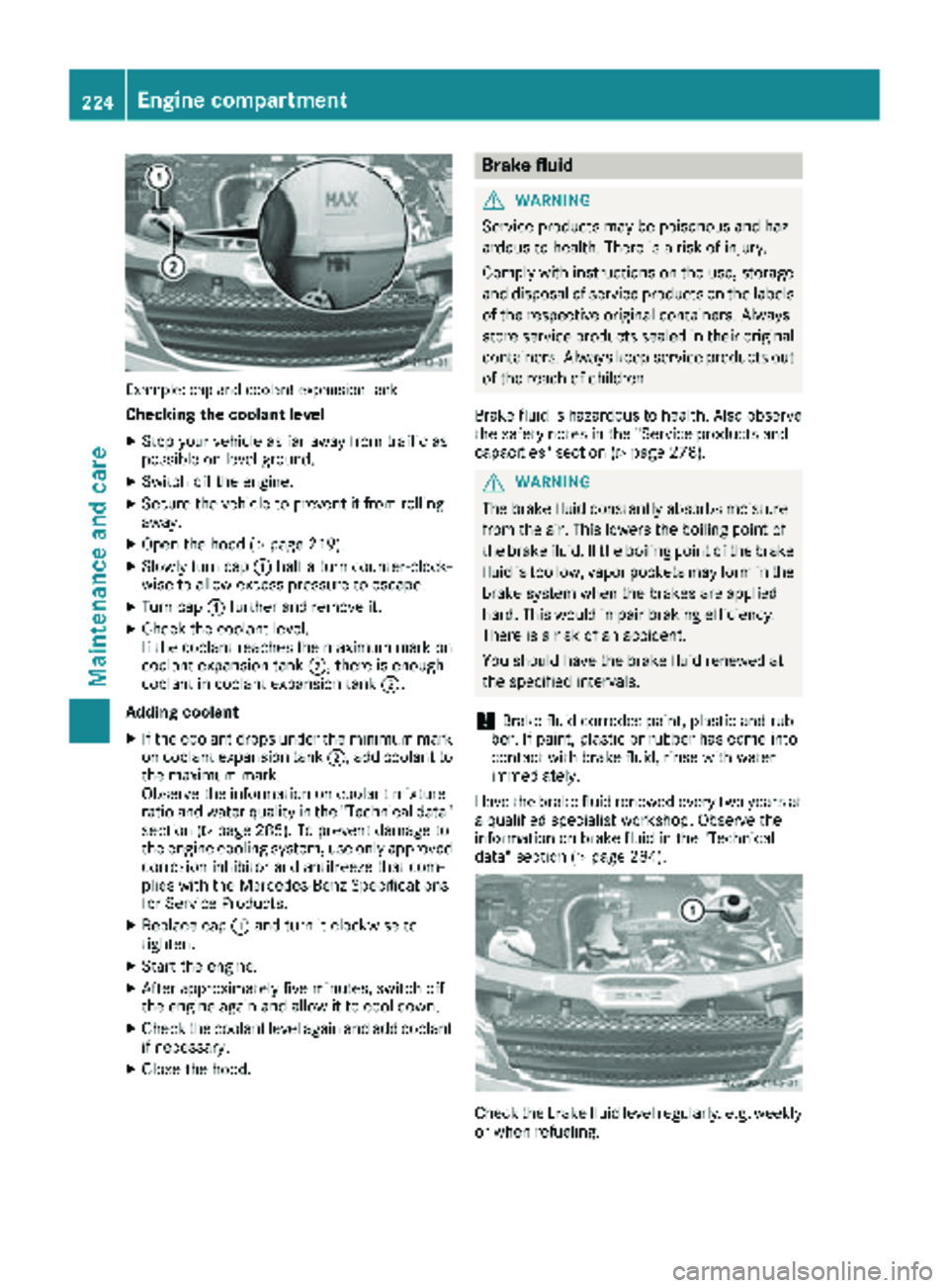
Example: cap and coolant expansion tank
Checking the coolant level
XStop your vehicle as far away from traffic as
possible on level ground.
XSwitch off the engine.
XSecure the vehicle to prevent it from rolling
away.
XOpen the hood (Ypage 219).
XSlowly turn cap:half a turn counter-clock-
wise to allow excess pressure to escape.
XTurn cap :further and remove it.
XCheck the coolant level.
If the coolant reaches the maximum mark on
coolant expansion tank ;, there is enough
coolant in coolant expansion tank ;.
Adding coolant
XIf the coolant drops under the minimum mark
on coolant expansion tank ;, add coolant to
the maximum mark.
Observe the information on coolant mixture
ratio and water quality in the "Technical data"
section (
Ypage 285). To prevent damage to
the engine cooling system, use only approved
corrosion inhibitor and antifreeze that com-
plies with the Mercedes-Benz Specifications
for Service Products.
XReplace cap :and turn it clockwise to
tighten.
XStart the engine.
XAfter approximately five minutes, switch off
the engine again and allow it to cool down.
XCheck the coolant level again and add coolant
if necessa ry.
XClose the hood.
Brake fluid
GWARNING
Service products may be poisonous and haz-
ardous to health. There is a risk of injury.
Comply with instructions on the use, storage
and disposal of service products on the labels
of the respective original containers. Always
store service products sealed in their original
containers. Always keep service products out
of the reach of children.
Brake fluid is hazardous to health. Also observe
the safety notes in the "Service products and
capacities" section (
Ypage 278).
GWARNING
The brake fluid constantly absorbs moisture
from the air. This lowers the boiling point of
the brake fluid. If the boiling point of the brake
fluid is too low, vapor pockets may form in the
brake system when the brakes are applied
hard. This would impair braking efficiency.
There is a risk of an accident.
You should have the brake fluid renewed at
the specified intervals.
!Brake fluid corrodes paint, plastic and rub-
ber. If paint, plastic or rubber has come into
contact with brake fluid, rinse with water
immediately.
Have the brake fluid renewed every two years at
a qualified specialist workshop. Observe the
information on brake fluid in the "Technical
data" section (
Ypage 284).
Check the brake fluid level regularly, e.g. weekly
or when refueling.
224Engine compartment
Maintenance and care
Page 229 of 294
Do not run the engine for longer than neces-
sary when the vehicle is stationary.
Before having maintenance and repairs per-
formed, it is essential to read the materials rela-
ted to the maintenance and repairs:
Rthe applicable sections of the technical doc-
umentation, e.g. the Operator's Manual and
workshop information.
Rregulations such as industrial safety regula-
tions and accident prevention regulations.
While working under the vehicle, you must
secure the vehicle on jack stands with sufficient load capacity.
Never use the jack as a substitute. The vehicle's
jack is intended only to raise the vehicle for a
short time when changing a wheel. It is not
suited for performing maintenance work under
the vehicle.
Please also refer to the notes about qualified
specialist workshops (
Ypage 27).
The scope and regularity of the inspection and
maintenance work primarily depend on the
often diverse operating conditions. Specialist
knowledge beyond the scope of this Operator's
Manual is required when carrying out testing
and maintenance work. This work should only be
carried out by trained staff.
The vehicle Maintenance Booklet describes the scope and fre que
ncy of maintenance work and
contains additional notes on the New Vehicle
Limited Warranty and on service products.
Maintenance services must be carried out in
accordance with the provisions and recommen-
dations in the Maintenance Booklet. Not doing
so could void the warranty claim and lead to
refusal of goodwill gestures after the manufac-
turer has submitted a damage report.
iObserve the notes on genuine Sprinter parts
(Ypage 29).
Service interval display
General notes
A service that is due is displayed in the service
interval display about one month in advance. A
message is then displayed while the vehicle is in
motion or when the ignition is switched on.
iThe service interval display does not provide
information about the engine oil level. The service interval display should therefore not
be confused with the
5engine oil level
display.
The service due date is displayed in days or
miles (kilometers), depending on the total dis-
tance driven.
The symbols or letters on the service display
show the type of service that is due.
¯ orA
for a minor service
° orB
for a major service
Service due date display
Vehicles with steering wheel buttons: the
following messages may be displayed.
R¯ Service A due in ... days
R¯Service A due in ... mi(km)
R¯ Service A Carry out now
Vehicles without steering wheel buttons:
the following messages may be displayed.
R¯for service A
R°for Service B
Additionally, you will see the remaining distance
in miles ( mi
) or kilometers ( km) or the remaining
time in days ( d).
Service due date has been exceeded
Vehicles with steering wheel buttons: if you
have missed the service due date, one of the
following messages appears in the display and
warning tone also sounds.
R¯ Service A overdue by ... days
R¯Service A overdue by ... km(km)
Vehicles without steering wheel buttons: if
you have missed the service due date, the ¯
or ° symbol for the service flashes for ten
seconds after the ignition is switched on. A
minus sign also appears in front of the service
due date.
Calling up the service due date
XTurn the key to position 2in the ignition lock.
The display is activated.
Vehicles without steering wheel buttons
XPress the 4menu button on the instrument
cluster repeatedly until the ¯or°
symbol for the service appears in the display.
Maintenance227
Maintenance and care
Z