climate settings MERCEDES-BENZ SPRINTER 2018 MY18 Operator’s Manual
[x] Cancel search | Manufacturer: MERCEDES-BENZ, Model Year: 2018, Model line: SPRINTER, Model: MERCEDES-BENZ SPRINTER 2018Pages: 294, PDF Size: 4.36 MB
Page 33 of 294
data. These data document the vehicle's tech-
nical states, are used to help in finding malfunc-
tions and improving quality and are sent to the
manufacturer where necessary. In addition, the
manufacturer is subject to product liability. The
manufacturer needs technical data from vehi-
cles for this purpose.
Malfunction memories in the vehicle can be
reset by a service center during repair or service
work.
You can incorporate data into the vehicle's com-
fort and infotainment functions yourself as part
of the selected equipment.
These include:
RMultimedia data such as music, films or pho-
tos for playback in an integrated multimedia
system
RAddress book data for use in conjunction with
an integrated hands-free system or an inte-
grated navigation system
RNavigation destinations that have been
entered
RData about using Internet services
These data can be saved locally in the vehicle or are located on a device that you have connected
to the vehicle. If these data are saved in the
vehicle, you can delete them at any time. These data are sent to third parties only at your
request, particularly when you use online serv-
ices in accordance with the settings that you
have selected.
You can save and change comfort settings/
customizations in the vehicle at any time.
Depending on the equipment, these settings
include:
RSeat and steering wheel position settings
RSuspension and climate control settings
RCustom settings such as interior lighting
If your vehicle is equipped appropriately, you
can connect your smartphone or another mobile terminal to the vehicle. You can control this by
means of the control elements integrated in the
vehicle. The smartphone's picture and sound
can be output via the multimedia system. Spe-
cific items of information are also sent to your
smartphone.
Depending on the type of integration, such infor-
mation includes:
RGeneral vehicle information
RPosition data This allows you to use selected apps on your
smartphon
e, such as navigation or music play-
back. There is no additional interaction between
the smartphone and the vehicle, particularly
active access to vehicle data. The type of addi-
tional data processing is determined by the pro- vider of the app being used. Whether you can
configure settings for it and, if so, which ones,
depends on the app and your smartphone's
operating system.
Service provider
Wireless network connection
If your vehicle has a wireless network connec-
tion, it enables data to be exchanged between
your vehicle and other systems. The wireless
network connection is enabled by either an in-
vehicle transmitter and receiver or your own
mobile end device (e.g. smartphone). Online
functions can be used via this wireless connec-
tion. These include online services and applica-
tions/apps provided by the manufacturer or
other providers.
Manufacturer's own services
In the case of the manufacturer's online serv-
ices, the manufacturer describes the functions
in a suitable place and the associated informa-
tion subject to data protection legislation. Per-
sonal data can be used in the provision of online
services. Data are exchanged via a secure con-
nection (e.g. using the IT system specially pro-
vided for this purpose by the manufacturer).
Collecting, processing and using personal data
beyond the provision of services is permitted
only on the basis of a statutory permit or decla-
ration of consent.
You can usually activate and deactivate the serv-
ices and functions (some of which are subject to
charge). In many cases, this also applies to the
vehicle's entire data connection. However, this
does not apply in particular to legally prescribed
functions and services such as the "eCall" emer-
gency call system.
Services from third parties
If it is possible to use online services from other
providers, these services are the responsibility
of the provider in question and subject to that
provider's data protection conditions and terms
Introduction31
Z
Page 101 of 294
Useful information
This Operator's Manual describes all models as
well as standard and optional equipment of your
vehicle that were available at the time of going
to print. Country-specific variations are possi-
ble. Note that your vehicle may not be equipped
with all of the described functions. This also
applies to systems and functions relevant to
safety.
Read the information on qualified specialist
workshops (
Ypage 27).
Overview of climate control systems
Important safety notes
Observe the recommended settings on the fol-
lowing pages. Otherwise, the windows could fog
up.
Climate control regulates the temperature and
the humidity in the vehicle interior and filters
undesirable substances from the air.Climate control is only operational when the
engine is running. The system only functions
optimally when the side windows are closed.
iVentilate the vehicle for a brief period during
warm weather. In order to cool the vehicle
more rapidly, switch climate control to air-
recirculation mode briefly. This will speed up
the cooling process and the desired interior
temperature will be reached more quickly.
iThe integrated filter can filter out most par-
ticles of dust and completely filters out pollen.
A clogged filter reduces the airflow into the
vehicle interior. For this reason, you should
always observe the interval for replacing the
filter, which is specified in the Maintenance
Booklet. As it depends on environmental con-
ditions, e.g. heavy air pollution, the interval
may be shorter than that stated in the Main-
tenance Booklet.
Heating control panel
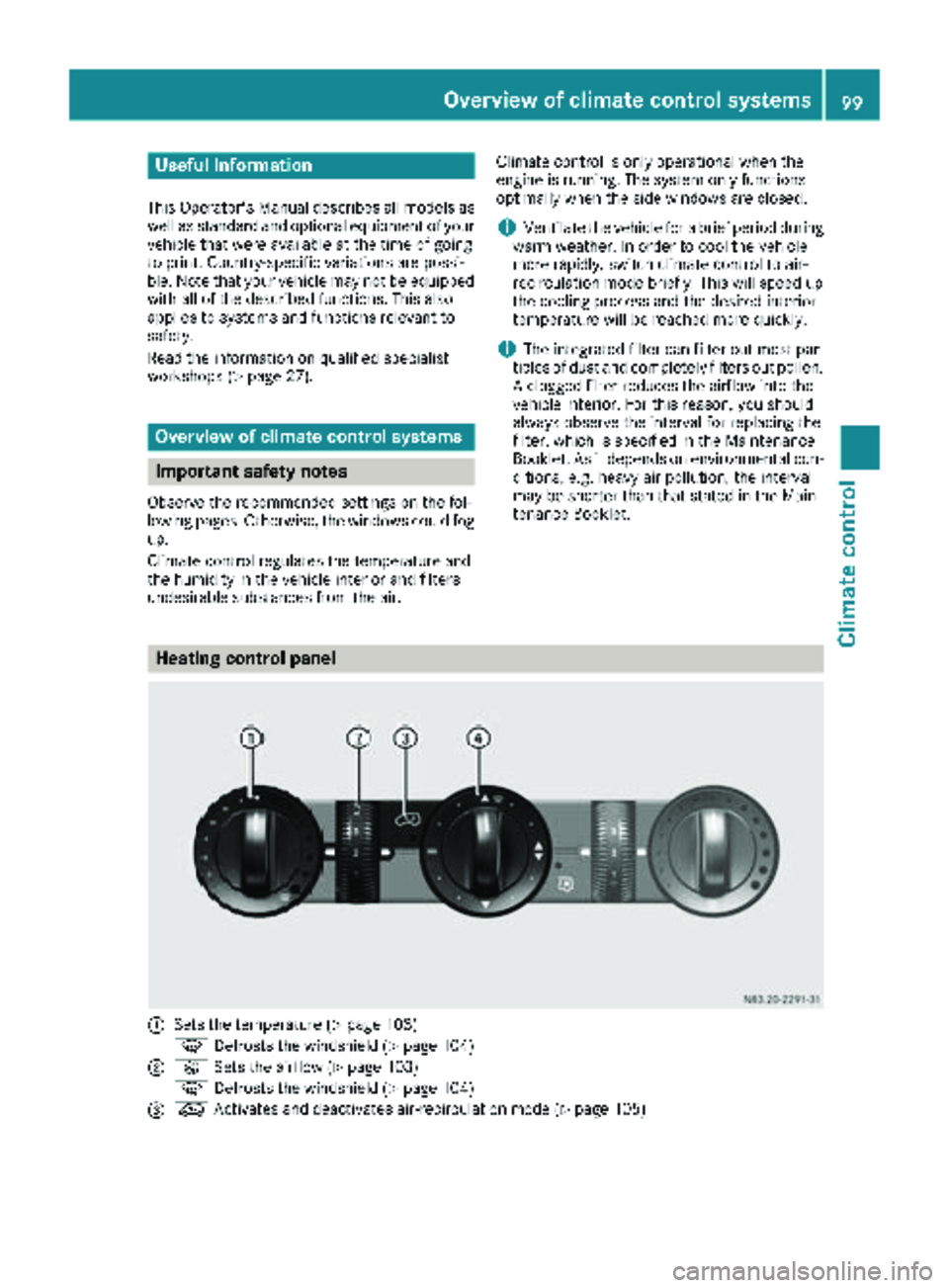
:Sets the temperature (Ypage 103)
z Defrosts the windshield (
Ypage 104)
;KSets the airflow (Ypage 103)
z Defrosts the windshield (
Ypage 104)
=eActivates and deactivates air-recirculation mode (Ypage 105)
Overview of climate control systems99
Climate control
Page 102 of 294
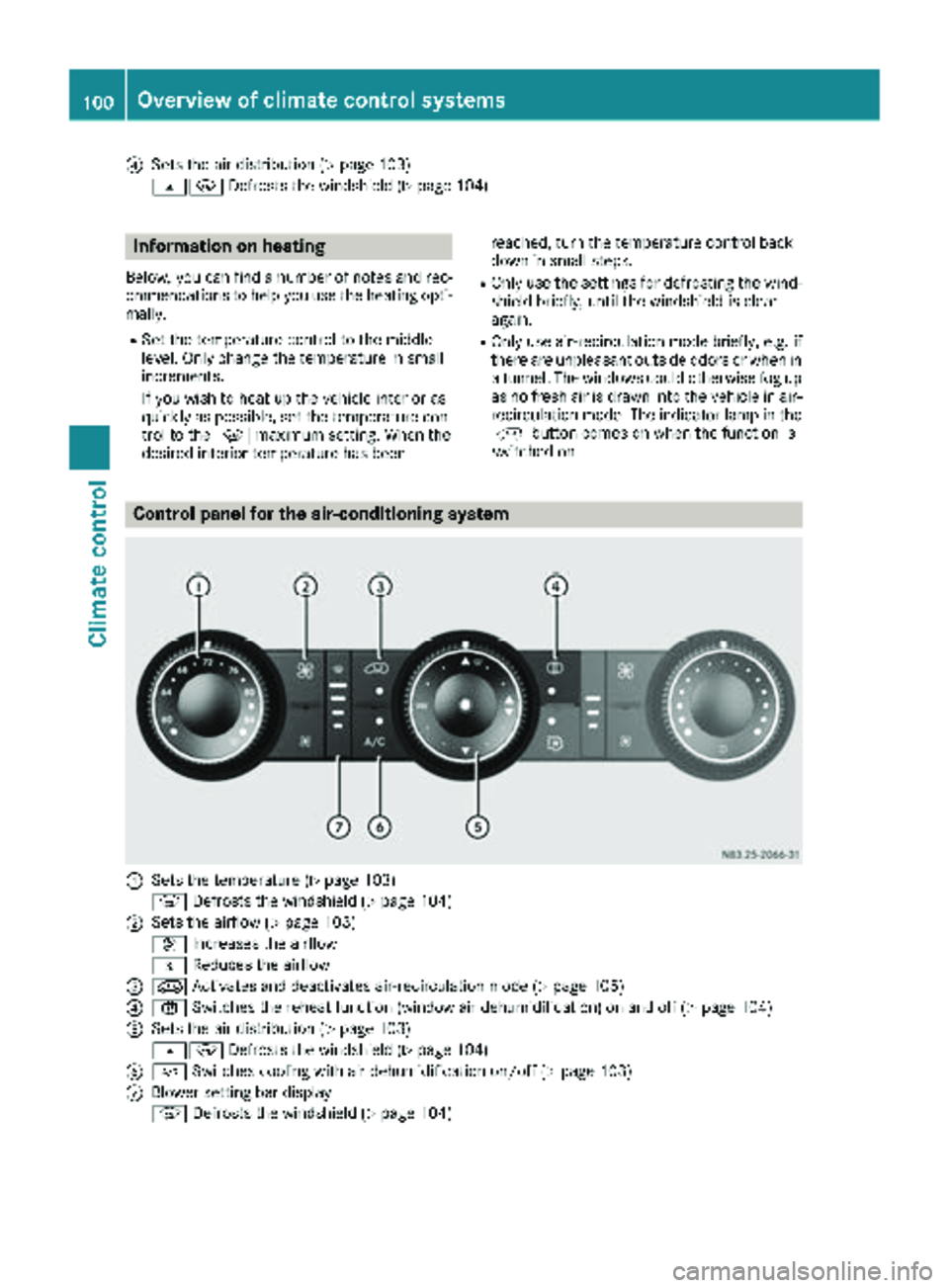
?Sets the air distribution (Ypage 103)
sz Defrosts the windshield (
Ypage 104)
Information on heating
Below, you can find a number of notes and rec-
ommendations to help you use the heating opti-
mally.
RSet the temperature control to the middle
level. Only change the temperature in small
increments.
If you wish to heat up the vehicle interior as
quickly as possible, set the temperature con-
trol to thezmaximum setting. When the
desired interior temperature has been reached, turn the temperature control back
down in small steps.
ROnly use the settings for defrosting the wind-
shield briefly, until the windshield is clear
again.
ROnly use air-recirculation mode briefly, e.g. if
there are unpleasant outside odors or when in
a tunnel. The windows could otherwise fog up
as no fresh air is drawn into the vehicle in air-
recirculation mode. The indicator lamp in the
h button comes on when the function is
switched on.
Control panel for the air-conditioning system
:Sets the temperature (Ypage 103)
z Defrosts the windshield (
Ypage 104)
;Sets the airflow (Ypage 103)
K Increases the airflow
I Reduces the airflow
=eActivates and deactivates air-recirculation mode (Ypage 105)
?xSwitches the reheat function (window air dehumidification) on and off (Ypage 104)
ASets the air distribution (Ypage 103)
sz Defrosts the windshield (
Ypage 104)
B¿Switches cooling with air dehumidification on/off (Ypage 103)
CBlower setting bar display
zDefrosts the windshield (
Ypage 104)
100Overview of climate control systems
Climate control
Page 105 of 294
Vehicle with rear-compartment heating/
rear-compartment air conditioning
XTo switch on/off:press theiswitch.
If the indicator lamp in the button lights up,
the rear-compartment heating/rear-com-
partment air conditioning is switched on.
Switching the cooling with air dehu-
midification function on/off
Important information
If you switch off the "Cooling with air dehumid-
ification" function, the air inside the vehicle will
not be cooled (in warm weather) or dehumidi-
fied. The windows could fog up more quickly.
The cooling with air dehumidification function is
only available when the engine is running. The
air inside the vehicle is cooled and dehumidified
according to the temperature selected.
Condensation may appear on the underside of
the vehicle when in cooling mode. This is normal
and not a sign that there is a malfunction.
Switching on and off
Vehicle with air conditioning
XPress the ¿button.
If the indicator lamp in the button lights up,
cooling with air dehumidification is switched
on.
Setting the temperature
Increasing and reducing temperature in
the front compartment via the control
panel
Only change the temperature in small incre-
ments. Start at the center position, or at 72 ‡
(22 †).
XSwitch on climate control (Ypage 102).
XTurn temperature control :clockwise to
increase or counterclockwise to reduce the
temperature (
Ypage 100).
Increasing and reducing temperature in
the rear compartment via the control
panel
Only change the temperature in small incre-
ments.
XSwitch on climate control (Ypage 102).
XTurn rear-compartment temperature control
= (Ypage 101) or rear-compartment air-
conditioning system ;(Ypage 102) clock-
wise to increase or counterclockwise to
reduce the temperature.
iVehicles with additional air conditioning and
heating in the rear compartment: if you set
the temperature control to the center posi-
tion, only one of the two climate control sys-
tems works in the rear compartment and in
air-recirculation mode (
Ypage 105).
Setting the air distribution
Air distribution settings
The air distribution symbols have the following
meanings:
m Directs air through the center and side
air vents
s
z Directs air to the windshield and the air
vents
q Directs air to the windshield, the air
vents and into the footwell
r Directs air to the air vents and into the
footwell
Adjusting
XSwitch on climate control (Ypage 102).
XSet air-distribution control ?for the heating
(Ypage 99) or air-conditioning system A
(Ypage 100) to the corresponding symbol.
Setting the airflow
XSwitch on climate control (Ypage 102).
XVehicle with heating/rear-compartment
heating: set airflow control ;of the heating
(
Ypage 99) or of the rear-compartment heat-
ing (Ypage 101) to the desired level.
XVehicle with air conditioning/rear-com-
partment air conditioning: press theI
Operating the climate control system103
Climate control
Page 106 of 294
button to reduce or theKbutton to
increase the airflow.
The blower speeds are shown in bars next to
the buttons.
Defrosting the windows
You can use the "defrosting" function to defrost
the windshield or to demist the inside of the
windshield and the side windows.
Only use the following settings until the win-
dows are clear again.
XVehicle with window heating: switch on the
front (Ypage 105) and/or rear window
defroster (Ypage 105) .
XSwitch on climate control (Ypage 102).
Vehicle with heating
XSet temperature control :and airflow con-
trol ;toz (Ypage 99).
XSet air-distribution control ?tosz
(Ypage 99).
XClose the center air vents (Ypage 106) and
the air outlets for the headroom and the rear compartment (
Ypage 107).
XDirect the side air vents towards the side win-dows and open the defroster vents for the
side windows (
Ypage 107).
Vehicle with air conditioning
XSet temperature control :to
z (Ypage 100).
XPress the Kbutton until the maximum
blower output is reached.
All bars in the display next to the button light
up.
XSet air-distribution control Atosz
(Ypage 100).
XClose the center air vents (Ypage 106) and
the air outlets for the headroom and the rear
compartment (
Ypage 107).
XDirect the side air vents towards the side win-
dows and open the defroster vents for the
side windows (
Ypage 107).
Clearing condensation from the win-
dows
Windows fogged up on the inside
You should only select this setting until the win-
dows are clear again.
XVehicle with window heating: switch on the
front (Ypage 105) and/or rear window
defroster (Ypage 105) .
XSwitch on climate control (Ypage 102).
XSwitch off air-recirculation mode
(Ypage 105).
Vehicle with heating
XSet temperature control :to a higher tem-
perature (Ypage 99).
XSet airflow control ;to a higher blower set-
ting. It should be set at least to level two
(
Ypage 99).
XSet air-distribution control ?tosz
(Ypage 99).
iIf the windows still fog up, set the control as
described for defrosting (Ypage 104).
Vehicle with air conditioning
XActivate cooling with air dehumidification
(Ypage 103).
XPress the ¨button (Ypage 100).
Reheat mode is activated. The indicator lamp
in the switch lights up.
To deactivate reheat mode, press the ¨
button again. The indicator lamp in the button
goes out.
Windows fogged up on the outside
You should only select this setting until the
windshield is clear again.
XSwitch on the windshield wipers (Ypage 96).
XSwitch on climate control (Ypage 102).
XAdjust air distribution to the footwell
(Ypage 103).
XClose the air vents (Ypage 106).
104Operating the climate control system
Climate control
Page 112 of 294
On-board computer with steering wheel
buttons
XTurn the key to position2in the ignition lock.
XPress the ybutton.
The Aux. heatsubmenu is shown in the dis-
play.
If no switch-on time has been selected, the
selected switch-on time is highlighted or
Timer off
is highlighted.
iYou can also access the Aux. heat.sub-
menu via the Settingsmenu (Ypage 167).
XUse theWorX button on the steering
wheel to select the desired switch-on time.
Use the Timer off
setting to deactivate
automatic switch-on.
XPress the Vbutton on the steering wheel.
The switch-on time is selected. The yellow
indicator lamp in the ybutton lights up.
Setting the switch-on time
XUse the same method to select a switch-on
time as described in the "Preselecting a
switch-on time" section.
On-board computer without steering wheel
buttons
XPress the 9reset button on the instrument
cluster.
The hour display flashes.
XUse the fand gbuttons on the instrument
cluster to set the hours.
XPress the 9reset button
The minute display flashes.
XUse the fand gbuttons to set the minutes.
The switch-on time is set and selected.
On-board computer with steering wheel but-
tons
XPress the 9button on the steering wheel.
The display shows the Hoursmenu.
XUse theWandX buttons on the steer-
ing wheel to set the hours.
XPress the 9button.
The display shows the Minutesmenu.
XUse theWandX buttons to set the
minutes.
XPress the Vbutton.
The switch-on time is set and selected.
Operation with the remote control
Important information
You can switch the auxiliary heating on/off and
set the operating duration using the remote con-
trol. You can use up to 4 remote control units on
the vehicle. These must be synchronized for the
receiver in your vehicle (
Ypage 111).
The remote control has a maximum range of
approximately 600 meters. This range is
reduced by:
Rsources of interference
Rsolid objects between the remote control and
the vehicle
Rthe remote control being in an unfavorable
position in relation to the vehicle
Rtransmitting from an enclosed space
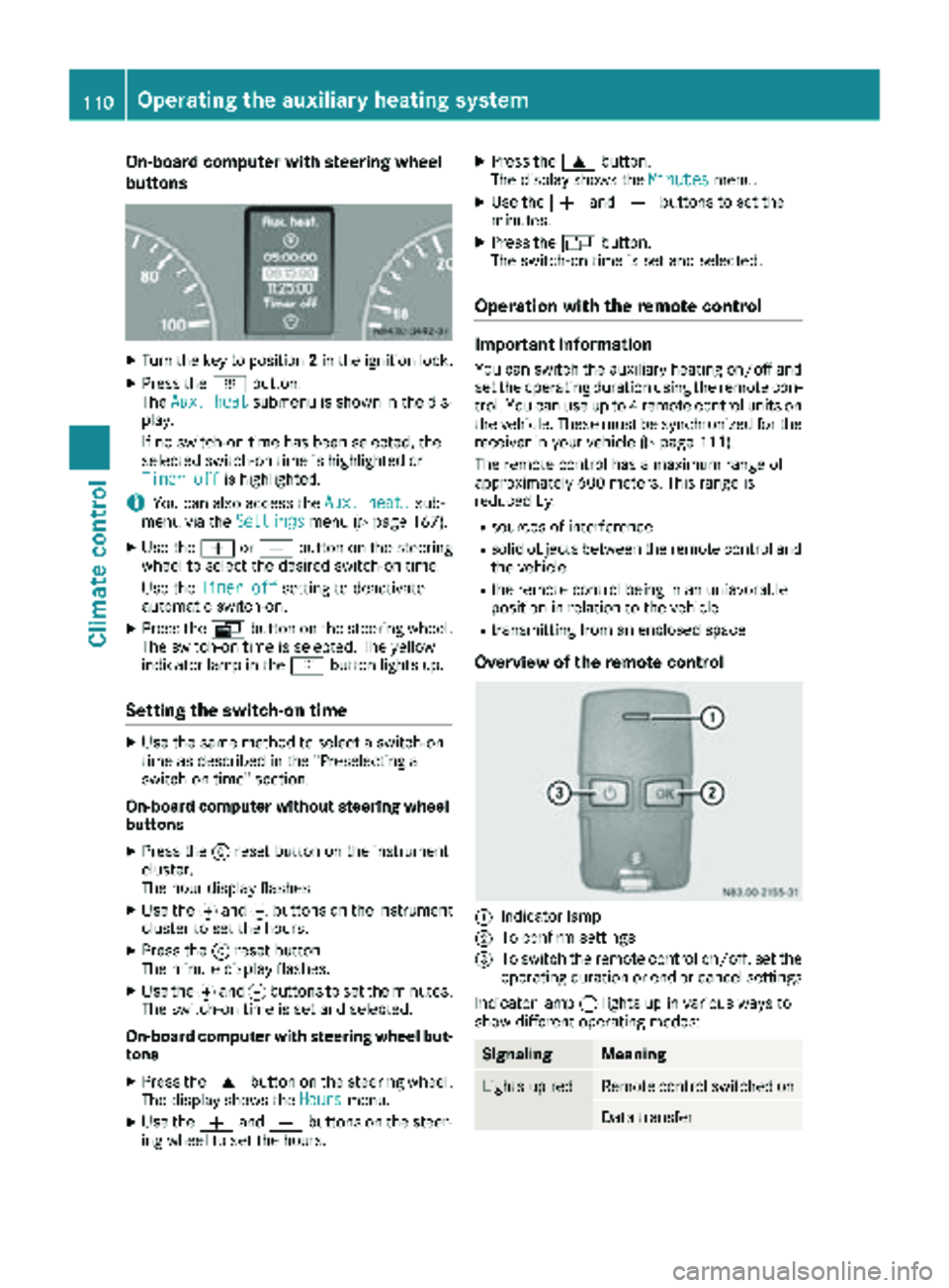
Overview of the remote control
:Indicator lamp
;To confirm settings
=To switch the remote control on/off, set the operating duration or end or cancel settings
Indicator lamp :lights up in various ways to
show different operating modes:
SignalingMeaning
Lights up redRemote control switched on
Data transfer
110Operating the auxiliary heating system
Climate control
Page 117 of 294
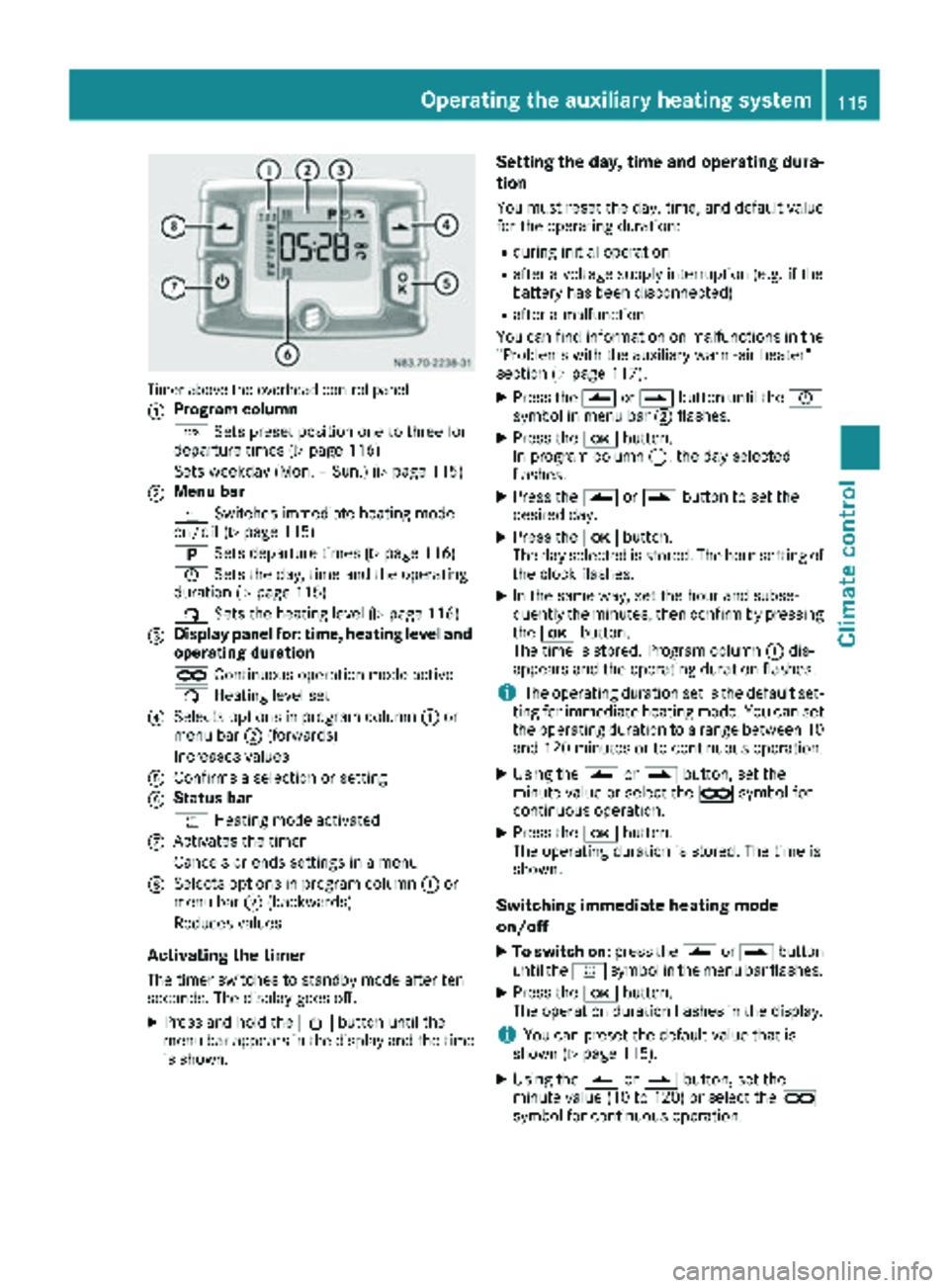
Timer above the overhead control panel
:
Program column
GSets preset position one to three for
departure times (
Ypage 116)
Sets weekday (Mon. – Sun.) (
Ypage 115)
;Menu bar
y Switches immediate heating mode
on/off (
Ypage 115)
B Sets departure times (
Ypage 116)
Ñ Sets the day, time and the operating
duration (
Ypage 115)
ß Sets the heating level (
Ypage 116)
=Display panel for: time, heating level and
operating duration
àContinuous operation mode active
ß Heating level set
?Selects options in program column :or
menu bar ;(forwards)
Increases values
AConfirms a selection or setting
BStatus bar
y Heating mode activated
CActivates the timer
Cancels or ends settings in a menu
DSelects options in program column :or
menu bar ;(backwards)
Reduces values
Activating the timer
The timer switches to standby mode after ten
seconds. The display goes off.
XPress and hold the Übutton until the
menu bar appears in the display and the time
is shown.
Setting the day, time and operating dura-
tion
You must reset the day, time, and default value
for the operating duration:
Rduring initial operation
Rafter a voltage supply interruption (e.g. if the
battery has been disconnected)
Rafter a malfunction
You can find information on malfunctions in the
"Problems with the auxiliary warm-air heater"
section (
Ypage 117).
XPress the Ûorâ button until the Ñ
symbol in menu bar ;flashes.
XPress the bbutton.
In program column :, the day selected
flashes.
XPress the Ûorâ button to set the
desired day.
XPress the bbutton.
The day selected is stored. The hour setting of
the clock flashes.
XIn the same way, set the hour and subse-
quently the minutes, then confirm by pressing
the b button.
The time is stored. Program column :dis-
appears and the operating duration flashes.
iThe operating duration set is the default set-
ting for immediate heating mode. You can set
the operating duration to a range between 10
and 120 minutes or to continuous operation.
XUsing the Ûorâ button, set the
minute value or select the àsymbol for
continuous operation.
XPress the bbutton.
The operating duration is stored. The time is
shown.
Switching immediate heating mode
on/off
XTo switch on: press theÛorâ button
until the ysymbol in the menu bar flashes.
XPress the bbutton.
The operation duration flashes in the display.
iYou can preset the default value that is
shown (Ypage 115).
XUsing the Ûorâ button, set the
minute value (10 to 120) or select the à
symbol for continuous operation.
Operating the auxiliary heating system115
Climate control
Z