cooling MERCEDES-BENZ SPRINTER 2018 MY18 Operator’s Manual
[x] Cancel search | Manufacturer: MERCEDES-BENZ, Model Year: 2018, Model line: SPRINTER, Model: MERCEDES-BENZ SPRINTER 2018Pages: 294, PDF Size: 4.36 MB
Page 6 of 294
1, 2, 3 ...
4ETS (Electronic Traction System).... 57
12-V socket ........................................ 211
A
ABS (Anti-lock Braking System)
Display message ............................ 181
Function/notes ................................ 54
Important safety notes .................... 54
Indicator lamp ................................ 196
Access step in the bumper
Cleaning .........................................2 38
Activating/deactivating cooling
with air dehumidification ................. 103
Activating/deactivating the roof
ventilator ...........................................1 17
Adaptive Brake Assist
Function/notes .............................1 42
ADAPTIVE ESP
®
see ESP®(Electronic Stability Program)
Add-on equipment ............................... 28
Additional indicators
Replacing bulbs ............................... 91
Replacing bulbs (roof) ......................9 4
Additives
Diesel ............................................ 280
Engine oil ...................................... .283
Adjusting the headlamp range ........... 84
ADR (working speed governor) ........153
Air bags
Deployment ..................................... 47
Front air bag (driver, front
passenger) ....................................... 46
Important safety notes .................... 45
Introduction ..................................... 45
Side impact air bag .......................... 46
Window curtain air bag .................... 47
Air filter
Indicator lamp ................................ 202
Air pressure
see Tire pressure
Air vents
Adjusting for the passenger com-
partment ........................................ 107
Adjusting on the roof ..................... 107
Importa nt sa
fety notes .................. 106 Setting the center air vents ........... 106
Setting the side air vents ...............1
07
Air vents
see Air vents
Air-conditioning system
Refrigerant ..................................... 286
see Climate control
Air-recirculation mode
Important safety notes .................. 105
Switching on/off ........................... 105
All-wheel drive
Engaging/disengaging ................... 147
Important safety notes .................. 146
LOW RANGE transmission ratio ..... 147
Anti-lock braking system
see ABS (Anti-lock Braking System)
Anti-theft system
Interior motion sensor ..................... 59
Armrests .............................................. 78
Ashtray ............................................... 210
ASR (acceleration skid control)
Activating/deactivating ................... 55
Display message ............................ 182
Function/notes ................................ 55
Important safety notes .................... 55
Indicator lamp ................................ 196
ATA (Anti-Theft Alarm system)
Activating/deactivating ................... 58
Switching off the alarm .................... 58
Authorized workshop
see Qualified specialist workshop
Automatic car wash (care) ...............234
Automatic headlamp mode ................ 83
Automatic locking ............................... 66
Automatic transmission
Accelerator pedal position ............. 125
Changing gear ............................... 124
Changing gear yourself .................. 124
Driving tips .................................... 125
Emergency running mode .............. 126
Important safety notes .................. 123
Kickdown ....................................... 125
Maneuvering .................................. 125
Overview ........................................ 123
Problem (malfunction) ................... 126
Releasing the parking lock man-
ually ............................................... 126
4Index
Page 9 of 294
Change of address.............................. 24
Change of ownership .......................... 24
Changing bulbs
Additional indicators (roof) .............. 94
Additional turn signals .................... .91
Backup lamp (Chassis Cab) ............. 93
Backup lamps .................................. 92
Bi-Xenon bulbs ................................. 89
Brake lamps ..................................... 92
Brake lamps (Chassis Cab) .............. 93
Cornering lamps .............................. 90
Courtesy lights ................................. 94
Daytime running lamps (halogen
headlamps) ...................................... 90
Display message ............................ 185
Front interior light ............................ 95
High-beam headlamps ..................... 90
Interior light ..................................... 95
Interior lighting ................................ 95
License plate lamp ........................... 93
License plate lamp (Chassis Cab) .... 93
Low-beam headlamps ...................... 90
Overview of lamp types (front
bulbs) ............................................... 89
Overview of lamp types (rear
bulbs, Chassis Cab) ......................... 93
Overview of lamp types (rear
bulbs) ............................................... 92
Parking lamps .................................. 91
Perimeter lamp .......................... 93, 94
Perimeter/side marker lamp ........... 91
Rear fog lamp .................................. 92
Rear fog lamp (Chassis Cab) ............ 93
Rear interior light ............................. 95
Standing lamps (rear, Chassis
Cab) ................................................. 93
Standing lamps (rear) ...................... 92
Tail lamps ........................................ 92
Tail lamps (Chassis Cab) .................. 93
Turn signals (front) ........................... 91
Turn signals (rear, Chassis Cab) ....... 93
Turn signals (re ar) ............................ 92
W
arning and indicator lamps ......... 203
Changing bulbs
see Replacing bulbs
Checklist
Before driving off-road ................... 138 Child
Restraint system .............................. 50
Child seat
Forward-facing restraint system ...... 53
LATCH-type (ISOFIX) child seat
anchors ............................................ 51
On the front-passenger seat ............ 52
Rearward-facing restraint system .... 52
Top Tether ....................................... 52
Child-proof locks
Important safety notes .................... 53
Rear door ......................................... 54
Children
Special seat belt retractor ............... 49
Children in the vehicle
Important safety notes .................... 49
Chock ................................................. 131
Cigarette lighter ................................ 210
Cleaning
Mirror turn signal ........................... 237
Trailer tow hitch ............................. 238
Cleaning
see Care
Climate control
Air conditioning in the rear com-
partment ........................................ 102
Air-conditioning system ................. 100
Auxiliary heating ............................ 107
Checking/cleaning the air filter
(rear-compartment air condition-
ing) ................................................ 226
Cooling with air dehumidification .. 103
Defrosting the windows ................. 104
Heating ............................................ 99
Heating in the rear compartment ... 101
Important safety notes .................... 99
Operating the cargo compartment
air vents ......................................... 117
Overview of systems ........................ 99
Problem with the rear window
defroster ........................................ 105
Problems with the windshield
heating .......................................... 105
Rear-compartment air condition-
ing ................................................. 102
Rear-compartment heating ............ 101
Reheat function (air dehumidifica-
tion) ............................................... 104
Index7
Page 10 of 294
Setting the air distribution ............. 103
Setting the air vents ...................... 106
Setting the airflow ......................... 103
Setting the temperature ................ 103
Switching air-recirculation mode
on/off ............................................ 105
Switching on/off ........................... 102
Switching the rear window
defroster on/off ............................ 105
Switching windshield heating on/
off .................................................. 105
Cockpit
Overview .......................................... 33
COLLISION PREVENTION ASSIST
Activating/deactivating the dis-
tance warning function .................. 142
Display messages (vehicles with
steering wheel buttons) ................. 192
Display messages (vehicles with-
out steering wheel buttons) ........... 180
COMAND display
Cleaning ......................................... 238
Combination switch ............................ 84
Communications equipment
Operation ....................................... 212
PND fittings ................................... 212
Type approval/frequency .............. 276
Consumption statistics (on-board
computer) .......................................... 173
Control panel
Above the windshield ....................... 38
Center console ................................ 37
Climate control ................................ 37
Driver's door .................................... 39
Left and right side of the steering
wheel ............................................... 39
Conversions/equipment .................... 28
Coolant (engine)
Adding ........................................... 224
Checking the level ......................... 223
Display message ............................ 190
Displaying the temperature (on-
board computer) ............................ 166
Filling capacity ............................... 285
Important safety notes .................. 223
Warning lamp ................................. 200
Cooling
see Climate control Cornering lamps
Replacing bulbs ............................... 90
Cornering light function
Function/notes ................................ 85
Courtesy lights
Replacing bulbs ............................... 94
Crosswind Assist
Display message ............................ 192
Fu
nction/notes ................................ 57
Cruise control
Activating ....................................... 140
Activation conditions ..................... 140
Cruise control lever ....................... 139
Deactivating ................................... 140
Display message ............................ 191
Display messages (vehicle with-
out steering wheel buttons) ........... 176
Driving system ............................... 139
Function/notes ............................. 139
Important safety notes .................. 139
Problem (malfunction) ................... 141
Resuming the stored speed ........... 140
Setting a speed .............................. 140
Storing and maintaining current
speed ............................................. 140
Cup holder ......................................... 209
Cup holder
see Cup holders
Cup holders ........................................ 209
Curtains (cleaning instructions) ...... 240
Customer Assistance Center
(CAC) ..................................................... 28
Customer Relations Department ....... 28
D
Dashboard
see Cockpit
Dashboard lighting
see Instrument cluster lighting
Data
see Technical data
Daytime running lamps
Activating/deactivating (vehicles
with steering wheel buttons) ......... 170
Changing bulbs (halogen head-
lamps) .............................................. 90
Switching on/off (switch) ................ 82
8Index
Page 101 of 294
Useful information
This Operator's Manual describes all models as
well as standard and optional equipment of your
vehicle that were available at the time of going
to print. Country-specific variations are possi-
ble. Note that your vehicle may not be equipped
with all of the described functions. This also
applies to systems and functions relevant to
safety.
Read the information on qualified specialist
workshops (
Ypage 27).
Overview of climate control systems
Important safety notes
Observe the recommended settings on the fol-
lowing pages. Otherwise, the windows could fog
up.
Climate control regulates the temperature and
the humidity in the vehicle interior and filters
undesirable substances from the air.Climate control is only operational when the
engine is running. The system only functions
optimally when the side windows are closed.
iVentilate the vehicle for a brief period during
warm weather. In order to cool the vehicle
more rapidly, switch climate control to air-
recirculation mode briefly. This will speed up
the cooling process and the desired interior
temperature will be reached more quickly.
iThe integrated filter can filter out most par-
ticles of dust and completely filters out pollen.
A clogged filter reduces the airflow into the
vehicle interior. For this reason, you should
always observe the interval for replacing the
filter, which is specified in the Maintenance
Booklet. As it depends on environmental con-
ditions, e.g. heavy air pollution, the interval
may be shorter than that stated in the Main-
tenance Booklet.
Heating control panel
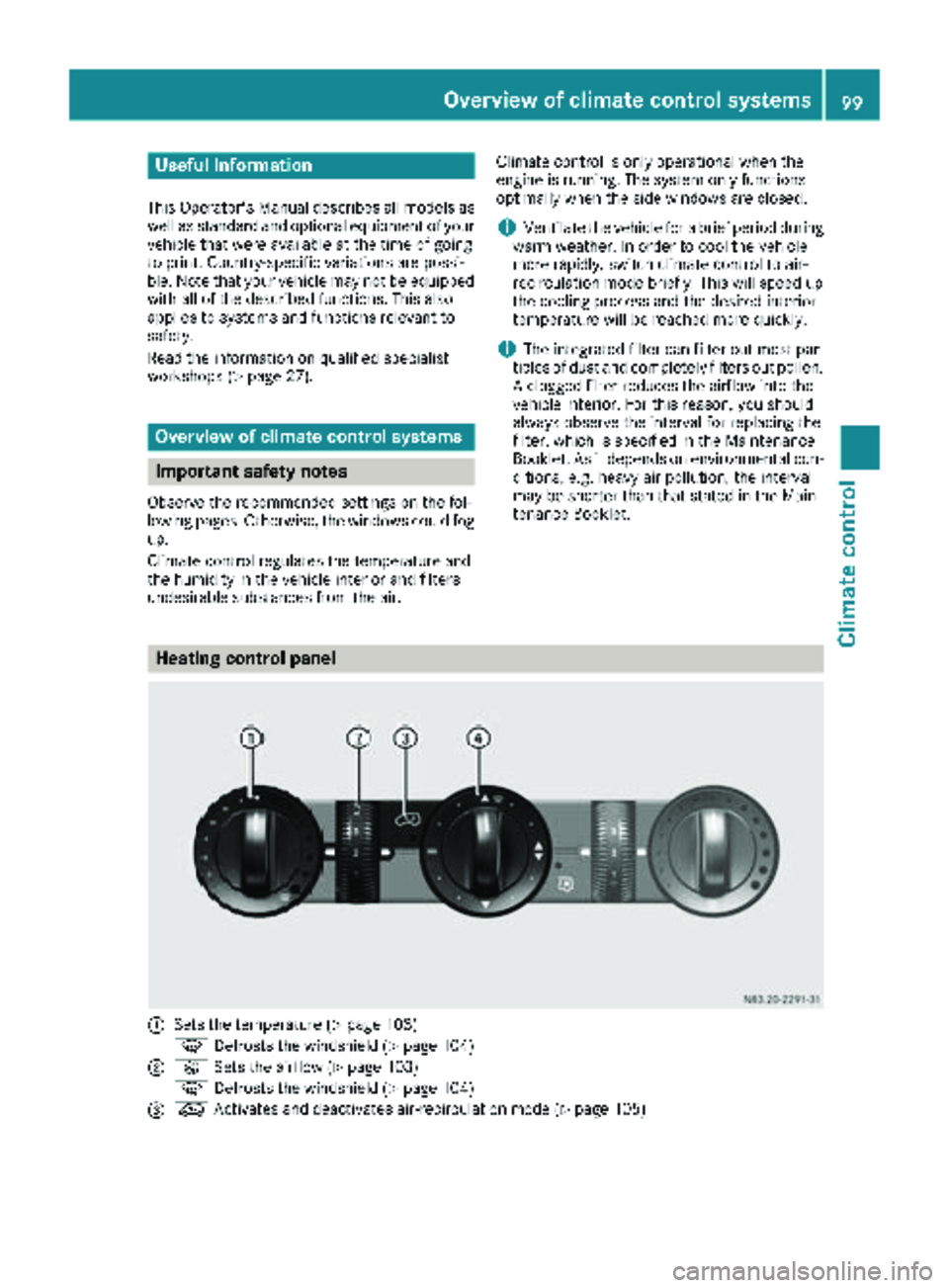
:Sets the temperature (Ypage 103)
z Defrosts the windshield (
Ypage 104)
;KSets the airflow (Ypage 103)
z Defrosts the windshield (
Ypage 104)
=eActivates and deactivates air-recirculation mode (Ypage 105)
Overview of climate control systems99
Climate control
Page 102 of 294
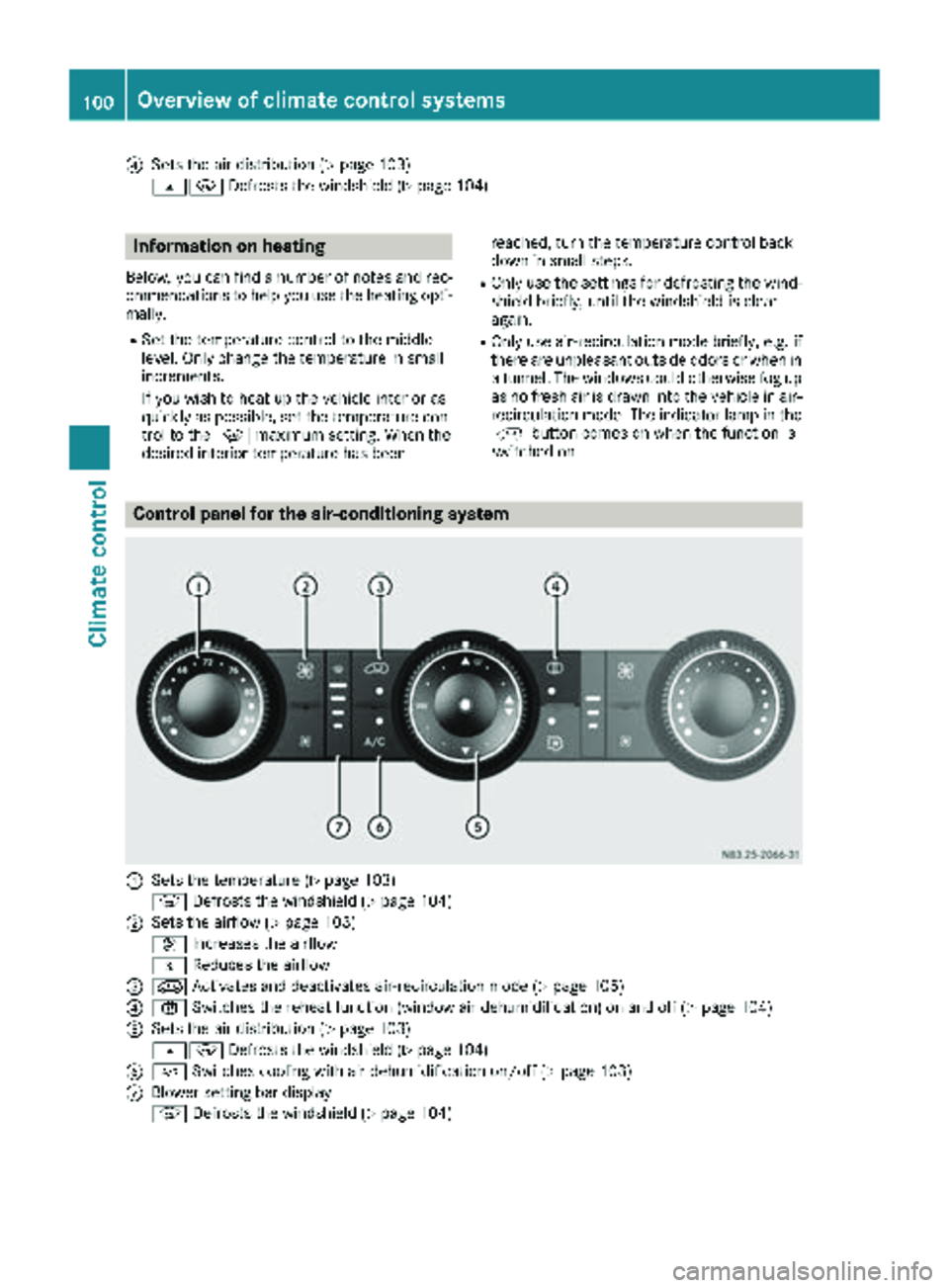
?Sets the air distribution (Ypage 103)
sz Defrosts the windshield (
Ypage 104)
Information on heating
Below, you can find a number of notes and rec-
ommendations to help you use the heating opti-
mally.
RSet the temperature control to the middle
level. Only change the temperature in small
increments.
If you wish to heat up the vehicle interior as
quickly as possible, set the temperature con-
trol to thezmaximum setting. When the
desired interior temperature has been reached, turn the temperature control back
down in small steps.
ROnly use the settings for defrosting the wind-
shield briefly, until the windshield is clear
again.
ROnly use air-recirculation mode briefly, e.g. if
there are unpleasant outside odors or when in
a tunnel. The windows could otherwise fog up
as no fresh air is drawn into the vehicle in air-
recirculation mode. The indicator lamp in the
h button comes on when the function is
switched on.
Control panel for the air-conditioning system
:Sets the temperature (Ypage 103)
z Defrosts the windshield (
Ypage 104)
;Sets the airflow (Ypage 103)
K Increases the airflow
I Reduces the airflow
=eActivates and deactivates air-recirculation mode (Ypage 105)
?xSwitches the reheat function (window air dehumidification) on and off (Ypage 104)
ASets the air distribution (Ypage 103)
sz Defrosts the windshield (
Ypage 104)
B¿Switches cooling with air dehumidification on/off (Ypage 103)
CBlower setting bar display
zDefrosts the windshield (
Ypage 104)
100Overview of climate control systems
Climate control
Page 103 of 294
Optimum use of the air-conditioning
system
Below, you can find a number of notes and rec-
ommendations to help you use the air-condi-
tioning system optimally.
RSwitch on the cooling with air dehumidifica-
tion function. The indicator lamp above the
rocker switch lights up.
RSet the temperature to 72 ‡ (22 †). Only
change the temperature in small increments.
ROnly use the "Windshield defrosting" function
briefly until the windshield is clear again.
ROnly use air-recirculation mode briefly, e.g. if
there are unpleasant outside odors or when in
a tunnel. The windows could otherwise fog up
as no fresh air is drawn into the vehicle in air-
recirculation mode.
ROnly use reheat mode until the windows are
clear again.
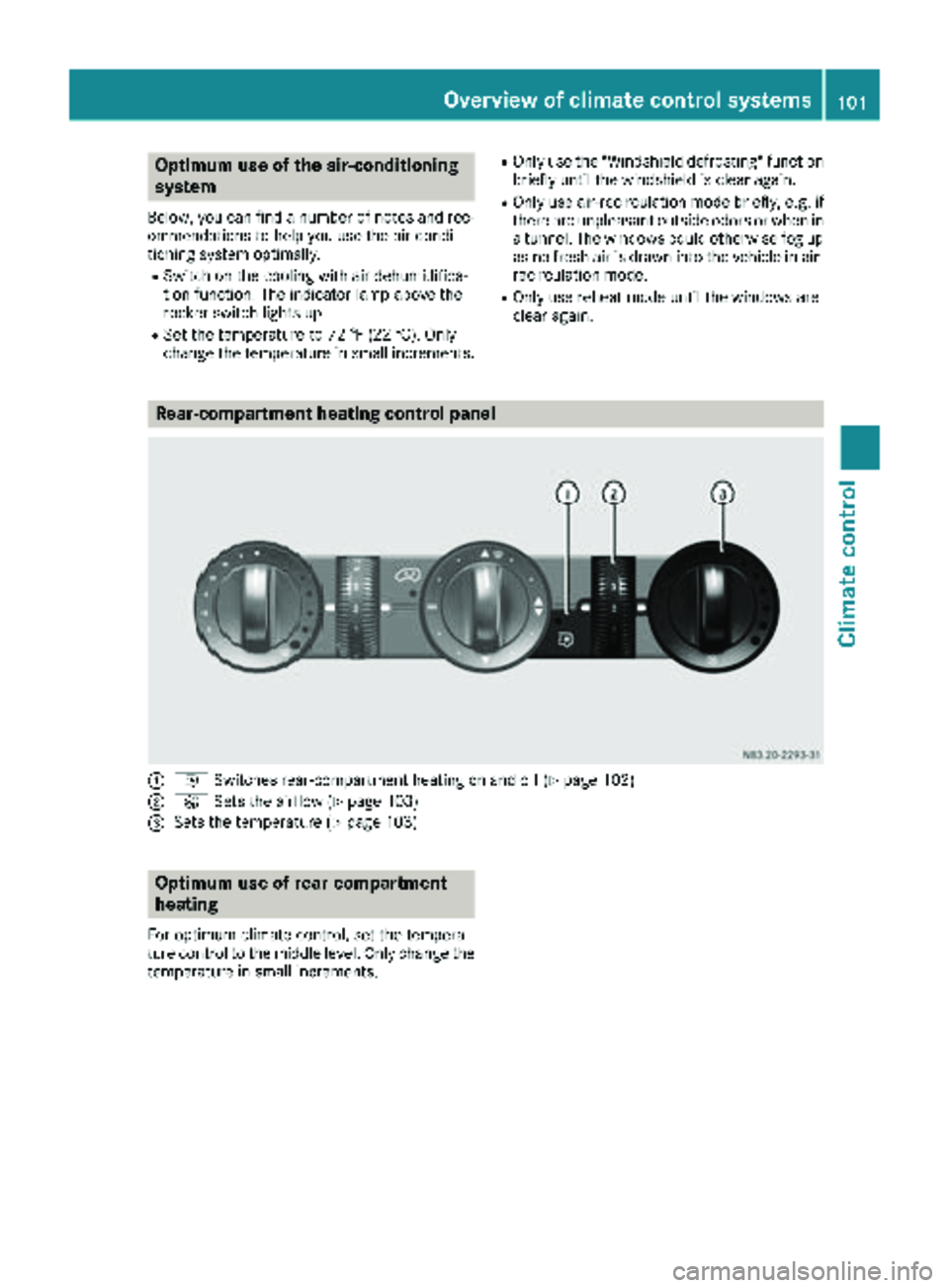
Rear-compartment heating control panel
:i Switches rear-compartment heating on and off (Ypage 102)
;KSets the airflow (Ypage 103)
=Sets the temperature (Ypage 103)
Optimum use of rear-compartment
heating
For optimum climate control, set the tempera-
ture control to the middle level. Only change the
temperature in small increments.
Overview of climate control systems101
Climate control
Page 105 of 294
Vehicle with rear-compartment heating/
rear-compartment air conditioning
XTo switch on/off:press theiswitch.
If the indicator lamp in the button lights up,
the rear-compartment heating/rear-com-
partment air conditioning is switched on.
Switching the cooling with air dehu-
midification function on/off
Important information
If you switch off the "Cooling with air dehumid-
ification" function, the air inside the vehicle will
not be cooled (in warm weather) or dehumidi-
fied. The windows could fog up more quickly.
The cooling with air dehumidification function is
only available when the engine is running. The
air inside the vehicle is cooled and dehumidified
according to the temperature selected.
Condensation may appear on the underside of
the vehicle when in cooling mode. This is normal
and not a sign that there is a malfunction.
Switching on and off
Vehicle with air conditioning
XPress the ¿button.
If the indicator lamp in the button lights up,
cooling with air dehumidification is switched
on.
Setting the temperature
Increasing and reducing temperature in
the front compartment via the control
panel
Only change the temperature in small incre-
ments. Start at the center position, or at 72 ‡
(22 †).
XSwitch on climate control (Ypage 102).
XTurn temperature control :clockwise to
increase or counterclockwise to reduce the
temperature (
Ypage 100).
Increasing and reducing temperature in
the rear compartment via the control
panel
Only change the temperature in small incre-
ments.
XSwitch on climate control (Ypage 102).
XTurn rear-compartment temperature control
= (Ypage 101) or rear-compartment air-
conditioning system ;(Ypage 102) clock-
wise to increase or counterclockwise to
reduce the temperature.
iVehicles with additional air conditioning and
heating in the rear compartment: if you set
the temperature control to the center posi-
tion, only one of the two climate control sys-
tems works in the rear compartment and in
air-recirculation mode (
Ypage 105).
Setting the air distribution
Air distribution settings
The air distribution symbols have the following
meanings:
m Directs air through the center and side
air vents
s
z Directs air to the windshield and the air
vents
q Directs air to the windshield, the air
vents and into the footwell
r Directs air to the air vents and into the
footwell
Adjusting
XSwitch on climate control (Ypage 102).
XSet air-distribution control ?for the heating
(Ypage 99) or air-conditioning system A
(Ypage 100) to the corresponding symbol.
Setting the airflow
XSwitch on climate control (Ypage 102).
XVehicle with heating/rear-compartment
heating: set airflow control ;of the heating
(
Ypage 99) or of the rear-compartment heat-
ing (Ypage 101) to the desired level.
XVehicle with air conditioning/rear-com-
partment air conditioning: press theI
Operating the climate control system103
Climate control
Page 106 of 294
button to reduce or theKbutton to
increase the airflow.
The blower speeds are shown in bars next to
the buttons.
Defrosting the windows
You can use the "defrosting" function to defrost
the windshield or to demist the inside of the
windshield and the side windows.
Only use the following settings until the win-
dows are clear again.
XVehicle with window heating: switch on the
front (Ypage 105) and/or rear window
defroster (Ypage 105) .
XSwitch on climate control (Ypage 102).
Vehicle with heating
XSet temperature control :and airflow con-
trol ;toz (Ypage 99).
XSet air-distribution control ?tosz
(Ypage 99).
XClose the center air vents (Ypage 106) and
the air outlets for the headroom and the rear compartment (
Ypage 107).
XDirect the side air vents towards the side win-dows and open the defroster vents for the
side windows (
Ypage 107).
Vehicle with air conditioning
XSet temperature control :to
z (Ypage 100).
XPress the Kbutton until the maximum
blower output is reached.
All bars in the display next to the button light
up.
XSet air-distribution control Atosz
(Ypage 100).
XClose the center air vents (Ypage 106) and
the air outlets for the headroom and the rear
compartment (
Ypage 107).
XDirect the side air vents towards the side win-
dows and open the defroster vents for the
side windows (
Ypage 107).
Clearing condensation from the win-
dows
Windows fogged up on the inside
You should only select this setting until the win-
dows are clear again.
XVehicle with window heating: switch on the
front (Ypage 105) and/or rear window
defroster (Ypage 105) .
XSwitch on climate control (Ypage 102).
XSwitch off air-recirculation mode
(Ypage 105).
Vehicle with heating
XSet temperature control :to a higher tem-
perature (Ypage 99).
XSet airflow control ;to a higher blower set-
ting. It should be set at least to level two
(
Ypage 99).
XSet air-distribution control ?tosz
(Ypage 99).
iIf the windows still fog up, set the control as
described for defrosting (Ypage 104).
Vehicle with air conditioning
XActivate cooling with air dehumidification
(Ypage 103).
XPress the ¨button (Ypage 100).
Reheat mode is activated. The indicator lamp
in the switch lights up.
To deactivate reheat mode, press the ¨
button again. The indicator lamp in the button
goes out.
Windows fogged up on the outside
You should only select this setting until the
windshield is clear again.
XSwitch on the windshield wipers (Ypage 96).
XSwitch on climate control (Ypage 102).
XAdjust air distribution to the footwell
(Ypage 103).
XClose the air vents (Ypage 106).
104Operating the climate control system
Climate control
Page 192 of 294
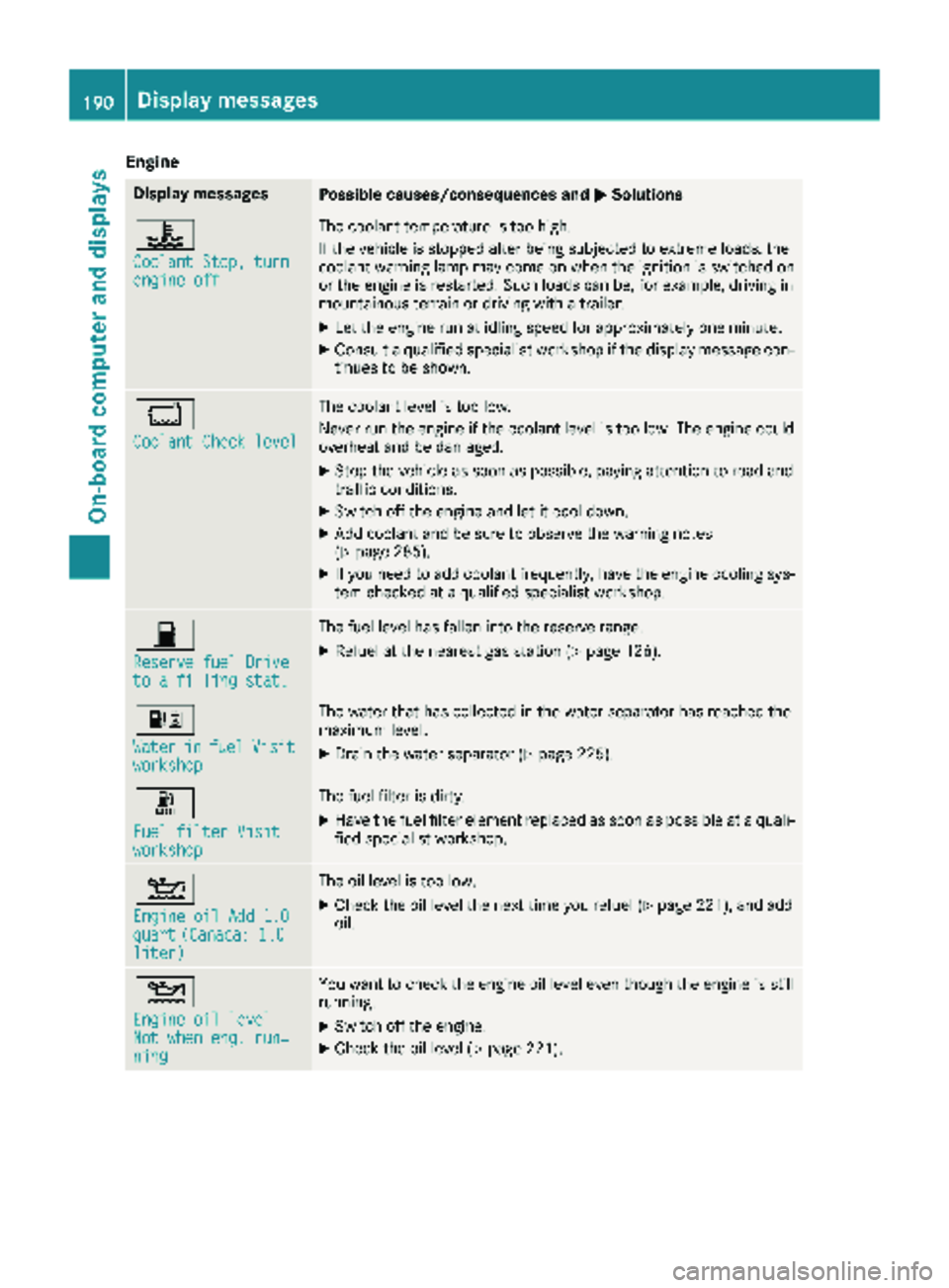
Engine
Display messagesPossible causes/consequences andMSolutions
?
Coolant Stop, turnengine off
The coolant temperature is too high.
If the vehicle is stopped after being subjected to extreme loads, the
coolant warning lamp may come on when the ignition is switched on
or the engine is restarted. Such loads can be, for example, driving in
mountainous terrain or driving with a trailer.
XLet the engine run at idling speed for approximately one minute.
XConsult a qualified specialist workshop if the display message con-
tinues to be shown.
*
Coolant Check level
The coolant level is too low.
Never run the engine if the coolant level is too low. The engine could
overheat and be damaged.
XStop the vehicle as soon as possible, paying attention to road and
traffic conditions.
XSwitch off the engine and let it cool down.
XAdd coolant and be sure to observe the warning notes
(Ypage 285).
XIf you need to add coolant frequently, have the engine cooling sys-
tem checked at a qualified specialist workshop.
7
Reserve fuel Driveto a filling stat.
The fuel level has fallen into the reserve range.
XRefuel at the nearest gas station (Ypage 126).
:
WaterinfuelVisitworkshop
The water that has collected in the water separator has reached the
maximum level.
XDrain the water separator (Ypage 225).
m
Fuel filter Visitworkshop
The fuel filter is dirty.
XHave the fuel filter element replaced as soon as possible at a quali-
fied specialist workshop.
4
Engine oil Add 1.0quart(Canada: 1.0liter)
The oil level is too low.
XCheck the oil level the next time you refuel (Ypage 221), and add
oil.
4
Engine oil levelNot when eng. run‐ning
You want to check the engine oil level even though the engine is still
running.
XSwitch off the engine.
XCheck the oil level (Ypage 221).
190Display messages
On-board computer and displays
Page 202 of 294
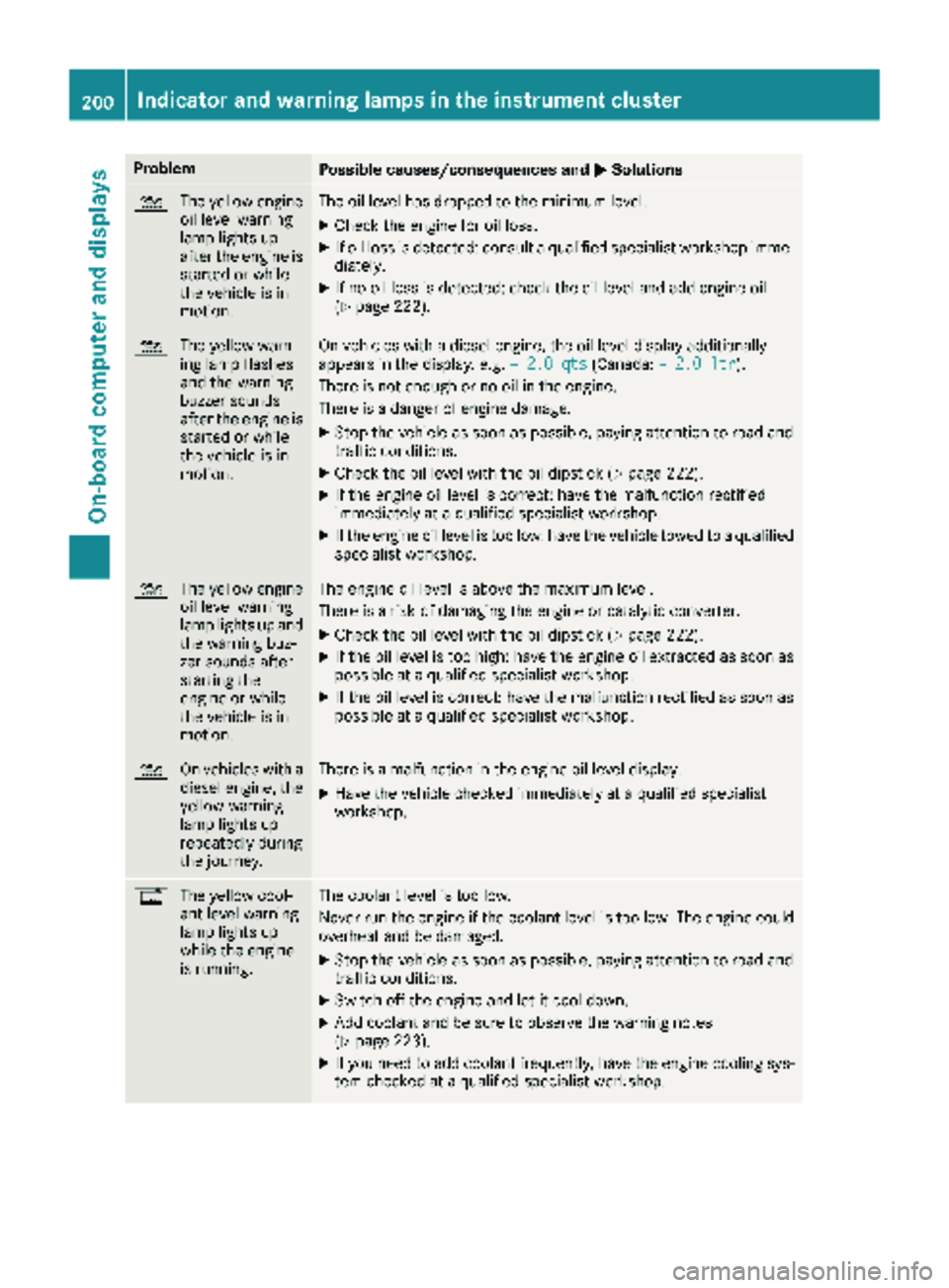
ProblemPossible causes/consequences andMSolutions
4
The yellow engine
oil level warning
lamp lights up
after the engine is
started or while
the vehicle is in
motion.The oil level has dropped to the minimum level.
XCheck the engine for oil loss.
XIf oil loss is detected: consult a qualified specialist workshop imme-
diately.
XIf no oil loss is detected: check the oil level and add engine oil
(Ypage 222).
4 The yellow warn-
ing lamp flashes
and the warning
buzzer sounds
after the engine is
started or while
the vehicle is in
motion.On vehicles with a diesel engine, the oil level display additionally
appears in the display, e.g. – 2.0 qts(Canada:– 2.0 ltr).
There is not enough or no oil in the engine.
There is a danger of engine damage.
XStop the vehicle as soon as possible, paying attention to road and
traffic conditions.
XCheck the oil level with the oil dipstick (Ypage 222).
XIf the engine oil level is correct: have the malfunction rectified
immediately at a qualified specialist workshop.
XIf the engine oil level is too low: have the vehicle towed to a qualified
specialist workshop.
4 The yellow engine
oil level warning
lamp lights up and
the warning buz-
zer sounds after
starting the
engine or while
the vehicle is in
motion.The engine oil level is above the maximum level.
There is a risk of damaging the engine or catalytic converter.
XCheck the oil level with the oil dipstick (Ypage 222).
XIf the oil level is too high: have the engine oil extracted as soon as
possible at a qualified specialist workshop.
XIf the oil level is correct: have the malfunction rectified as soon as
possible at a qualified specialist workshop.
4 On vehicles with a
diesel engine, the
yellow warning
lamp lights up
repeatedly during
the journey.There is a malfunction in the engine oil level display.
XHave the vehicle checked immediately at a qualified specialist
workshop.
%The yellow cool-
ant level warning
lamp lights up
while the engine
is running.The coolant level is too low.
Never run the engine if the coolant level is too low. The engine could
overheat and be damaged.
XStop the vehicle as soon as possible, paying attention to road and
traffic conditions.
XSwitch off the engine and let it cool down.
XAdd coolant and be sure to observe the warning notes
(Ypage 223).
XIf you need to add coolant frequently, have the engine cooling sys-
tem checked at a qualified specialist workshop.
200Indicator and warning lamps in the instrument cluster
On-board computer and displays