transmission fluid MERCEDES-BENZ SPRINTER 2018 MY18 Operator’s Manual
[x] Cancel search | Manufacturer: MERCEDES-BENZ, Model Year: 2018, Model line: SPRINTER, Model: MERCEDES-BENZ SPRINTER 2018Pages: 294, PDF Size: 4.36 MB
Page 7 of 294
Selector lever ................................ 123
Selector lever positions ................. 124
Shift ranges ................................... 125
Starting the engine ........................ 120
Touchshift ...................................... 124
Trailer towing ................................. 125
Transmission oil change ................ 284
Automatic transmission emer-
gency mode ....................................... 126
AUX port ............................................. 212
Auxiliary heater
see Auxiliary warm-air heater
see Hot-water auxiliary heater
Auxiliary heating
Activating/deactivating heater
booster mode ................................ 112
Adjusting ....................................... 172
Conditions for switching on ........... 109
Heating time .................................. 108
Important safety notes .................. 107
Operating with the button (control
panel) ............................................ 109
Operation with the remote con-
trol ................................................. 110
Operation with the timer ................ 114
Selecting a switch-on time ............. 109
Setting the switch-on time ............. 110
see Auxiliary heating
see Auxiliary warm-air heater
see Hot-water auxiliary heater
Auxiliary warm-air heater
Problem (malfunction) ................... 117
Setting the departure time ............. 116
Axle load, permissible (trailer tow-
ing) ...................................................... 288
B
Backup lamps
Replacing bulbs ............................... 92
Backup lamps (Chassis Cab)
Replacing bulbs ............................... 93
BAS (Brake Assist System)
Display message ............................ 182
Function/notes ................................ 56
Indicator lamp ................................ 196
Basic settings
see Settings Battery
Replacing (SmartKey) ...................... 63
Battery (SmartKey)
Checking .......................................... 63
Important safety notes .................... 63
Replacing ......................................... 63
Battery (vehicle)
Care ............................................... 233
Charging ........................................ 233
Disconnecting/connecting (addi-
tional battery) ................................ 232
Disconnecting/connecting
(starter battery) ............................. 230
Display message ............................ 194
Important safety notes .................. 228
Indicator lamp ................................ 199
Installing/removing (additional
battery) .......................................... 233
Jump starting ................................. 243
Location ......................................... 229
Main switch ................................... 118
Removing and installing (starter
battery) .......................................... 231
Removing and installing the floor
covering ......................................... 229
Before driving off
Important safety notes .................. 120
Belt
see Seat belts
Belt warning ......................................... 45
Bio-diesel ........................................... 279
Bleeding the fuel system .................. 122
Blind Spot Assist
Activating/deactivating (button) .... 145
Activating/deactivating (vehicle
with steering wheel buttons) ......... 172
Display messages (vehicles with
steering wheel buttons) ................. 192
Display messages (vehicles with-
out steering wheel buttons) ........... 180
Notes/function .............................. 143
Trailer towing ................................. 145
Bottle holder
see Cup holder
Brake Assist
see BAS (Brake Assist System)
Brake fluid
Checking the level ......................... 224
Index5
Page 18 of 294
Windshield wiper .............................. 96
Range (vehicles with steering
wheel buttons) ..................................1 73
Rear bench seat
Installing/removing (Passenger
Van) ................................................. 77
Stowage compartment (crewcab) .. 208
Rear compartment
Activating/deactivating climate
control ...........................................1 02
Setting the air vents ......................1 07
Rear door
Child-proof locks .............................. 54
Important safety notes .................... 69
Opening/closing from inside ........... 71
Opening/closing from the out-
side ..................................................7 0
Rear fog lamp
Replacing bulbs ............................... 92
Switching on/off .............................. 83
Rear fog lamp (Chassis Cab)
Replacing bulbs ............................... 93
Rear interior light
Replacing bulbs ............................... 95
Rear view camera
Cleaning instructions ..................... 237
Important safety notes .................. 153
Switching on .................................. 153
Rear window defroster
Problem (malfunction) ................... 105
Switching on/off ........................... 105
Rear window wiper
Switching on/off .............................. 97
Rear-compartment air-condition-
ing system
see Climate control
Rear-compartment heating
see Climate control
Rear-view mirror
Anti-glare mode ............................... 80
Refilling
DEF filler neck ............................... 128
Important safety notes (Diesel
Exhaust Fluid – DEF) ...................... 128
Refilling procedure (Diesel
Exhaust Fluid – DEF) ...................... 128
Refrigerant ......................................... 286 Refueling
Fuel filler flap ................................. 127
Important safety notes (fuel) ......... 126
Refueling procedure (fuel) ............. 127
see Fuel
Releasing the parking lock man-
ually (automatic transmission) ........ 126
Remote contro l
C
hanging the operating duration
(auxiliary heating) .......................... 111
Replacing the battery (auxiliary
heating ) ........................................ 112
Switching on/off (auxiliary heat-
ing) ................................................ 111
Synchronizing (auxiliary heating) ... 111
Replacing bulbs
Important safety notes .................... 89
Replacing the battery (auxiliary
heating remote control) .................... 112
Replacing the fuel filter .................... 203
Reporting safety defects .................... 28
Rescue card ......................................... 30
Reserve fuel
Display message ............................ 190
Restraint system
Display message ............................ 184
Introduction ..................................... 41
Warning lamp ................................. 199
Warning lamp (function) ................... 41
Reverse warning feature .................. 121
Roadside Assistance (breakdown) .... 24
Roof carrier
Maximum payload .......................... 287
Notes ............................................. 217
Roof load (roof carrier) ..................... 287
S
Safety
Children in the vehicle ..................... 49
Operating safety .............................. 26
see Occupant safety
Safety system
see Driving safety systems
Seat belts
Adjusting the height ......................... 44
Cleaning ......................................... 239
Correct usage .................................. 43
16Index
Page 19 of 294
Display message ............................ 184
Fastening ......................................... 44
Important safety guidelines .............42
Introduction .....................................4 2
Releasin g ......................................... 45
Warning lamp ................................. 203
Warning lamp (function) ................... 45
Seat heating ......................................... 79
Seats
Adjusting lumbar support ................ 75
Adjusting the front-passenger
seat .................................................. 75
Adjusting the head restraint ............ 78
Armrest ............................................ 78
Cleaning the cover ......................... 239
Correct driver's seat position ........... 74
Folding seat ..................................... 76
Important safety notes .................... 74
Rear bench seat ............................... 77
Seat heating .................................... 79
Setting the driver's seat ................... 75
Swivel seat ....................................... 75
Twin front-passenger seat ................ 76
Securing loads
Important safety notes .................. 215
Selector lever
Cleaning ......................................... 239
see Automatic transmission
Sensors (cleaning instructions) ....... 237
Service center
see Qualified specialist workshop
Service interval display
Calling up the service due date ...... 227
Exceeding a service due date ........ 227
Notes ............................................. 227
Service due date (automatic dis-
play) ............................................... 227
Service products
Brake fluid ..................................... 284
Coolant (engine) ............................ 285
Diesel Exhaust Fluid (DEF) ............. 281
Engine oil ....................................... 282
Fuel ................................................ 278
Important safety notes .................. 278
Power steering fluid ....................... 284
Refrigerant ..................................... 286
Transmission oil ............................. 284
Washer fluid ................................... 286 Setting the air distribution
............... 103
Setting the airflow ............................ 103
Setting the clock
Vehicles with steeri
ng wheel but-
tons ............................................... 169
Vehicles without steering wheel
buttons .......................................... 163
Settings
Resetting all (vehicles with steer-
ing wheel buttons) ......................... 167
Resetting submenus (vehicles
with steering wheel buttons) ......... 167
Short journeys (diesel particle fil-
ter) ...................................................... 133
Side impact air bag ............................. 46
Side marker lamp
Changing bulbs ................................ 91
Side windows
Cleaning ......................................... 236
Hinged side windows ....................... 72
Important safety information ........... 72
Opening/closing .............................. 72
Overview .......................................... 72
Problem (malfunction) ..................... 73
Resetting ......................................... 73
Sliding door
Cleaning ......................................... 238
Closing assist ................................... 68
Important safety notes .................... 67
Opening/closing from the inside ..... 67
Opening/closing from the out-
side .................................................. 67
SmartKey
Changing the battery ....................... 63
Changing the locking system set-
tings ............................................... 172
Checking the battery ....................... 63
Display message ............................ 194
Door central locking/unlocking ....... 61
Important safety notes .................... 61
Loss ................................................. 64
Problem (malfunction) ..................... 64
Snow chains ...................................... 251
Sockets .............................................. 211
Spare wheel
General notes ................................ 273
Important safety notes .................. 273
Index17
Page 27 of 294
Proper use
Observe the following information when oper-
ating your vehicle:
Rthe safety notes in these operating instruc-
tions
Rthe technical data in these Operating Instruc-
tions
Rtraffic laws and regulations
Rmotor vehicle laws and safety standards
There are various warning stickers affixed to the
vehicle. If you remove warning stickers, you and
others may fail to recognize the dangers. Leave
the warning stickers in their original position.
GWARNING
Modifications to electronic components, their software as well as wiring can impair their
function and/or the function of other net-
worked components. In particular, systems
relevant to safety could also be affected. As a
result, these may no longer function as inten-
ded and/or jeopardize the operating safety of
the vehicle. There is an increased risk of an
accident and injury.
Never tamper with the wiring as well as elec-
tronic components or their software. You
should have all work to electrical and elec-
tronic equipment carried out at a qualified
specialist workshop.
The general operating permit for your vehicle
could be rendered invalid if you carry out mod-
ifications to electronic components, their soft-
ware as well as wiring.
GWARNING
Gases and fluids from substances that con-
stitute a health hazard or react aggressively
can escape even from securely closed con-
tainers. When transporting such substances
in the vehicle interior, your ability to concen-
trate or your health could be affected during
the journey. Malfunctions, short circuits or
electrical component system failures may
also result. There is a risk of an accident and
fire.
Do not store or transport any substances in
the vehicle interior which are hazardous to
health or react aggressively.
These instructions must also be observed for
vehicles where the cargo compartment is not
fully separated from the driver's cab.
Partition with door/window: always keep the
door/window in the partition closed during
transport.
Examples of substances that are hazardous to
health and/or react aggressively:
RSolvents
RFuel
ROil and grease
RCleaning agents
RAcids
Protection of the environment
Economic and environmentally aware
driving
HEnvironmental note
Daimler's declared policy is one of compre-
hensive environmental protection.
The objectives are for the natural resources
that form the basis of our existence on this
planet to be used sparingly and in a manner
that takes the requirements of both nature
and humanity into account.
You too can help to protect the environment
by operating your vehicle in an environmen-
tally responsible manner.
Fuel consumption and the rate of engine,
transmission, brake and tire wear are affected
by these factors:
Roperating conditions of your vehicle
Ryour personal driving style
You can influence both factors. You should
bear the following in mind:
Introduction25
Z
Page 164 of 294
If the supply of DEF falls below the reserve range
of 0.8 US gal (3.0l)the StArtS RExxmessage
appears in the display. Also, the yellow å
DEF indicator lamp lights up in the instrument
cluster and three warning tones sound.
In the display, xx
corresponds to the number of
possible remaining engine starts ( 16to0).
When the display shows that the number of
remaining starts is 0
, theStArtSIdLEmessage
appears in the display and three warning tones
sound.
In addition, the yellow åDEF indicator lamp
and the ;Check Engine indicator lamp light
up in the instrument cluster and three warning
tones sound.
The engine management only allows speeds of
up to 5 mph (8 km/h).
Add at least 1.5 US gal (5.5 l) of DEF
(
Ypage 128).
The display message only disappears when the
vehicle is stationary, at the latest after
20 second s, as soon as yo uswit ch on the igni-
tion or start the engine after refueling.
Vehicles with steering wheel buttons
If the supply of DEF is less than 1.5 US gal
(5.5 l),the Check Diesel Exhaust Fluid
See Operator's Manualmessage appears in
the display.
If the supply of DEF falls below the reserve range
of 0.8 US ga l(3.0 l),the XX
startsremainingmessage is displayed.
Three short warning tones also sound.
In the display, xx
corresponds to the number of
possible remaining engine starts ( 16to0).
When the display shows that the number of
remaining starts is 0
, theStArtSIdLEmessage
appears in the display.
The yellow ;Check Engine indicator lamp
also lights up and three short warning tones
sound.
The engine management only allows speeds of
up to 5 mph (8 km/h).
Add at least 1.5 US gal (5.5 l) of DEF
(
Ypage 128).
The display message only disappears when the
vehicle is stationary, at the latest after
20 seconds, as soon as you switch on the igni-
tion or start the engine after refueling.
On-board computer (vehicles without
steering wheel buttons)
Operating the on-board computer
General notes
The on-board computer is activated as soon as
you turn the key to position 1in the ignition lock.
The on-board computer shows vehicle informa-
tion and settings in the display.
You can control the display and the settings in
the on-board computer using the adjustment
buttons on the instrument cluster.
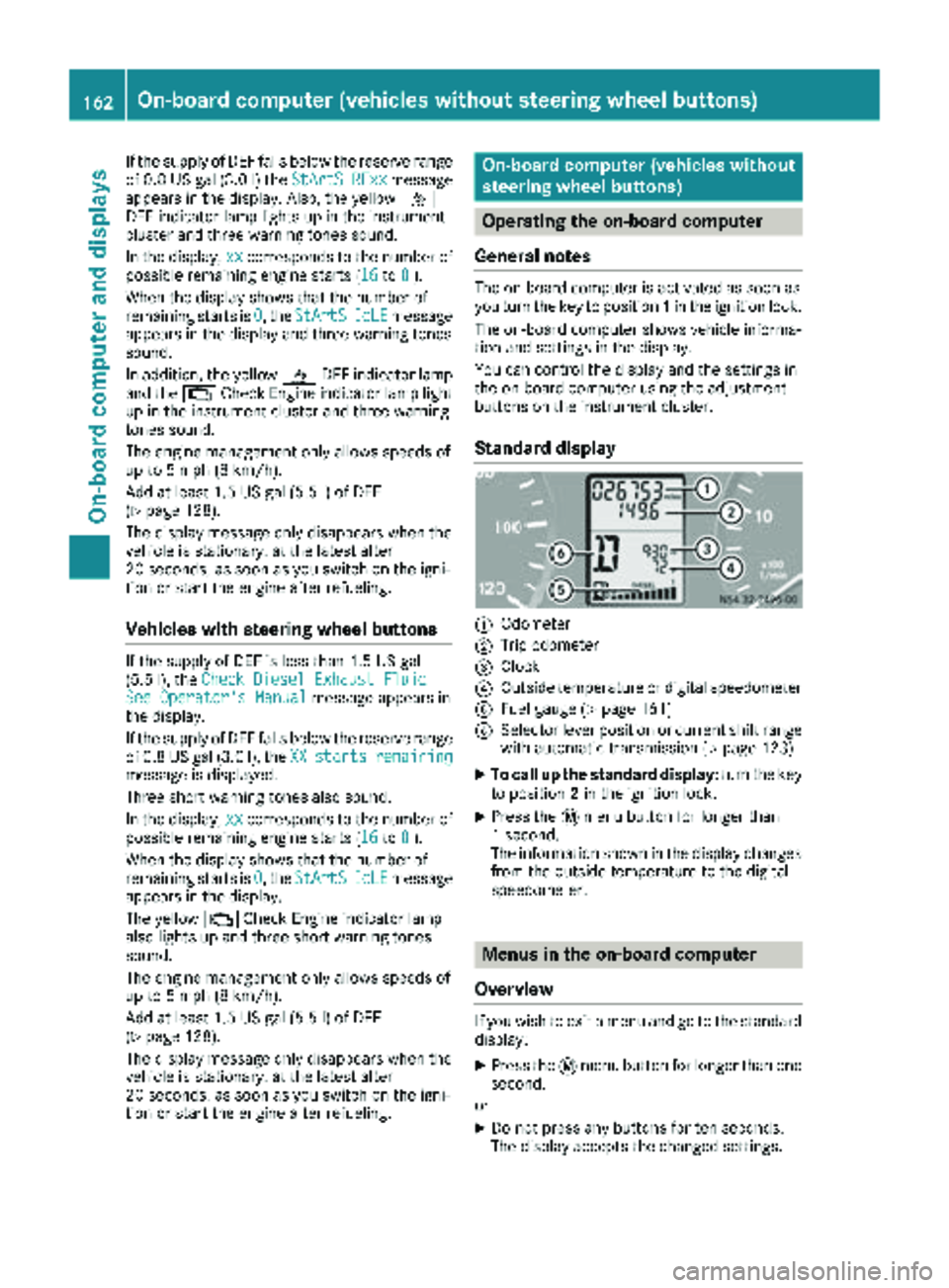
Standard display
:Odometer
;Trip odometer
=Clock
?Outside temperature or digital speedometer
AFuel gauge (Ypage 161)
BSelector lever position or current shift range
with automatic transmission (Ypage 123)
XTo call up the standard display: turn the key
to position 2in the ignition lock.
XPress the 4menu button for longer than
1 second.
The information shown in the display changes
from the outside temperature to the digital
speedometer.
Menus in the on-board computer
Overview
If you wish to exit a menu and go to the standard display:
XPress the 4menu button for longer than one
second.
or
XDo not press any buttons for ten seconds.
The display accepts the changed settings.
162On-board computer (vehicles without steering wheel buttons)
On-board computer and displays
Page 280 of 294
iSuch data is vehicle-specific and may differ
from that shown. Always observe the specifi-
cations on your vehicle's identification plate.
Engine number
The engine number is stamped on the crank-
case. More information may be obtained at any
qualified specialist workshop.
Service products and capacities
Important safety notes
GWARNING
Service products may be poisonous and haz-
ardous to health. There is a risk of injury.
Comply with instructions on the use, storage
and disposal of service products on the labels
of the respective original containers. Always
store service products sealed in their original
containers. Always keep service products out
of the reach of children.
HEnvironmental note
Dispose of service products in an environ-
mentally responsible manner.
Service products include the following:
RFuels, e.g. diesel
RAdditives for the exhaust gas aftertreatment,
e.g. Diesel Exhaust Fluid (DEF)
RLubricants, e.g. engine oil, transmission oil
RCoolant
RBrake fluid
RWasher fluid
RClimate control system refrigerants
Approved service products comply with the
highest quality standards and are listed in the
MB Specifications for Service Products. Only
use service products approved for the vehicle.
This is an important condition for the warranty.
You will recognize the approved service prod-
ucts by the inscription on the container: MB
Approval (e.g. MB Approval 228.5)
Other identifications and recommendations
refer to quality level or a specification according to an MB Sheet Number (e.g. MB 228.5). They
are therefore not necessarily approved.
More information can be obtained at any quali-
fied specialist workshop.
Additives for approved service products are nei-
ther required nor permitted. Approved fuel addi- tives are the exception. Additives can cause
engine damage and must therefore not be
added to the service products.
The use of additives is always the responsibility
of the vehicle operator. The use of additives may
result in the restriction or loss of you
r Limited
Warranty entitlements.
Fuel
Important safety notes
GWARNING
Fuel is highly flammable. Improper handling of
fuel creates a risk of fire and explosion.
Avoid fire, open flames, smoking and creating
sparks under all circumstances. Switch off the
engine and, if applicable, the auxiliary heating
before refueling.
GWARNING
Fuel is poisonous and hazardous to health.
There is a risk of injury.
You must make sure that fuel does not come into contact with your skin, eyes or clothing
and that it is not swallowed. Do not inhale fuel
vapors. Keep fuel away from children.
If you or others come into contact with fuel,
observe the following:
RWash away fuel from skin immediately
using soap and water.
RIf fuel comes into contact with your eyes,
immediately rinse them thoroughly with
clean water. Seek medical assistance with-
out delay.
RIf fuel is swallowed, seek medical assis-
tance without delay. Do not induce vomit-
ing.
RImmediately change out of clothing which
has come into contact with fuel.
278Service products and capacities
Technical data
Page 286 of 294
Depending on the driving style, the vehicle con-
sumes a maximum of 1.0 qt (1.0l)of engine oil
over a distance of 620 miles (1000 km).
Oil consumption may be higher if:
RThe vehicle is new.
RYou mainly operate the vehicle under arduous
operating conditions.
RYou frequently drive at high engine speeds.
Regular maintenance is one of the preconditions
for moderate rates of consumption.
You can only estimate the oil consumption after
you have driven a considerable distance.
Check the engine oil level on a regular basis, e.g.
weekly or each time you refuel (
Ypage 221).
Transmission and power steering oil
Automatic transmission
Service product: automatic transmission
fluid
Product name/numberMaintenance interval
Shell ATF 3403/M-115
MB Sheet No. 236.10—
Fuchs/Shell ATF 3353
MB Sheet No. 236.12
Further information can be obtained at any
qualified specialist workshop.
Rear axle
Service product: transmission oil
Product name/numberMaintenanceinterval
BP Energear Hypo DC
80W-90
MB Sheet No. 235.20—
Mobil Delvac Synthetic
Gear Oil 75W-90
MB Sheet No. 235.8
Further information can be obtained at any
qualified specialist workshop.
Steering
Service product: power steering fluid
Product name/numberMaintenanceinterval
Mobil ATF‑D,
Exxon Mobil Corporation
or equivalent
MB Sheet No. 236.3—
The steering is maintenance-free. Further infor-
mation can be obtained at any qualified special-
ist workshop.
Brake fluid
GWARNING
The brake fluid constantly absorbs moisture
from the air. This lowers the boiling point of
the brake fluid. If the boiling point of the brake
fluid is too low, vapor pockets may form in the
brake system when the brakes are applied
hard. This would impair braking efficiency.
There is a risk of an accident.
You should have the brake fluid renewed at
the specified intervals.
!Brake fluid corrodes paint, plastic and rub-
ber. If paint, plastic or rubber has come into
contact with brake fluid, rinse with water
immediately.
When handling, storing and disposing of brake
fluid, please observe the relevant regulations
and the important safety notes for service prod-
ucts.
Over a period of time, the brake fluid absorbs
moisture from the air. This reduces its boiling
point.
Have the brake fluid replaced at specified inter-
vals by a qualified specialist workshop.
iThere is usually a notice in the engine com-
partment to remind you when the next brake
fluid change is due.
Only use brake fluid approved by Mercedes-
Benz in accordance with MB-Freigabe or MB-
Approval 331.0.
284Service products and capacities
Technical data