light MERCEDES-BENZ WAGON 2016 User Guide
[x] Cancel search | Manufacturer: MERCEDES-BENZ, Model Year: 2016, Model line: WAGON, Model: MERCEDES-BENZ WAGON 2016Pages: 350, PDF Size: 6.71 MB
Page 22 of 350
Stowage areas................................... 238
Stowage compartments
Armrest (under) ............................. 239
Center console .............................. 239
Cup holders ................................... 251
Display message) ........................... 191
Eyeglasses compartment ............... 239
Glove box ....................................... 239
Important safety information ......... 239
Rear ............................................... 239
Stowage net ................................... 239
Under driver's seat/front-
passenger seat .............................. 239
Stowage net ....................................... 239
Stowage well beneath the trunk
floor ....................................................2 48
Summer tires ..................................... 290
Sun visor ............................................ 251
Surround lighting (on-board com-
puter) ..................................................1 90
Suspension tuning
AIRMATIC ...................................... 167
SETUP (on-board computer) .......... 190
Switching air-recirculation mode
on/off ................................................. 133
T
Tachometer ........................................ 188
Tail lamps
Display message ............................ 191
Tailgate
Display message ............................ 201
Emergency unlocking ..................... 103
Important safety notes .................... 96
Limiting the opening angle ............. 102
Opening dimensions ......................3 44
Opening/closing (automatically
from inside) ................................... 101
Opening/closing (automatically
from outside) ................................... 98
Opening/closing (from outside) ....... 97
Tank
see Fuel tank
Tank content
Fuel gauge ....................................... 37
Technical data
Capacities ...................................... 337 Emergency spare wheel ................. 332
Information ....................................3
34
Tires/wheels ................................. 314
Vehicle data ................................... 344
Telephone
Accepting a call ..................... 190, 231
Authorizing a mobile phone (con-
necting) ......................................... 229
Connecting a mobile phone (gen-
eral information) ............................ 227
De-authorizing (disconnecting) a
mobile phone ................................. 231
Ending an active call ......................2 32
Entering phone numbers ................ 232
Establishing the connection from
the mobile phone ........................... 230
Making a call ................................. 232
Menu (on-board computer) ............ 190
Number from the phone book ........1 90
Reconnecting a mobile phone
automatically ................................. 231
Redialing ........................................ 190
Rejecting a call .............................. 232
Rejecting/ending a call ................. 190
see also Digital Operator's Man-
ual ..................................................2 14
Switching between mobile
phones ...........................................2 31
Using the telephone ....................... 231
Telephone number
Entering ......................................... 232
Telescopic rod (EASY-PACK load-
securing kit) ....................................... 248
Te
mperature
Coolant .......................................... 188
Coolant (on-board computer) ......... 190
Engine oil (on-board computer) ...... 190
Outside temperature ......................1 88
Setting (climate control) ................ 133
Through-loading feature ................... 239
Timing (RACETIMER) ......................... 190
Tire pressure
Calling up (on-board computer) ..... 294
Checking manually ........................ 294
Display message ............................ 200
Maximum ....................................... 294
Not reached (TIREFIT) .................... 274
Notes ............................................. 292
20Index
Page 38 of 350
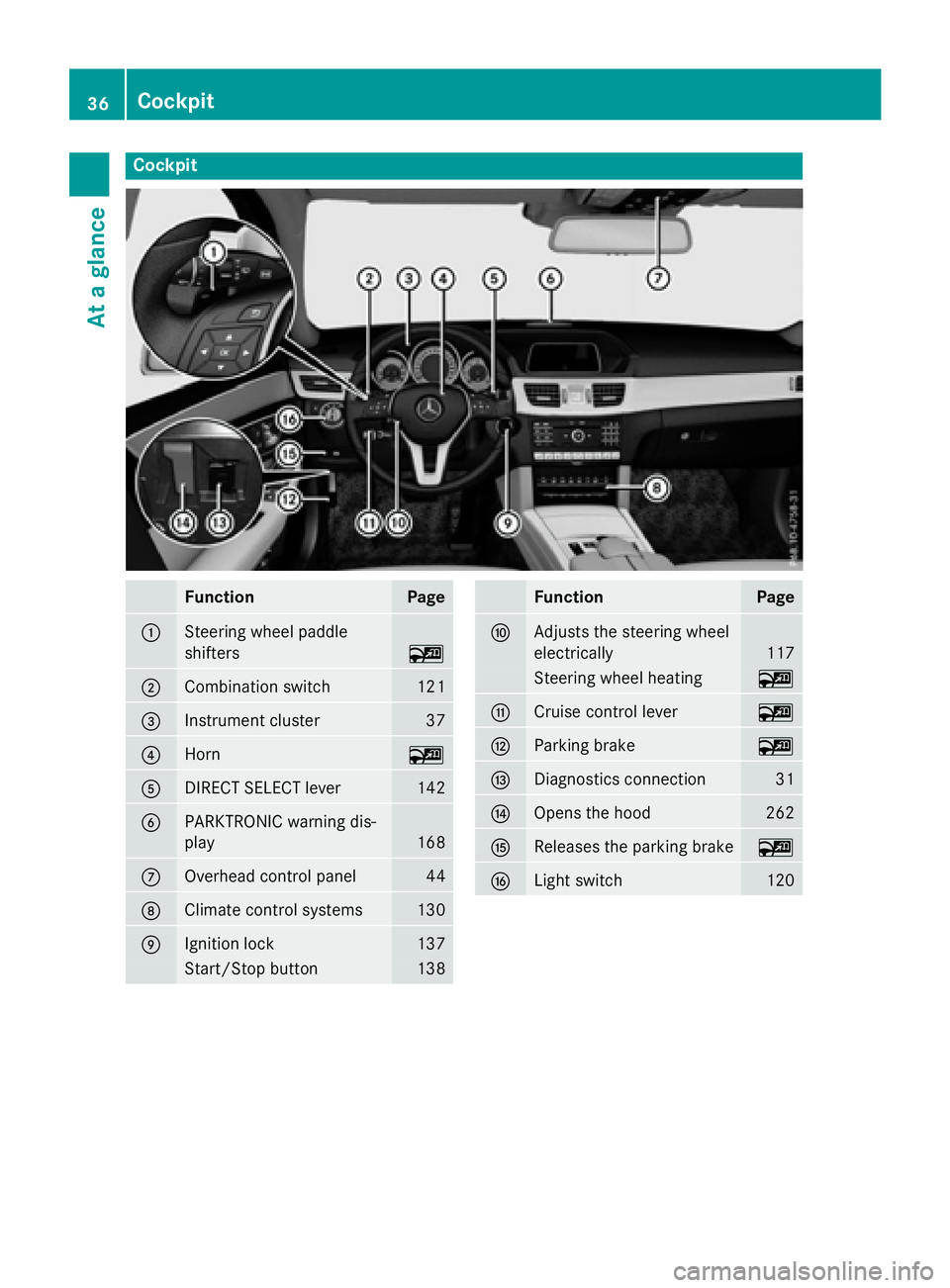
Cockpit
FunctionPage
:Steering wheel paddle
shifters
~
;Combination switch121
=Instrument cluster37
?Horn~
ADIRECT SELECT lever142
BPARKTRONIC warning dis-
play
168
COverhead control panel44
DClimate control systems130
EIgnition lock137
Start/Stop button138
FunctionPage
FAdjusts the steering wheel
electrically
117
Steering wheel heating~
GCruise control lever~
HParking brake~
IDiagnostics connection31
JOpens the hood262
KReleases the parking brake~
LLight switch120
36Cockpit
At a glance
Page 39 of 350
Instrument cluster
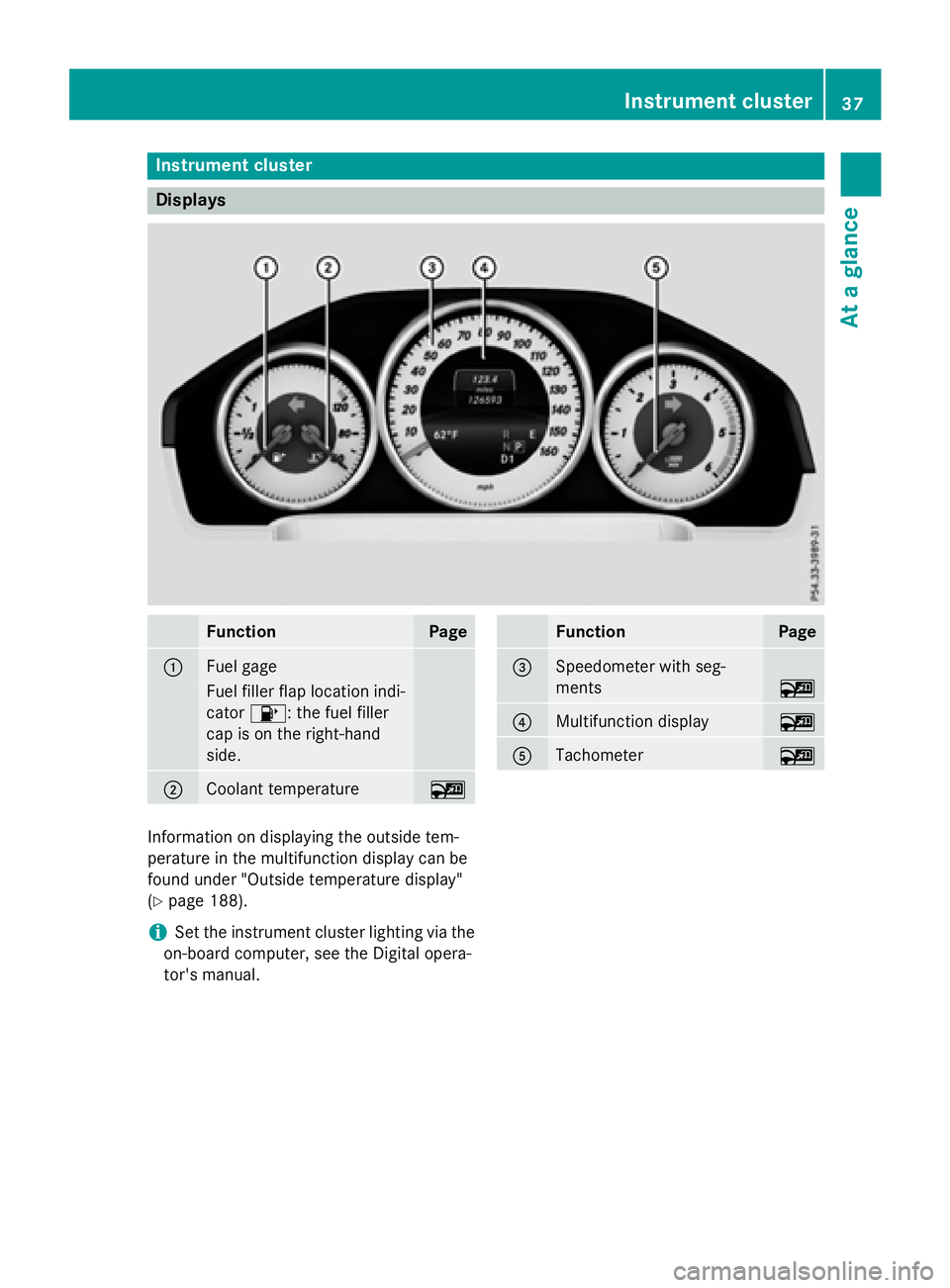
Displays
FunctionPage
:Fuel gage
Fuelfiller flap location ind i-
cator 8: the fuel filler
cap ison the right-hand
side .
;Coolant temperature~
FunctionPage
=Speedometer with seg-
ments
~
?Multifunction display~
ATachometer~
In formation on displaying the outside tem-
perature inthe multifunction display can be
found under "Outside temperature display"
(
Ypage 188).
iSe t the instrument cluster lighting via the
on-board computer, see the Digital opera-
tor's manual.
Instrument cluster37
At a glance
Page 44 of 350
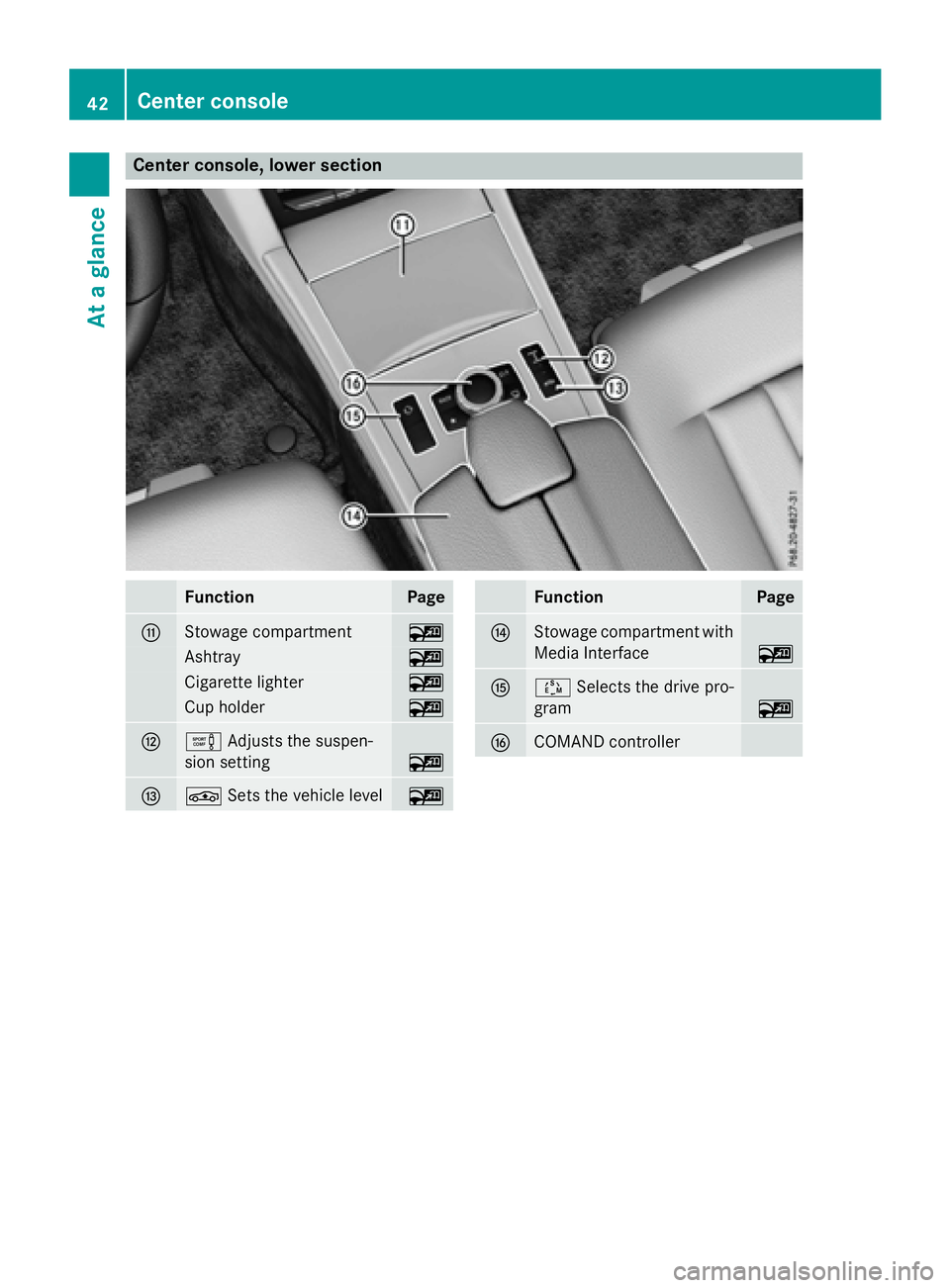
Center console, lower section
FunctionPage
GStowage compartment~
Ashtray~
Cigarette lighter~
Cup holder~
HeAdjusts the suspen-
sion setting
~
IÉ Sets the vehicle level~
FunctionPage
JStowage compartment with
Media Interface
~
KÚSelects the drive pro-
gram
~
LCOMAND controller
42Center console
At a glance
Page 45 of 350
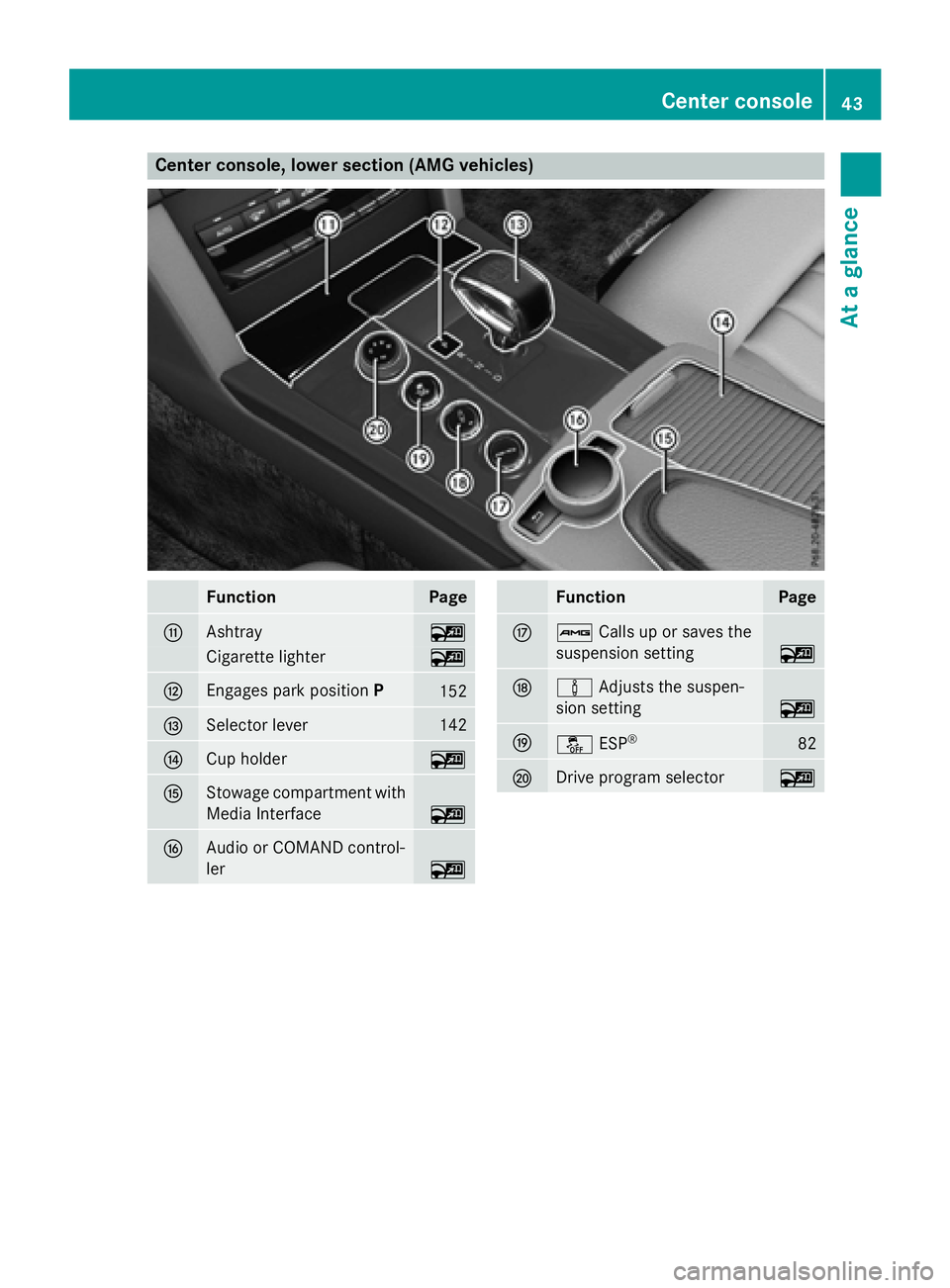
Center console, lower section (AMG vehicles)
FunctionPage
GAshtray~
Cigarette lighter~
HEngages park positionP152
ISelector lever142
JCup holder~
KStowage compartment with
Media Interface
~
LAudio or COMAND control-
ler
~
FunctionPage
MßCalls up or saves the
suspension setting
~
Nà Adjusts the suspen-
sion setting
~
Oå ESP®82
PDrive program selector~
Center console43
At a glance
Page 46 of 350

Overhead control panel
FunctionPage
:uSwitches the rear
interior lighting on/off
~
;| Switches the auto-
matic interior lighting con-
trol on/off
~
=p Switches the right-
hand reading lamp on/off
~
?3 Opens/closes the
sliding sunroof
107
3 Opens/closes the
panorama roof with power
tilt/sliding panel with roller
sunblinds
108
Aï MB Info call button
(mbrace system)
255
BG SOS button (mbrace
system)
253
FunctionPage
CRear-view mirror~
DButtons for the garage door
opener
257
EMicrophone for mbrace
(emergency call system),
telephone and Voice Con-
trol System (see the sepa-
rate operating instructions)
FF Roadside Assistance
call button (mbrace sys-
tem)
254
Gp Switches the left-
hand reading lamp on/off
~
Hc Switches the front
interior lighting on/off
~
44Overhead control panel
At a glance
Page 51 of 350
For more information about children traveling
with you in the vehicle and on child restraint
systems, see "Children in the vehicle"
(
Ypage 68).
Important safety notes
GWARNING
Modifications to the restraint system may
cause it to no longer work as intended. The
restraint system may then not perform its
intended protective function and may fail in an
accident or trigger unexpectedly, for example.
This poses an increased risk of injury or even fatal injury.
Never modify parts of the restraint system.
Never tamper with the wiring, the electronic
components or their software.
If it is necessary to modify an air bag system to
accommodate a person with disabilities, con-
tact an authorized Mercedes-Benz Center for
details. USA only: for further information con-
tact our Customer Assistance Center at
1-800-FOR-MERCedes (1‑800‑367 ‑6372).
Restraint system warning lamp
The functions of the restraint system are
checked after the ignition is switched on and
at regular intervals while the engine is run-
ning. Therefore, malfunctions can be detec-
ted in good time.
The 6 restraint system warning lamp in
the instrument cluster lights up when the igni-
tion is switched on. It goes out no later than a
few seconds after the vehicle is started. The
components of the restraint system are in
operational readiness.
A malfunction has occurred if the 6
restraint system warning lamp:
Rdoes not light up after the ignition is
switched on
Rdoes not go out after a few seconds with
the engine running
Rlights up again while the engine is running
GWARNING
If restraint system is malfunctioning, restraint
system components may be triggered unin-
tentionally or might not be triggered at all in
the event of an accident with a high rate of
vehicle deceleration. This can affect the Emer- gency Tensioning Device or air bag, for exam-
ple. This poses an increased risk of injury or
even fatal injury.
Have the restraint system checked and
repaired in a qualified specialist workshop as
soon as possible.
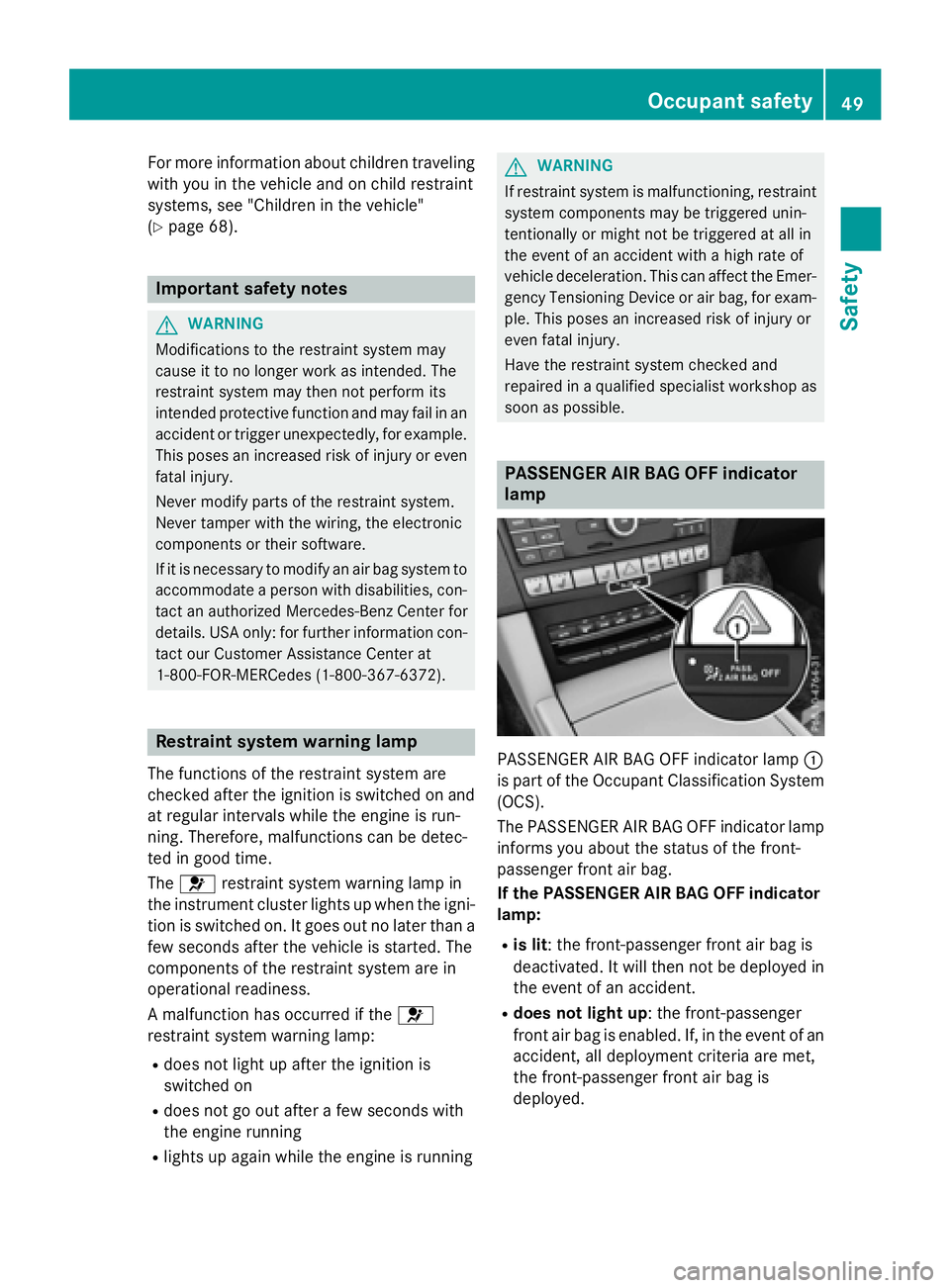
PASSENGER AIR BAG OFF indicator
lamp
PASSENGER AIR BAG OFF indicator lamp :
is part of the Occupant Classification System
(OCS).
The PASSENGER AIR BAG OFF indicator lamp
informs you about the status of the front-
passenger front air bag.
If the PASSENGER AIR BAG OFF indicator
lamp:
Ris lit: the front-passenger front air bag is
deactivated. It will then not be deployed in
the event of an accident.
Rdoes not light up: the front-passenger
front air bag is enabled. If, in the event of an
accident, all deployment criteria are met,
the front-passenger front air bag is
deployed.
Occupant safety49
Safety
Z
Page 55 of 350

Wagon:you can also adjust the belt height on
the outer rear bench seats.
The shoulder section of the seat belt must
always be routed across the center of the
shoulder. Adjust the belt outlet if necessary.
XTo raise: slide the belt outlet upwards.
The belt outlet will engage in various posi-
tions.
XTo lower: hold belt outlet release ?and
slide belt outlet downwards.
XLet go of belt outlet release ?in the
desired position and make sure that the
belt outlet engages.
All seat belts in the vehicle with the exception
of the driver's seat belt and the seat belt on
the folding bench seat in the cargo compart-
ment are equipped with a special seat belt
retractor, to which a child restraint system
can be secured. Further information can be
found under "Special seat belt retractor"
(
Ypage 69).
Seat belt for the center rear seat
If the left-hand rear seat backrest is folded
down and back up again, the rear center seat
belt may lock. The seat belt can then not be
pulled out.
XTo release the rear center seat belt: pull
the seat belt out approximately 1 in
(25 mm) at the belt outlet on the backrest
and then release it again.
The seat belt is retracted and released.
Releasing seat belts
!Make sure that the seat belt is fully rolled
up. Otherwise, the seat belt or belt tongue
will be trapped in the door or in the seat
mechanism. This could damage the door,
the door trim panel and the seat belt. Dam-
aged seat belts can no longer fulfill their
protective function and must be replaced.
Visit a qualified specialist workshop.
XPress release button :, hold belt
tongue ;firmly and guide it back towards
belt outlet =.
Seat belt adjustment
The seat-belt adjustment is an integral part of
the PRE-SAFE®convenience function. This
function adjusts the driver's and front-
passenger seat belt to the upper body of the
occupants.
The belt strap is tightened slightly when:
Rthe belt tongue is engaged in the buckle
and
Rthe ignition is switched on
The seat-belt adjustment will apply a certain
retraction force if any slack is detected
between the vehicle occupant and the seat
belt. Do not hold on to the seat belt tightly
while it is adjusting.
Occupant safety53
Safety
Z
Page 56 of 350
You can switch the seat-belt adjustment on
and off in the on-board computer.
Belt warning for the driver and front
passenger
The7 seat belt warning lamp in the instru-
ment cluster is a reminder that all vehicle
occupants must wear their seat belts. It may
light up continuously or flash. In addition,
there may be a warning tone.
Regardless of whether the driver's seat belt
has already been fastened, the 7seat belt
warning lamp lights up for six seconds each
time the engine is started. If, after
six seconds, the driver or front-passenger
seat belt has not been fastened and the doors
are closed, the 7seat belt warning lamp
lights up. As soon as the driver's and front-
passenger seat belts are fastened or a front
door is opened again, the 7seat belt
warning lamp goes out.
If the driver's seat belt is not fastened after
the engine is started, an additional warning
tone will sound. This warning tone stops after
six seconds or when the driver's seat belt is
fastened.
If the vehicle's speed exceeds 15 mph
(25 km/h) once and the driver's and front-
passenger seat belts are not fastened, a
warning tone sounds. A warning tone also
sounds with increasing intensity for
60 seconds or until the driver or front
passenger have fastened their seat belts.
If the driver or front passenger unfasten their
seat belts during the journey, the seat belt
warning is activated again.
iFor more information on the 7seat
belt warning lamp, see "Warning and indi-
cator lamps in the instrument cluster, seat
belts" (
Ypage 202).
Air bags
Introduction
The installation point of an air bag can be rec- ognized by the AIR BAG symbol.
An air bag complements the correctly fas-
tened seat belt. It is no substitute for the seat
belt. The air bag provides additional protec-
tion in applicable accident situations.
Not all air bags are deployed in an accident.
The different air bag systems function inde-
pendently from one another (
Ypage 63).
However, no system available today can com-
pletely eliminate injuries and fatalities.
It is also not possible to rule out a risk of injury
caused by an air bag due to the high speed at
which the air bag must be deployed.
Important safety notes
GWARNING
If you do not sit in the correct seat position,
the air bag cannot protect as intended and
could even cause additional injury when
deployed. This poses an increased risk of
injury or even fatal injury.
To avoid hazardous situations, always make
sure that all of the vehicle's occupants:
Rhave fastened their seat belts correctly,
including pregnant women
Rare sitting correctly and maintain the great-
est possible distance to the air bags
Rfollow the following instructions
Always make sure that there are no objects
between the air bag and the vehicle's occu-
pants.
RAdjust the seats properly before beginning
your journey. Always make sure that the
seat is in an almost upright position. The
center of the head restraint must support
the head at about eye level.
RMove the driver's and front-passenger
seats as far back as possible. The driver's
seat position must allow the vehicle to be
driven safely.
54Occupant safety
Safety
Page 60 of 350
Occupant Classification System
(OCS)
Introduction
The Occupant Classification System (OCS)
categorizes the person in the front-passenger
seat. Depending on that result, the front-
passenger front air bag is either enabled or
deactivated.
The system does not deactivate:
Rthe side impact air bag
Rthe pelvis air bag
Rthe window curtain air bag
Rthe Emergency Tensioning Devices
Prerequisites
To be classified correctly, the front passenger
must sit:
Rwith the seat belt fastened correctly
Rin an almost upright position with their
back against the seat backrest
Rwith their feet resting on the floor, if possi-
ble
If the front passenger does not observe these
conditions, OCS may produce a false classi-
fication, e.g. because the front passenger:
Rtransfers their weight by supporting them-
selves on a vehicle armrest
Rsits in such a way that their weight is raised
from the seat cushion
If it is absolutely necessary to install a child
restraint system on the front-passenger seat,
be sure to observe the correct positioning of
the child restraint system. Never place
objects under or behind the child restraint
system, e.g. cushions. The entire base of the
child restraint system must always rest on the seat cushion of the front-passenger seat. The
backrest of the forward-facing child restraint
system must lie as flat as possible against the
backrest of the front-passenger seat.
The child restraint system must not touch theroof or be subjected to a load by the head
restraint. Adjust the angle of the seat back- rest and the head restraint position accord-
ingly.
Only then can OCS be guaranteed to function
correctly. Always observe the child restraint
system manufacturer's installation instruc-
tions.
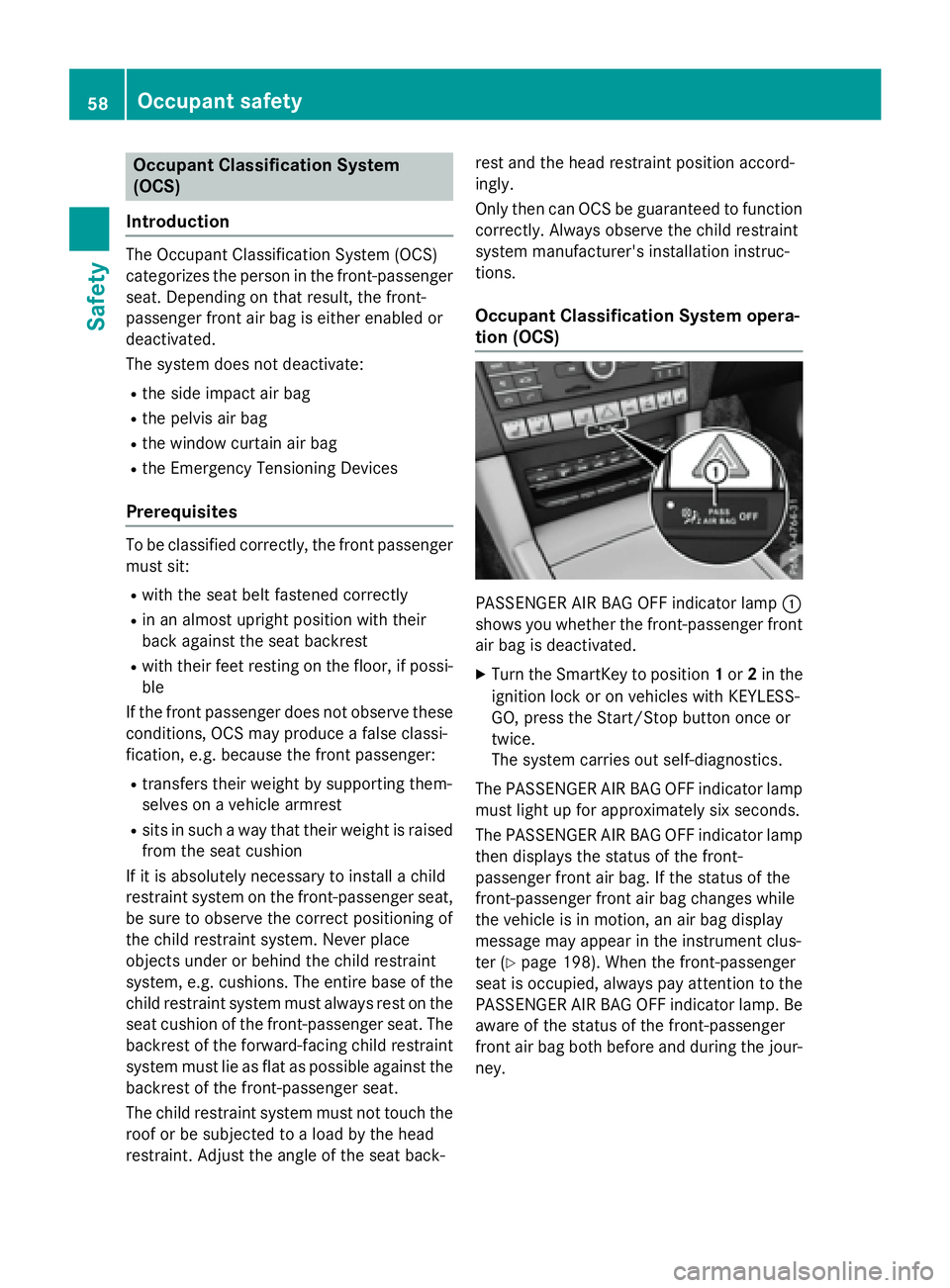
Occupant Classification System opera-
tion (OCS)
PASSENGER AIR BAG OFF indicator lamp :
shows you whether the front-passenger front
air bag is deactivated.
XTurn the SmartKey to position 1or 2in the
ignition lock or on vehicles with KEYLESS-
GO, press the Start/Stop button once or
twice.
The system carries out self-diagnostics.
The PASSENGER AIR BAG OFF indicator lamp
must light up for approximately six seconds.
The PASSENGER AIR BAG OFF indicator lamp
then displays the status of the front-
passenger front air bag. If the status of the
front-passenger front air bag changes while
the vehicle is in motion, an air bag display
message may appear in the instrument clus-
ter (
Ypage 198). When the front-passenger
seat is occupied, always pay attention to the
PASSENGER AIR BAG OFF indicator lamp. Be
aware of the status of the front-passenger
front air bag both before and during the jour-
ney.
58Occupant safety
Safety