warning MERCEDES-BENZ WAGON 2016 User Guide
[x] Cancel search | Manufacturer: MERCEDES-BENZ, Model Year: 2016, Model line: WAGON, Model: MERCEDES-BENZ WAGON 2016Pages: 350, PDF Size: 6.71 MB
Page 17 of 350
Menu (on-board computer) ............ 190
Transmission output (maximum) ....334
Modifying the programming
(SmartKey) ...........................................9 2
MOExtended tires .............................. 272
Mounting wheels
Lowering the vehicle ...................... 313
Mounting a new wheel ................... 313
Preparing the vehicle .....................3 09
Raising the vehicle ......................... 310
Removing a wheel .......................... 312
Securing the vehicle against roll-
ing away ........................................ 310
MP3
Operation ....................................... 190
see also Digital Operator's Man-
ual ..................................................2 14
see separate operating instructions
Multifunction display
Function/notes .............................1 88
Permanent display ......................... 190
Multifunction steering wheel
Operating the on-board computer .. 189
Overview .......................................... 39
Music files
see also Digital Operator's Man-
ual ..................................................2 14
N
Navigation
Menu (on-board computer) ............ 190
see also Digital Operator's Man-
ual ..................................................2 14
Showing/hiding the menu ............. 225
Switching to ................................... 225
see separate operating instructions
NECK-PRO head restraints
Operation ......................................... 65
Resetting triggered .......................... 65
NECK-PRO luxury head restraints
Important safety notes .................... 65
Operation ......................................... 65
Resetting when triggered ................. 66
Notes on breaking-in a new vehi-
cle ....................................................... 136
O
Occupant Classification System
(OCS)
Conditions ....................................... 58
Faults ............................................... 62
Operation ......................................... 58
System self-test ............................... 60
Occupant safety
Automatic measures after an acci-
dent ................................................. 67
Children in the vehicle ..................... 68
Important safety notes .................... 49
Introduction to the restraint sys-
tem ..................................................4 8
Occupant Classification System
(OCS) ............................................... 58
PASSENGER AIR BAG indicator
lamps ............................................... 49
Pets in the vehicle ........................... 75
PRE-SAFE
®(anticipatory occu-
pant protection) ...............................6 6
PRE-SAFE
®PLUS (anticipatory
occupant protection PLUS) .............. 67
Restraint system warning lamp ........ 49
OCS
Conditions ....................................... 58
Faults ............................................... 62
Operation ......................................... 58
System self-test ...............................6 0
Odometer .......................................... .190
Oil
see Engine oil
On-board computer
AMG menu ..................................... 190
Assistance menu ........................... 190
Audio menu ................................... 190
Convenience submenu .................. 190
Display messages .......................... 191
Displaying a service message ........2 66
DISTRONIC PLUS ........................... 161
Factory settings submenu ............. 190
Important safety notes .................. 188
Instrument cluster submenu .......... 190
Lighting submenu .......................... 190
Menu overview ..................... ......... 190
Message memory .......................... 191
Na
vigation menu ............................ 190
Index15
Page 18 of 350
Operation ....................................... 189
RACETIMER ................................... 190
Service menu ................................. 190
Settings menu ...............................190
Standard display ............................ 190
Telephone menu ............................ 190
Trip menu ...................................... 190
Vehicle submenu ........................... 190
Video DVD operation ..................... 190
Online and Internet functions
Enabling a mobile phone for Inter-
net access ..................................... 233
Manually setting the access data
of the mobile phone network pro-
vider .............................................. 233
Selecting the access data of the
mobile phone network provider ..... 233
Setting up an Internet connection .. 232
Operating safety
Declaration of conformity ................ 31
Important safety notes .................... 30
Operating system
see On-board computer
Operation
Digital Operator's Manual ................ 25
Operator's Manual
Vehicle equipment ........................... 28
Outside temperature display ........... 188
Overhead control panel ...................... 44
Override feature
Rear side windows ........................... 74
P
Paint code number ............................ 336
Paintwork (cleaning instructions) ... 268
Panic alarm .......................................... 48
Panorama roof with power tilt/
sliding panel
Important safety notes .................. 106
Opening/closing ............................ 108
Opening/closing the roller sun-
blind ............................................... 109
Problem (malfunction) ................... 111
Resetting ....................................... 109
Parking
Important safety notes .................. 151
Parking brake ................................ 152 Position of exterior mirror, front-
passenger side ............................... 117
Rear view camera .......................... 171
see PARKTRONIC
Parking aid
Active Parking Assist ..................... 170
see Exterior mirrors
see PARKTRONIC
Parking assistance
see PARKTRONIC
Parking brake
Display message ............................ 191
Notes/function .............................. 152
PARKTRONIC
Deactivating/activating ................. 170
Driving system ............................... 168
Function/notes ............................. 168
Important safety notes .................. 168
Problem (malfunction) ................... 170
Range of the sensors ..................... 169
Warning display ............................. 170
PASSENGER AIR BAG
Display message ............................ 198
Problems (malfunction) .................. 198
PASSENGER AIR BAG OFF
Indicator lamp .................................. 49
Pets in the vehicle ............................... 75
Phone book
see also Digital Operator's Man-
ual .................................................. 214
Phone call
Dialing ........................................... 232
Plastic hooks ..................................... 242
Plastic trim (cleaning instruc-
tions) .................................................. 268
Power washers .................................. 268
Power windows
see Side windows
PRE-SAFE
®(anticipatory occupant
protection)
Display message ............................ 191
Operation ......................................... 66
PRE-SAFE
®Brake
Activating/deactivating ................. 190
Display message ............................ 191
Function/notes ................................ 84
Important safety notes .................... 85
16Index
Page 19 of 350
Warning lamp ................................. 210
PRE-SAFE®PLUS (anticipatory
occupant protection PLUS)
Operation ......................................... 67
Program selector button .................. 144
Protection against theft
ATA (Anti-Theft Alarm system) ......... 87
Immobilizer ...................................... 87
Protection of the environment
General notes ..................................2 7
Pulling away
Automatic transmission ................. 140
General notes ................................ 140
Q
QR codeMercedes-Benz Guide App ................. 1
Rescue card .....................................3 3
Qualified specialist workshop ........... 31
R
RACE START (AMG vehicles).............166
RACETIMER (on-board computer) .... 190
Radiator cover ................................... 263
Radio
Displaying radio text ......................2 36
Overview ........................................ 235
Selecting a station ......................... 190
Setting the waveband .................... 235
Switching on .................................. 234
see separate operating instructions
Radio mode
see also Digital Operator's Man-
ual ..................................................2 14
Radio-wave reception/transmis-
sion in the vehicle
Declaration of conformity ................ 31
Reading lamp ..................................... 123
Rear fog lamp
Display message ............................ 191
Switching on/off ........................... 121
Rear seats
Folding the backrest forwards/
back ............................................... 240
Rear sill protector .............................2 49Rear view camera
Cleaning instructions ..................... 268
Displays in the Audio display ......... 173
Displays in the COMAND display ... 173
Function/notes ............................. 171
Switching on/off ........................... 172
Rear window blind ............................ 251
Rear window defroster
Problem (malfunction) ................... 133
Switching on/off ........................... 133
Rear window wiper
Replacing the wiper blade .............. 126
Switching on/off ........................... 125
Rear-view mirror
Anti-glare (manual) ........................ 117
Dipping (automatic) ....................... 117
Refrigerant (air-conditioning sys-
tem)
Important safety notes .................. 344
Refueling
Fuel gauge ....................................... 37
Important safety notes .................. 145
Refueling process .......................... 146
see Fuel
Remote control
Garage door opener ....................... 256
Programming (garage door
opener) .......................................... 257
Replacing bulbs
Important safety notes .................. 123
Overvi
ew of bulb types .................. 124
Reporting safety defects .................... 32
Rescue card ......................................... 33
Reserve (fuel tank)
see Fuel
Reserve fuel
Display message ............................ 191
Warning lamp ................................. 202
see Fuel
Residual heat (climate control) ........ 133
Restraint system
Display message ............................ 195
Introduction ..................................... 48
Warning lamp ................................. 208
Warning lamp (function) ................... 49
Reverse gear
Engaging (automatic transmis-
sion) ............................................... 142
Index17
Page 20 of 350
Reversing featurePanorama sliding sunroof .............. 107
Roller sunblinds ............................. 109
Side windows ................................. 104
Sliding sunroof ............................... 107
Trunk lid/tailgate ............................. 97
Reversing lamps (display mes-
sage) ................................................... 191
Roadside Assistance (breakdown) .... 29
Roller sunblind
Panorama roof with power tilt/
sliding panel .................................. 108
Rear side windows ......................... 251
Rear window .................................. 251
Roof lining and carpets (cleaning
guidelines) ......................................... 268
Roof load (maximum) ........................ 344
Route (navigation)
see Route guidance (navigation)
Route guidance
see also Digital Operator's Man-
ual .................................................. 214
Route guidance (navigation) ............ 190
S
Safety
Children in the vehicle ..................... 68
Safety system
see Driving safety systems
SD memory card
see also Digital Operator's Man-
ual .................................................. 214
Search & Send
see also Digital Operator's Man-
ual .................................................. 214
Seat belts
Adjusting the driver's and front-
passenger seat belt ......................... 53
Adjusting the height ......................... 52
center rear-compartment seat ......... 53
Cleaning ......................................... 268
Correct usage .................................. 51
Fastening ......................................... 52
Important safety guidelines ............. 50
Introduction ..................................... 50
Releasing ......................................... 53 Switching belt adjustment on/off
(on-board computer) ...................... 190
Warning lamp ................................. 202
Warning lamp (function) ................... 54
Seats
Active multicontour seat ................ 116
Adjusting (electrically) ................... 116
Adjusting the 4 ‑way lumbar sup-
port ................................................ 116
Adjusting the head restraint .......... 116
Cleaning the cover ......................... 268
Correct driver's seat position ........ 114
Folding the backrest (rear com-
partment) forwards/back .............. 241
Important safety notes .................. 115
Seat heating problem .................... 117
Storing settings (memory func-
tion) ............................................... 117
Switching seat heating on/off ....... 116
Switching seat ventilation on/off .. 116
Securing cargo .................................. 242
Selecting stations
Radio ............................................. 235
Sensors (cleaning instructions) ....... 268
Service menu (on-board com-
puter) .................................................. 190
Service products
Brake fluid ..................................... 342
Coolant (engine) ............................ 342
DEF special additives ..................... 341
Engine oil ....................................... 341
Fuel ................................................ 337
Important safety notes .................. 337
Refrigerant (air-conditioni ng sy
s-
tem) ............................................... 344
Washer fluid ................................... 343
Setting access data
Online and Internet ........................ 233
Setting the air distribution ............... 133
Setting the airflow ............................ 133
Setting the date/time format
see also Digital Operator's Man-
ual .................................................. 214
Setting the language
see also Digital Operator's Man-
ual .................................................. 214
18Index
Page 21 of 350
Setting the timesee also Digital Operator's Man-
ual .................................................. 214
Settings
Factory (on-board computer) ......... 190
On-board computer ....................... 190
SETUP (on-board computer) .............190
Side impact air bag .............................5 6
Side marker lamp (display mes-
sage) ................................................... 191
Side windows
Cleaning ......................................... 268
Important safety information ......... 104
Opening/closing (all) ..................... 105
Opening/closing (front) ................. 105
Problem (malfunction) ................... 106
Resetting ....................................... 105
SIRIUS services
see also Digital Operator's Man-
ual .................................................. 214
Sliding sunroof
Important safety notes .................. 106
Opening/closing ............................ 107
Problem (malfunction) ................... 111
Resetting ....................................... 108
see Panorama roof with power
tilt/sliding panel
SmartKey
Changing the battery ....................... 93
Changing the programming ............. 92
Checking the battery ....................... 93
Display message ............................ 191
Door central locking/unlocking ....... 90
Important safety notes .................... 90
Loss ................................................. 94
Mechanical key ................................ 92
Overview .......................................... 90
Positions (ignition lock) ................. 137
Problem (malfunction) ..................... 94
Starting the engine ........................ 140
SMS
see also Digital Operator's Man-
ual .................................................. 214
Snow chains ...................................... 291
Sockets
Center console .............................. 251
General notes ................................ 251
Luggage compartment ................... 251 Rear compartment ......................... 251
Spare wheel
Stowing .......................................... 330
Special seat belt retractor .................. 69
Specialist workshop ............................ 31
Speed, controlling
see Cru ise co
ntrol
Speedometer
In the Instrument cluster ................. 37
Segments ...................................... 188
Selecting the unit of measure-
ment .............................................. 190
see Instrument cluster
SPORT handling mode
Activating/deactivating (AMG
vehicles) .......................................... 82
Warning lamp ................................. 207
Standing lamps
Display message ............................ 191
Switching on/off ........................... 121
Start/stop function
see ECO start/stop function
Starting (engine) ................................ 139
STEER CONTROL .................................. 86
Steering (display message) .............. 201
Steering Assist and Stop&Go Pilot
(DISTRONIC PLUS)
Activating/deactivating ................. 190
Display message ............................ 191
Steering assistant STEER CON-
TROL
see STEER CONTROL
Steering wheel
Adjusting (electrically) ................... 117
Button overview ............................... 39
Buttons (on-board computer) ......... 189
Important safety notes .................. 117
Paddle shifters ............................... 144
Steering wheel heating .................. 117
Storing settings (memory func-
tion) ............................................... 117
Steering wheel (cleaning instruc-
tions) .................................................. 268
Steering wheel heating
Switching on/off ........................... 117
Steering wheel paddle shifters ........ 144
Stopwatch (RACETIMER) ................... 190
Index19
Page 23 of 350
Reached (TIREFIT) .......................... 274
Recommended .............................. .291
Tire pressure monitor
Checking the tire pressure elec-
tronically ........................................ 296
Function/notes .............................2 94
General notes ................................ 294
Important safety notes .................. 295
Radio type approval for the tire
pressure monitor ........................... 297
Restarting ...................................... 297
Warning lamp ................................. 211
Warning message .......................... 296
Tire-change tool kit ........................... 270
TIREFIT kit .......................................... 273
Tires
Aspect ratio (definition) ................. 308
Average weight of the vehicle
occupants (definition) .................... 307
Bar (definition) ............................... 306
Changing a wheel .......................... 309
Characteristics .............................. 306
Checking ........................................ 289
Curb weight (definition) ................. 308
Definition of terms ......................... 306
Direction of rotation ...................... 309
Display message ............................ 200
Distribution of the vehicle occu-
pants (definition) ............................ 309
DOT (Department of Transporta-
tion) (definition) ............................. 307
DOT, Tire Identification Number
(TIN) ............................................... 306
GAWR (Gross Axle Weight Rating)
(definition) ..................................... 307
General notes ................................ 314
GVW (Gross Vehicle Weight) (def-
inition) ........................................... 307
GVWR (Gross Vehicle Weight Rat-
ing) (definition) .............................. 307
Important safety notes .................. 288
Increased vehicle weight due to
optional equipment (definition) ...... 307
Information on driving .................... 288
Kilopascal (kPa ) (
definition) ........... 307
Labeling (overview) ........................ 303
Load bearing index (definition) ...... 308
Load index ..................................... 305 Load index (definition) ................... 307
Maximum load on a tire (defini-
tion) ............................................... 308
Maximum loaded vehicle weight
(definition) ..................................... 307
Maximum permissible tire pres-
sure (definition) ............................. 308
Maximum tire load ......................... 305
Maximum tire load (definition) ....... 308
MOExtended tires .......................... 290
Optional equipment weight (defi-
nition) ............................................ 308
PSI (pounds per square inch) (def-
inition) ........................................... 308
Replacing ....................................... 309
Service life ..................................... 290
Sidewall (definition) ....................... 308
Speed rating (definition) ................ 307
Storing ........................................... 309
Structure and characteristics
(definition) ..................................... 306
Temperature .................................. 302
TIN (Tire Identification Number)
(definition) ..................................... 308
Tire bead (definition) ...................... 308
Tire pressure (definition) ................ 308
Tire pressures (recommended) ...... 307
Tire size (data) ............................... 314
Tire size designation, load-bearing
capacity, speed rating .................... 303
Tire tread ....................................... 289
Tire tread (definition) ..................... 308
Total load limit (definition) ............. 309
Traction ......................................... 302
Traction (definition) ....................... 308
Tread wear ..................................... 302
Uniform Tire Quality Grading
Standards ...................................... 301
Uniform Tire Quality Grading
Standards (definition) .................... 307
Wear indicator (definition) ............. 308
Wheel and tire combination ........... 316
Wheel rim (definition) .................... 307
see Fl
at tire
Top Tether ............................................ 71
Tow-starting
Emergency engine starting ............ 284
Important safety notes .................. 281
Index21
Page 25 of 350
Vehicle dimensions........................... 344
Vehicle emergency locking ................ 96
Vehicle identification number
see VIN
Vehicle identification plate .............. 336
Vehicle level
AIRMATIC ...................................... 166
Vehicle maintenance
see ASSYST PLUS
Vehicle tool kit .................................. 270
Video
see also Digital Operator's Man-
ual .................................................. 214
Video (DVD) ........................................ 190
VIN
Seat ............................................... 336
Type plate ...................................... 336
Voice Control System
see Separate operating instructions
W
Warning and indicator lampsABS ................................................ 205
Brakes ........................................... 204
Check Engine ................................. 202
Coolant .......................................... 209
Distance warning ........................... 210
ESP
®.............................................. 206
ESP®OFF ....................................... 207
Fuel tank ........................................ 202
General notes ................................ 202
Overview .......................................... 38
PASSENGER AIR BAG OFF ............... 49
Reserve fuel ................................... 202
Restraint system ............................ 208
Seat belt ........................................ 202
SPORT handling mode ................... 207
Tire pressure monitor .................... 211
Warranty .............................................. 28
Washer fluid
Display message ............................ 191
Wheel and tire combination
see Tires
Wheel bolt tightening torque ........... 313
Wheel chock ...................................... 310
Wheels
Changing a wheel .......................... 309 Checking ........................................ 289
Cleaning ......................................... 268
Emergency spare wheel ................. 329
General notes ................................ 314
Important safety notes .................. 288
Information on driving .................... 288
Interchanging/changing ................ 309
Mounting a new wheel ................... 313
Mounting a wheel .......................... 309
Removing a wheel .......................... 312
Storing ........................................... 309
Tightening torque ........................... 313
Wheel size/tire size ....................... 314
Window curtain air bag
Operation ......................................... 57
Windows
see Side windows
Windshield
Defrosting ...................................... 133
Windshield washer fluid
see Windshield washer system
Windshield washer system
Adding washer fluid ....................... 266
Important safety notes .................. 343
Windshield wipers
Problem (malfunction) ................... 127
Rear window wiper ........................ 125
Replacing the wiper blades ............ 125
Switching on/off ........................... 125
Winter driving
Important safety notes .................. 290
Slippery road surfaces ................... 155
Snow chains .................................. 291
Winter operation
Radiator cove r ............................... 263
Wi
nter tires
M+S tires ....................................... 290
Wiper blades
Cleaning ......................................... 268
Important safety notes .................. 125
Replacing (rear window) ................ 126
Replacing (windshield) ................... 126
Wooden trim (cleaning instruc-
tions) .................................................. 268
Workshop
see Qualified specialist workshop
Index23
Page 27 of 350
Introduction
Theprinted Operator's Manual provides infor-
mation about the safe operation of your veh i-
cle. The Digital Operator's Manual addition-
ally describe s further functions and equip-
ment installed inyour vehicle. The vehicle
functions and functions of Audio 20 or
COMAND are describe d in the Digital Opera-
tor's Manual. You can call up the Digital Oper-
ator's Manual via Audio 20 or COMAND.
iYou willnot incur any costs when calling
up the Digital Operator's Manual. The Dig-
it al Operator's Manual works without con-
necting to the Internet.
There are three ways to access the topics of
the Digital Operator's Manual:
RVisual search
The visual search allowsyou to explore your
vehicle "virtually". Starting from either the
vehicle exterior view or interior view, you
can access many of the different topics
covered bythe Digital Operator's Manual.
To access the vehicle interior section,
select the "Vehicle interior" view.
RKeyword search
The keyword search allows you to search
for a keyword byentering characters. Fur-
ther information can be found in the Digital
Operator's Manual inthe "Aud io20" or
"COMAND" section under the "Character
entry (telephony)" keyword.
RContents
You can select individ ual sect
ionsinthe
contents.
iThe Digital Operator's Manual is deacti-
vated for safety reasons while driving.
Operation
Calling up the Digital Operator's Man-
ual
XPress the Øbutton inthe center con-
sole.
The overview relating to the vehicle
appears.
XSe lect the "Operator's Manual" menu item
by turning 3or pressing 7the con-
troller.
XConfirm 7the message about the warning
and safety notes.
The basic menu for the Digital Operator's
Manual appears.
Operating the Digital Operator's Man-
ual
General notes
Please observe the information about the
operation of the controller (
Ypage 222).
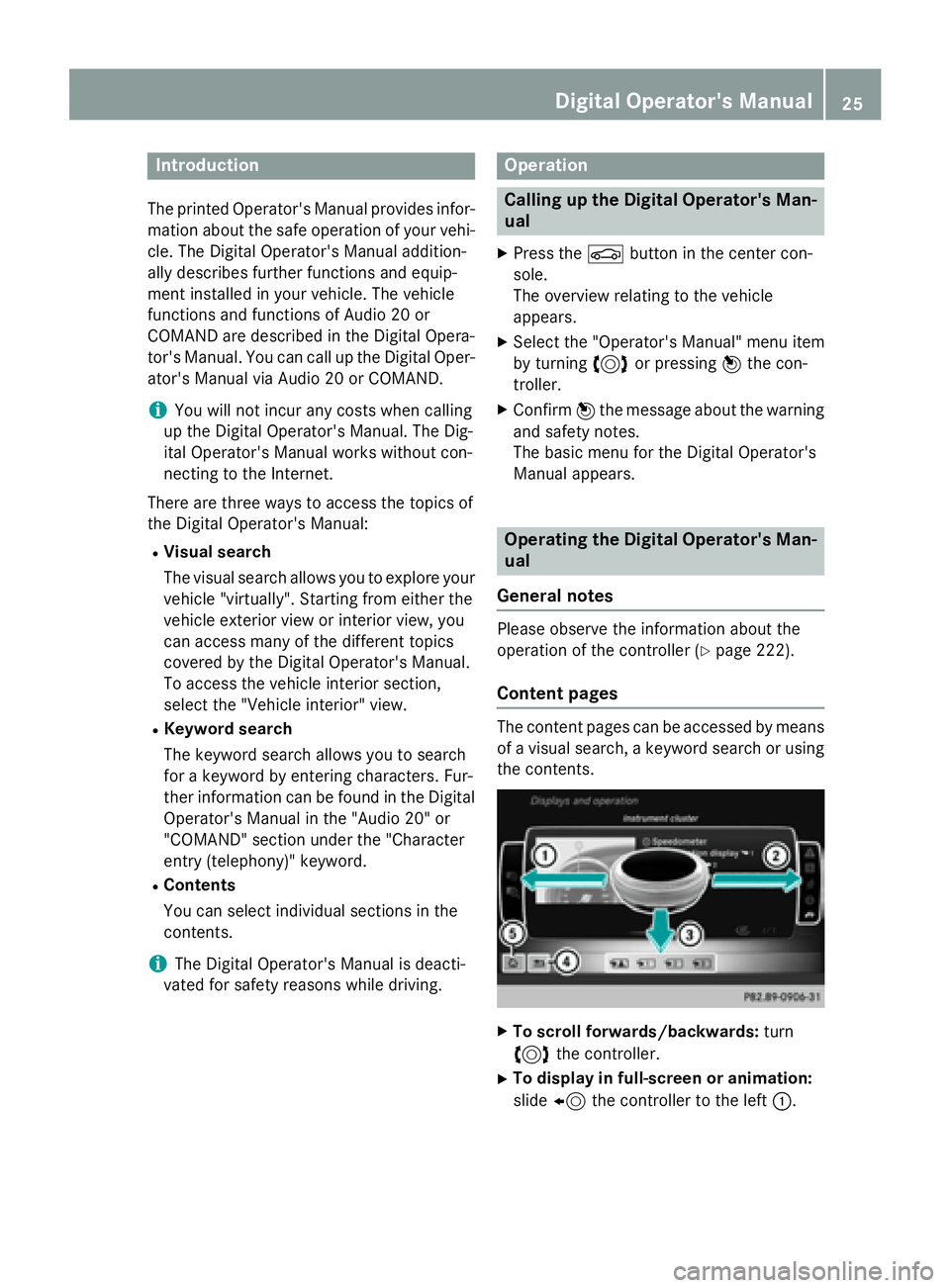
Content pages
The content pages can beaccessed bymeans
of a visual search, a keyword search or using
the contents.
XTo scroll forwards/backwa rds: turn
3 the controller.
XTo display in full-screen orani mati on:
slide 8 the controller to the left :.
Digital Operator's Manual25
Page 32 of 350
the Service and Guarantee booklet or simply
call the Mercedes-Benz Customer Assistance
Center (USA) at the hotline number
1-800-FOR-MERCedes(1-800-367-6372) or
Customer Service (Canada) at
1-800-387-0100.
Vehicle operation outside the USA
and Canada
If you plan to operate your vehicle in foreign
countries, please be aware that:
Rservice facilities or replacement parts may
not be readily available.
Runleaded fuel for vehicles with a catalytic
converter may not be available. Leaded fuel may cause damage to the catalytic con-
verter.
Rthe fuel may have a considerably lower
octane rating. Unsuitable fuel can cause
engine damage.
Some Mercedes-Benz models are available
for delivery in Europe through our European
Delivery Program. For details, consult an
authorized Mercedes-Benz Center or write to
one of the following addresses.
In the USA
Mercedes-Benz USA, LLC
European Delivery Department
One Mercedes Drive
Montvale, NJ 07645-0350
In Canada
Mercedes-Benz Canada, Inc.
European Delivery Department
98 Vanderhoof Avenue
Toronto, Ontario M4G 4C9
Operating safety
Important safety notes
GWARNING
If you do not have the prescribed service/
maintenance work or any required repairs
carried out, this can result in malfunctions or system failures. There is a risk of an accident.
Always have the prescribed service/mainte-
nance work as well as any required repairs
carried out at a qualified specialist workshop.
GWARNING
Flammable material such as leaves, grass or
twigs may ignite if they come into contact with
hot parts of the exhaust system. There is a risk of fire.
When driving off road or on unpaved roads,
check the vehicle's underside regularly. In
particular, remove parts of plants or other
flammable materials which have become
trapped. In the case of damage, contact a
qualified specialist workshop.
GWARNING
Modifications to electronic components, their software as well as wiring can impair their
function and/or the function of other net-
worked components. In particular, systems
relevant to safety could also be affected. As a
result, these may no longer function as inten-
ded and/or jeopardize the operating safety of
the vehicle. There is an increased risk of an
accident and injury.
Never tamper with the wiring as well as elec-
tronic components or their software. You
should have all work to electrical and elec-
tronic equipment carried out at a qualified
specialist workshop.
!There is a risk of damage to the vehicle if:
Rthe vehicle becomes stuck, e.g. on a high
curb or an unpaved road
Ryou drive too fast over an obstacle, e.g. a
curb or a hole in the road
Ra heavy object strikes the undercarriage
or parts of the chassis
In situations like this, the body, the under-
carriage, chassis parts, wheels or tires
could be damaged without the damage
being visible. Components damaged in this
way can unexpectedly fail or, in the case of
30Introduction
Page 33 of 350
an accident, no longer withstand the strain
they are designed to.
If the underbody paneling is damaged,
combustible materials such as leaves,
grass or twigs can gather between the
underbody and the underbody paneling. If
these materials come in contact with hot
parts of the exhaust system, they can catch
fire.
In such situations, have the vehicle
checked and repaired immediately at a
qualified specialist workshop. If on con-
tinuing your journey you notice that driving
safety is impaired, pull over and stop the
vehicle immediately, paying attention to
road and traffic conditions. In such cases,
consult a qualified specialist workshop.
Declarations of conformity
Vehicle components which receive
and/or transmit radio waves
USA: "The wireless devices of this vehicle
comply with Part 15 of the FCC Rules. Oper-
ation is subject to the following two condi-
tions: 1) These devices may not cause harm-
ful interference, and 2) These devices must
accept any interference received, including
interference that may cause undesired oper-
ation. Changes or modifications not expressly
approved by the party responsible for com-
pliance could void the user’s authority to
operate the equipment."
Canada: "The wireless devices of this vehicle
comply with Industry Canada license-exempt
RSS standard(s). Operation is subject to the
following two conditions: (1) These devices
may not cause interference, and (2) These
devices must accept any interference, includ-
ing interference that may cause undesired
operation of the device."
Diagnostics connection
The diagnostics connection is only intended
for the connection of diagnostic equipment at
a qualified specialist workshop.
GWARNING
If you connect equipment to the diagnostics
connection in the vehicle, itmay affect the
operation of the vehicle systems. As a result,
the operating safety of the vehicle could be
affected. There isa risk of an accident.
Do not connect any equipment to a diagnos-
tics connection inthe vehicle.
GWARNING
Objects in the driver's footwell can restrict the pedal travel or obstruct a depressed pedal.
The operating and road safety of the vehicle is
je opardized. There is a risk of an accident.
Make sure that all objects in the vehicle are
stowed correctly, and that they cannot enter
the driver's footwell. Install the floormats
securely and as specified in order to ensure
sufficient clearance for the pedals. Do not use
loose floormats and do not place floormats on
top of one another.
!If the engine is switched off and equip-
ment on the diagnostics connection is
used, the starter battery may discharge.
Connecting equipment to the diagnostics
connection can lead to emissions monitoring
information being reset, for example. This
may lead to the vehicle failing to meet the
requirements of the next emissions test dur-
ing the main inspection.
Qualified specialist workshop
An authorized Mercedes-Benz Center is a
qualified specialist workshop. It has the nec-
essary specialist knowledge, tools and quali-
fications to correctly carry out the work
required on your vehicle. This is especially the
case for work relevant to safety.
Introduction31
Z