ignition Mercury Mariner 2009 s User Guide
[x] Cancel search | Manufacturer: MERCURY, Model Year: 2009, Model line: Mariner, Model: Mercury Mariner 2009Pages: 312, PDF Size: 2.27 MB
Page 40 of 312

5.Power/:Press to activate/deactivate the climate control
system. When the system is off, outside air is prevented from entering
the vehicle through the vents. Turn to manually increase/decrease the
fan speed. The manual fan speed setting will appear on the left side of
the display. Press AUTO to return to full automatic control.
6.
:Distributes air through the instrument panel vents. Press AUTO
to return to full automatic control.
7.
:Distributes air through the instrument panel vents, demister
vents, floor vents and rear seat floor vents. Press AUTO to return to full
automatic control.
8.
:Distributes air through the demister vents, floor vents and rear
seat floor vents. Press AUTO to return to full automatic control.
9.Pass Temp (passenger temperature):Press to engage/disengage
separate passenger side temperature control. Turn to increase/decrease
the temperature on the passenger side of the vehicle. The recommended
initial setting is between 72°F (22°C) and 75°F (24°C), then adjust for
comfort. The passenger side temperature setting will appear in the upper
right corner of the display.
10.
Passenger heated seat control (if equipped):Press to
activate/deactivate the passenger heated seat. SeeHeated seatsin the
Seating and Safety Restraintschapter.
11.
Recirculated air:Press to activate/deactivate air recirculation
in the vehicle. Recirculated air may reduce the amount of time needed to
cool down the interior of the vehicle and may also help reduce undesired
odors from reaching the interior of the vehicle. Recirculated air engages
automatically when MAX A/C is selected or can be engaged manually in
any airflow mode except
(defrost). Recirculated air may turn off
automatically in some airflow modes to reduce fog potential. When the
ignition switch is turned off and back on, the climate system will return
to the recirculated air mode only if the A/C button LED is illuminated
and the air distribution selection is either AUTO,
(panel) or
(panel/floor).
12.MAX A/C:Distributes recirculated air through the instrument panel
vents to cool the vehicle. This re-cooling of the interior air is more
economical and efficient. Recirculated air may also help reduce
undesirable odors from entering the vehicle. Press the MAX A/C button
again for normal A/C operation.
2009 Mariner(mrn)
Owners Guide, 2nd Printing
USA(fus)
Climate Controls
40
Page 42 of 312
•Manual operation:
1. Select MAX A/C.
2. Select
or.
3. Select
(recirculated air) to provide colder airflow.
4. Set the temperature to 60°F (16°C).
5. Set highest fan setting initially, then adjust to maintain comfort.
To aid in side window defogging/demisting in cold weather:
1. Select
.
2. Select A/C.
3. Adjust the temperature control to maintain comfort.
4. Set the fan speed to the highest setting.
5. Direct the outer instrument panel vents towards the side windows.
To increase airflow to the outer instrument panel vents, close the vents
located in the middle of the instrument panel.
REAR WINDOW DEFROSTER
R
The rear defroster control is located on the climate control panel and
works to clear the rear window of fog and thin ice.
The engine must be running to operate the rear window defroster.
Press
Rto turn the rear window defroster on. An indicator light on the
button will illuminate when active. The rear window defroster turns off
automatically after a predetermined amount of time, if a low battery
condition is detected or when the ignition is turned off or to the
accessory position. To manually turn off the rear window defroster at any
time, press the control again.
If your vehicle is equipped with both rear defroster and heated mirrors,
the same button will activate both. Refer toHeated outside mirrorsin
theDriver Controlschapter.
Do not use razor blades or other sharp objects to clean the inside
of the rear window or to remove decals from the inside or the
rear window. This may cause damage to the heated grid lines and
will not be covered by your warranty.
2009 Mariner(mrn)
Owners Guide, 2nd Printing
USA(fus)
Climate Controls
42
Page 43 of 312

HEADLAMP CONTROL
Rotate the headlamp control to the
first position
to turn on the
parking lamps.
Rotate to the second position
to
turn on the headlamps.
Rotate back to
to turn the
headlamps off.
Autolamp control (if equipped)
The autolamp system provides light
sensitive automatic on-off control of
the exterior lights normally
controlled by the headlamp control.
The autolamp system is factory
programmed to keep the lights on
for 20 seconds after the ignition
switch is turned to off. This delay
can be programmed, using the
procedure listed below, to any value
up to 180 seconds. If equipped, this
delay can also be programmed through the message center
•To turn autolamps on, rotate the control counterclockwise.
•To turn autolamps off, rotate the control clockwise to the off position.
Note:If the vehicle is equipped with autolamps it will have the
headlamps on with windshield wipers feature.If the windshield
wipers are turned on for a brief period of time, the exterior lamps will
turn on with the headlamp control in the autolamp position.
2009 Mariner(mrn)
Owners Guide, 2nd Printing
USA(fus)
Lights
43
Page 48 of 312

For models equipped with a moon
roof, the map lamps are located on
the moon roof control panel. Press
the button on either side of each
map lamp to illuminate the lamps.
Push the button again to turn off
the lamps.
The map lamps will illuminate
whenever a door is opened. After
the door is shut, the lamps will remain illuminated for 25 seconds.
Cargo and dome lamp
Rear cargo lamp equipped with an
ON/OFF/DOOR control will light
when:
•the doors are closed and the
control is in the ON position.
•the control is in the DOOR
position and any door is open.
When the control is in the OFF position, it will not illuminate when you
open the doors.
Ambient lighting (if equipped)
Illuminates footwells, cupholders,
the console bin and the console tray
with a choice of seven colors. The
ambient lighting control switch is
located on the floor console. To
activate, press and release the
control switch to cycle through the
seven color choices plus the off
state.
The lights come on whenever the ignition is in either the on or accessory
position.
Note:The ambient lights will stay on until after the ignition is placed in
the off position and either of the front doors are opened or the accessory
delay timer expires.
2009 Mariner(mrn)
Owners Guide, 2nd Printing
USA(fus)
Lights
48
Page 49 of 312

Interior lighting battery saver
The interior lamps will automatically extinguish after 10 minutes when
the ignition key is in the off/lock position, a door has been left open or
the interior lamp controls are in the on position.
BULB REPLACEMENT
Lamp assembly condensation
Exterior lamps are vented to accommodate normal changes in pressure.
Condensation can be a natural by-product of this design. When moist air
enters the lamp assembly through the vents, there is a possibility that
condensation can occur when the temperature is cold. When normal
condensation occurs, a thin film of mist can form on the interior of the
lens. The thin mist eventually clears and exits through the vents during
normal operation. Clearing time may take as long as 48 hours under dry
weather conditions.
Examples of acceptable condensation are:
•Presence of thin mist (no streaks, drip marks or droplets)
•Fine mist covers less than 50% of the lens
Examples of unacceptable moisture (usually caused by a lamp water
leak) are:
•Water puddle inside the lamp
•Large water droplets, drip marks or streaks present on the interior of
the lens
Take your vehicle to dealer for service if any of the above conditions of
unacceptable moisture are present.
2009 Mariner(mrn)
Owners Guide, 2nd Printing
USA(fus)
Lights
49
Page 58 of 312

Most geographic areas (zones) have a magnetic north compass point that
varies slightly from the northerly direction on maps. This variation is four
degrees between adjacent zones and will become noticeable as the
vehicle crosses multiple zones. A correct zone setting will eliminate this
error. Refer toCompass zone adjustment.
Compass zone adjustment
1. Determine which magnetic zone
you are in for your geographic
location by referring to the zone
map.
2. Turn ignition to the on position.
3. Start the engine.
4. Press the SETUP control to select
the Update Zone function and
display the current ZONE XX in the
center stack display.
5. Continue to press the RESET
control until the correct zone
appears in the center stack display.
6. The direction will display after
the RESET control is released. The
zone is now updated.
1 2 3
4
5
6 7 8 9 101112 13 14 15
2009 Mariner(mrn)
Owners Guide, 2nd Printing
USA(fus)
Driver Controls
58
Page 62 of 312

WARNING:When closing the power windows, you should verify
they are free of obstructions and ensure that children and/or
pets are not in the proximity of the window openings.
Press and pull the window switches
to open and close windows.
•Push down (to the first detent)
and hold the switch to open.
•Pull up and hold the switch to
close.
Rear Window Buffeting:When one or both of the rear windows are
open, the vehicle may demonstrate a wind throb or buffeting noise; this
noise can be alleviated by lowering a front window approximately two to
three inches.
One touch down (AUTO)
Allows the driver’s window to open
fully without holding the control
down. Push the switch completely
down to the second detent and
release quickly. The window will
open fully. Momentarily press the
switch to any position to stop the
window operation.
Window lock
The window lock feature allows only
the driver to operate the power
windows.
To lock out all the window controls
(except for the driver’s) press the
right side of the control. Press the
left side to restore the window
controls.
Accessory delay
With accessory delay, the window switches, moon roof (if equipped) and
audio system may be used for up to 10 minutes after the ignition switch
is turned to the off position or until either front door is opened.
2009 Mariner(mrn)
Owners Guide, 2nd Printing
USA(fus)
Driver Controls
62
Page 67 of 312
Turning off speed control
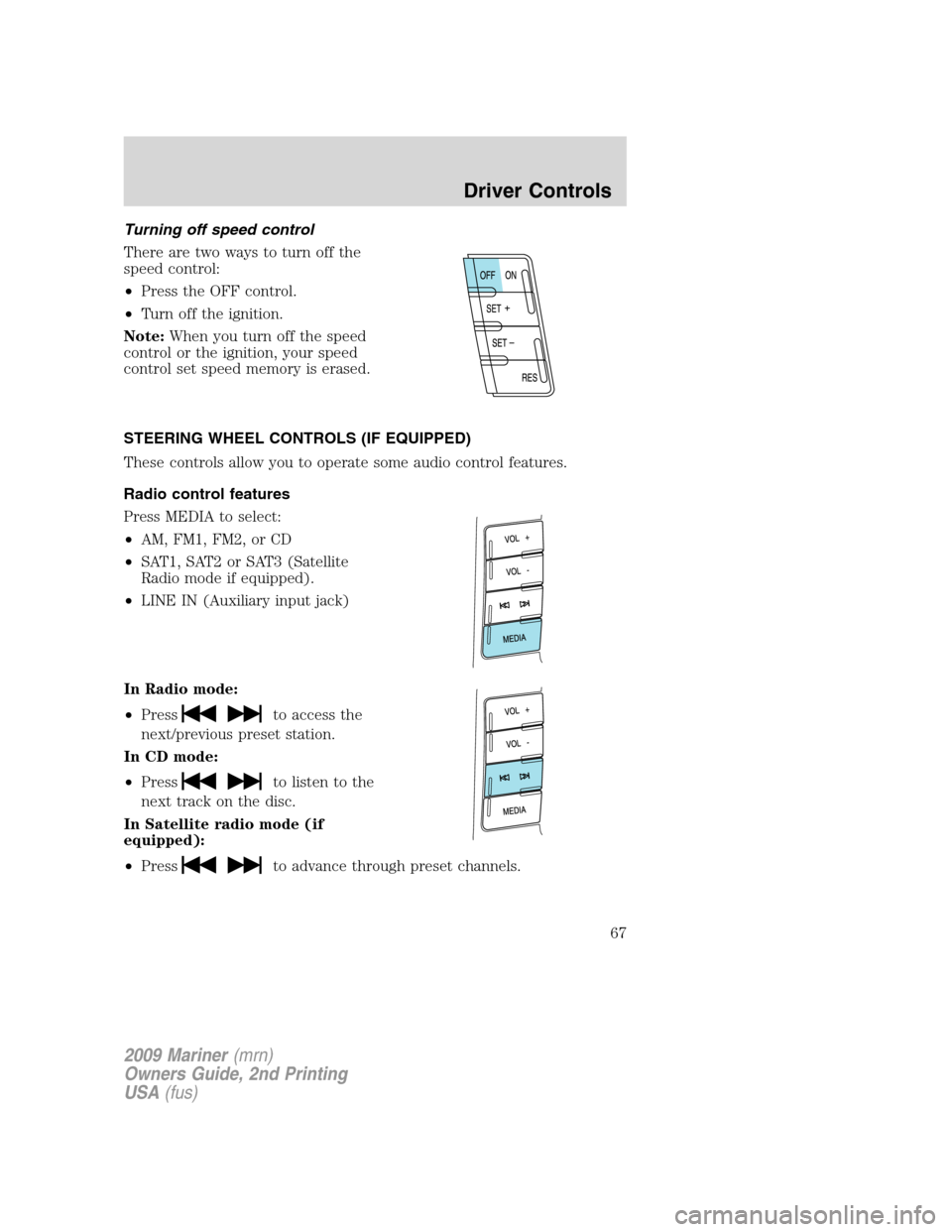
There are two ways to turn off the
speed control:
•Press the OFF control.
•Turn off the ignition.
Note:When you turn off the speed
control or the ignition, your speed
control set speed memory is erased.
STEERING WHEEL CONTROLS (IF EQUIPPED)
These controls allow you to operate some audio control features.
Radio control features
Press MEDIA to select:
•AM, FM1, FM2, or CD
•SAT1, SAT2 or SAT3 (Satellite
Radio mode if equipped).
•LINE IN (Auxiliary input jack)
In Radio mode:
•Press
to access the
next/previous preset station.
In CD mode:
•Press
to listen to the
next track on the disc.
In Satellite radio mode (if
equipped):
•Press
to advance through preset channels.
2009 Mariner(mrn)
Owners Guide, 2nd Printing
USA(fus)
Driver Controls
67
Page 70 of 312

Bounce-back:When an obstacle has been detected in the moon roof
opening as the moon roof is closing, the moon roof will automatically
open and stop at a prescribed position. This is known as “bounce-back”.
If the ignition is turned off (without accessory delay being active) during
bounce-back, the moon roof will move until the bounce-back position is
reached.
Bounce-back override:To override bounce-back, press and hold the
front portion of the control. For example: Bounce-back can be used to
overcome the resistance of ice on the moon roof or seals. If during a
bounce-back condition, the control is released to the neutral position,
then held in the one-touch position within two seconds after the moon
roof reaches the bounce-back position,the moon roof will travel with
no bounce-back protection.If the control is released before the moon
roof reaches fully closed or the ignition is turned off (without accessory
delay being active), the moon roof will stop.
To vent:
•The moon roof is equipped with an automatic, one-touch, vent feature.
To tilt the moon roof into the vent position (when the glass panel is
closed), press and release the front portion of the control.
•To close the moon roof from the vent position, press and hold the rear
portion of the control until the glass panel stops moving.
The moon roof has a sliding shade that can be opened or closed when
the glass panel is shut. To close the shade, pull it toward the front of the
vehicle.
Accessory delay:
With accessory delay, the window switches, audio system, and moon roof
(if equipped) may be used for up to 10 minutes after the ignition switch
is turned off or until either front door is opened.
MESSAGE CENTER
With the ignition in the on position,
the message center, located on your
instrument cluster, displays
important vehicle and daily driving
informationthrough a constant
monitor of vehicle systems.Yo u
may select display features on the message center for a display of status.
The system will also notify you of potential vehicle problems with a
display of system warnings followed by an indicator chime.
2009 Mariner(mrn)
Owners Guide, 2nd Printing
USA(fus)
Driver Controls
70
Page 71 of 312

Selectable features
Reset
Press this control to select and reset
functions shown in the INFO menu
and SETUP menu.
Info menu
This control displays the following
control displays:
•Odometer/Trip Odometer
•Distance to Empty (DTE)
•Average Fuel Economy (AFE)
•Instantaneous Fuel Economy
•Blank (odometer off)
Odometer/Trip odometer
Refer toGaugesin theInstrument Clusterchapter.
Distance to empty (DTE)
Selecting this function from the
INFO menu will give you an
estimate of how far you can drive
with the fuel remaining in your tank
under normal driving conditions.
Remember to turn the ignition off
when refueling your vehicle. Otherwise, the display will not show the
addition of fuel for a few miles (kilometers). DTE will vary according to
your driving habits.
2009 Mariner(mrn)
Owners Guide, 2nd Printing
USA(fus)
Driver Controls
71