door lock Mercury Mariner Hybrid 2009 Owner's Manuals
[x] Cancel search | Manufacturer: MERCURY, Model Year: 2009, Model line: Mariner Hybrid, Model: Mercury Mariner Hybrid 2009Pages: 333, PDF Size: 2.33 MB
Page 17 of 333
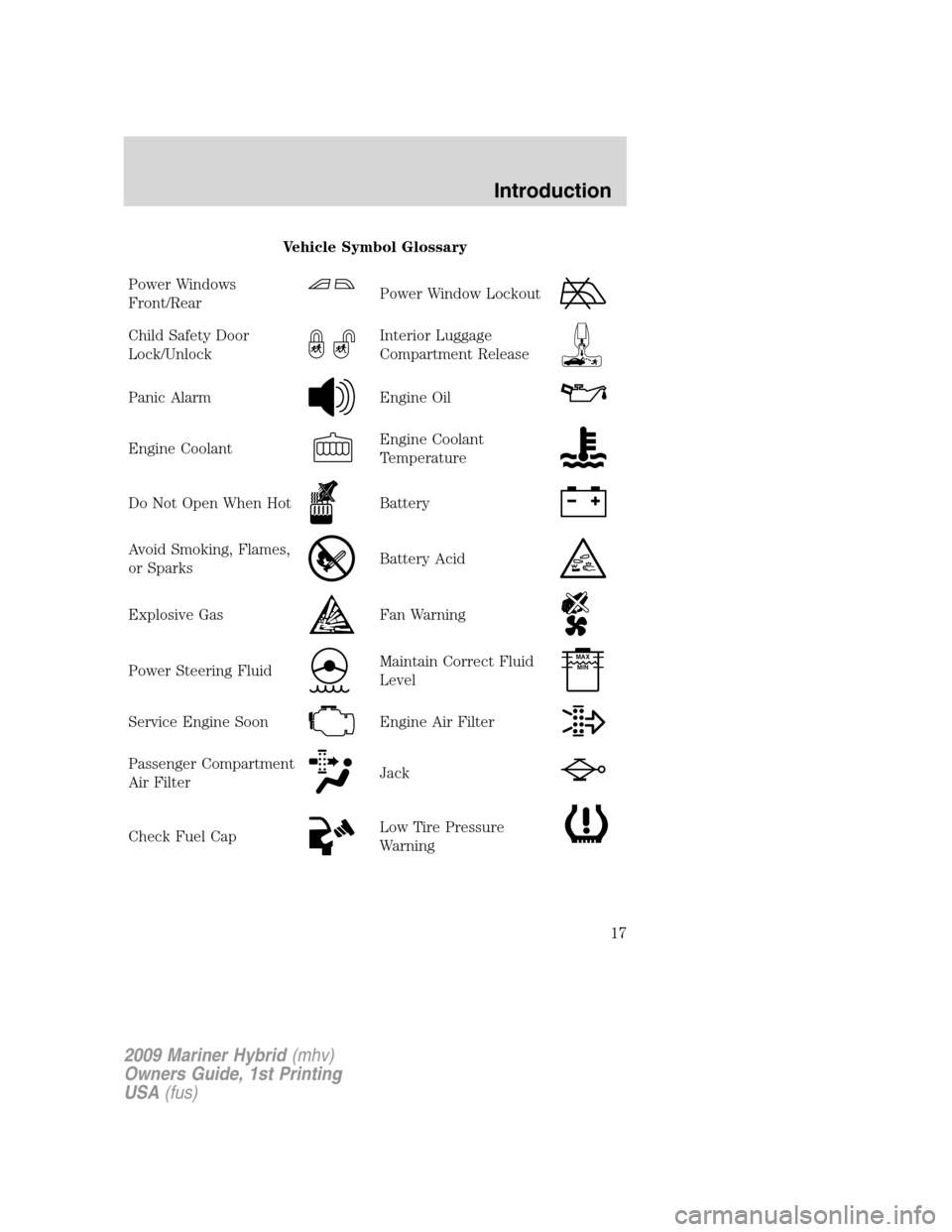
Vehicle Symbol Glossary
Power Windows
Front/Rear
Power Window Lockout
Child Safety Door
Lock/UnlockInterior Luggage
Compartment Release
Panic AlarmEngine Oil
Engine CoolantEngine Coolant
Temperature
Do Not Open When HotBattery
Avoid Smoking, Flames,
or SparksBattery Acid
Explosive GasFan Warning
Power Steering FluidMaintain Correct Fluid
LevelMAX
MIN
Service Engine SoonEngine Air Filter
Passenger Compartment
Air FilterJack
Check Fuel CapLow Tire Pressure
Warning
2009 Mariner Hybrid(mhv)
Owners Guide, 1st Printing
USA(fus)
Introduction
17
Page 25 of 333
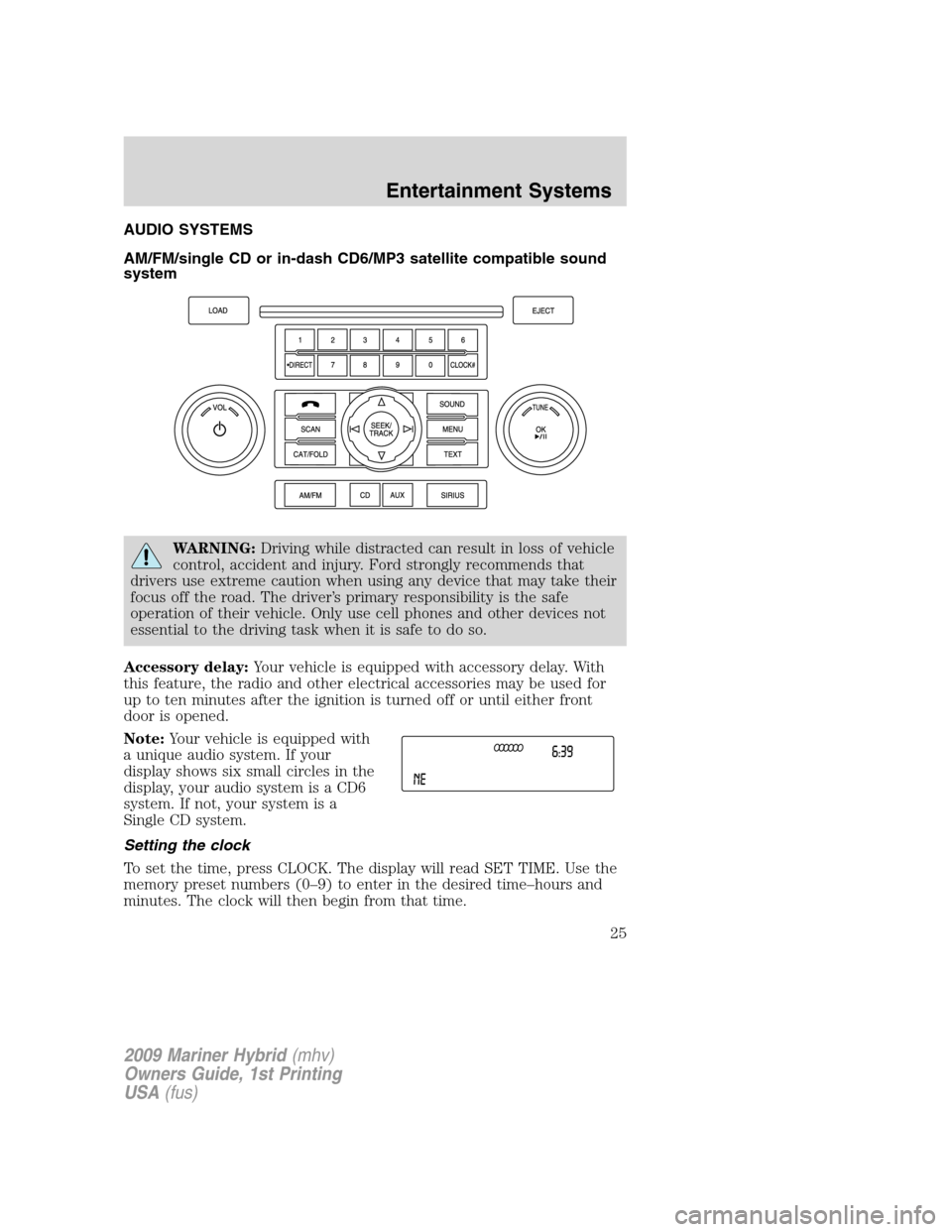
AUDIO SYSTEMS
AM/FM/single CD or in-dash CD6/MP3 satellite compatible sound
system
WARNING:Driving while distracted can result in loss of vehicle
control, accident and injury. Ford strongly recommends that
drivers use extreme caution when using any device that may take their
focus off the road. The driver’s primary responsibility is the safe
operation of their vehicle. Only use cell phones and other devices not
essential to the driving task when it is safe to do so.
Accessory delay:Your vehicle is equipped with accessory delay. With
this feature, the radio and other electrical accessories may be used for
up to ten minutes after the ignition is turned off or until either front
door is opened.
Note:Your vehicle is equipped with
a unique audio system. If your
display shows six small circles in the
display, your audio system is a CD6
system. If not, your system is a
Single CD system.
Setting the clock
To set the time, press CLOCK. The display will read SET TIME. Use the
memory preset numbers (0–9) to enter in the desired time–hours and
minutes. The clock will then begin from that time.
2009 Mariner Hybrid(mhv)
Owners Guide, 1st Printing
USA(fus)
Entertainment Systems
25
Page 54 of 333

Ambient lighting (if equipped)
Illuminates footwells, cupholders,
the console bin and the console tray
with a choice of seven colors. The
ambient lighting control switch is
located on the floor console. To
activate, press and release the
control switch to cycle through the
seven color choices plus the off
state.
The lights come on whenever the ignition is in either the on or accessory
position.
Note:The ambient lights will stay on until after the ignition is placed in
the off position and either of the front doors are opened or the delay
accessory timer expires.
Interior lighting battery saver
The interior lamps will automatically extinguish after 10 minutes when
the ignition key is in the off/lock position, a door has been left open or
the interior lamp controls are in the on position.
BULB REPLACEMENT
Headlamp condensation
Exterior lamps are vented to accommodate normal changes in pressure.
Condensation can be a natural by-product of this design. When moist air
enters the lamp assembly through the vents, condensation can occur
when the temperature is cold. When normal condensation occurs, a thin
film of mist can form on the interior of the lens. The thin mist eventually
clears and exits through the vents during normal operation. Clearing
time may take as long as 48 hours under dry weather conditions.
Examples of acceptable condensation are:
•Presence of thin mist (no streaks, drip marks or droplets)
•Fine mist covers less than 50% of the lens
Examples of unacceptable moisture (usually caused by a lamp water
leak) are:
•Water puddle inside the lamp
•Large water droplets, drip marks or streaks present on the interior of
the lens
2009 Mariner Hybrid(mhv)
Owners Guide, 1st Printing
USA(fus)
Lights
54
Page 68 of 333
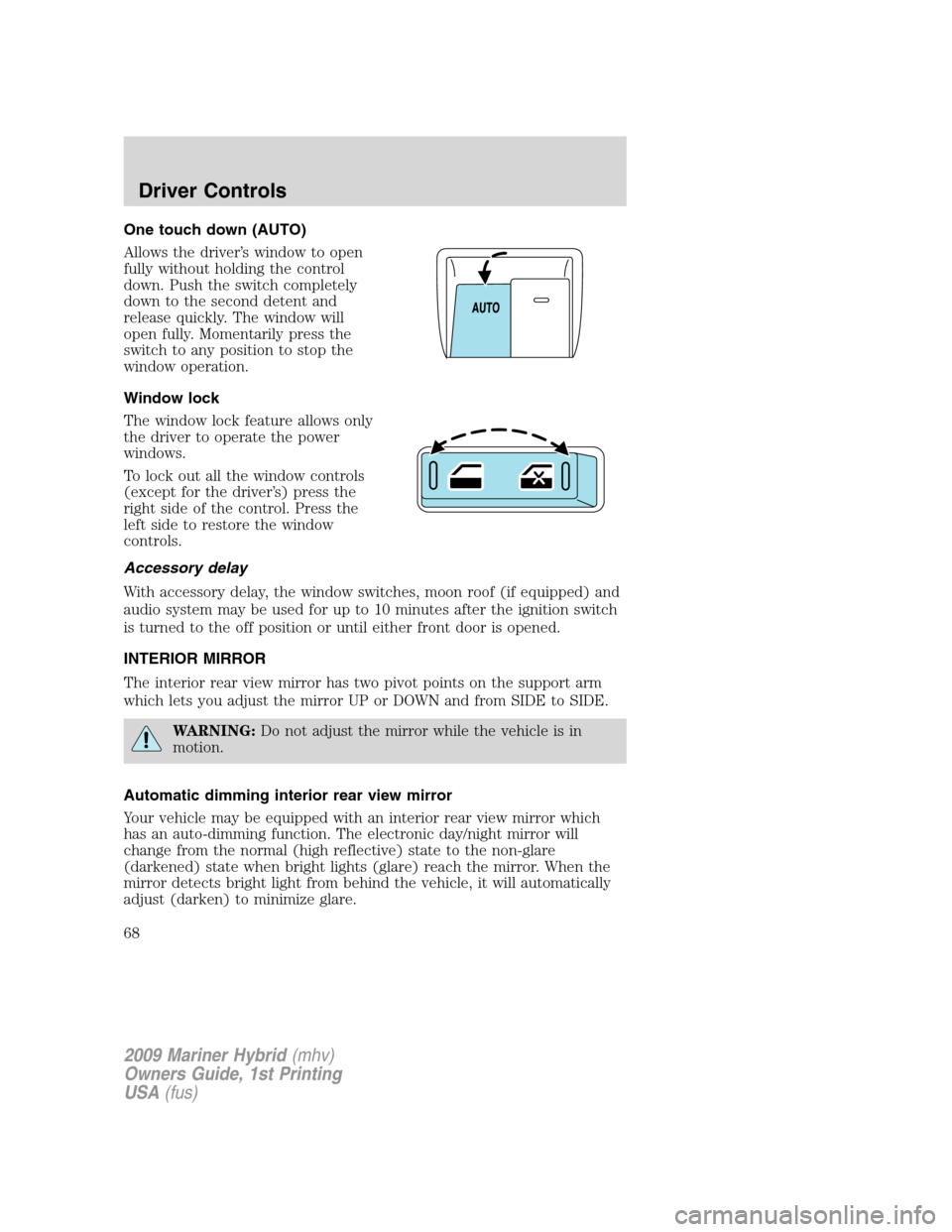
One touch down (AUTO)
Allows the driver’s window to open
fully without holding the control
down. Push the switch completely
down to the second detent and
release quickly. The window will
open fully. Momentarily press the
switch to any position to stop the
window operation.
Window lock
The window lock feature allows only
the driver to operate the power
windows.
To lock out all the window controls
(except for the driver’s) press the
right side of the control. Press the
left side to restore the window
controls.
Accessory delay
With accessory delay, the window switches, moon roof (if equipped) and
audio system may be used for up to 10 minutes after the ignition switch
is turned to the off position or until either front door is opened.
INTERIOR MIRROR
The interior rear view mirror has two pivot points on the support arm
which lets you adjust the mirror UP or DOWN and from SIDE to SIDE.
WARNING:Do not adjust the mirror while the vehicle is in
motion.
Automatic dimming interior rear view mirror
Your vehicle may be equipped with an interior rear view mirror which
has an auto-dimming function. The electronic day/night mirror will
change from the normal (high reflective) state to the non-glare
(darkened) state when bright lights (glare) reach the mirror. When the
mirror detects bright light from behind the vehicle, it will automatically
adjust (darken) to minimize glare.
2009 Mariner Hybrid(mhv)
Owners Guide, 1st Printing
USA(fus)
Driver Controls
68
Page 81 of 333
![Mercury Mariner Hybrid 2009 Owners Manuals Note:Oil life start value of 100% equals 10,000 miles [16,000 km] or
12 months. For example, setting oil life start value to 60% sets the oil
life start value to 6,000 miles (10,000 km) and 219 days.](/img/33/10940/w960_10940-80.png "Mercury Mariner Hybrid 2009 Owners Manuals Note:Oil life start value of 100% equals 10,000 miles [16,000 km] or
12 months. For example, setting oil life start value to 60% sets the oil
life start value to 6,000 miles (10,000 km) and 219 days.")
Note:Oil life start value of 100% equals 10,000 miles [16,000 km] or
12 months. For example, setting oil life start value to 60% sets the oil
life start value to 6,000 miles (10,000 km) and 219 days.
Units (English/Metric)
1. Select this function from the
SETUP menu for the current units
to be displayed.
2. Press the RESET control to
change the message display from
English to Metric.
Autolamp delay
This feature keeps your headlights on for up to three minutes after the
ignition is switched off.
1. To disable/enable the autolamp
delay feature, select this function
from the SETUP control for the
current display mode.
2. Press the RESET control to select
the new Autolamp delay values of 0,
10, 20, 30, 60, 90, 120 or 180 seconds.
Autolock
This feature automatically locks all vehicle doors when the vehicle is
shifted into any gear, putting the vehicle in motion.
1. To disable/enable the autolock
feature, select this function from the
SETUP control for the current
display mode.
2. Press the RESET control to turn
the autolock ON or OFF.
Autounlock
This feature automatically unlocks all vehicle doors when the driver’s
door is opened within 10 minutes of the ignition being turned off.
2009 Mariner Hybrid(mhv)
Owners Guide, 1st Printing
USA(fus)
Driver Controls
81
Page 85 of 333
LOW TIRE PRESSURE— Displayed when one or more tires on your
vehicle have low tire pressure. Refer toInflating your tiresin theTires,
Wheels and Loadingchapter.
TIRE PRESSURE MONITOR FAULT— Displayed when the Tire
Pressure Monitoring System is malfunctioning. If the warning stays on or
continues to come on, have the system inspected by your authorized
dealer.
TIRE PRESSURE SENSOR FAULT— Displayed when a tire pressure
sensor is malfunctioning, or your spare tire is in use. For more
information on how the system operates under these conditions, refer to
Tire Pressure Monitoring System (TPMS)in theTires, Wheels and
Loadingchapter. If the warning stays on or continues to come on, have
the system inspected by your authorized dealer
OIL LIFE CHANGE SOON— Displayed when the engine oil life
remaining is 10% or less. When oil life left is between 10% and 0%, the
XX% OIL LIFE CHANGE SOON message will be displayed.
OIL CHANGE REQUIRED— Displayed when the oil life left reaches
0%, the OIL CHANGE REQUIRED message will be displayed.
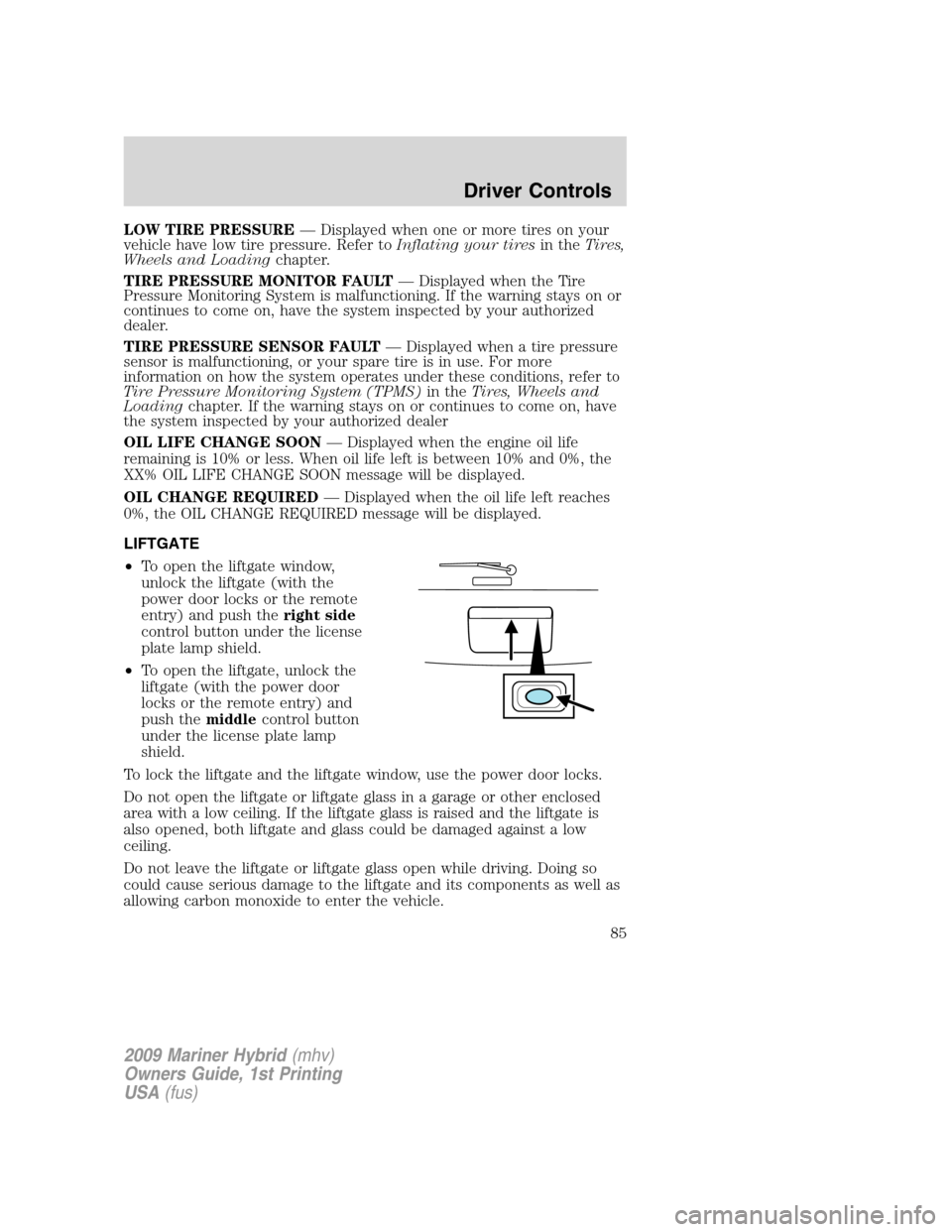
LIFTGATE
•To open the liftgate window,
unlock the liftgate (with the
power door locks or the remote
entry) and push theright side
control button under the license
plate lamp shield.
•To open the liftgate, unlock the
liftgate (with the power door
locks or the remote entry) and
push themiddlecontrol button
under the license plate lamp
shield.
To lock the liftgate and the liftgate window, use the power door locks.
Do not open the liftgate or liftgate glass in a garage or other enclosed
area with a low ceiling. If the liftgate glass is raised and the liftgate is
also opened, both liftgate and glass could be damaged against a low
ceiling.
Do not leave the liftgate or liftgate glass open while driving. Doing so
could cause serious damage to the liftgate and its components as well as
allowing carbon monoxide to enter the vehicle.
2009 Mariner Hybrid(mhv)
Owners Guide, 1st Printing
USA(fus)
Driver Controls
85
Page 92 of 333

POWER DOOR LOCKS
•Press the
control to unlock all
doors.
•Press the
control to lock all
doors.
Door key unlocking/locking
Unlocking the doors
Turn the key in the door cylinder to unlock the driver’s door only. All
other doors will remain locked.
Locking the doors
Turn the key in the door cylinder to lock the driver’s door only.
Autolock
The autolock feature will lock all the doors, liftgate and liftgate window
when:
•all doors are closed,
•the ignition is in the on position,
•you shift into any gear putting the vehicle in motion, and
•the vehicle attains a speed greater than 12 mph (20 km/h).
The autolock feature repeats when:
•any door is opened then closed while the ignition is in the on position
and the vehicle speed is 9 mph (15 km/h) or lower, and
•the vehicle attains a speed greater than 12 mph (20 km/h).
Deactivating/activating autolock
Your vehicle comes with the autolock feature enabled. There are four
methods to enable/disable this feature:
•Through your authorized dealer, or
•Performing the power door lock control procedure, or
•Performing the keyless entry keypad (if equipped) procedure, or
•Performing the message center (if equipped) procedure.
2009 Mariner Hybrid(mhv)
Owners Guide, 1st Printing
USA(fus)
Locks and Security
92
Page 93 of 333

Note:The autolock feature can be activated/deactivated independently
of the autounlock feature.
Before following the activation or deactivation procedures, make sure
that the anti-theft system is not armed, ignition is in the off position, and
all vehicle doors, liftgate and liftgate window are closed.
Power door unlock/lock procedure
You must complete Steps 1-5 within 30 seconds or the procedure will
have to be repeated. If the procedure needs to be repeated, you must
wait 30 seconds.
Note: Alldoors must be closed and remain closed throughout the
configuration process.
1. The ignition must be off to begin
sequence.
2. Turn the ignition to the on
position.
3. Press the power door unlock
control three times.
4. Turn the ignition from the on to
the off position.
5. Press the power door unlock control three times.
6. Turn the ignition back to the on position. The horn will chirp.
7. Press the unlock control, then press the lock control. The horn will
chirp once if autolock was deactivated or twice (one short and one long
chirp) if autolock was activated.
8. Turn the ignition to the off position. The horn will chirp once to
confirm the procedure is complete.
Keyless entry keypad procedure
1. Turn the ignition to the off position.
2. Close all doors, the liftgate and liftgate window.
3. Enter 5–digit entry code
4. Press and hold the 3•4. While holding the 3•4pressthe7•8.
5. Release the 7•8.
6. Release the 3•4.
The user should receive a horn chirp to indicate the system has been
disabled or a chirp followed by a honk to indicate the system has been
enabled.
2009 Mariner Hybrid(mhv)
Owners Guide, 1st Printing
USA(fus)
Locks and Security
93
Page 94 of 333

Message center procedure
For information on activating/deactivating the autolock feature using the
vehicle’s message center, refer toMessage centerinformation in the
Driver Controlschapter.
Autounlock
The autounlock feature will unlock all the doors when:
•the ignition is in the on position, all the doors are closed, and the
vehicle has been in motion at a speed greater than 12 mph (20 km/h);
•the vehicle has then come to a stop and the ignition is turned to the
off or accessory position; and
•the driver door is opened within 10 minutes of the ignition being
transitioned to the off or accessory position.
Note:The doors will not autounlock if the vehicle has been
electronically locked before the driver door is opened.
Deactivating/activating autounlock
Your vehicle comes with the autounlock feature activated. There are four
methods to enable/disable this feature:
•Through your authorized dealer, or
•by using the power door unlock/lock sequence,
•Performing the keyless entry keypad procedure (if equipped), or
•by using the instrument cluster message center. Refer toMessage
centerin theDriver Controlschapter.
Note: The autounlock feature can be activated/deactivated
independently of the autolock feature.
Power door lock switch autounlock enable/disable procedure
Before starting, ensure the ignition is in the off position and all vehicle
doors are closed. You must complete Steps 1–5 within 30 seconds or the
procedure will have to be repeated. If the procedure needs to be
repeated, wait a minimum of 30 seconds before beginning again.
2009 Mariner Hybrid(mhv)
Owners Guide, 1st Printing
USA(fus)
Locks and Security
94
Page 95 of 333

1. Place the key in the ignition and
turn the ignition to the on position.
2. Press the power door unlock
control on the door panel three
times.
3. Turn the ignition from the on
position to the off position.
4. Press the power door unlock control on the door panel three times.
5. Turn the ignition back to the on position. The horn will chirp one time
to confirm programming mode has been entered and is active.
6. To enable/disable the autounlock feature, press the lock control, then
press the unlock control. The horn will chirp once if autounlock was
deactivated or twice (one short and one long chirp) if autounlock was
activated.
7. Turn the ignition to the off position. The horn will chirp once to
confirm the procedure is complete.
Keyless entry keypad autounlock enable/disable procedure
1. Turn the ignition to the off position.
2. Close all doors.
3. Enter factory–set 5–digit entry code.
4. Press and hold the 3•4. While holding the 3•4, press and release
the 7•8. While still holding the 3•4, press and release the 7•8a
second time.
5. Release the 3•4.
The user should receive ahorn chirpto indicate the system has been
disabled or a chirp followed by a honk to indicate the system has been
enabled.
Message center procedure
For information on activating/deactivating the autounlock feature using
the vehicle’s message center, refer toMessage centerinformation in the
Driver Controlschapter.
Smart unlocking feature
The smart unlocking feature helps prevent you from locking yourself out
of the vehicle. With the key in any ignition position, the driver’s door will
automatically unlock if it is locked using the power lock control on the
driver’s door panel while the driver’s door is open.
2009 Mariner Hybrid(mhv)
Owners Guide, 1st Printing
USA(fus)
Locks and Security
95