ignition Mercury Mystique 1999 s Owner's Guide
[x] Cancel search | Manufacturer: MERCURY, Model Year: 1999, Model line: Mystique, Model: Mercury Mystique 1999Pages: 244, PDF Size: 2.15 MB
Page 67 of 244

Controls and features
67
Opening the luggage
compartment
Press the TRUNK control.
Sounding the panic alarm
Press the PANIC control. The horn
will sound and the headlamps and
tail lamps will flash for
approximately 2 minutes and 45
seconds.
To deactivate the alarm, press the
PANIC control again or turn the
ignition key to the on position.
UN
LOCK
LOCKPANIC
TRUNK
TRUNKUN
LOCK
LOCKPANIC
Replacing the batteries
The transmitter is powered by two
coin-type, three-volt lithium
batteries. A decrease in operating
range can be caused by:
¥ battery failure,
¥ weather conditions, or
¥ structures around the vehicle.
Replacement batteries for the
remote entry system transmitters
may be purchased at pharmacies,
watch stores or at authorized
dealers.
13MCten 4/13/99 3:36 PM Page 67
Page 69 of 244

Controls and features
69
PASSIVE ANTI-THEFT SYSTEM
(if equipped)
The Passive Anti-Theft system
(PATS) is an engine immobilization
system. It is an additional theft
protection feature that prevents
the engine from being started
unless a coded key is used..
This system is only available with
2.5 litre engines.
OFF LO PNL/FLR
PANEL
A/CFLOOR
DEF FLR
DEF
MAX
A/C HI/
POWER AUDIO AM/FM
SCAN
SEEK 31245ANSSIDE 1-2EJECTVOLUME
123
00
7080
90
10 0
110
120
13 0
PH
120
14 0
160
18 0
200
EF
BRAKE
CHECK
ENGINE
CLOCK
Automatic arming
The system is armed five seconds
after switching off the ignition.
The armed status is indicated when
the control light flashes every
two seconds.
Automatic disarming
Switching on the ignition disarms
the system if the correct code is
recognized.
Keys
Your vehicle is supplied with two
coded keys.
Only these keys can be used to
start your vehicle.
13MCten 4/13/99 3:36 PM Page 69
Page 70 of 244
Controls and features
70
Functional check
When the ignition is switched on,
the control light will illuminate for
approximately three seconds to
indicate that the system is
operating correctly.
If the control light flashes rapidly
for approximately one minute and
then repeatedly at irregular
intervals, the system did not
recognize the key code. Remove
the key and try again.
If the control light illuminates
continuously for approximately
one minute and then flashes
repeatedly at irregular intervals, a
system malfunction has occurred.
Have the malfunction repaired by
your dealer or a qualified
technician as soon as possible.
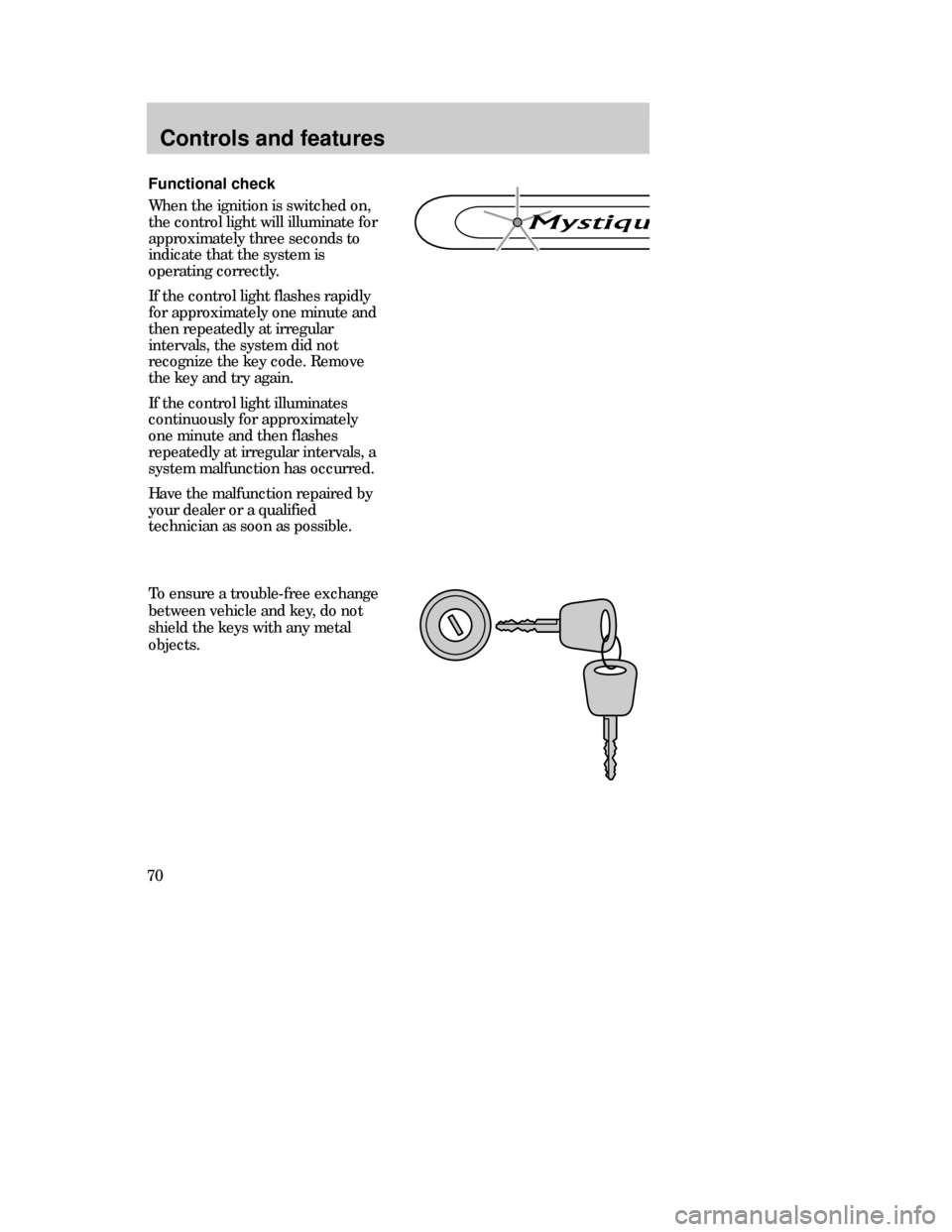
To ensure a trouble-free exchange
between vehicle and key, do not
shield the keys with any metal
objects.
13MCten 4/13/99 3:36 PM Page 70
Page 71 of 244

Controls and features
71
Spare key programming
A maximum of 8 keys in all can be
coded with any two coded keys.
¥ Insert the first key in the
ignition switch and turn to position
3.
¥ Turn the key back to position 1
and remove from the ignition
switch within 5 seconds.
¥ Insert the second key in the
ignition switch and turn to position
3 within 5 seconds.
¥ Turn the key back to position 1
and remove from the ignition
switch within 5 seconds - the key
coding mode is now activated.
¥ If an uncoded key is now
inserted in the ignition switch and
turned to position 3 within 10
seconds, this key is coded to the
system.
If coding is not completed
correctly, the control light flashes
after the ignition is switched on
with the newly coded key. Repeat
the coding process after waiting 20
seconds with the ignition in
position 3.
If keys become lost, you must have
your dealer clear and reprogram
the code for security reasons.3
4
21
13MCten 4/13/99 3:36 PM Page 71
Page 87 of 244

87
the instrument cluster or a
secondary warning light to indicate
the condition of the system. Refer
to the
Air bag readinesssection in
the
Instrumentationchapter.
Routine maintenance of the air bag
is not required.
A difficulty with the system is
indicated by one or more of the
following:
¥ The readiness light will either
flash or stay lit.
¥ The readiness light will not
illuminate after ignition is turned
on.
¥ The air bag secondary warning
light will flash five times. The
pattern will repeat periodically
until the problem or the readiness
light is repaired.
If any of these things happen, even
intermittently, have the SRS
serviced at your dealership or by a
qualified technician immediately.
Unless serviced, the system may
not function properly in the event
of a collision.
O/D
OFFTRACTION
CONTROL
Page 107 of 244

Starting
107
PREPARING TO START THE
VEHICLE
Engine starting is controlled by the
spark ignition system. This system
meets all Canadian Interference-
Causing Equipment standard
requirements regulating the
impulse electrical field strength of
radio noise.
When starting a fuel-injected
engine, avoid pressing the
accelerator pedal before or during
starting. Only use the accelerator
pedal when you have difficulty
starting the engine. For more
information on starting the vehicle,
refer to
Starting the enginein this
chapter.
Before starting the vehicle:
1. Make sure all vehicle occupants
have buckled their safety belts. For
more information on safety belts
and their proper usage, refer to the
Seating and safety restraints
chapter.
2. Make sure the headlamps and
vehicle accessories are off.
21MSten 4/13/99 2:23 PM Page 107
Page 115 of 244

Driving
115
TRACTION CONTROL
(if equipped)
This system prevents wheel spin at
all speeds. The control will toggle
this function on and off, but the
feature defaults to on after each
cycle of the ignition key.
The traction control system
controls excessive wheel spin by
automatically applying and
releasing the brakes in conjunction
with engine torque reductions.
This can occur when accelerating
on a slippery road, a loose surface
or when pulling away on a hill. The
traction control lamp flashes on the
instrument panel when the system
is functioning to regulate tire
traction.
When the ignition is turned to the
on position, the traction control
system light comes on for
approximately three (3) seconds. If
the light does not come on when
the ignition is turned to the on
position or if it remains on when
the traction control system is
turned on, have the system
serviced by your dealer or a
qualified service technician. You
can continue to drive and do not
need to have the vehicle towed in.
You should not take unnecessary
driving risks because of the
systemÕs safety potential.
22MDren 4/13/99 3:40 PM Page 115
Page 118 of 244
Driving
118
Overriding the brake-shift
interlock feature
If it is necessary to use this
procedure to move the gearshift
lever, it is possible that a fuse has
blown and the vehicleÕs brakelamps
may not be working. Refer to
Fuses
and relays
in the Roadside
emergencies
chapter.
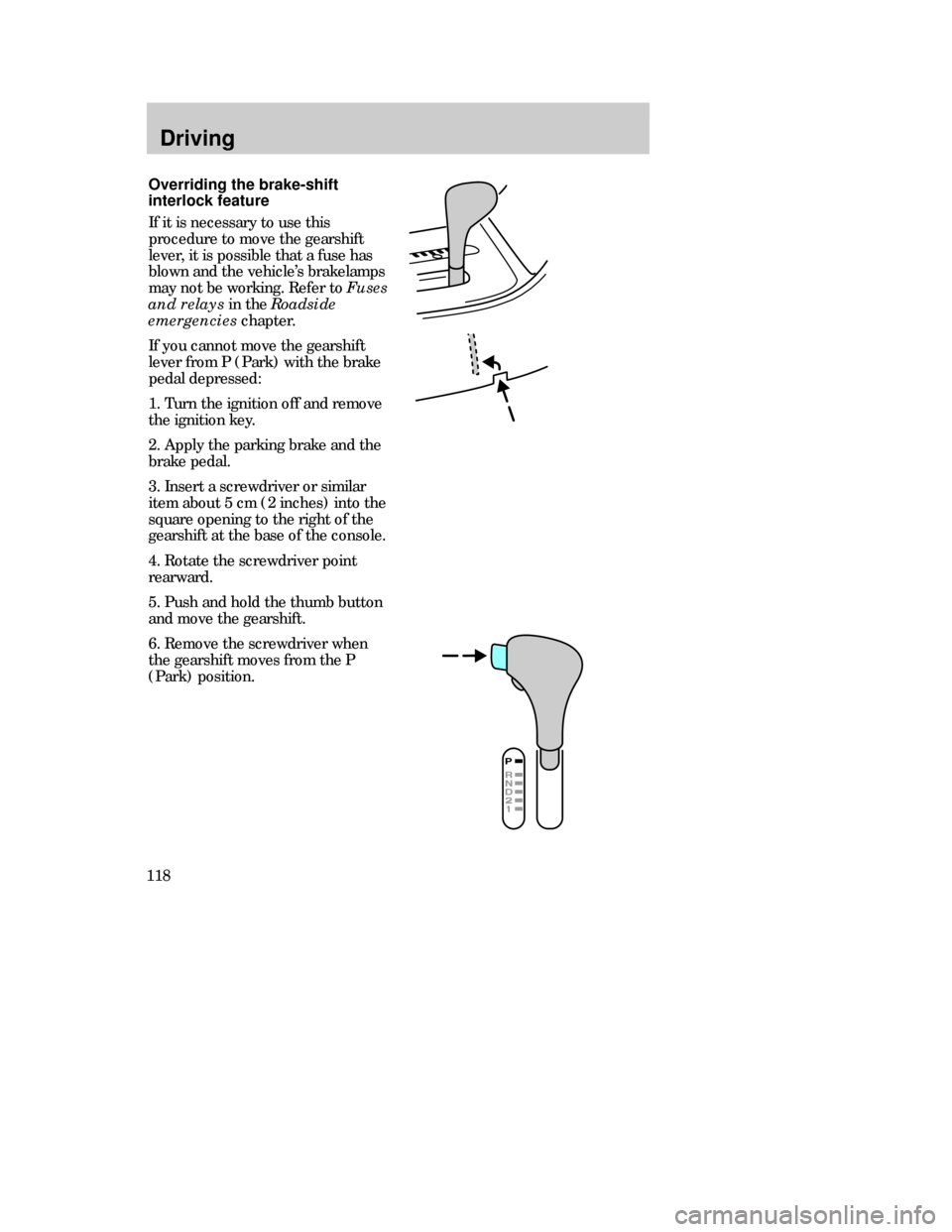
If you cannot move the gearshift
lever from P (Park) with the brake
pedal depressed:
1. Turn the ignition off and remove
the ignition key.
2. Apply the parking brake and the
brake pedal.
3. Insert a screwdriver or similar
item about 5 cm (2 inches) into the
square opening to the right of the
gearshift at the base of the console.
4. Rotate the screwdriver point
rearward.
5. Push and hold the thumb button
and move the gearshift.
6. Remove the screwdriver when
the gearshift moves from the P
(Park) position.
22MDren 4/13/99 3:40 PM Page 118
Page 119 of 244

Driving
119
¥P(Park)
Always come to a complete stop
before shifting into P (Park). This
locks the transaxle and prevents
the front wheels from rotating.
¥R(Reverse)
The vehicle only moves backward.
Always come to a complete stop
before shifting in or out of R
(Reverse).
P= Park . . . . . . . . . . . . . .
R= Reverse . . . . . . . . . . .
N= Neutral . . . . . . . . . . . .
D= Drive: Gear 1 to 4
with overdrive . . . . . .
Gear 1 to 3
with overdrive
cancelled . . . . . . . . . .
2= Gear 2 . . . . . . . . . . . .
1= Gear 1 . . . . . . . . . . . .
Driving
Never leave a vehicle
unattended while it is
running.
The console-mounted gearshift will
lock when you turn the key to the
lock position. When the gearshift is
in any position except P (Park),
the ignition key cannot be turned
to lock or removed from the
steering column. To remove the
key, the gearshift lever must be in
P (Park).
Once the gearshift is secure in the
desired position, release the brake
pedal and use the accelerator as
necessary.
22MDren 4/13/99 3:40 PM Page 119
Page 125 of 244
Driving
125
Parking
1. Apply the brake and the clutch
and shift into neutral.
2. Engage the parking brake.
3. Shift into 1 (First) or R
(Reverse).
4. Turn the ignition off.
Do not park your vehicle in
Neutral, it may move
unexpectedly and injure someone.
Use 1 (first) gear and set the
parking brake.
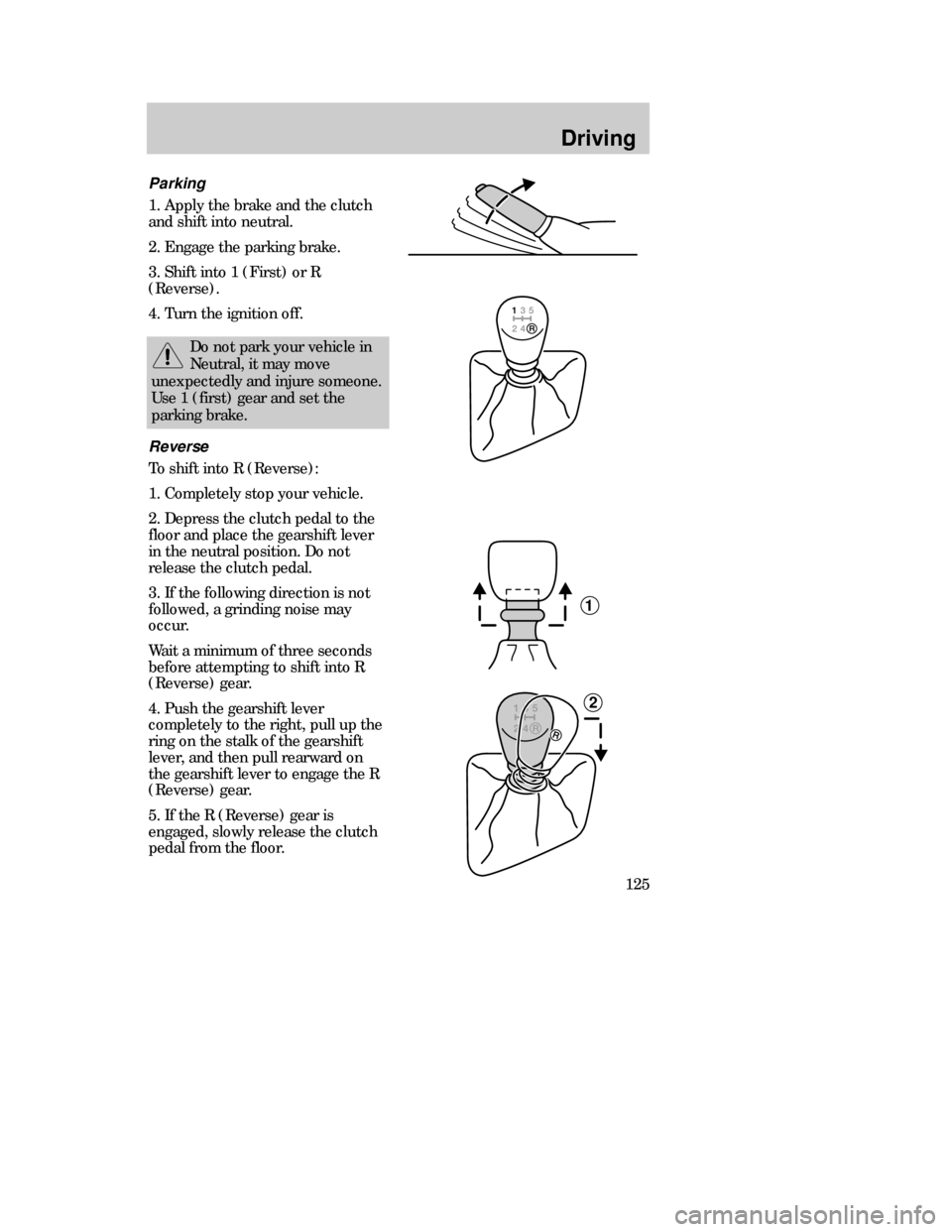
Reverse
To shift into R (Reverse):
1. Completely stop your vehicle.
2. Depress the clutch pedal to the
floor and place the gearshift lever
in the neutral position. Do not
release the clutch pedal.
3. If the following direction is not
followed, a grinding noise may
occur.
Wait a minimum of three seconds
before attempting to shift into R
(Reverse) gear.
4. Push the gearshift lever
completely to the right, pull up the
ring on the stalk of the gearshift
lever, and then pull rearward on
the gearshift lever to engage the R
(Reverse) gear.
5. If the R (Reverse) gear is
engaged, slowly release the clutch
pedal from the floor.
1
2
22MDren 4/13/99 3:40 PM Page 125