heating Mercury Villager 1997 s User Guide
[x] Cancel search | Manufacturer: MERCURY, Model Year: 1997, Model line: Villager, Model: Mercury Villager 1997Pages: 389, PDF Size: 2.31 MB
Page 68 of 389
66rear climate controls are turned off. If the lever is set in any of
the fan speed positions (1-4), air will be discharged from the
rear seat vents at the corresponding speed. However, when the
lever is set at REAR, rear seat passengers can control their own
fan speed.
[CF08000(ALL)01/96]
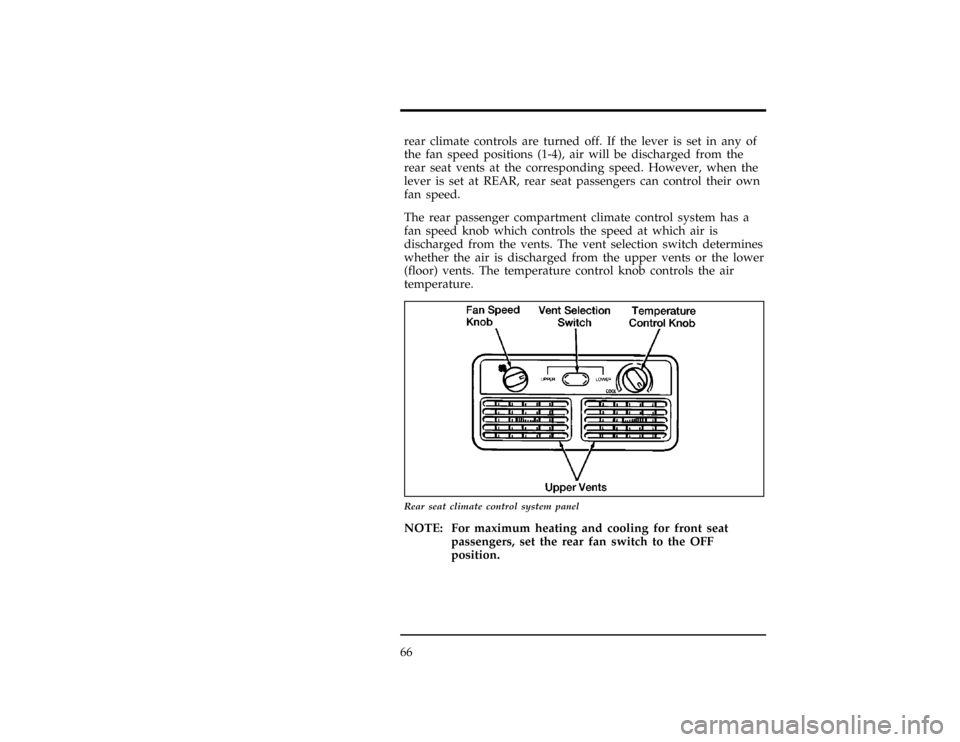
The rear passenger compartment climate control system has a
fan speed knob which controls the speed at which air is
discharged from the vents. The vent selection switch determines
whether the air is discharged from the upper vents or the lower
(floor) vents. The temperature control knob controls the air
temperature.
[CF08100(ALL)01/96]
13-1/2 pica
art:0040079-A
Rear seat climate control system panel
[CF08200(ALL)01/96]
NOTE: For maximum heating and cooling for front seat
passengers, set the rear fan switch to the OFF
position.
File:05vxcfn.ex
Update:Thu May 30 09:49:09 1996
Page 70 of 389
![Mercury Villager 1997 s User Guide 68
[CF08900(ALL)01/96]
The ATC maintains the temperature you select and
automatically controls the airflow for your comfort. It also
allows you to override the automatic operation of airflow and
fan s](/img/33/11174/w960_11174-69.png "Mercury Villager 1997 s User Guide 68
[CF08900(ALL)01/96]
The ATC maintains the temperature you select and
automatically controls the airflow for your comfort. It also
allows you to override the automatic operation of airflow and
fan s")
68
[CF08900(ALL)01/96]
The ATC maintains the temperature you select and
automatically controls the airflow for your comfort. It also
allows you to override the automatic operation of airflow and
fan speed with manual function selector buttons and the fan
speed dial.
[CF09000(ALL)01/96]
When you select the AUTOMATIC button, the system
determines airflow location and fan speed automatically. It also
automatically determines whether you will be receiving fresh
outside airflow, recirculated interior airflow, or a combination of
both. You can manually override the airflow source (outside or
recirculated air) and airflow location by selecting one of the
function selector buttons. You can also manually override the
fan speed by rotating the fan speed dial.
[CF09100(ALL)01/96]
Whether you operate in the AUTOMATIC mode or manually
override the AUTOMATIC mode settings, the ATC will continue
to maintain the air temperature you have selected. However, if
you choose to manually override the airflow location by
selecting one of the function selector buttons, you will also need
to select the A/C button if you desire cool air-conditioned air.
(Your ATC automatically operates the air conditioning [if
required] when you are in the AUTOMATIC mode without
illuminating the A/C button, but the system requires you to
manually select the A/C button if you desire A/C operation
when you manually override airflow location.)
[CF09200(ALL)01/96]
If you want continuous maximum cooling, push the
dside of
the TEMP button until60ÊF (16ÊC)shows in the display
window. The ATC will cool at its maximum level and disregard
the 60ÊF (16ÊC)setting until a warmer temperature is selected. If
you want continuous maximum heating, push the
cside of the
TEMP button until90ÊF (32ÊC)shows in the display window.
The ATC will provide maximum heat regardless of the90ÊF
(32ÊC) setting until a cooler temperature is selected.
File:05vxcfn.ex
Update:Thu May 30 09:49:09 1996
Page 71 of 389
![Mercury Villager 1997 s User Guide Controls and Features
69
[CF09300(ALL)01/96]
The display window and the function selector buttons indicate
how the system is operating. The display window shows the
selected temperature and displays A](/img/33/11174/w960_11174-70.png "Mercury Villager 1997 s User Guide Controls and Features
69
[CF09300(ALL)01/96]
The display window and the function selector buttons indicate
how the system is operating. The display window shows the
selected temperature and displays A")
Controls and Features
69
[CF09300(ALL)01/96]
The display window and the function selector buttons indicate
how the system is operating. The display window shows the
selected temperature and displays AUTO if you are operating in
the AUTOMATIC mode. If you override the automatic mode by
selecting any of the function selector buttons, AUTO no longer
appears in the display window and the appropriate function
selector button(s) illuminate. The display window also indicates
manual (thumbwheel) control of the fan speed when a
His
shown.
[CF09400(ALL)01/96]
Automatic Operation
[CF09450(ALL)01/96]
Push the AUTOMATIC button and select the desired
temperature. The selected temperature and AUTO appear in the
display window. The ATC heats or cools to achieve the set
temperature. It is important to note that if the ATC engages
your vehicle's air-conditioning, it will do so automatically
without illuminating the A/C button.
[CF09500(ALL)05/96]
When in AUTOMATIC and weather conditions require heat, air
is sent to the floor. However, a feature is included in the ATC
to prevent blowing cold air to the floor if the engine coolant is
not warm enough to provide heating. Within three or four
minutes (of determining the engine coolant is warm enough),
the fan speed gradually increases and airflow changes to the
floor.
[CF09600(ALL)05/96]
If specific conditions exist (such as window fogging), the five
override buttons allow specific airflow selection. The
thumbwheel allows you to adjust the fan speed to suit your
needs.
[CF09700(ALL)01/96]
Temperature Selection
[CF09800(ALL)01/96]
The
dTEMP
cbutton on the left side of the control panel is
for temperature selection. The
dside lowers the set
temperature, and the
cside raises the set temperature. Press
and hold either side of the button to rapidly change the
temperature setting in one degree increments to either65ÊF
File:05vxcfn.ex
Update:Thu May 30 09:49:09 1996
Page 72 of 389
![Mercury Villager 1997 s User Guide 70(18ÊC) or 85ÊF (29ÊC).Then, the set temperature jumps 5ÊF and
stops at either60ÊF (16ÊC),which is maximum cooling, or90ÊF
(32ÊC),which is maximum heating.
[CF09850(ALL)05/96]
Changing the Di](/img/33/11174/w960_11174-71.png "Mercury Villager 1997 s User Guide 70(18ÊC) or 85ÊF (29ÊC).Then, the set temperature jumps 5ÊF and
stops at either60ÊF (16ÊC),which is maximum cooling, or90ÊF
(32ÊC),which is maximum heating.
[CF09850(ALL)05/96]
Changing the Di")
70(18ÊC) or 85ÊF (29ÊC).Then, the set temperature jumps 5ÊF and
stops at either60ÊF (16ÊC),which is maximum cooling, or90ÊF
(32ÊC),which is maximum heating.
[CF09850(ALL)05/96]
Changing the Display Mode (English/Metric)
[CF09860(ALL)03/96]
To switch between the English and Metric display mode, press
the DEFROST and A/C buttons simultaneously while rotating
the fan speed dial upward until it stops moving. After one
second, the display will begin to toggle between English and
Metric.
[CF09900(ALL)01/96]
Fan Speed and Thumbwheel
[CF09925(ALL)01/96]
The ATC automatically adjusts the fan speed to the existing
conditions. To control the fan speed yourself, use the
thumbwheel located at the extreme right side of the ATC
control panel. Using the thumbwheel cancels the automatic fan
speed control, and causes a
Hto appear in the display window.
Rotate the thumbwheel up for HI speeds and down for LO
speeds.
[CF09960(ALL)01/96]
To return to auto fan control, press the AUTOMATIC button.
[CF10000(ALL)01/96]
Airflow Function Selector Buttons
[CF10100(ALL)01/96]
Your ATC has five buttons which allow you to make special
selections for airflow. The buttons are grouped in the middle of
the ATC panel and allow you to determine airflow location.
Pressing any of the function selector buttons illuminates the
button pushed and directs airflow to the appropriate location.
The temperature of the airflow will still be automatically
controlled. Return to fully automatic operation by pushing the
AUTOMATIC button.
File:05vxcfn.ex
Update:Thu May 30 09:49:09 1996
Page 216 of 389
![Mercury Villager 1997 s User Guide 216
*
[TO09065(ALL)01/96]5.
Check under the vehicle again for leaking fuel. If you see or
smell fuel, do not start your vehicle again. If there is no fuel,
you can try to start your vehicle again.
*
[](/img/33/11174/w960_11174-215.png "Mercury Villager 1997 s User Guide 216
*
[TO09065(ALL)01/96]5.
Check under the vehicle again for leaking fuel. If you see or
smell fuel, do not start your vehicle again. If there is no fuel,
you can try to start your vehicle again.
*
[")
216
*
[TO09065(ALL)01/96]5.
Check under the vehicle again for leaking fuel. If you see or
smell fuel, do not start your vehicle again. If there is no fuel,
you can try to start your vehicle again.
*
[TO09070(ALL)03/96]6.
Check all vehicle warning lights before driving your vehicle.
*
[TO09100(ALL)12/95]
Guarding Against Exhaust Fumes
*
[TO09200(ALL)01/96]
Carbon monoxide, although colorless and odorless, is present in
exhaust fumes. Take precautions to avoid its dangerous effects.
*
[TO09300(ALL)02/96]
RWARNING
Do not start your vehicle in a closed garage or in other
enclosed areas. Exhaust fumes can be toxic. Always open
the garage door before you start the engine.
*
[TO09400(ALL)01/96]
RWARNING
If you ever smell exhaust fumes of any kind inside your
vehicle, have your dealer inspect and fix your vehicle
immediately. Do not drive if you smell exhaust fumes.
These fumes are harmful and could kill you.
*
[TO09500(ALL)01/96]
Have the exhaust and body ventilation systems checked by a
qualified technician whenever:
*
[TO09600(ALL)01/96]
n
your vehicle is raised for service
*
[TO09700(ALL)01/96]
n
the sound of the exhaust system changes
*
[TO09800(ALL)01/96]
n
your vehicle has been damaged in an accident
*
[TO09900(ALL)01/96]
Improve your ventilation by keeping all air intake vents clear of
snow, leaves, and other objects.
*
[TO10000(ALL)01/96]
If the engine is idling while you are stopped in an open area
for long periods of time, open the windows at least one inch
(2.5 cm). Also, adjust the heating or air conditioning system to
bring in outside air.
File:08vxton.ex
Update:Thu May 30 09:53:35 1996
Page 286 of 389
![Mercury Villager 1997 s User Guide Maintenance and Care
289
%*
[MC18475(ALL)01/96]
Engine Coolant
%*
[MC18500(ALL)01/96
]
Checking the Engine Coolant
*
[MC18550(ALL)05/96]
NOTE: Be sure to read and understandPrecautions When
Servicing](/img/33/11174/w960_11174-285.png "Mercury Villager 1997 s User Guide Maintenance and Care
289
%*
[MC18475(ALL)01/96]
Engine Coolant
%*
[MC18500(ALL)01/96
]
Checking the Engine Coolant
*
[MC18550(ALL)05/96]
NOTE: Be sure to read and understandPrecautions When
Servicing")
Maintenance and Care
289
%*
[MC18475(ALL)01/96]
Engine Coolant
%*
[MC18500(ALL)01/96
]
Checking the Engine Coolant
*
[MC18550(ALL)05/96]
NOTE: Be sure to read and understandPrecautions When
Servicing Your Vehicleat the beginning of this chapter.
[MC18600(ALL)03/96]
Your vehicle's engine coolant protects the engine from
overheating in the summer and from freezing in the winter.
Check the level of the engine coolant at least once a month, but
preferably each time you stop for fuel. Simply check the coolant
reservoir, located in the engine compartment. The coolant
should stay between the MIN and MAX marks. It will be closer
to MAX when the engine is warm and closer to MIN when the
engine is cold. To locate the coolant reservoir, see the diagram
of your vehicle's engine underEngine Compartmentin the
Capacities and Specificationschapter.
File:11vxmcn.ex
Update:Mon Jun 10 15:17:05 1996
Page 373 of 389

388
Child safety seats (continued)
in rear outboard seat................ 156
in rear seat..................... 156
tether anchorage hardware.............. 163
Chime
headlamps on.................... 17
key in ignition.................... 17
safety belt...................... 11
Circuit breakers
checking and replacing............... 254
see also fuses.................... 245
Cleaning your vehicle
chrome and aluminum parts............. 333
engine compartment................. 334
exterior...................... 332
exterior lamps................... 333
fabric....................... 335
headlamps..................... 333
instrument panel.................. 333
instrument panel lens................ 335
interior....................... 335
plastic parts.................... 333
polishing...................... 332
rustproofing.................... 333
safety belts..................... 335
tail lamps..................... 333
upholstery and interior trim............. 335
washing...................... 332
waxing....................... 332
wheels....................... 334
Climate control system
air conditioning.................... 56
heating........................ 56
File:vxixn.ex
Update:Fri Jun 14 07:38:49 1996
Page 379 of 389

394
Gearshift:shifting the gears............... 224
GVWR (Gross Vehicle Weight Rating)
calculating..................... 234
definition....................229, 232
driving with a heavy load.............. 229
location...................... 233
H
Hazard flashers................... 76,243
Headlamps
bulb specification.................. 325
checking alignment................. 319
cleaning...................... 333
daytime running lights................ 77
replacing bulbs................... 318
warning chime.................... 17
Head restraints.................... 123
Heating, manual heating and air conditioning system.... 56
High beams, indicator light................ 17
Hitch......................... 236
Hood
latch location.................... 279
lubrication specifications............... 343
release lever.................... 279
working under the hood............... 278
I
Identification Number, Vehicle (VIN).......... 356
Idle
relearning..................... 274
speed....................... 213
Ignition
chime........................ 17
positions of the ignition................ 86
File:vxixn.ex
Update:Fri Jun 14 07:38:49 1996