change time MINI 3 door 2013 User Guide
[x] Cancel search | Manufacturer: MINI, Model Year: 2013, Model line: 3 door, Model: MINI 3 door 2013Pages: 233, PDF Size: 17.19 MB
Page 149 of 233
MultimediaExternal devices
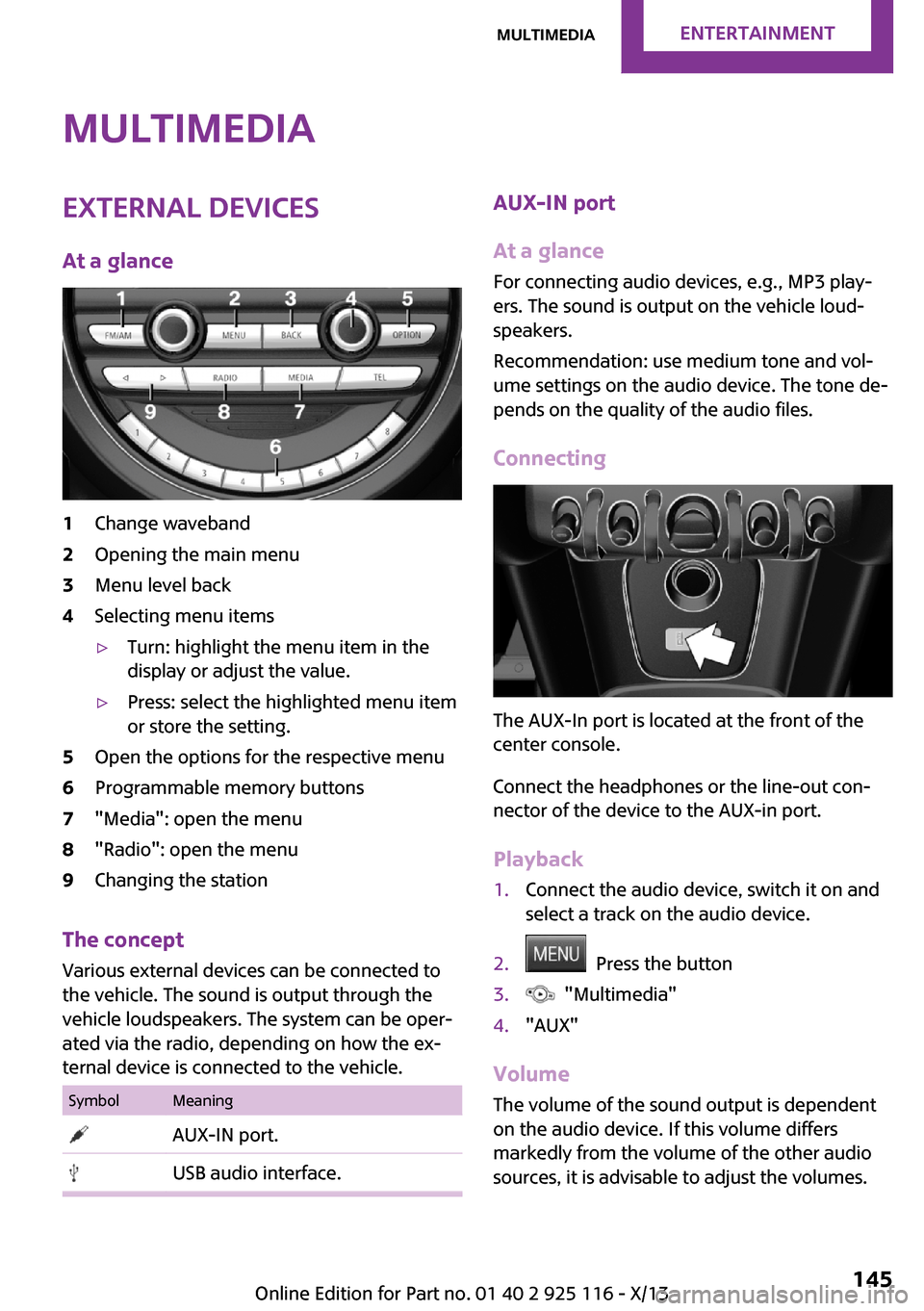
At a glance1Change waveband2Opening the main menu3Menu level back4Selecting menu items▷Turn: highlight the menu item in the
display or adjust the value.▷Press: select the highlighted menu item
or store the setting.5Open the options for the respective menu6Programmable memory buttons7"Media": open the menu8"Radio": open the menu9Changing the station
The concept
Various external devices can be connected to
the vehicle. The sound is output through the
vehicle loudspeakers. The system can be oper‐
ated via the radio, depending on how the ex‐
ternal device is connected to the vehicle.
SymbolMeaning AUX-IN port. USB audio interface.AUX-IN port
At a glance
For connecting audio devices, e.g., MP3 play‐
ers. The sound is output on the vehicle loud‐
speakers.
Recommendation: use medium tone and vol‐
ume settings on the audio device. The tone de‐
pends on the quality of the audio files.
Connecting
The AUX-In port is located at the front of the
center console.
Connect the headphones or the line-out con‐
nector of the device to the AUX-in port.
Playback
1.Connect the audio device, switch it on and
select a track on the audio device.2. Press the button3. "Multimedia"4."AUX"
Volume
The volume of the sound output is dependent
on the audio device. If this volume differs
markedly from the volume of the other audio
sources, it is advisable to adjust the volumes.
Seite 145MultimediaEntertainment145
Online Edition for Part no. 01 40 2 925 116 - X/13
Page 191 of 233
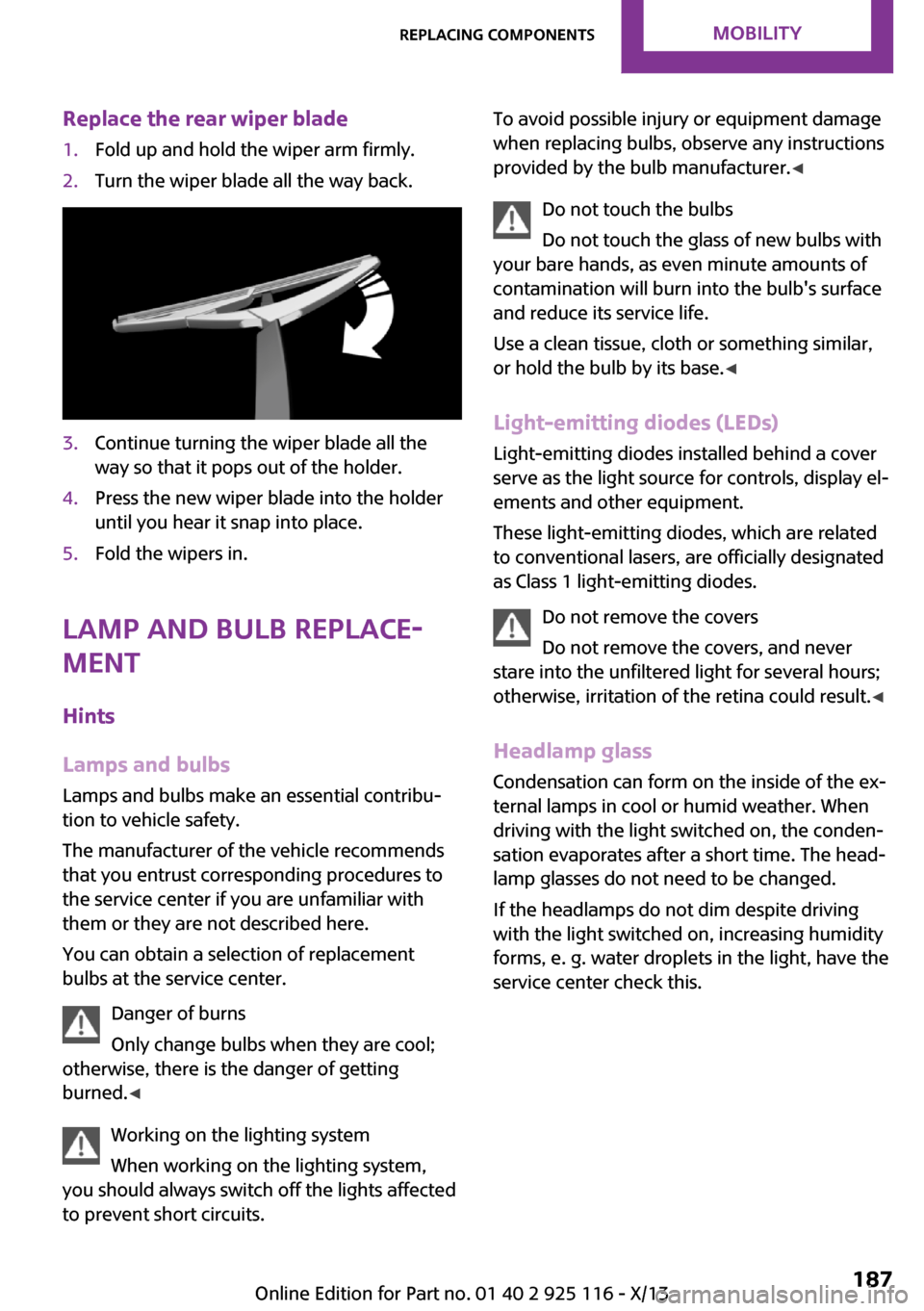
Replace the rear wiper blade1.Fold up and hold the wiper arm firmly.2.Turn the wiper blade all the way back.3.Continue turning the wiper blade all the
way so that it pops out of the holder.4.Press the new wiper blade into the holder
until you hear it snap into place.5.Fold the wipers in.
Lamp and bulb replace‐
ment
Hints
Lamps and bulbs Lamps and bulbs make an essential contribu‐
tion to vehicle safety.
The manufacturer of the vehicle recommends
that you entrust corresponding procedures to
the service center if you are unfamiliar with
them or they are not described here.
You can obtain a selection of replacement
bulbs at the service center.
Danger of burns
Only change bulbs when they are cool;
otherwise, there is the danger of getting
burned. ◀
Working on the lighting system
When working on the lighting system,
you should always switch off the lights affected
to prevent short circuits.
To avoid possible injury or equipment damage
when replacing bulbs, observe any instructions
provided by the bulb manufacturer. ◀
Do not touch the bulbs
Do not touch the glass of new bulbs with
your bare hands, as even minute amounts of
contamination will burn into the bulb's surface
and reduce its service life.
Use a clean tissue, cloth or something similar,
or hold the bulb by its base. ◀
Light-emitting diodes (LEDs)
Light-emitting diodes installed behind a cover
serve as the light source for controls, display el‐
ements and other equipment.
These light-emitting diodes, which are related
to conventional lasers, are officially designated
as Class 1 light-emitting diodes.
Do not remove the covers
Do not remove the covers, and never
stare into the unfiltered light for several hours;
otherwise, irritation of the retina could result. ◀
Headlamp glass Condensation can form on the inside of the ex‐
ternal lamps in cool or humid weather. When
driving with the light switched on, the conden‐
sation evaporates after a short time. The head‐
lamp glasses do not need to be changed.
If the headlamps do not dim despite driving
with the light switched on, increasing humidity
forms, e. g. water droplets in the light, have the
service center check this.Seite 187Replacing componentsMobility187
Online Edition for Part no. 01 40 2 925 116 - X/13
Page 225 of 233
C
California Proposition 65 Warning 7
Camera-based cruise control, ACC 90
Camera, care 206
Can holder, refer to Cu‐ pholder 119
Car battery 196
Car care products 204
Care, displays 206
Care, vehicle 204
Cargo 127
Cargo area 115
Cargo area, adapting size 120
Cargo area, enlarging 116
Cargo area lid 24
Cargo area, storage compart‐ ments 120
Cargo cover 115
Cargo, securing 128
Cargo straps, securing cargo 128
Car key, refer to Remote con‐ trol 20
Carpet, care 206
Car wash 203
Catalytic converter, refer to Hot exhaust system 125
CBS Condition Based Serv‐ ice 184
Center armrest 119
Center console 14
Changes, technical, refer to Safety 6
Changing parts 186
Changing the station 140
Changing wheels 193
Changing wheels/tires 171
Check Control 57
Children, seating position 40
Children, transporting safely 40
Child restraint fixing sys‐ tem 40 Child restraint fixing system
LATCH 41
Child restraint fixing systems, mounting 40
Child seat, mounting 40
Child seats 40
Chrome parts, care 205
Cigarette lighter 115
Cleaning, displays 206
Climate control 104, 106
Clock 60
Closing/opening via door lock 23
Closing/opening with remote control 22
Clothes hooks 120
Coasting 133
Coasting with engine decou‐ pled, coasting 133
Coasting with idling en‐ gine 133
Cold starting, refer to Starting the engine 45
Collision warning with City Braking function 80
Combination switch, refer to Turn signals 49
Combination switch, refer to Wiper system 49
Comfort Access 25
Compact wheel 194
Compartments in the doors 119
Compass 112
Compressor 173
Computer 63
Condensation on win‐ dows 108
Condensation under the vehi‐ cle 126
Condition Based Service CBS 184
Confirmation signal 27
Control systems, driving stabil‐ ity 86
Convenient opening 22 Coolant 183
Coolant temperature 59
Cooling function 105, 108
Cooling, maximum 107
Cooling system 183
Cornering lamp 68
Corrosion on brake discs 126
Cruise control 96
Cruise control, active 90
Cruise control, refer to cam‐ era-based cruise control 90
Cruising range 60
Cupholder 119
Current fuel consumption 60
D
Damage, tires 171
Damping control, dynamic 87
Data, technical 210
Date 60
Date, radio 65
Date, setting on radio 65
Daytime running lights 67
Defrosting, refer to defrosting the windows 105
Defrosting, refer to Windows, defrosting 108
Defrosting the windows 105
Dehumidifying, air 105, 108
Diesel particulate filter 125
Digital clock 60
Digital compass 112
Digital radio 141
Dimensions 210
Dimmable exterior mirrors 38
Dimmable interior rearview mirror 38
Direction indicator, refer to Turn signals 49
Display, electronic, instrument cluster 57
Display lighting, refer to In‐ strument lighting 70
Displays 56
Displays, cleaning 206 Seite 221Everything from A to ZReference221
Online Edition for Part no. 01 40 2 925 116 - X/13
Page 230 of 233
Safety belt reminder for driv‐
er's seat and front passenger
seat 35
Safety belts 34
Safety belts, care 205
Safety systems, airbags 71
Satellite radio 143
Saving fuel 130
Screwdriver 186
Screw thread for tow fit‐
ting 202
Sealant 173
Seat belts, refer to Safety
belts 34
Seat heating, front 34
Seating position for chil‐
dren 40
Seats 32
Select a station 139
Selecting a station man‐
ually 140
Selection list in instrument
cluster 63
Sensors, care 206
Service and warranty 8
Service requirements, Condi‐
tion Based Service CBS 184
Service requirements, dis‐
play 60
Service, Roadside Assis‐
tance 198
Settings and information 65
Settings, locking/unlocking 26
Settings, mirrors 37
Shifting, automatic transmis‐
sion 52
Shifting, manual transmis‐
sion 52
Shift paddles on steering
wheel 54
Side airbags 71
Signaling, horn 12
Signals when unlocking 27
Sitting safely 32
Size 210
Slide/tilt glass roof 30
Snow chains 176
Socket 114
Socket, OBD Onboard Diag‐
nostics 184
Soot particulate filter 125
Spare fuse 197
Specified engine oil types 182
Speed, average 64
Speed limit detection, on‐
board computer 64
Speed limiter, display 61
Speed Limit Information 61
Speed limit in the com‐
puter 64
Sport automatic transmis‐
sion 54
SPORT program, Dynamic
Driving Control 88
Sport program, transmis‐
sion 53
Stability control systems 86
Start/stop, automatic func‐
tion 46
Start/Stop button 44
Start function during malfunc‐
tion 21
Starting the engine 45
Station, storing 140
Status of Owner's Manual 6
Steering wheel, adjusting 39
Steptronic, automatic trans‐
mission 52
Stopping the engine 45
Storage compartments 118
Storage, tires 172
Storing the vehicle 206
Summer tires, tread 170
Supplementary text mes‐
sages 58
Switch for Dynamic Driving 88
Switch, refer to Cockpit 12
Symbols 6
T
Tachometer 59
Tailgate 24
Tailgate via remote control 23
Tail lamps 190
Technical changes, refer to
Safety 6
Technical data 210
Temperature, air condi‐
tioner 105
Temperature, automatic cli‐
mate control 107
Temperature display, external
temperature 59
Temperature display, setting
units 65
Temperature, engine oil 59
Terminal, starting aid 199
Text messages, supplemen‐
tary 58
Theft alarm system, refer to
Alarm system 27
Theft protection, lug
bolts 196
Thigh support 33
Tilt alarm sensor 28
Time, radio, setting time on
the radio 65
Tire damage 171
Tire identification marks 169
Tire inflation pressure 166
Tire inflation pressure moni‐
tor, refer to FTM 77
Tire Pressure Monitor TPM 74
Tires, changing 171
Tire sealant 173
Tires, everything on wheels
and tires 166
Tires, run-flat tires 173
Tire tread 170
Tone settings 138
Tools 186
Total vehicle weight 210
Seite 226ReferenceEverything from A to Z226
Online Edition for Part no. 01 40 2 925 116 - X/13