lock MINI 3 door 2013 Service Manual
[x] Cancel search | Manufacturer: MINI, Model Year: 2013, Model line: 3 door, Model: MINI 3 door 2013Pages: 233, PDF Size: 17.19 MB
Page 195 of 233
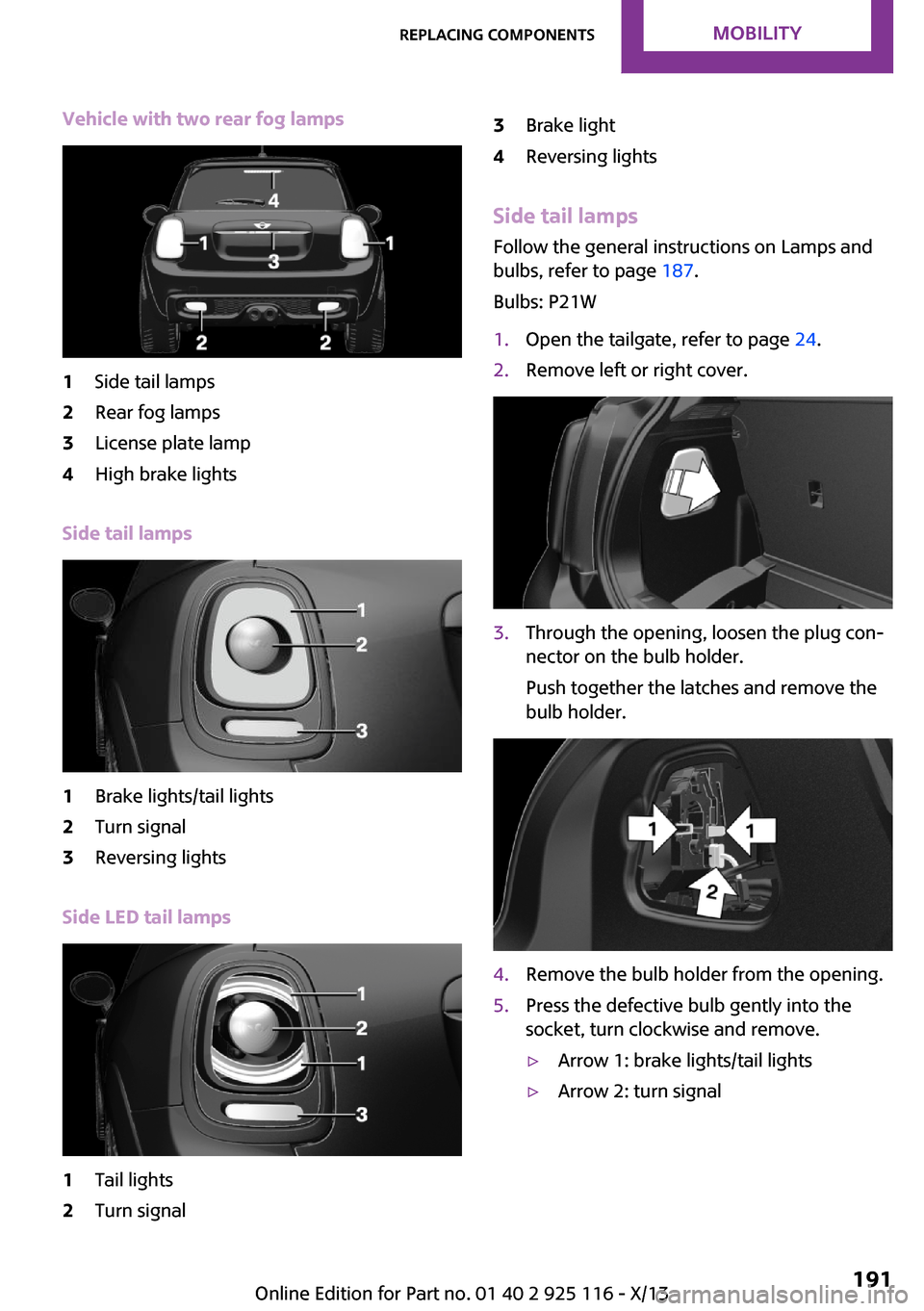
Vehicle with two rear fog lamps1Side tail lamps2Rear fog lamps3License plate lamp4High brake lights
Side tail lamps
1Brake lights/tail lights2Turn signal3Reversing lights
Side LED tail lamps
1Tail lights2Turn signal3Brake light4Reversing lights
Side tail lampsFollow the general instructions on Lamps and
bulbs, refer to page 187.
Bulbs: P21W
1.Open the tailgate, refer to page 24.2.Remove left or right cover.3.Through the opening, loosen the plug con‐
nector on the bulb holder.
Push together the latches and remove the
bulb holder.4.Remove the bulb holder from the opening.5.Press the defective bulb gently into the
socket, turn clockwise and remove.▷Arrow 1: brake lights/tail lights▷Arrow 2: turn signalSeite 191Replacing componentsMobility191
Online Edition for Part no. 01 40 2 925 116 - X/13
Page 196 of 233
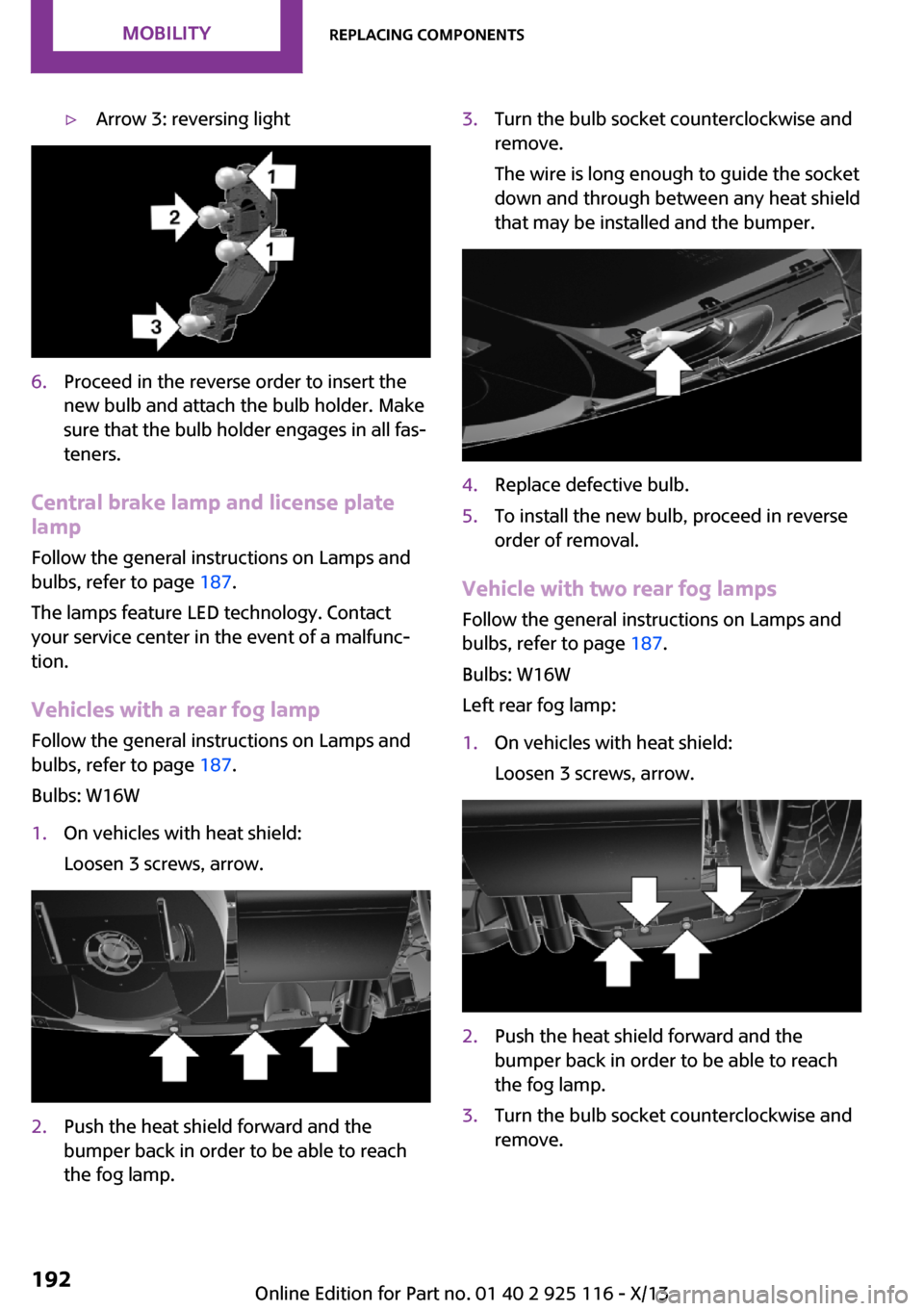
▷Arrow 3: reversing light6.Proceed in the reverse order to insert the
new bulb and attach the bulb holder. Make
sure that the bulb holder engages in all fas‐
teners.
Central brake lamp and license plate
lamp
Follow the general instructions on Lamps and
bulbs, refer to page 187.
The lamps feature LED technology. Contact your service center in the event of a malfunc‐
tion.
Vehicles with a rear fog lamp
Follow the general instructions on Lamps and
bulbs, refer to page 187.
Bulbs: W16W
1.On vehicles with heat shield:
Loosen 3 screws, arrow.2.Push the heat shield forward and the
bumper back in order to be able to reach
the fog lamp.3.Turn the bulb socket counterclockwise and
remove.
The wire is long enough to guide the socket
down and through between any heat shield
that may be installed and the bumper.4.Replace defective bulb.5.To install the new bulb, proceed in reverse
order of removal.
Vehicle with two rear fog lamps
Follow the general instructions on Lamps and
bulbs, refer to page 187.
Bulbs: W16W
Left rear fog lamp:
1.On vehicles with heat shield:
Loosen 3 screws, arrow.2.Push the heat shield forward and the
bumper back in order to be able to reach
the fog lamp.3.Turn the bulb socket counterclockwise and
remove.Seite 192MobilityReplacing components192
Online Edition for Part no. 01 40 2 925 116 - X/13
Page 197 of 233
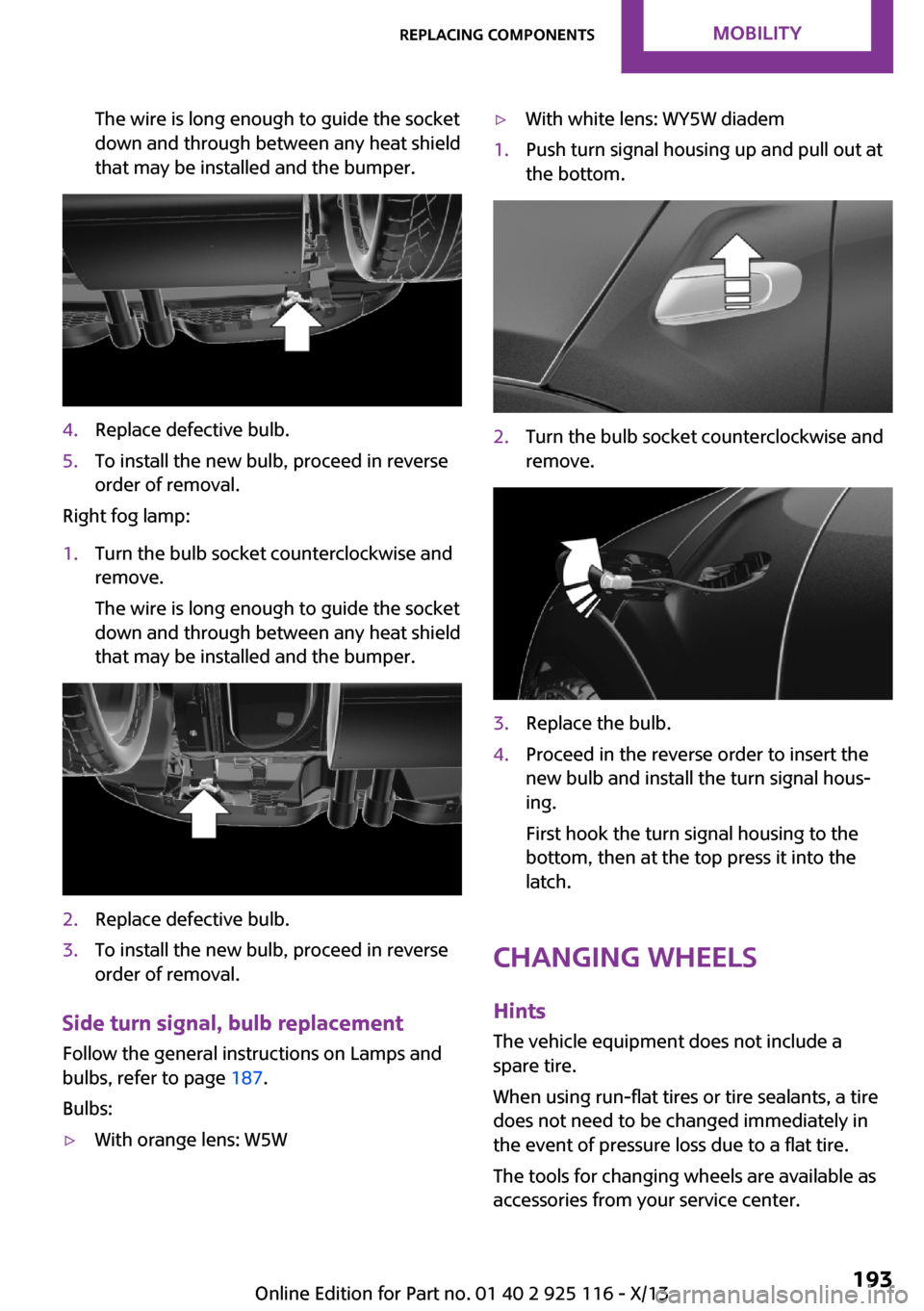
The wire is long enough to guide the socket
down and through between any heat shield
that may be installed and the bumper.4.Replace defective bulb.5.To install the new bulb, proceed in reverse
order of removal.
Right fog lamp:
1.Turn the bulb socket counterclockwise and
remove.
The wire is long enough to guide the socket
down and through between any heat shield
that may be installed and the bumper.2.Replace defective bulb.3.To install the new bulb, proceed in reverse
order of removal.
Side turn signal, bulb replacement
Follow the general instructions on Lamps and
bulbs, refer to page 187.
Bulbs:
▷With orange lens: W5W▷With white lens: WY5W diadem1.Push turn signal housing up and pull out at
the bottom.2.Turn the bulb socket counterclockwise and
remove.3.Replace the bulb.4.Proceed in the reverse order to insert the
new bulb and install the turn signal hous‐
ing.
First hook the turn signal housing to the
bottom, then at the top press it into the
latch.
Changing wheels
Hints
The vehicle equipment does not include a
spare tire.
When using run-flat tires or tire sealants, a tire
does not need to be changed immediately in
the event of pressure loss due to a flat tire.
The tools for changing wheels are available as
accessories from your service center.
Seite 193Replacing componentsMobility193
Online Edition for Part no. 01 40 2 925 116 - X/13
Page 198 of 233
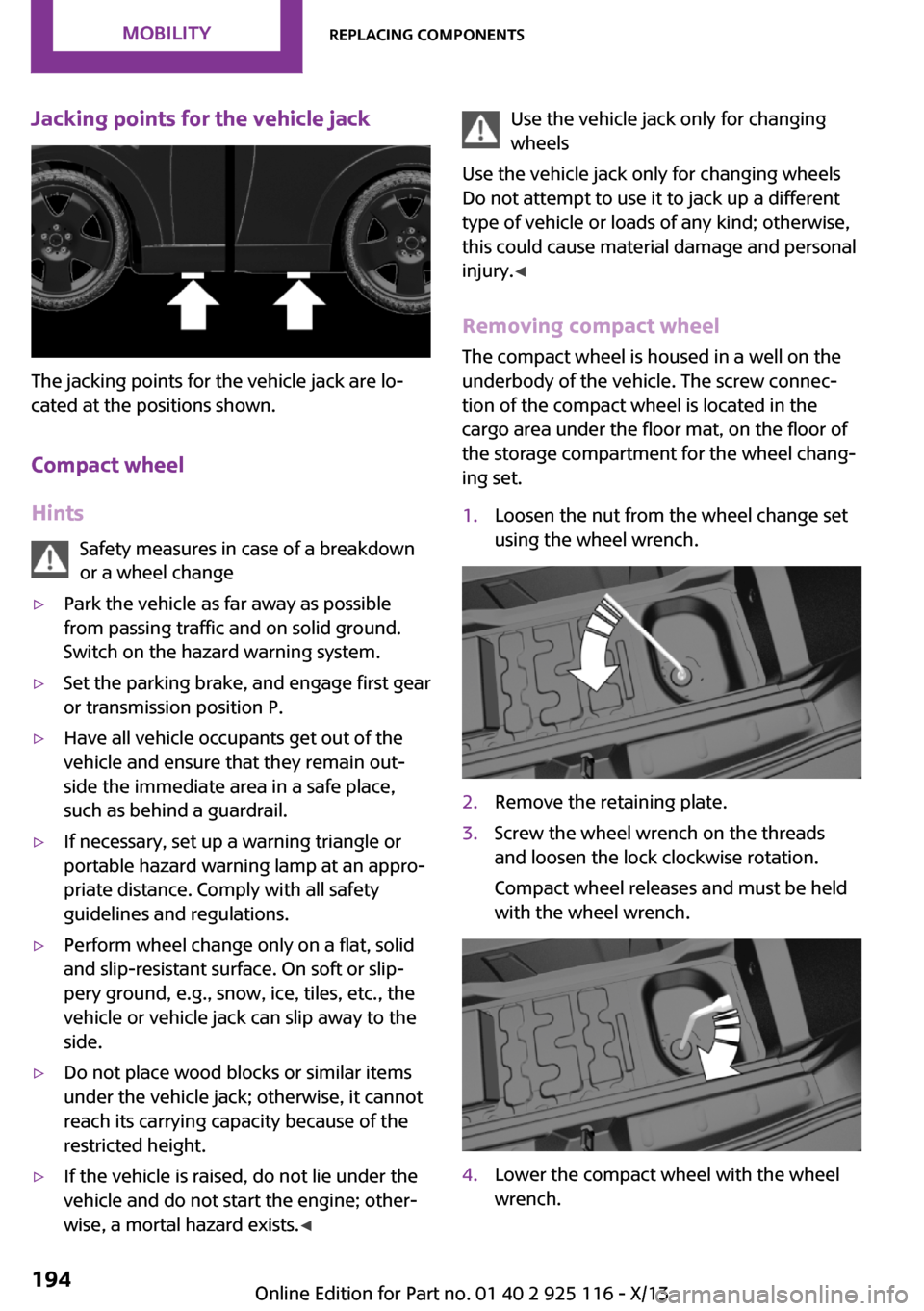
Jacking points for the vehicle jack
The jacking points for the vehicle jack are lo‐
cated at the positions shown.
Compact wheel
Hints Safety measures in case of a breakdown
or a wheel change
▷Park the vehicle as far away as possible
from passing traffic and on solid ground.
Switch on the hazard warning system.▷Set the parking brake, and engage first gear
or transmission position P.▷Have all vehicle occupants get out of the
vehicle and ensure that they remain out‐
side the immediate area in a safe place,
such as behind a guardrail.▷If necessary, set up a warning triangle or
portable hazard warning lamp at an appro‐
priate distance. Comply with all safety
guidelines and regulations.▷Perform wheel change only on a flat, solid
and slip-resistant surface. On soft or slip‐
pery ground, e.g., snow, ice, tiles, etc., the
vehicle or vehicle jack can slip away to the
side.▷Do not place wood blocks or similar items
under the vehicle jack; otherwise, it cannot
reach its carrying capacity because of the
restricted height.▷If the vehicle is raised, do not lie under the
vehicle and do not start the engine; other‐
wise, a mortal hazard exists. ◀Use the vehicle jack only for changing
wheels
Use the vehicle jack only for changing wheels
Do not attempt to use it to jack up a different
type of vehicle or loads of any kind; otherwise,
this could cause material damage and personal
injury. ◀
Removing compact wheel The compact wheel is housed in a well on the
underbody of the vehicle. The screw connec‐
tion of the compact wheel is located in the
cargo area under the floor mat, on the floor of
the storage compartment for the wheel chang‐
ing set.1.Loosen the nut from the wheel change set
using the wheel wrench.2.Remove the retaining plate.3.Screw the wheel wrench on the threads
and loosen the lock clockwise rotation.
Compact wheel releases and must be held
with the wheel wrench.4.Lower the compact wheel with the wheel
wrench.Seite 194MobilityReplacing components194
Online Edition for Part no. 01 40 2 925 116 - X/13
Page 199 of 233
5.Unscrewing the wheel wrench6.Pull out the well with compact wheel under
the vehicle toward the rear.7.Remove the spacer and compact wheel of
the well.8.Stow the well and spacer in the vehicle.
Prepare wheel change
1.Follow the Safety instructions, refer to
page 194.2.With the wheel chock from the wheel
change set, also secure the vehicle against
rolling away at the front wheel of the oppo‐
site side.3.Loosen the wheel lug bolts a half turn.
Lug bolt lock, refer to page 196
Jacking up the vehicle
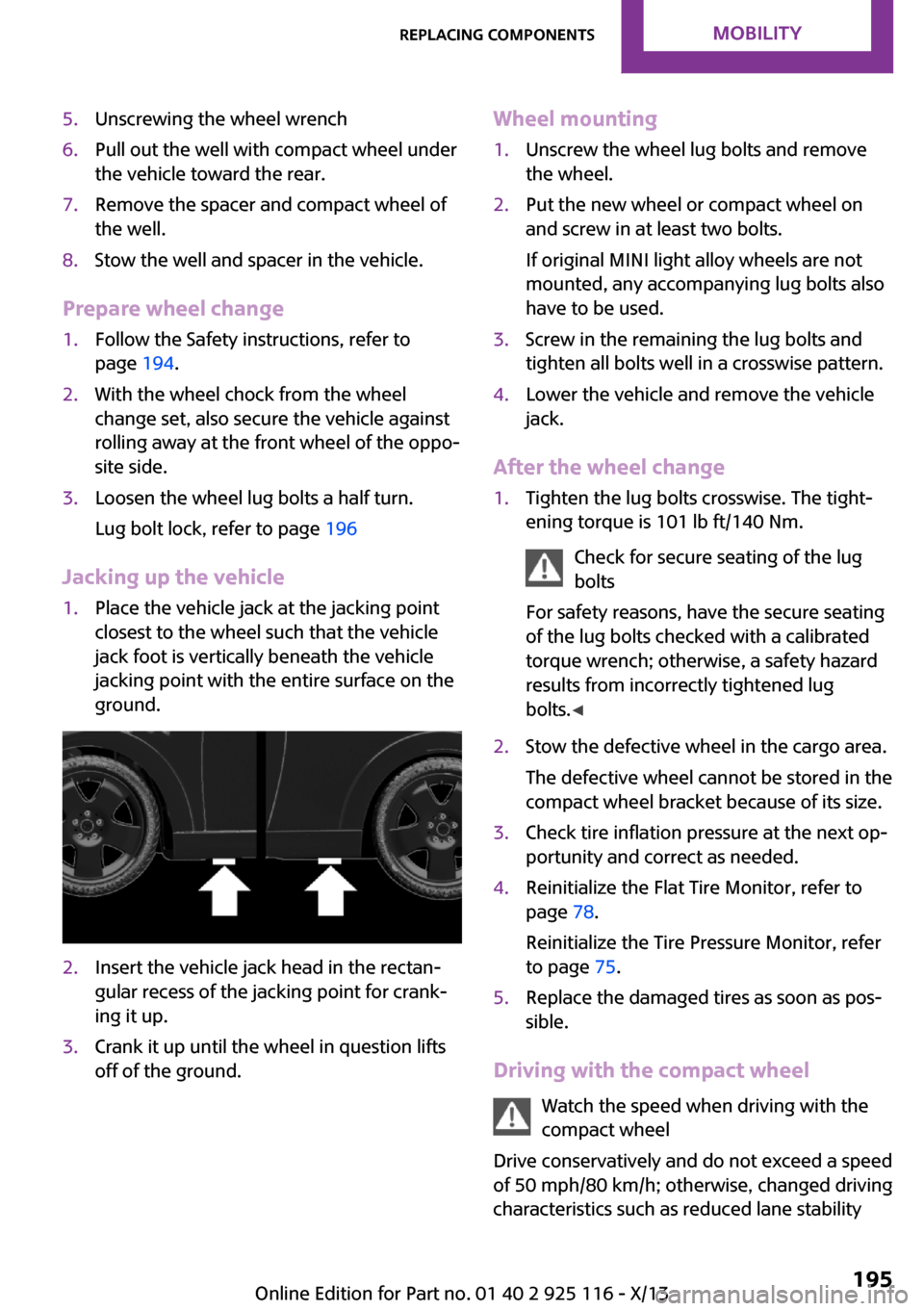
1.Place the vehicle jack at the jacking point
closest to the wheel such that the vehicle
jack foot is vertically beneath the vehicle
jacking point with the entire surface on the
ground.2.Insert the vehicle jack head in the rectan‐
gular recess of the jacking point for crank‐
ing it up.3.Crank it up until the wheel in question lifts
off of the ground.Wheel mounting1.Unscrew the wheel lug bolts and remove
the wheel.2.Put the new wheel or compact wheel on
and screw in at least two bolts.
If original MINI light alloy wheels are not
mounted, any accompanying lug bolts also
have to be used.3.Screw in the remaining the lug bolts and
tighten all bolts well in a crosswise pattern.4.Lower the vehicle and remove the vehicle
jack.
After the wheel change
1.Tighten the lug bolts crosswise. The tight‐
ening torque is 101 lb ft/140 Nm.
Check for secure seating of the lug
bolts
For safety reasons, have the secure seating
of the lug bolts checked with a calibrated
torque wrench; otherwise, a safety hazard
results from incorrectly tightened lug
bolts. ◀2.Stow the defective wheel in the cargo area.
The defective wheel cannot be stored in the
compact wheel bracket because of its size.3.Check tire inflation pressure at the next op‐
portunity and correct as needed.4.Reinitialize the Flat Tire Monitor, refer to
page 78.
Reinitialize the Tire Pressure Monitor, refer
to page 75.5.Replace the damaged tires as soon as pos‐
sible.
Driving with the compact wheel
Watch the speed when driving with the
compact wheel
Drive conservatively and do not exceed a speed
of 50 mph/80 km/h; otherwise, changed driving
characteristics such as reduced lane stability
Seite 195Replacing componentsMobility195
Online Edition for Part no. 01 40 2 925 116 - X/13
Page 200 of 233
while braking, extended braking distance and
changed self-steering properties in the limit
area. ◀
Mounting only one compact wheel
Only a single compact wheel may be
mounted. Reinstall wheels and tires of the orig‐
inal size as quickly as possible; otherwise, there
is a safety risk. ◀
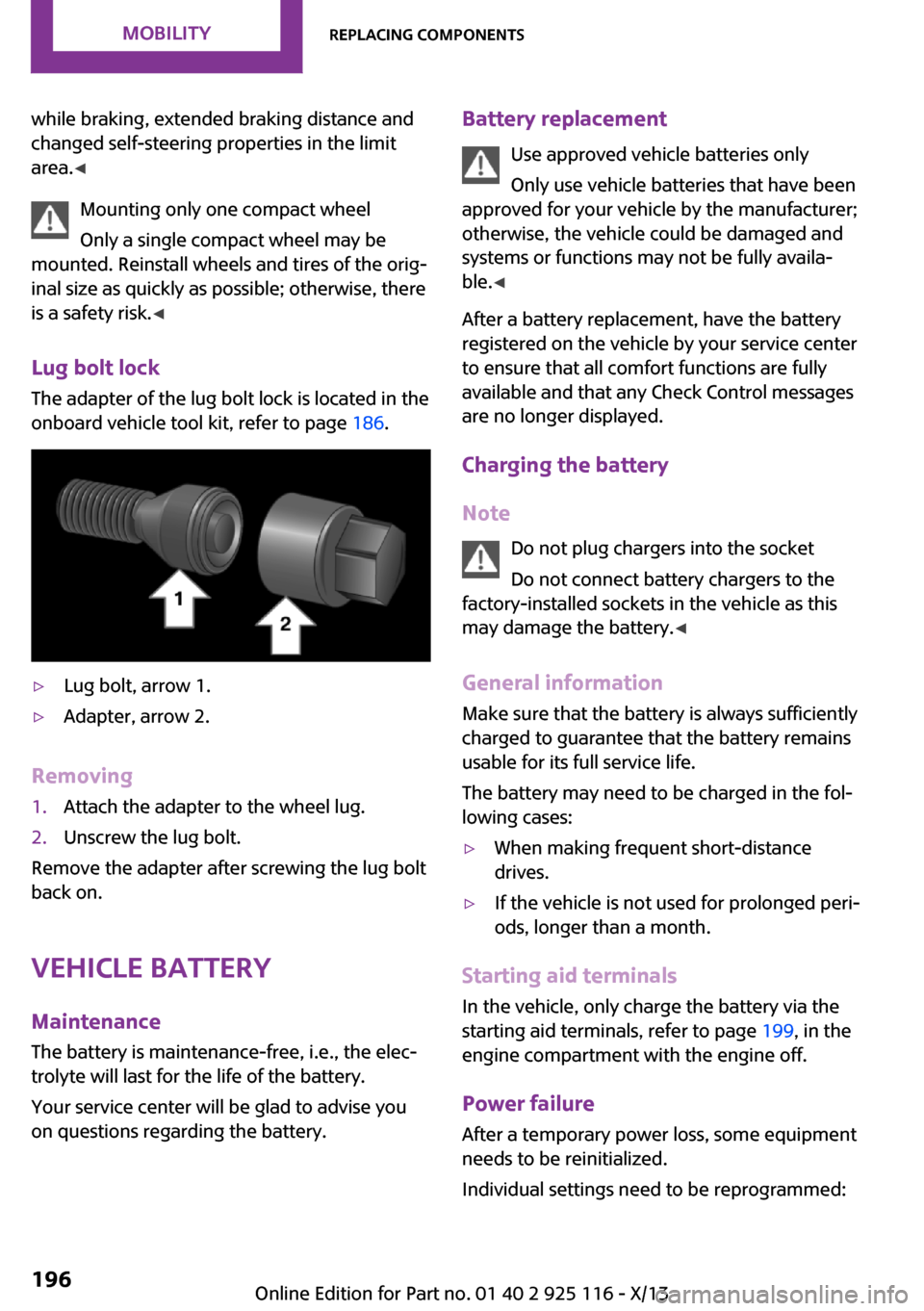
Lug bolt lock
The adapter of the lug bolt lock is located in the
onboard vehicle tool kit, refer to page 186.▷Lug bolt, arrow 1.▷Adapter, arrow 2.
Removing
1.Attach the adapter to the wheel lug.2.Unscrew the lug bolt.
Remove the adapter after screwing the lug bolt
back on.
Vehicle battery
Maintenance
The battery is maintenance-free, i.e., the elec‐
trolyte will last for the life of the battery.
Your service center will be glad to advise you
on questions regarding the battery.
Battery replacement
Use approved vehicle batteries only
Only use vehicle batteries that have been
approved for your vehicle by the manufacturer;
otherwise, the vehicle could be damaged and
systems or functions may not be fully availa‐
ble. ◀
After a battery replacement, have the battery
registered on the vehicle by your service center
to ensure that all comfort functions are fully
available and that any Check Control messages
are no longer displayed.
Charging the battery
Note Do not plug chargers into the socket
Do not connect battery chargers to the
factory-installed sockets in the vehicle as this
may damage the battery. ◀
General information
Make sure that the battery is always sufficiently
charged to guarantee that the battery remains
usable for its full service life.
The battery may need to be charged in the fol‐
lowing cases:▷When making frequent short-distance
drives.▷If the vehicle is not used for prolonged peri‐
ods, longer than a month.
Starting aid terminals
In the vehicle, only charge the battery via the
starting aid terminals, refer to page 199, in the
engine compartment with the engine off.
Power failure
After a temporary power loss, some equipment
needs to be reinitialized.
Individual settings need to be reprogrammed:
Seite 196MobilityReplacing components196
Online Edition for Part no. 01 40 2 925 116 - X/13
Page 202 of 233
Breakdown assistanceVehicle equipment
All standard, country-specific and optional
equipment that is offered in the model series is
described in this chapter. Therefore, equipment
is also described that is not available in a vehi‐
cle, e. g., because of the selected optional
equipment or country variant. This also applies
for safety-related functions and systems.
Hazard warning flash‐
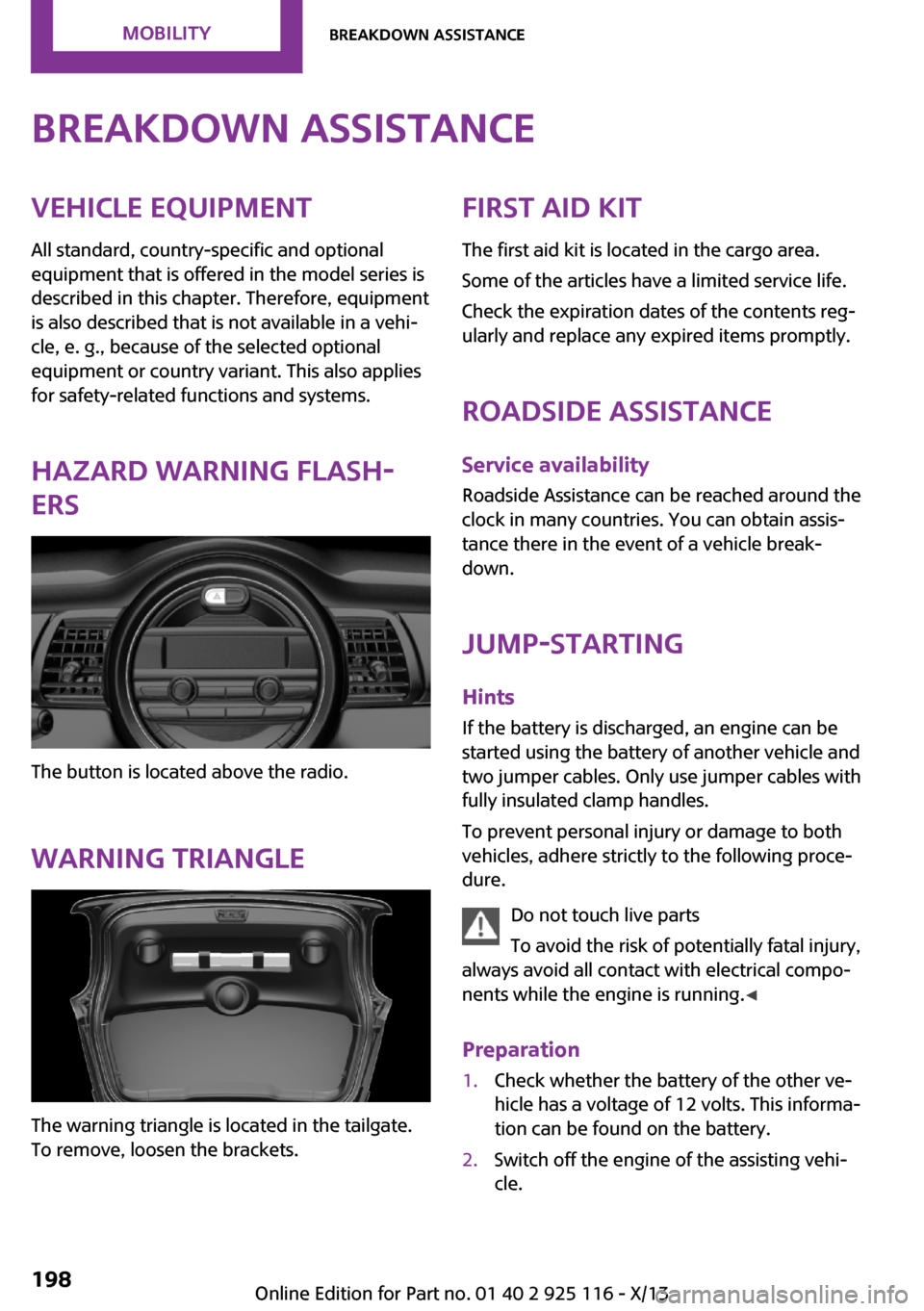
ers
The button is located above the radio.
Warning triangle
The warning triangle is located in the tailgate.
To remove, loosen the brackets.
First aid kit
The first aid kit is located in the cargo area.
Some of the articles have a limited service life.
Check the expiration dates of the contents reg‐
ularly and replace any expired items promptly.
Roadside Assistance Service availability
Roadside Assistance can be reached around the
clock in many countries. You can obtain assis‐
tance there in the event of a vehicle break‐
down.
Jump-starting Hints
If the battery is discharged, an engine can be
started using the battery of another vehicle and
two jumper cables. Only use jumper cables with
fully insulated clamp handles.
To prevent personal injury or damage to both
vehicles, adhere strictly to the following proce‐
dure.
Do not touch live parts
To avoid the risk of potentially fatal injury,
always avoid all contact with electrical compo‐
nents while the engine is running. ◀
Preparation1.Check whether the battery of the other ve‐
hicle has a voltage of 12 volts. This informa‐
tion can be found on the battery.2.Switch off the engine of the assisting vehi‐
cle.Seite 198MobilityBreakdown assistance198
Online Edition for Part no. 01 40 2 925 116 - X/13
Page 204 of 233
function of individual systems could result in an
accident. ◀
Switching off Intelligent Safety systems, refer to
page 79.
Automatic transmission: transporting
your vehicle
Note Your vehicle must not be towed if the frontwheels are touching the ground. Therefore,
contact a service center in the event of a break‐ down.
Tow the vehicle only with the front axle
raised
Have the vehicle towed only with the front axle
raised or transported on a loading platform; otherwise, damage may occur. ◀
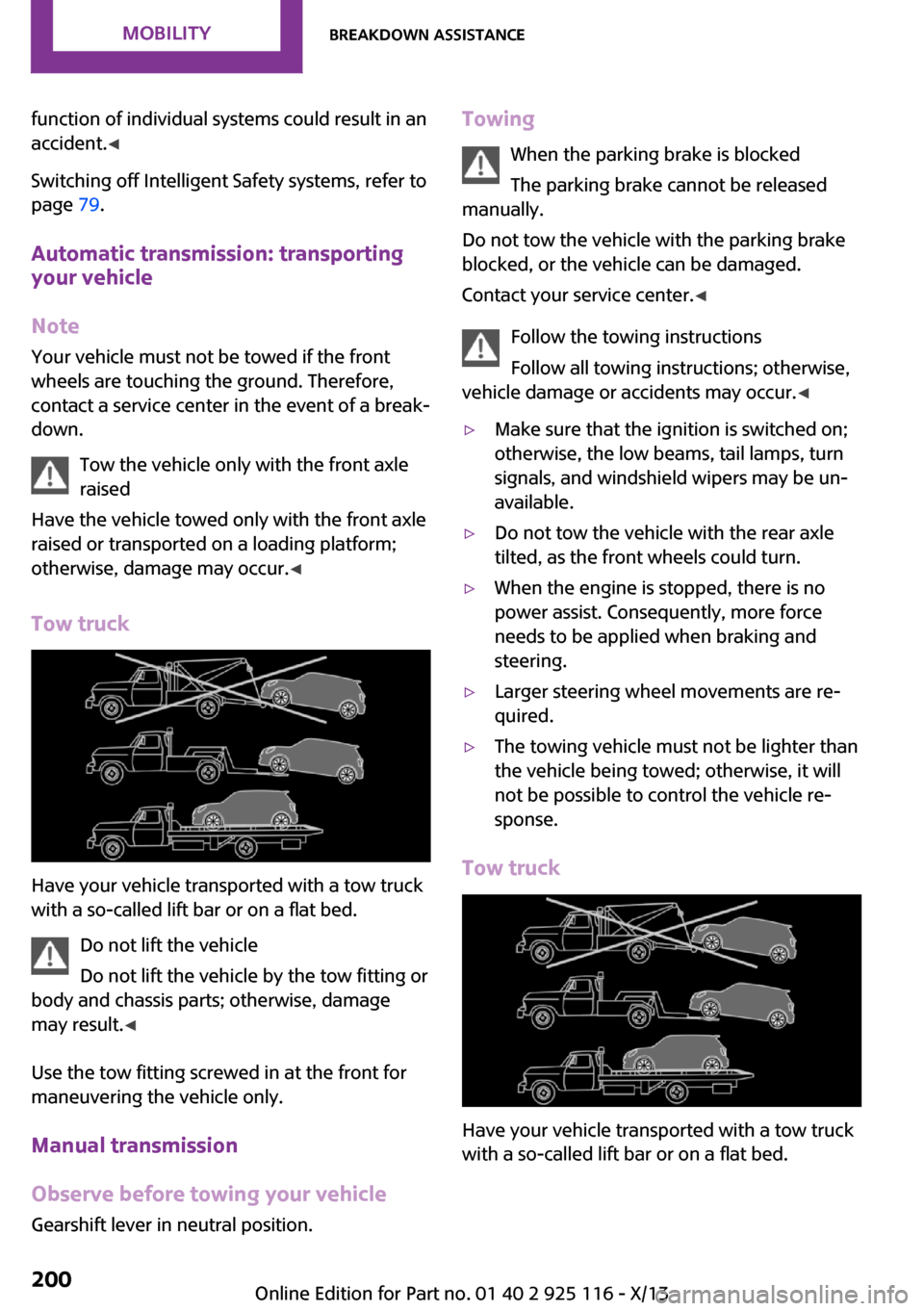
Tow truck
Have your vehicle transported with a tow truck
with a so-called lift bar or on a flat bed.
Do not lift the vehicle
Do not lift the vehicle by the tow fitting or
body and chassis parts; otherwise, damage
may result. ◀
Use the tow fitting screwed in at the front for
maneuvering the vehicle only.
Manual transmission
Observe before towing your vehicle Gearshift lever in neutral position.
Towing
When the parking brake is blocked
The parking brake cannot be released
manually.
Do not tow the vehicle with the parking brake
blocked, or the vehicle can be damaged.
Contact your service center. ◀
Follow the towing instructions
Follow all towing instructions; otherwise,
vehicle damage or accidents may occur. ◀▷Make sure that the ignition is switched on;
otherwise, the low beams, tail lamps, turn
signals, and windshield wipers may be un‐
available.▷Do not tow the vehicle with the rear axle
tilted, as the front wheels could turn.▷When the engine is stopped, there is no
power assist. Consequently, more force
needs to be applied when braking and
steering.▷Larger steering wheel movements are re‐
quired.▷The towing vehicle must not be lighter than
the vehicle being towed; otherwise, it will
not be possible to control the vehicle re‐
sponse.
Tow truck
Have your vehicle transported with a tow truck
with a so-called lift bar or on a flat bed.
Seite 200MobilityBreakdown assistance200
Online Edition for Part no. 01 40 2 925 116 - X/13
Page 208 of 233
Automatic transmission:1.Drive into the car wash.2.Engage transmission position N.3.Switch the engine off.
In this way, the ignition remains switched
on, and a Check-Control message is dis‐
played.
Do not turn off the ignition in the car
wash
Do not turn off the ignition in the car wash;
otherwise, the transmission position P is
engaged and damages can result. ◀
To start the engine:
1.Depress the brake pedal.2.Press the Start/Stop button.
Pressing the Start/Stop button without stepping
on the brake turns the ignition off.
The vehicle cannot be locked from the outside
when in transmission position N. A signal is
sounded when an attempt is made to lock the
vehicle.
Headlamps
▷Do not rub dry and do not use abrasive or
caustic cleansers.▷Soak areas that have been soiled, e.g., due
to insects, with shampoo and wash off with
water.▷Thaw ice with de-icing spray; do not use an
ice scraper.
After washing the vehicle
After washing the vehicle, apply the brakes
briefly to dry them; otherwise, braking action
can be reduced and corrosion of the brake
discs can occur.
Completely remove all residues on the win‐
dows, to minimize loss of visibility due to
smearing and to reduce wiper noises and wiper
blade wear.
Vehicle care
Car care products MINI recommends using cleaning and care
products from MINI, since these have been
tested and approved.
Car care and cleaning products
Follow the instructions on the container.
When cleaning the interior, open the doors or
windows.
Only use products intended for cleaning vehi‐
cles.
Cleansers can contain substances that are dan‐
gerous and harmful to your health. ◀
Vehicle paint
Regular care contributes to driving safety and
value retention. Environmental influences in
areas with elevated air pollution or natural con‐
taminants, such as tree resin or pollen can af‐
fect the vehicle's paintwork. Tailor the fre‐
quency and extent of your car care to these
influences.
Aggressive substances such as spilled fuel, oil,
grease or bird droppings must be removed im‐
mediately to prevent the finish from being al‐
tered or discolored.
Leather care Remove dust from the leather often, using a
cloth or vacuum cleaner.
Otherwise, particles of dust and road grime
chafe in pores and folds, and lead to increased
wear and premature degradation of the leather
surface.
To guard against discoloration, such as from
clothing, provide leather care roughly every
two months.
Clean light-colored leather more frequently be‐
cause soiling on such surfaces is substantially
more visible.Seite 204MobilityCare204
Online Edition for Part no. 01 40 2 925 116 - X/13
Page 224 of 233
Everything from A to Z
Index
A
ABS, Antilock Brake Sys‐
tem 86
ACC, Active Cruise Control 90
Acceleration Assistant, refer to
Launch Control 55
Activated-charcoal filter 109
Active cruise control, ACC 90
Additives, oil 181
Adjusting the headlamps 69
Adjustments, seats/head re‐
straints 32
Adjustments, steering
wheel 39
After washing vehicle 204
Airbags 71
Airbags, indicator/warning
light 72
Air circulation, refer to Recir‐
culated-air mode 105, 108
Air conditioner 104
Air, dehumidifying, refer to
Cooling function 105, 108
Air distribution,
manual 105, 107
Air flow, air conditioner 105
Air flow, automatic climate
control 107
Air pressure, tires 166
Air vents, refer to Ventila‐
tion 109
Alarm system 27
Alarm triggering 27
Alarm, unintentional 28
All around the center con‐
sole 14
All around the headliner 15
All around the steering
wheel 12
All-season tires, refer to Win‐
ter tires 172
Alternating-code hand-held
transmitter 111
Alternative oil types 182
Antifreeze, washer fluid 51
Antilock Brake System,
ABS 86
Anti-slip control, refer to
DSC 86
Appendix
Approved axle load 210
Approved engine oils 182
Ash tray 115
Assistance, Roadside Assis‐
tance 198
Assistance when driving
off 89
Assist system, refer to Intelli‐
gent Safety 79
AUTO intensity 107
Automatic car wash 203
Automatic climate con‐
trol 106
Automatic cruise control with
Stop & Go 90
Automatic Curb Monitor 37
Automatic deactivation, front
passenger airbags 73
Automatic headlamp con‐
trol 67
Automatic locking 27
Automatic recirculated-air
control 108
Automatic transmission with
Steptronic 52
AUTO program, automatic cli‐
mate control 107
AUTO program, intensity 107
Auto Start/Stop function 46
Average fuel consumption 64
Average speed 64
Axle loads, weights 210
B
Backrest curvature, refer to
Lumbar support 33
Balance 138
Band-aids, refer to First aid
kit 198
Bar for tow-starting/
towing 201
Bass 138
Battery replacement, vehicle
battery 196
Battery, vehicle 196
Belts, safety belts 34
Beverage holder, cu‐
pholder 119
Bluetooth, refer to Hands-free
system 152
Bonus range, GREEN
mode 132
Bottle holder, refer to Cu‐
pholder 119
Brake assistant 86
Brake discs, breaking in 124
Brake pads, breaking in 124
Braking, hints 125
Breakdown assistance 198
Breaking in 124
Bug light 188
Bulb replacement 187
Bulb replacement, front 188
Bulb replacement, rear 190
Bulb replacement, side 193
Bulbs and lamps 187
Button, RES 92
Button, Start/Stop 44
Bypassing, refer to Jump-
starting 198
Seite 220ReferenceEverything from A to Z220
Online Edition for Part no. 01 40 2 925 116 - X/13
212