fuel cap MINI Clubman 2009 Owner's Manual (Mini Connected)
[x] Cancel search | Manufacturer: MINI, Model Year: 2009, Model line: Clubman, Model: MINI Clubman 2009Pages: 218, PDF Size: 3.69 MB
Page 58 of 218
Everything under control
56
tion, a message will appear on the Control
Display.
Check coolant level, refer to page169.
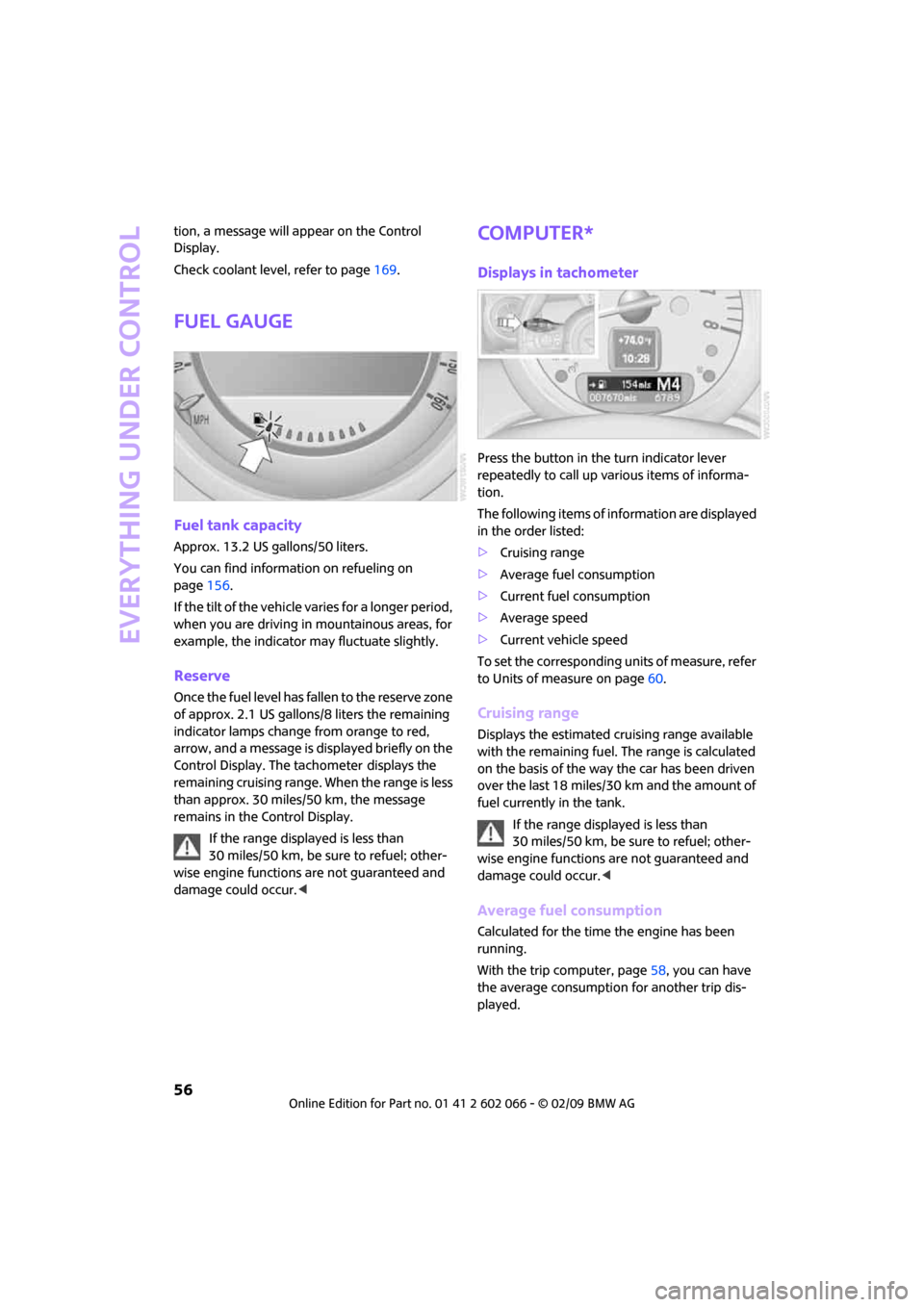
Fuel gauge
Fuel tank capacity
Approx. 13.2 US gallons/50 liters.
You can find information on refueling on
page156.
If the tilt of the vehicle varies for a longer period,
when you are driving in mountainous areas, for
example, the indicator may fluctuate slightly.
Reserve
Once the fuel level has fallen to the reserve zone
of approx. 2.1 US gallons/8 liters the remaining
indicator lamps change from orange to red,
arrow, and a message is displayed briefly on the
Control Display. The tachometer
displays the
remaining cruising range. When the range is less
than approx. 30 miles/50 km, the message
remains in the Control Display.
If the range displayed is less than
30 miles/50 km, be sure to refuel; other-
wise engine functions are not guaranteed and
damage could occur.<
Computer*
Displays in tachometer
Press the button in the turn indicator lever
repeatedly to call up various items of informa-
tion.
The following items of information are displayed
in the order listed:
>Cruising range
>Average fuel consumption
>Current fuel consumption
>Average speed
>Current vehicle speed
To set the corresponding units of measure, refer
to Units of measure on page60.
Cruising range
Displays the estimated cruising range available
with the remaining fuel. The range is calculated
on the basis of the way the car has been driven
over the last 18 miles/30 km and the amount of
fuel currently in the tank.
If the range displayed is less than
30 miles/50 km, be sure to refuel; other-
wise engine functions are not guaranteed and
damage could occur.<
Average fuel consumption
Calculated for the time the engine has been
running.
With the trip computer, page58, you can have
the average consumption for another trip dis-
played.
Page 103 of 218
MOBILITYAT A GLANCE CONTROLS DRIVING TIPS ENTERTAINMENT
101
NAVIGATION REFERENCE
sudden swerves, etc., and endanger the occu-
pants. Do not secure cargo using the fastening
points for the tether strap, page44; they may
become damaged.<
Roof-mounted
luggage rack*
A special rack system is available as an option for
your MINI. Your MINI Dealer will be glad to
advise you. Comply with the installation instruc-
tions supplied with the rack system.
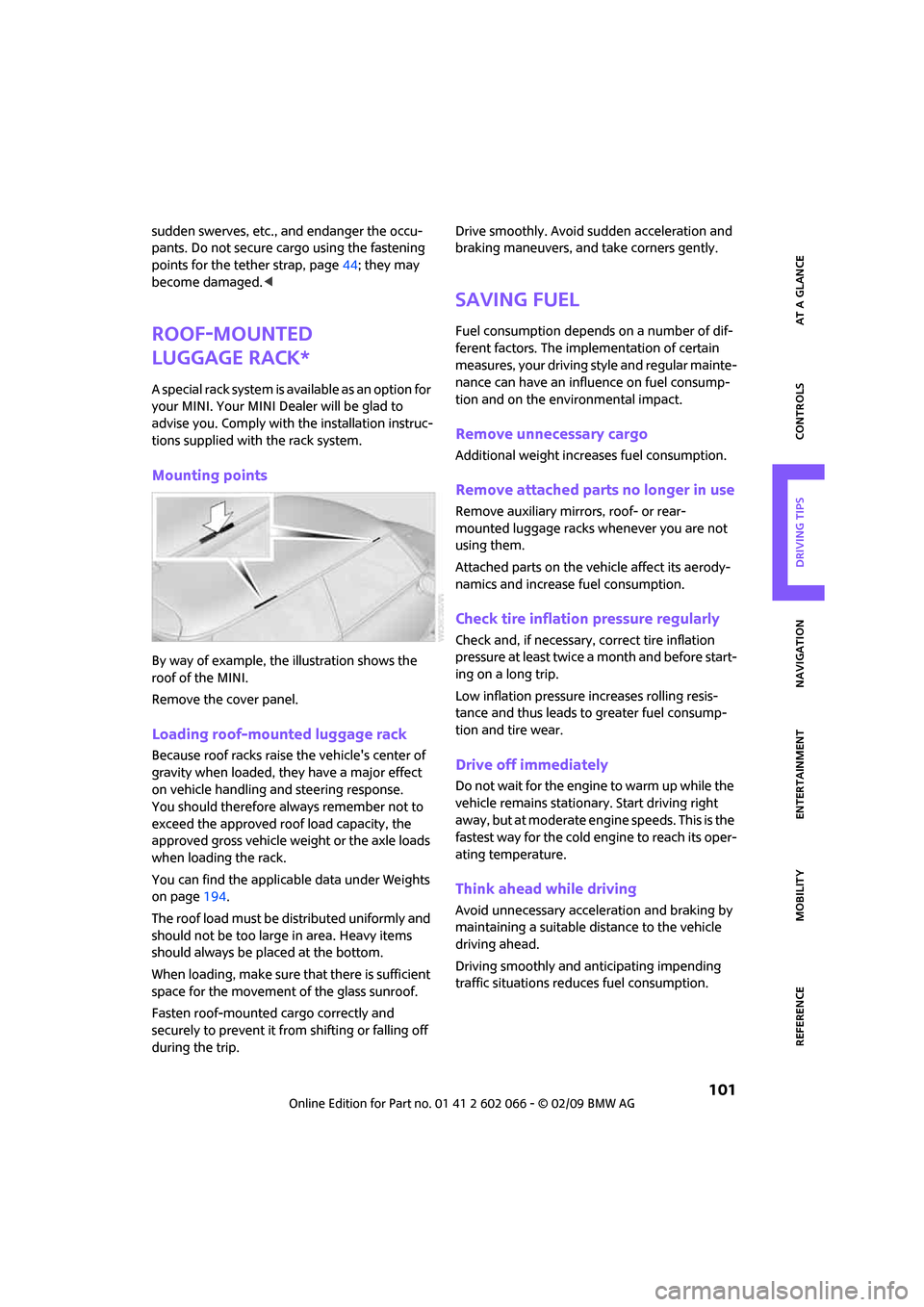
Mounting points
By way of example, the illustration shows the
roof of the MINI.
Remove the cover panel.
Loading roof-mounted luggage rack
Because roof racks raise the vehicle's center of
gravity when loaded, they have a major effect
on vehicle handling and steering response.
You should therefore always remember not to
exceed the approved roof load capacity, the
approved gross vehicle weight or the axle loads
when loading the rack.
You can find the applicable data under Weights
on page194.
The roof load must be distributed uniformly and
should not be too large in area. Heavy items
should always be placed at the bottom.
When loading, make sure that there is sufficient
space for the movement of the glass sunroof.
Fasten roof-mounted cargo correctly and
securely to prevent it from shifting or falling off
during the trip.Drive smoothly. Avoid sudden acceleration and
braking maneuvers, and take corners gently.
Saving fuel
Fuel consumption depends on a number of dif-
ferent factors. The implementation of certain
measures, your driving style and regular mainte-
nance can have an influence on fuel consump-
tion and on the environmental impact.
Remove unnecessary cargo
Additional weight increases fuel consumption.
Remove attached parts no longer in use
Remove auxiliary mirrors, roof- or rear-
mounted luggage racks whenever you are not
using them.
Attached parts on the vehicle affect its aerody-
namics and increase fuel consumption.
Check tire inflation pressure regularly
Check and, if necessary, correct tire inflation
pressure at least twice a month and before start-
ing on a long trip.
Low inflation pressure increases rolling resis-
tance and thus leads to greater fuel consump-
tion and tire wear.
Drive off immediately
Do not wait for the engine to warm up while the
vehicle remains stationary. Start driving right
away, but at moderate engine speeds. This is the
fastest way for the cold engine to reach its oper-
ating temperature.
Think ahead while driving
Avoid unnecessary acceleration and braking by
maintaining a suitable distance to the vehicle
driving ahead.
Driving smoothly and anticipating impending
traffic situations reduces fuel consumption.
Page 158 of 218
Refueling
156
Refueling
Switch off the engine before refueling,
otherwise fuel cannot be added to the
tank and a message will be displayed.<
Take all precautionary measures and
observe all applicable regulations when
handling fuel. Do not carry any spare fuel con-
tainers in your vehicle. They can develop a leak
and cause an explosion or cause a fire in the
event of an accident.<
Fuel filler door
Opening
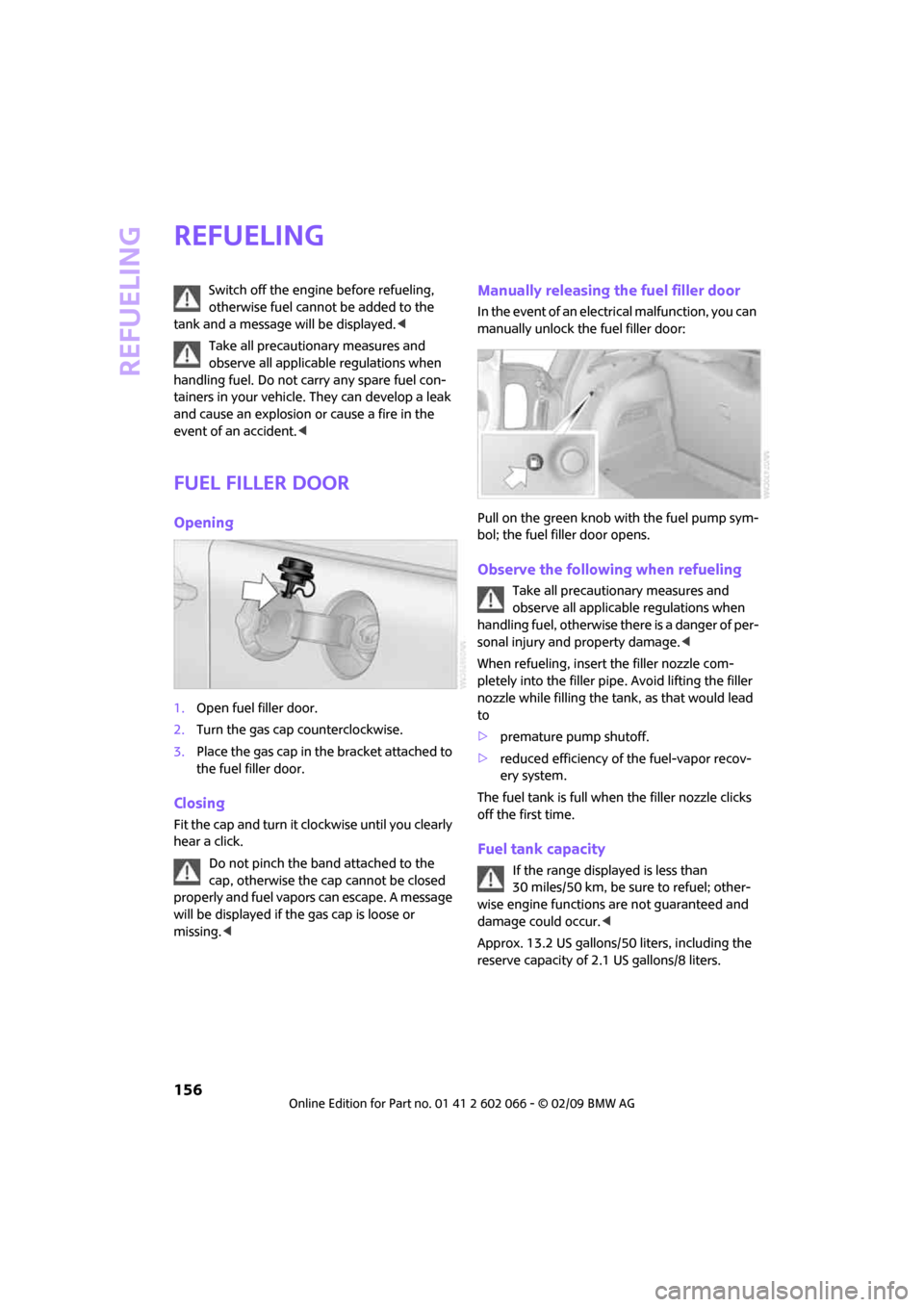
1.Open fuel filler door.
2.Turn the gas cap counterclockwise.
3.Place the gas cap in the bracket attached to
the fuel filler door.
Closing
Fit the cap and turn it clockwise until you clearly
hear a click.
Do not pinch the band attached to the
cap, otherwise the cap cannot be closed
properly and fuel vapors can escape. A message
will be displayed if the gas cap is loose or
missing.<
Manually releasing the fuel filler door
In the event of an electrical malfunction, you can
manually unlock the fuel filler door:
Pull on the green knob with the fuel pump sym-
bol; the fuel filler door opens.
Observe the following when refueling
Take all precautionary measures and
observe all applicable regulations when
handling fuel, otherwise there is a danger of per-
sonal injury and property damage.<
When refueling, insert the filler nozzle com-
pletely into the filler pipe. Avoid lifting the filler
nozzle while filling the tank, as that would lead
to
>premature pump shutoff.
>reduced efficiency of the fuel-vapor recov-
ery system.
The fuel tank is full when the filler nozzle clicks
off the first time.
Fuel tank capacity
If the range displayed is less than
30 miles/50 km, be sure to refuel; other-
wise engine functions are not guaranteed and
damage could occur.<
Approx. 13.2 US gallons/50 liters, including the
reserve capacity of 2.1 US gallons/8 liters.
Page 167 of 218
MOBILITYAT A GLANCE CONTROLS DRIVING TIPS ENTERTAINMENT
165
NAVIGATION REFERENCE
When properly used, these tires meet the high-
est standards in terms of safety and handling
characteristics.
Run-Flat Tires*
When mounting new tires or changing over from
summer to winter tires and vice versa, mount
Run-Flat Tires for your own safety. Keep in mind
that no space-saver spare tire is available in the
event of a flat. Your MINI Dealer will be glad to
advise you.
Special characteristics of winter tires
The manufacturer of MINI recommends the use
of winter tires on snowy roads or if temperatures
drop below 457/ +76. Although all-season
M+S tires provide better winter traction than
summer tires, they generally fail to provide the
same levels of cold-weather performance as
winter tires.
Pay attention to speed
Always comply with the speed limit for
the winter tires mounted on your car;
failure to do so could result in tire damage and
accidents.<
If the car is capable of speeds higher than that
permitted for the winter tires, a label stating the
maximum permitted speed for the mounted
tires must be displayed in your field of view. Spe-
cialist tire dealers and your MINI Dealer can sup-
ply these labels.
Storage
Always store wheels and tires in a cool, dry place
with as little exposure to light as possible.
Always protect tires against all contact with oil,
grease and fuels.
Do not exceed the maximum tire inflation pres-
sure indicated on the sidewall of the tire.
Swapping wheels among the axles
Depending on the individual use, front and rear
tires may exhibit different wear and tear.
In order to maintain an even wear and tear, the
wheels may be rotated between the axles. Your
MINI Dealer will be glad to advise you.Always check the inflation pressure after the tire
rotation, if necessary change the pressure.
Snow chains*
Only certain types of fine-link snow chains have
been tested by the manufacturer of your MINI,
classified as road-safe and recommended. Con-
tact your MINI Dealer for more details.
Only attach snow chains in pairs to the front
wheels with the following tires.
>175/65 R 15 M+S
>175/60 R 16 M+S
John Cooper Works:
>185/50 R 17 86 H M+S XL RSC
Observe the manufacturer's instructions when
mounting snow chains. Do not exceed a speed
of 30 mph or 50 km/h.
Do not initialize the Flat Tire Monitor if
snow chains are mounted, otherwise the
instrument might issue an incorrect reading.
When driving with snow chains, it can be useful
to briefly deactivate the DSC or activate the DTC,
refer to page72.<
Page 173 of 218
MOBILITYAT A GLANCE CONTROLS DRIVING TIPS ENTERTAINMENT
171
NAVIGATION REFERENCE
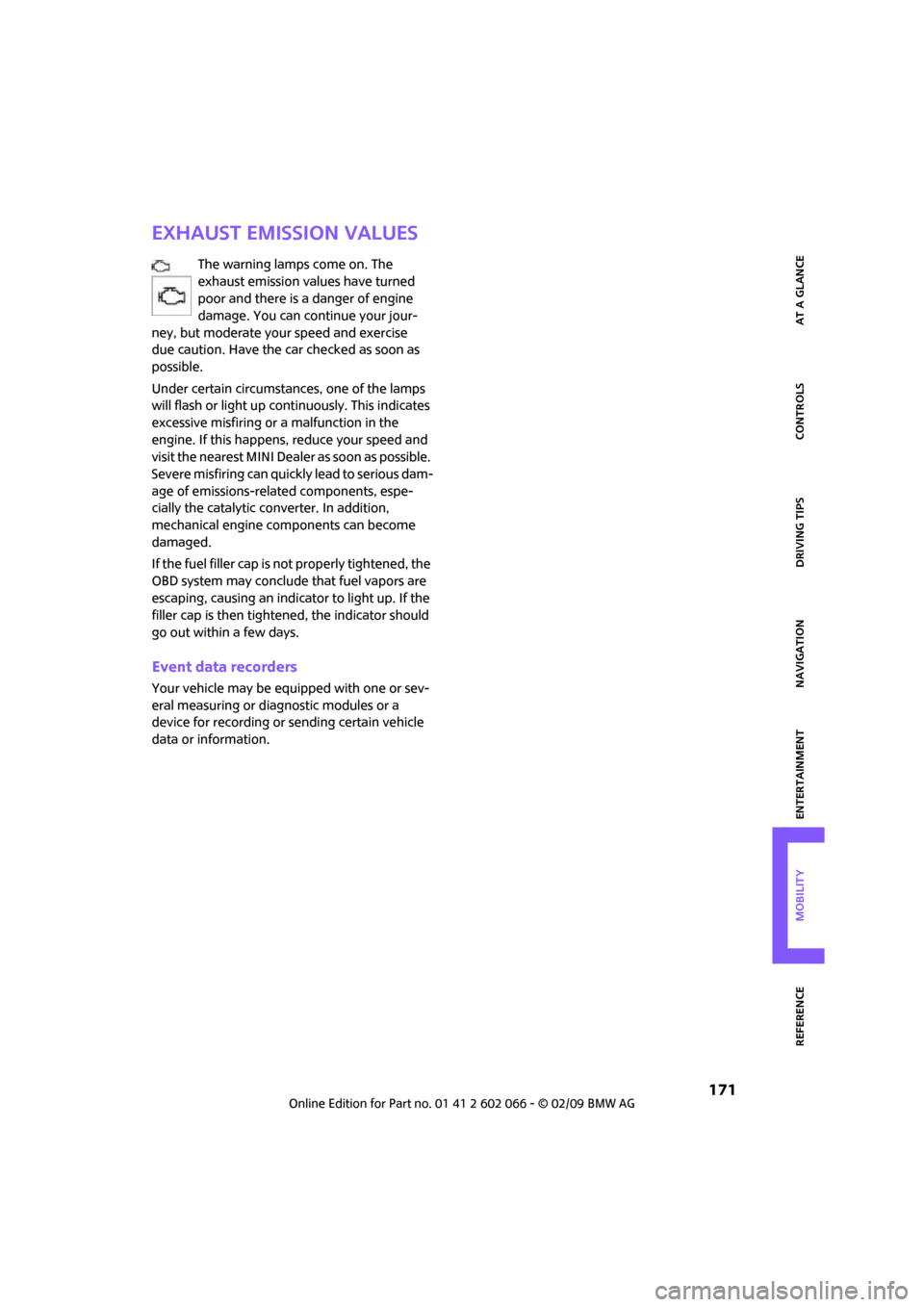
Exhaust emission values
The warning lamps come on. The
exhaust emission values have turned
poor and there is a danger of engine
damage. You can continue your jour-
ney, but moderate your speed and exercise
due caution. Have the car checked as soon as
possible.
Under certain circumstances, one of the lamps
will flash or light up continuously. This indicates
excessive misfiring or a malfunction in the
engine. If this happens, reduce your speed and
visit the nearest MINI Dealer as soon as possible.
Severe misfiring can quickly lead to serious dam-
age of emissions-related components, espe-
cially the catalytic converter. In addition,
mechanical engine components can become
damaged.
If the fuel filler cap is not properly tightened, the
OBD system may conclude that fuel vapors are
escaping, causing an indicator to light up. If the
filler cap is then tightened, the indicator should
go out within a few days.
Event data recorders
Your vehicle may be equipped with one or sev-
eral measuring or diagnostic modules or a
device for recording or sending certain vehicle
data or information.
Page 196 of 218
Technical data
194
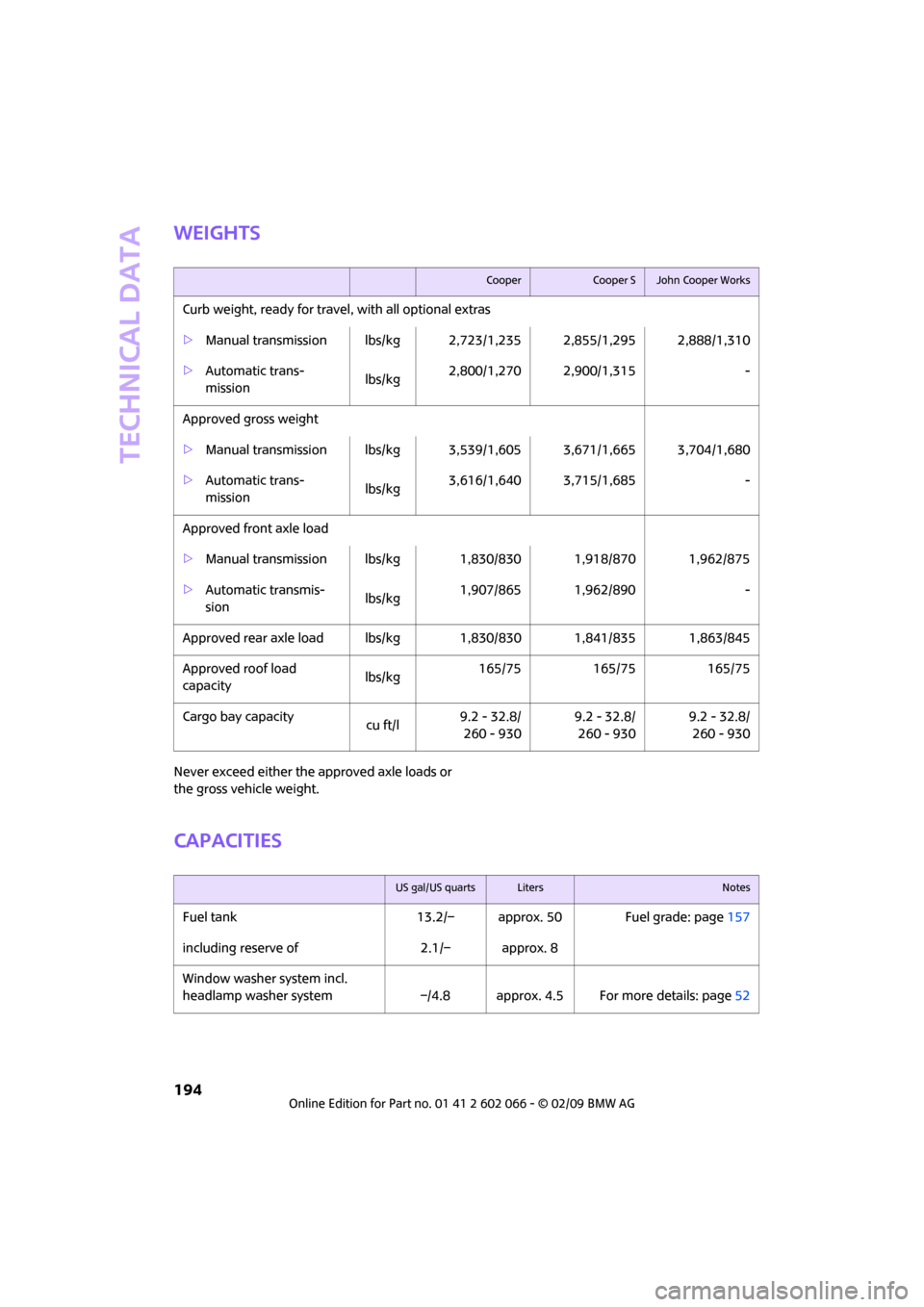
Weights
Never exceed either the approved axle loads or
the gross vehicle weight.
Capacities
CooperCooper SJohn Cooper Works
Curb weight, ready for travel, with all optional extras
>Manual transmission lbs/kg 2,723/1,235 2,855/1,295 2,888/1,310
>Automatic trans-
mission lbs/kg2,800/1,270 2,900/1,315 -
Approved gross weight
>Manual transmission lbs/kg 3,539/1,605 3,671/1,665 3,704/1,680
>Automatic trans-
mission lbs/kg3,616/1,640 3,715/1,685 -
Approved front axle load
>Manual transmission lbs/kg 1,830/830 1,918/870 1,962/875
>Automatic transmis-
sion lbs/kg1,907/865 1,962/890 -
Approved rear axle load lbs/kg 1,830/830 1,841/835 1,863/845
Approved roof load
capacitylbs/kg165/75 165/75 165/75
Cargo bay capacity
cu ft/l9.2 - 32.8/
260 - 9309.2 - 32.8/
260 - 9309.2 - 32.8/
260 - 930
US gal/US quartsLitersNotes
Fuel tank 13.2/– approx. 50 Fuel grade: page157
including reserve of 2.1/– approx. 8
Window washer system incl.
headlamp washer system –/4.8 approx. 4.5 For more details: page52
Page 204 of 218
From A to Z
202
CD player143
– controls132
– fast forward/reverse146
– playing a track144
– random order146
– repeating a track145
– selecting a track144
– switching on/off132
– tone control133
– volume133
Center armrest91
Center brake lamp180
Center console, refer to
Around the center
console14
"Central locking"28
Central locking system27
– convenient access32
– from inside30
– from outside27
Changing bulbs176
Changing the language on the
Control Display68
Changing the measurement
units on the Control
Display60
Changing wheels182
Chassis number, refer to
Engine compartment167
Check Control65
"Check Control messages"67
Child's seats43
Child-restraint fixing system
LATCH44
Child-restraint systems43
Chrome parts, care173
Chrome parts, refer to
Care172
Cigarette lighter93
Cleaning headlamps52
– washer fluid52
Clock55
– 12h/24h mode64
– hour signal64
– setting time63
Closing
– from inside30
– from outside27
Clothes hooks92Clubdoor31
Cockpit10
Cold start, refer to Starting the
engine46
Comfort access
– what to observe before
entering a car wash34
Comfort access, refer to
Convenient access32
Comfort area, refer to Around
the center console14
Compact disc, refer to
– CD changer143
– CD player143
Compartment for remote
control, refer to Ignition
lock46
Computer56
– displays on Control
Display57
– hour signal64
Condensation, refer to When
the vehicle is parked97
Condition Based Service
CBS170
Configuring settings, refer to
Personal Profile26
Confirmation signals for
vehicle locking/unlocking28
Connecting vacuum cleaner,
refer to Connecting electrical
appliances93
Consumption indicator
– average fuel consumption56
Consumption, refer to Average
fuel consumption56
Control Display
– settings59
– switching off/on20
Control Display, refer to
Onboard monitor16
Control stick, refer to Onboard
monitor16
Control unit, refer to Onboard
monitor16
Controls and displays10
Convenience start, refer to
Starting the engine46Convenient access32
– replacing the battery34
Convenient operation
– windows28
Coolant169
– checking level169
– filling169
Coolant temperature55
Cooling fluid, refer to
Coolant169
Cooling, maximum87
Copyright2
Country of destination for
navigation109
Cross-hairs in navigation113
Cruise control
– indicator lamp13
Cruising range56
Cup holders92
Curb weight, refer to
Weights194
Current fuel consumption57
"Current position"128
Current position
– displaying128
– entering116
– storing116
D
Dashboard instruments, refer
to Displays12
Dashboard lighting, refer to
Instrument lighting84
Dashboard, refer to Cockpit10
Data192
– capacities194
– dimensions193
– engine192
– weights194
"Date"65
Date
– setting64
– setting format65
"Date format"65
"Daytime running lamps"83
Daytime running lamps83
DBC Dynamic Brake Control,
refer to Brake assist71
Page 206 of 218
From A to Z
204
Engine
– breaking in96
– data192
– overheated, refer to Coolant
temperature55
– speed192
– starting46
– starting, convenient
access32
– switching off47
Engine compartment167
Engine coolant, refer to
Coolant169
Engine malfunction
– indicator lamp13
Engine oil
– adding168
– additives, refer to Approved
engine oils168
– approved engine oils168
– capacity168
– checking level167
– dipstick167
– intervals between changes,
refer to Service
requirements60
– MINI Maintenance
System170
Engine oil level, checking167
Engine output, refer to Engine
data192
Engine starting, refer to
Starting the engine46
Entering address111
Entering destination109
Entering intersection110
Error messages, refer to Check
Control65
"ESN"139,140,141
ESP Electronic Stability
Program, refer to Dynamic
Stability Control DSC71
Event data recorders171
Exhaust system, refer to Hot
exhaust system96
Exterior mirrors40
– adjusting40
– automatic heating41
– folding in and out41External audio device91
External audio device, refer to
AUX-In port149
Eyes
– for tow-starting and towing
away187
– for tying down loads100
F
Fader, tone control133
Failure messages, refer to
Check Control65
Failure of an electrical
consumer185
Fast forward
– CD changer146
– CD player146
"Fast route" in navigation118
Fasten safety belts reminder,
refer to Seat belt
reminder40
Fastening safety belts, refer to
Safety belts40
Fastest route for
navigation118
Filter
– microfilter/activated-
charcoal filter for automatic
climate control88
Fine wood, care174
First aid pouch186
Fixture for remote control,
refer to Ignition lock46
Flash when locking/
unlocking28
Flat tire
– Run-Flat Tires164
– Tire Pressure Monitor TPM76
Flat Tire Monitor FTM73
– indicating a flat tire75
– initializing the system74
– snow chains74
– system limits74
Flat tires, refer to Tire
condition163
Floor mats, care174
Floor plate, see Level load
floor99"FM", waveband132,135
FM, waveband135
Fog lamps
– replacing bulb178,180
Folding rear seat backrest98
Footbrake, refer to Braking
safely97
Footwell lamps84
For your own safety5
Frequency, selecting
manually136
Front airbags80
Front fog lamps84
– replacing bulb178
Front seat adjustment37
Frost on windows, refer to
Defrosting windows88
"FTM"77
FTM, refer to Flat Tire
Monitor73
Fuel157
– gauge56
– high-quality brands157
– quality157
– specifications157
– tank capacity194
Fuel clock, refer to Fuel
gauge56
Fuel display, refer to Fuel
gauge56
Fuel filler door156
– releasing in the event of
electrical malfunction156
Fuses185
G
Garage door opener, refer to
Integrated universal remote
control89
Gasoline
– refer to Average
consumption56
Gasoline display, refer to Fuel
gauge56
Gasoline, refer to Required
fuel157
Page 211 of 218
209
MOBILITYAT A GLANCE CONTROLS DRIVING TIPS ENTERTAINMENT NAVIGATION REFERENCE
Replacing bulbs, refer to
Lamps and bulbs176
Replacing tires, refer to New
wheels and tires164
Reporting safety defects6
Reserve warning, refer to Fuel
gauge56
Reservoir for washer
systems52
"Reset"75
"Reset" for stopwatch68
"Reset" for tone settings134
Reset, refer to Resetting tone
settings134
Restraint systems
– for children43
– refer to Safety belts40
Reverse
– CD changer146
– CD player146
Reverse gear
– automatic transmission with
Steptronic49
– manual transmission48
Road map121
Roadside Assistance186
Roadside parking lamps83
– replacing bulb178
Roadworthiness test, refer to
Service requirements60
Roof load capacity194
Roof-mounted luggage
rack101
Rope, refer to Tow-starting,
towing away188
Route118
– changing118,124
– display121
– displaying arrow view121
– displaying map view121
– displaying town123
– list123
– selecting118
– selecting criteria118
– taking detours124
Route selection118
RSC Runflat System
Component, refer to Run-
Flat Tires164Rubber parts, care173
Runflat System Component
RSC, refer to Run-Flat
Tires164
Run-Flat Tires164
– flat tire75
– new tires164
– tire inflation pressure158
– winter tires165
Runflat Tyres, refer to Run-Flat
Tires
164
S
Safety belts40
– damage40
– indicator lamp40
– reminder40
– sitting safely37
Safety belts, care174
Safety systems
– airbags80
– Antilock Brake System
ABS71
– Dynamic Stability Control
DSC71
– safety belts40
Safety tires, refer to Run-Flat
Tires164
"SAT" on the radio132,140
Satellite radio140
– enabling channel140
– selecting channel140
– storing channel140
Scale for navigation,
changing122
"Scan"
– sampling radio stations136
Scan
– CD changer144
– CD player144
– radio136
"Scan all" for audio mode145
"Scan directory" for audio
mode145
Screen, refer to Onboard
monitor controls16
Screw thread for tow
fitting188SDARS, refer to Satellite
radio140
Seat adjustment
– mechanical38
Seats37
– adjusting the seats38
– heating39
– sitting safely37
Securing the vehicle
– from inside30
– from outside27
"Select as destination"114
"Select current speed"68
Selecting an audio source132
Selecting menu items19
Selecting the route118
Selection options for
navigation118
Selector lever
– automatic transmission with
Steptronic48
Selector lever lock
– automatic transmission with
Steptronic, refer to
Shiftlock48
– overriding manually
50
Selector lever positions
– automatic transmission with
Steptronic48
"Service"67
Service car, refer to Roadside
Assistance186
Service data in the remote
control170
Service Interval Display, refer
to Condition Based Service
CBS170
Service, refer to Roadside
Assistance186
Service requirement display,
refer to Condition Based
Service CBS170
"Service requirements"61,62
Service requirements60
"Set date"65
Settings
– clock, 12h/24h mode64
– date format65
Page 214 of 218
From A to Z
212
Transporting children safely43
Tread depth, refer to Minimum
tire tread163
Treble, refer to Tone
control133
Treble, refer to Treble and
bass133
Treble, tone control133
"Trip computer"58
Trip computer58
Trip odometer55
Trip-distance counter, refer to
Trip odometer55
"Triple turn signal"51
Triple turn signal activation50
Turn signal indicator50
– front, replacing bulb178
– indicator lamp12,13
– rear, replacing bulb179
– side, replacing bulb179
Turning circle, refer to
Dimensions193
Tying down loads, refer to
Cargo loading100
U
Uniform Tire Quality Grading
UTQR162
"Units"60
Units
– average fuel consumption60
– temperature60
Universal garage door opener,
refer to Integrated universal
remote control89
Universal remove control89
Unlatching, refer to
Unlocking33
"Unlock button"28
Unlocking
– from inside30
– from outside27
– tailgate33
– without remote control, refer
to Convenient access32
Upholstery, care173
USB-audio interface150
V
Vehicle
– battery184
– breaking in96
– cargo loading97
– dimensions193
– Identification Number, refer
to Engine compartment167
– parking47
– storage175
– weight194
Vehicle jack183
– jacking points183
Vehicle position, refer to
Displaying current
position128
Ventilation
– air conditioner88
Vents, refer to Ventilation88
Voice commands
– overview21
– short commands195
Voice instructions from
navigation system123
– switching on/off123
– volume123
Volume132
– audio sources132
– speed-dependent
control133
– voice instructions123
Volume distribution
– front/rear133
– left/right133
Volume of cargo area194
W
Warning and indicator
lamps13
Warning messages, refer to
Check Control65
Warning triangle186
Washer fluid52
– capacity of reservoir53
Washer fluid reservoir52
Waste tray, refer to Ashtray92Water on roads, refer to
Driving through water97
Waterfall lighting, refer to
Ambient lighting85
Waveband of radio135
Wear indicators in tires, refer to
Minimum tread depth163
Weights194
Welcome lamps82
Wheel stud wrench
– space-saver spare tire183
Wheelbase, refer to
Dimensions193
Wheels and tires158
Wheels, new164
Width, refer to
Dimensions193
Window washer, refer to
Washer fluid52
Window washer reservoir,
refer to Washer fluid
– volume, refer to
Capacities194
Windows35
– closing35
– convenient operation28
– opening35
– pinch protection system36
Windows, indicator on Control
Display16
Windshield
– cleaning52
– defrosting and removing
condensation88
Windshield, defrosting, refer to
Defrosting windows88
Windshield washer system51
– washer fluid52
– washer nozzles52
Windshield wiper blades,
changing176
Windshield wipers, refer to
Wiper system51
Winter tires165
– setting speed limit67
– storage165
Wiper blade replacement176
Wiper system51