ignition MINI Clubman 2009 Owner's Guide
[x] Cancel search | Manufacturer: MINI, Model Year: 2009, Model line: Clubman, Model: MINI Clubman 2009Pages: 158, PDF Size: 2.51 MB
Page 78 of 158
Practical interior accessories
76
The corresponding memory button 1 is now
programmed with the signal of the original
hand-held transmitter.
You can operate the system with the engine
running or with the ignition switched on.
If the system fails to function even after
repeated programming, check whether
the original hand-held transmitter uses an alter-
nating-code system. To do so, either read the
instructions for the original hand-held transmit-
ter or hold down the programmed memory
button1 of the integrated universal remote con-
trol. If the LED2 on the integrated universal
remote control flashes rapidly and then remains
lit for about two seconds, the original hand-held
transmitter uses an alternating-code system. If it
uses an alternating-code system, program the
memory buttons1 as described under Alternat-
ing-code hand-held transmitters.<
Alternating-code hand-held
transmitters
To program the integrated universal remote
control, consult the operating instructions for
the device to be set. You will find information
there on the possibilities for synchronization
or programming of additional hand-held trans-
mitters.
When programming hand-held transmitters that
employ an alternating code, please observe the
following supplementary instructions:
Programming will be easier with the aid of
a second person.<
1.Park your vehicle within the range of the re-
mote-controlled device.
2.Program the integrated universal remote
control as described above in the section
Fixed-code hand-held transmitters.
3.Locate the button on the receiver of the
device to be set, e.g. on the drive unit.
4.Press the button on the receiver of the
device to be set. After step 4, you have
approx. 30 seconds for the next step 5.
5.Press the programmed memory button1 of
the integrated universal remote control
three times.The corresponding memory button 1 is now
programmed with the signal of the original
hand-held transmitter.
Clearing stored programs
Press both outer memory buttons1 for approx.
20 seconds until the LED2 flashes: All stored
programs are cleared.
It is not possible to clear individual programs.
Reassigning individual programs
1.Hold the original hand-held transmitter at a
distance of approx. 2 to 12 in/5 to 30 cm
from the memory buttons1.
The required distance between the
hand-held transmitter and the mem-
ory buttons1 depends on the system of
the respective original hand-held transmit-
ter used.<
2.Press the desired memory button1 of the
integrated universal remote control.
3.If the LED 2 flashes slowly after approx.
20 seconds, press the transmit key of the
original hand-held transmitter and release
both buttons as soon as the LED2 flashes
rapidly.
If the LED 2 does not flash rapidly after
approx. 15 seconds, alter the distance and
repeat this step.
Glove compartment
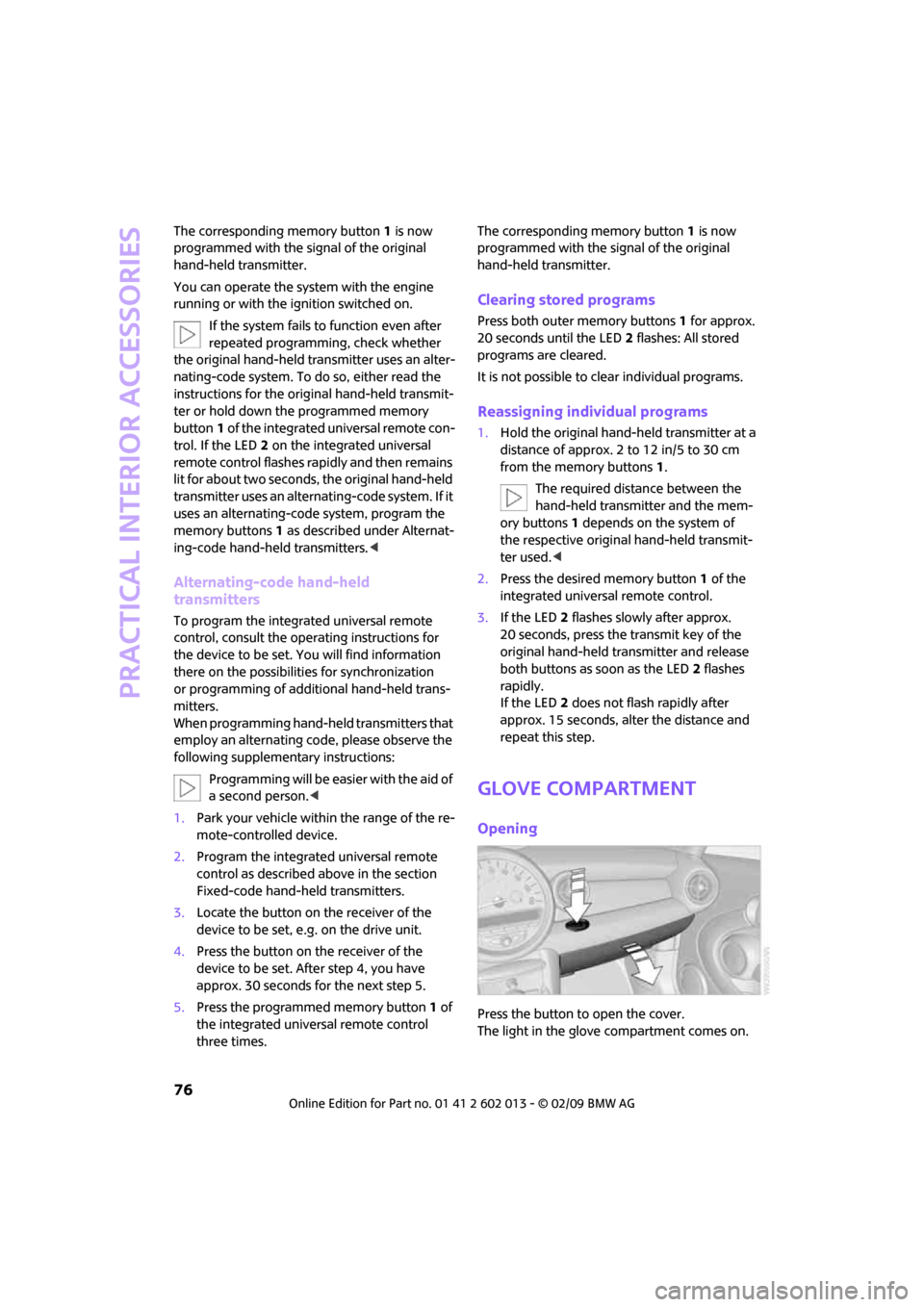
Opening
Press the button to open the cover.
The light in the glove compartment comes on.
Page 81 of 158
REFERENCEAT A GLANCE CONTROLS DRIVING TIPS MOBILITY
79
Cup holders and
ashtray*
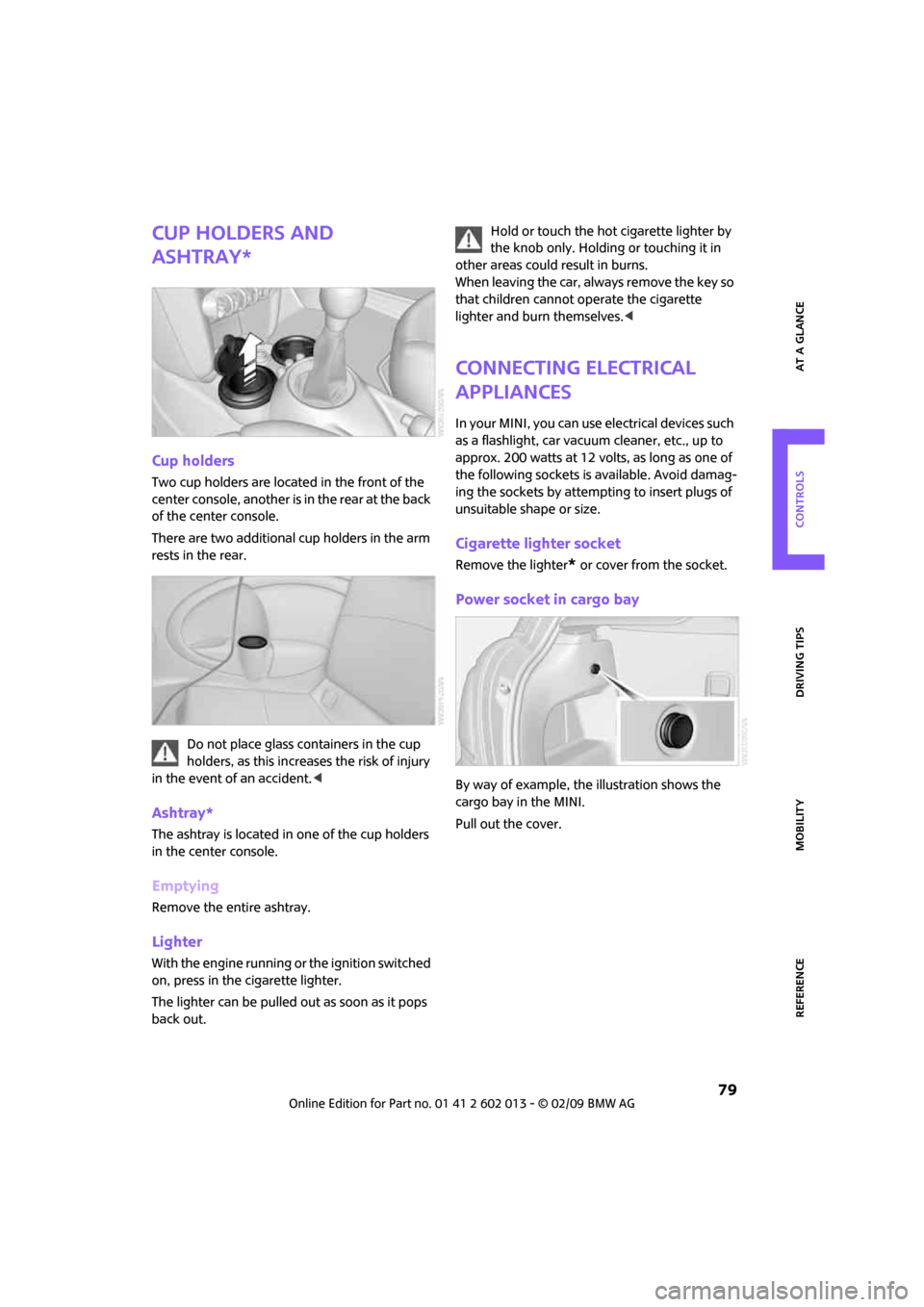
Cup holders
Two cup holders are located in the front of the
center console, another is in the rear at the back
of the center console.
There are two additional cup holders in the arm
rests in the rear.
Do not place glass containers in the cup
holders, as this increases the risk of injury
in the event of an accident.<
Ashtray*
The ashtray is located in one of the cup holders
in the center console.
Emptying
Remove the entire ashtray.
Lighter
With the engine running or the ignition switched
on, press in the cigarette lighter.
The lighter can be pulled out as soon as it pops
back out.Hold or touch the hot cigarette lighter by
the knob only. Holding or touching it in
other areas could result in burns.
When leaving the car, always remove the key so
that children cannot operate the cigarette
lighter and burn themselves.<
Connecting electrical
appliances
In your MINI, you can use electrical devices such
as a flashlight, car vacuum cleaner, etc., up to
approx. 200 watts at 12 volts, as long as one of
the following sockets is available. Avoid damag-
ing the sockets by attempting to insert plugs of
unsuitable shape or size.
Cigarette lighter socket
Remove the lighter* or cover from the socket.
Power socket in cargo bay
By way of example, the illustration shows the
cargo bay in the MINI.
Pull out the cover.
Page 110 of 158
Care
108
Care
Car-care products
Regular cleaning and care helps to maintain the
value of your MINI.
The manufacturer of your MINI recommends
using manufacturer-approved products to clean
and care for your vehicle.
MINI Service would be pleased to advise you
on cleaning and care products and services for
your MINI.
The ingredients of original MINI CareProd-
ucts have been tested, and the products
have been tested in the laboratory and in prac-
tice. They offer optimum care and protection for
your vehicle.<
Do not use any cleansers containing alco-
hol or solvents as these may cause dam-
age.<
Cleaning agents may contain hazardous
or health-damaging substances. Follow
the warning and hazard instructions on the
packaging. For interior cleaning, always open
the doors or windows of the vehicle.
Do not use any products that are not intended
for cleaning the vehicle.<
External care
Washing your vehicle
Especially during the winter months the
vehicle should be frequently washed. Dirt
and road salt can damage the vehicle.<
After washing the vehicle, apply the
brakes briefly to dry them, otherwise
water can reduce braking efficiency over the
short term and the brake rotors can corrode.<
Car washes
Preference should be given to cloth car washes.Do not use automatic high-pressure car
washes, otherwise water may drip into the
vehicle around the windows.<
Before driving into the car wash, check if the sys-
tem is suitable for your MINI. Observe the fol-
lowing points:
>Dimensions of the vehicle, page141
>If necessary: Fold in the outside mirrors,
page32.
>Maximum permissible tire width
Avoid car washes with tracks higher than
4 in/10 cm, otherwise the chassis could be
damaged.<
Preparations for driving into the car wash:
>Unscrew the rod antenna.
>Deactivate the rain sensor
* to prevent unin-
tentional wiping.
>Deactivate the rear window wiper
* and pro-
tect it from damage. Ask the car wash oper-
ator about measures that can be taken to
protect the wipers.
>Remove additional attachments, e.g. spoil-
ers or telephone antennas, if there is a pos-
sibility that they could be damaged.
Automatic transmission
Before driving into the car wash, make sure that
the vehicle can roll:
1.Place the remote control, even with conve-
nient access, in the ignition lock.
2.Move the selector lever to position N.
3.Release the parking brake.
4.Switch off the engine.
5.Insert the remote control in the ignition lock
so that the vehicle can roll.
Steam jets/high-pressure washers
When using steam jets or high-pressure
washers, ensure that you maintain a suffi-
cient distance to the vehicle and do not exceed a
Page 111 of 158
REFERENCEAT A GLANCE CONTROLS DRIVING TIPS MOBILITY
109
maximum temperature of 1407/606.
If the distance is too close, the pressure too high,
or the temperature too high, parts of the vehicle
can be damaged, or water can penetrate.
Observe the operating instructions for high-
pressure washers.<
Do not spray sensors such as Park Dis-
tance Control with high-pressure washers
for a long time or at a distance of less than 1 ft/
30 cm.<
Manual washing
Use a great deal of water and, if necessary, car
shampoo when washing your car by hand. Clean
the vehicle with a sponge or a washing brush
applying a slight amount of pressure.
Before cleaning the windshield, deacti-
vate the rain sensor or turn off the ignition
to prevent unintentional wiping.<
Observe local regulations regarding wash-
ing vehicles by hand.<
Headlamps
Do not wipe dry and do not use abrasive or cor-
rosive cleaning agents. Remove dirt and con-
tamination, such as insects, by soaking with
shampoo and then washing with plenty of
water.
Do not remove accumulated ice and snow with
an ice scraper; use window de-icers instead.
Windows
Clean the outside and inside of the windows and
mirrors with a window cleaner.
Do not clean the mirrors with cleaners
containing quartz.<
Wiper blades
Clean with soapy water and change regularly to
prevent the formation of streaks.
Wax, preservatives and dirt on the win-
dows cause streaks when the windshield
wipers are on, and can cause premature wear
of the wiper blades and interfere with the rain
sensor.<
Paintwork, care
Regular care helps your vehicle retain its value
and protects the paint from the long-term
effects of aggressive substances.
In some regions, environmental factors can
affect the vehicle paintwork and damage it. It is
therefore important to adjust the frequency and
extent of vehicle care correspondingly.
Immediately remove aggressive materials such
as spilled fuel, oil, grease, brake fluid, tree sap
or bird droppings to prevent damage to the
paintwork.
Removing paintwork damage
Depending on the severity of the damage,
immediately repair stone damage or
scratches to prevent rusting.<
The manufacturer of the MINI recommends
repairing paint damage professionally according
to factory specifications with original MINI
paints.
Preservation
Preservation is necessary when water no longer
beads on the clean paint surface. To preserve
the paint, only use preservatives that contain
carnauba or synthetic waxes.
Rubber seals
Only treat with water or rubber care products.
Do not use silicon sprays or other silicon-
containing care products on rubber seals,
otherwise noise and damage could occur.<
Chrome parts*
Carefully clean vehicle parts such as the radiator
grill and door handles with copious quantities of
water and, if necessary, a shampoo additive,
especially when contaminated with road salt.
For additional treatment, use chrome polish.
Light-alloy wheels*
The system produces brake dust that collects on
the light alloy wheels. Clean them regularly with
acid-free wheel cleaner.
Page 126 of 158
Giving and receiving assistance
124
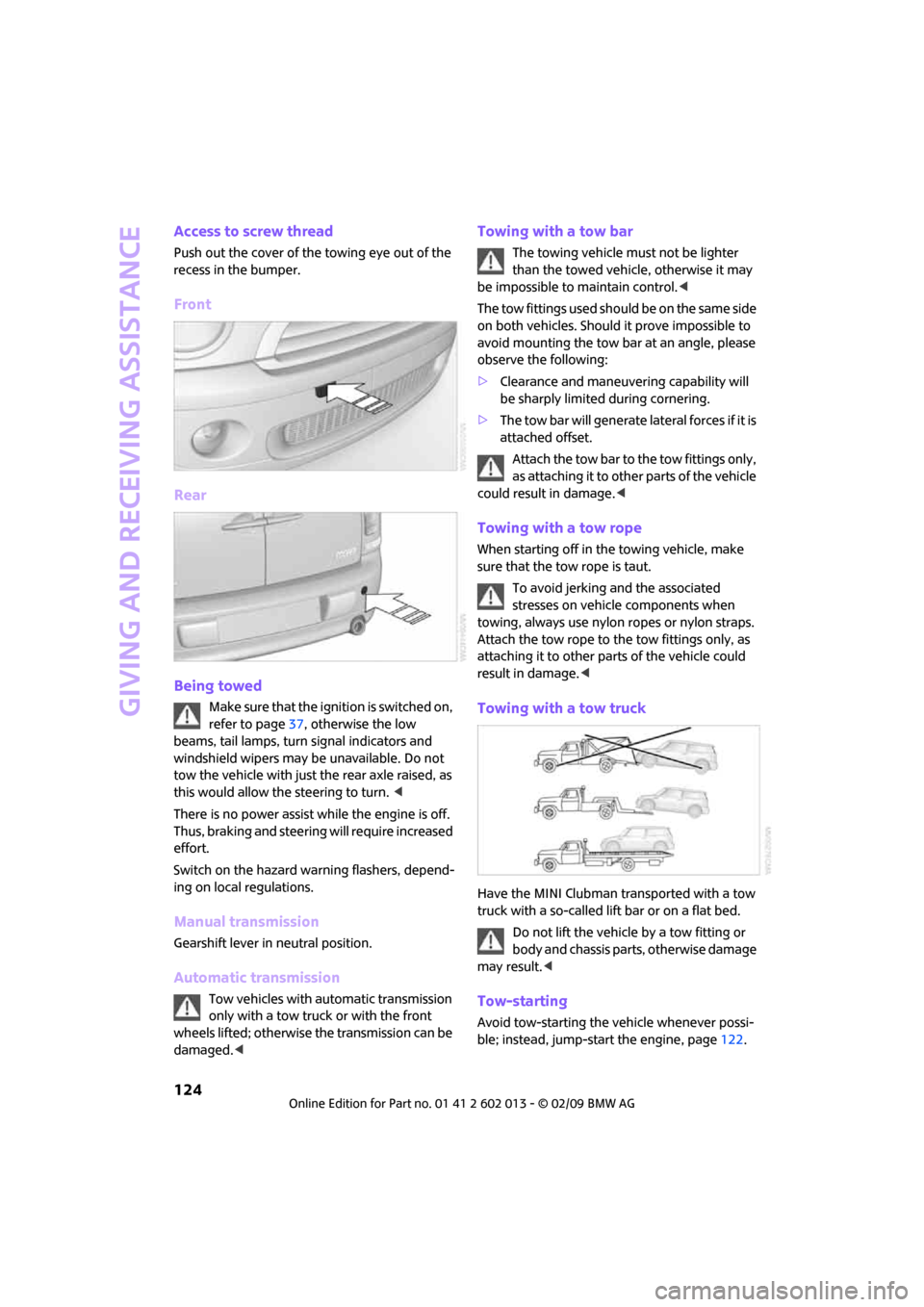
Access to screw thread
Push out the cover of the towing eye out of the
recess in the bumper.
Front
Rear
Being towed
Make sure that the ignition is switched on,
refer to page37, otherwise the low
beams, tail lamps, turn signal indicators and
windshield wipers may be unavailable. Do not
tow the vehicle with just the rear axle raised, as
this would allow the steering to turn. <
There is no power assist while the engine is off.
Thus, braking and steering will require increased
effort.
Switch on the hazard warning flashers, depend-
ing on local regulations.
Manual transmission
Gearshift lever in neutral position.
Automatic transmission
Tow vehicles with automatic transmission
only with a tow truck or with the front
wheels lifted; otherwise the transmission can be
damaged.<
Towing with a tow bar
The towing vehicle must not be lighter
than the towed vehicle, otherwise it may
be impossible to maintain control.<
The tow fittings used should be on the same side
on both vehicles. Should it prove impossible to
avoid mounting the tow bar at an angle, please
observe the following:
>Clearance and maneuvering capability will
be sharply limited during cornering.
>The tow bar will generate lateral forces if it is
attached offset.
Attach the tow bar to the tow fittings only,
as attaching it to other parts of the vehicle
could result in damage.<
Towing with a tow rope
When starting off in the towing vehicle, make
sure that the tow rope is taut.
To avoid jerking and the associated
stresses on vehicle components when
towing, always use nylon ropes or nylon straps.
Attach the tow rope to the tow fittings only, as
attaching it to other parts of the vehicle could
result in damage.<
Towing with a tow truck
Have the MINI Clubman transported with a tow
truck with a so-called lift bar or on a flat bed.
Do not lift the vehicle by a tow fitting or
body and chassis parts, otherwise damage
may result.<
Tow-starting
Avoid tow-starting the vehicle whenever possi-
ble; instead, jump-start the engine, page122.
Page 127 of 158
REFERENCEAT A GLANCE CONTROLS DRIVING TIPS MOBILITY
125
Vehicles with a catalytic converter should only
be tow-started when the engine is cold, vehicles
with an automatic transmission cannot be tow-
started at all.
1.Switch on hazard warning flashers, comply
with local regulations.
2.Switch on the ignition, page37.
3.Shift into 3
rd gear.
4.Have the vehicle tow-started with the clutch
completely depressed and then slowly
release the clutch. After the engine starts,
immediately depress the clutch completely
again.
5.Stop at a suitable location, remove the tow
bar or rope and switch off the hazard warn-
ing flashers.
6.Have the vehicle checked.
Page 129 of 158
REFERENCEAT A GLANCE CONTROLS DRIVING TIPS MOBILITY
127
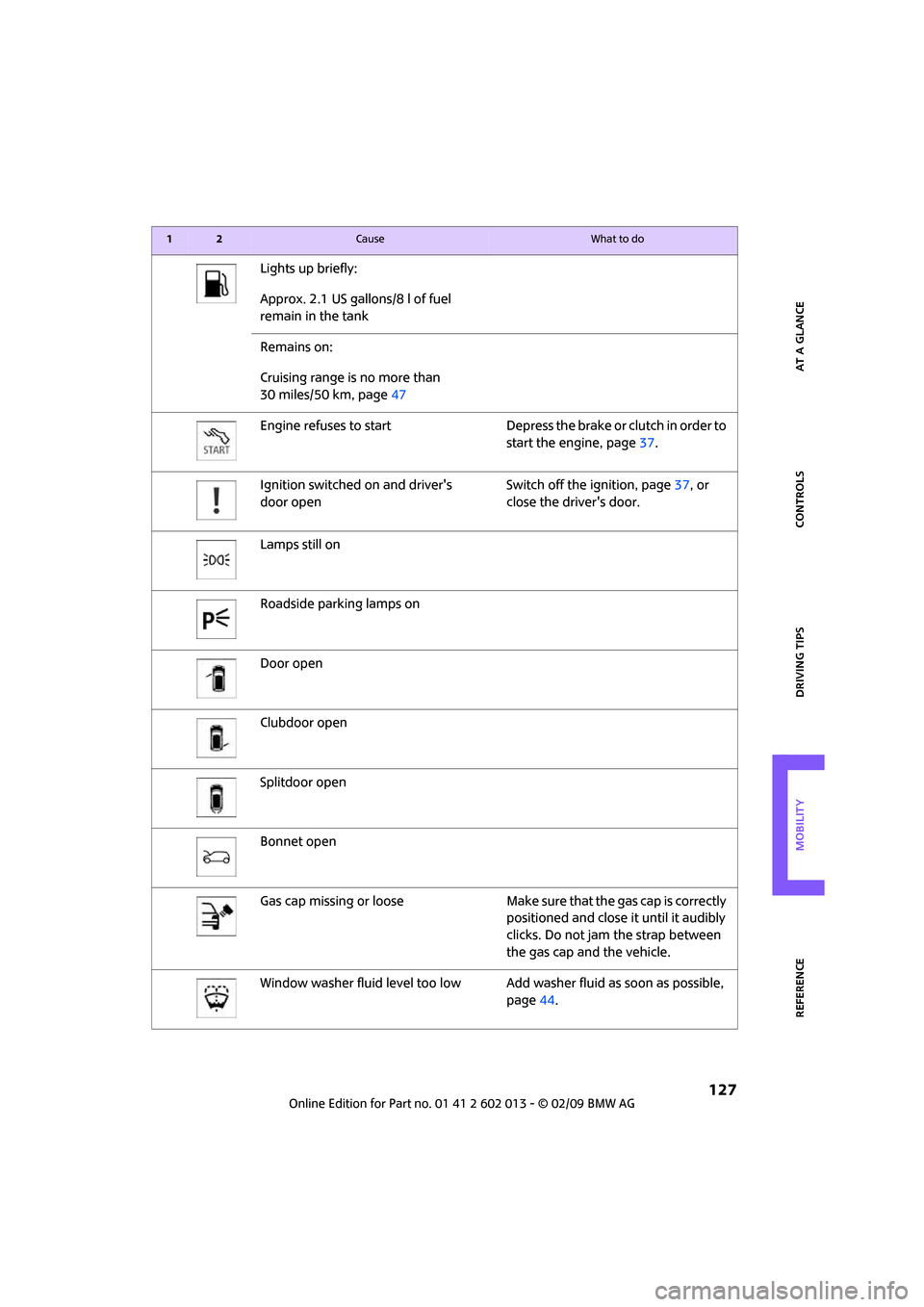
Lights up briefly:
Approx. 2.1 US gallons/8 l of fuel
remain in the tank
Remains on:
Cruising range is no more than
30 miles/50 km, page47
Engine refuses to start Depress the brake or clutch in order to
start the engine, page37.
Ignition switched on and driver's
door openSwitch off the ignition, page37, or
close the driver's door.
Lamps still on
Roadside parking lamps on
Door open
Clubdoor open
Splitdoor open
Bonnet open
Gas cap missing or loose Make sure that the gas cap is correctly
positioned and close it until it audibly
clicks. Do not jam the strap between
the gas cap and the vehicle.
Window washer fluid level too low Add washer fluid as soon as possible,
page44.
12Cause What to do
Page 133 of 158
REFERENCEAT A GLANCE CONTROLS DRIVING TIPS MOBILITY
131
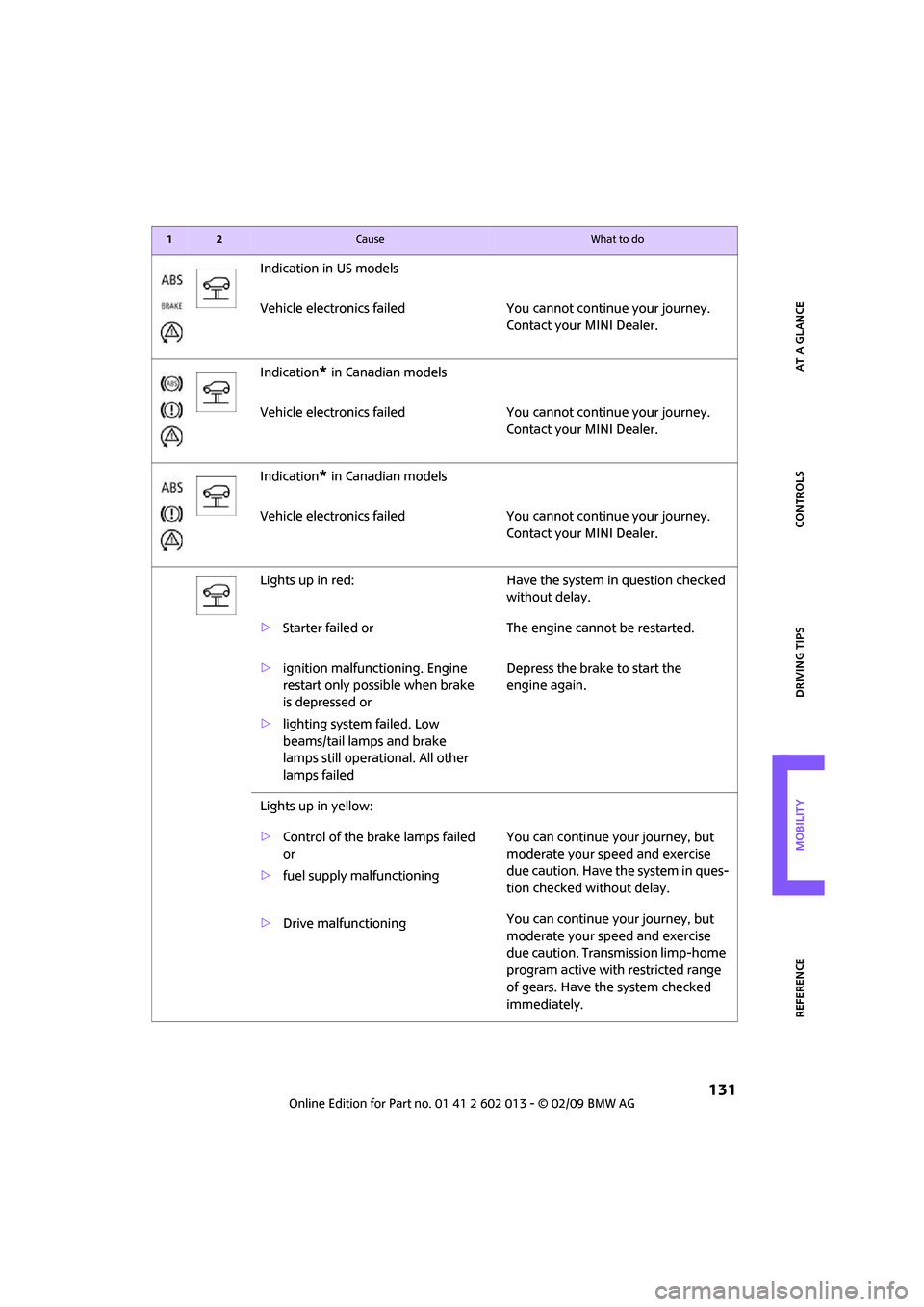
Indication in US models
Vehicle electronics failed You cannot continue your journey.
Contact your MINI Dealer.
Indication
* in Canadian models
Vehicle electronics failed You cannot continue your journey.
Contact your MINI Dealer.
Indication
* in Canadian models
Vehicle electronics failed You cannot continue your journey.
Contact your MINI Dealer.
Lights up in red: Have the system in question checked
without delay.
>Starter failed or The engine cannot be restarted.
>ignition malfunctioning. Engine
restart only possible when brake
is depressed or
>lighting system failed. Low
beams/tail lamps and brake
lamps still operational. All other
lamps failedDepress the brake to start the
engine again.
Lights up in yellow:
>Control of the brake lamps failed
or
>fuel supply malfunctioningYou can continue your journey, but
moderate your speed and exercise
due caution. Have the system in ques-
tion checked without delay.
>Drive malfunctioningYou can continue your journey, but
moderate your speed and exercise
due caution. Transmission limp-home
program active with restricted range
of gears. Have the system checked
immediately.
12Cause What to do
Page 138 of 158
Indicator and warning lamps
136
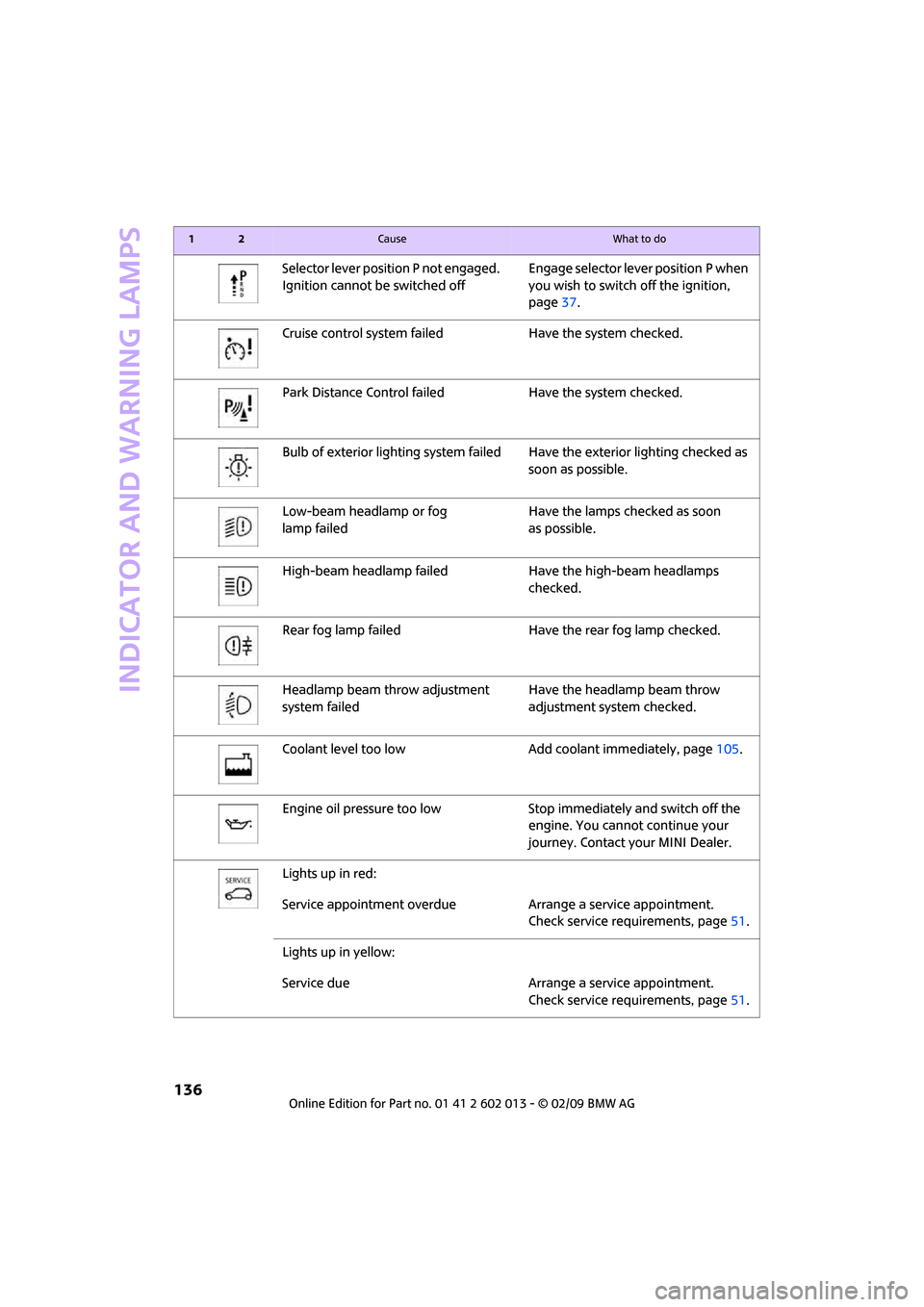
Selector lever position P not engaged.
Ignition cannot be switched offEngage selector lever position P when
you wish to switch off the ignition,
page37.
Cruise control system failed Have the system checked.
Park Distance Control failed Have the system checked.
Bulb of exterior lighting system failedHave the exterior lighting checked as
soon as possible.
Low-beam headlamp or fog
lamp failedHave the lamps checked as soon
as possible.
High-beam headlamp failed Have the high-beam headlamps
checked.
Rear fog lamp failed Have the rear fog lamp checked.
Headlamp beam throw adjustment
system failedHave the headlamp beam throw
adjustment system checked.
Coolant level too low Add coolant immediately, page105.
Engine oil pressure too low Stop immediately and switch off the
engine. You cannot continue your
journey. Contact your MINI Dealer.
Lights up in red:
Service appointment overdue Arrange a service appointment.
Check service requirements, page51.
Lights up in yellow:
Service due Arrange a service appointment.
Check service requirements, page51.
12Cause What to do
Page 147 of 158
REFERENCEAT A GLANCE CONTROLS DRIVING TIPS MOBILITY
145
Bottle holders, refer to Cup
holders79
Brake Assist56
Brake fluid, refer to Service
requirements51
Brake lamps
– replacing bulbs115
Brake pads, breaking in82
Brake rotors83
– brakes82
– breaking in82
Brake system82
– breaking in82
– disc brakes83
– MINI Maintenance
System106
Brakes
– ABS56
– breaking in82
– MINI Maintenance
System106
– parking brake38
– service requirements51
Brakes, refer to Braking
safely83
Breakdown service, refer to
Roadside Assistance122
Break-in period82
Breaking in the clutch82
Bulb changing, refer to Lamps
and bulbs112
Button for starting the
engine37
Buttons on the steering
wheel11
C
California Proposition 65
warning5
Can holders, refer to Cup
holders79
Capacities142
Car battery, refer to Vehicle
battery120
Car care108
Car key, refer to Keys/remote
controls18Car phone
– installation location, refer to
Center armrest77
– refer to separate Owner's
Manual
Car wash, care108
Car washes108
Care108
– car washes108
– car-care products108
– CD/DVD drives111
– external108
– high-pressure washers108
– internal110
– leather110
– manual washing109
– upholstery and fabrics110
– windows109
– wiper blades109
Cargo area
– capacity142
Cargo bay84
– convenient access26
– doors, refer to Splitdoor23
– lamp68
– opening from outside24
– trunk lid, refer to Splitdoor23
Cargo bay doors, refer to
Splitdoor23
Cargo bay, expanding84
Cargo bay lamp68
Cargo bay partition net, refer
to Partition net85
Cargo loading85
– securing cargo86
– stowing cargo86
– vehicle84
Cargo, securing86
Carpets, care110
Catalytic converter, refer to
Hot exhaust system82
Center armrest77
Center brake lamp116
Center console, refer to
Around the center
console14Central locking system19
– convenient access25
– from inside22
– from outside19
Changing bulbs112
Changing wheels118
Chassis number, refer to
Engine compartment103
Check Control53
Child's seats34
Child-restraint fixing system
LATCH35
Child-restraint systems34
Chrome parts, care109
Chrome parts, refer to
Care108
Cigarette lighter79
Cleaning headlamps43
– washer fluid44
Clock46
– 12h/24h mode49
– setting time52
Closing
– from inside22
– from outside19
Clothes hooks78
Clubdoor23
Cockpit10
Cold start, refer to Starting the
engine37
Comfort access
– what to observe before
entering a car wash26
Comfort access, refer to
Convenient access25
Comfort area, refer to Around
the center console14
Compartment for remote
control, refer to Ignition
lock37
Computer47
Condensation, refer to When
the vehicle is parked83
Condition Based Service
CBS106
Configuring settings, refer to
Personal Profile18
Confirmation signals for
vehicle locking/unlocking20