wheel MINI Clubman 2010 Owner's Guide
[x] Cancel search | Manufacturer: MINI, Model Year: 2010, Model line: Clubman, Model: MINI Clubman 2010Pages: 160, PDF Size: 2.58 MB
Page 122 of 160

Replacing components
120
4.Unscrew the dust cap from the valve of the
defective wheel and screw the filling hose 2
of the sealant bottle onto the valve.
5.Ensure that the compressor is switched off.
6.Insert the plug 3 into the lighter socket/
power socket in the vehicle interior,
page81.
7.With the engine running:
Switch on the compressor and let is run for
approx. 3 to 8 minutes to fill the tire with
sealant and achieve a tire inflation pressure
of approx. 26 psi/180 kPa.
When the tire is being filled with seal-
ant, the inflation pressure may spo-
radically reach approx. 73 psi/500 kPa. Do
not switch off the compressor in this
phase.<
Do not run the compressor for longer
than 10 minutes; otherwise, the
device will overheat and possibly be
damaged.<
8.Switch off the compressor.
If an air pressure of 26 psi/180 kPa is not
reached:
1.Unscrew the filling hose 2 from the wheel
and drive the vehicle forward and backward
approx. 33 ft/10 m to distribute the liquid
sealant in the tire evenly.
2.Inflate the tire again with the compressor.
If an inflation pressure of 26 psi/180 kPa
still cannot be reached, the tire is too
heavily damaged. Please contact the nearest
MINI dealer.<
Detach the connection hose 9 and filling hose 2
from the sealant bottle connection and tire
valve.Wrap the empty sealant bottle in suitable mate-
rial to avoid dirtying the cargo bay. Stow the
Mobility System back in the vehicle.
Distributing the sealant
Immediately drive approx. 3 mls/5 km to evenly
distribute the sealant.
Do not exceed speeds of 50 mph/
80 km/h.
If possible, do not drop below 10 mph/
20 km/h.<
Correcting the tire inflation pressure
1.After driving approx. 3 mls/5 km or ten min-
utes, stop at a suitable location.
2.Screw the connection hose 2 of the com-
pressor directly onto the tire valve.
3.Insert the plug 3 into the power socket in the
vehicle interior.
4.Correct the inflation pressure to 26 psi/
180 kPa. With the engine running:
>To increase the inflation pressure: switch on
the compressor. To check the current infla-
tion pressure, switch off the compressor.
Do not run the compressor for longer
than 10 minutes; otherwise, the
device will overheat and possibly be
damaged.<
>To decrease the inflation pressure: press the
release button 5.
If the tire cannot maintain the inflation
pressure, drive the vehicle again, refer to
Distributing the sealant. Then repeat steps
1to4.
If an inflation pressure of 26 psi/180 kPa still
cannot be reached, the tire is too heavily dam-
aged. Contact the nearest MINI dealer.<
Driving on
Do not exceed the permitted maximum
speed of 50 mph/80 km/h; doing so may
result in an accident.<
Replace the defective tire as soon as possible
and have the new wheel/tire assembly bal-
anced.
Have the Mobility System refilled.
Page 123 of 160

REFERENCEAT A GLANCE CONTROLS DRIVING TIPS MOBILITY
121
Changing wheels
Space-saver spare tire*
To change a space-saver spare tire, proceed as
follows:
>Remove the space-saver spare tire,
page121
>Prepare for tire change, page121
>Jack up vehicle, page122
>Mount space-saver spare tire, page122
>Tighten lug bolts, page122
>Drive with space-saver spare tire, page121
Tire change set for a space-saver
spare tire*
In vehicles with the space-saver spare tire, the
tire change set with the onboard vehicle tool kit
is located beneath the floor mat or level load
floor in the cargo bay.
1Folding chock and cover for defective wheel
2Vehicle jack
3Wheel stud wrench
4Hub cover remover
5Flat screwdriver/Phillips screwdriver
6Torx insert bit for screwdriver
7Towing eyelet
The onboard vehicle tool kit includes a pouch
with a plastic bag in which you can place the
damaged wheel.
Removing the space-saver spare tire
The space-saver spare tire is located under the
tire change set in the cargo bay.
1.Fold up the floor mat.
2.Unscrew the nut, arrow, and remove the
space-saver spare tire.
Driving with the space-saver spare tire
Drive cautiously and do not exceed a
speed of 50 mph/80 km/h. Changes may
occur in vehicle handling such as lower track sta-
bility during braking, longer braking distances
and changes in self-steering properties when
close to the handling limit. These properties are
more noticeable with winter tires.<
Only one space-saver spare tire may be
mounted at one time. Mount a wheel and
tire of the original size as soon as possible, to
avoid any safety risks.<
Check the tire inflation pressure at the ear-
liest opportunity and correct it if neces-
sary. Replace the defective tire as soon as possi-
ble and have the new wheel/tire assembly
balanced.<
Preparing for a tire change
Observe the safety precautions regarding
flat tires on page118.<
Additional safety measures when chang-
ing tires:
Only change the tire when parked on a surface
that is level, firm and not slippery.
The vehicle or the jack could slip sideways on
soft or slippery support surfaces, such as snow,
ice, flagstones, etc.
Page 124 of 160
Replacing components
122
Do not use a wooden block or similar object as a
support base for the jack, as this would prevent
it from extending to its full support height and
reduce its load-carrying capacity.
Do not lie under the vehicle or start the engine
when the vehicle is supported by the jack; other-
wise, there is a risk of fatal injury.<
1.Place the foldable chock
* behind the front
wheel on the other side of the vehicle or in
front of the wheel if the vehicle is on an
incline. If the wheel is changed on a surface
with a more severe slope, take additional
precautions to secure the vehicle from
rolling.
2.Uncover the lug bolts if necessary.
If the wheel is equipped with a hub cover,
pry it off using the screwdriver from the tire
change kit.
3.Loosen the lug bolts by a half turn.
Jacking up the vehicle
The vehicle jack is designed for changing
wheels only. Do not attempt to raise
another vehicle model with it or to raise any load
of any kind. To do so could cause accidents and
personal injury.<
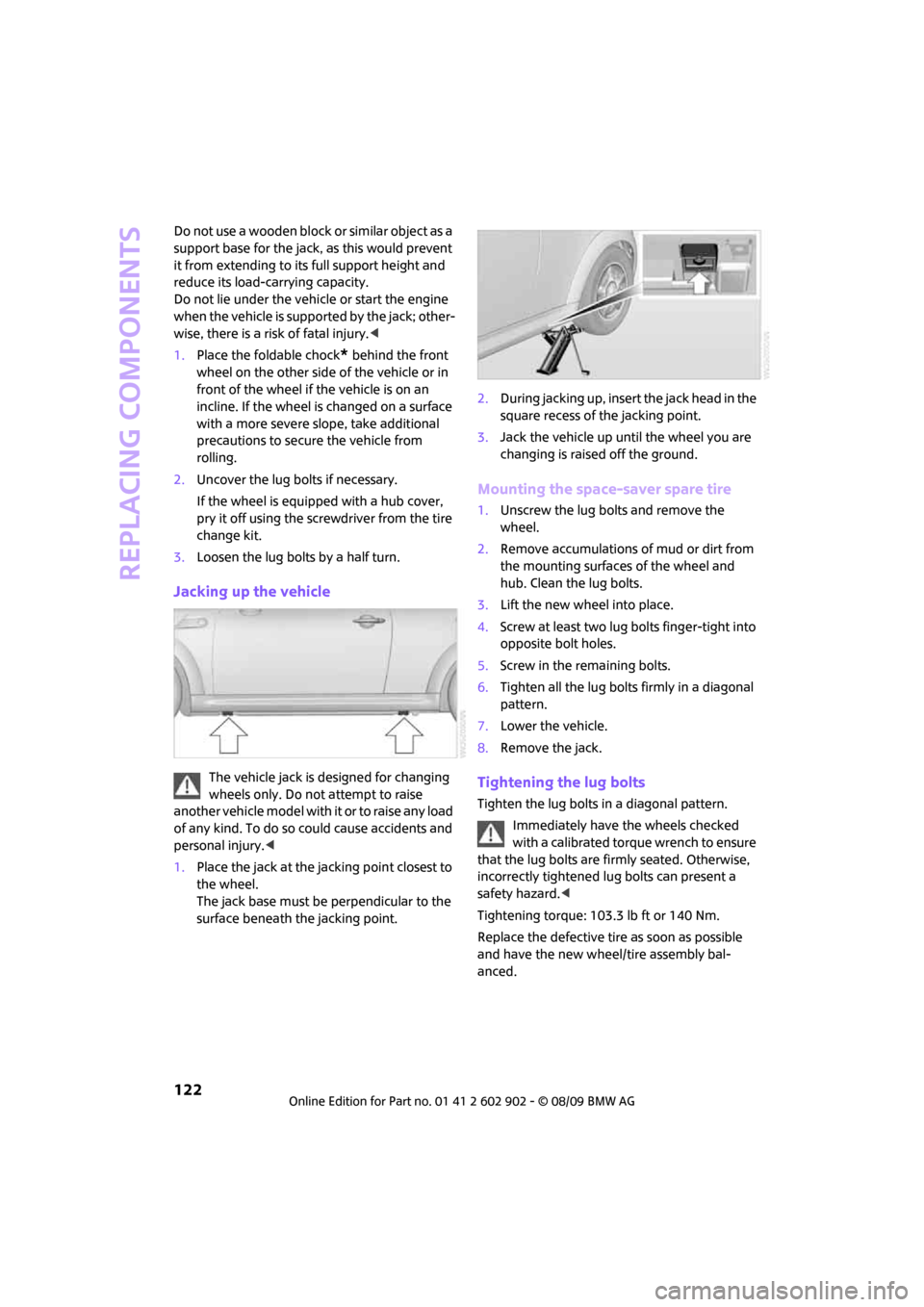
1.Place the jack at the jacking point closest to
the wheel.
The jack base must be perpendicular to the
surface beneath the jacking point.2.During jacking up, insert the jack head in the
square recess of the jacking point.
3.Jack the vehicle up until the wheel you are
changing is raised off the ground.
Mounting the space-saver spare tire
1.Unscrew the lug bolts and remove the
wheel.
2.Remove accumulations of mud or dirt from
the mounting surfaces of the wheel and
hub. Clean the lug bolts.
3.Lift the new wheel into place.
4.Screw at least two lug bolts finger-tight into
opposite bolt holes.
5.Screw in the remaining bolts.
6.Tighten all the lug bolts firmly in a diagonal
pattern.
7.Lower the vehicle.
8.Remove the jack.
Tightening the lug bolts
Tighten the lug bolts in a diagonal pattern.
Immediately have the wheels checked
with a calibrated torque wrench to ensure
that the lug bolts are firmly seated. Otherwise,
incorrectly tightened lug bolts can present a
safety hazard.<
Tightening torque: 103.3 lb ft or 140 Nm.
Replace the defective tire as soon as possible
and have the new wheel/tire assembly bal-
anced.
Page 128 of 160
Giving and receiving assistance
126
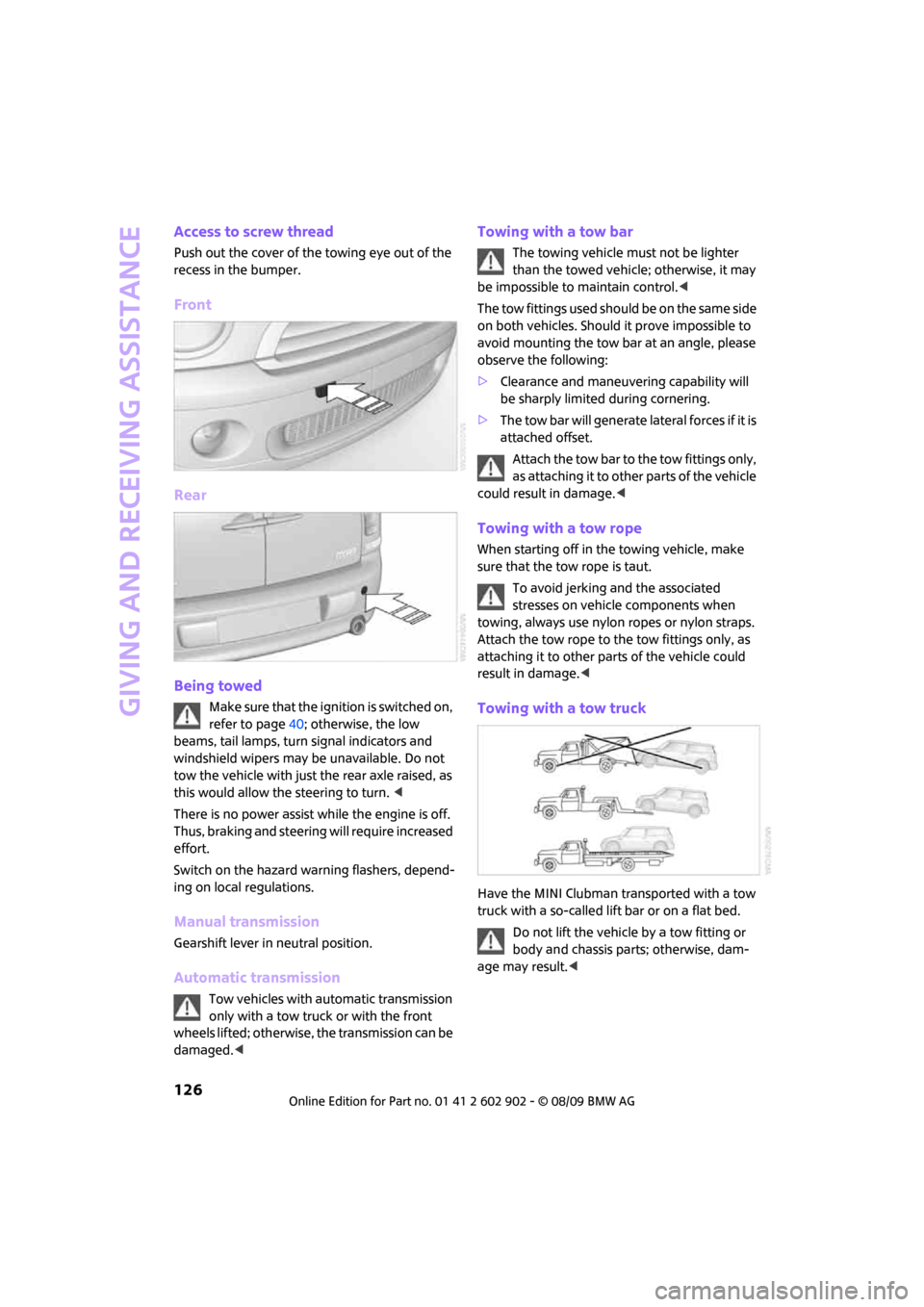
Access to screw thread
Push out the cover of the towing eye out of the
recess in the bumper.
Front
Rear
Being towed
Make sure that the ignition is switched on,
refer to page40; otherwise, the low
beams, tail lamps, turn signal indicators and
windshield wipers may be unavailable. Do not
tow the vehicle with just the rear axle raised, as
this would allow the steering to turn. <
There is no power assist while the engine is off.
Thus, braking and steering will require increased
effort.
Switch on the hazard warning flashers, depend-
ing on local regulations.
Manual transmission
Gearshift lever in neutral position.
Automatic transmission
Tow vehicles with automatic transmission
only with a tow truck or with the front
wheels lifted; otherwise, the transmission can be
damaged.<
Towing with a tow bar
The towing vehicle must not be lighter
than the towed vehicle; otherwise, it may
be impossible to maintain control.<
The tow fittings used should be on the same side
on both vehicles. Should it prove impossible to
avoid mounting the tow bar at an angle, please
observe the following:
>Clearance and maneuvering capability will
be sharply limited during cornering.
>The tow bar will generate lateral forces if it is
attached offset.
Attach the tow bar to the tow fittings only,
as attaching it to other parts of the vehicle
could result in damage.<
Towing with a tow rope
When starting off in the towing vehicle, make
sure that the tow rope is taut.
To avoid jerking and the associated
stresses on vehicle components when
towing, always use nylon ropes or nylon straps.
Attach the tow rope to the tow fittings only, as
attaching it to other parts of the vehicle could
result in damage.<
Towing with a tow truck
Have the MINI Clubman transported with a tow
truck with a so-called lift bar or on a flat bed.
Do not lift the vehicle by a tow fitting or
body and chassis parts; otherwise, dam-
age may result.<
Page 137 of 160
REFERENCEAT A GLANCE CONTROLS DRIVING TIPS MOBILITY
135
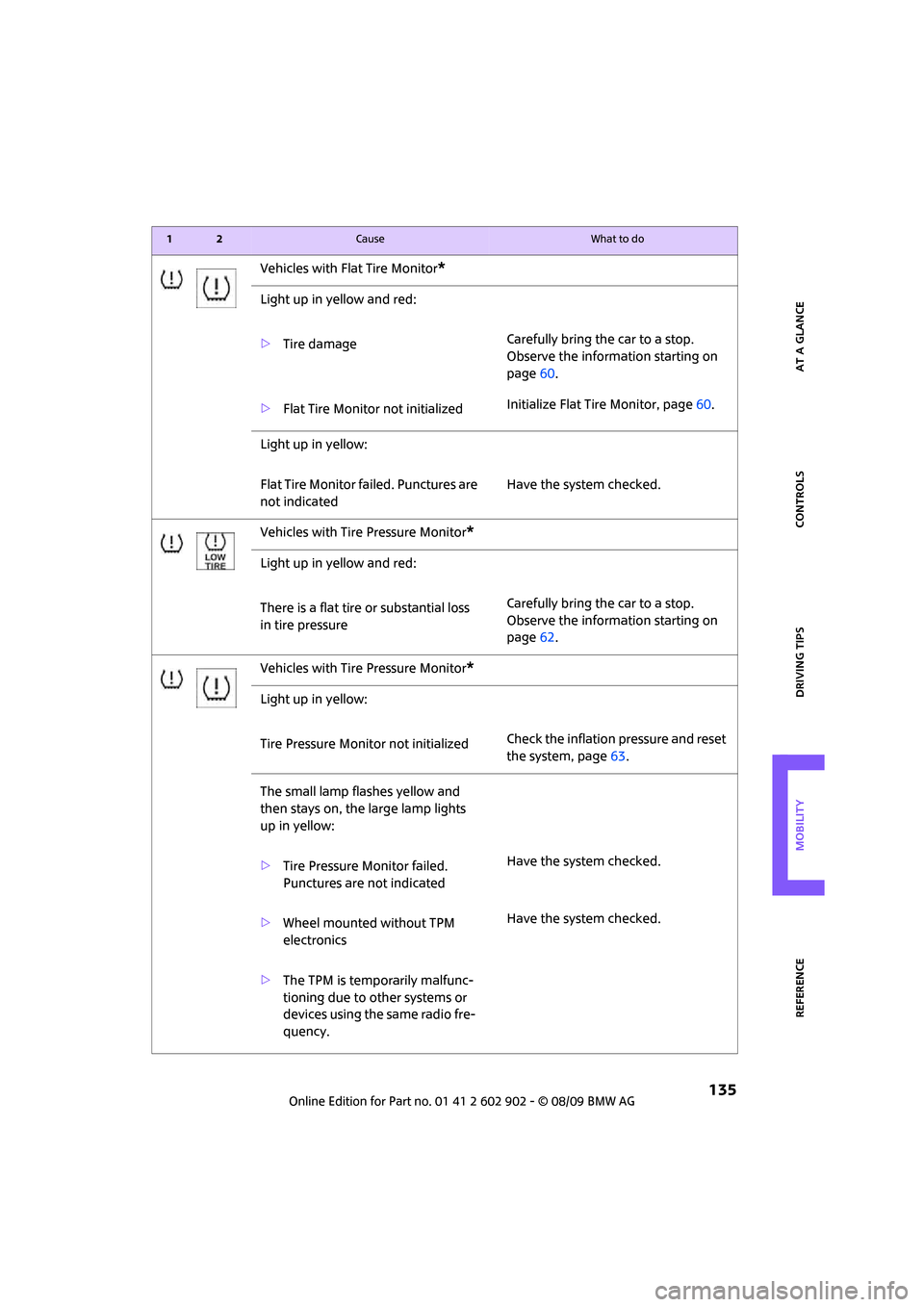
Vehicles with Flat Tire Monitor*
Light up in yellow and red:
>Tire damageCarefully bring the car to a stop.
Observe the information starting on
page60.
>Flat Tire Monitor not initializedInitialize Flat Tire Monitor, page60.
Light up in yellow:
Flat Tire Monitor failed. Punctures are
not indicatedHave the system checked.
Vehicles with Tire Pressure Monitor
*
Light up in yellow and red:
There is a flat tire or substantial loss
in tire pressureCarefully bring the car to a stop.
Observe the information starting on
page62.
Vehicles with Tire Pressure Monitor
*
Light up in yellow:
Tire Pressure Monitor not initializedCheck the inflation pressure and reset
the system, page63.
The small lamp flashes yellow and
then stays on, the large lamp lights
up in yellow:
>Tire Pressure Monitor failed.
Punctures are not indicatedHave the system checked.
>Wheel mounted without TPM
electronicsHave the system checked.
>The TPM is temporarily malfunc-
tioning due to other systems or
devices using the same radio fre-
quency.
12Cause What to do
Page 149 of 160
REFERENCEAT A GLANCE CONTROLS DRIVING TIPS MOBILITY
147
Bottle holders, refer to
Cupholders81
Brake Assist58
Brake fluid, refer to Service
requirements53
Brake lamps
– replacing bulbs117
Brake pads, breaking in84
Brake rotors85
– brakes84
– breaking in84
Brake system84
– breaking in84
– disc brakes85
– MINI Maintenance
System108
Brakes
– ABS58
– breaking in84
– MINI Maintenance
System108
– parking brake41
– service requirements53
Brakes, refer to Braking
safely85
Breakdown service, refer to
Roadside Assistance124
Break-in period84
Breaking in the clutch84
Bulb changing, refer to Lamps
and bulbs114
Button for starting the
engine40
Buttons on the steering
wheel11
C
California Proposition 65
warning5
Can holders, refer to
Cupholders81
Capacities144
Car battery, refer to Vehicle
battery123
Car care110
Car key, refer to Keys/remote
controls20Car phone
– installation location, refer to
Center armrest79
– refer to separate Owner's
Manual
Car wash, care110
Car washes110
Care110
– car washes110
– car-care products110
– CD/DVD drives113
– external110
– high-pressure washers111
– internal112
– leather112
– manual washing111
– upholstery and fabrics112
– windows111
– wiper blades111
Cargo area
– capacity144
Cargo bay86
– Comfort Access28
– doors, refer to Splitdoor25
– lamp70
– opening from outside26
– trunk lid, refer to Splitdoor25
Cargo bay doors, refer to
Splitdoor25
Cargo bay, expanding86
Cargo bay lamp70
Cargo bay partition net, refer
to Partition net87
Cargo loading87
– securing cargo88
– stowing cargo88
– vehicle86
Cargo, securing88
Carpets, care112
Catalytic converter, refer to
Hot exhaust system84
Center armrest79
Center brake lamp118
Center console, refer to
Around the center
console14Central locking system21
– Comfort Access27
– from inside24
– from outside21
Changing bulbs114
Changing wheels121
Chassis number, refer to
Engine compartment106
Check Control55
Child restraint systems37
Child seats37
Child-restraint fixing system
LATCH38
Chrome parts, care111
Chrome parts, refer to
Care110
Cigarette lighter81
Cleaning headlamps46
– washer fluid47
Clock49
– 12h/24h mode52
– setting time55
Closing
– from inside24
– from outside21
Clothes hooks80
Clubdoor25
Cockpit10
Cold start, refer to Starting the
engine41
Comfort Access27
– replacing the battery29
Comfort access
– what to observe before
entering a car wash28
Comfort area, refer to Around
the center console14
Compartment for remote
control, refer to Ignition
lock40
Computer50
Condensation, refer to When
the vehicle is parked85
Condition Based Service
CBS108
Configuring settings, refer to
Personal Profile20
Confirmation signals for
vehicle locking/unlocking22
Page 152 of 160
From A to Z
150
Glove compartment78
Grills, refer to Air vents72
Gross vehicle weight, refer to
Weights144
H
Halogen lamps
– replacing bulb115
Handbrake, refer to Parking
brake41
Hands-free system14
Hazard warning flashers14
Head airbags65
Head restraints33
– sitting safely31
Headlamp control,
automatic67
Headlamp flasher44
– indicator lamp11,128
Headlamps
– replacing bulb115
Headlamps, care111
Heated
– mirrors35
– rear window73,75
– seats34
Heating72
– mirrors35
– rear window73,75
– seats34
Heavy loads, refer to Stowing
cargo88
Height adjustment
– seats32
– steering wheel36
Height, refer to
Dimensions143
High beams69
– headlamp flasher69
– indicator lamp128
– replacing bulb115
High water, refer to Driving
through water85
Hill Assist59
Hills85
Holders for cups81
Homepage4Horn10
Hot exhaust system84
Hydroplaning84
I
Ice warning49
Icy roads, refer to Outside
temperature warning49
Ignition40
– switched off40
– switched on40
Ignition key position 1, refer to
Radio readiness40
Ignition key position 2, refer to
Ignition on40
Ignition key, refer to
Integrated key/remote
control20
Ignition lock40
Imprint2
Indicator and warning
lamps13,128
– Tire Pressure Monitor TPM63
Indicator lighting, refer to
Instrument lighting70
Individual air distribution74
Individual settings, refer to
Personal Profile20
Inflation pressure monitoring,
refer to Tire Pressure Monitor
TPM62
Initializing
– Flat Tire Monitor FTM60
– glass sunroof, electric30
Instrument cluster, refer to
Displays12
Instrument lighting70
Instrument panel, refer to
Cockpit10
Instrument panel, refer to
Displays12
Integrated key20
Integrated universal remote
control77
Interior lamps70
– remote control23Interior rearview mirror35
– automatic dimming
feature35
Interlock42
Intermittent mode of the
wipers45
Internet page4
J
Jacking points122
Jets, refer to Window washer
nozzles47
Jumpering, refer to Jump-
starting124
Jump-starting124
K
Key Memory, refer to Personal
Profile20
Key, refer to Keys/remote
controls20
Keyless go, refer to Comfort
Access27
Keyless opening and closing,
refer to Comfort Access27
Kickdown43
– automatic transmission with
Steptronic43
Knock control95
L
Lamps and bulbs, replacing
bulbs114
Lamps, refer to Parking lamps/
Low beams67
Lashing eyes, refer to Securing
cargo88
LATCH child-restraint fixing
system38
Leather care112
LEDs light-emitting diodes115
Length, refer to
Dimensions143
Level load floor87
License plate lamp
– bulb replacement118
Page 153 of 160
REFERENCEAT A GLANCE CONTROLS DRIVING TIPS MOBILITY
151
Light switch67
Light-alloy wheels, care112
Light-emitting diodes
LEDs115
Lighter81
– socket81
Lighting
– lamps and bulbs114
– of the instruments70
– of vehicle, refer to Lamps67
Limit138
Load87
Load securing equipment,
refer to Securing cargo88
Lock buttons of doors, refer to
Locking24
Locking
– adjusting confirmation
signal22
– from inside24
– from outside22
– without remote control, refer
to Comfort Access27
Locking and unlocking doors
– confirmation signals22
– from inside24
– from outside21
Low beams67
– automatic67
– replacing bulb115
Lower back support, refer to
Lumbar support32
Luggage compartment doors,
refer to Splitdoor25
Luggage compartment
partition net, refer to
Partition net87
Luggage rack, refer to Roof-
mounted luggage rack89
Lumbar support32
M
M+S tires, refer to Winter
tires104
Maintenance, refer to Service
Booklet
Maintenance system108Malfunction warnings, refer to
Check Control55
Manual air distribution74
Manual mode
– automatic transmission with
Steptronic43
Manual operation
– door lock24
– fuel filler flap94
– transmission lock, automatic
transmission44
Manual transmission42
Manual washing111
Master key, refer to Integrated
key/remote control20
Maximum cooling75
Maximum speed
– with winter tires104
Medical assistance, refer to
First aid pouch124
Microfilter
– for air conditioner74
– for automatic climate
control76
– MINI Maintenance
System108
Microfilter/activated-charcoal
filter
– MINI Maintenance
System108
Microphone for telephone14
MINI Internet page4
MINI Maintenance System108
Mirror dimming feature35
Mirrors35
– exterior mirrors35
– heating35
– interior rearview mirror35
Mobile phone
– installation location, refer to
Center armrest79
– refer to separate Owner's
Manual
Mobile phone, installation
location, refer to Center
armrest79
Mobile phone, refer to the
separate Owner's Manual
Mobility System118Modifications, technical, refer
to For your own safety5
Monitoring system for tire
pressures, refer to Flat Tire
Monitor60
Multifunction switch
– refer to Turn signals/
headlamp flasher44
– refer to Wiper system45
Multifunctional steering
wheel, refer to Buttons on
the steering wheel11
N
Neck support, refer to Head
restraints33
Nets, refer to Storage
compartments80
New tires103
Number of cylinders, refer to
Engine data142
Nylon rope, refer to Tow
rope126
O
OBD socket, refer to Socket for
Onboard Diagnosis108
Octane ratings, refer to Fuel
specifications95
Odometer49
Oil consumption106
Oil level106
Oil, refer to Engine oil106
Oil types107
Old batteries, refer to
Disposal123
Onboard vehicle tool kit114
Opening and closing
– Comfort Access27
– from inside24
– from outside21
– using the door lock24
– via the remote control21
Opening and unlocking
– from inside24
Opening/closing the
splitdoor26
Page 154 of 160
From A to Z
152
Outlets
– refer to Ventilation76
Outlets, refer to Air vents72
Output, refer to Engine
data142
Outside temperature
display49
– changing unit of measure52
– on onboard computer52
Outside-air mode
– automatic climate control75
Overheated engine, refer to
Coolant temperature49
P
Paintwork, care111
Park Distance Control PDC57
Parking
– vehicle41
Parking aid, refer to Park
Distance Control PDC57
Parking brake41
Parking lamps, replacing
bulb116
Parking lamps/low beams67
Partition net87
Parts and accessories, refer to
Your individual vehicle4
Pathway lighting67
Personal Profile20
Pinch protection system
– windows30
Plastic parts, care112
Pollen
– refer to Microfilter for air
conditioner74
– refer to Microfilter/activated-
charcoal filter for automatic
climate control76
Power failure123
Power windows30
Power windows, refer to
Windows30
Pressure monitoring of tires,
refer to Tire Pressure Monitor
TPM62
Pressure monitoring, tires60
– Flat Tire Monitor60Pressure, tires96
Protective function, refer to
Pinch protection system
– windows30
Puncture
– Flat Tire Monitor60
R
Radio key, refer to Integrated
key/remote control20
Radio position, refer to Radio
readiness40
Radio readiness40
– switched off40
– switched on40
Rain sensor46
Range, refer to Cruising
range50
Reading lamps70
Rear door, refer to
Clubdoor25
Rear doors, refer to
Splitdoor25
Rear double doors, refer to
Splitdoor25
Rear fog lamp70
– indicator lamp128
– replacing bulb118
Rear lamps
– bulb replacement117
Rear lamps, refer to Tail
lamps117
Rear seat backrest, folding86
Rear seats
– folding the backrests86
Rear window heating73,75
Rearview mirror, refer to
Mirrors35
Recirculated-air mode73,75
Recirculation of air, refer to
Recirculated-air
mode73,75
Reclining seat, refer to
Backrest32
Refueling94Releasing
– bonnet105
Remote control20
– battery renewal29
– Comfort Access27
– garage door opener77
– malfunctions23,28
– service data108
– splitdoor23
Replacement remote
control20
Replacing bulbs, refer to
Lamps and bulbs114
Replacing tires, refer to New
wheels and tires103
Reporting safety defects6
Reserve warning, refer to Fuel
gauge50
Reservoir for washer
systems
47
Restraint systems
– for children37
– refer to Safety belts34
Reverse gear
– automatic transmission with
Steptronic43
– manual transmission42
Roadside Assistance124
Roadside parking lamps69
– replacing bulb116
Roadworthiness test, refer to
Service requirements53
Roof load capacity144
Roof-mounted luggage
rack89
Rope, refer to Tow-starting,
towing away126
RSC Runflat System
Component, refer to Run-flat
tires103
Rubber parts, care111
Runflat System Component
RSC, refer to Run-flat
tires103
Run-flat tires103
– flat tire61
– new tires103
– tire inflation pressure96
– winter tires104
Page 155 of 160
REFERENCEAT A GLANCE CONTROLS DRIVING TIPS MOBILITY
153
Runflat Tyres, refer to Run-flat
tires103
S
Safety belts34
– damage34
– indicator lamp34
– reminder34
– sitting safely31
Safety belts, care112
Safety systems
– airbags65
– Antilock Brake System
ABS58
– Dynamic Stability Control
DSC58
– safety belts34
Safety tires, refer to Run-flat
tires103
Screw thread for tow
fitting126
Seat adjustment
– mechanical32
Seats31
– adjusting the seats32
– heating34
– sitting safely31
Securing the vehicle
– from inside24
– from outside21
Selector lever
– automatic transmission with
Steptronic42
Selector lever lock
– automatic transmission with
Steptronic, refer to
Shiftlock42
– overriding manually44
Selector lever positions
– automatic transmission with
Steptronic42
Service car, refer to Roadside
Assistance124
Service data in the remote
control108Service Interval Display, refer
to Condition Based Service
CBS108
Service, refer to Roadside
Assistance124
Service requirement display,
refer to Condition Based
Service CBS108
Service requirements53
Settings
– clock, 12h/24h mode52
Shifting gears
– automatic transmission with
Steptronic43
– manual transmission42
Shiftlock
– automatic transmission, refer
to Changing selector lever
positions42
Side airbags65
Side door, rear, refer to
Clubdoor25
Side turn signal indicator
– replacing bulb117
Side windows, refer to
Windows30
Signal horn, refer to Horn10
Sitting safely
31
– airbags31
– safety belts31
– with head restraint31
Size, refer to Dimensions143
Sliding/tilt sunroof
– refer to Glass sunroof,
electric29
Slot for remote control40
Smokers' package, refer to
Ashtray81
Snap-in adapter, refer to
Center armrest storage
compartment79
Snow chains104
Socket for Onboard Diagnosis
OBD108
Socket, refer to Connecting
electrical appliances81Space-saver spare tire
– changing tires121
– inflation pressure96
Spare wheel, refer to Space-
saver spare tire121
Special oils, refer to Approved
engine oils107
Speed142
– with winter tires104
Speed control, refer to Cruise
control47
Speedometer12
Split rear seat backrest, refer to
Expanding the cargo bay86
Splitdoor25
– opening from outside26
– unlocking with remote
control23
Sport button60
Stability control, refer to
Driving stability control
systems57
Start/stop button40
– starting the engine41
– switching off the engine41
Starting assistance, refer to
Jump-starting124
Starting, refer to Starting the
engine41
Starting the engine
– start/stop button40
Start-off assistance, refer to
– DSC58
– Hill Assist59
Status of this Owner's Manual
at time of printing4
Steering wheel36
– adjustment36
– buttons on steering wheel11
– lock40
– shift paddles43
Steptronic, refer to Automatic
transmission with
Steptronic
42
Storage area
– cargo bay86