brake fluid MINI Clubman 2010 Owner's Manual
[x] Cancel search | Manufacturer: MINI, Model Year: 2010, Model line: Clubman, Model: MINI Clubman 2010Pages: 160, PDF Size: 2.58 MB
Page 7 of 160
REFERENCEAT A GLANCE CONTROLS DRIVING TIPS MOBILITY
5
For your safety
Maintenance and repair
Advanced technology, e.g. the use of
modern materials and powerful electron-
ics, requires specially adapted maintenance and
repair methods. Therefore, have the necessary
work on your MINI only carried out by a MINI
dealer or a workshop that has specially trained
personnel working in accordance with the spec-
ifications of the MINI manufacturer. If this work
is not carried out properly, there is a danger
of subsequent damage and related safety
hazards.<
Parts and accessories
For your own safety, use genuine parts
and accessories approved by the manu-
facturer of the MINI.
When you purchase accessories tested and
approved by the manufacturer of the MINI and
Original MINI Parts, you simultaneously acquire
the assurance that they have been thoroughly
tested by the manufacturer of the MINI to
ensure optimum performance when installed on
your vehicle.
The manufacturer of the MINI warrants these
parts to be free from defects in material and
workmanship.
The manufacturer of the MINI will not accept any
liability for damage resulting from installation of
parts and accessories not approved by the man-
ufacturer of the MINI.
The manufacturer of the MINI cannot test every
product made by other manufacturers to verify
i f i t c a n b e u s e d o n a M I N I s a f e l y a n d w i t h o u t r i s k
to either the vehicle, its operation, or its occu-
pants.
Original MINI Parts, MINI Accessories and other
products approved by the manufacturer of the
MINI, together with professional advice on using
these items, are available from all MINI dealers.
Installation and operation of accessories that
have not been approved by the manufacturer of
your MINI, such as alarms, radios, amplifiers,
radar detectors, wheels, suspension compo-nents, brake dust shields, telephones, including
operation of any mobile phone from within the
vehicle without using an externally mounted
antenna, or transceiver equipment, for instance,
CBs, walkie-talkies, ham radios or similar acces-
sories, may cause extensive damage to the vehi-
cle, compromise its safety, interfere with the
vehicle's electrical system or affect the validity of
the MINI Limited Warranty. See your MINI dealer
for additional information.<
Maintenance, replacement, or repair of
the emission control devices and systems
may be performed by any automotive repair
establishment or individual using any certified
automotive part.
warning:
Engine exhaust and a wide variety of
automobile components and parts,
including components found in the interior fur-
nishings in a vehicle, contain or emit chemicals
known to the State of California to cause cancer
and birth defects and reproductive harm. In
addition, certain fluids contained in vehicles and
certain products of component wear contain or
emit chemicals known to the State of California
to cause cancer and birth defects or other repro-
ductive harm.
Battery posts, terminals and related accessories
contain lead and lead compounds. Wash your
hands after handling.
Used engine oil contains chemicals that have
caused cancer in laboratory animals. Always
protect your skin by washing thoroughly with
soap and water.<
Page 56 of 160
Controls overview
54
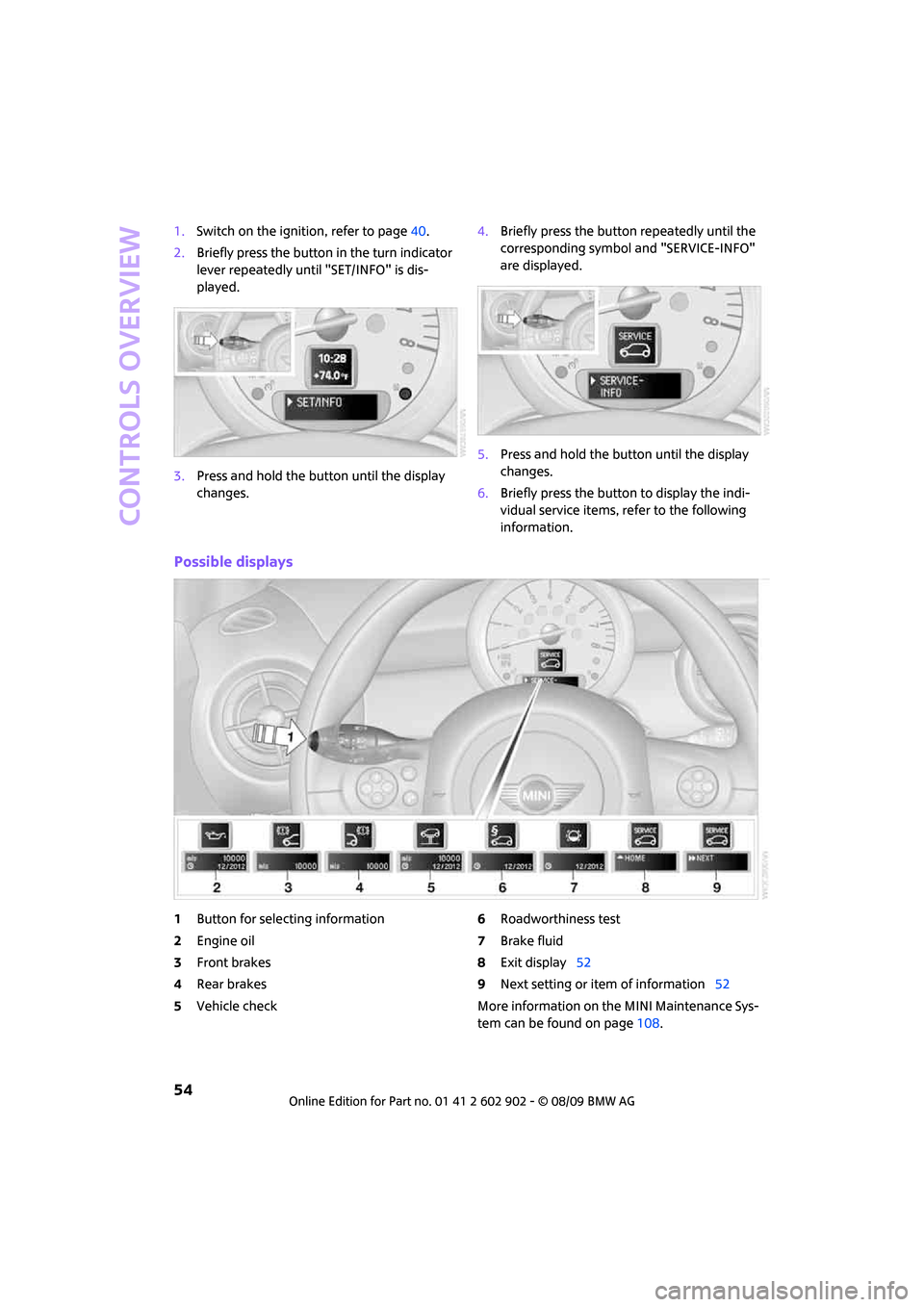
1.Switch on the ignition, refer to page40.
2.Briefly press the button in the turn indicator
lever repeatedly until "SET/INFO" is dis-
played.
3.Press and hold the button until the display
changes.4.Briefly press the button repeatedly until the
corresponding symbol and "SERVICE-INFO"
are displayed.
5.Press and hold the button until the display
changes.
6.Briefly press the button to display the indi-
vidual service items, refer to the following
information.
Possible displays
1Button for selecting information
2Engine oil
3Front brakes
4Rear brakes
5Vehicle check6Roadworthiness test
7Brake fluid
8Exit display52
9Next setting or item of information52
More information on the MINI Maintenance Sys-
tem can be found on page108.
Page 113 of 160
REFERENCEAT A GLANCE CONTROLS DRIVING TIPS MOBILITY
111
Steam jets/high-pressure washers
When using steam jets or high-pressure
washers, ensure that you maintain suffi-
cient clearance to the vehicle and do not exceed
a temperature of 1407/606.
If the distance is too close, the pressure too high,
or the temperature too high, parts of the vehicle
can be damaged, or water can penetrate.
Observe the operating instructions for high-
pressure washers.<
Do not spray sensors such as Park Dis-
tance Control with high-pressure washers
for a long time or at a distance of less than
1 ft/30 cm.<
Manual washing
Use a great deal of water and, if necessary, car
shampoo when washing your car by hand. Clean
the vehicle with a sponge or a washing brush
applying a slight amount of pressure.
Before cleaning the windshield, deacti-
vate the rain sensor or turn off the ignition
to prevent unintentional wiping.<
Observe local regulations regarding wash-
ing vehicles by hand.<
Headlamps
Do not wipe dry and do not use abrasive or cor-
rosive cleaning agents. Remove dirt and con-
tamination, such as insects, by soaking with
shampoo and then washing with plenty of
water.
Do not remove accumulated ice and snow with
an ice scraper; use window deicers instead.
Windows
Clean the outside and inside of the windows and
mirrors with a window cleaner.
Do not clean the mirrors with cleaners
containing quartz.<
Wiper blades
Clean with soapy water and change regularly to
prevent the formation of streaks.
Wax, preservatives and dirt on the win-
dows cause streaks when the windshield wipers are on, and can cause premature wear
of the wiper blades and interfere with the rain
sensor.<
Paintwork, care
Regular care helps your vehicle retain its value
and protects the paint from the long-term
effects of aggressive substances.
In some regions, environmental factors can
affect the vehicle paintwork and damage it. It is
therefore important to adjust the frequency and
extent of vehicle care correspondingly.
Immediately remove aggressive materials such
as spilled fuel, oil, grease, brake fluid, tree sap
or bird droppings to prevent damage to the
paintwork.
Removing paintwork damage
Depending on the severity of the damage,
immediately repair stone damage or
scratches to prevent rusting.<
The manufacturer of the MINI recommends
repairing paint damage professionally according
to factory specifications with original MINI
paints.
Preservation
Preservation is necessary when water no longer
beads on the clean paint surface. To preserve
the paint, only use preservatives that contain
carnauba or synthetic waxes.
Rubber seals
Only treat with water or rubber care products.
Do not use silicon sprays or other silicon-
containing care products on rubber seals;
otherwise, noise and damage could occur.<
Chrome parts*
Carefully clean vehicle parts such as the radiator
grill and door handles with copious quantities of
water and, if necessary, a shampoo additive,
especially when contaminated with road salt.
For additional treatment, use chrome polish.
Page 131 of 160
REFERENCEAT A GLANCE CONTROLS DRIVING TIPS MOBILITY
129
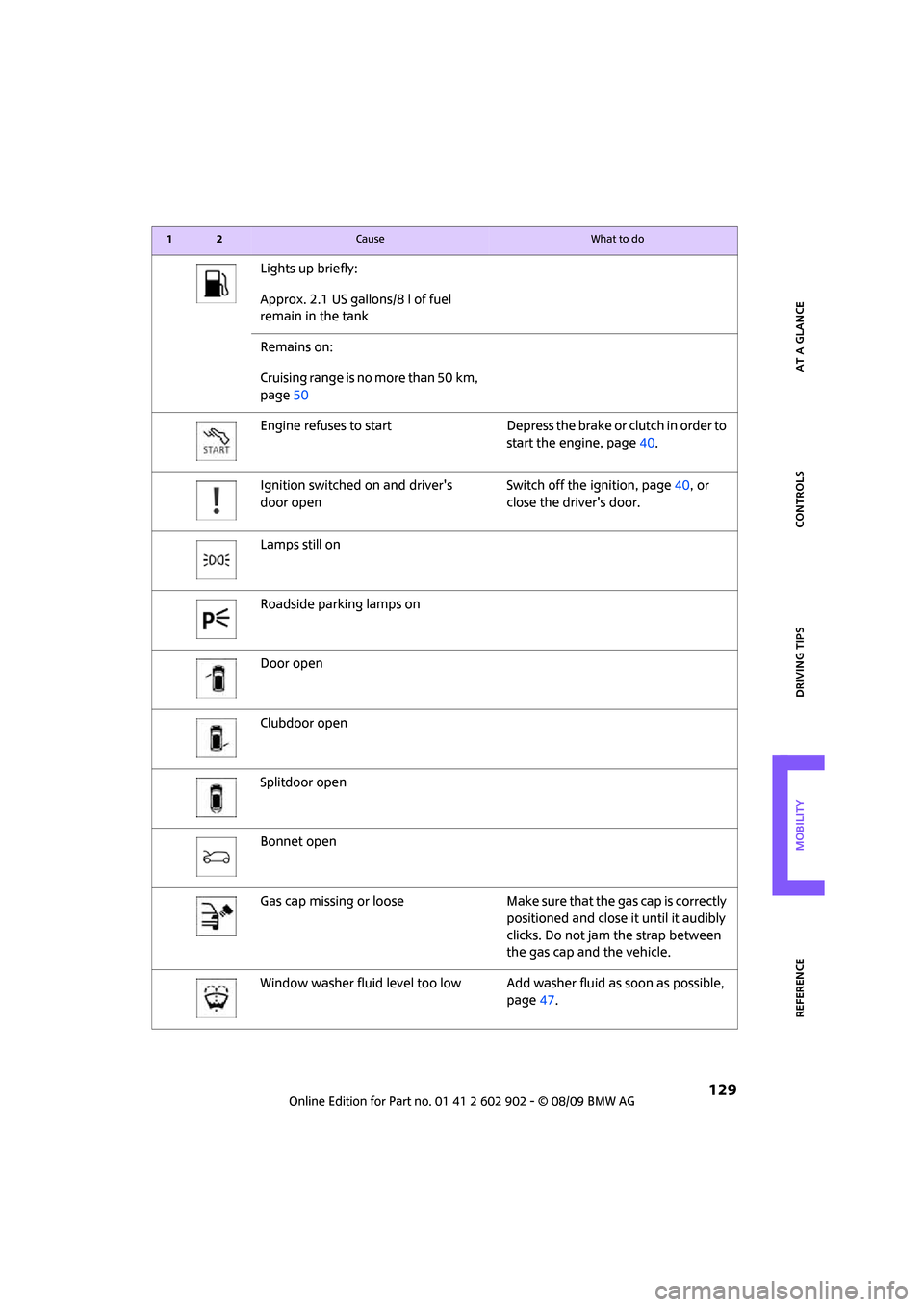
Lights up briefly:
Approx. 2.1 US gallons/8 l of fuel
remain in the tank
Remains on:
Cruising range is no more than 50 km,
page50
Engine refuses to start Depress the brake or clutch in order to
start the engine, page40.
Ignition switched on and driver's
door openSwitch off the ignition, page40, or
close the driver's door.
Lamps still on
Roadside parking lamps on
Door open
Clubdoor open
Splitdoor open
Bonnet open
Gas cap missing or loose Make sure that the gas cap is correctly
positioned and close it until it audibly
clicks. Do not jam the strap between
the gas cap and the vehicle.
Window washer fluid level too low Add washer fluid as soon as possible,
page47.
12Cause What to do
Page 134 of 160
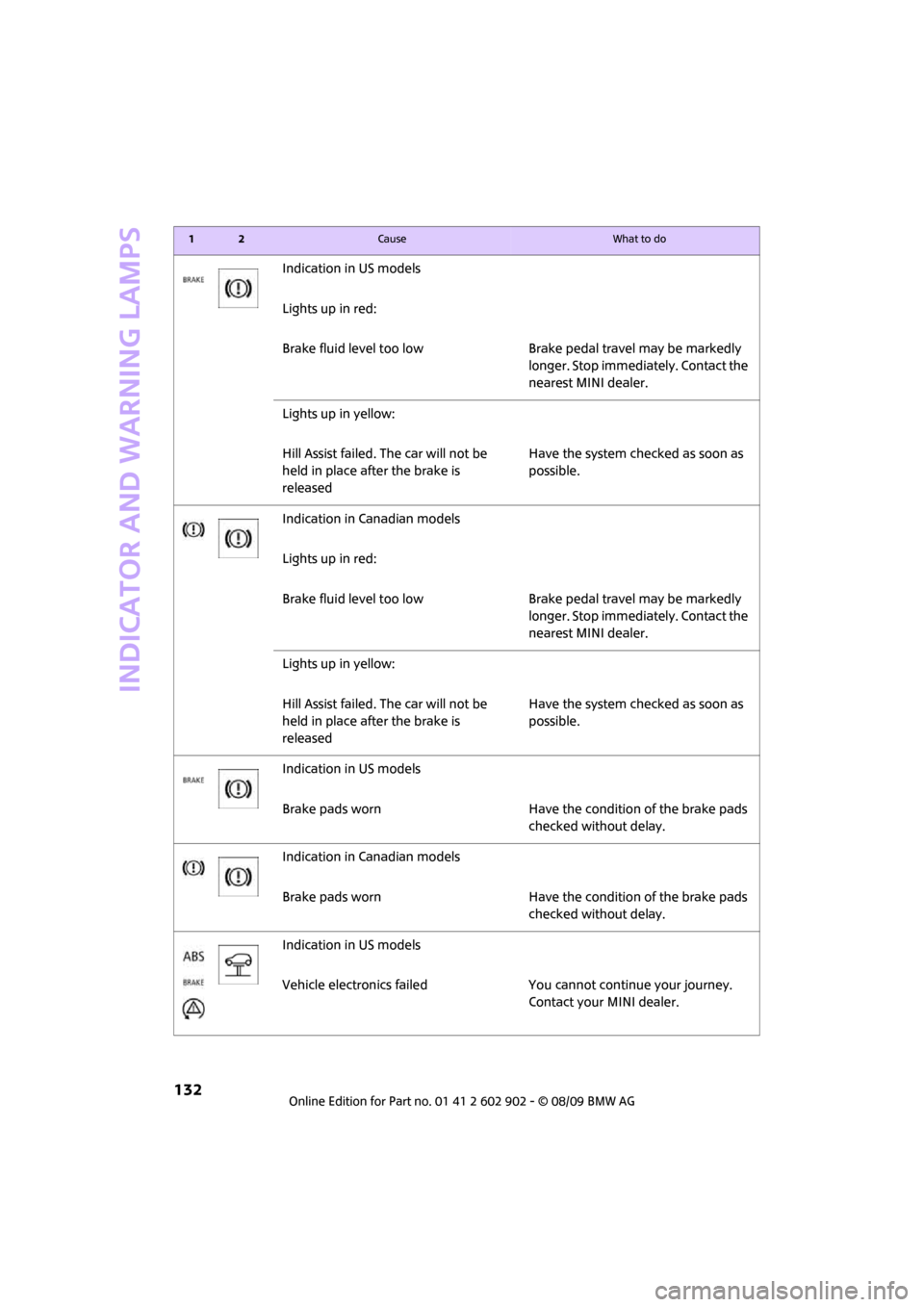
Indicator and warning lamps
132
Indication in US models
Lights up in red:
Brake fluid level too low Brake pedal travel may be markedly
longer. Stop immediately. Contact the
nearest MINI dealer.
Lights up in yellow:
Hill Assist failed. The car will not be
held in place after the brake is
releasedHave the system checked as soon as
possible.
Indication in Canadian models
Lights up in red:
Brake fluid level too low Brake pedal travel may be markedly
longer. Stop immediately. Contact the
nearest MINI dealer.
Lights up in yellow:
Hill Assist failed. The car will not be
held in place after the brake is
releasedHave the system checked as soon as
possible.
Indication in US models
Brake pads worn Have the condition of the brake pads
checked without delay.
Indication in Canadian models
Brake pads worn Have the condition of the brake pads
checked without delay.
Indication in US models
Vehicle electronics failed You cannot continue your journey.
Contact your MINI dealer.
12Cause What to do
Page 148 of 160
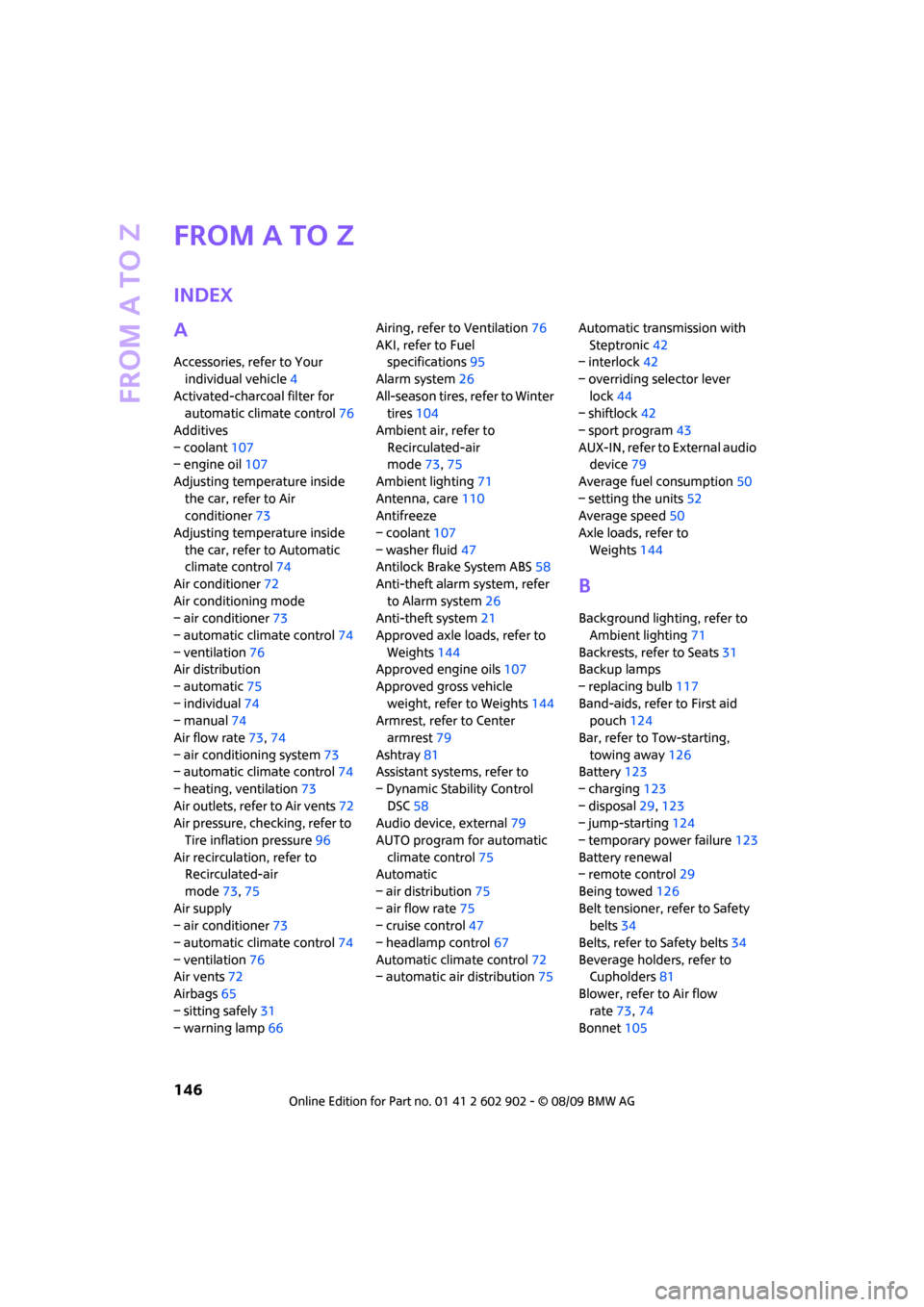
From A to Z
146
From A to Z
INDEX
A
Accessories, refer to Your
individual vehicle4
Activated-charcoal filter for
automatic climate control76
Additives
– coolant107
– engine oil107
Adjusting temperature inside
the car, refer to Air
conditioner73
Adjusting temperature inside
the car, refer to Automatic
climate control74
Air conditioner72
Air conditioning mode
– air conditioner73
– automatic climate control74
– ventilation76
Air distribution
– automatic75
– individual74
– manual74
Air flow rate73,74
– air conditioning system73
– automatic climate control74
– heating, ventilation73
Air outlets, refer to Air vents72
Air pressure, checking, refer to
Tire inflation pressure96
Air recirculation, refer to
Recirculated-air
mode73,75
Air supply
– air conditioner73
– automatic climate control74
– ventilation76
Air vents72
Airbags65
– sitting safely31
– warning lamp66Airing, refer to Ventilation76
AKI, refer to Fuel
specifications95
Alarm system26
All-season tires, refer to Winter
tires104
Ambient air, refer to
Recirculated-air
mode73,75
Ambient lighting71
Antenna, care110
Antifreeze
– coolant107
– washer fluid47
Antilock Brake System ABS58
Anti-theft alarm system, refer
to Alarm system26
Anti-theft system
21
Approved axle loads, refer to
Weights144
Approved engine oils107
Approved gross vehicle
weight, refer to Weights144
Armrest, refer to Center
armrest79
Ashtray81
Assistant systems, refer to
– Dynamic Stability Control
DSC58
Audio device, external79
AUTO program for automatic
climate control75
Automatic
– air distribution75
– air flow rate75
– cruise control47
– headlamp control67
Automatic climate control72
– automatic air distribution75Automatic transmission with
Steptronic42
– interlock42
– overriding selector lever
lock44
– shiftlock42
– sport program43
AUX-IN, refer to External audio
device79
Average fuel consumption50
– setting the units52
Average speed50
Axle loads, refer to
Weights144
B
Background lighting, refer to
Ambient lighting71
Backrests, refer to Seats31
Backup lamps
– replacing bulb117
Band-aids, refer to First aid
pouch124
Bar, refer to Tow-starting,
towing away126
Battery123
– charging123
– disposal29,123
– jump-starting124
– temporary power failure123
Battery renewal
– remote control29
Being towed126
Belt tensioner, refer to Safety
belts34
Belts, refer to Safety belts34
Beverage holders, refer to
Cupholders81
Blower, refer to Air flow
rate73,74
Bonnet105
Page 149 of 160
REFERENCEAT A GLANCE CONTROLS DRIVING TIPS MOBILITY
147
Bottle holders, refer to
Cupholders81
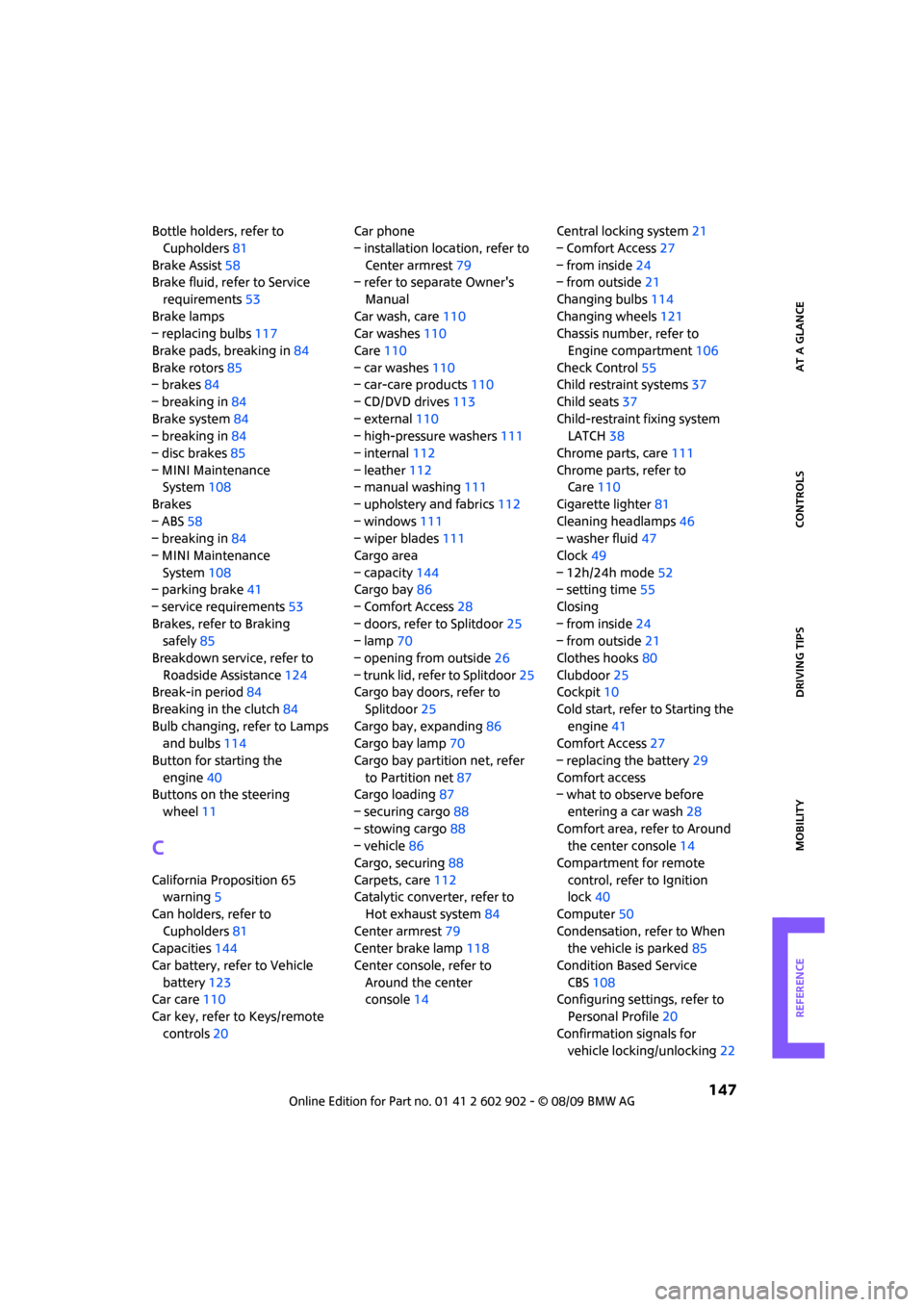
Brake Assist58
Brake fluid, refer to Service
requirements53
Brake lamps
– replacing bulbs117
Brake pads, breaking in84
Brake rotors85
– brakes84
– breaking in84
Brake system84
– breaking in84
– disc brakes85
– MINI Maintenance
System108
Brakes
– ABS58
– breaking in84
– MINI Maintenance
System108
– parking brake41
– service requirements53
Brakes, refer to Braking
safely85
Breakdown service, refer to
Roadside Assistance124
Break-in period84
Breaking in the clutch84
Bulb changing, refer to Lamps
and bulbs114
Button for starting the
engine40
Buttons on the steering
wheel11
C
California Proposition 65
warning5
Can holders, refer to
Cupholders81
Capacities144
Car battery, refer to Vehicle
battery123
Car care110
Car key, refer to Keys/remote
controls20Car phone
– installation location, refer to
Center armrest79
– refer to separate Owner's
Manual
Car wash, care110
Car washes110
Care110
– car washes110
– car-care products110
– CD/DVD drives113
– external110
– high-pressure washers111
– internal112
– leather112
– manual washing111
– upholstery and fabrics112
– windows111
– wiper blades111
Cargo area
– capacity144
Cargo bay86
– Comfort Access28
– doors, refer to Splitdoor25
– lamp70
– opening from outside26
– trunk lid, refer to Splitdoor25
Cargo bay doors, refer to
Splitdoor25
Cargo bay, expanding86
Cargo bay lamp70
Cargo bay partition net, refer
to Partition net87
Cargo loading87
– securing cargo88
– stowing cargo88
– vehicle86
Cargo, securing88
Carpets, care112
Catalytic converter, refer to
Hot exhaust system84
Center armrest79
Center brake lamp118
Center console, refer to
Around the center
console14Central locking system21
– Comfort Access27
– from inside24
– from outside21
Changing bulbs114
Changing wheels121
Chassis number, refer to
Engine compartment106
Check Control55
Child restraint systems37
Child seats37
Child-restraint fixing system
LATCH38
Chrome parts, care111
Chrome parts, refer to
Care110
Cigarette lighter81
Cleaning headlamps46
– washer fluid47
Clock49
– 12h/24h mode52
– setting time55
Closing
– from inside24
– from outside21
Clothes hooks80
Clubdoor25
Cockpit10
Cold start, refer to Starting the
engine41
Comfort Access27
– replacing the battery29
Comfort access
– what to observe before
entering a car wash28
Comfort area, refer to Around
the center console14
Compartment for remote
control, refer to Ignition
lock40
Computer50
Condensation, refer to When
the vehicle is parked85
Condition Based Service
CBS108
Configuring settings, refer to
Personal Profile20
Confirmation signals for
vehicle locking/unlocking22
Page 150 of 160
From A to Z
148
Connecting vacuum cleaner,
refer to Connecting electrical
appliances81
Consumption indicator
– average fuel consumption50
Consumption, refer to Average
fuel consumption50
Control Display
– settings51
Controls and displays10
Convenient access, refer to
Comfort Access27
Convenient operation
– windows22
Convenient start, refer to
Starting the engine41
Coolant107
– checking level107
– filling107
Coolant temperature49
Cooling fluid, refer to
Coolant107
Cooling, maximum75
Copyright2
Cruising range50
Cupholders81
Curb weight, refer to
Weights144
Current fuel consumption50
D
Dashboard instruments, refer
to Displays12
Dashboard lighting, refer to
Instrument lighting70
Dashboard, refer to Cockpit10
Data142
– capacities144
– dimensions143
– engine142
– weights144
Data recorders109
Date
– setting55
Daytime running lights68
DBC Dynamic Brake Control,
refer to Brake Assist58Deactivating front passenger
airbags65
Deadlocking, refer to
Locking22
Defect
– door lock24
– fuel filler flap94
Defogging windows74,75
Defrost position, refer to
Defrosting windows74,75
Defrosting windows74,75
Defrosting windows and
removing condensation
– air conditioner74
– automatic climate control75
Differential, breaking in84
Digital clock49
Dimensions143
Dipstick, engine oil106
Directional indicators, refer to
Turn signals44
Displacement, refer to Engine
data142
Display lighting, refer to
Instrument lighting70
Displays12
– instrument combination12
Displays and controls10
Displays, care113
Disposal
– of coolant107
– remote control battery29
– vehicle battery123
Distance remaining to service,
refer to Service
requirements53
Distance warning, refer to Park
Distance Control PDC57
Diving stability control
systems57
Door
– rear, refer to Clubdoor25
Door key, refer to Integrated
key/remote control
20
Door lock24
Door lock, confirmation
signals22Doors, manual operation24
DOT Quality Grades101
Double doors, refer to
Splitdoor25
Drinks holders, refer to
Cupholders81
Drive-off assistant, refer to Hill
Assist59
Driving dynamics control, refer
to Sport button60
Driving lamps, refer to Parking
lamps/low beams67
Driving notes84
Driving off on inclines, refer to
Hill Assist59
Driving through water85
Driving tips, refer to Driving
notes84
Dry air, refer to Cooling
function76
DTC Dynamic Traction Control
DTC59
Dynamic Brake Control DBC,
refer to Brake Assist58
Dynamic Stability Control
DSC58
Dynamic Traction Control59
E
Electrical malfunction
– door lock24
– fuel filler flap94
Electronic brake-force
distribution58
Electronic Stability Program
ESP, refer to Dynamic
Stability Control DSC58
Emergency operation, refer to
Manual operation
– door lock24
– fuel filler flap94
– transmission lock, automatic
transmission44
Emergency services, refer to
Roadside Assistance124