battery MINI Clubman 2011 (Mini Connected) Owner's Guide
[x] Cancel search | Manufacturer: MINI, Model Year: 2011, Model line: Clubman, Model: MINI Clubman 2011Pages: 256, PDF Size: 3.75 MB
Page 221 of 256

Giving and receiving assistanceMOBILITY
219
Giving and receiving assistance
Roadside Assistance
Roadside Assistance is available by phone
24 hours a day in many countries. You can
receive assistance there in the event of an emer-
gency.
First aid pouch*
Some of the articles co ntained in the first aid
pouch have a limited se rvice life. Therefore,
check the expiration dates of the contents regu-
larly and replace any items in good time, if nec-
essary.
The first aid pouch is located on the rear cargo
well by the left side trim panel or under the flat
load floor.
Warning triangle*
In the cargo area under the loading sill. Open the center lock to take it out.
Jump-starting
If the car's own battery is flat, your MINI's engine
can be started by connecting two jumper cables
to another vehicle's battery. You can also use
the same method to help start another vehicle.
Only use jumper cables with fully-insulated
clamp handles.
Do not touch any electrically live parts
w hen the e ngin e is run ning, or a fatal acci-
dent may occur. Carefully adhere to the follow-
ing sequence, both to prevent damage to one or
both vehicles, and to guard against possible per-
sonal injuries. <
Preparation
1.Check whether the battery of the other vehi-
cle has a voltage of 12 volts and approxi-
mately the same capacitance in Ah. This
information can be found on the battery.
2. Switch off the engine of the support vehicle.
3. Switch off any consumers in both vehicles.
There must not be any contact between
the bodies of the two vehicles; otherwise,
there is a danger of shorting. <
Connecting jumper cables
Connect the jumper cables in the correct
o r d e r , s o t h a t n o s parks which could cause
injury occur. <
Page 222 of 256
MOBILITYGiving and receiving assistance
220
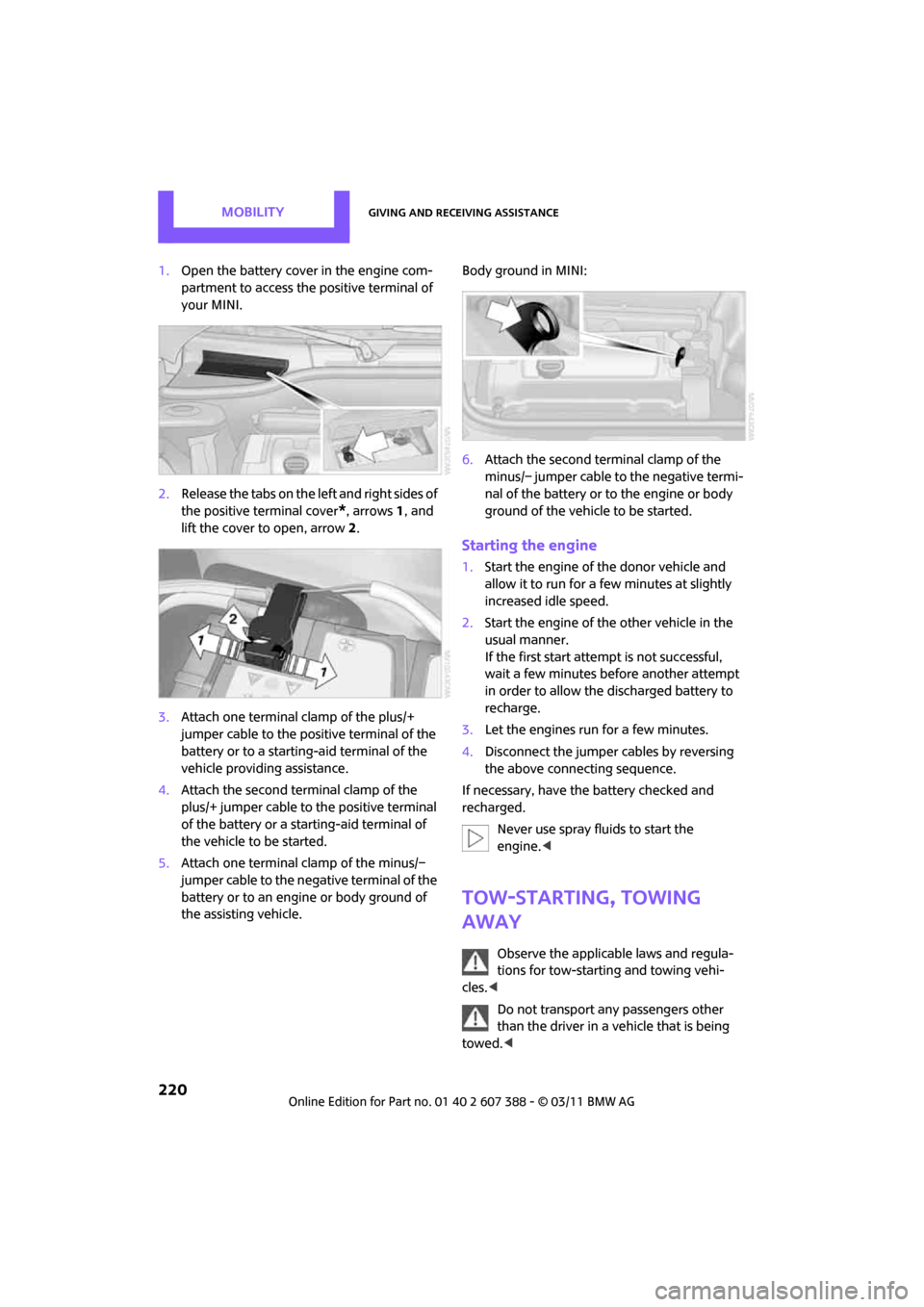
1.Open the battery cover in the engine com-
partment to access the positive terminal of
your MINI.
2. Release the tabs on the left and right sides of
the positive terminal cover
*, arrows 1, and
lift the cover to open, arrow 2.
3. Attach one terminal clamp of the plus/+
jumper cable to the positive terminal of the
battery or to a starting-aid terminal of the
vehicle providing assistance.
4. Attach the second terminal clamp of the
plus/+ jumper cable to the positive terminal
of the battery or a starting-aid terminal of
the vehicle to be started.
5. Attach one terminal clamp of the minus/–
jumper cable to the negative terminal of the
battery or to an engine or body ground of
the assisting vehicle. Body ground in MINI:
6.
Attach the second te rminal clamp of the
minus/– jumper cable to the negative termi-
nal of the battery or to the engine or body
ground of the vehicle to be started.
Starting the engine
1. Start the engine of the donor vehicle and
allow it to run for a few minutes at slightly
increased idle speed.
2. Start the engine of the other vehicle in the
usual manner.
If the first start attempt is not successful,
wait a few minutes before another attempt
in order to allow the discharged battery to
recharge.
3. Let the engines run for a few minutes.
4. Disconnect the jumper cables by reversing
the above connecting sequence.
If necessary, have the battery checked and
recharged. Never use spray fluids to start the
engine. <
Tow-starting, towing
away
Observe the applicable laws and regula-
tions for tow-starting and towing vehi-
cles. <
Do not transport any passengers other
than the driver in a vehicle that is being
towed. <
Page 241 of 256
Everything from A to ZREFERENCE
239
B
Background lighting, refer to
Ambient lighting 84
Backrests, refer to Seats 38
Backup lamps
– replacing bulb 212
Band-aids, refer to First aid pouch 219
Bar, refer to Tow-starting,
towing away 221
Base plate for telephone or mobile phone
– refer to Snap-in adapter 175
Bass sounds, refer to Tone control 131
Battery 217
– charging 217
– disposal 35,217
– jump-starting 219
– temporary power failure 217
Battery renewal
– remote control 35
Being towed 221
Belt tensioner, refer to Safety
belts 40
Belts, refer to Safety belts 40
Beverage holders, refer to
Cupholders 94
Black ice, refer to External
temperature warning 57
Blower, refer to Air flow rate 86,88
Bluetooth, activating/ deactivating 154,165
Bluetooth audio 146
– device pairing 146
– disconnecting an audio connection 148
– playback 147
– unpairing device 148
– What to do if... 148
Bottle holders, refer to Cupholders 94
Brake Assist 69
Brake fluid, refer to Service requirements 60 Brake lamps
– replacing bulbs
212
Brake pads, breaking in 98
Brake rotors 99
– brakes 98
– breaking in 98
Brake system 98
– breaking in 98
– disc brakes 99
– MINI Maintenance
System 202
Brakes
– ABS 69
– b
reaking in 98
– MINI Maintenance System 202
– parking brake 48
– service requirements 60
Brakes, refer to Braking
safely 99
Breakdown service, refer to Roadside Assistance 219
Break-in period 98
Breaking in the clutch 98
Bulb changing, refer to Lamps
and bulbs 209
Button for starting the engine 46
Buttons on the steering wheel 11
C
Calendar 180
– displaying appointment 181
– selecting calendar day 181
California Proposition 65 warning 5
Call
– accepting 157,169
– ending 157,170
– muting the
microphone 158,171
– rejecting 157,169
Calling, refer to Phone
numbers, dialing 157,170 Can holders, refer to
Cupholders 94
Capacities 229
Car battery, refer to Vehicle
battery 217
Car care 204
Car key, refer to Keys/remote
controls 26
Car phone
– installation location, refer to
Center armrest 93
– refer to separate Owner's Manual
Car phone, refer to Telephone 154,164
Car radio, refer to Radio 132
Car wash, care 204
Car washes 204
Care 204
– car washes 204
– car-care products 204
– CD/DVD drives 207
– external 204
– high-pressure washers 205
– internal 206
– leather 206
– manual washing 205
– upholstery and fabrics 206
– windows 205
– wiper blades 205
Cargo area 100
– capacity 228
– Comfort Access 34
– doors, refer to Split Rear Barn Doors 31
– lamp 84
– opening from outside 31
– trunk lid, refer to Split Rear Barn Doors 31
Cargo area doors, refer to Split Re
ar Barn Doors 31
Cargo area, expanding 100
Cargo area lamp 84
Cargo area partition net, refer to Cargo net 101
Page 242 of 256
REFERENCEEverything from A to Z
240
Cargo loading102
– securing cargo 103
– stowing cargo 103
– vehicle 100
Cargo net 101
Cargo, securing 103
Carpets, care 206
Catalytic conver ter, refer to
Hot exhaust system 98
CD, audio playback 140
CD player 140
– controls 130
– fast forward/reverse 141
– random order 141
– selecting a track 140
– switching on/off 130
– tone control 131
– volume 130
Center armrest 93
Center brake lamp 213
Center console, refer to Around the center
console 14
Central locking system 27
– Comfort Access 33
– from inside 30
– from outside 27
Changing bulbs 209
Changing the language on the Control Display 66
Changing the measurement units on the Control
Display 60
Changing wheels 215
Chassis number, refer to Engine compartment 199
Check Control 64
Child restraint fixing system LATCH 44
Child restraint systems 43
Child seats 43
Chrome parts, care 206
Chrome parts, refer to Care 204
Cigarette lighter 94
Cleaning headlamps 52
– washer fluid 53 Clock
– 12 h/24 h mode
63
– setting time 63
Closing
– from inside 30
– from outside 27
Clothes hooks 93
Club Door 30
Cockpit 10
Cold start, refer to Starting the
en
gine 47
Comfort Access 33
– replacing the battery 34
– what to observe before entering a car wash 34
Comfort area, refer to Around
the center console 14
Compartment for remote control, refer to Ignition
lock 46
Computer 57
– displays on Control
Display 58
Condensation, refer to When the vehicle is parked 100
Condition Based Service CBS 202
Configuring settings, refer to
Personal Profile 26
Connecting vacuum cleaner,
refer to Connecting electrical
appliances 94
Consumption, refer to Average
fuel consumption 57
Contacts 161,177
– deleting 163,180
– displaying 162
– editing 162
– exporting/importing 180
– new contact 179
Control Display
– settings 59
Control Display, refer to iDrive
– switching on/off 19
Control Display, refer to On-
board computer 16Control stick, refer to On-board
computer 16
Control unit, refer to On-board computer 16
Controls and displays 10
Convenient access, refer to Comfort Access 33
Convenient operation
– windows 28
Convenient star t, refer to
Starting the engine 47
Coolant 200
– checking level 201
– filling 201
Coolant temperature 201
Cooling fluid, refer to
Coolant 200
Cooling, maximum 88
Copyright 2
Cornering light, refer to Adaptive Light Control 82
Criteria for route 118
Cruise control
– in
dicator lamp 13
Cruising range 57
Cupholders 94
Curb weight, refer to Weights 228
Current fuel consumption 57
Current playback
– external devices 145
D
Dashboard instruments, refer
to Displays 12
Dashboard lighting, refer to Instrument lighting 83
Dashboard, refer to Cockpit 10
Data 226
– capacities 229
– dimensions 227
– engine 226
– weights 228
Data memory 203
Page 243 of 256
Everything from A to ZREFERENCE
241
Date
– setting63
– setting format 63
Daytime running lights 82
DBC Dynamic Brake Control, refer to Brake Assist 69
Deactivating front passenger
airbags 79
Deadlocking, refer to Locking 28
Defect
– door lock 29
– fuel filler flap 188
Defining a home address 179
Defogging windows 87,89
Defrost position, refer to
Defrosting windows 87,89
Defrosting windows 87,89
Defrosting windows and
removing condensation
– air conditioner 87
– automatic climate control 89
Defrosting windshield, refer to Defrosting windows 87,89
Destination address
– entering 109,115
Destination for navigation
– entering 109
– entering via map 114
Differential, breaking in 98
Digital radio, refer to HD Radio 133
Dimensions 227
Dipstick, engine oil 199
Direction announcements, refer to Voice
instructions 122
Direction instructions, refer to Voice instructions 122
Directional indicators, refer to Turn signals 51
Directory for navigation, refer
to Address book 111
Displacement, refer to Engine data 226
Display lighting, refer to Instrument lighting 83Display, refer to On-board
computer controls 16
Displaying contact pictures 180
Displaying special destinations 114
Displays 12
– instrument cluster 12
– on the Control Display 16
Displays and controls 10
Displays, care 207
Disp
osal
– of coolant 200
– remote control battery 35
– vehicle battery 217
Distance remaining to service,
refer to Service
requirements 60
Distance warning, refer to Park
Distance Control PDC 68
Door
– rear, refer to Club Door 30
Door key, refer to Integrated key/remote control 26
Door lock 29
Door lock, confirmation signals 28
Doors, manual operation 29
DOT Quality Grades 194
Double doors, refer to Split
Rear Barn Doors 31
Drinks holders, refer to Cupholders 94
Drive-off assistant, refer to Hill
Assist 71
Driving dynamics control, refer
to Sport button 71
Driving lamps, refer to Parking lamps/low beams 81
Driving notes 98
Driving off on inclines, refer to Hill Assist 71
Driving stability control systems 69
Driving through water 99
Driving tips, refer to Driving notes 98 Dry air, refer to Cooling
function 89
DSC Dynamic Stability Control 69
DTC Dynamic Traction Control 70
Dynamic Brake Control DBC,
refer to Brake Assist 69
Dynamic route guidance 125
Dynamic Stability Control
DSC 69
Dynamic Traction Control DTC 70
E
Eject button, refer to Buttons
on the CD player 130
Electrical malfunction
– door lock 29
– fuel filler flap 188
Electronic brake-force
distribution 69
Electronic Stability Program ESP, refer to Dynamic
Stability Control DSC 69
Emergency operation, refer to Manual operation
– door lock 29
– fuel filler flap 188
– transmission lock, automatic transmission 50
Emergency services, refer to
Roadside Assistance 219
Engine
– breaking in 98
– data 226
– overheated, refer to Coolant temperature 201
– speed 226
– starting 47
– starting, Comfort Access 33
– switching off 47
Engine compartment 199
Engine coolant, refer to
Coolant 200
Page 248 of 256
REFERENCEEverything from A to Z
246
P
Paintwork, care205
Park Distance Control PDC 68
Parking
– vehicle 47
Parking aid, refer to Park
Distance Control PDC 68
Parking brake 48
– indicator lamp 13
Parking lamps, replacing bulb 211
Parking lamps/low beams 81
Parts and accessories, refer to Your individual vehicle 4
Pathway lighting 81
Personal Profile 26
Phone numbers
– dialing 157,170
Pinch protection system
– windows 36
Plastic parts, care 206
Pollen
– refer to Microfilter for air conditioner 87
– refer to Microfilter/activated- charcoal filter for automatic
climate control 89
Power failure 217
Power windows 36
Power windows, refer to Windows 35
Pressure monitoring of tires,
refer to Tire Pressure Monitor
TPM 74
Pressure moni toring, tires71
– Flat Tire Monitor 71
Pressure, tires 190
Protective function, refer to
Pinch protection system
– windows 36
Puncture
– Flat Tire Monitor 71
R
Radio
– controls130
– HD Radio 133
– satellite radio 134
– select waveband 132
– storing stations 133
– switching on/off 130
– tone control 131
– volume 130
Radio key, refer to Integrated key/remote control 26
Radio position, refer to Radio readiness 46
Radio readiness 46
– switched off 47
– switched on 46
Rain sensor 52
Random play sequence
– external devices 145
Range, refer to Cruising
range 57
Reading aloud 183
Reading lamps 84
Rear door, re fer to Club
Door 30
Rear doors, refer to Split Rear
Barn Doors 31
Rear double doors, refer to
Split Rear Barn Doors 31
Rear fog lamp 83
– indicator lamp 13
– replacing bulb 212
Rear lamps
– bulb replacement 212
Rear lamps, refer to Tail lamps 212
Rear seat back rest, folding100
Rear seats
– folding down the backrests 100
Rear window defroster 86,88
Rearview mirror, refer to Mirrors 41 Reception
– quality
133
– radio station 133
Recirculated-air mode 86,88
Recirculation of air, refer to Recirculated-air
mode 86,88
Reclining seat , refer to
Backrest 38
Refueling 188
Releasing
– hood 198
Reminders 183
Rem
ote control 26
– battery renewal 34
– Comfort Access 33
– garage door opener 90
– malfunctions 29,34
– service data 202
– Split Rear Barn Doors 28
Replacement remote control 26
Replacing bulbs, refer to Lamps and bulbs 209
Replacing tires, refer to New
wheels and tires 196
Reporting safety defects 6
Reserve warning, refer to Fuel
gauge 56
Reservoir for washer
systems 53
Reset, refer to Resetting tone settings 131
Restraint systems
– for children 43
– refer to Safety belts 40
Reverse
– CD player 141
Reverse gear
– automatic transmission with Steptronic 49
– manual transmission 48
Road map 120
Roadside Assistance 219
Roadside parking lamps 83
– replacing bulb 211
Page 252 of 256
REFERENCEEverything from A to Z
250
Triple turn signal activation 51
Turn signal 51
– front, replacing bulb 211
– indicator lamp 12,13
– rear, replacing bulb 212
– side, replacing bulb 212
Turning circle, refer to
Dimensions 227
Tying down load s, refer to
Cargo loading 103
U
Uniform Tire Quality Grading
UTQR 194
Units
– average fuel consumption 60
– temperature 60
Universal garage-door opener,
refer to Integrated universal
remote control 90
Universal remote control 90
Unlatching, refer to Unlocking 33
Unlocking
– from inside 30
– from outside 27
– liftgate 34
– without remote control, refer to Comfort Access 33
Updating the navigation data 108
Upholstery, care 206
USB audio interface 143
USB interface 92
V
Vehicle
– battery217
– breaking in 98
– cargo loading 100
– dimensions 227
– identification number, refer to Engine compartment 199
– parking 47
– storage 207
– weight 228
Vehicle jack 208
– jacking points 216
Ventilation
– air conditioner 89
Vents, refer to Air vents 85
Vents, refer to Ventilation 89
Voice commands
– overview 21
– short commands 230
– telephone 173
Voice instructions for navigation system 122
– repeating 122
– switching on/off 122
– volume 122
Voice phone book 174
Volume 130
– audio sources 130
– mobile phone 157,169
– voice instructions 122
Volume balance, tone
setting 131
Volume of cargo area 228
W
Warning and indicator
lamps 13
Warning messages, refer to Check Control 64
Warning triangle 219
Washer fluid 53
– capacity of reservoir 53
Washer fluid reservoir 53
Waste tray, refer to Ashtray 94Water on roads, refer to
Driving through water 99
Waterfall lighti ng, refer to
Ambient lighting 84
Waveband for radio 132
Wear indicators in tires, refer to Minimum tread depth 195
Weights 228
Welcome lamps 81
Wheel stud wrench
– space-saver spare tire 208
Wheelbase, refer to Dimensions 227
Wheels and tires 190
Wheels, new 196
Width, refer to
Dimensions 227
Window washer, refer to Washer fluid 53
Window washer reservoir, refer to Washer fluid
– volume, refer to
Capacities 229
Window washer system 51
– washer fluid 53
– washer jets 53
Windows 35
– closing 36
– convenient operation 28
– opening 36
– pinch protection system 36
Windows, indicator on Control Display 16
Windshield
– cleaning 52
– defrosting and removing
condensation 87,89
Windshield wiper blades, changing 208
Windshield wipers, refer to Wiper system 51
Winter tires 197
– setting speed limit 65
– storage 197
Wiper blade replacement 208
Wiper system 51