automatic transmission MINI Clubman 2011 User Guide
[x] Cancel search | Manufacturer: MINI, Model Year: 2011, Model line: Clubman, Model: MINI Clubman 2011Pages: 196, PDF Size: 3.08 MB
Page 93 of 196

Things to remember when drivingDRIVING TIPS
91
Hydroplaning
When driving on wet or slushy roads,
reduce road speed. If you do not, a wedge
of water can form betw een tires and road sur-
face. This situation, known as hydroplaning, can
cause partial or complete loss of tire contact
with the road surface, so that the car cannot be
steered or braked properly. <
The risk of hydroplaning increases with declining
tread depth on the tires, refer also to Tread
depth on page 133.
Driving through water
Drive through water on the road only if it is
not deeper than 1 ft/30 cm, and then only
at walking speed at the most. Otherwise, the
vehicle's engine, the electrical systems and the
transmission may be damaged. <
Parking brake on inclines
On inclines, do not hold the vehicle with
the clutch; use the parking brake. Other-
wise, greater clutch wear will result. <
For information on drivin g off using Hill Assist,
refer to page 63.
Braking safely
Your MINI is equipped with ABS. If you are in a
situation which requires full braking, it is best to
brake using maximum brake pressure. Since the
vehicle maintains steeri ng responsiveness, you
can still avoid possible obstacles with a mini-
mum of steering effort.
The pulsation of the brake pedal, together with
the sound of hydraulic regulation, indicates that
ABS is functioning properly.
Objects in the move ment range of the
pedals
Keep floor mats, carpet, and other objects
out of the movement range of the pedals;
otherwise, they may inhibit the function of the
pedals during driving.
Do not place additional floor mats onto an exist-
ing one or onto other objects. Only use floor mats that
have been approved for
the vehicle and can be appropriately fastened.
Make sure that the floo r mats are securely fas-
tened again after they have been removed, e.g.
for cleaning. <
Driving in wet conditions
When roads are wet or ther e is heavy rain, briefly
exert gentle pressure on the brake pedal every
few miles. Monitor traffic conditions to ensure
that this maneuver does not endanger other
road users. The heat generated in this process
helps dry the pads and rotors to ensure that
Then full braking force will be immediately avail-
able when it is needed.
Hills
To prevent overheatin g and the resulting
reduced efficiency of the brake system,
drive long or steep downhill gradients in the
gear in which the least braking is required. Even
light but consistent brake pressure can lead to
high temperatures, brake wear and possibly
even brake failure. <
You can increase the engine's braking effect by
shifting down, all the way to first gear if neces-
sary. This strategy helps you avoid placing
excessive loads on the brake system. Downshift-
ing in manual mo de of the automatic transmis-
sion, page 45.
Never drive with the clutch held down,
with the transmission in neutral or with
the engine switched off; otherwise, engine brak-
ing action will not be present or there will be no
power assistance to th e brakes or steering.
Never allow floor mats, carpets or any other
objects to protrude into the area around the
pedals; otherwise, pedal function could be
impaired. <
Corrosion on brake rotors
When the vehicle is driven only occasionally,
during extended periods when the vehicle is not
used at all, and in operating conditions where
brake applications are less frequent, there is an
Page 144 of 196

MOBILITYCare
142
Care
Car-care products
Regular cleaning and care helps to maintain the
value of your MINI.
The manufacturer of your MINI recommends
using manufacturer-approved products to clean
and care for your vehicle.
Your MINI dealer would be pleased to advise
you on cleaning and care products and services
for your MINI.The ingredients of original MINI Care Prod-
ucts have been tested, and the products
have been tested in the laboratory and in prac-
tice. They offer optimum care and protection for
your vehicle. <
Do not use any cleansers containing alco-
hol or solvents as these may cause dam-
age. <
Cleaning agents may contain hazardous
or health-damaging substances. Follow
the warning and hazard instructions on the
packaging. For interior cleaning, always open
the doors or windows of the vehicle.
Do not use any products that are not intended
for cleaning the vehicle. <
External care
Washing your vehicle
Especially during the winter months the
vehicle should be frequently washed. Dirt
and road salt can damage the vehicle. <
After washing the vehicle, apply the
brakes briefly to dry them; otherwise,
water can reduce braking efficiency over the
short term and the brake rotors can corrode. <
Car washes
Preference should be given to cloth car washes. Do not use automatic high-pressure car
washes; otherwise, water may drip into
the vehicle around the windows. <
Before driving in to the car wash, check if the sys-
tem is suitable for your MINI. Observe the fol-
lowing points:
> Vehicle dimensions, page 177
> If necessary: fold in the outside mirrors,
page 36
> Maximum permissible tire width
Avoid car washes with tracks higher than
4 in/10 cm; otherwise, the chassis could
be damaged. <
Preparations for driving into the car wash:
> Unscrew the rod antenna.
> Deactivate the rain sensor
* to prevent unin-
tentional wiping.
> Deactivate the rear window wiper
* and pro-
tect it from damage. Ask the car wash oper-
ator about measures that can be taken to
protect the wipers.
> Remove additional atta chments, e.g. spoil-
ers or telephone antennas, if there is a pos-
sibility that they could be damaged.
> Inserting the remote control into the ignition
lock.
Automatic transmission
Before driving into the car wash, make sure that
the vehicle can roll:
1.Place the remote control, even with Comfort
Access, in the ignition lock.
2. Move the selector le ver to position N.
3. Release the parking brake.
4. Switch off the engine.
5. Insert the remote control in the ignition lock
so that the vehicle can roll.
Page 161 of 196

Giving and receiving assistanceMOBILITY
159
Using a tow fitting
The screw-in tow fitting must always be carried
in the car. It can be screwed in at the front or
rear of the MINI.
It is stored in the onboard vehicle toolkit in the
cargo area underneath the cover on the right-
hand side, page 146.
Use only the tow fitting provided with the
vehicle and screw it all the way in. Use the
tow fitting for towing on paved roads only. Avoid
lateral loading of the tow fitting, e.g. do not lift
the vehicle by the tow fitting. Otherwise, the tow
fitting and the vehicle could be damaged. <
Access to screw thread
Push out the cover of the towing eye out of the
recess in the bumper.
Front
Rear
Being towed
M a k e s u r e t h a t t h e i g n i t i o n i s s w i t c h e d o n ,
refer to page41; otherwise, the low
beams, tail lamps, turn signals, and windshield
wipers may be unavailable. Do not tow the vehi- cle with just the rear ax
le raised, as this would
allow the steering to turn. <
There is no power assist while the engine is off.
Thus, braking and steering will require increased
effort.
Switch on the hazard warning flashers, depend-
ing on local regulations.
Manual transmission
Gearshift lever in neutral position.
Automatic transmission
Tow vehicles with automatic transmission
only with a tow truck or with the front
wheels lifted; otherwise, the transmission can be
damaged. <
Towing with a tow bar
The towing vehicle must not be lighter
than the towed vehicle; otherwise, it may
be impossible to maintain control. <
The tow fittings used should be on the same side
on both vehicles. Should it prove impossible to
avoid mounting the tow bar at an angle, please
observe the following:
> Clearance and maneuvering capability will
be sharply limited during cornering.
> The tow bar will generate lateral forces if it is
attached offset.
Only attach the tow bar to the tow fittings,
as attachment to ot her vehicle parts can
lead to damage. <
Towing with a tow rope
When starting off in the towing vehicle, make
sure that the tow rope is taut.
To avoid jerking and the associated
stresses on vehicle components when
towing, always use nylon ropes or nylon straps.
Attach the tow rope to the tow fittings only, as
attaching it to other parts of the vehicle could
result in damage. <
Page 162 of 196

MOBILITYGiving and receiving assistance
160
Towing with a tow truck
Have the MINI Clubman transported with a tow
truck with a so-called lift bar or on a flat bed.Do not lift the vehicle by a tow fitting or
body and chassis parts; otherwise, dam-
age may result. <
Tow-starting
Avoid tow-starting the vehicle whenever possi-
ble; instead, jump-start the engine, page 157.
Vehicles with a catalyti c converter should only
be tow-started when the engine is cold, vehicles
with an automatic transmission cannot be tow-
started at all.
1. Switch on hazard warning flashers, comply
with local regulations.
2. Switch on the ignition, page 41.
3. Shift into 3rd gear.
4. Have the vehicle tow-started with the clutch
completely depressed and then slowly
release the clutch. Afte r the engine starts,
immediately depress the clutch completely
again.
5. Stop at a suitable lo cation, remove the tow
bar or rope and switch off the hazard warn-
ing flashers.
6. Have the vehicle checked.
Page 172 of 196
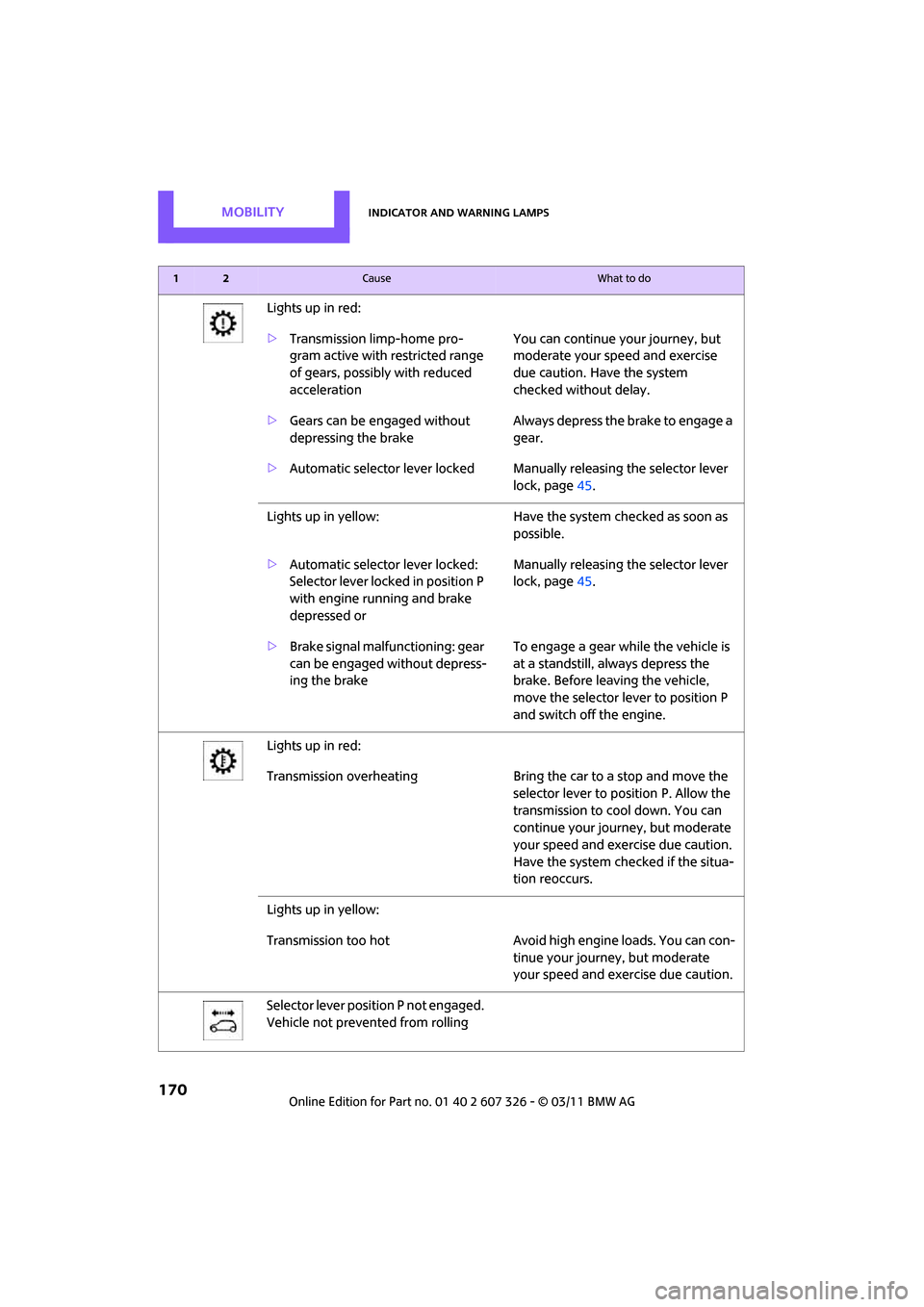
MOBILITYIndicator and warning lamps
170
Lights up in red:
>Transmission limp-home pro-
gram active with restricted range
of gears, possibly with reduced
acceleration You can continue your journey, but
moderate your speed and exercise
due caution. Have the system
checked without delay.
> Gears can be engaged without
depressing the brake Always depress the brake to engage a
gear.
> Automatic selector lever locked Manually releasing the selector lever
lock, page45.
Lights up in yellow: Have the system checked as soon as
possible.
> Automatic selector lever locked:
Selector lever locked in position P
with engine running and brake
depressed or Manually releasing the selector lever
lock, page
45.
> Brake signal malfunctioning: gear
can be engaged without depress-
ing the brake To engage a gear while the vehicle is
at a standstill, always depress the
brake. Before leaving the vehicle,
move the selector lever to position P
and switch off the engine.
Lights up in red:
Transmission overheating Bring the car to a stop and move the
selector lever to po sition P. Allow the
transmission to co ol down. You can
continue your journey, but moderate
your speed and exercise due caution.
Have the system checked if the situa-
tion reoccurs.
Lights up in yellow:
Transmission too hot Avoid high engine loads. You can con-
tinue your journey, but moderate
your speed and exer cise due caution.
Selector lever position P not engaged.
Vehicle not prevented from rolling
12Cause What to do
Page 180 of 196

REFERENCETechnical data
178
Weights
Never exceed either the approved axle loads or the gross vehicle weight.
CooperCooper SJohn Cooper Works
Curb weight, ready for travel, with all optional extras
> Manual transmission lbs./kg 2,7 12/1,230 2,833/1,285 2,833/1,285
> Automatic transmis-
sion lbs./kg 2,789/1,265 2,877/1,305 –
Approved gross weight
> Manual transmission lbs./kg 3,5 49/1,610 3,671/1,665 3,704/1,680
> Automatic transmis-
sion lbs./kg 3,627/1,645 3,726/1,690 –
Approved front axle load
> Manual transmission lbs./k g 1,830/830 1,918/870 1,929/875
> Automatic transmis-
sion lbs./kg 1,907/865 1,962/890
–
Approved rear axle load lb s./kg 1,830/830 1,841/835 1,863/845
Approved roof load
capacity lbs./kg
165/75165/75 165/75
Cargo area capacity cu ft/
liters 9.2 - 32.8/
260 - 930 9.2 - 32.8/
260 - 930 9.2 - 32.8/
260 - 930
Page 182 of 196

180
REFERENCEEverything from A to Z
Everything from A to Z
INDEX
A
ABS Antilock Brake System61
Accessories, refer to Your individual vehicle 4
Acknowledgment signals for
locking/unlocking vehicle 22
Activated-charcoa l filter for
automatic climate control 82
Adaptive Light Control 74
Additives
– coolant 139
– engine oil 138
Adjusting temperature inside the car, refer to Air
conditioner 79
Adjusting temperature inside the car, refer to Automatic
climate control 80
Air conditioner 78
Air conditioning mode
– air conditioner 79
– automatic cl imate control80
– ventilation 82
Air distribution
– automatic 81
– individual 80
– manual 80
Air flow rate 79,81
– air conditioning system 79
– automatic cl imate control81
– heating, ventilation 79
Air outlets, refer to Air vents 78
Air pressure, checking, refer to Tire inflation pressure 128
Air recirculation, refer to Recir-
culated-air mode 79,81
Air supply
– air conditioner 79
– automatic cl imate control80
– ventilation 82 Air vents
78
Airbags 69
– sitting safely 32
– warning lamp 71
Airing, refer to Ventilation82
AKI, refer to Fuel grade 127
Alarm system 27
All-season tires, refer to Winter tires 135
Ambient air, refer to Recircu- lated-air mode 79,81
Ambient lighting 77
Antenna, care 142
Antifreeze
– coolant 139
– washer fluid 49
Anti
lock Brake System ABS 61
Anti-theft alarm system, refer
to Alarm system 27
Anti-theft system 21
Approved axle loads, refer to Weights 178
Approved engine oils 138
Approved gross vehicle weight, refer to Weights 178
Armrest, refer to Center
armrest 85
Ashtray 87
Assistant systems, refer to
– Dynamic Stability Control DSC 61
Audio device, external 85
AUTO program for automatic climate control 81
Auto radio, refer to Radio MINI
Boost CD 100
Automatic
– air distribution 81
– air flow rate 81
– cruise control 49
– headlamp control 72Automatic climate control
78
– automatic air distribution 81
Automatic station search 101
Automatic station storage 102
Automatic transmission with Steptronic 43
– interlock 44
– overriding selector lever lock 45
– shiftlock 44
– sport program 45
AUX In connection 100
AUX-IN, refer to External audio device 85
Average fuel consumption 52
– setting the units 55
Average speed 52
Axle loads, refer to
Weights 178
B
Background lighting, refer to
Ambient lighting 77
Backrests, refer to Seats 33
Backup lamps
– replacing bulb 150
Band-aids, refer to First aid pouch 157
Bar, refer to Tow-starting, towing away 159
Base plate for telephone or
mobile phone
– refer to Snap-in adapter 123
Battery 155
– charging 155
– disposal 30,155
– jump-starting 157
– temporary power failure 155
Battery renewal
– remote control 30
Page 185 of 196

Everything from A to ZREFERENCE
183
Drive-off assistant, refer to Hill
Assist 63
Driving dynamics control, refer to Sport button 63
Driving lamps, refer to Parking lamps/low beams 72
Driving notes 90
Driving off on inclines, refer to Hill Assist 63
Driving stability control
systems 60
Driving through water 91
Driving tips, refer to Driving
notes 90
Dry air, refer to Cooling function 82
DSC Dynamic Stability Control 61
DTC Dynamic Traction
Control 62
Dynamic Brake Control DBC, refer to Brake Assist 61
Dynamic Stability Control DSC 61
Dynamic Traction Control
DTC 62
E
Eject button 106
Electrical malfunction
– door lock 24
– fuel filler flap 126
Electronic brake-force distribution 61
Electronic Stability Program
ESP, refer to Dynamic
Stability Control DSC 61
Emergency operation, refer to
Manual operation
– door lock 24
– fuel filler flap 126
– transmission lock, automatic transmission 45
Emergency services, refer to
Roadside Assistance 157Engine
– breaking in
90
– data 176
– overheated, refer to Coolant
temperature 139
– speed 176
– starting 42
– starting, Comfort Access 28
– switching off 42
Engine compartment 137
Engine coolant, refer to Coolant 139
Engine oil
– adding 138
– additives, refer to Approved engine oils 138
– alternative oil types 138
– approved engine oils 138
– capacity 138
– checking level 137
– dipstick 137
– intervals between changes,
refer to Service
requirements 56
– MINI Maintenance
System 140
Engine oil level, checking 137
Engine output, refer to Engine
data 176
Engine starting, refer to
Starting the engine 42
ESP Electronic Stability Program, refer to Dynamic
Stability Control DSC 61
Exhaust system, refer to Hot exhaust system 90
Exterior mirrors 36
– adjusting 36
– automatic heating 36
– folding in and out 36
External audio device 85,100
External temperature display
– change units of measure 55
– in the on-board computer 55Eyes
– for tow-
starting and towing
away 159
– for tying down loads 95
F
Failure messages, refer to
Check Control 58
Failure of an electrical
consumer 156
Fast forward
– CD 106
Fastening safety be lts, refer to
Safety belts 35
Fault messages, refer to Check
Control 58
Filter
– microfilter for air
conditioner 80
– microfilter/activated- charcoal filter for automatic
climate control 82
Fine wood, care 145
First aid pouch 157
Fixture for remote control, refer to Ignition lock 41
Flash when locking/
unlocking 22
Flat load floor 94
Flat tire
– run-flat tires 134
– Tire Pressure Monitor TPM 65
Flat Tire Monitor FTM 63
– indicating a flat tire 64
– initializing the system 64
– snow chains 64
– system limits 64
Flat tires, refer to Tire
condition 133
Floor mats, care 144
Floor plate, refe r to Flat load
floor 94
Fog lamps
– replacing bulb 149,150
Folding rear seat backrest 92
Page 186 of 196
REFERENCEEverything from A to Z
184
Footbrake, refer to Braking safely 91
Footwell lamps 76
For your own safety 5
Front airbags 69
Front fog lamps 75
– indicator lamp 161
– replacing bulb 149
Front seat adjustment 33
Frost on windows, refer to
Defrosting windows 80,82
FTM, refer to Flat Tire Monitor 63
Fuel 127
– gauge 51
– high-quality brands 127
– quality 127
– specifications 127
– tank volume 179
Fuel clock, refer to Fuel gauge 51
Fuel consumption display
– average fuel consumption 52
Fuel display, refer to Fuel gauge 51
Fuel filler flap 126
– releasing in the event of electrical malfunction 126
Fuses 156
G
Garage door opener, refer to
Integrated universal remote
control 83
Gasoline
– refer to Average fuel consumption 52
Gasoline display, refer to Fuel
gauge 51
Gasoline, refer to Required fuel 127
Gear indicator
– automatic transmission with Steptronic 44 Gear shifting
– automatic transmission
44
– manual transmission 43
Gearshift lever
– automatic transmission with Steptronic 44
– manual transmission 43
General driving notes 90
Glass roof, electric 30
– convenient operation 22,24
– opening, closing 30
– remote control 22
– tilting 30
Glove compartment 85
Grills, refer to Air vents 78
Gross vehicle weight, refer to
Weights 178
H
Halogen lamps
– replacing bulb 148
Handbrake, refe r to Parking
brake 43
Hands-free system 14,120
Hazard warning flashers 14
HD Radio 103
Head airbags 69
Head Light, refer to Adaptive Light Control 74
Head restraints 34
– sitting safely 32
Headlamp control,
automatic 72
Headlamp flasher 46
– indicator lamp 11,161
Headlamp glass lens 147
Headlamps
– replacing bulb 148
Headlamps, care 143
Heated
– mirrors 36
– rear window 79,81
– seats 35 Heating
78
– mirrors 36
– rear window 79,81
– seats 35
Heavy loads, refer to Stowing cargo 95
Height adjustment
– seats 33
– steering wheel 37
Height, refer to
Dimensions 177
High beams 75
– headlamp flasher 75
– indicator lamp 161
– replacing bulb 148
High water, refer to Driving
through water 91
Hill Assist 63
Hills 91
Holders for cups 87
Homepage 4
Hood 136
Horn 10
Hot exhaust system 90
Hydroplaning 91
I
IBOC, refer to HD Radio 103
Ignition 41
– switched off 42
– switched on 41
Ignition key position 1, refer to
Radio readiness 41
Ignition key position 2, refer to Ignition on 41
Ignition key, refer to Integrated key/remote
control 20
Ignition lock 41
Imprint 2
Incoming call 117
Indicator and warning lamps 13,161
– Tire Pressure Monitor TPM 66
Indicator lighting, refer to Instrument lighting 76
Page 187 of 196

Everything from A to ZREFERENCE
185
Individual air distribution80
Individual settings, refer to Personal Profile 20
Inflation pressure monitoring,
refer to Tire Pressure Monitor
TPM 65
Initializing
– Flat Tire Monitor FTM 64
– glass roof, electric 30
Instrument cluster, refer to
Displays 12
Instrument lighting 76
Instrument panel, refer to
Cockpit 10
Instrument panel, refer to Displays 12
Integrated key 20
Integrated universal remote control 83
Interior lamps 76
– remote control 23
Interior rearview mirror 36
– automatic dimming feature 36
Interlock 44
Intermittent mode of the wipers 47
Internet page 4
J
Jacking points 154
Jets, refer to Window washer
nozzles 48
Jumpering, refer to Jump- starting 157
Jump-starting 157
K
Key Memory, refe r to Personal
Profile 20
Key, refer to Keys/remote controls 20
Keyless opening and closing,
refer to Comfort Access 28Keyless-Go, refer to Comfort
Access 28
Keypad dialing 118
Kickdown 44
– automatic transmission with Steptronic 44
Knock control 127
L
Lamps and bulbs, replacing
bulbs 147
Lamps, refer to Parking lamps/
Low beams 72
Lashing eyes, refer to Securing cargo 95
LATCH child restraint fixing system 39
Leather care 144
LEDs light-emitting diodes 147
Length, refer to Dimensions 177
License plate lamp
– bulb replacement 151
Liftgate
– Comfort Access 29
Liftgate, refer to Split Rear Barn Doors 23
Light alloy wheels, care 144
Light switch 72
Light-emitting diodes LEDs 147
Lighter 87
– socket 87
Lighting
– lamps and bulbs 147
– of the instruments 76
– of vehicle, refer to Lamps 72
Limit 172
Listening to test scan
– Radio MINI Boost CD 102
Load 94
Load securing equipment, refer to Secu ring cargo95
Lock buttons of doors, refer to
Locking 25 Locking
– adjusting confirmation
signal 22
– from inside 25
– from outside 22
– without remote control, refer
to Comfort Access 28
Locking and unlocking doors
– confirmation signals 22
– from inside 24
– from outside 21
Longlife oils
– approved motor oils 138
Low beams 72
– automatic 72
– replacing bulb 148
Lower back suppo rt, refer to
Lumbar support 33
Luggage compartment doors,
refer to Split Rear Barn
Doors 26
Luggage compartment
partition net, refer to Cargo
net 93
Luggage rack, re fer to Roof-
mounted luggage rack 95
Lumbar su
pport 33
M
M+S tires, refer to Winter
tires 135
Maintenance, refer to Service
and Warranty Information
Booklet for US models and
Service Guide Booklet for
Canadian models
Maintenance system 140
Malfunction warnings, refer to
Check Control 58
Manual air distribution 80
Manual mode
– automatic transmission with Steptronic 45