brake MINI Clubman 2011 Owner's Guide
[x] Cancel search | Manufacturer: MINI, Model Year: 2011, Model line: Clubman, Model: MINI Clubman 2011Pages: 196, PDF Size: 3.08 MB
Page 163 of 196

Indicator and warning lampsMOBILITY
161
Indicator and warning lamps
Indicator and warning lamps can light up in var-
ious combinations and colors in indicator area 1
or 2. Refer to the table for information on causes
and how to react. Note wh ether a lamp lights up
alone or in combinatio n with another. Some
lamps can light up in different colors. Corre-
sponding distinctions are made in the text.
12Cause What to do
Turn signals
High beams/head lamp flasher
switched on
Fog lamps switched on
Rear fog lamp switched on
Fasten safety belts Fasten your safety belt, refer also to page35.
Indication in US models
Parking brake applied Release the parking brake.
Indication in Canadian models
Parking brake applied Release the parking brake.
External temperature wa rningDrive cautiously, refer also to page 52.
Page 164 of 196
MOBILITYIndicator and warning lamps
162
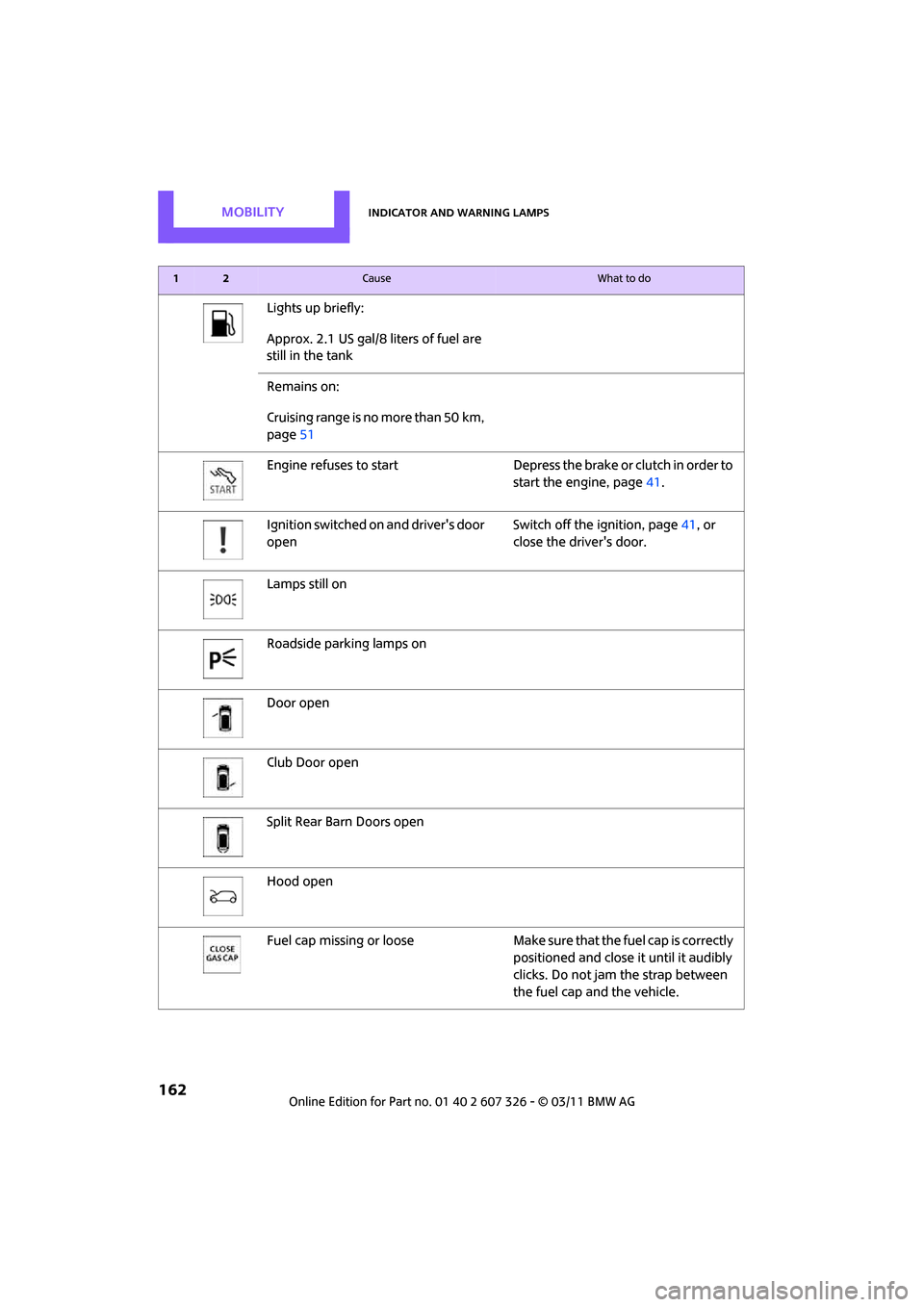
Lights up briefly:
Approx. 2.1 US gal/8 liters of fuel are
still in the tank
Remains on:
Cruising range is no more than 50 km,
page51
Engine refuses to start Depress th e brake or clutch in order to
start the engine, page 41.
Ignition switched on and driver's door
open Switch off the ignition, page
41, or
close the driver's door.
Lamps still on
Roadside parking lamps on
Door open
Club Door open
Split Rear Barn Doors open
Hood open
Fuel cap missing or loose Make sure that the fuel cap is correctly
positioned and close it until it audibly
clicks. Do not jam the strap between
the fuel cap and the vehicle.
12Cause What to do
Page 165 of 196
Indicator and warning lampsMOBILITY
163
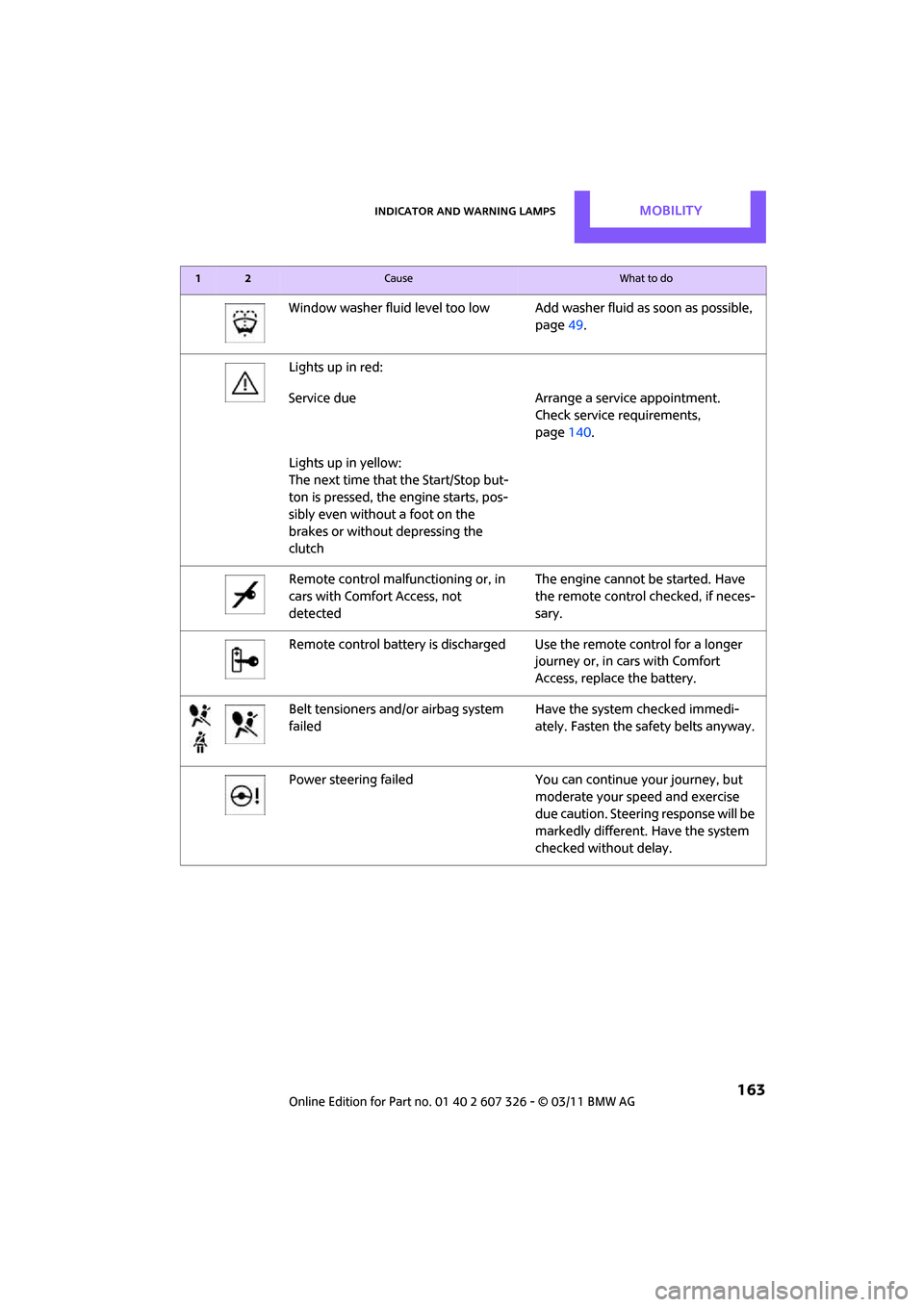
Window washer fluid level too low Add washer fluid as soon as possible,
page 49.
Lights up in red:
Service due Arrange a service appointment.
Check service requirements,
page 140.
Lights up in yellow:
The next time that the Start/Stop but-
ton is pressed, the engine starts, pos-
sibly even without a foot on the
brakes or without depressing the
clutch
Remote control malfunctioning or, in
cars with Comfort Access, not
detected The engine cannot be started. Have
the remote control checked, if neces-
sary.
Remote control battery is discharged Use the remote control for a longer journey or, in cars with Comfort
Access, replace the battery.
Belt tensioners and/ or airbag system
failed Have the system checked immedi-
ately. Fasten the safety belts anyway.
Power steering failed You can continue your journey, but
moderate your speed and exercise
due caution. Steering response will be
markedly different. Have the system
checked without delay.
12Cause What to do
Page 167 of 196

Indicator and warning lampsMOBILITY
165
Lights up in red:
Battery is no longer being charged.
Alternator malfunctionSwitch off all unne
cessary electrical
consumers. Have the battery checked
without delay.
Lights up in yellow:
Battery charge level very low, battery
aged or not securely connected Have the battery checked as soon as
possible.
Indication in US models
Parking brake applied
Indication in Canadian models
Parking brake applied
Indication in US models
Lights up in red:
Brake fluid level too low Braking action is reduced, stop with care. Contact the nearest MINI dealer.
Lights up in yellow:
Hill Assist failed. The car will not be
held in place after the brake is
released Have the system ch
ecked as soon as
possible.
12Cause What to do
Page 168 of 196
MOBILITYIndicator and warning lamps
166
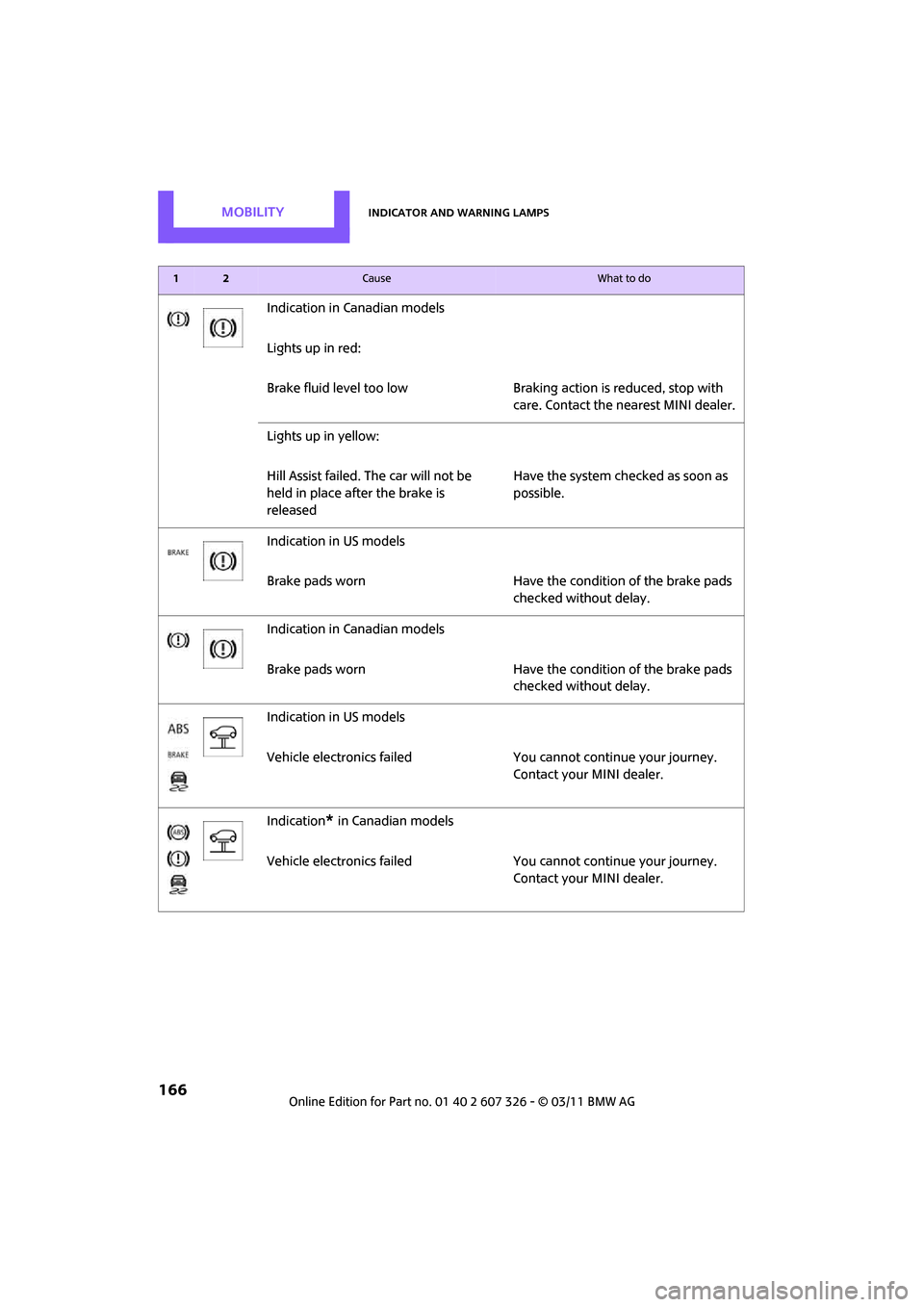
Indication in Canadian models
Lights up in red:
Brake fluid level too lowBraking action is reduced, stop with
care. Contact the nearest MINI dealer.
Lights up in yellow:
Hill Assist failed. The car will not be
held in place after the brake is
released Have the system checked as soon as
possible.
Indication in US models
Brake pads worn Have the condition of the brake pads
checked without delay.
Indication in Canadian models
Brake pads worn Have the condition of the brake pads
checked without delay.
Indication in US models
Vehicle electronics failed You cannot continue your journey.
Contact your MINI dealer.
Indication
* in Canadian models
Vehicle electronics failed You cannot continue your journey.
Contact your MINI dealer.
12Cause What to do
Page 169 of 196
Indicator and warning lampsMOBILITY
167
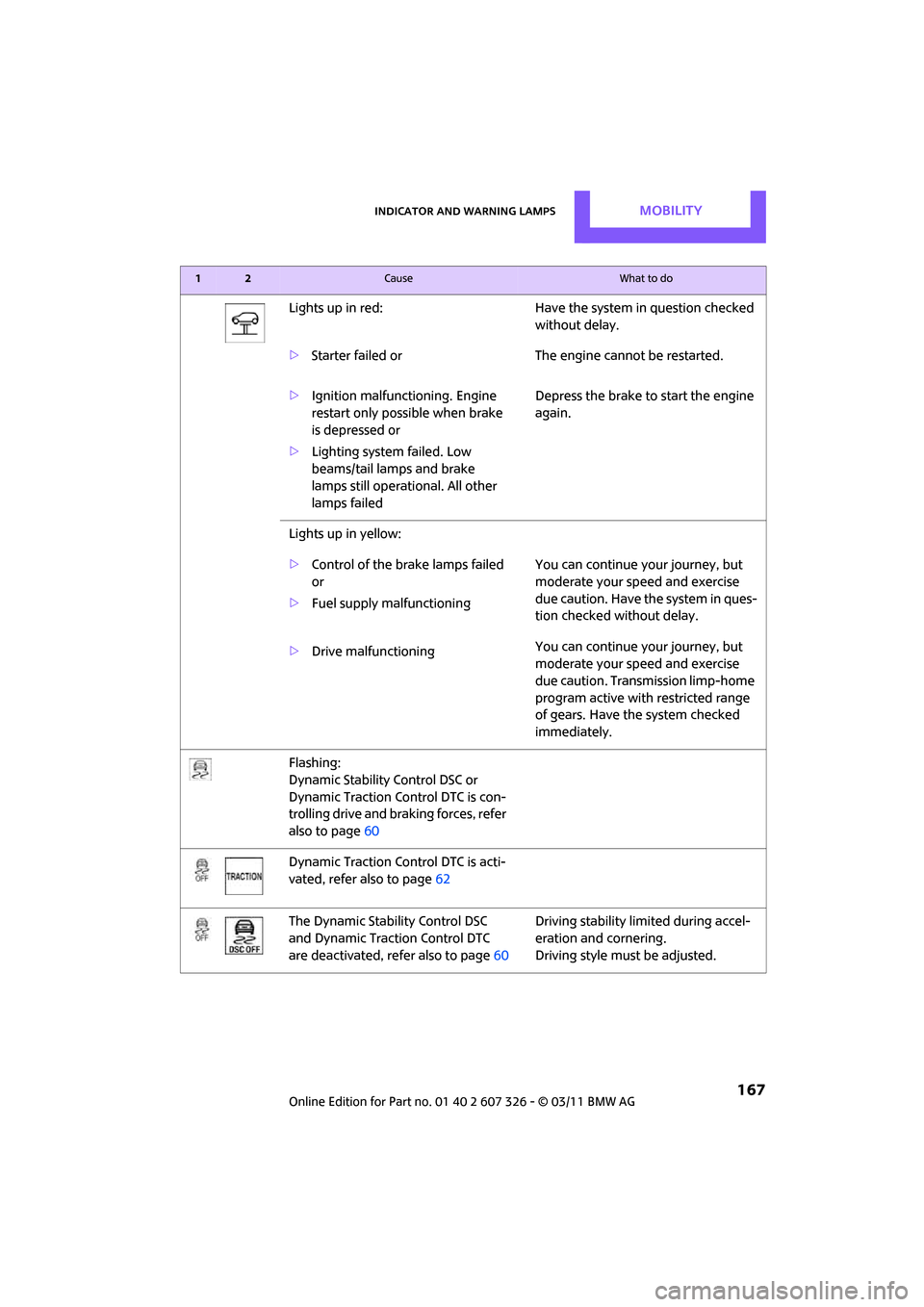
Lights up in red:Have the system in question checked
without delay.
> Starter failed or The engine cannot be restarted.
> Ignition malfunctioning. Engine
restart only possible when brake
is depressed or
> Lighting system failed. Low
beams/tail lamps and brake
lamps still operational. All other
lamps failed Depress the brake to start the engine
again.
Lights up in yellow:
> Control of the brake lamps failed
or
> Fuel supply malfunctioning You can continue your journey, but
moderate your speed and exercise
due caution. Have the system in ques-
tion checked without delay.
> Drive malfunctioning You can continue your journey, but
moderate your speed and exercise
due caution. Transmission limp-home
program active with restricted range
of gears. Have the system checked
immediately.
Flashing:
Dynamic Stability Control DSC or
Dynamic Traction Control DTC is con-
trolling drive and braking forces, refer
also to page 60
Dynamic Traction Control DTC is acti-
vated, refer also to page 62
The Dynamic Stability Control DSC
and Dynamic Traction Control DTC
are deactivated, refer also to page 60Driving stability limited during accel-
eration and cornering.
Driving style must
be adjusted.
12Cause What to do
Page 172 of 196
MOBILITYIndicator and warning lamps
170
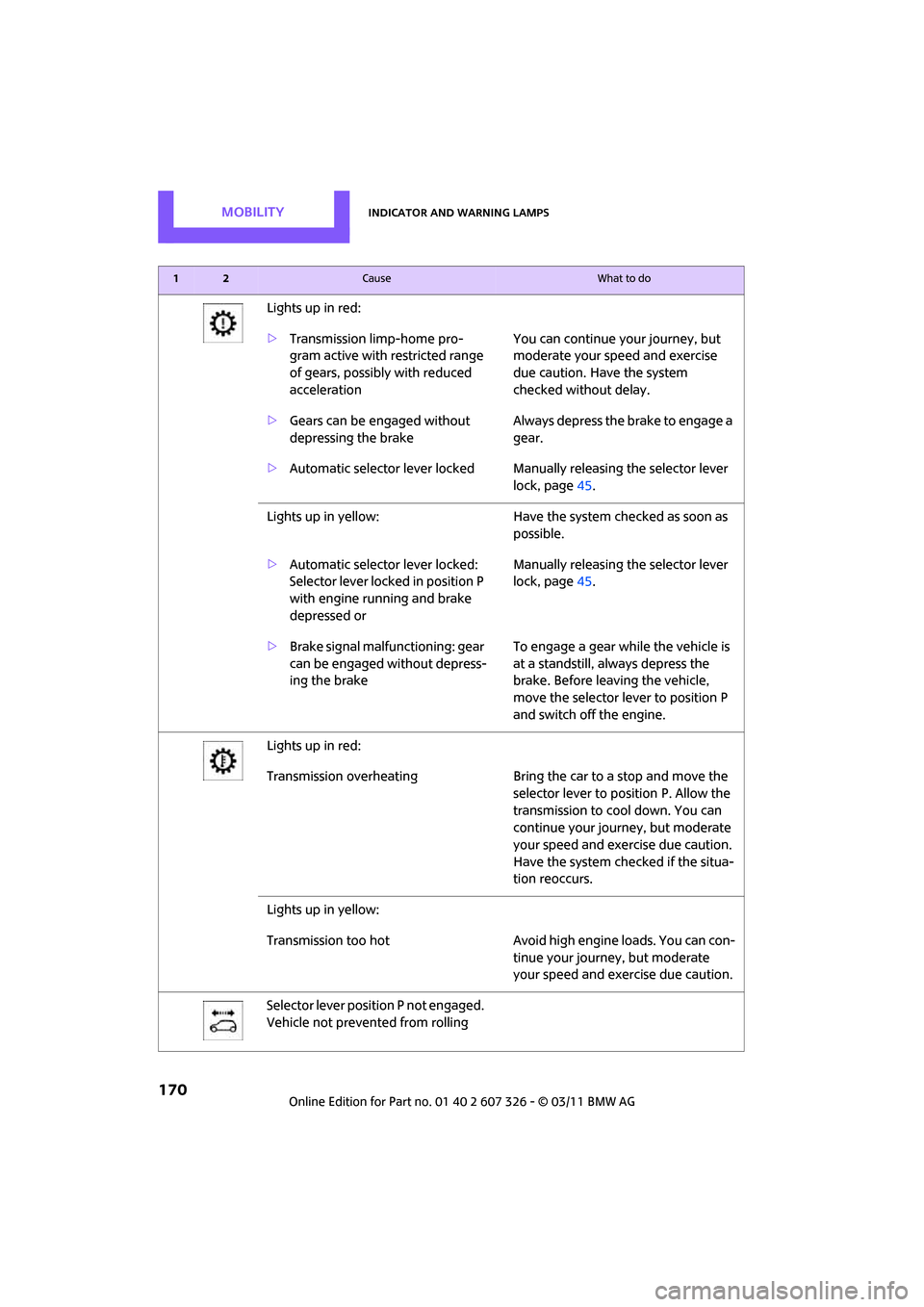
Lights up in red:
>Transmission limp-home pro-
gram active with restricted range
of gears, possibly with reduced
acceleration You can continue your journey, but
moderate your speed and exercise
due caution. Have the system
checked without delay.
> Gears can be engaged without
depressing the brake Always depress the brake to engage a
gear.
> Automatic selector lever locked Manually releasing the selector lever
lock, page45.
Lights up in yellow: Have the system checked as soon as
possible.
> Automatic selector lever locked:
Selector lever locked in position P
with engine running and brake
depressed or Manually releasing the selector lever
lock, page
45.
> Brake signal malfunctioning: gear
can be engaged without depress-
ing the brake To engage a gear while the vehicle is
at a standstill, always depress the
brake. Before leaving the vehicle,
move the selector lever to position P
and switch off the engine.
Lights up in red:
Transmission overheating Bring the car to a stop and move the
selector lever to po sition P. Allow the
transmission to co ol down. You can
continue your journey, but moderate
your speed and exercise due caution.
Have the system checked if the situa-
tion reoccurs.
Lights up in yellow:
Transmission too hot Avoid high engine loads. You can con-
tinue your journey, but moderate
your speed and exer cise due caution.
Selector lever position P not engaged.
Vehicle not prevented from rolling
12Cause What to do
Page 182 of 196

180
REFERENCEEverything from A to Z
Everything from A to Z
INDEX
A
ABS Antilock Brake System61
Accessories, refer to Your individual vehicle 4
Acknowledgment signals for
locking/unlocking vehicle 22
Activated-charcoa l filter for
automatic climate control 82
Adaptive Light Control 74
Additives
– coolant 139
– engine oil 138
Adjusting temperature inside the car, refer to Air
conditioner 79
Adjusting temperature inside the car, refer to Automatic
climate control 80
Air conditioner 78
Air conditioning mode
– air conditioner 79
– automatic cl imate control80
– ventilation 82
Air distribution
– automatic 81
– individual 80
– manual 80
Air flow rate 79,81
– air conditioning system 79
– automatic cl imate control81
– heating, ventilation 79
Air outlets, refer to Air vents 78
Air pressure, checking, refer to Tire inflation pressure 128
Air recirculation, refer to Recir-
culated-air mode 79,81
Air supply
– air conditioner 79
– automatic cl imate control80
– ventilation 82 Air vents
78
Airbags 69
– sitting safely 32
– warning lamp 71
Airing, refer to Ventilation82
AKI, refer to Fuel grade 127
Alarm system 27
All-season tires, refer to Winter tires 135
Ambient air, refer to Recircu- lated-air mode 79,81
Ambient lighting 77
Antenna, care 142
Antifreeze
– coolant 139
– washer fluid 49
Anti
lock Brake System ABS 61
Anti-theft alarm system, refer
to Alarm system 27
Anti-theft system 21
Approved axle loads, refer to Weights 178
Approved engine oils 138
Approved gross vehicle weight, refer to Weights 178
Armrest, refer to Center
armrest 85
Ashtray 87
Assistant systems, refer to
– Dynamic Stability Control DSC 61
Audio device, external 85
AUTO program for automatic climate control 81
Auto radio, refer to Radio MINI
Boost CD 100
Automatic
– air distribution 81
– air flow rate 81
– cruise control 49
– headlamp control 72Automatic climate control
78
– automatic air distribution 81
Automatic station search 101
Automatic station storage 102
Automatic transmission with Steptronic 43
– interlock 44
– overriding selector lever lock 45
– shiftlock 44
– sport program 45
AUX In connection 100
AUX-IN, refer to External audio device 85
Average fuel consumption 52
– setting the units 55
Average speed 52
Axle loads, refer to
Weights 178
B
Background lighting, refer to
Ambient lighting 77
Backrests, refer to Seats 33
Backup lamps
– replacing bulb 150
Band-aids, refer to First aid pouch 157
Bar, refer to Tow-starting, towing away 159
Base plate for telephone or
mobile phone
– refer to Snap-in adapter 123
Battery 155
– charging 155
– disposal 30,155
– jump-starting 157
– temporary power failure 155
Battery renewal
– remote control 30
Page 183 of 196
Everything from A to ZREFERENCE
181
Being towed159
Bell
– volume 100
Belt tensioner, refer to Safety
belts 35
Belts, refer to Safety belts 35
Beverage holders, refer to
Cupholders 87
Black ice, refer to External temperature warning 52
Blower, refer to Air flow rate 79,81
Bluetooth, activating/
deactivating 114
Bottle holders, refer to Cupholders 87
Brake Assist 61
Brake fluid, refer to Service requirements 56
Brake lamps
– replacing bulbs 150
Brake pads, breaking in 90
Brake rotors 91
– brakes 90
– breaking in 90
Brake system 90
– breaking in 90
– disc brakes 91
– MINI Maintenance System 140
Brakes
– ABS 61
– breaking in 90
– MINI Maintenance System 140
– parking brake 43
– service requirements 56
Brakes, refer to Braking safely 91
Breakdown service, refer to Roadside Assistance 157
Break-in period 90
Breaking in the clutch 90
Bulb changing, refer to Lamps and bulbs 147
Button for starting the engine 41 Buttons on the steering
wheel 11
C
California Proposition 65
warning 5
Call
– accepting 117
– ending 118
– rejecting 118
Calling, refer to Phone numbers, dialing 118
Can holders, refer to Cupholders 87
Capacities 179
Car battery, refer to Vehicle battery 155
Car care 142
Car key, refer to Keys/remote controls 20
Car phone
– installation location, refer to Center armrest 85
– refer to separate Owner's
Manual
Car phone, refer to Telephone 112
Car wash, care 142
Car washes 142
Care 142
– car washes 142
– car-care products 142
– CD/DVD drives 145
– external 142
– high-pressure washers 143
– internal 144
– leather 144
– manual washing 143
– upholstery and fabrics 144
– windows 143
– wiper blades 143 Cargo area
92
– capacity 178
– Comfort Access 29
– doors, refer to Split Rear Barn
Doors 26
– lamp 76
– opening from outside 26
– trunk lid, refer to Split Rear Barn Doors 26
Cargo area doors, refer to Split
Rear Barn Doors 26
Cargo area, expanding 92
Cargo area lamp 76
Cargo area partition net, refer to Cargo net 93
Cargo loading 94
– securing cargo 95
– stowing cargo 95
– vehicle 92
Cargo net 93
Cargo, securing 95
Carpets, care 144
Cataly
tic converter, refer to
Hot exhaust system 90
CD player 105
– changing the track 106
– fast forward/reverse 106
– playing a track 106
– random order 106
– starting 105
– volume 100
Center armrest 85
Center brake lamp 151
Center console, refer to Around the center
console 14
Central locking system 21
– Comfort Access 28
– from inside 24
– from outside 21
Changing bulbs 147
Changing wheels 153
Chassis number, refer to Engine compartment 137
Check Control 58
Child restraint fixing system LATCH 39
Page 184 of 196

REFERENCEEverything from A to Z
182
Child restraint systems38
Child seats 38
Chrome parts, care 144
Chrome parts, refer to
Care 142
Cigarette lighter 87
Cleaning headlamps 48
– washer fluid 49
Clock
– 12 h/24 h mode 55
– setting time 57
Closing
– from inside 24
– from outside 21
Clothes hooks 86
Club Door 26
Cockpit 10
Cold start, refer to Starting the engine 42
Comfort Access 28
– replacing the battery 30
– what to observe before
entering a car wash 29
Comfort area, refer to Around the center console 14
Compartment for remote control, refer to Ignition
lock 41
Compressed audio files 105
Computer 52
Condensation, refer to When the vehicle is parked 92
Condition Based Service
CBS 140
Configuring settings, refer to Personal Profile 20
Connecting vacuum cleaner, refer to Connecting electrical
appliances 87
Consumption, refer to Average fuel consumption 52
Control Display
– settings 53
Controls and displays 10
Convenient access, refer to
Comfort Access 28 Convenient operation
– windows
22
Convenient start, refer to Starting the engine 42
Coolant 139
– checking level 139
– filling 139
Coolant temperature 139
Cooling fluid, refer to Coolant 139
Cooling, maximum 81
Copyright 2
Cornering light, refer to
Adaptive Light Control 74
Cruising range 52
Cupholders 87
Curb weight, refer to Weights 178
C
urrent fuel consumption 52
D
Dashboard instruments, refer
to Displays 12
Dashboard lighting, refer to
Instrument lighting 76
Dashboard, refer to Cockpit 10
Data 176
– capacities 179
– dimensions 177
– engine 176
– weights 178
Data memory 141
Date
– setting 58
Date setting 101
Daytime running lights 73
DBC Dynamic Brake Control, refer to Brake Assist 61
Deactivating front passenger airbags 70
Deadlocking, refer to
Locking 22
Defect
– door lock 24
– fuel filler flap 126
Defogging windows 80,82 Defrost positi
on, refer to
Defrosting windows 80,82
Defrosting windows 80,82
Defrosting windows and
removing condensation
– air conditioner 80
– automatic climate control 82
Defrosting windshield, refer to Defrosting windows 80,82
Differential, breaking in 90
Digital radio, refer to HD Radio 103
Dimensions 177
Dipstick, engine oil 137
Directional indicators, refer to Turn signals 46
Displacement, refer to Engine data 176
Display lighting, refer to
Instrument lighting 76
Displays 12
– instrument cluster 12
Displays and controls 10
Displays, care 145
Disposal
– of coolant 139
– remote control battery 30
– vehicle battery 155
Distance remaining to service, refer to Service
requirements 56
Distance warning, refer
to Park
Distance Control PDC 60
Door
– rear, refer to Club Door 26
Door key, refer to Integrated
key/remote control 20
Door lock 24
Door lock, confirmation
signals 22
Doors, manual operation 24
DOT Quality Grades 132
Double doors, refer to Split Rear Barn Doors 26
Drinks holders, refer to
Cupholders 87