104 MINI Clubman 2012 Owner's Manual
[x] Cancel search | Manufacturer: MINI, Model Year: 2012, Model line: Clubman, Model: MINI Clubman 2012Pages: 207, PDF Size: 3.26 MB
Page 4 of 207
Contents
The fastest way to find information on a particu-
lar topic or item is by using the index, refer to
page194.
4 Notes
7 Reporting safety defects
AT A GLANCE 9
10Cockpit
16 Radio
CONTROLS 21
22Opening and closing
35 Adjustments
41 Transporting children safely
44 Driving
54 Controls overview
63 Technology for drivin g comfort and safety
75 Lamps
80 Climate
85 Practical interior accessories
DRIVING TIPS 93
94Things to remember when driving
ENTERTAINMENT 103
104Radio MINI Boost CD
COMMUNICATIONS 115
116Telephone
MOBILITY 127
128Refueling
131 Wheels and tires
143 Engine compartment
147 Maintenance
149 Care
153 Replacing components
167 Giving and receiving assistance
172 Indicator and warning lamps
REFERENCE 185
186Technical data
194 Everything from A to Z
Online Edition for Part no. 01 40 2 914 744 - \251 07/12 BMW AG
Page 24 of 207
Opening and closingCONTROLS
23
Personal Profile settings
For more information on specific settings, refer
to the specified pages.
> Response of the central locking system
when the car is being unlocked 23
> Automatic locking of the vehicle 27
> Triple turn signal activation 49
> Settings for the displays in the speedometer
and tachometer:
>12 h/24 h mode of the clock, refer to
Formats and units of measure 58
> Date format, refer to Formats and units
of measure 58
> Units of measure for fuel consumption,
distance covered/re maining distances
and temperature, refer to Formats and
units of measure 58
> Light settings:
>Pathway lighting 76
> Daytime running lights 76
> Automatic climate control: activating/deac-
tivating the AUTO program, setting the tem-
perature, air volume and air distribution 82
> Entertainment:
>Most recent ente rtainment source
> Radio MINI Boost CD:
Setting the volume 104
Setting the tone 105
Central locking system
The concept
The central locking system is ready for operation
whenever the driver's door is closed.
The system simultaneously engages and
releases the locks on the following:
>Doors
> MINI: tailgate
> MINI Clubman: Split Rear Barn Doors
> Fuel filler flap
Operating from outside
>Via the remote control
> Using the door lock
> In cars with Comfor t Access, via the door
handles on the driver's and passenger's
sides
The anti-theft system is also operated at the
same time. It prevents the doors from being
unlocked using the lock buttons or door han-
dles. The remote control can also be used to
switch on/off the welcome lamps and interior
lamps. The alarm system is also activated or
deactivated, page 29.
Operating from inside
Button for central locking system, page 26.
In the event of a sufficiently severe accident, the
central locking system unlocks automatically. In
addition, the hazard warning flashers and inte-
rior lamps come on.
Opening and closing:
from outside
Persons or animals in a parked vehicle
could lock the doors from the inside. Take
the key with you when you leave the vehicle so
that the vehicle can be opened from the out-
side. <
Using the remote control
Unlocking
Press the button.
The welcome lamps and interior lamps come on.
Unlocking mode
You can also set which parts of the car are
unlocked. The setting is stored for the remote
control in use.
Online Edition for Part no. 01 40 2 914 744 - \251 07/12 BMW AG
Page 64 of 207
Technology for driving comfort and safetyCONTROLS
63
Technology for driving comfort and
safety
Vehicle equipment
In this chapter, all production, country, and
optional equipment that is offered in the model
range is described. Equipment is also described
that is not available because of, for example,
selected options or count ry version. This also
applies to safety related functions and systems.
Park Distance Control
PDC
The concept
PDC assists you with parking in reverse. Acoustic
signals warn you of the presence of an object
behind the vehicle. To measure the distance,
there are four ultrasonic sensors in either
bumper.
However, an acoustic warning does not sound
until an object is approx. 24 in/60 cm from the
corner sensors, or approx. 5 ft/1.50 m from the
center sensors.
PDC is a parking aid that can indicate
objects when they are approached slowly,
as is usually the case when parking. Avoid
approaching an object at high speed; otherwise,
physical circumstances ma y lead to the system
warning being issued too late.<
Automatic mode
With the engine running or the ignition switched
on, the system is activated automatically after
approx. 1 second when you engage reverse
gear or move the automatic transmission selec-
tor lever to position R. Wait this short period
before driving.
Acoustic signals
As the distance between vehicle and object
decreases, the intervals between the tones
become shorter. If the distance to the nearest
object falls to below roughly 1 ft/30 cm, then a
continuous tone sounds.
If the distance remains constant, e.g. when
driving parallel to a wall, the acoustic signal
stops after approx. 3 seconds.
Adjustments
The volume of the acoustic signals can be set,
refer to page 104.
Malfunction
Indicator lamp lights up. PDC has failed.
Have the system checked.
To avoid this problem, keep the sensors
clean and free of ice or snow in order to ensure
that they will continue to operate effectively.
When using a high-pressure cleaner, do not
direct the jet toward the sensors for lengthy
periods and only spray from a distance of at least
4in/10cm.
System limitations
Even with PDC, final re sponsibility for esti-
mating the distance between the vehicle
and any obstructions always remains with the
driver. Sensors, too, ha ve blind spots in which
objects cannot be detected. Moreover, ultra-
sonic detection can reach its physical limits with
objects such as trailer tow bars and couplings,
thin and wedge-shaped objects, etc. Low
objects already indicated, such as curbs, may
enter the sensors' blind spots before or after a
continuous audible signal is given. Higher, pro-
truding objects, such as wall ledges, may not be
detectable. Therefore, al ways drive cautiously;
otherwise, there is a risk of personal injury or
Online Edition for Part no. 01 40 2 914 744 - \251 07/12 BMW AG
Page 105 of 207
ENTERTAINMENTRadio MINI Boost CD
104
Radio MINI Boost CD
Vehicle equipment
In this chapter, all production, country, and
optional equipment that is offered in the model
range is described. Equipment is also described
that is not available because of, for example,
selected options or coun try version. This also
applies to safety relate d functions and systems.
Switching radio on/off
Press the left rotary knob. The radio
selects the last set audio source:
> Radio
> HD Radio
> Satellite radio
> CD
> External audio device
> USB audio interface.
Listening to the radi o when the ignition
is switched off
After switching off the radio readiness, the radio
functions are available for approx. 20 minutes.
To do so, switch the radio on again.
To spare the battery, ensure that the radio
is switched off when leaving the vehicle. <
Adjusting volume
Turn left rotary knob. The setting is
stored for the remote control in use.
As soon as you make a phone call using
the hands-free device, the radio will auto-
matically be muted. <
Setting the volume for the PDC and gong
You can raise or lower the audio signals for the
PDC or gong with respect to the volume of the
audio sources.
The audio signals have a set minimum and max-
imum volume, below which they can not fall and
above which they can not go.
Set the audio source to a high volume to
be able to better set the volume of the
audio signals. <
1. Press the button.
2. Press the button if necessary.
3. Press the button.
or
Press the button.
4. Select the desired vo lume and press the
knob on the right.
Setting the speed-dependent volume
The speed-dependent volume controls auto-
matically increases the volume as the speed of
the vehicle increases. You can set different levels
for increasing the volume.
1. Press the button.
2. Press the button if necessary.
3. Press the button.
4. Select the desired vo lume and press the
knob on the right.
Setting the volume for external audio
devices
Your radio has the option of connecting an
external audio device, e.g., an MP3 player, and
playing it over the loudspeakers in the vehicle.
You can set the volume by using the radio.
Online Edition for Part no. 01 40 2 914 744 - \251 07/12 BMW AG
Page 106 of 207
Radio MINI Boost CDENTERTAINMENT
105
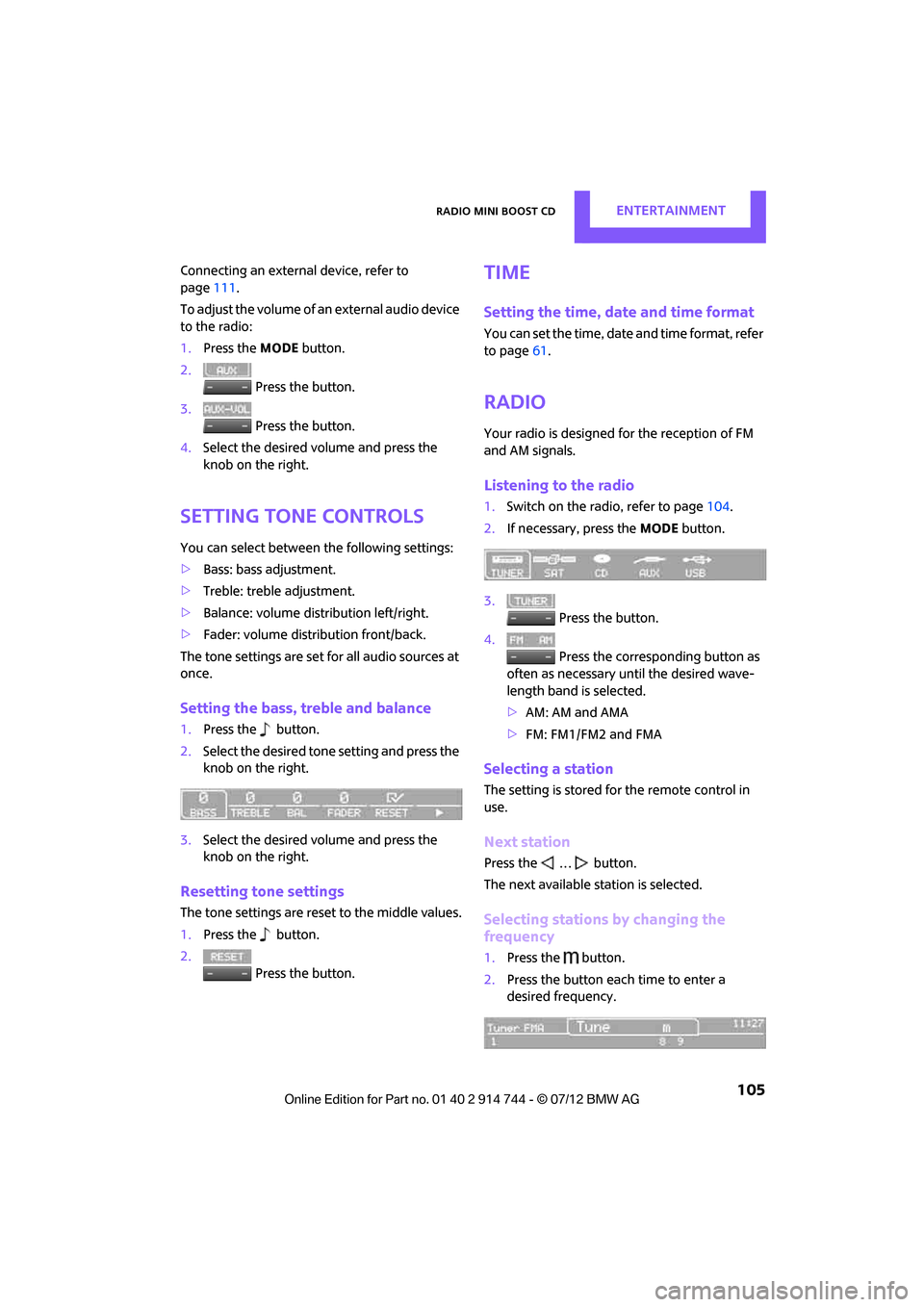
Connecting an external device, refer to
page111.
To adjust the volume of an external audio device
to the radio:
1. Press the MODEbutton.
2. Press the button.
3. Press the button.
4. Select the desired volume and press the
knob on the right.
Setting tone controls
You can select between the following settings:
>Bass: bass adjustment.
> Treble: treble adjustment.
> Balance: volume distribution left/right.
> Fader: volume distri bution front/back.
The tone settings are set for all audio sources at
once.
Setting the bass, treble and balance
1. Press the button.
2. Select the desired tone setting and press the
knob on the right.
3. Select the desired volume and press the
knob on the right.
Resetting tone settings
The tone settings are reset to the middle values.
1.Press the button.
2. Press the button.
Time
Setting the time, date and time format
You can set the time, date and time format, refer
to page61.
Radio
Your radio is designed for the reception of FM
and AM signals.
Listening to the radio
1.Switch on the radio, refer to page 104.
2. If necessary, press the MODEbutton.
3. Press the button.
4. Press the corresponding button as
often as necessary until the desired wave-
length band is selected.
> AM: AM and AMA
> FM: FM1/FM2 and FMA
Selecting a station
The setting is stored for the remote control in
use.
Next station
Press the … button.
The next available st ation is selected.
Selecting stations by changing the
frequency
1. Press the button.
2. Press the button each time to enter a
desired frequency.
Online Edition for Part no. 01 40 2 914 744 - \251 07/12 BMW AG
Page 110 of 207

Radio MINI Boost CDENTERTAINMENT
109
Changing to the current channel
Press the button.
Additional information
The name of the channel and additional infor-
mation about the current track is displayed, e.g.,
the name of the artist.
1.Select the desired channel.
2. Press the button.
Changing channels using buttons
Press the … button for the corresponding
direction.
The next activated channel is recalled.
Search function
1.Press and hold the … button for the
corresponding direction.
The activated channels are shown, one after
another, on the display.
2. Release the button to select the displayed
channel.
Notes
When there is a signal blockage or the transmis-
sion is suspended mome ntarily for more than
4 seconds, a message appears on the Control
Display.
Service may be interrupted or unavailable
for specific reasons such as environmental
or topographic conditions and others that Satel-
lite Radio cannot directly control.
Signals may not be available under tunnels, in
parking garages, next to tall buildings, nearby trees with dense foliage, nearby mountains or
other possible strong so
urces of radio inter-
ference.
Service should resume no rmally after the source
of signal unavailabil ity has been cleared.<
CD player
Starting the CD player
Some time may pass until the CD player starts.
1.Switch on the radio, refer to page 104.
2. Insert the CD with the printed side up into
the CD slot.
If there is already a CD in the CD slot:
1. Switch on the radio, if necessary.
2. Press the MODEbutton.
3. Press the button.
Changing the music track
Skipping tracks
Press the … button as often as necessary
until the desired track is reached.
Using the knob on the right:
Turn the knob on the right until the desired track
has been reached.
Fast forward/reverse
1.Press and hold the … button.
The track can be heard but is distorted.
2. To cancel the fast fo rward/reverse, release
the button.
Random order
Press the button.
To terminate the random generator:
Press the button.
Online Edition for Part no. 01 40 2 914 744 - \251 07/12 BMW AG
Page 195 of 207
194
REFERENCEEverything from A to Z
Everything from A to Z
Index
A
ABS Antilock Brake System64
Accepting a call 121
Accessories, see Vehicle equipment 4
Acknowledgment signals for locking/unlocking vehicle 24
Activated-charcoa l filter for
automatic climate control 84
Adaptive Light Control 77
Adding engine oil 145
Additives
– coolant 146
– engine oil 145
Adjusting temperature inside the car, refer to Air
conditioner 81
Adjusting temperature inside the car, refer to Automatic
climate control 82
Airbags 72
– sitting safely 35
– warning lamp 73
Air conditioner 80
Air conditioning mode
– air conditioner 81
– automatic cl imate control82
– ventilation 84
Air distribution
– automatic 83
– individual 82
– manual 82
Air flow rate 81,83
– air conditioning system 81
– automatic cl imate control83
– heating, ventilation 81
Airing, refer to Ventilation84
Air outlets, refer to Air vents 80
Air pressure, checking, refer to Tire inflation pressure 131Air recirculation, refer to
Recirculated-air
mode 81,83
Air supply
– air conditioner 81
– automatic climate control 82
– ventilation 84
Air vents 80
AKI, refer to Fuel grade 129
Alarm system 29
All-season tires, refer to Winter tires 141
Ambient air, refer to Recirculated-air
mode 81,83
Ambient lighting 79
Antenna, care 149
An
tifreeze
– coolant 146
– washer fluid 52
Antilock Brake System ABS 64
Anti-theft alarm system, refer to Alarm system 29
Anti-theft system 23
Approved axle loads, refer to Weights 191
Approved engine oils 145
Approved gross vehicle weight, refer to Weights 191
Armrest, refer to Center armrest 89
Ashtray 91
Assistant systems, refer to
– Dynamic Stability Control DSC 64
Audio device, external 89
Automatic
– air distribution 83
– air flow rate 83
– cruise control 52
– headlamp control 75Automatic climate control
80
– automatic air distribution 83
Automatic station search 105
Automatic station storage 106
Automatic transmission with Steptronic 46
– interlock 47
– overriding selector lever lock 48
– shiftlock 47
– sport program 48
AUTO program for automatic
climate control 83
Auto radio, refer to Radio MINI Boost CD 104
AUX-In, refer to External audio device 89
AUX-In connection 104
Average fuel consumption 55
– setting the units 58
Average speed 56
Axle loads, refer to Weights 191
B
Background lighting, refer to
Ambient lighting 79
Backrests, refer to Seats 36
Backup lamps
– replacing bulb 158,159
Band-aids, refer to First aid
pouch 167
Bar, refer to Tow-starting, towing away 170
Base plate for telephone or mobile phone
– refer to Snap-in adapter 124
Online Edition for Part no. 01 40 2 914 744 - \251 07/12 BMW AG
Page 196 of 207
Everything from A to ZREFERENCE
195
Battery165
– disposal 32,165
– jump-starting 168
– temporary power failure 165
Battery renewal
– remote control 32
Being towed 170
Belts, refer to Safety belts 38
Belt tensioner, refer to Safety belts 38
Beverage holders, refer to Cupholders 90
Black ice, refer to External
temperature warning 55
Blower, refer to Air flow rate 81,83
Bluetooth, activating/ deactivating 118
Bottle holders, refer to
Cupholders 90
Brake Assist 64
Brake fluid, refer to Service
requirements 59
Brake lamps
– replacing bulbs 158,159
Brake pads, breaking in 94
Brake rotors 96
– brakes 94
– breaking in 94
Brakes
– ABS 64
– breaking in 94
– MINI Maintenance
System 147
– parking brake 46
– service requirements 59
Brakes, refer to Braking safely 95
Brake system 94
– breaking in 94
– disc brakes 96
– MINI Maintenance
System 147
Breakdown service, refer to Roadside Assistance 167
Breaking in the clutch 94
Break-in period 94 Bulb changing, refer to Lamps
and bulbs 155
Button for starting the engine 44
Buttons on the steering wheel 11
C
California Proposition 65
warning 5
Call ending 122
Calling, refer to Phone
numbers, dialing 122
Calling, refer to Telephone 89
Can holders, refer to
Cupholders 90
Capacities 192
Car battery, refer to Vehicle
battery 165
Car care 149
Care 149
– car-care products 149
– car washes 149
– CD/DVD drives 152
– high-pressure washers 150
– leather 151
– manual washing 150
– upholstery and fabrics 151
– windows 150
– wiper blades 150
Cargo, securing 99
Cargo area 96
– capacity 191
– Comfort Access 31
– cover 96
– doors, refer to Split Rear Barn Doors 28
– expanding 97
– lamp 79
– opening from outside 28
– trunk lid, refer to Split Rear
Barn Doors 28
Cargo area doors, refer to Split Rear Barn Doors 28
Cargo area lamp 79 Cargo area lid, refer to
Tailgate 28
Cargo area partition net, refer to Cargo net 98
Cargo loading 98
– securing cargo 99
– stowing cargo 99
– vehicle 96
Cargo net 98
Car key, refer to Keys/remote
controls 22
Carpets, care 151
Car phone
– installation location, refer to Center armrest 89
– refer to Telephone 89,116
Car radio, refer to Radio 16
Car wash, care 149
Car washes 149
Cataly
tic converter, refer to
Hot exhaust system 95
CD player 109
– changing the track 109
– fast forward/reverse 109
– playing a track 110
– random order 109
– volume 104
Center armrest 89
Center brake lamp 160
Center console, refer to
Around the center
console 14
Central locking system 23
– Comfort Access 30
– from inside 26
– from outside 23
Changing bulbs 155
Changing wheels 162
Charging the battery 165
Chassis number, refer to Engine compartment 143
Check Control 61
Child restraint fixing system LATCH 42
Child restraint systems 41
Child seats 41
Chrome parts, care 151
Online Edition for Part no. 01 40 2 914 744 - \251 07/12 BMW AG
Page 198 of 207
Everything from A to ZREFERENCE
197
Drive-off assistant, refer to Hill
Assist 66
Driving dynamics control, refer to Sport button 66
Driving lamps, refer to Parking lamps/low beams 75
Driving notes 94
Driving off on inclines, refer to Hill Assist 66
Driving stability control
systems 64
Driving through water 95
Driving tips, refer to Driving
notes 94
Dry air, refer to Cooling function 84
DSC Dynamic Stability Control 64
DTC Dynamic Traction
Control 65
Dynamic Brake Control DBC, refer to Brake Assist 64
Dynamic Stability Control DSC 64
Dynamic Traction Control
DTC 65
E
Eject button 110
Electrical malfunction
– door lock 26
– fuel filler flap 128
Electric power windows
– initializing 33
Electronic brake-force
distribution 64
Electronic Stability Program ESP, refer to Dynamic
Stability Control DSC 64
Emergency operation, refer to Manual operation
– door lock 26
– fuel filler flap 128
– transmission lock, automatic
transmission 48 Emergency services, refer to
Roadside Assistance 167
Ending a call 122
Engine
– breaking in 94
– data 186
– overheated, refer to Coolant
temperature 146
– speed 186
– starting, Comfort Access 30
Engine compartment 143
Engine coolant, refer to Coolant 146
Engine oil
– additives, refer to Approved engine oils 145
– alternative oil types 145
– approved engine oils 145
– capacity 145
– checking level 144
– dipstick 144
– intervals between changes,
refer to Service
requirements 59
– MINI Maintenance
System 147
Engine oil level, checking 144
Engine output, refer to Engine
data 186
Engine starting, refer to
Starting the engine 45
ESP Electronic Stability Program, refer to Dynamic
Stability Control DSC 64
Exhaust system, refer to Hot exhaust system 95
Exterior mirrors 39
– adjusting 39
– automatic heating 39
– folding in and out 39
External audio device 89,104
External care 149
External temperature display
– change units of measure 58
– in the onboard computer 58Eyes
– for tow-
starting and towing
away 169
– for tying down loads 99
F
Failure messages, refer to
Check Control 61
Failure of an electrical
consumer 166
Fastening safety be lts, refer to
Safety belts 38
Fast forward
– CD 109
Fault messages, refer to Check
Control 61
Filter
– microfilter/activated-
charcoal filter for automatic
climate control 84
– microfilter for air
conditioner 82
Fine wood, care 152
First aid pouch 167
Fixture for remote control, refer to Ignition lock 44
Flash when locking/
unlocking 24
Flat load floor 98
Flat tire
– run-flat tires 140
– Tire Pressure Monitor TPM 69
Flat Tire Monitor FTM 66
– indicating a flat tire 67
– initializing the system 67
– snow chains 67
– system limits 67
Flat tires, refer to Tire
condition 139
Floor mats, care 151
Floor plate, refe r to Flat load
floor 98
Fog lamps
– replacing bulb 156,159
Folding rear seat backrest 97
Online Edition for Part no. 01 40 2 914 744 - \251 07/12 BMW AG
Page 199 of 207

REFERENCEEverything from A to Z
198
Footbrake, refer to Braking safely 95
Footwell lamps 79
For universal garage door
openers, refer to the
Integrated universal remote
control 85
For your own safety 4
Front airbags 72
Front fog lamps 78
– indicator lamp 172
– replacing bulb 156
Front seat adjustment 36
Frost on windows, refer to Defrosting windows 82,84
FTM, refer to Flat Tire
Monitor 66
Fuel 129
– fuel tank volume 192
– gauge 54
– high-quality brands 129
– quality 129
Fuel clock, refer to Fuel gauge 54
Fuel consumption display
– average fuel consumption 55
Fuel display, refer to Fuel gauge 54
Fuel filler flap 128
– releasing in the event of
electrical malfunction 128
Fuel specifications 129
Fuses 166
G
Garage door opener, refer to
Integrated universal remote
control 85
Gasoline
– refer to Average fuel consumption 55
Gasoline, refer to Required fuel 129
Gasoline display, refer to Fuel
gauge 54 Gear indicator
– automatic transmission with
Steptronic 47
Gear shifting
– automatic transmission 47
– manual transmission 46
Gearshift lever
– automatic transmission with Steptronic 47
– manual transmission 46
General driving notes 94
Glass roof, electric 32
– convenience operation 24
– opening, closing 33
– remote control 24
– tilting 32
Glove compartment 89
Gong
– volume 104
Grills, refer to Air vents 80
Gross vehicle weight, refer to Weights 191
H
Halogen lamps
– replacing bulb 156
Handbrake, refe r to Parking
brake 46
Hands-free system 14,124
Hazard warning flashers 14
HD Radio 107
Head airbags 72
Headlamp control, automatic 75
Headlamp flasher 49
– indicator lamp 11,81,172
Headlamp glass lens 155
Headlamps
– replacing bulb 156
Headlamps, care 150
Head Light, refer to Adaptive
Light Control 77
Head restraints 37
– sitting safely 35 Heated
– mirrors
39
– rear window 81,83
– seats 38
Heating 80
– mirrors 39
– rear window 81,83
– seats 38
Heavy loads, refer to Stowing cargo 99
Height, refer to Dimensions 187
Height adjustment
– seats 36
– steering wheel 40
High beams 78
– headlamp flasher 78
– indicator lamp 81,172
– replacing bulb 156
High water, refer to Driving through water 95
Hill Assist 66
Hills 95
Holders for cups 90
Homepage 4
Hood 144
Horn 10
Hot exhaust system 95
Hydroplaning 95
I
IBOC, refer to HD Radio 107
Ignition 44
– switched off 45
– switched on 44
Ignition key, refer to Integrated key/remote
control 22
Ignition key position 1, refer to Radio readiness 44
Ignition key position 2, refer to
Ignition on 44
Ignition lock 44
Imprint 2
Online Edition for Part no. 01 40 2 914 744 - \251 07/12 BMW AG