change wheel MINI Clubman 2013 User Guide
[x] Cancel search | Manufacturer: MINI, Model Year: 2013, Model line: Clubman, Model: MINI Clubman 2013Pages: 267, PDF Size: 3.63 MB
Page 189 of 267

COMMUNICATIONSMINI Connected
188
Connecting via the snap-in adapter
The mobile phone can also be connected using
the snap-in adapter, refer to page177.
Using MINI Connected
After successful connection of the mobile phone
to the vehicle and activation of MINI Connected,
the applications are di splayed on the Control
Display and can be operated using the MINI joy-
stick.
Volume adjustments can be made using the
buttons on the steering wheel, refer to page 10,
or using the volume control knob on the radio,
refer to page 133.
1. Press the button.
This opens the main menu.
2. "MINI Connected"
3. Select the desired so ftware application.
The extent of MINI Connected that is shown on
the Control Display depends on the range of
installed software applic ations on the mobile
phone.
The data transfer of the software applica-
tion from the telephone to the vehicle can
take a few minutes. Some software applications
depend on the speed of the available Internet
connection for the mobile phone. <
Certain versions of mobile phones used and
their software can make it impossible to use
MINI Connected and the Bluetooth hands-free
system at the same time.
After a phone call, it may be necessary to restart
the software application on the mobile phone.
PlugIn
Selected functions for a compatible Apple device
are shown on the Control Display via a video link.
Operation is via the MINI joystick and an
onboard monitor.
1. Connecting an Apple device.
>via a USB audio interface, refer to
page 187.
> via the snap-in-Adapter, refer to
page 177.
2. "MINI Connected"
3. "PlugIn"
4. Select the type of connection: "Activate via
AUX connection" or "Activate via Snap-In
adapter"
5. "Activate PlugIn"
6. Navigate among the functions shown via a
MINI joystick and, e.g., select a desired cate-
gory or track.
Press the button to return back or to change
to a level higher within the functions of the
Apple device.
Press the button twice to return back to the
main menu.
Additional information can be found in the
MINI Connected Owner's Manual at
www.mini.com/c onnectivity.
Note
Audio and video playba ck from a snap-in
adapter may only be possible if there is no cable
connected to the AV-In port.
00320051004F004C00510048000300280047004C0057004C005200510003
Page 207 of 267

MOBILITYWheels and tires
206
marked with a clearly visible MINI designation
on the sidewall of the tire.
When properly used, these tires meet the high-
est standards in terms of safety and handling
characteristics.
Run-flat tires
When mounting new tires or changing over from
summer to winter tires and vice versa, mount
run-flat tires for your ow n safety. Keep in mind
that no space-saver spare tire is available in the
event of a flat. Your MINI dealer will be glad to
advise you.
Special characteristics of winter tires
The manufacturer of your MINI recommends the
use of winter tires on snowy roads or if temper-
atures drop below 45 7/+7 6. Although all-
season M+S tires provide better winter traction
than summer tires, they generally fail to provide
the same levels of cold-weather performance as
winter tires.
Pay attention to speed
Always comply with the speed limit for the
winter tires mounted on your car; failure
to do so could result in tire damage and acci-
dents. <
If the car is capable of speeds higher than that
permitted for the winter tires, a label stating the
maximum permitted speed for the mounted
tires must be displayed in your field of view. This
label is available at your tire dealer or MINI
dealer.
Storage
Always store wheels and tires in a cool, dry place
with as little exposure to light as possible.
Always protect tires agains t all contact with oil,
grease and fuels.
Do not exceed the maximum tire inflation pres-
sure indicated on the sidewall of the tire.
Swapping wheels among the axles
Depending on the individual use, front and rear
tires may exhibit different wear and tear.
In order to maintain an even wear and tear, the
wheels may be rotated between the axles. Your
MINI dealer will be glad to advise you.
Always check the inflation pressure after the tire
rotation, if necessary change the pressure.
Snow chains
Only certain types of fine-link snow chains have
been tested by the manufacturer of your MINI,
classified as road-safe and recommended. Con-
tact your MINI dealer for more details.
Only attach snow chains in pairs to the front
wheels with the following tires.
>175/65 R 15 M+S
> 175/60 R 16 M+S
John Cooper Works:
> 185/50 R 17 86 H M+S XL RSC
Observe the manufacturer's instructions when
mounting snow chains. Do not exceed a speed
of 30 mph or 50 km/h. Do not initialize the Flat Tire Monitor if
snow chains are mounted; otherwise, the
instrument might issue an incorrect reading.
When driving with snow ch ains, it can be useful
to briefly deactivate DSC or activate DTC, refer to
page 70.<
00320051004F004C00510048000300280047004C0057004C005200510003
Page 221 of 267

MOBILITYReplacing components
220
carried out only by your MINI dealer. Due to high
voltage, there is a risk of fatal injury if work on
the xenon lamps is carried out improperly.<
Halogen low beams and high beams
H13 bulb, 60/55 watts
The H13 bulb is pressurized. Therefore,
wear safety glasses and protective gloves.
Otherwise, there is a risk of injury if the bulb is
damaged. <
Be careful when insta lling the cover; oth-
erwise, leaks could occur and cause dam-
age to the headlamp system. <
Accessing the lamp from the engine
compartment
The low-beam/high-beam bulb can be changed
from the engine compartment.
Removing the cover:
1.Press the tab.
2. Flip open the cover and take it out of the
holder.
Follow the same steps in reverse order to reat-
tach the cover. Be careful when insta lling the cover; oth-
erwise, leaks could occur and cause dam-
age to the headlamp system. <
Replacing the bulb
1.Turn the lamp counterclockwise, arrow 1,
and remove it, arrow 2.
2. Push on the catch, arrow 1, and disconnect
the connector, arrow 2.
3. To insert the new bulb and replace the
cover, proceed in reverse order.
Turn signals, parking lamps, roadside
parking lamps, and fog lamps
Accessing the lamps via the wheel well
1Turn signal
2 Parking/roadside parking/fog lamps
00320051004F004C00510048000300280047004C0057004C005200510003
Page 225 of 267
MOBILITYReplacing components
224
MINI: license plate lamps
5 watt bulb, C 5 W
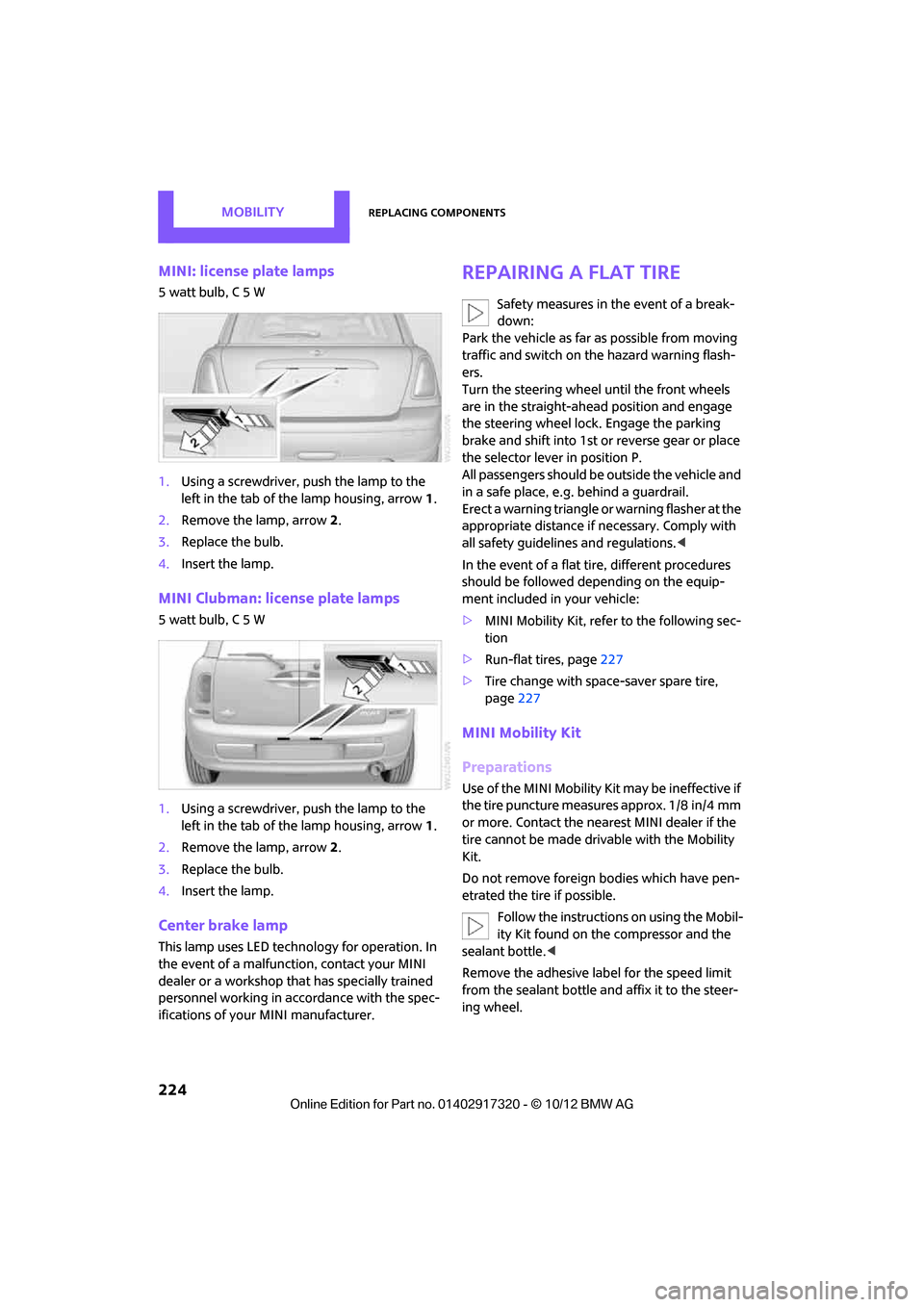
1.Using a screwdriver, push the lamp to the
left in the tab of the lamp housing, arrow 1.
2. Remove the lamp, arrow 2.
3. Replace the bulb.
4. Insert the lamp.
MINI Clubman: license plate lamps
5 watt bulb, C 5 W
1.Using a screwdriver, push the lamp to the
left in the tab of the lamp housing, arrow 1.
2. Remove the lamp, arrow 2.
3. Replace the bulb.
4. Insert the lamp.
Center brake lamp
This lamp uses LED techno logy for operation. In
the event of a malfunction, contact your MINI
dealer or a workshop th at has specially trained
personnel working in acco rdance with the spec-
ifications of your MINI manufacturer.
Repairing a flat tire
Safety measures in the event of a break-
down:
Park the vehicle as far as possible from moving
traffic and switch on the hazard warning flash-
ers.
Turn the steering wheel until the front wheels
are in the straight-ahead position and engage
the steering wheel lock. Engage the parking
brake and shift into 1st or reverse gear or place
the selector lever in position P.
All passengers should be outside the vehicle and
in a safe place, e.g. behind a guardrail.
Erect a warning triangle or warning flasher at the
appropriate distance if necessary. Comply with
all safety guidelines and regulations. <
In the event of a flat ti re, different procedures
should be followed depending on the equip-
ment included in your vehicle:
> MINI Mobility Kit, refer to the following sec-
tion
> Run-flat tires, page 227
> Tire change with space-saver spare tire,
page 227
MINI Mobility Kit
Preparations
Use of the MINI Mobility Kit may be ineffective if
the tire puncture measures approx. 1/8 in/4 mm
or more. Contact the nearest MINI dealer if the
tire cannot be made drivable with the Mobility
Kit.
Do not remove foreign bodies which have pen-
etrated the tire if possible.
Follow the instructions on using the Mobil-
ity Kit found on the compressor and the
sealant bottle. <
Remove the adhesive label for the speed limit
from the sealant bottle an d affix it to the steer-
ing wheel.
00320051004F004C00510048000300280047004C0057004C005200510003
Page 228 of 267
Replacing componentsMOBILITY
227
Changing wheels
Run-flat tires
Tire change for run-flat tires:
>Prepare for tire change, page 228
> Jack up vehicle, page 228
> Tighten lug bolts, page 229
Space-saver spare tire
Tire change with space-saver spare tire:
>Remove the space-saver spare tire,
page 228
> Prepare for tire change, page 228
> Jack up vehicle, page 228
> Mount space-saver spare tire, page 229
> Tighten lug bolts, page 229
> Drive with space-saver spare tire, page 228
MINI: removing the space-saver spare
tire
The screw connection of the space-saver spare
tire is under the floor mat in the cargo area, on
the base of the storage compartment for the tire
change set.
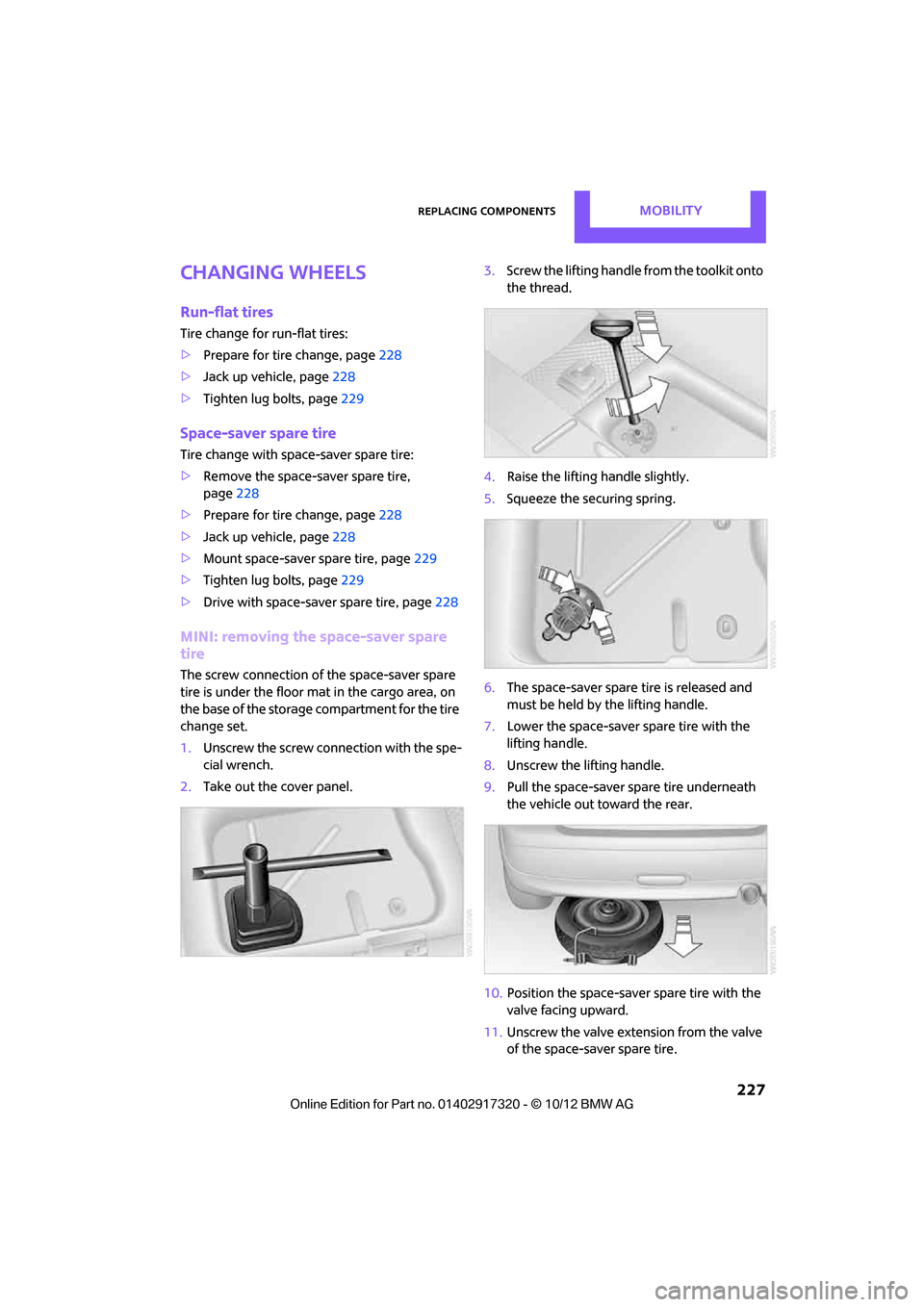
1.Unscrew the screw conn ection with the spe-
cial wrench.
2. Take out the cover panel. 3.
Screw the lifting handle from the toolkit onto
the thread.
4. Raise the lifting handle slightly.
5. Squeeze the securing spring.
6. The space-saver spare tire is released and
must be held by the lifting handle.
7. Lower the space-saver spare tire with the
lifting handle.
8. Unscrew the lifting handle.
9. Pull the space-saver spare tire underneath
the vehicle out toward the rear.
10. Position the space-saver spare tire with the
valve facing upward.
11. Unscrew the valve extension from the valve
of the space-saver spare tire.
00320051004F004C00510048000300280047004C0057004C005200510003
Page 229 of 267

MOBILITYReplacing components
228
12.Unscrew the dust cap from the extension
and place it on the valve of the space-saver
spare tire.
Due to its different dimensions, the dam-
aged wheel cannot be placed in the recess
for the space-saver spare tire. <
MINI Clubman: removing the space-
saver spare tire
The space-saver spare tire is located under the
tire change set in the cargo area.
1.Fold up the floor mat.
2. Unscrew the nut, arrow, and remove the
space-saver spare tire.
Driving with the space-saver spare tire
Drive cautiously and do not exceed a
speed of 50 mph/80 km/h. Changes may
occur in vehicle handling such as lower track sta-
bility during br aking, longer braking distances
and changes in self-steering properties when
close to the handling limit. These properties are
more noticeable with winter tires. <
Only one space-saver spare tire may be
mounted at one time. Mount a wheel and
tire of the original size as soon as possible, to
avoid any safety risks. <
Check the tire inflation pressure at the ear-
liest opportunity and correct it if neces-
sary. Replace the defective tire as soon as possi-
ble and have the new wheel/tire assembly
balanced. <
Preparing for a tire change
Observe the safety precautions regarding
flat tires on page 224.<
Additional safety measures when chang-
ing tires:
Only change the tire wh en parked on a surface
that is level, firm and not slippery.
The vehicle or the jack could slip sideways on
soft or slippery support surfaces, such as snow,
ice, flagstones, etc.
Do not use a wooden block or similar object as a
support base for the jack, as this would prevent
it from extending to its full support height and
reduce its load-carrying capacity.
Do not lie under the vehicle or start the engine
when the vehicle is supported by the jack; other-
wise, there is a risk of fatal injury. <
1. Place the foldable chock behind the front
wheel on the other side of the vehicle or in
front of the wheel if the vehicle is on an
incline. If the wheel is changed on a surface
with a more severe sl ope, take additional
precautions to secure the vehicle from roll-
ing.
2. Uncover the lug bolts if necessary.
3. Loosen the lug bolts by a half turn.
Jacking up the vehicle
The vehicle jack is designed for changing
wheels only. Do not attempt to raise
another vehicle model with it or to raise any load
of any kind. To do so could cause accidents and
personal injury. <
1. Place the jack at the jacking point closest to
the wheel.
00320051004F004C00510048000300280047004C0057004C005200510003
Page 264 of 267

Everything from A to ZREFERENCE
263
Telephone
– hands-free system163,175
– installation location, refer to Center armrest 95
– voice commands 175
Telephone receiving power, refer to Status
information 19
Temperature display
– setting the units 60
Temperature of coolant, refer to Coolant temperature 210
Temperature setting
– air conditioner 87
– automatic climate control 89
Tempomat, refer to Cruise
control 55
Tensioning straps, refer to Securing cargo 105
Text message 182
Third brake lamp, refer to Center brake lamp 224
Three-point safety belt 41
Tightening the lug bolts
– keys 217,218
– torque 229
Tightening torque, refer to Tightening lug bolts 229
Tire change set
– space-saver spare tire 217
Tire failure
– Flat Tire Monitor 73
– indicator/warning lamp 73
– MINI Mobility Kit 224
– run-flat tires 73
– space-saver spare tire 227
– Tire Pressure Monitor 74
Tire inflation pressure 195
– loss 73,74
– space-saver spare tire 195
Tire pressure monitoring, refer to Flat Tire Monitor 71
Tire Pressure Monitor TPM 74
– limitations of system 74
– resetting system 75
– warning lamp 75
Tire Quality Grading 203Tires
– age
204
– breaking in 100
– changing, refe r to Changing
wheels 227
– condition 204
– damage 204
– inflation pressure 195
– inflation pressure loss 75
– minimum tread depth 204
– new tires
205
– pressure moni toring,
refer to
Flat Tire Monitor 71
– pressure monitoring, refer to Tire Pressure Monitor
TPM 74
– puncture 73
– size 202
– wear indicators, refer to
Minimum tread depth 204
– winter tires 206
– with emergency operation
properties 205
Tires with emergency operation properties, refer to
Run-flat tires 205
Tires with safety features, refer
to Run-flat tires 205
TMC station, refer to Traffic information 125
Tone
– middle setting 134
Tone during audio playback
– adjusting 133
Toolkit 217
Tools, refer to Toolkit 217
Torque 238
– lug bolts 229
Tow bar 234
Tow fitting 233
– screw thread 233
Tow fittings for tow-starting
and towing away 233
Towing 233
– car with automatic
transmission 234
– methods 234 Tow rope
234
Tow-starting 233
TPM, refer to Tire Pressure Monitor 74
Track
– selecting on CD 143
Track width, refer to
Dimension 239
Traction control, refer to
– Dynamic Stability Control
DSC 69
Traffic bulletins
– categories 127
Traffic bulletins, filtering 127
Traffic congestion
– displaying traffic
information 125
– refer to Route, bypassing segments 122
Traffic information for navigation
– displaying 126
Traffic information in navigation
– screen display in the map
view 127
Trailer operation
– trailer loads and gross vehicle
weight 242
Transmission
– automatic transmission with Steptron ic
49
– manual transmission 49
– overriding selector lever lo ck
f
or automatic transmission
with Steptronic 51
Transporting children safely 44
Transport securing devices, refer to Securing cargo 105
Tread depth, refer to Minimum tire tread 204
Treble, refer to Tone
control 133
Trip computer 59
Trip-distance counter, refer to
Trip odometer 58
Triple turn signal activation 52
00320051004F004C00510048000300280047004C0057004C005200510003