inflation pressure MINI Clubman 2014 (Mini Connected) User Guide
[x] Cancel search | Manufacturer: MINI, Model Year: 2014, Model line: Clubman, Model: MINI Clubman 2014Pages: 276, PDF Size: 6.44 MB
Page 212 of 276
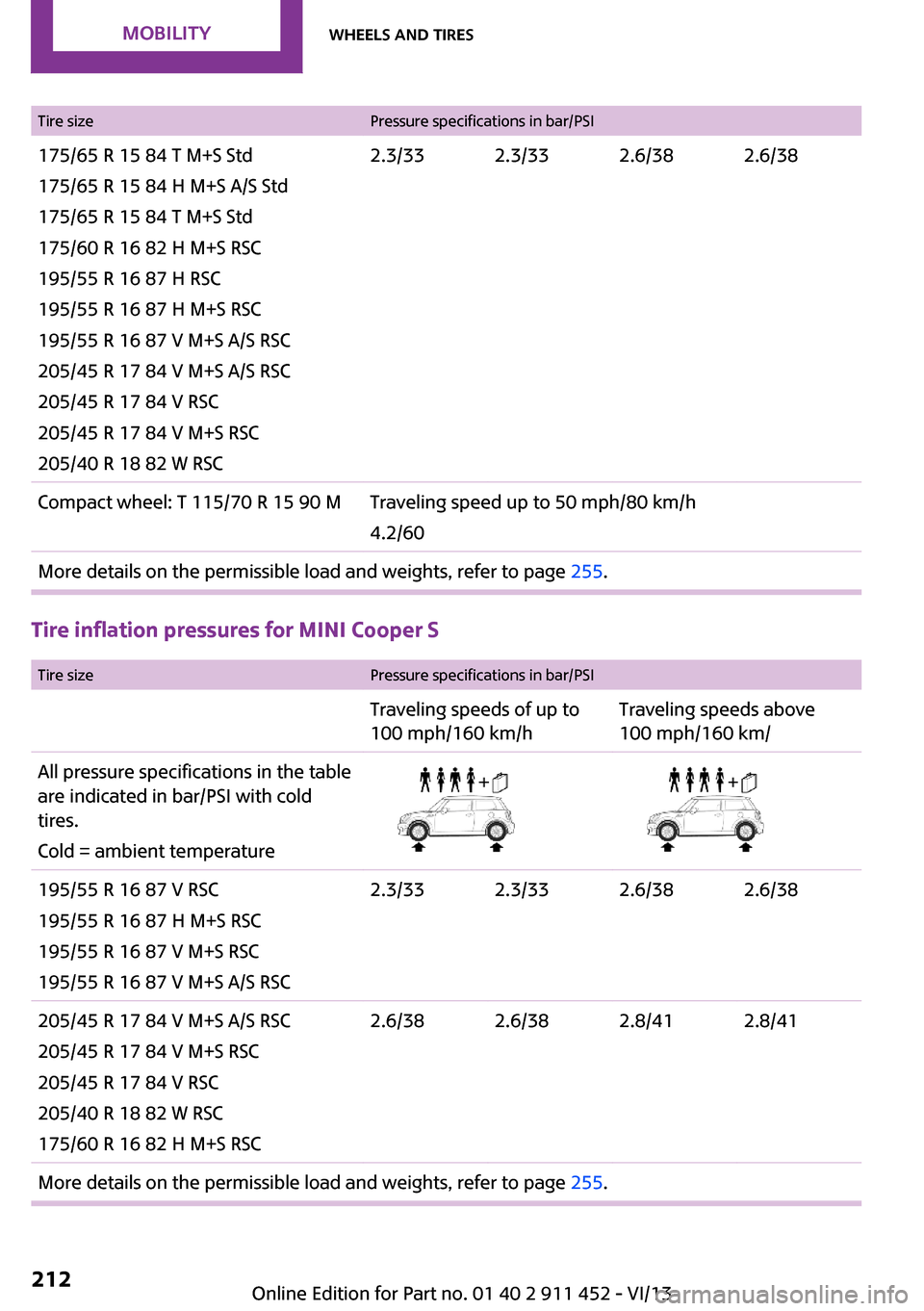
Tire sizePressure specifications in bar/PSI175/65 R 15 84 T M+S Std
175/65 R 15 84 H M+S A/S Std
175/65 R 15 84 T M+S Std
175/60 R 16 82 H M+S RSC
195/55 R 16 87 H RSC
195/55 R 16 87 H M+S RSC
195/55 R 16 87 V M+S A/S RSC
205/45 R 17 84 V M+S A/S RSC
205/45 R 17 84 V RSC
205/45 R 17 84 V M+S RSC
205/40 R 18 82 W RSC2.3/332.3/332.6/382.6/38Compact wheel: T 115/70 R 15 90 MTraveling speed up to 50 mph/80 km/h
4.2/60More details on the permissible load and weights, refer to page 255.
Tire inflation pressures for MINI Cooper S
Tire sizePressure specifications in bar/PSITraveling speeds of up to
100 mph/160 km/hTraveling speeds above
100 mph/160 km/All pressure specifications in the table are indicated in bar/PSI with cold
tires.
Cold = ambient temperature195/55 R 16 87 V RSC
195/55 R 16 87 H M+S RSC
195/55 R 16 87 V M+S RSC
195/55 R 16 87 V M+S A/S RSC2.3/332.3/332.6/382.6/38205/45 R 17 84 V M+S A/S RSC
205/45 R 17 84 V M+S RSC
205/45 R 17 84 V RSC
205/40 R 18 82 W RSC
175/60 R 16 82 H M+S RSC2.6/382.6/382.8/412.8/41More details on the permissible load and weights, refer to page 255.Seite 212MobilityWheels and tires212
Online Edition for Part no. 01 40 2 911 452 - VI/13
Page 213 of 276
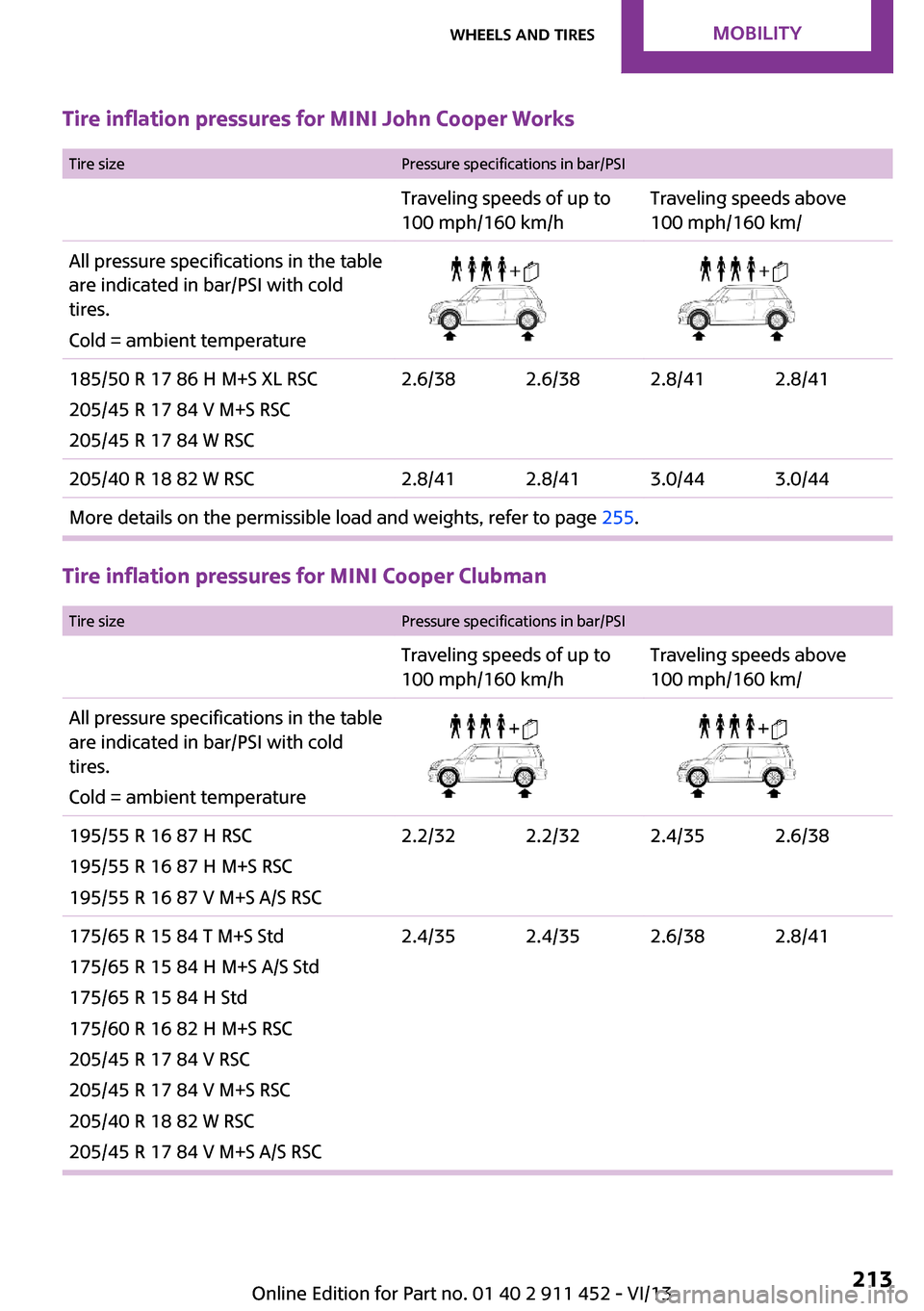
Tire inflation pressures for MINI John Cooper Works Tire sizePressure specifications in bar/PSITraveling speeds of up to
100 mph/160 km/hTraveling speeds above
100 mph/160 km/All pressure specifications in the table are indicated in bar/PSI with cold
tires.
Cold = ambient temperature185/50 R 17 86 H M+S XL RSC
205/45 R 17 84 V M+S RSC
205/45 R 17 84 W RSC2.6/382.6/382.8/412.8/41205/40 R 18 82 W RSC2.8/412.8/413.0/443.0/44More details on the permissible load and weights, refer to page 255.
Tire inflation pressures for MINI Cooper Clubman
Tire sizePressure specifications in bar/PSITraveling speeds of up to
100 mph/160 km/hTraveling speeds above
100 mph/160 km/All pressure specifications in the table are indicated in bar/PSI with cold
tires.
Cold = ambient temperature195/55 R 16 87 H RSC
195/55 R 16 87 H M+S RSC
195/55 R 16 87 V M+S A/S RSC2.2/322.2/322.4/352.6/38175/65 R 15 84 T M+S Std
175/65 R 15 84 H M+S A/S Std
175/65 R 15 84 H Std
175/60 R 16 82 H M+S RSC
205/45 R 17 84 V RSC
205/45 R 17 84 V M+S RSC
205/40 R 18 82 W RSC
205/45 R 17 84 V M+S A/S RSC2.4/352.4/352.6/382.8/41Seite 213Wheels and tiresMobility213
Online Edition for Part no. 01 40 2 911 452 - VI/13
Page 214 of 276
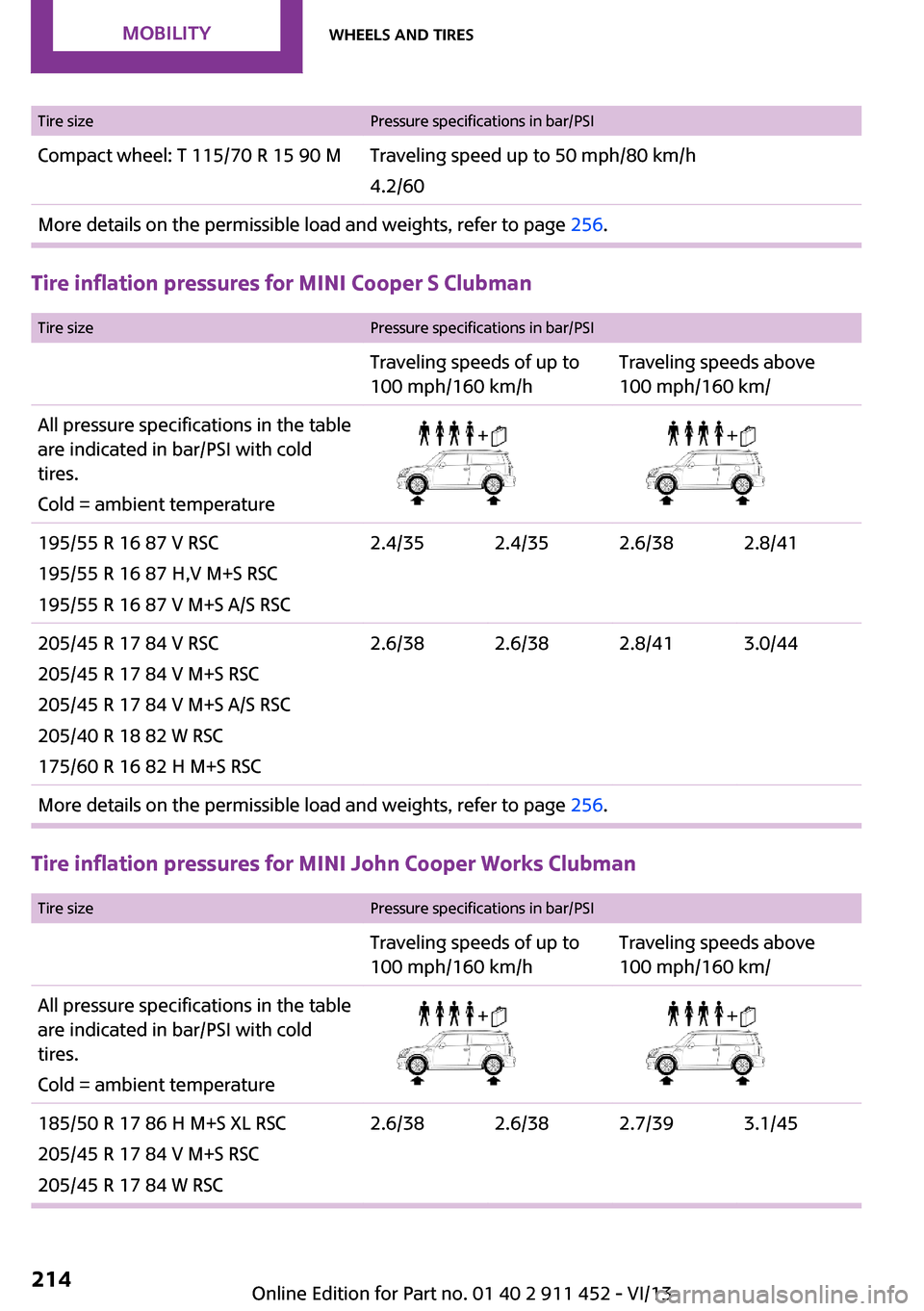
Tire sizePressure specifications in bar/PSICompact wheel: T 115/70 R 15 90 MTraveling speed up to 50 mph/80 km/h
4.2/60More details on the permissible load and weights, refer to page 256.
Tire inflation pressures for MINI Cooper S Clubman
Tire sizePressure specifications in bar/PSITraveling speeds of up to
100 mph/160 km/hTraveling speeds above
100 mph/160 km/All pressure specifications in the table are indicated in bar/PSI with cold
tires.
Cold = ambient temperature195/55 R 16 87 V RSC
195/55 R 16 87 H,V M+S RSC
195/55 R 16 87 V M+S A/S RSC2.4/352.4/352.6/382.8/41205/45 R 17 84 V RSC
205/45 R 17 84 V M+S RSC
205/45 R 17 84 V M+S A/S RSC
205/40 R 18 82 W RSC
175/60 R 16 82 H M+S RSC2.6/382.6/382.8/413.0/44More details on the permissible load and weights, refer to page 256.
Tire inflation pressures for MINI John Cooper Works Clubman
Tire sizePressure specifications in bar/PSITraveling speeds of up to
100 mph/160 km/hTraveling speeds above
100 mph/160 km/All pressure specifications in the table are indicated in bar/PSI with cold
tires.
Cold = ambient temperature185/50 R 17 86 H M+S XL RSC
205/45 R 17 84 V M+S RSC
205/45 R 17 84 W RSC2.6/382.6/382.7/393.1/45Seite 214MobilityWheels and tires214
Online Edition for Part no. 01 40 2 911 452 - VI/13
Page 218 of 276

Wheels with electronics for TPM Tire
Pressure Monitor
When mounting new tires or changing from
summer to winter tires or vice versa, only use
wheels with TPM electronics; otherwise, the
Tire Pressure Monitor will not be able to detect
a flat tire, refer to page 83. Your service center
will be glad to advise you.
Recommended tire brands
For each tire size, the manufacturer of your ve‐
hicle recommends certain tire brands. These
are indicated by the clearly visible marking on
the tire sidewall.
With proper use, these tires meet the highest
standards for safety and handling.
Retreaded tires
The manufacturer of your vehicle does not rec‐
ommend the use of retreaded tires.
Retreaded tires
Possibly substantial variations in the de‐
sign and age of the tire casing structures can
limit service life and have a negative impact on
road safety. ◀
Winter tires The manufacturer of your vehicle recommends
winter tires for winter roads or at temperatures
below +45 ℉/+7 ℃.
Although so-called all-season M+S tires do pro‐
vide better winter traction than summer tires,
they do not provide the same level of perform‐
ance as winter tires.
Maximum speed of winter tires
If the maximum speed of the vehicle is higher
than the permissible speed for the winter tires,
then display a corresponding sign in the field of
vision. You can obtain this sign from the tire
specialist or from your service center.
Maximum speed for winter tires
Do not exceed the maximum speed for
the winter tires; otherwise, tire damage and ac‐
cidents can occur. ◀
Run-flat tires When mounting new tires or changing fromsummer to winter tires or vice versa, use run-
flat tires for your own safety. Also, a compact
wheel is not available in case of a flat tire. Your
service center will be glad to advise you.
Rotating wheels between axles
Different wear patterns occur on the front and
rear axles, depending on the individual condi‐
tions of use.
To ensure even wear on the tires, the wheels
can be rotated between the axles. Your service
center will be glad to advise you.
After changing the tires, check the tire inflation
pressure and correct it if necessary.
Storage Store wheels and tires in a cool, dry place with
as little exposure to light as possible.
Always protect tires against all contact with oil,
grease and fuels.
Do not exceed the maximum tire inflation pres‐
sure indicated on the side wall of the tire.Seite 218MobilityWheels and tires218
Online Edition for Part no. 01 40 2 911 452 - VI/13
Page 220 of 276
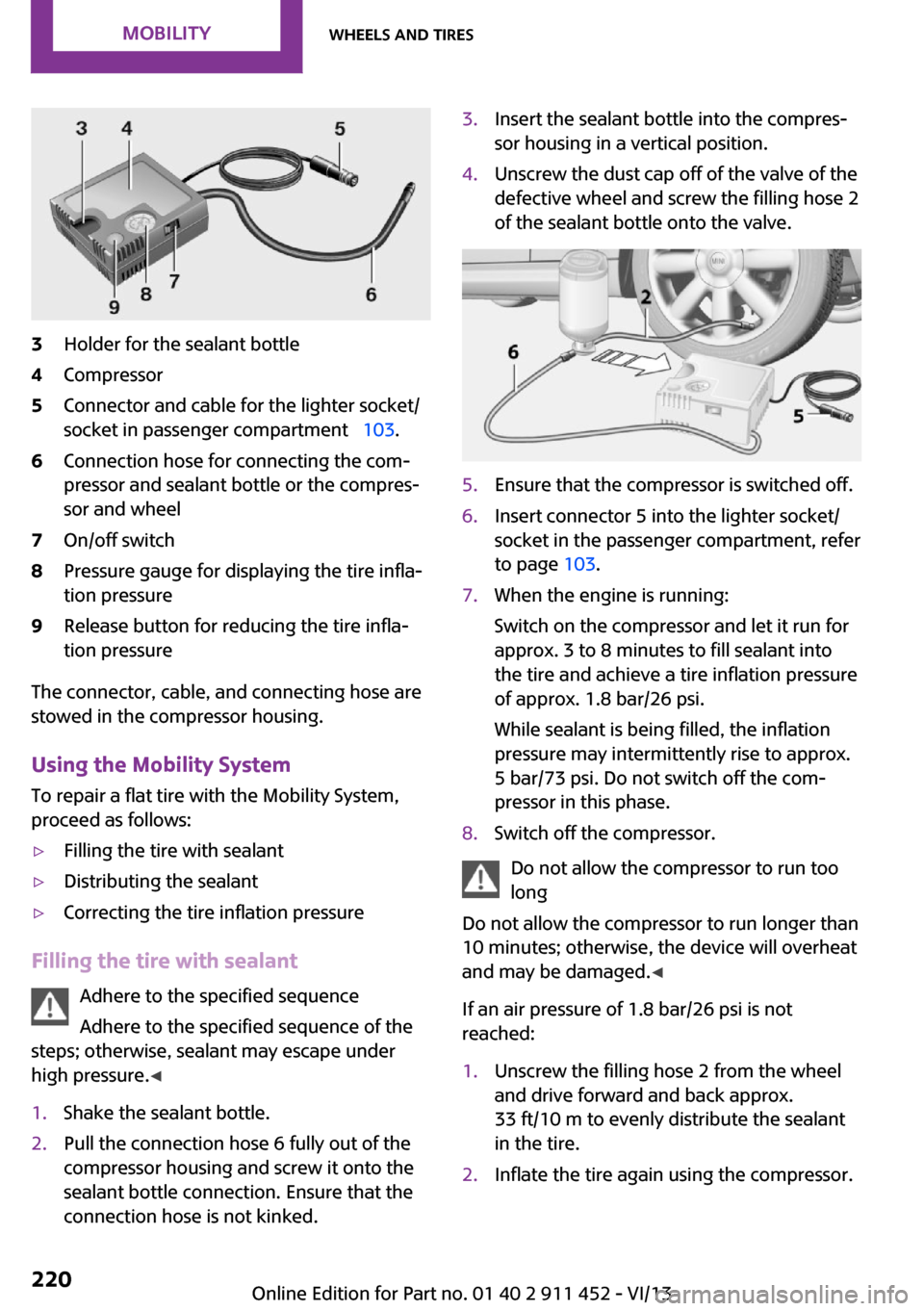
3Holder for the sealant bottle4Compressor5Connector and cable for the lighter socket/
socket in passenger compartment 103.6Connection hose for connecting the com‐
pressor and sealant bottle or the compres‐
sor and wheel7On/off switch8Pressure gauge for displaying the tire infla‐
tion pressure9Release button for reducing the tire infla‐
tion pressure
The connector, cable, and connecting hose are
stowed in the compressor housing.
Using the Mobility System
To repair a flat tire with the Mobility System,
proceed as follows:
▷Filling the tire with sealant▷Distributing the sealant▷Correcting the tire inflation pressure
Filling the tire with sealant
Adhere to the specified sequence
Adhere to the specified sequence of the
steps; otherwise, sealant may escape under
high pressure. ◀
1.Shake the sealant bottle.2.Pull the connection hose 6 fully out of the
compressor housing and screw it onto the
sealant bottle connection. Ensure that the
connection hose is not kinked.3.Insert the sealant bottle into the compres‐
sor housing in a vertical position.4.Unscrew the dust cap off of the valve of the
defective wheel and screw the filling hose 2
of the sealant bottle onto the valve.5.Ensure that the compressor is switched off.6.Insert connector 5 into the lighter socket/
socket in the passenger compartment, refer
to page 103.7.When the engine is running:
Switch on the compressor and let it run for
approx. 3 to 8 minutes to fill sealant into
the tire and achieve a tire inflation pressure
of approx. 1.8 bar/26 psi.
While sealant is being filled, the inflation
pressure may intermittently rise to approx.
5 bar/73 psi. Do not switch off the com‐
pressor in this phase.8.Switch off the compressor.
Do not allow the compressor to run too
long
Do not allow the compressor to run longer than
10 minutes; otherwise, the device will overheat
and may be damaged. ◀
If an air pressure of 1.8 bar/26 psi is not
reached:
1.Unscrew the filling hose 2 from the wheel
and drive forward and back approx.
33 ft/10 m to evenly distribute the sealant
in the tire.2.Inflate the tire again using the compressor.Seite 220MobilityWheels and tires220
Online Edition for Part no. 01 40 2 911 452 - VI/13
Page 221 of 276
If the inflation pressure of 1.8 bar/26 psi is still
not reached, the tire is too heavily damaged.
Contact the nearest service center.
Stowing the Mobility System1.Unscrew the filling hose 2 of the sealant
bottle from the wheel.2.Unscrew the compressor connection hose 6
from the sealant bottle.3.Connect the filling hose 2 of the sealant
bottle with the free connector on the seal‐
ant bottle.
This prevents left-over sealant from escap‐
ing from the bottle.4.Wrap the empty sealant bottle in suitable
material to avoid dirtying the cargo area.5.Stow the Mobility System back in the vehi‐
cle.
Distributing the sealant
Drive approx. 3.1 miles/5 km to evenly distrib‐
ute the sealant.
Do not exceed a speed of 50 mph/80 km/h. If
possible, do not drop below a speed of
10 mph/20 km/h.
Correcting the tire inflation pressure
1.After driving approx. 3.1 miles/5 km, or
about 10 minutes, stop in a suitable loca‐
tion.2.Screw the connection hose 6 of the com‐
pressor directly onto the tire valve.3.Insert the connector 5 into the power
socket in the passenger compartment.4.Correct the tire inflation pressure to
1.8 bar/26 psi. When the engine is running:▷To increase the inflation pressure:
switch on the compressor. To check the
currently set inflation pressure, switch
off the compressor.▷To reduce the inflation pressure: press
the release button 9.Do not allow the compressor to run too
long
Do not allow the compressor to run longer than
10 minutes; otherwise, the device will overheat
and may be damaged. ◀
If the inflation pressure is not maintained, take
the vehicle on another drive, distributing the
sealant, refer to page 221. Then repeat steps
1 to 4 once.
If the inflation pressure of 1.8 bar/26 psi is still
not reached, the tire is too heavily damaged.
Contact the nearest service center.
Continuing the trip Note the maximum speed
Do not exceed the maximum speed of
50 mph/80 km/h; otherwise, accidents can oc‐
cur. ◀
Replace the defective tire as soon as possible
and have the wheel balanced.
Have the Mobility System refilled.
Snow chains
Only certain fine-link snow chains have been
tested by MINI, classified as safe for use, and
recommended. Consult your service center for more information.
Use only in pairs on the front wheels, equipped
with tires of the following size:▷175/65 R 15 M+S▷175/60 R 16 M+S
John Cooper Works:
▷185/50 R 17 86 H M+S XL RSC
Observe the manufacturer's instructions when
mounting snow chains. Do not exceed a speed
of 30 mph or 50 km/h when using snow chains.
Do not initialize the Flat Tire Monitor if snow
chains are mounted; otherwise, the instrument
might issue an incorrect reading. When driving
with snow chains, it may be useful to tempora‐
Seite 221Wheels and tiresMobility221
Online Edition for Part no. 01 40 2 911 452 - VI/13
Page 239 of 276

11.Unscrew the valve extension from the valve
of the compact wheel.12.Unscrew the dust cap from the extension
and attach it to the valve of the compact
wheel.
The defective wheel cannot be stowed in the
compact wheel holder because it has a differ‐
ent size.
MINI Clubman: removing the compact
wheel
The compact wheel is located under the wheel
change set in the cargo area.
1.Fold up the floor mat.2.Unscrew the nut, arrow, and take out the
compact wheel.
Driving with compact wheel
Do not exceed a speed of
50 mph/80 km/h.
Drive conservatively and do not exceed a speed
of 50 mph/80 km/h. Otherwise, changes in the
driving characteristics could result, for example
reduced track stability on braking, extended
braking distance, and altered self-steering
characteristics in the limit range. In conjunction
with winter tires, these characteristics are more
pronounced. ◀
Only mount one compact wheel
Only one compact wheel may be
mounted. Restore the wheels and tires to their
original size as quickly as possible. Failure to do
so is a safety risk. ◀
Check the tire inflation pressure at the next op‐
portunity and correct it if necessary. Replace
the defective tire as soon as possible and have
the new wheel balanced.
Preparing wheel change
Observe the safety precautions regarding flat
tires, refer to page 219.
Additional safety precautions in the event
of a wheel change
Change the wheel only on a level, firm surface
which is not slippery.
The vehicle or the jack could slip to the side if
you attempt to raise the vehicle on a soft or
slippery surface, snow, ice, tiles, etc. Do not use
a wooden block or similar object as a support
base for the jack, as this would prevent it from
extending to its full support height and reduce
its load-carrying capacity.
To avoid serious or fatal injury: never lie under
the vehicle, and never start the engine while it
is supported by the jack. ◀1.Place the folding wheel chock behind the
front wheel of the other vehicle side; if the
vehicle is on an incline, place it in front of
this wheel. If the vehicle is parked on a
steep incline, additionally secure the vehi‐
cle against rolling.2.Expose the lug bolts if necessary.3.Loosen the lug bolts a half turn.
Jacking up vehicle
Seite 239Replacing componentsMobility239
Online Edition for Part no. 01 40 2 911 452 - VI/13
Page 268 of 276
Glass sunroof, electrical– Convenient operation 34– Opening, closing 42– Raising 42– Remote control 34
GPS navigation, refer to Navi‐
gation system 124
H Halogen headlamps, bulb re‐ placement 233
Hand car wash, care 249
Hand-held transmitter, alter‐ nating code 100
Hands-free microphone 18
Hazard warning system 18
HD Radio 149
Head airbags 78
Headlamp control, auto‐ matic 74
Headlamp courtesy delay fea‐ ture 75
Headlamp flasher 57, 75
Headlamp flasher, indicator lamp 17
Headlamps 74
Headlamps, care 249
Headlamps, cleaning, washer fluid 60
Head restraints 47
Head restraints
– Adjusting the height 47– Removing 47
Heatable
– Windshield 98
Heating
– Rear window 95, 98– Seats 46– Windshield 98
Height adjustment
– Seats 44
High beams 75
High beams, bulb replace‐ ment 233
High beams, indicator lamp 17
Hill drive-off assistant 90
Hills 114
Holder for remote control, re‐ fer to Ignition lock 54
Homepage 6
Hood 223
Hood, closing 224
Hood, opening 224
Hood, unlocking 224
Horn 14
House number, entering for navigation 127
Hydraulic brake assistant 88
I
Ice warning, refer to External temperature warning 64
Icy roads, refer to External temperature warning 64
Identification marks, run-flat tires 219
Identification marks, tires 215
iDrive– Changing settings 69– Changing the date and
time 68– Changing the language 69– Changing the units of meas‐
ure and display format 68– Setting the brightness 70
Ignition 54
Ignition key position 1, refer to Radio ready state 54
Ignition key position 2, refer to Ignition on 54
Ignition key, refer to Remote control with integrated
key 32
Ignition lock 54
Ignition, switched off 55
Ignition, switched on 54
Indicator and warning lamps 17
Indicator and warning lamps
– Tire Pressure Monitor
TPM 84Individual air distribution 95
Inflation pressure monitor, re‐ fer to Flat Tire Monitor 80
Inflation pressure monitor, re‐ fer to Tire Pressure Monitor
TPM 83
Inflation pressure, refer to Tire inflation pressure 210
Information on the navigation data 124
Initializing– Compass, refer to Calibrat‐
ing 102– Glass sunroof, electrical 42– Refer to Setting the time and
date 68
Initializing, Flat Tire Monitor
FTM 81
Instrument cluster, refer to Displays 16
Instrument lighting 76
Instruments, refer to Cock‐ pit 14
Integrated key 32
Interactive map 131
Interior equipment 99
Interior lamps 77
Interior lamps
– Remote control 35
Interior mirror 48
Interior rearview mirror, com‐ pass 101
Interior temperature, setting
– Air conditioner 94– Automatic climate con‐
trol 96
Internet page 6
Intersection, entering for navi‐ gation 127
J
Jump-starting 244
Seite 268ReferenceEverything from A to Z268
Online Edition for Part no. 01 40 2 911 452 - VI/13
Page 271 of 276

Range 66
RDS 149
Reading out loud 198
Rear door, refer to Club‐ door 37
Rear doors, refer to Split door 37
Rear fog lamp 76
Rear fog lamp, bulb replace‐ ment 235
Rear fog lamps, indicator lamp 17
Rear lamps, refer to Tail lamps 235
Rear swing doors, refer to Split door 37
Rearview mirror, refer to Mir‐ rors 48
Rear window defroster 95, 98
Rear window, washing 59
Rear window wiper 59
Recirculated air mode 95, 97
Recommended tire brands 218
Redialing 176, 188
Releasing, refer to Unlock‐ ing 39
Remaining range for service, refer to Service require‐
ments 70
Remaining range, refer to Range 66
Reminders 198
Remote control– Battery replacement 40– Comfort Access 38– Malfunctions 35, 40– Split door 35
Remote control, removing
from the ignition lock 54
Remote control, service data 228
Remote control, universal 99
Remote inquiry 175, 187
Replacement remote con‐ trol 32
Replacing wheels/tires 217
Reporting safety defects 9
Reserve warning, refer to Fuel gauge 65
Reservoir for washer fluid, re‐ fer to Washer fluid reser‐
voir 60
Restraining systems– Refer to Safety belts 46
Restraint systems for chil‐
dren 50
Retreaded tires 218
Reverse gear, manual trans‐ mission 61
Road, avoiding 135
Road detour 135
Roadside Assistance 244
Roadside parking lamp, bulb replacement 234
Roadside parking lamps 75
RON gasoline quality 208
RON, refer to Fuel quality 208
Route 136
Route criteria, route 135
Route, displaying 136
Route section, bypassing 136
RPM, refer to Engine data 254
Rubber seals, care 250
Run-flat tires 219
Run-flat tires
– Flat tire 82
Run-flat tires, tire inflation
pressure 210
Running lights, refer to Park‐ ing lamps/low beams 74
S Safe braking 114
Safety 7
Safety belts 46
Safety belts
– Damage 47
Safety belts, care 251
Safety belts, indicator/warning lamp 47
Safety belts, reminder 47
Safety systems– Safety belts 46
Safety systems, airbags 78
Satellite radio 150
Saving fuel 120
Scale, changing during navi‐ gation 139
Screen, see Control Display 20
Seat adjustment
– Manual 44
Seat belts
– Refer to Safety belts 46
Seat heating 46
Seats
– Adjusting 44– Heating 46– Sitting safely 44
Selector lever, automatic
transmission with Step‐
tronic 61
Selector lever lock, overrid‐ ing 63
Selector lever lock, refer to Changing selector lever posi‐
tions, Shiftlock 61
Selector lever positions, auto‐ matic transmission with
Steptronic 61
Service and warranty 8
Service data in the remote control 228
Service interval display, refer to Condition Based Service
CBS 228
Service interval display, refer to Service requirements 70
Service requirements 70
Service requirements, CBS Condition Based Service 228
Settings
– Changing on the Control Dis‐
play 69– Language 69
Settings and information 67
Settings, configuring, refer to Personal Profile 32
Seite 271Everything from A to ZReference271
Online Edition for Part no. 01 40 2 911 452 - VI/13
Page 272 of 276
Setting the clock, 12h/24h for‐mat 68
Shifting– Automatic transmission with
Steptronic 62
Shifting, manual transmis‐
sion 60
Shift lever
– Automatic transmission with
Steptronic 61
Shift paddles on the steering
wheel 62
Short commands, voice acti‐ vation 258
Side airbags 78
Side door, rear, refer to Club‐ door 37
Side windows, refer to Win‐ dows 42
Sliding/tilting sunroof
– Refer to Glass sunroof, elec‐
trical 41
Slot for remote control 54
Snap-in adapter, mobile phone 190
Socket, OBD Onboard Diagno‐ sis 229
Software applications, iPhone 200
Software part num‐ ber 170, 180
Software update 166
Special destinations, naviga‐ tion 130
Special equipment, series equipment 6
Speed, average 66
Speed limit 87
Speed limit
– Setting 87
Speedometer 16
Speed, with winter tires 218
Split door– Opening/closing 37– Opening from the out‐
side 37– Unlocking with remote con‐
trol 35
Spoken instructions, naviga‐
tion 137
Sport button 90
Sport program, automatic transmission with Step‐
tronic 62
Stability control systems 88
Start/Stop button 54
Start/Stop button, starting the engine 55
Start/Stop button, switching off the engine 56
Starting the engine 55
Start problems, refer to Jump- starting 244
State/province, selecting for navigation 126
Stations, stored 154
Station, storing 149
Status information, onboard monitor 23
Steering wheel 49
Steering wheel
– Shift paddles 62
Steering wheel, adjusting 49
Steering wheel lock 54
Stopping, engine 56
Storage, tires 218
Storing the vehicle 251
Street, entering for naviga‐ tion 127
Summer tires, refer to Wheels and tires 210
Summer tires, tread 216
Swing doors, refer to Split door 37
Switches, refer to Cockpit 14
Switching off, engine 56
Switching off, vehicle 56
Symbols 6
T
Tachometer 65
Tailgate 37
Tailgate– Comfort Access 39
Tailgate, see Split door 35
Tail lamps 235
Tank gauge, refer to Fuel gauge 65
Tasks 197
Technical changes, refer to Safety 7
Technical data 254
Telephone 170, 180
Telephone, adjusting the vol‐ ume 173, 185
Temperature
– Air conditioner 95– Automatic climate con‐
trol 97– Changing the unit of meas‐
ure 68
Temperature, coolant, refer to
Coolant temperature 65
Temperature display
– External temperature 64– External temperature warn‐
ing 64– Setting the unit 68
Temperature warning 64
Text messages 195
Theft alarm system, refer to Alarm system 41
Time
– Setting the time 68– Setting the time zone 69
Tire age 217
Tire identification marks 215
Tire inflation pressure 210
Tire inflation pressure
– Pressure loss 82, 83
Tire pressure monitor, refer to
Flat Tire Monitor 80
Tire Pressure Monitor TPM
– System limits 83– System reset 84– Warning lamp 84Seite 272ReferenceEverything from A to Z272
Online Edition for Part no. 01 40 2 911 452 - VI/13