gas MINI Clubman 2014 Owner's Manual (Mini Connected)
[x] Cancel search | Manufacturer: MINI, Model Year: 2014, Model line: Clubman, Model: MINI Clubman 2014Pages: 276, PDF Size: 6.44 MB
Page 55 of 276

To save battery power when the engine is off,
switch off the ignition and any unnecessary
electronic systems/power consumers.
Radio ready state and ignition off All indicator and warning lamps in the displays
go out.
The ignition switches off automatically when
the driver's door is opened. Pressing the Start/
Stop button again switches the ignition back
on.
For example, the ignition is not switched off in
the following situations:▷Depress the clutch or brake pedal.▷The low beams are switched on
Starting the engine
General information Enclosed areas
Do not let the engine run in enclosed
areas; otherwise, breathing of exhaust fumes
may lead to loss of consciousness and death.
The exhaust gases contain carbon monoxide,
an odorless and colorless but highly toxic gas. ◀
Unattended vehicle
Do not leave the car unattended with the
engine running; otherwise, it presents a poten‐
tial source of danger.
Before leaving the car with the engine running,
shift to neutral or engage transmission posi‐
tion P and set the handbrake firmly; otherwise,
the vehicle may begin to roll. ◀
Frequent starting in quick succession
Avoid repeated futile attempts at starting
the car and avoid starting the car frequently in
quick succession. Otherwise, the fuel is not
burned or is inadequately burned, and there is
the danger of overheating and damaging the
catalytic converter. ◀
Do not wait for the engine to warm-up while
the vehicle remains stationary; start driving
right away, but at moderate engine speeds.
Do not depress the accelerator when starting
the engine.
Starting the engine
Manual transmission
Remote control in the ignition lock or, with
Comfort Access, inside the vehicle, refer to
page 38.
1.Depress the brake pedal.2.Depress the clutch pedal.3.Press the Start/Stop button.
The ignition is activated automatically for a cer‐
tain time and is stopped as soon as the engine
starts.
Automatic transmission
Remote control in the ignition lock or, with
Comfort Access, inside the vehicle, refer to
page 38.
1.Depress the brake pedal.2.Move the selector lever to position P or N.3.Press the Start/Stop button.
The ignition is activated automatically for a cer‐
tain time and is stopped as soon as the engine
starts.
Seite 55DrivingControls55
Online Edition for Part no. 01 40 2 911 452 - VI/13
Page 96 of 276

Microfilter
The microfilter traps dust and pollen. The mi‐
crofilter is changed by the service center during
routine maintenance work.
Microfilter/activated-charcoal filter
The microfilter traps dust and pollen. The acti‐
vated-charcoal filter provides additional protec‐tion by filtering gaseous pollutants from the
outside air. The service center replaces this
combined filter during routine maintenance.
Automatic climate control
1Air volume, manual2AUTO program3Recirculated air mode4Maximum cooling5Manual air distribution6Temperature7Defrosting windows and removing conden‐
sation8Cooling function9Rear window defroster10Windshield heatingComfortable interior climate
The AUTO program offers the optimum air dis‐tribution and air volume for virtually all condi‐
tions, refer to AUTO program below. Select a
comfortable interior temperature only.The following sections contain more detailed
information on the available setting options.
Most of these settings are stored for the remote
control in use, Personal Profile settings, refer to
page 33.Seite 96ControlsClimate96
Online Edition for Part no. 01 40 2 911 452 - VI/13
Page 98 of 276

When switching between different temperature
settings in rapid succession, the automatic cli‐
mate control does not have sufficient time to
adjust the set temperature.
Rear window defroster The rear window defroster
switches off automatically after a
certain period of time.
Defrosting and defogging windows Quickly removes ice and con‐
densation from the windshield
and front side windows. For this
purpose, also switch on the cool‐
ing function.
The windshield heating switches on automati‐
cally.
Windshield heating The windshield heating switches
off automatically after some
time.
Cooling function The cooling function cools and
dehumidifies the incoming air
before reheating it as required,
according to the temperature
setting. The passenger compart‐
ment can only be cooled with the engine run‐ ning.
The cooling function helps to prevent conden‐
sation on the windows or to remove it quickly.
Depending on the weather, the windshield may
fog up briefly when the engine is started. Recir‐
culated air mode is switched on automatically if
necessary.The cooling function is switched on automati‐
cally when the AUTO button is pressed.
Microfilter/activated-charcoal filter
The microfilter traps dust and pollen. The acti‐
vated-charcoal filter provides additional protec‐
tion by filtering gaseous pollutants from the
outside air. The service center replaces this
combined filter during routine maintenance.
Ventilation1Knob for continuous opening and closing2Nozzle for direction of air flow
Opening/closingTurn the knob.
Direction of air flow Pivot the entire nozzle.
Seite 98ControlsClimate98
Online Edition for Part no. 01 40 2 911 452 - VI/13
Page 112 of 276

Things to remember when drivingVehicle equipmentThis chapter describes all series equipment as
well as country-specific and special equipment
offered for this model series.Therefore, it also
describes equipment that may not be found in
your vehicle, for instance due to the selected
special equipment or the country version. This
also applies to safety-related functions and sys‐
tems.
Breaking-in period General information Moving parts need to be broken in to adjust to
each other.
The following instructions will help achieve a
long vehicle life and good economy.
Engine and differential
Always obey all official speed limits.
Up to 1,200 miles/2,000 kmDrive at various engine and vehicle speeds, but
do not exceed:▷For a gasoline engine, 4,500 rpm and
100 mph/160 km/h.
Avoid full-throttle operation and use of the
transmission's kickdown mode for the initial
miles.
From 1,200 miles/2,000 km
The engine and vehicle speed can gradually be
increased.
Tires Due to technical factors associated with their
manufacture, tires do not achieve their full trac‐
tion potential until after an initial breaking-in
period.
Drive conservatively for the first
200 miles/300 km.
Brake system Brakes require an initial break-in period of ap‐
prox. 300 miles/500 km to achieve optimized
contact and wear patterns between brake pads
and discs. Drive cautiously during this break-in
period.
Clutch
The clutch requires an initial break-in period of
approx. 300 miles/500 km to function at an op‐ timal level.
During this break-in period, engage the clutch
gently.
Following part replacementThe same breaking in procedures should be ob‐
served if any of the components mentioned
above have to be renewed in the course of the
vehicle's operating life.
General driving notes
Ground clearance Ensure adequate ground clearance
Ensure adequate ground clearance, e.g.,
when driving into underground garages, when
driving over curbs, or when driving in winter;
otherwise, damage may occur to the vehicle. ◀Seite 112Driving tipsThings to remember when driving112
Online Edition for Part no. 01 40 2 911 452 - VI/13
Page 130 of 276
Editing the destination
Destinations can be edited, for example to
change the house number of an existing entry.1."Navigation"2."Last destinations"3.Highlight the destination.4.Open "Options".5."Edit destination"
Deleting the last destinations
1."Navigation"2."Last destinations"3.Highlight the destination.4.Open "Options".5."Delete entry" or "Delete all last
destinations"
Special destinations
General information
Even with the latest navigation data, informa‐
tion on individual special destinations may
have changed; for example, gas stations might
not be in operation.
Opening the search for specialdestinations
Selection of special destinations, such as hotels
or tourist attractions.
1."Navigation"2."Points of Interest"3.Select the search function.
A-Z search
1."A-Z search"2."Town/City"3.Select or enter the town/city.4."Category"5.Select the category.6."Category details"
For some special destinations, it may be
possible to select multiple category details.
Move the MINI joystick to the left to leave
the category details.7."Keyword"8.Enter the keyword.
A list of the special destinations is dis‐
played.9.Select a special destination.
Details are displayed.
If multiple details are stored, you can leaf
through the pages.
If a phone number is available, a connec‐
tion can be established if necessary.10. Select the symbol.11."Start guidance" or "Add as another
destination"
Add a destination as a further destination,
refer to page 134.
Category search
1."Category search"2."Search destination"3.Select or enter the town/city.4."Category"5.Select the category.6."Category details"
For some special destinations, it may be
possible to select multiple category details.
Move the MINI joystick to the left to leave
the category details.7."Start search"
A list of the special destinations is dis‐
played.8.Select a special destination.
Details are displayed.
If multiple details are stored, you can leaf
through the pages.Seite 130NavigationDestination entry130
Online Edition for Part no. 01 40 2 911 452 - VI/13
Page 137 of 276

3."New route for"4.Turn the MINI joystick. Enter the number of
kilometers within which you would like to
return to the original route.5.Press the MINI joystick.
Resuming the original route
If the route section should no longer be by‐
passed:
1."Navigation"2."Route information"3."New route for:"4."Remove blocking"
Gas station recommenda‐
tion
The remaining range is calculated and gas sta‐
tions along the route are displayed if needed.
Even with the latest navigation data, informa‐
tion on individual special destinations may
have changed; for example, gas stations might
not be in operation.
1."Navigation"2."Route information"3."Recommended refuel"
A list of the gas stations is displayed.4.Highlight a gas station.5.Select the gas station.6. Select the symbol.7."Start guidance": destination guidance to
the selected gas station is started.
"Add as another destination": the gas sta‐
tion is added to the route.
Destination guidance
through voice instruc‐
tions
Switching spoken instructions on/off The spoken instructions can be switched on or
off during destination guidance.
The setting is stored for the remote control cur‐
rently in use.
1."Navigation"2."Map"3. Select the symbol.SymbolFunction The spoken instructions are switched
on. Spoken instructions are switched off.
Repeating a spoken instruction
1."Navigation"2."Map"3. Highlight the symbol.4.Press the MINI joystick twice.
Volume of spoken instructions
Turn the volume knob while giving an instruc‐
tion until the desired volume is set.
Seite 137Destination guidanceNavigation137
Online Edition for Part no. 01 40 2 911 452 - VI/13
Page 207 of 276
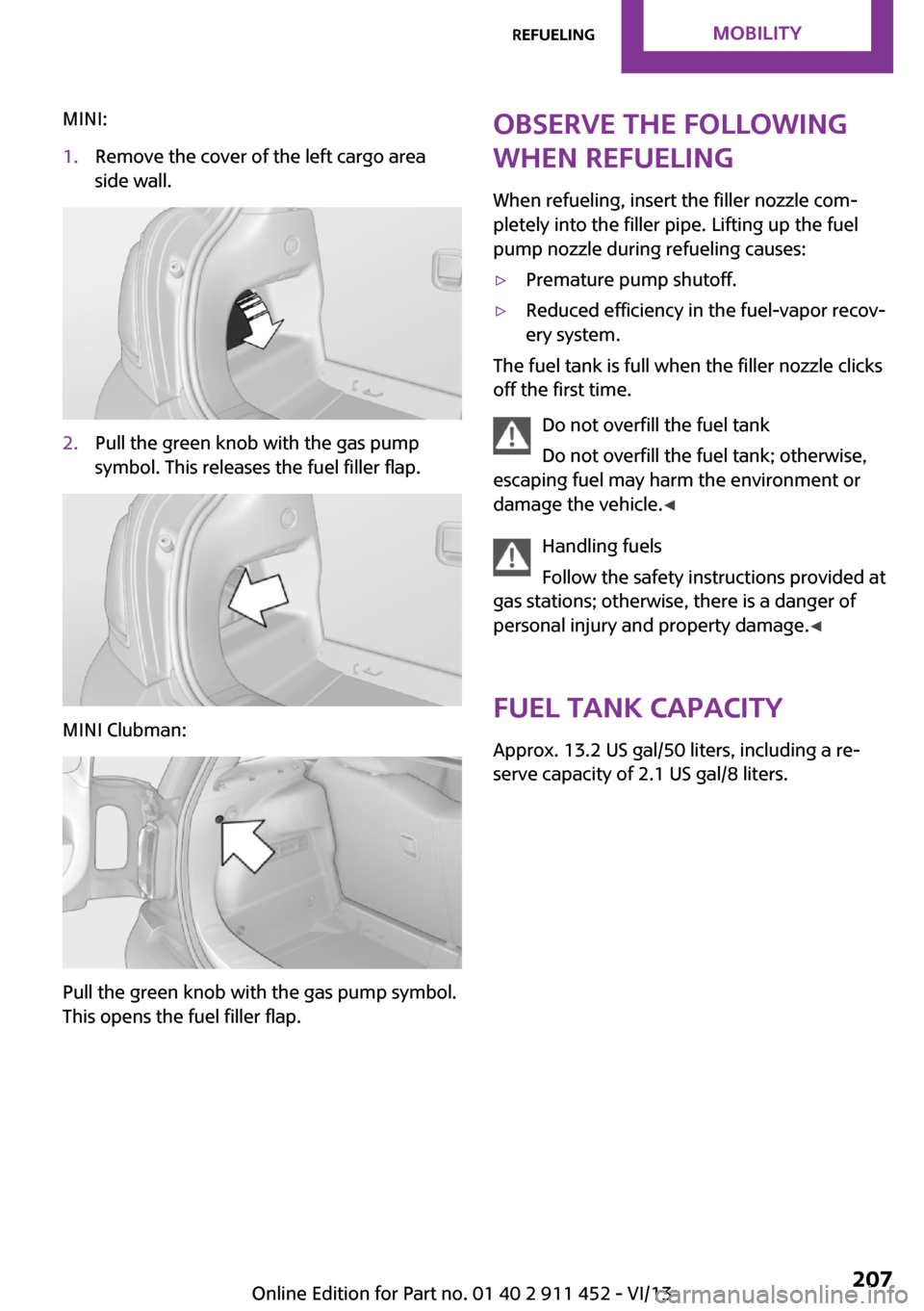
MINI:1.Remove the cover of the left cargo area
side wall.2.Pull the green knob with the gas pump
symbol. This releases the fuel filler flap.
MINI Clubman:
Pull the green knob with the gas pump symbol.
This opens the fuel filler flap.
Observe the following
when refueling
When refueling, insert the filler nozzle com‐
pletely into the filler pipe. Lifting up the fuel
pump nozzle during refueling causes:▷Premature pump shutoff.▷Reduced efficiency in the fuel-vapor recov‐
ery system.
The fuel tank is full when the filler nozzle clicks
off the first time.
Do not overfill the fuel tank
Do not overfill the fuel tank; otherwise,
escaping fuel may harm the environment or
damage the vehicle. ◀
Handling fuels
Follow the safety instructions provided at
gas stations; otherwise, there is a danger of
personal injury and property damage. ◀
Fuel tank capacity Approx. 13.2 US gal/50 liters, including a re‐
serve capacity of 2.1 US gal/8 liters.
Seite 207RefuelingMobility207
Online Edition for Part no. 01 40 2 911 452 - VI/13
Page 208 of 276

FuelVehicle equipmentThis chapter describes all series equipment as
well as country-specific and special equipment
offered for this model series.Therefore, it also
describes equipment that may not be found in
your vehicle, for instance due to the selected
special equipment or the country version. This
also applies to safety-related functions and sys‐
tems.
Fuel recommendation GasolineFor the best fuel economy, the gasoline should
be sulfur-free or very low in sulfur content.
Do not use fuels that are labeled at the fuel
pump as containing metals.
Only refuel with lead-free gasoline with‐
out metal additives
Do not refuel with leaded gasoline or gasoline
with metal additives, e. g., manganese or iron;
otherwise, the catalytic converter and other components will be permanently damaged. ◀
Fuels with a maximum ethanol content of
10 %, i.e., E10, may be used for refueling.
The ethanol should fulfill the following quality standards:
US: ASTM 4806–xx
CAN: CGSB-3.511–xx
xx: always adhere to the currently applicable
standard.
Do not refuel with ethanol E85
Do not refuel with E85, i.e., fuel with an
ethanol content of 85 %, or with Flex Fuel, as
this would damage the engine and fuel supply system. ◀The engine is knock controlled. Therefore, you
can refuel with different gasoline qualities.
Gasoline quality
The manufacturer of your MINI recommends:▷AKI 91.▷John Cooper Works AKI 93.
Minimum fuel grade
The manufacturer of your MINI recommends
AKI 89.
Minimum fuel grade
Do not fill up with fuel below the speci‐
fied minimum quality; otherwise, the engine
may not run properly. ◀
If you use gasoline with this minimum AKI rat‐
ing, the engine may produce knocking sounds
when starting at high outside temperatures.
This has no effect on the engine life.
Minimum fuel grade
The use of poor-quality fuels may result in
harmful engine deposits or damage. Addition‐
ally, problems relating to drivability, starting
and stalling, especially under certain environ‐
mental conditions such as high ambient tem‐
perature and high altitude, may occur.
If drivability problems are encountered, we rec‐
ommend switching to a high quality gasoline
brand and a higher octane grade — AKI num‐
ber — for a few tank fills. To avoid harmful en‐
gine deposits, it is highly recommended to pur‐
chase gasoline from BP or Top Tier retailers.
Failure to comply with these recommendations
may result in the need for unscheduled mainte‐
nance. ◀
Seite 208MobilityFuel208
Online Edition for Part no. 01 40 2 911 452 - VI/13
Page 226 of 276

Too much engine oil
Have the vehicle checked immediately;
otherwise, surplus oil can lead to engine dam‐
age. ◀
Protect children
Keep oil, grease, etc., out of reach of chil‐
dren and heed the warnings on the containers
to prevent health risks. ◀
Oil types for refilling
Notes No oil additives
Do not use oil additives as these may
cause engine damage. ◀
Viscosity classes of engine oils
When selecting an engine oil, ensure that
the engine oil belongs to one of the SAE viscos‐
ity classes 0W-40, 0W-30, 5W-40, or 5W-30, or
malfunctions or engine damage may occur. ◀
The engine oil quality is critical for the life of the
engine.
Due to national regulations, some oil types are
not available in every country.
Approved oil typesGasoline engineBMW High Performance SAE 5W-30BMW Longlife-01BMW Longlife-01 FE
Further information on approved oil types can
be obtained from the service center.
Alternative oil types
If the approved engine oils are not available, up
to 1 US quart/1 liter of an oil with the following
specification can be used:
Gasoline engineAPI SM or a higher quality standard
Oil change
An oil change should be carried out by the serv‐
ice center only.
Seite 226MobilityEngine oil226
Online Edition for Part no. 01 40 2 911 452 - VI/13
Page 267 of 276

Engine oil, MINI maintenancesystem 228
Engine oil types, alterna‐ tive 226
Engine oil types, ap‐ proved 226
Engine, overheating, refer to Coolant temperature 65
Engine power, refer to Engine data 254
Engine, RPM 254
Engine start, assistance 244
Engine, starting 55
Engine, starting– Comfort Access 38
Engine, starting, Start/Stop
button 54
Engine, stopping, Start/Stop button 54
Engine, switching off 56
Equipment, interior 99
ESP Electronic Stability Pro‐ gram, refer to Dynamic Sta‐
bility Control DSC 88
Exchanging wheels/tires 217
Exterior mirrors 48
Exterior mirrors, adjusting 48
Exterior mirrors, folding in and out 48
Exterior sensors, care 251
External devices 159
External temperature dis‐ play 64
External temperature display
– Changing the unit of meas‐
ure 68– On computer 68
External temperature warn‐
ing 64
Externel temperature dis‐ play 64
F
Fader 146
Failure messages, refer to Check Control 71
False alarm, refer to Avoiding
unintentional alarms 41
Fastening safety belts, refer to Safety belts 46
Fault messages, refer to Check Control 71
Filling capacities 257
Filter– Refer to Activated-charcoal
filter 96– Refer to Microfilter 96– Refer to Microfilter/acti‐
vated-charcoal filter with
automatic climate control 98
First aid kit 243
First aid, refer to First aid kit 243
Flashing when locking/unlock‐ ing 35
Flat tire
– Flat Tire Monitor 82– Indicator/warning lamp 82– Run-flat tire 82– Tire Pressure Monitor
TPM 83
Flat Tire Monitor FTM 80
Flat Tire Monitor FTM
– Flat tire message 82– Initializing the system 81– Limits of the system 81– Snow chains 81
Flat tire, wheel change 238
Floor mats, care 251
FM/AM station 148
Fog lamps 76
Foot brake 114
Footwell lamps, refer to Inte‐ rior lamps 77
Front airbags 78
Front fog lamp, bulb replace‐ ment 234
Front fog lamps 76
Front lamps, bulb replace‐ ment 233
Front passenger airbags, de‐ activating 79
FTM Flat Tire Monitor 80
Fuel 208
Fuel– Refer to Average fuel con‐
sumption 66
Fuel, additives 208
Fuel, average consump‐ tion 66
Fuel cap, closing 206
Fuel consumption display
– Average fuel consump‐
tion 66
Fuel filler flap, closing 206
Fuel filler flap, opening 206
Fuel filler flap, unlocking in case of an electrical malfunc‐
tion 206
Fuel gauge 65
Fuel, saving 120
Fuel tank capacity, refer to Filling capacities 257
Fuel tank contents, refer to Filling capacities 257
Fuel tank, refer to Filling ca‐ pacities 257
Fuse 241
G Garage door opener, refer to Universal garage door
opener 99
Gasoline 208
Gasoline gauge, refer to Fuel gauge 65
Gasoline quality 208
Gas station recommenda‐ tion 137
Gear change
– Automatic transmission with
Steptronic 61
Gear display, automatic trans‐
mission with Steptronic 61
Glass sunroof, electrical 41
Seite 267Everything from A to ZReference267
Online Edition for Part no. 01 40 2 911 452 - VI/13