steering MINI Clubman 2014 Owner's Guide
[x] Cancel search | Manufacturer: MINI, Model Year: 2014, Model line: Clubman, Model: MINI Clubman 2014Pages: 210, PDF Size: 5.12 MB
Page 131 of 210
▷"A-Z"
Entries of the phone book of the SIM card
or of the mobile phone, which consist of a
name and phone number, are sorted in al‐
phabetical order.▷"TOP8"
The Top 8 list contains the eight phone
numbers that were dialed most frequently.▷"LAST8"
The last eight phone numbers that were di‐
aled are stored. The phone number dialed
last is at the top of the list.▷"CALLS"
The phone numbers of the last eight ac‐
cepted calls are stored. For this to be possi‐
ble, it must be possible to transmit the
phone number of the caller.▷"MISSED"
The phone numbers of the last eight calls
that were not accepted are stored. For this
to be possible, it must be possible to trans‐
mit the phone number of the caller.
Dialing a phone number from the phone
book
The list A-Z is available for phone book entries.
If entries with different names but the same
phone number are transferred to the vehicle
from the mobile phone, only one entry is dis‐
played.
The display of the phone book entries on the
radio may differ from the display on the mobile
phone, such as the order of the first and last
names.
1.Switch on the radio ready state or the igni‐
tion.2. Press the button.3."PHONE"4."A-Z"5. The arrows indicate that additional
letters can be displayed.Turn the right knob to display additional
letters if necessary.6.Turn the right knob to select the first letter
of the entry.7.Select the entry with the function button.
The phone number is dialed.
To display all entries:
1.Turn the right knob to select the first letter
of the entry and press the knob.2.Turn the right knob to select the desired
entry and press the knob.
or
Press the button on the steering
wheel or radio to dial the number.
The phone number is dialed.
Editing and dialing a phone number
from the phone book
You can edit the phone number of an entry be‐
fore making a call. This change is not stored in
the phone book.
1.Selecting an entry.2."EDIT"3.To delete a digit: "DEL"4.Enter additional digits on the buttons 0–9.5.Press the right knob to dial the phone num‐
ber.
Dialing a phone number from the phone
book using the buttons on the steering
wheel
1. Press and hold the button to dis‐
play the Telephone menu.2.Press the arrow buttons on the steering
wheel to leaf through the phone book.3. Press the button to dial the phone
number.
Seite 131TelephoneCommunication131
Online Edition for Part no. 01 40 2 911 429 - VI/13
Page 151 of 210
Run-flat tiresLabel
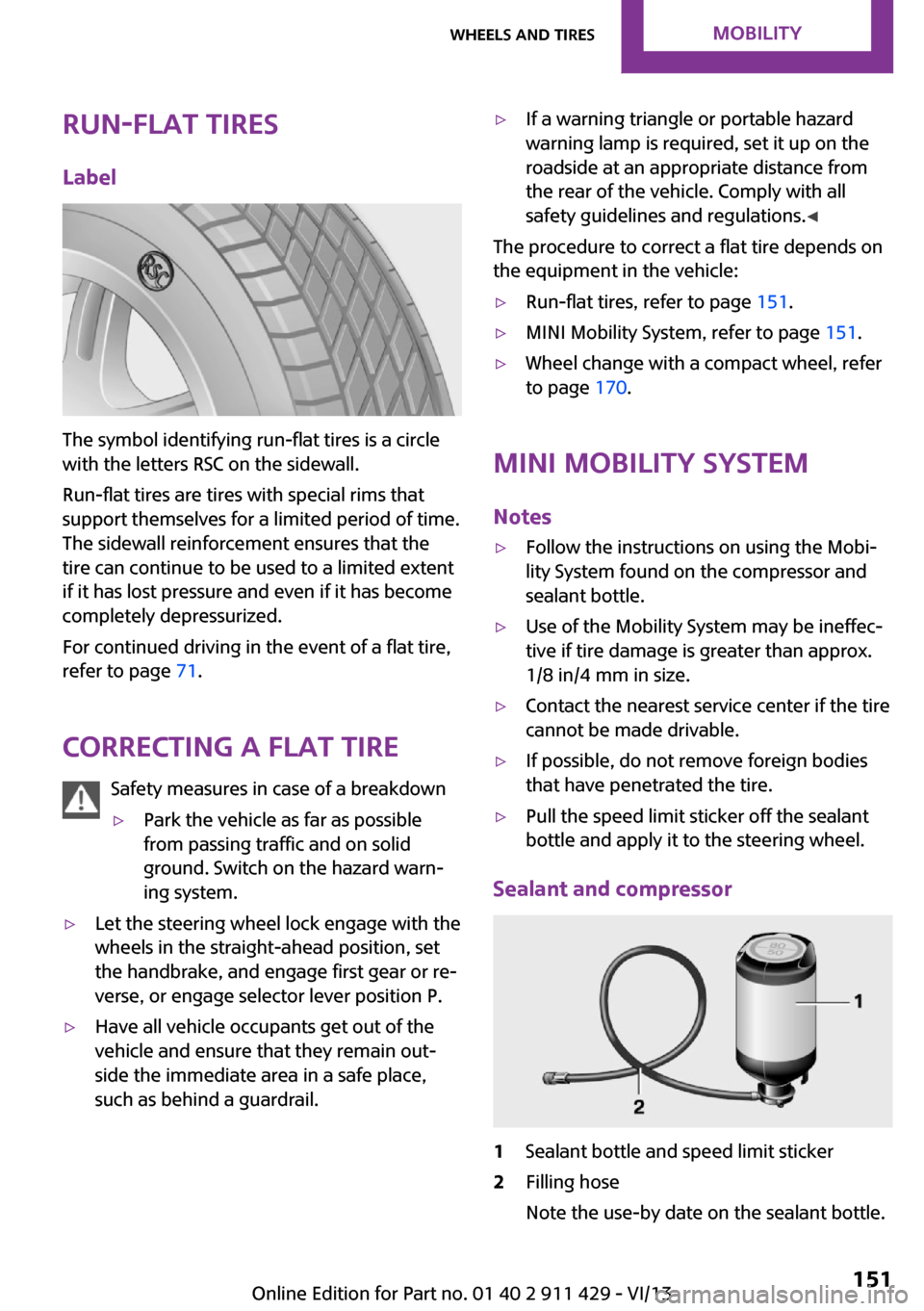
The symbol identifying run-flat tires is a circle
with the letters RSC on the sidewall.
Run-flat tires are tires with special rims that
support themselves for a limited period of time.
The sidewall reinforcement ensures that the
tire can continue to be used to a limited extent
if it has lost pressure and even if it has become
completely depressurized.
For continued driving in the event of a flat tire,
refer to page 71.
Correcting a flat tire Safety measures in case of a breakdown
▷Park the vehicle as far as possible
from passing traffic and on solid
ground. Switch on the hazard warn‐
ing system.▷Let the steering wheel lock engage with the
wheels in the straight-ahead position, set
the handbrake, and engage first gear or re‐
verse, or engage selector lever position P.▷Have all vehicle occupants get out of the
vehicle and ensure that they remain out‐
side the immediate area in a safe place,
such as behind a guardrail.▷If a warning triangle or portable hazard
warning lamp is required, set it up on the
roadside at an appropriate distance from
the rear of the vehicle. Comply with all
safety guidelines and regulations. ◀
The procedure to correct a flat tire depends on
the equipment in the vehicle:
▷Run-flat tires, refer to page 151.▷MINI Mobility System, refer to page 151.▷Wheel change with a compact wheel, refer
to page 170.
MINI Mobility System
Notes
▷Follow the instructions on using the Mobi‐
lity System found on the compressor and
sealant bottle.▷Use of the Mobility System may be ineffec‐
tive if tire damage is greater than approx.
1/8 in/4 mm in size.▷Contact the nearest service center if the tire
cannot be made drivable.▷If possible, do not remove foreign bodies
that have penetrated the tire.▷Pull the speed limit sticker off the sealant
bottle and apply it to the steering wheel.
Sealant and compressor
1Sealant bottle and speed limit sticker2Filling hose
Note the use-by date on the sealant bottle.Seite 151Wheels and tiresMobility151
Online Edition for Part no. 01 40 2 911 429 - VI/13
Page 171 of 210
11.Unscrew the valve extension from the valve
of the compact wheel.12.Unscrew the dust cap from the extension
and attach it to the valve of the compact
wheel.
The defective wheel cannot be stowed in the
compact wheel holder because it has a differ‐
ent size.
MINI Clubman: removing the compact
wheel
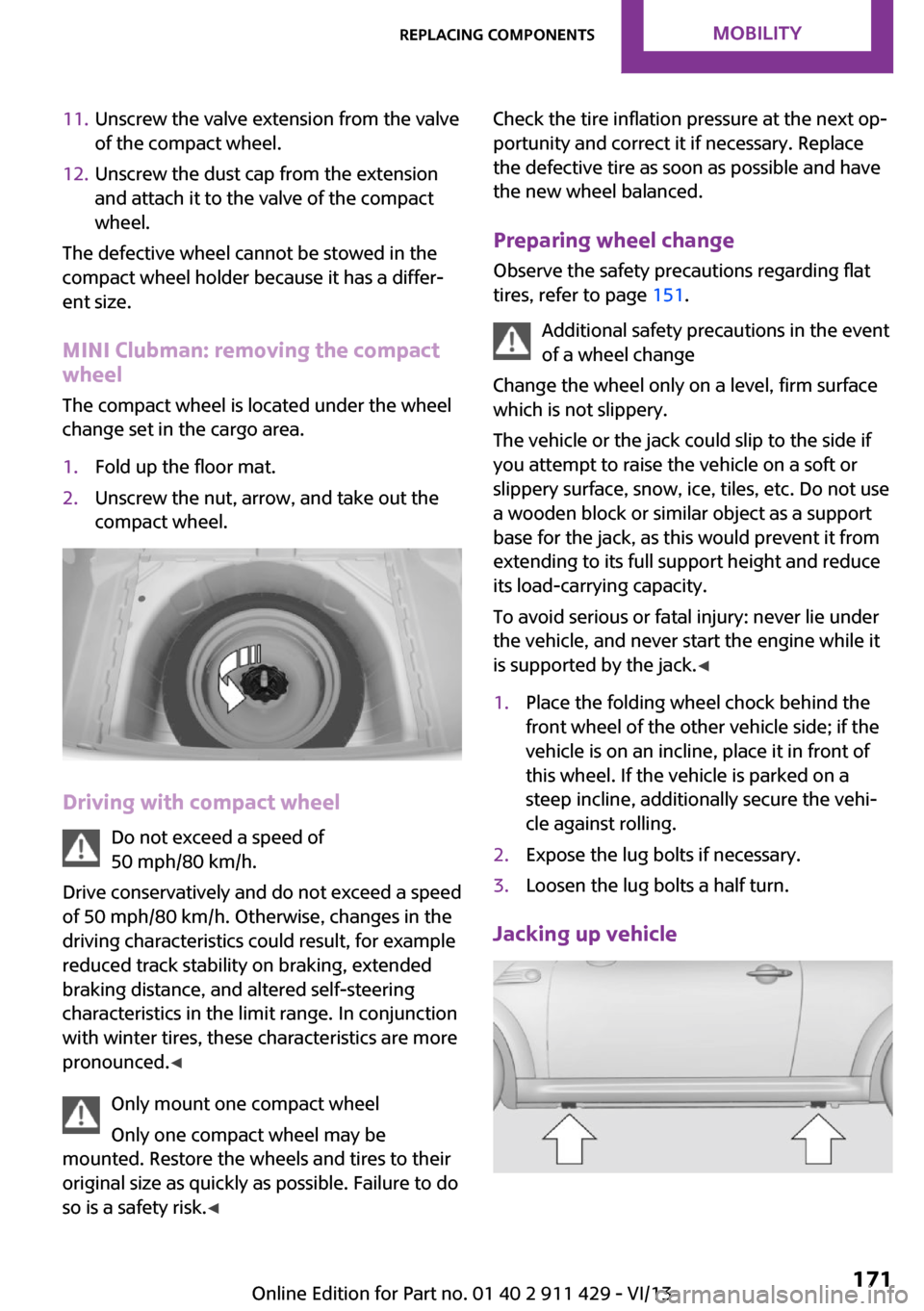
The compact wheel is located under the wheel
change set in the cargo area.
1.Fold up the floor mat.2.Unscrew the nut, arrow, and take out the
compact wheel.
Driving with compact wheel
Do not exceed a speed of
50 mph/80 km/h.
Drive conservatively and do not exceed a speed
of 50 mph/80 km/h. Otherwise, changes in the
driving characteristics could result, for example
reduced track stability on braking, extended
braking distance, and altered self-steering
characteristics in the limit range. In conjunction
with winter tires, these characteristics are more
pronounced. ◀
Only mount one compact wheel
Only one compact wheel may be
mounted. Restore the wheels and tires to their
original size as quickly as possible. Failure to do
so is a safety risk. ◀
Check the tire inflation pressure at the next op‐
portunity and correct it if necessary. Replace
the defective tire as soon as possible and have
the new wheel balanced.
Preparing wheel change
Observe the safety precautions regarding flat
tires, refer to page 151.
Additional safety precautions in the event
of a wheel change
Change the wheel only on a level, firm surface
which is not slippery.
The vehicle or the jack could slip to the side if
you attempt to raise the vehicle on a soft or
slippery surface, snow, ice, tiles, etc. Do not use
a wooden block or similar object as a support
base for the jack, as this would prevent it from
extending to its full support height and reduce
its load-carrying capacity.
To avoid serious or fatal injury: never lie under
the vehicle, and never start the engine while it
is supported by the jack. ◀1.Place the folding wheel chock behind the
front wheel of the other vehicle side; if the
vehicle is on an incline, place it in front of
this wheel. If the vehicle is parked on a
steep incline, additionally secure the vehi‐
cle against rolling.2.Expose the lug bolts if necessary.3.Loosen the lug bolts a half turn.
Jacking up vehicle
Seite 171Replacing componentsMobility171
Online Edition for Part no. 01 40 2 911 429 - VI/13
Page 177 of 210
Using a tow fittingThe screw-in tow fitting must always be carried
in the vehicle. It can be screwed in at the front
or rear of the MINI.
It is stored in the onboard vehicle tool kit under
the cover on right in the cargo area, refer to
page 162.
Tow fitting, information on use▷Use only the tow fitting provided with
the vehicle and screw it all the way in.▷Use the tow fitting for towing on paved
roads only.▷Avoid lateral loading of the tow fitting, e.g.,
do not lift the vehicle by the tow fitting.
Otherwise, damage to the tow fitting and the
vehicle can occur. ◀
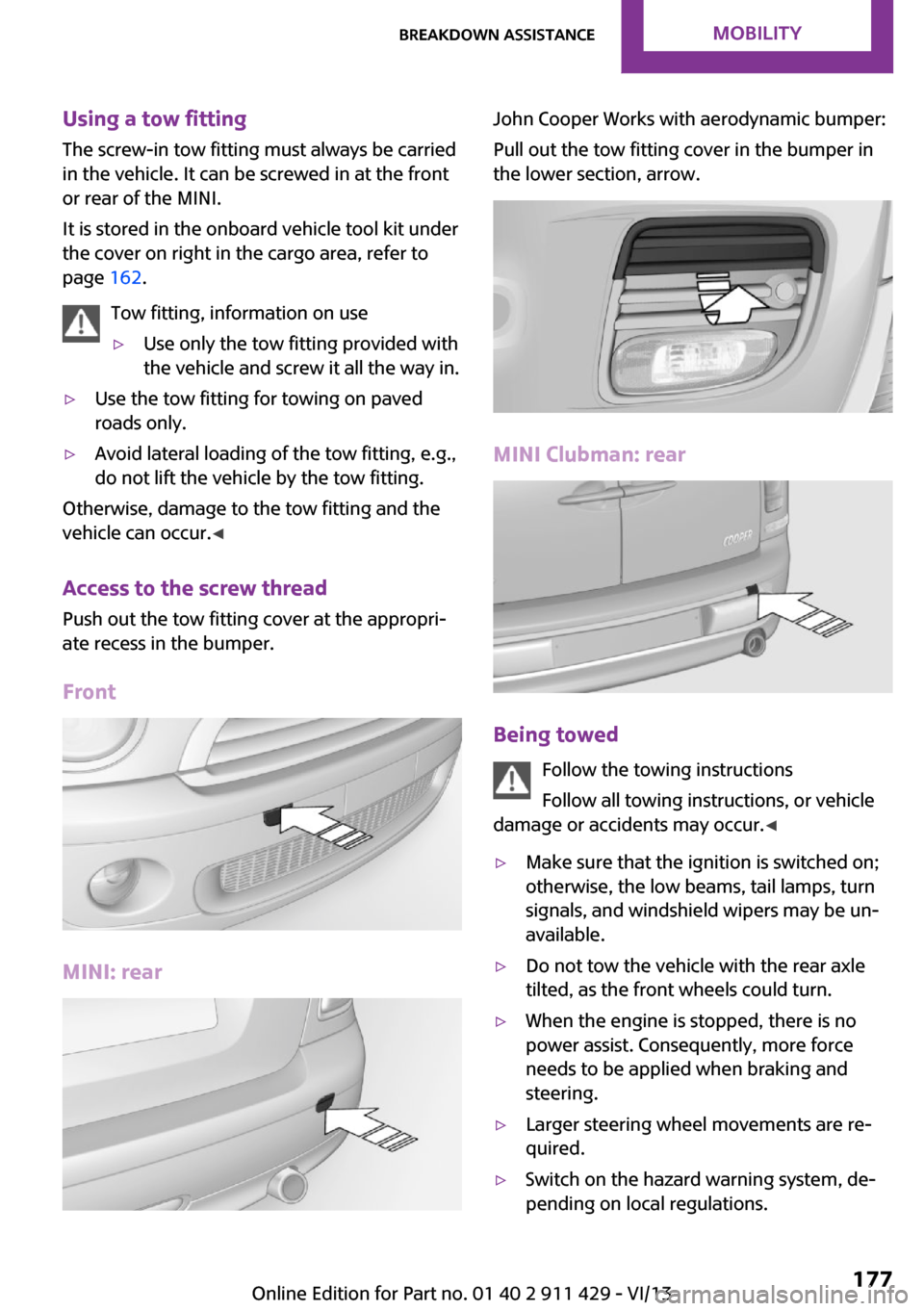
Access to the screw thread Push out the tow fitting cover at the appropri‐
ate recess in the bumper.
Front
MINI: rear
John Cooper Works with aerodynamic bumper:
Pull out the tow fitting cover in the bumper in
the lower section, arrow.
MINI Clubman: rear
Being towed
Follow the towing instructions
Follow all towing instructions, or vehicle
damage or accidents may occur. ◀
▷Make sure that the ignition is switched on;
otherwise, the low beams, tail lamps, turn
signals, and windshield wipers may be un‐
available.▷Do not tow the vehicle with the rear axle
tilted, as the front wheels could turn.▷When the engine is stopped, there is no
power assist. Consequently, more force
needs to be applied when braking and
steering.▷Larger steering wheel movements are re‐
quired.▷Switch on the hazard warning system, de‐
pending on local regulations.Seite 177Breakdown assistanceMobility177
Online Edition for Part no. 01 40 2 911 429 - VI/13
Page 185 of 210
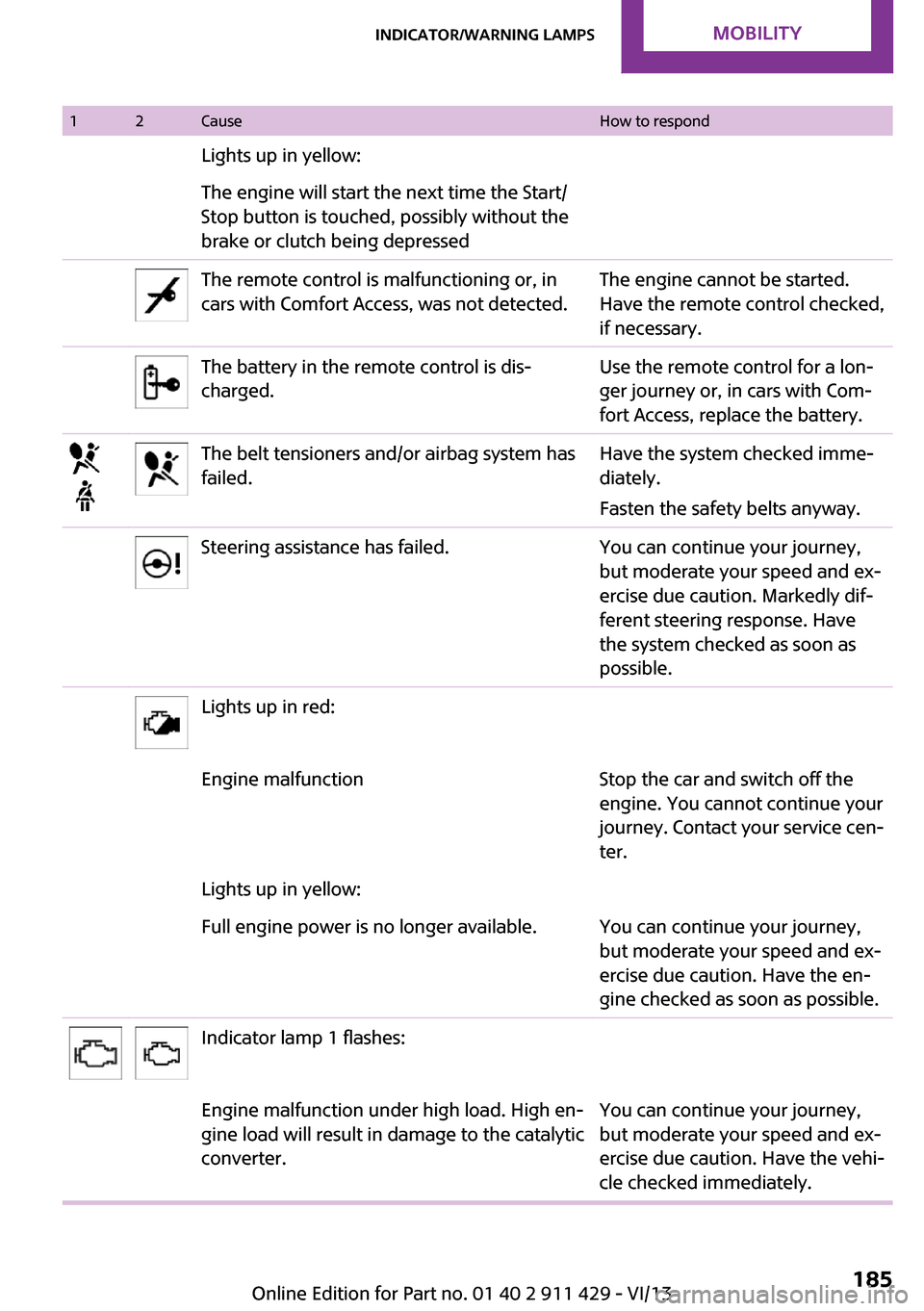
12CauseHow to respondLights up in yellow:The engine will start the next time the Start/
Stop button is touched, possibly without the
brake or clutch being depressedThe remote control is malfunctioning or, in
cars with Comfort Access, was not detected.The engine cannot be started.
Have the remote control checked,
if necessary.The battery in the remote control is dis‐
charged.Use the remote control for a lon‐
ger journey or, in cars with Com‐
fort Access, replace the battery.The belt tensioners and/or airbag system has
failed.Have the system checked imme‐
diately.
Fasten the safety belts anyway.Steering assistance has failed.You can continue your journey,
but moderate your speed and ex‐
ercise due caution. Markedly dif‐
ferent steering response. Have
the system checked as soon as
possible.Lights up in red:Engine malfunctionStop the car and switch off the
engine. You cannot continue your
journey. Contact your service cen‐
ter.Lights up in yellow:Full engine power is no longer available.You can continue your journey,
but moderate your speed and ex‐
ercise due caution. Have the en‐
gine checked as soon as possible.Indicator lamp 1 flashes:Engine malfunction under high load. High en‐
gine load will result in damage to the catalytic
converter.You can continue your journey,
but moderate your speed and ex‐
ercise due caution. Have the vehi‐
cle checked immediately.Seite 185Indicator/warning lampsMobility185
Online Edition for Part no. 01 40 2 911 429 - VI/13
Page 207 of 210
Service interval display, referto Service requirements 59
Service requirements 59
Service requirements, CBS Condition Based Service 160
Settings– Clock, 12h/24h format 57
Settings and information 56
Settings, configuring, refer to Personal Profile 20
Shifting
– Automatic transmission with
Steptronic 52
Shifting, manual transmis‐
sion 51
Shift lever
– Automatic transmission with
Steptronic 52
Shift paddles on the steering
wheel 53
Side airbags 67
Side door, rear, refer to Club‐ door 26
Side windows, refer to Win‐ dows 31
Sliding/tilting sunroof
– Refer to Glass sunroof, elec‐
trical 31
Slot for remote control 44
Snap-in adapter, mobile phone 133
Socket, OBD Onboard Diagno‐ sis 161
Special equipment, series equipment 6
Speed, average 56
Speedometer 14
Speed, with winter tires 150
Split door
– Opening/closing 27– Opening from the out‐
side 27– Unlocking with remote con‐
trol 24
Sport button 78
Sport program, automatic
transmission with Step‐
tronic 52
Stability control systems 76
Start/Stop button 44
Start/Stop button, starting the engine 45
Start/Stop button, switching off the engine 46
Starting the engine 45
Start problems, refer to Jump- starting 175
Steering wheel 39
Steering wheel– Shift paddles 53
Steering wheel, adjusting 39
Steering wheel lock 44
Stopping, engine 46
Storage, tires 150
Storing the vehicle 182
Summer tires, refer to Wheels and tires 142
Summer tires, tread 148
Swing doors, refer to Split door 27
Switches, refer to Cockpit 12
Switching off, engine 46
Switching off, vehicle 46
Symbols 6
T Tachometer 55
Tailgate 27
Tailgate
– Comfort Access 29
Tailgate, see Split door 24
Tail lamps 167
Tank gauge, refer to Fuel gauge 55
Technical changes, refer to Safety 6
Technical data 196
Telephone 126
Temperature– Air conditioner 83– Automatic climate con‐
trol 85
Temperature, coolant, refer to
Coolant temperature 55
Temperature display
– External temperature 54– External temperature warn‐
ing 54– Setting the units 57
Temperature warning 54
Theft alarm system, refer to Alarm system 30
Time
– Setting the time 58
Tire age 149
Tire identification marks 147
Tire inflation pressure 142
Tire inflation pressure
– Pressure loss 70
Tire pressure monitor, refer to
Flat Tire Monitor 69
Tire Pressure Monitor TPM
– System limits 72– System reset 72– Warning lamp 73
Tire Quality Grading 147
Tires
– Flat tire 70– Inflation pressure 142– Inflation pressure loss 73– Pressure monitoring, refer to
Tire Pressure Monitor
TPM 72
Tires, breaking in 100
Tires, changing 149
Tires, condition 148
Tires, damage 148
Tire size 147
Tires, minimum tread 148
Tires, retreaded tires 150
Tires, storage 150
Tire tread 148
Tool kit, refer to Onboard ve‐ hicle tool kit 162
Tools, refer to Onboard vehi‐ cle tool kit 162
Seite 207Everything from A to ZReference207
Online Edition for Part no. 01 40 2 911 429 - VI/13