phone MINI Clubman 2016 (Mini Connected) User Guide
[x] Cancel search | Manufacturer: MINI, Model Year: 2016, Model line: Clubman, Model: MINI Clubman 2016Pages: 246, PDF Size: 5.21 MB
Page 39 of 246

the edges and ensure that pointed objects do
not hit the rear window.◀
Malfunction
Remote control detection by the vehicle can
among others be malfunctioning under the fol‐
lowing circumstances:
▷The battery of the remote control is dis‐
charged. Replace the battery, refer to
page 34.
▷Interference of the radio connection from
transmission towers or other equipment
with high transmit power.
▷Shielding of the remote control due to
metal objects.
▷Interference of the radio connection from
mobile phones or other electronic devices
in direct proximity.
Do not transport the remote control together
with metal objects or electronic devices.
In the case of a malfunction, unlock and lock
the vehicle using the integrated key, refer to
page 39.
For US owners only
The transmitter and receiver units comply with
part 15 of the FCC/Federal Communication
Commission regulations. Operation is governed
by the following:
FCC ID:
▷LX8766S.▷LX8766E.▷LX8CAS.▷LX8CAS2.▷MYTCAS4.
Compliance statement:
This device complies with part 15 of the FCC
Rules. Operation is subject to the following two
conditions:
▷This device may not cause harmful interfer‐
ence, and
▷this device must accept any interference re‐
ceived, including interference that may
cause undesired operation.
Any unauthorized modifications or changes to
these devices could void the user's authority to
operate this equipment.
Without remote control
From the outside
WARNING
Unlocking from the inside is only possible
with special knowledge.
If people must spend a longer time in the vehi‐
cle while it is very hot or cold outside, there is
risk of injuries or danger to life. Do not lock the
vehicle from the outside when there are people
in it.◀
CAUTION
The door lock is permanently joined with
the door. The door handle can be moved.
When pulling the door handle with the
integrated key inserted, paint or key can be
damaged. There is risk of property damage. Re‐
move the integrated key before pulling the
outside door handle.◀
Unlock or lock the driver's door via the door
lock using the integrated key, refer to page 34.
The other doors must be unlocked or locked
from the inside.
1.Remove lid on the door lock.Seite 39Opening and closingCONTROLS39
Online Edition for Part no. 01 40 2 964 571 - X/15
Page 43 of 246

the foot motion, make sure there is steady
stance and do not touch the vehicle.◀
1.Place in the center behind the vehicle,
about an arm's length from the vehicle
rear.
2.Move a foot in the direction of travel as far
under the vehicle as possible and immedi‐
ately pull it back. With this movement, the
leg must pass through the ranges of both
sensors.
Opening
WARNING
Body parts can be jammed when operat‐
ing the split doors. There is risk of injuries.
Make sure that the area of movement of the
split doors is clear during opening and clos‐
ing.◀
CAUTION
The split doors swivel back and to the
side when they open. There is risk of property
damage. Make sure that the area of movement
of the split doors is clear during opening and
closing.◀
Before the opening, the hazard warning system
flashes.
1.Perform the foot movement described ear‐
lier.
The right side of the split doors opens, re‐
gardless of whether it was previously
locked or unlocked.
2.After complete opening of the right side,
make a second foot movement in order to
open the left side of the split doors.
If the remote control is in the sensor area, the
split doors can be opened inadvertently by an
unconscious or alleged recognized foot move‐
ment.
The sensor range reaches approx. 5 ft/1.50 m
behind the area at the rear of the car.
Malfunction
Remote control detection by the vehicle can
among others be malfunctioning under the fol‐
lowing circumstances:
▷The battery of the remote control is dis‐
charged. Replace the battery, refer to
page 34.
▷Interference of the radio connection from
transmission towers or other equipment
with high transmit power.
▷Shielding of the remote control due to
metal objects.
▷Interference of the radio connection from
mobile phones or other electronic devices
in direct proximity.
Do not transport the remote control together
with metal objects or electronic devices.
In the case of a malfunction, unlock and lock
the vehicle using the buttons of the remote
control or using the integrated key, refer to
page 39.
Adjusting
Unlocking
The settings are saved in the active profile. Per‐
sonal Profile, refer to page 36.
Doors
1. "Settings"2."Doors/key"Seite 43Opening and closingCONTROLS43
Online Edition for Part no. 01 40 2 964 571 - X/15
Page 88 of 246
▷If the traffic signs are non-conforming.▷During calibration of the camera immedi‐
ately after vehicle delivery.
Selection lists in the in‐
strument cluster
The concept
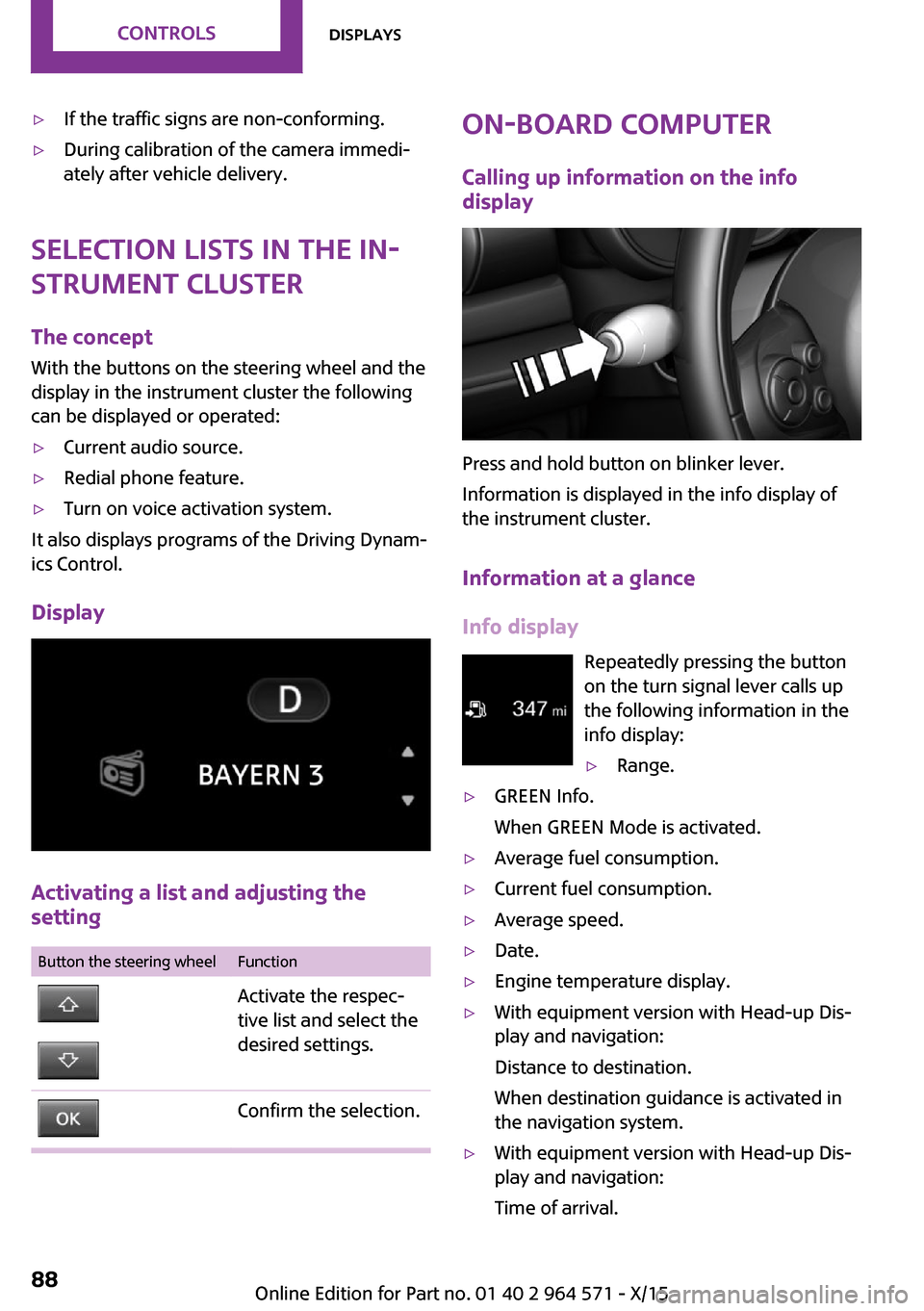
With the buttons on the steering wheel and the
display in the instrument cluster the following
can be displayed or operated:
▷Current audio source.▷Redial phone feature.▷Turn on voice activation system.
It also displays programs of the Driving Dynam‐
ics Control.
Display
Activating a list and adjusting the
setting
Button the steering wheelFunctionActivate the respec‐
tive list and select the
desired settings.
Confirm the selection.On-board computer
Calling up information on the info
display
Press and hold button on blinker lever.
Information is displayed in the info display of
the instrument cluster.
Information at a glance
Info display
Repeatedly pressing the button
on the turn signal lever calls up
the following information in the
info display:
▷Range.▷GREEN Info.
When GREEN Mode is activated.
▷Average fuel consumption.▷Current fuel consumption.▷Average speed.▷Date.▷Engine temperature display.▷With equipment version with Head-up Dis‐
play and navigation:
Distance to destination.
When destination guidance is activated in
the navigation system.
▷With equipment version with Head-up Dis‐
play and navigation:
Time of arrival.
Seite 88CONTROLSDisplays88
Online Edition for Part no. 01 40 2 964 571 - X/15
Page 102 of 246
Ejection Mitigation
The head airbag system is designed as an ejec‐
tion mitigation countermeasure to reduce the
likelihood of ejections of vehicle occupants
through side windows during rollovers or side
impact events.
Knee airbag
The knee airbag supports the legs in a frontal
impact.
Protective action
Airbags are not triggered in every impact situa‐
tion, e.g., in less severe accidents or rear-end
collisions.
Information for optimum effect of the
airbags
WARNING
If the seat position is incorrect or the de‐
ployment area of the airbags is impacted, the
airbag system cannot protect as intended or
cause additional injuries due to triggering.
There is risk of injuries or danger to life. Ob‐
serve the hints for optimum protective effect of
the airbag system.◀
▷Keep at a distance from the airbags.▷Make sure that occupants keep their heads
away from the side airbag.
▷Always grasp the steering wheel on the
steering wheel rim. Hold your hands at the
3 o'clock and 9 o'clock positions, to keep
the risk of injury to your hands or arms as
low as possible when the airbag is trig‐
gered.
▷Make sure that the front passenger is sitting
correctly, i.e., keeps his or her feet and legs
in the floor area and does not support them
on the dashboard.
▷There should be no persons, animals or ob‐
jects between an airbag and a person.
▷Do not apply adhesive materials to the air‐
bag cover panels, do not cover them or
modify them in any way.
▷Dashboard and windshield on the front
passenger side must stay clear - do not at‐
tach adhesive labels or coverings and do
not attach brackets or cables, e. g., for GPS
devices or' mobile phones.
▷Do not use the cover of the front airbag on
the front passenger side as a storage area.
▷Do not place slip covers, seat cushions or
other objects on the front passenger seat
that are not specifically suited for seats with
integrated side airbags.
▷Do not hang pieces of clothing, such as
jackets, over the backrests.
▷Never modify either the individual compo‐
nents or the wiring in the airbag system.
This also applies to steering wheel covers,
the dashboard, and the seats.
▷Do not remove the airbag system.
Even when you follow all instructions very
closely, injury from contact with the airbags
cannot be fully ruled out in certain situations.
The ignition and inflation noise may lead to
short-term and, in most cases, temporary hear‐
ing impairment in sensitive individuals.
Warnings and information on the airbags are
also found on the sun visors.
Functional readiness of the airbag
system
Information
WARNING
Individual components can be hot after
triggering of the airbag system. There is risk of
injuries. Do not touch individual components.◀
WARNING
Improperly executed work can lead to
failure, malfunction or unintentional triggering
of the airbag system. In the case of a malfunc‐
Seite 102CONTROLSSafety102
Online Edition for Part no. 01 40 2 964 571 - X/15
Page 152 of 246

Overview
The USB interface is located in the front of the
center console.
Cargo area
Cargo cover
Information
WARNING
Loose objects or devices with a cable
connection to the vehicle, for example mobile
phones, can be thrown into the car's interior
while driving, for example in the event of an
accident or during braking and evasive maneu‐
vers. There is risk of injuries. Secure loose ob‐
jects or devices with a cable connection to the
vehicle in the car's interior.◀
Closing
CAUTION
A cargo cover hooked in incorrectly can
cause damage. There is risk of property dam‐
age. Hook the cargo cover on both sides.◀
Pull out the cargo cover, arrow 1, and hook
both sides into the brackets, arrow 2.
Opening
WARNING
A cargo cover that snaps back quickly can
jam body parts or cause damage. There is risk
of injuries or risk of property damage. Do not
let the cargo cover snap back into place.◀
Pull over the cargo cover and hook into the
brackets on both sides.
Removing
For storing bulky objects the cargo cover can
be removed.
Press the release button, arrow 1, and pull the
cargo cover out towards the rear, arrow 2.
Installing
Slide the cargo cover in until it engages on both
sides with an audible click.
Seite 152CONTROLSInterior equipment152
Online Edition for Part no. 01 40 2 964 571 - X/15
Page 155 of 246

Storage compartmentsVehicle features and op‐
tions
This chapter describes all standard, country-
specific and optional features offered with the
series. It also describes features that are not
necessarily available in your car, e. g., due to
the selected options or country versions. This
also applies to safety-related functions and sys‐
tems. The respectively applicable country provi‐
sions must be observed when using the respec‐
tive features and systems.
Information
WARNING
Loose objects or devices with a cable
connection to the vehicle, for example mobile
phones, can be thrown into the car's interior
while driving, for example in the event of an
accident or during braking and evasive maneu‐
vers. There is risk of injuries. Secure loose ob‐
jects or devices with a cable connection to the
vehicle in the car's interior.◀
CAUTION
Anti-slip pads such as anti-slip mats can
damage the dashboard. There is risk of prop‐
erty damage. Do not use anti-slip pads.◀
Overview
The following storage compartments are avail‐
able in the vehicle interior:
▷Storage compartment in front of the cu‐
pholders.
▷Storage tray in the center console.▷Glove compartment on the front passenger
side.
▷Storage compartment in the center arm‐
rest.
▷Compartments in the doors.▷Pockets on the backrests of the front seats.▷Storage compartments in the trunk
Glove compartment
Information
WARNING
Folded open, the glove compartment
protrudes in the car's interior. Objects in the
glove compartment can be thrown into the
car's interior while driving, for example in the
event of an accident or during braking and eva‐
sive maneuvers. There is risk of injuries. Always
close the glove compartment immediately after
using it.◀
Opening
Pull the handle.
The light in the glove compartment switches
on.
Closing
Fold up the cover.
Seite 155Storage compartmentsCONTROLS155
Online Edition for Part no. 01 40 2 964 571 - X/15
Page 163 of 246

General driving notes
Closing split doors
WARNING
An open split door protrudes from the ve‐
hicle and can endanger occupants and other
road users or damage the vehicle in the event
of an accident, braking or evasive maneuvers.
In addition, exhaust fumes may enter the vehi‐
cle interior. There is risk of injuries or risk of
property damage. Do not drive with split doors
open.◀
If nevertheless you need to drive with split
doors open:
▷Close all windows and the glass sunroof.▷Greatly increase the air flow from the vents.▷Drive moderately.
Hot exhaust system
WARNING
During driving operation, high tempera‐
tures can occur underneath the body, for ex‐
ample caused by the exhaust gas system. If
combustible materials, such as leaves or grass,
come in contact with hot parts of the exhaust
gas system, these materials can ignite. There is
risk of injuries or risk of property damage.
Do not remove the heat shields installed and
never apply undercoating to them. Make sure
that no combustible materials can come in con‐
tact with hot vehicle parts in driving operation,
idle or during parking. Do not touch the hot ex‐
haust system.◀
Mobile communication devices in the
vehicle
WARNING
Vehicle electronics and mobile phones
can influence one another. There is radiation
due to the send operations of mobile phones.
There is risk of injuries or risk of property dam‐
age. If possible, in the car's interior use only
mobile phones with direct connections to an
exterior antenna in order to exclude mutual
disturbance and deflect the radiation from the
car's interior.◀
Hydroplaning
On wet or slushy roads, a wedge of water can
form between the tires and road surface.
This phenomenon is referred to as hydroplan‐
ing. It is characterized by a partial or complete
loss of contact between the tires and the road
surface, ultimately undermining your ability to
steer and brake the vehicle.
Driving through water
CAUTION
When driving too quickly through too
deep water, water can enter into the engine
compartment, the electrical system or the
transmission. There is risk of property damage.
When driving through water, do not exceed the
maximum indicated water level and the maxi‐
mum speed for driving through water.◀
When driving through water, observe the fol‐
lowing:
▷Drive through calm water only.▷Drive through water only if it is not deeper
than maximum 9.8 inches/25 cm.
▷Drive through water no faster than walking
speed, up to 3 mph/5 km/h.
Braking safely
Your vehicle is equipped with ABS as a standard
feature.
Perform an emergency stop in situations that
require such.
Steering is still responsive. You can still avoid
any obstacles with a minimum of steering ef‐
fort.
Pulsation of the brake pedal and sounds from
the hydraulic circuits indicate that ABS is in its
active mode.
Seite 163Things to remember when drivingDRIVING TIPS163
Online Edition for Part no. 01 40 2 964 571 - X/15
Page 165 of 246

LoadingVehicle features and op‐
tions
This chapter describes all standard, country-
specific and optional features offered with the
series. It also describes features that are not
necessarily available in your car, e. g., due to
the selected options or country versions. This
also applies to safety-related functions and sys‐
tems. The respectively applicable country provi‐
sions must be observed when using the respec‐
tive features and systems.
Information
WARNING
High gross weight can overheat the tires,
damage them, and cause a sudden drop in tire
inflation pressure. There is risk of an accident.
Pay attention to the permitted load capacity of
the tires and never exceed the permitted gross
weight.◀
WARNING
Loose objects or devices with a cable
connection to the vehicle, for example mobile
phones, can be thrown into the car's interior
while driving, for example in the event of an
accident or during braking and evasive maneu‐
vers. There is risk of injuries. Secure loose ob‐
jects or devices with a cable connection to the
vehicle in the car's interior.◀
CAUTION
Fluids in the cargo area can cause dam‐
age. There is risk of property damage. Make
sure that no fluids leak in the cargo area.◀
CAUTION
The cargo floor panel is designed for a
particular maximum weight. Weight that is too
high and that is selective can damage the cargo
floor panel. There is risk of property damage.
Do not exceed the maximum load of the cargo
area floor and evenly distribute the cargo
across the cargo area floor.
The maximum load is 881 lbs/440 kg.◀
Determining the load
limit
1.Locate the following statement on your ve‐
hicle’s placard:
▷The combined weight of occupants and
cargo should never exceed XXX kg or
YYY lbs. Otherwise, damage to the ve‐
hicle and unstable driving situations
may result.
2.Determine the combined weight of the
driver and passengers that will be riding in
your vehicle.
3.Subtract the combined weight of the driver
and passengers from XXX kilograms or YYY
pounds.
4.The resulting figure equals the available
amount of cargo and luggage load ca‐
pacity.
Seite 165LoadingDRIVING TIPS165
Online Edition for Part no. 01 40 2 964 571 - X/15
Page 241 of 246
MINI Motorer’s Guide app 6
Minimum tread, tires 186
Mirror memory 56
Mirrors 57
Mobile communication devi‐
ces in the vehicle 163
Mobility System 189
Mode, GREEN Mode 169
Modifications, technical, refer
to Own Safety 7
Moisture in headlight 204
Monitor, refer to Control Dis‐
play 18
Mounting of child restraint
systems 61
Multifunction steering wheel,
buttons 14
Multimedia, refer to
Integrated Owner's Manual
N
Navigation, refer to Integrated
Owner's Manual
Neck restraints, front, see
Head restraints 54
Neck restraints, rear, see
Head restraints 55
New wheels and tires 187
No-touch opening of the split
doors 42
O
OBD Onboard Diagnos‐
tics 202
Obstacle marking, rearview
camera 133
Octane rating, see Recom‐
mended fuel grade 180
Odometer 84
Office, refer to Integrated
Owner's Manual
Oil 195
Oil, adding 196
Oil additives 197
Oil change 197
Oil change interval, service re‐
quirements 85
Oil filler neck 196
Oil types, alternative 197
Oil types, suitable 197
Old batteries, disposal 214
On-board computer 88
On-board computer, refer to
On-board computer 88
Onboard Diagnostics
OBD 202
Onboard monitor 18
Onboard monitor operating
concept 18
Onboard vehicle tool kit 203
Opening/closing via door
lock 39
Opening/closing with remote
control 37
Open the split doors with no-
touch activation 42
Operating menus, onboard
monitor 18
Optional equipment, standard
equipment 7
Outside air, see Automatic re‐
circulated-air control 143
Own safety 7
P
Paint, vehicle 222
Panoramic glass sunroof 47
Parallel parking assistant 134
Park Distance Control
PDC 129
Parked-car ventilation 144
Parked vehicle, condensa‐
tion 164
Parking aid, see PDC 129
Parking assistant 134
Parking brake 68
Parking lights 96
Parts and accessories 8
Passenger side mirror, tilting
downward 58
Pathway lines, rearview cam‐
era 133
PDC Park Distance Con‐
trol 129
Performance Control 118
Personal Profile 36
Person warning with City light
braking function 114
Phone, refer to Integrated
Owner's Manual
Pinch protection system, glass
sunroof 48
Pinch protection system, win‐
dows 46
Plastic, care 223
PostCrash 116
Power failure 214
Power windows 46
Prescribed engine oil
types 197
Pressure, tire air pressure 182
Pressure warning, tires 108
Profile, see Personal Pro‐
file 36
Protective function, glass sun‐
roof 48
Protective function, win‐
dows 46
Push-and-turn switch, see
Controller 19
R
Radiator fluid 199
Radio-operated key, see Re‐
mote control 34
Radio ready state 64
Radio, refer to Integrated
Owner's Manual
Rain sensor 72
Rear fog lights 99
Rear lights 207
Rearview camera 132
Rearview mirror 57
Seite 241Everything from A to ZREFERENCE241
Online Edition for Part no. 01 40 2 964 571 - X/15