lock MINI Clubman 2016 (Mini Connected) Workshop Manual
[x] Cancel search | Manufacturer: MINI, Model Year: 2016, Model line: Clubman, Model: MINI Clubman 2016Pages: 246, PDF Size: 5.21 MB
Page 206 of 246
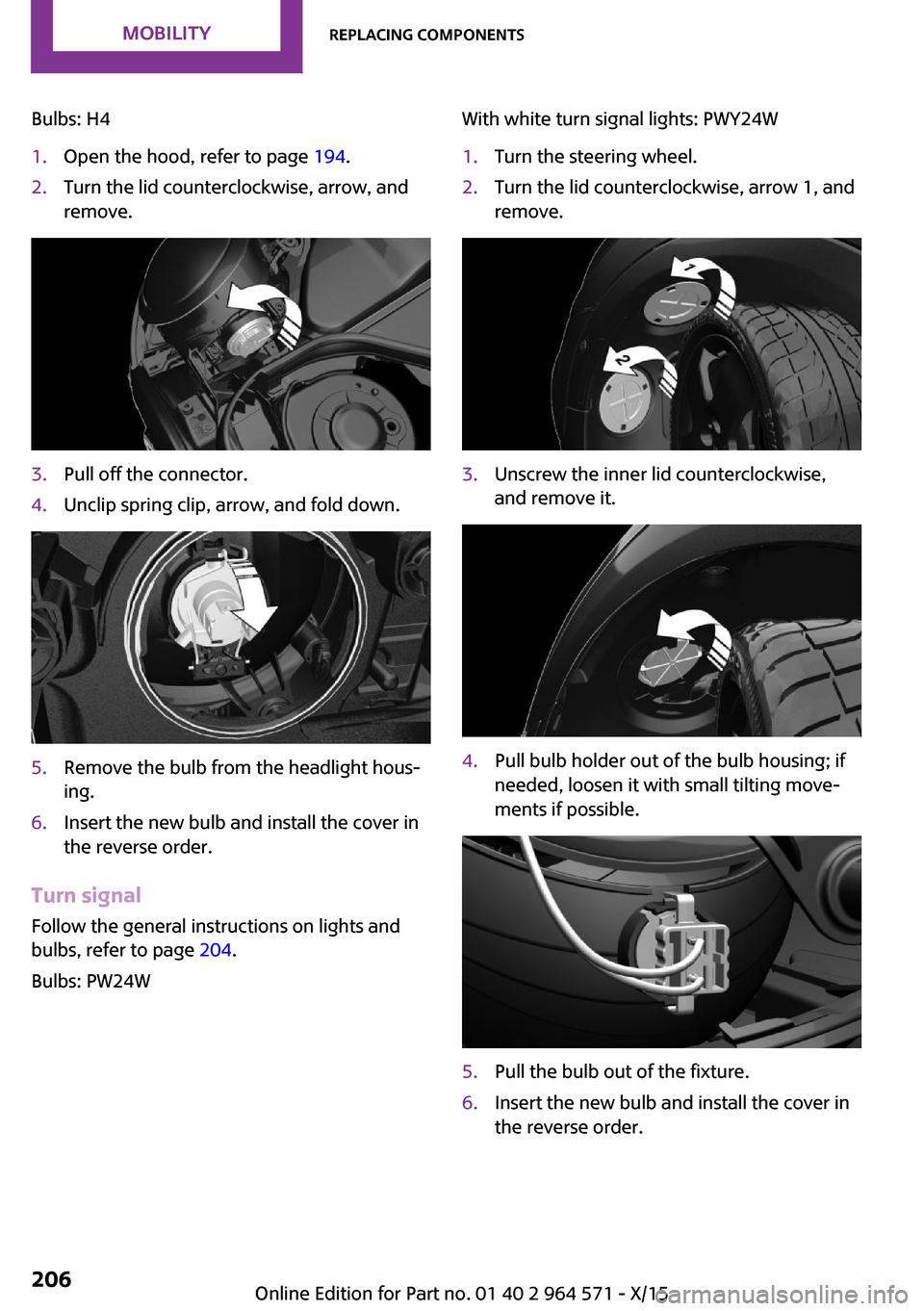
Bulbs: H41.Open the hood, refer to page 194.2.Turn the lid counterclockwise, arrow, and
remove.
3.Pull off the connector.4.Unclip spring clip, arrow, and fold down.5.Remove the bulb from the headlight hous‐
ing.
6.Insert the new bulb and install the cover in
the reverse order.
Turn signal
Follow the general instructions on lights and
bulbs, refer to page 204.
Bulbs: PW24W
With white turn signal lights: PWY24W1.Turn the steering wheel.2.Turn the lid counterclockwise, arrow 1, and
remove.
3.Unscrew the inner lid counterclockwise,
and remove it.
4.Pull bulb holder out of the bulb housing; if
needed, loosen it with small tilting move‐
ments if possible.
5.Pull the bulb out of the fixture.6.Insert the new bulb and install the cover in
the reverse order.
Seite 206MOBILITYReplacing components206
Online Edition for Part no. 01 40 2 964 571 - X/15
Page 207 of 246
LED parking lights/LED fog lights
Follow the general instructions on lights and
bulbs, refer to page 204.
The lights feature LED technology. In the case
of a malfunction, contact a dealer’s service cen‐
ter or another qualified service center or repair
shop.
Parking lights/fog lights/daytime
running lights
Follow the general instructions on lights and
bulbs, refer to page 204.
Bulbs:
▷Parking lights for halogen headlights: W5W
Parking lights for LED headlights: W5W NBV
▷Daytime running light: PSX24W▷Fog lamp: H8
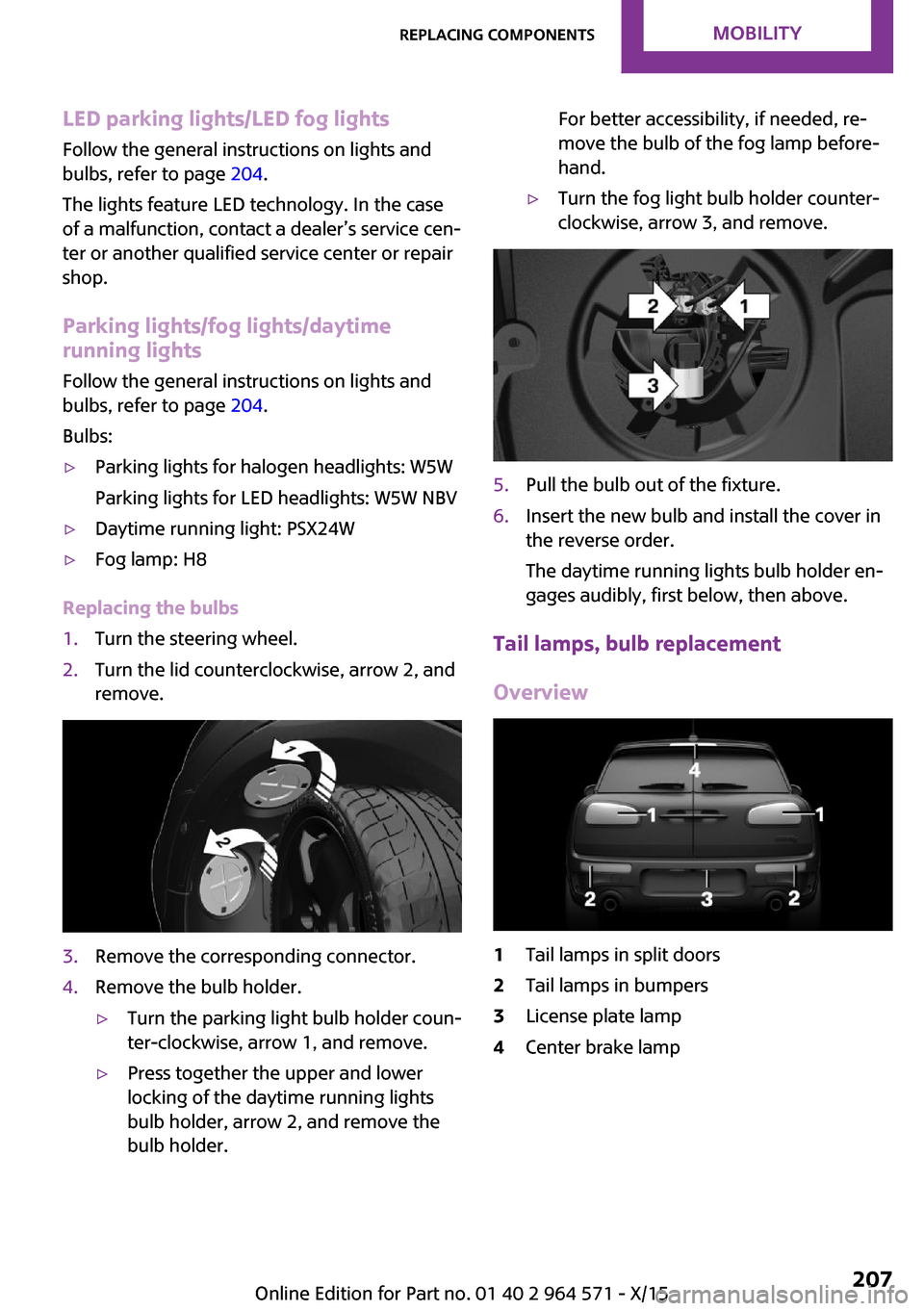
Replacing the bulbs
1.Turn the steering wheel.2.Turn the lid counterclockwise, arrow 2, and
remove.
3.Remove the corresponding connector.4.Remove the bulb holder.▷Turn the parking light bulb holder coun‐
ter-clockwise, arrow 1, and remove.
▷Press together the upper and lower
locking of the daytime running lights
bulb holder, arrow 2, and remove the
bulb holder.
For better accessibility, if needed, re‐
move the bulb of the fog lamp before‐
hand.
▷Turn the fog light bulb holder counter-
clockwise, arrow 3, and remove.
5.Pull the bulb out of the fixture.6.Insert the new bulb and install the cover in
the reverse order.
The daytime running lights bulb holder en‐
gages audibly, first below, then above.
Tail lamps, bulb replacement
Overview
1Tail lamps in split doors2Tail lamps in bumpers3License plate lamp4Center brake lampSeite 207Replacing componentsMOBILITY207
Online Edition for Part no. 01 40 2 964 571 - X/15
Page 209 of 246
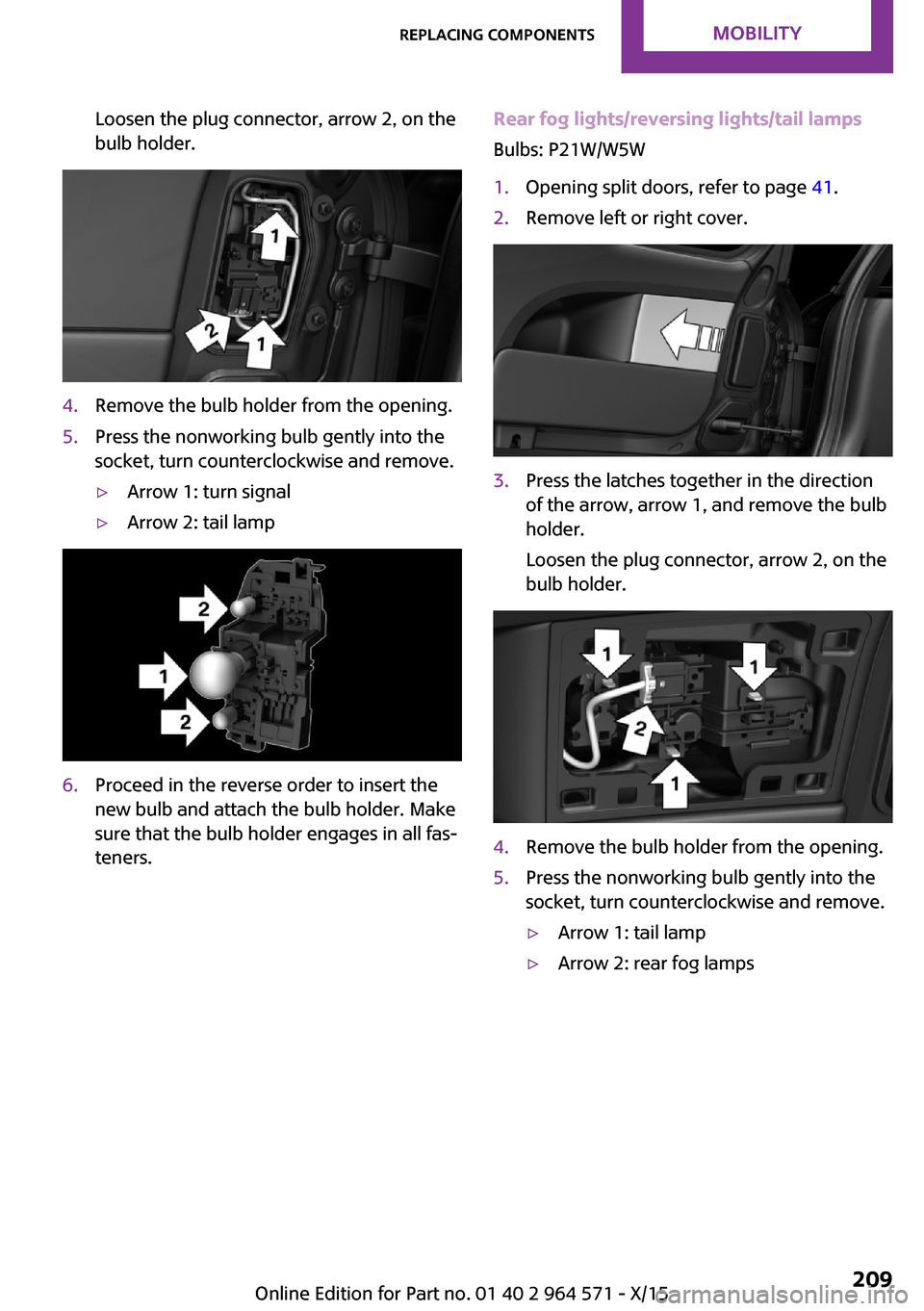
Loosen the plug connector, arrow 2, on the
bulb holder.
4.Remove the bulb holder from the opening.5.Press the nonworking bulb gently into the
socket, turn counterclockwise and remove.
▷Arrow 1: turn signal▷Arrow 2: tail lamp6.Proceed in the reverse order to insert the
new bulb and attach the bulb holder. Make
sure that the bulb holder engages in all fas‐
teners.
Rear fog lights/reversing lights/tail lamps
Bulbs: P21W/W5W
1.Opening split doors, refer to page 41.2.Remove left or right cover.3.Press the latches together in the direction
of the arrow, arrow 1, and remove the bulb
holder.
Loosen the plug connector, arrow 2, on the
bulb holder.
4.Remove the bulb holder from the opening.5.Press the nonworking bulb gently into the
socket, turn counterclockwise and remove.
▷Arrow 1: tail lamp▷Arrow 2: rear fog lampsSeite 209Replacing componentsMOBILITY209
Online Edition for Part no. 01 40 2 964 571 - X/15
Page 211 of 246
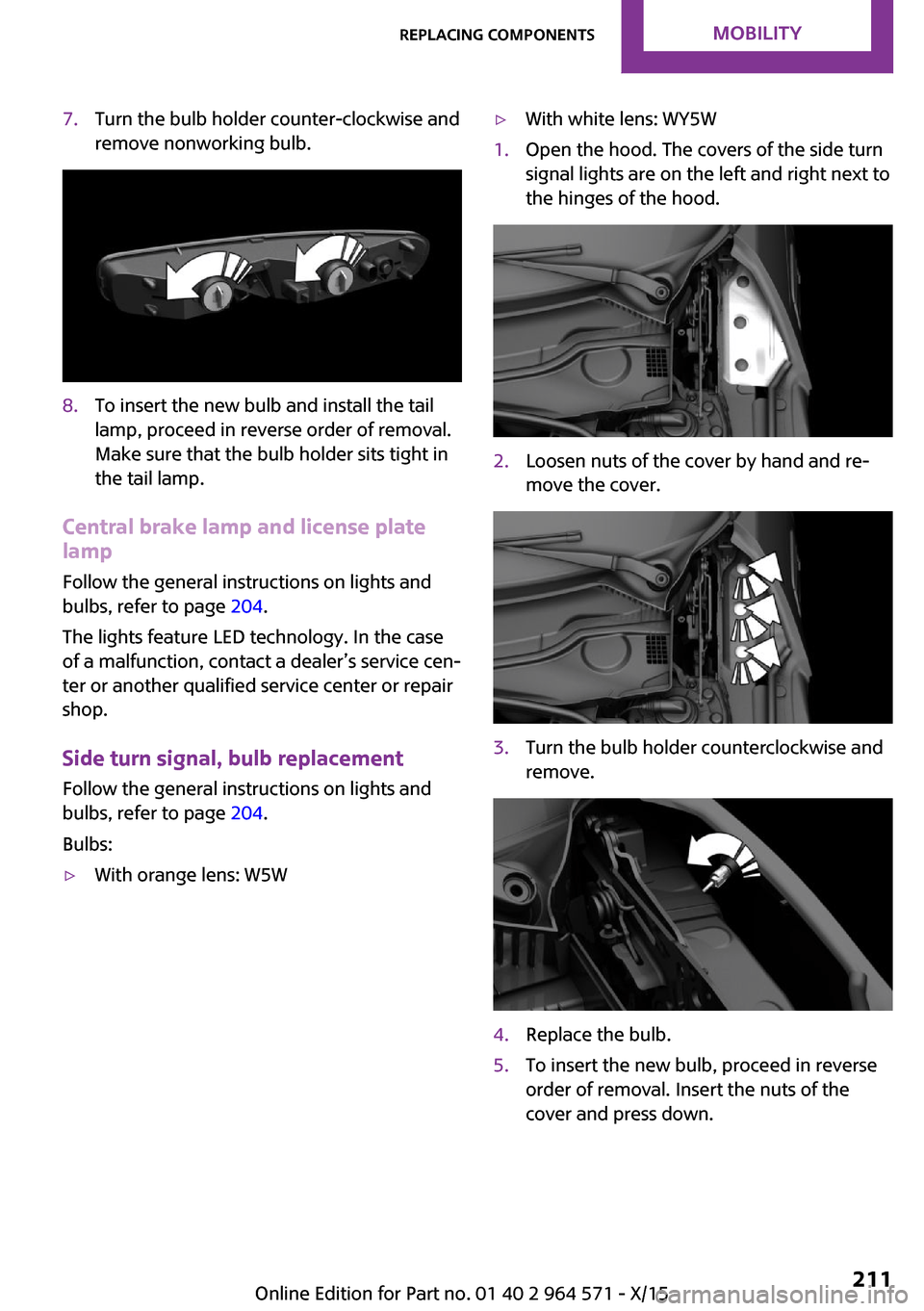
7.Turn the bulb holder counter-clockwise and
remove nonworking bulb.
8.To insert the new bulb and install the tail
lamp, proceed in reverse order of removal.
Make sure that the bulb holder sits tight in
the tail lamp.
Central brake lamp and license plate
lamp
Follow the general instructions on lights and
bulbs, refer to page 204.
The lights feature LED technology. In the case
of a malfunction, contact a dealer’s service cen‐
ter or another qualified service center or repair
shop.
Side turn signal, bulb replacement
Follow the general instructions on lights and
bulbs, refer to page 204.
Bulbs:
▷With orange lens: W5W▷With white lens: WY5W1.Open the hood. The covers of the side turn
signal lights are on the left and right next to
the hinges of the hood.
2.Loosen nuts of the cover by hand and re‐
move the cover.
3.Turn the bulb holder counterclockwise and
remove.
4.Replace the bulb.5.To insert the new bulb, proceed in reverse
order of removal. Insert the nuts of the
cover and press down.
Seite 211Replacing componentsMOBILITY211
Online Edition for Part no. 01 40 2 964 571 - X/15
Page 212 of 246
Changing wheels/tires
Information
When using run-flat tires or tire sealants, a tire
does not need to be changed immediately in
the event of pressure loss due to a flat tire.
Which is why no spare tire is available.
The tools for changing wheels are available as
accessories from your dealer’s service center or
another qualified service center or repair shop.
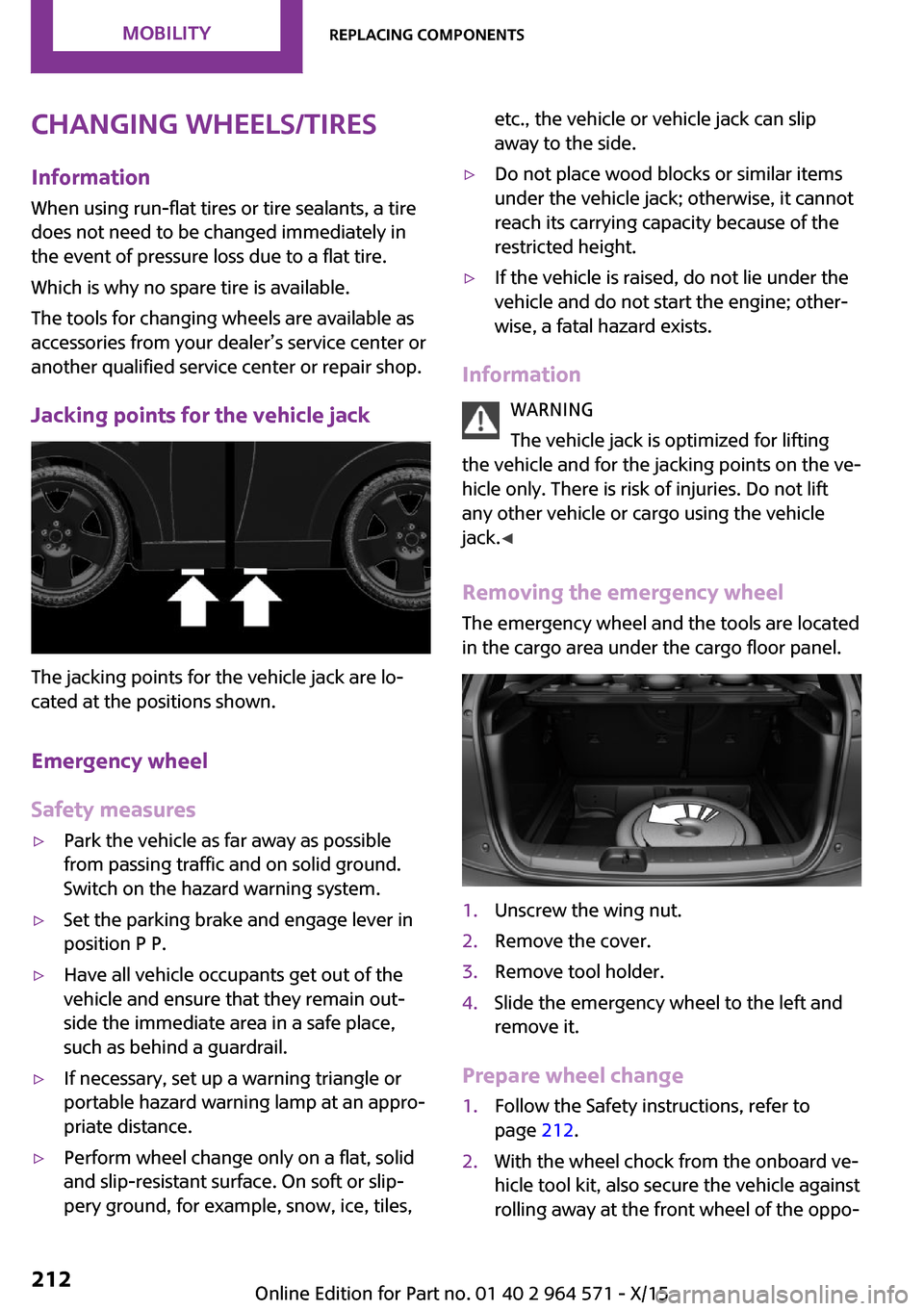
Jacking points for the vehicle jack
The jacking points for the vehicle jack are lo‐
cated at the positions shown.
Emergency wheel
Safety measures
▷Park the vehicle as far away as possible
from passing traffic and on solid ground.
Switch on the hazard warning system.
▷Set the parking brake and engage lever in
position P P.
▷Have all vehicle occupants get out of the
vehicle and ensure that they remain out‐
side the immediate area in a safe place,
such as behind a guardrail.
▷If necessary, set up a warning triangle or
portable hazard warning lamp at an appro‐
priate distance.
▷Perform wheel change only on a flat, solid
and slip-resistant surface. On soft or slip‐
pery ground, for example, snow, ice, tiles,
etc., the vehicle or vehicle jack can slip
away to the side.
▷Do not place wood blocks or similar items
under the vehicle jack; otherwise, it cannot
reach its carrying capacity because of the
restricted height.
▷If the vehicle is raised, do not lie under the
vehicle and do not start the engine; other‐
wise, a fatal hazard exists.
Information
WARNING
The vehicle jack is optimized for lifting
the vehicle and for the jacking points on the ve‐
hicle only. There is risk of injuries. Do not lift
any other vehicle or cargo using the vehicle
jack.◀
Removing the emergency wheel
The emergency wheel and the tools are located
in the cargo area under the cargo floor panel.
1.Unscrew the wing nut.2.Remove the cover.3.Remove tool holder.4.Slide the emergency wheel to the left and
remove it.
Prepare wheel change
1.Follow the Safety instructions, refer to
page 212.
2.With the wheel chock from the onboard ve‐
hicle tool kit, also secure the vehicle against
rolling away at the front wheel of the oppo‐
Seite 212MOBILITYReplacing components212
Online Edition for Part no. 01 40 2 964 571 - X/15
Page 218 of 246
Steptronic transmission: transporting
the vehicle
Information
The vehicle must not be towed if the front
wheels are touching the ground.
CAUTION
The vehicle can be damaged when tow‐
ing the vehicle with a lifted rear axle. There is
risk of property damage. Have vehicle trans‐
ported only with lifted front axle or on a load‐
ing platform.◀
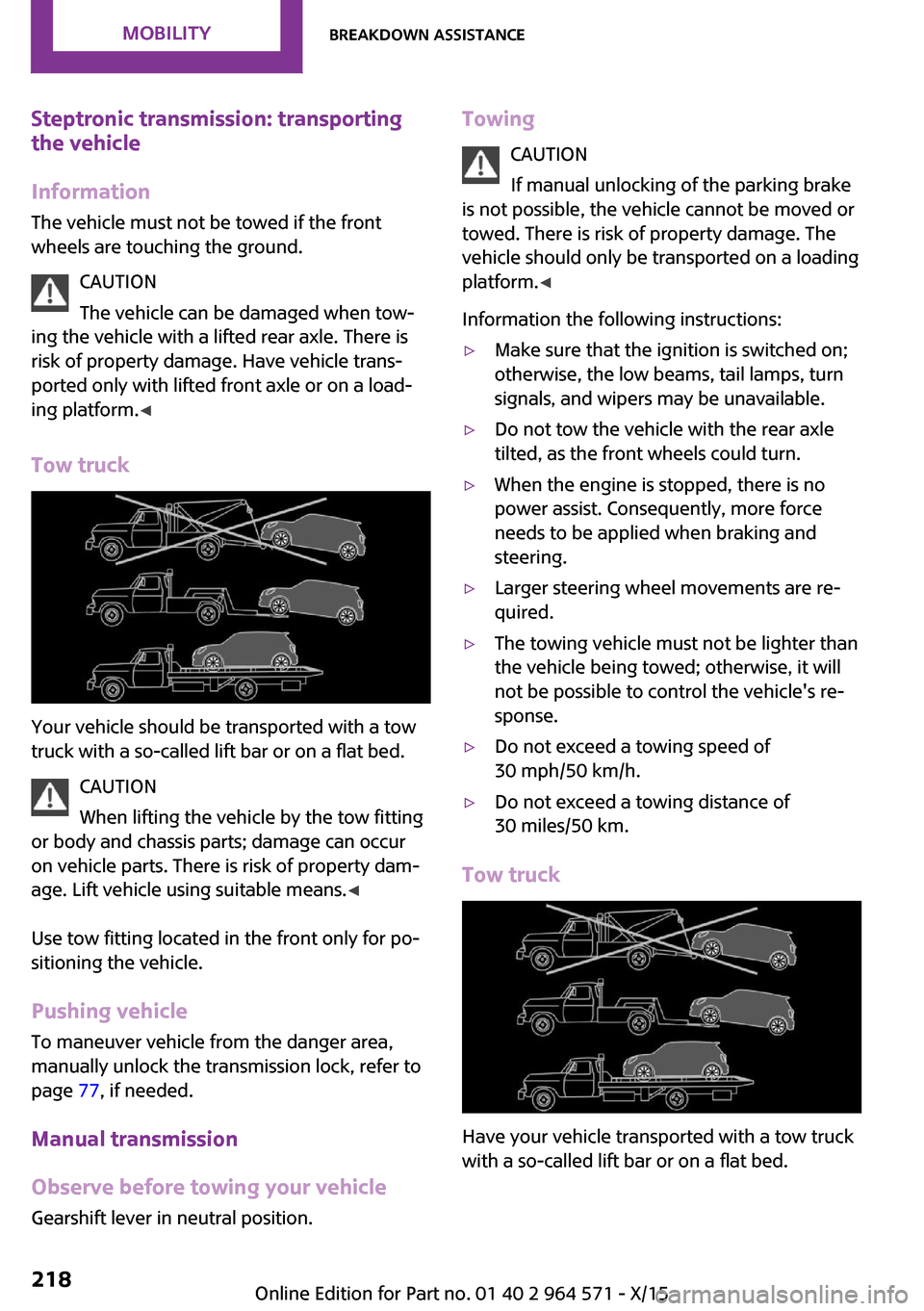
Tow truck
Your vehicle should be transported with a tow
truck with a so-called lift bar or on a flat bed.
CAUTION
When lifting the vehicle by the tow fitting
or body and chassis parts; damage can occur
on vehicle parts. There is risk of property dam‐
age. Lift vehicle using suitable means.◀
Use tow fitting located in the front only for po‐
sitioning the vehicle.
Pushing vehicle
To maneuver vehicle from the danger area,
manually unlock the transmission lock, refer to
page 77, if needed.
Manual transmission
Observe before towing your vehicle
Gearshift lever in neutral position.
Towing
CAUTION
If manual unlocking of the parking brake
is not possible, the vehicle cannot be moved or
towed. There is risk of property damage. The
vehicle should only be transported on a loading
platform.◀
Information the following instructions:
▷Make sure that the ignition is switched on;
otherwise, the low beams, tail lamps, turn
signals, and wipers may be unavailable.
▷Do not tow the vehicle with the rear axle
tilted, as the front wheels could turn.
▷When the engine is stopped, there is no
power assist. Consequently, more force
needs to be applied when braking and
steering.
▷Larger steering wheel movements are re‐
quired.
▷The towing vehicle must not be lighter than
the vehicle being towed; otherwise, it will
not be possible to control the vehicle's re‐
sponse.
▷Do not exceed a towing speed of
30 mph/50 km/h.
▷Do not exceed a towing distance of
30 miles/50 km.
Tow truck
Have your vehicle transported with a tow truck
with a so-called lift bar or on a flat bed.
Seite 218MOBILITYBreakdown assistance218
Online Edition for Part no. 01 40 2 964 571 - X/15
Page 222 of 246

Manual transmission:1.Drive into the car wash.2.Shift to neutral.3.Switch the engine off.4.Switch on the ignition.
Steptronic transmission:
1.Drive into the car wash.2.Engage selector lever position N.3.Make sure that the parking brake is re‐
leased.
4.Press the Start/Stop button to switch off the
engine.
In this way, the ignition remains switched
on, and two Check-Control messages are
displayed.
A signal sounds when you leave the vehicle
while in selector lever position N.
The vehicle cannot be locked from the outside
when in selector lever position N. A signal is
sounded when an attempt is made to lock the
vehicle.
To start the engine with manual transmission:
1.Press on the clutch pedal.2.Press the Start/Stop button.
To start the engine with Steptronic transmis‐
sion:
1.Depress the brake pedal.2.Press the Start/Stop button.
Headlights
▷Do not rub dry and do not use abrasive or
acidic cleansers.
▷Soak areas that have been dirtied e. g.,
from insects, with shampoo and wash off
with water.
▷Thaw ice with de-icing spray; do not use an
ice scraper.
After washing the vehicle
After washing the vehicle, apply the brakes
briefly to dry them; otherwise, braking action
can be reduced and corrosion of the brake
discs can occur.
Completely remove all residues on the win‐
dows, to minimize loss of visibility due to
smearing and to reduce wiper noises and wiper
blade wear.
Vehicle care
Car care products
The manufacturer of your vehicle recommends
using care and cleaning products from MINI.
WARNING
Cleansers can contain substances that are
dangerous and harmful to your health. There is
risk of injuries. When cleaning the interior, open
the doors or windows. Only use products in‐
tended for cleaning vehicles. Follow the instruc‐
tions on the container.◀
Vehicle paint
Regular care contributes to driving safety and
value retention. Environmental influences in
areas with elevated air pollution or natural con‐
taminants, such as tree resin or pollen can af‐
fect the vehicle's paintwork. Tailor the fre‐
quency and extent of your car care to these
influences.
Aggressive substances such as spilled fuel, oil,
grease or bird droppings must be removed im‐
mediately to prevent the finish from being al‐
tered or discolored.
Leather care
Remove dust from the leather often, using a
cloth or vacuum cleaner.
Otherwise, particles of dust and road grime
chafe in pores and folds, and lead to increased
Seite 222MOBILITYCare222
Online Edition for Part no. 01 40 2 964 571 - X/15
Page 224 of 246

microfiber cloth. Dampen cloth lightly with wa‐
ter.◀
Safety belts
Dirty belt straps impede the reeling action and
thus have a negative impact on safety.
WARNING
Chemical cleansers can destroy the safety
belt webbing. Missing protective effect of the
safety belts. There is risk of injuries or danger to
life. Use only a mild soapy solution for cleaning
the safety belts.◀
Use only a mild soapy solution, with the safety
belts clipped into their buckles.
Do not allow the switchs to retract the safety
belts until they are dry.
Carpets and floor mats
WARNING
Objects in the driver's floor area can limit
the pedal distance or block a depressed pedal.
There is risk of an accident. Stow objects in the
vehicle such that they are secured and cannot
enter into the driver's floor area. Use floor mats
that are suitable for the vehicle and can be
safely attached to the floor. Do not use loose
floor mats and do not layer several floor mats.
Make sure that there is sufficient clearance for
the pedals. Ensure that the floor mats are se‐
curely fastened again after they were removed,
for example for cleaning.◀
Floor mats can be removed from the car's inte‐
rior for cleaning.
If the floor carpets are very dirty, clean with a
microfiber cloth and water or a textile cleaner.
To prevent matting of the carpet, rub back and
forth in the direction of travel only.
Sensor/camera lenses
To clean sensors and camera lenses, use a cloth
moistened with a small amount of glass deter‐
gent.
Displays/Screens/Projection lenses
CAUTION
Chemical cleansers, moisture or fluids of
any kind can damage the surface of displays
and screens. There is risk of property damage.
Clean with a clean, antistatic microfiber cloth.◀
CAUTION
The surface of displays can be damaged
with improper cleaning. There is risk of prop‐
erty damage. Avoid pressure that is too high
and do not use any scratching materials.◀
Clean with a clean, antistatic microfiber cloth.
For stubborn soiling on the projection lens of
the Head-up Display, dampen the microfiber
cloth with alcohol. Extending projection lens,
refer to page 94.
Long-term
When the vehicle is shut down for longer than
three months, special measures must be taken.
Further information is available from a dealer’s
service center or another qualified service cen‐
ter or repair shop.
Seite 224MOBILITYCare224
Online Edition for Part no. 01 40 2 964 571 - X/15
Page 236 of 246
Everything from A to Z
Index
A
ABS, Antilock Brake Sys‐
tem 117
Acceleration Assistant, see
Launch Control 77
Accessories and parts 8
ACC, see camera-based cruise
control 121
Activated-charcoal filter 144
Active Cruise Control, see
camera-based cruise con‐
trol 121
Additives, oil 197
Adjustments, seats/head re‐
straints 50
Adjustments, steering
wheel 59
After washing vehicle 222
Airbags 101
Airbags, indicator/warning
light 102
Air circulation, see Recircu‐
lated-air mode 140, 143
Air conditioner 139
Air, dehumidifying, see Cool‐
ing function 140, 142
Air distribution,
manual 140, 143
Air flow, air conditioner 140
Air flow, automatic climate
control 143
Air pressure, tires 182
Air vents, see Ventilation 144
Alarm system 44
Alarm triggering 44
Alarm, unintentional 45
All around the center con‐
sole 16
All around the roofliner 17
All around the steering
wheel 14
All-season tires, see Winter
tires 188
Alternating-code hand-held
transmitter 147
Alternative oil types 197
Antifreeze, washer fluid 73
Antilock Brake System,
ABS 117
Anti-slip control, see DSC 117
App, MINI Motorer’s Guide 6
Approved axle load 229
Arrival time 89
Ash tray 150
Assistance when driving
off 120
Assist system, see Intelligent
Safety 110
AUTO intensity 143
Automatic car wash 221
Automatic climate con‐
trol 141
Automatic Curb Monitor 58
Automatic deactivation, Front-
seat passenger airbags 103
Automatic headlight con‐
trol 97
Automatic locking 44
Automatic recirculated-air
control 143
Automatic transmission with
Steptronic 75
AUTO program, automatic cli‐
mate control 142
AUTO program, intensity 143
Auto Start/Stop function 66
Average fuel consumption 89
Average speed 89
Axle loads, weights 229
B
Backrest curvature, see Lum‐
bar support 51, 52
Band-aids, see First-aid
kit 216
Battery replacement, vehicle
battery 214
Battery, vehicle 213
Being towed, see Tow-starting
and towing 217
Belts, safety belts 53
Beverage holder, cu‐
pholder 156
Bonus range, GREEN
Mode 171
Bottle holder, see Cu‐
pholder 156
Brake assistant 117
Brake discs, break-in 162
Brake pads, break-in 162
Braking, hints 163
Breakdown assistance 216
Break-in 162
Brightness of Control Dis‐
play 92
Bug light 205
Bulb replacement 204
Bulb replacement, front 205
Bulb replacement, rear 207
Bulb replacement, side 211
Bulbs and lights 204
Button, Start/Stop 64
Bypassing, see Jump-start‐
ing 216
C
California Proposition 65
Warning 8
Seite 236REFERENCEEverything from A to Z236
Online Edition for Part no. 01 40 2 964 571 - X/15
Page 237 of 246

Camera-based cruise con‐
trol 121
Camera lenses, care 224
Camera, rearview cam‐
era 132
Can holder, see Cu‐
pholder 156
Car battery 213
Car care products 222
Care, displays 224
Care, vehicle 222
Cargo area 152
Cargo area, adapting size 157
Cargo area door, see split
doors 40
Cargo area, enlarging 153
Cargo area, storage compart‐
ments 157
Cargo cover 152
Cargo, securing 166
Cargo straps, securing
cargo 166
Car key, see Remote con‐
trol 34
Carpet, care 224
Car wash 221
Catalytic converter, see Hot
exhaust system 163
CBS Condition Based Serv‐
ice 201
Center armrest 156
Center console 16
Central instrument cluster,
LED ring 92
Central locking system 40
Central screen, refer to Control
Display 18
Changes, technical, refer to
Own Safety 7
Changing parts 203
Changing wheels 212
Changing wheels/tires 187
Chassis number, see vehicle
identification number 10
Check Control 80
Checking the oil level elec‐
tronically 195
Children, seating position 60
Children, transporting
safely 60
Child restraint fixing sys‐
tem 60
Child restraint fixing system
LATCH 62
Child restraint fixing systems,
mounting 61
Child safety locks 63
Child seat, mounting 61
Child seats 60
Chrome parts, care 223
Cigarette lighter 150
Cleaning, displays 224
Climate control 139, 141
Clock 84
Closing/opening via door
lock 39
Closing/opening with remote
control 37
Clothes hooks 157
Coasting 172
Coasting with engine decou‐
pled, coasting 172
Coasting with idling en‐
gine 172
Combination switch, see Turn
signals 70
Combi switch, see wiper sys‐
tem 71
Comfort Access 41
Compartments in the
doors 156
Compass 148
Compressor 189
Condensation on win‐
dows 143
Condensation under the vehi‐
cle 164
Condition Based Service
CBS 201
Configuring driving pro‐
gram 120
Confirmation signal 44
Control Display 18
Control Display, settings 91
Controller 19
Control systems, driving stabil‐
ity 117
Convenient opening 38
Coolant 199
Cooling function 140, 142
Cooling, maximum 142
Cooling system 199
Cornering lamp 98
Corrosion on brake discs 164
Cosmetic mirror 150
Courtesy lamps during unlock‐
ing 37
Courtesy lamps with the vehi‐
cle locked 38
Cruise control 127
Cruise control, active 121
Cruising range 85
Cupholder 156
Current fuel consumption 85
D
Damage, tires 186
Damping control, dy‐
namic 119
Data, technical 228
Date 84
Daytime running lights 98
Defrosting, see defrosting the
windows 141
Defrosting, see Windows, de‐
frosting 143
Defrosting the windows 141
Dehumidifying, air 140, 142
Deleting personal data 24
Deletion of personal data 24
Destination distance 89
Digital clock 84
Digital compass 148
Dimensions 228
Dimmable exterior mirrors 58
Dimmable interior mirror 59
Seite 237Everything from A to ZREFERENCE237
Online Edition for Part no. 01 40 2 964 571 - X/15