park assist MINI Clubman 2016 Owner's Manual (Mini Connected)
[x] Cancel search | Manufacturer: MINI, Model Year: 2016, Model line: Clubman, Model: MINI Clubman 2016Pages: 246, PDF Size: 5.21 MB
Page 14 of 246
CockpitVehicle features and op‐
tions
This chapter describes all standard, country-
specific and optional features offered with the
series. It also describes features that are not
necessarily available in your car, e. g., due to
the selected options or country versions. This
also applies to safety-related functions and sys‐
tems. The respectively applicable country provi‐
sions must be observed when using the respec‐
tive features and systems.
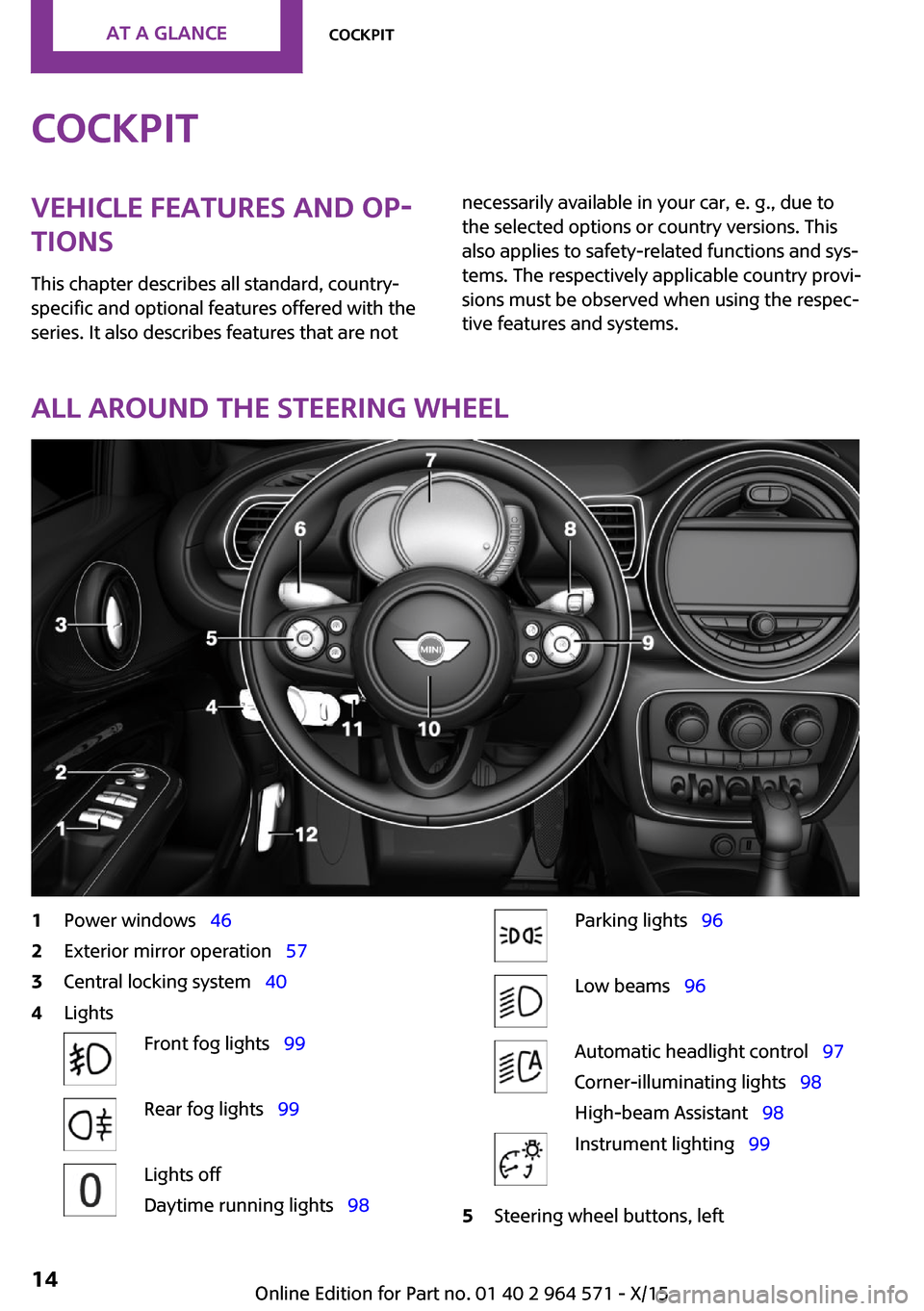
All around the steering wheel
1Power windows 462Exterior mirror operation 573Central locking system 404LightsFront fog lights 99Rear fog lights 99Lights off
Daytime running lights 98
Parking lights 96Low beams 96Automatic headlight control 97
Corner-illuminating lights 98
High-beam Assistant 98
Instrument lighting 995Steering wheel buttons, leftSeite 14AT A GLANCECockpit14
Online Edition for Part no. 01 40 2 964 571 - X/15
Page 15 of 246
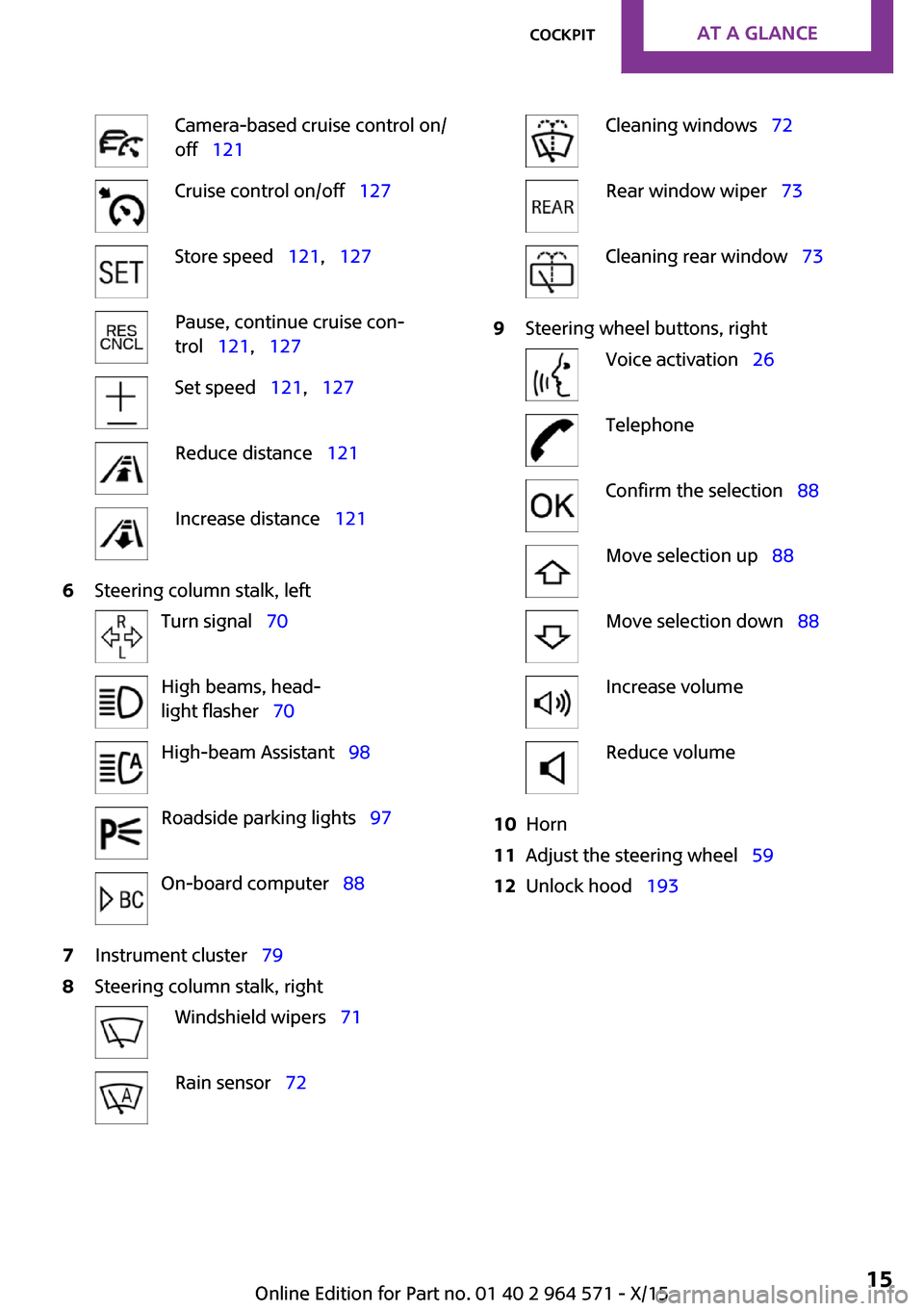
Camera-based cruise control on/
off 121
Cruise control on/off 127Store speed 121, 127Pause, continue cruise con‐
trol 121, 127
Set speed 121, 127Reduce distance 121Increase distance 1216Steering column stalk, leftTurn signal 70High beams, head‐
light flasher 70
High-beam Assistant 98Roadside parking lights 97On-board computer 887Instrument cluster 798Steering column stalk, rightWindshield wipers 71Rain sensor 72Cleaning windows 72Rear window wiper 73Cleaning rear window 739Steering wheel buttons, rightVoice activation 26TelephoneConfirm the selection 88Move selection up 88Move selection down 88Increase volumeReduce volume10Horn11Adjust the steering wheel 5912Unlock hood 193Seite 15CockpitAT A GLANCE15
Online Edition for Part no. 01 40 2 964 571 - X/15
Page 16 of 246

All around the center console1Hazard warning system 216Intelligent Safety 1102Control Display 183Radio/Multimedia4Glove compartment 1555Climate control 1396PDC Park Distance Control 129
Rearview camera 132
Parking assistant 134
Auto Start/Stop function 66Start/stop the engine and switch
the ignition on/off 64
DSC Dynamic Stability Con‐
trol 132
Head-up Display 937Steptronic transmission selector lever 75
Manual transmission selector lever 74
8Controller with buttons 199Parking brake 6810Driving Dynamics Control 119Seite 16AT A GLANCECockpit16
Online Edition for Part no. 01 40 2 964 571 - X/15
Page 67 of 246
▷The selector lever is in selector lever posi‐
tion D.
▷Brake pedal remains depressed while the
vehicle is stopped.
▷The driver's safety belt is buckled or the
driver's door is closed.
In order to be able to release the brake pedal,
engage lever in position P. The engine remains
off.
To continue driving depress the brake pedal.
When a gear is engaged, the engine starts au‐
tomatically.
The air flow from the air conditioner is reduced
when the engine is switched off.
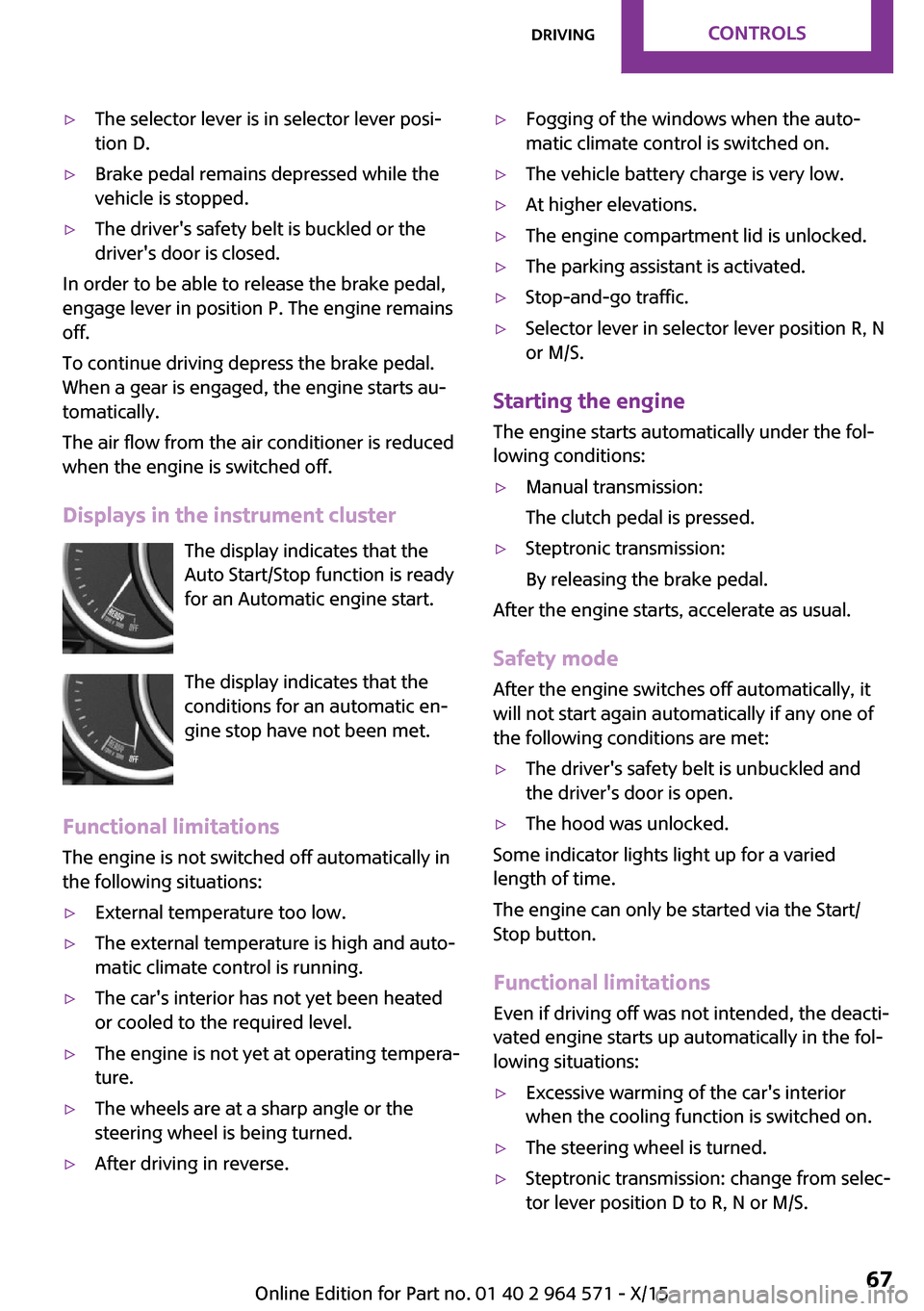
Displays in the instrument cluster
The display indicates that the
Auto Start/Stop function is ready
for an Automatic engine start.
The display indicates that the
conditions for an automatic en‐
gine stop have not been met.
Functional limitations
The engine is not switched off automatically in
the following situations:
▷External temperature too low.▷The external temperature is high and auto‐
matic climate control is running.
▷The car's interior has not yet been heated
or cooled to the required level.
▷The engine is not yet at operating tempera‐
ture.
▷The wheels are at a sharp angle or the
steering wheel is being turned.
▷After driving in reverse.▷Fogging of the windows when the auto‐
matic climate control is switched on.
▷The vehicle battery charge is very low.▷At higher elevations.▷The engine compartment lid is unlocked.▷The parking assistant is activated.▷Stop-and-go traffic.▷Selector lever in selector lever position R, N
or M/S.
Starting the engine
The engine starts automatically under the fol‐
lowing conditions:
▷Manual transmission:
The clutch pedal is pressed.
▷Steptronic transmission:
By releasing the brake pedal.
After the engine starts, accelerate as usual.
Safety mode
After the engine switches off automatically, it
will not start again automatically if any one of
the following conditions are met:
▷The driver's safety belt is unbuckled and
the driver's door is open.
▷The hood was unlocked.
Some indicator lights light up for a varied
length of time.
The engine can only be started via the Start/
Stop button.
Functional limitations
Even if driving off was not intended, the deacti‐
vated engine starts up automatically in the fol‐
lowing situations:
▷Excessive warming of the car's interior
when the cooling function is switched on.
▷The steering wheel is turned.▷Steptronic transmission: change from selec‐
tor lever position D to R, N or M/S.
Seite 67DrivingCONTROLS67
Online Edition for Part no. 01 40 2 964 571 - X/15
Page 83 of 246

Parking lights, headlight control
Parking lights or headlights are acti‐
vated.
For additional information, refer to
Parking lights/low beams, headlight control, re‐
fer to page 96.
Front fog lights
Front fog lights are activated.
For additional information, refer to
Front fog lights, refer to page 99.
High-beam Assistant
High-beam Assistant is switched on.
High beams are activated and off auto‐
matically as a function of the traffic sit‐
uation.
For additional information, refer to High-beam
Assistant, refer to page 98.
Cruise control
The system is switched on. It maintains
the speed that was set using the control
elements on the steering wheel.
Blue lights
High beams
High beams are activated.
For additional information, refer to High
beams, refer to page 71.
General lamps
At least one Check Control message is
displayed or is stored.
Text messages
Text messages in combination with a symbol in
the instrument cluster explain a Check Control
message and the meaning of the indicator and
warning lights.
Supplementary text messages
Additional information, such as on the cause of
an error or the required action, can be called up
via Check Control.
With urgent messages the added text will be
automatically displayed on the Control Display.
Symbols
Within the supplementary text, the following
functions can be selected independent of the
check control message.
▷ Display additional information about
the Check Control message in the
Integrated Owner's Manual.
▷ "Service request"
Contact a dealer’s service center or another
qualified service center or repair shop.
▷ "Roadside Assistance"
Contact Roadside Assistance.
Hiding Check Control messages
Press and hold button on turn signal lever.
▷Some Check Control messages are dis‐
played continuously and are not cleared
until the malfunction is eliminated. If sev‐
eral malfunctions occur at once, the mes‐
sages are displayed consecutively.
These messages can be faded for approx.
8 seconds. After this time, they are dis‐
played again automatically.
Seite 83DisplaysCONTROLS83
Online Edition for Part no. 01 40 2 964 571 - X/15
Page 98 of 246
System limits
The automatic headlamp control cannot serve
as a substitute for your personal judgment of
lighting conditions.
E. g. the sensors are unable to detect fog or
hazy weather. To avoid safety risks under these
conditions, you should always switch on the
lights manually.
Daytime running lights
General information
Position of switch: , ,
The daytime running lights light up when the
ignition is switched on. After the ignition is
switched off, the parking lights light up in posi‐
tion .
Activating/deactivating
In some countries, daytime running lights are
mandatory, so it may not be possible to deacti‐
vate the daytime running lights.
On the Control Display:
1. "Settings"2."Lighting"3."Daytime running lamps"
Settings are stored for the remote control cur‐
rently used.
Cornering lamp
General information
Position of switch:
When going around corners, the cornering light
also lights the interior area of the curve. Below
a speed of approx. 25 mph/40 km/h when the
turn signal is switched on and the steering an‐
gle is detected, there is automatic activation.
Malfunction
A Check Control message is displayed.
Cornering light is malfunctioning or has failed.
Have the system immediately checked by a
dealer’s service center or another qualified
service center or repair shop.
High-beam Assistant
The concept
The high-beam Assistant detects other traffic
participants early on and automatically
switches the high beams on or off depending
on the traffic situation. The assistant ensures
that the high beams are switched on, whenever
the traffic situation allows. In the low speed
range, the high beams are not switched on by
the system.
General information
The system responds to light from oncoming
traffic and traffic driving ahead of you, and to
adequate illumination, e.g., in towns and cities.
The driver can intervene at any time and switch
the high beams on and off as usual.
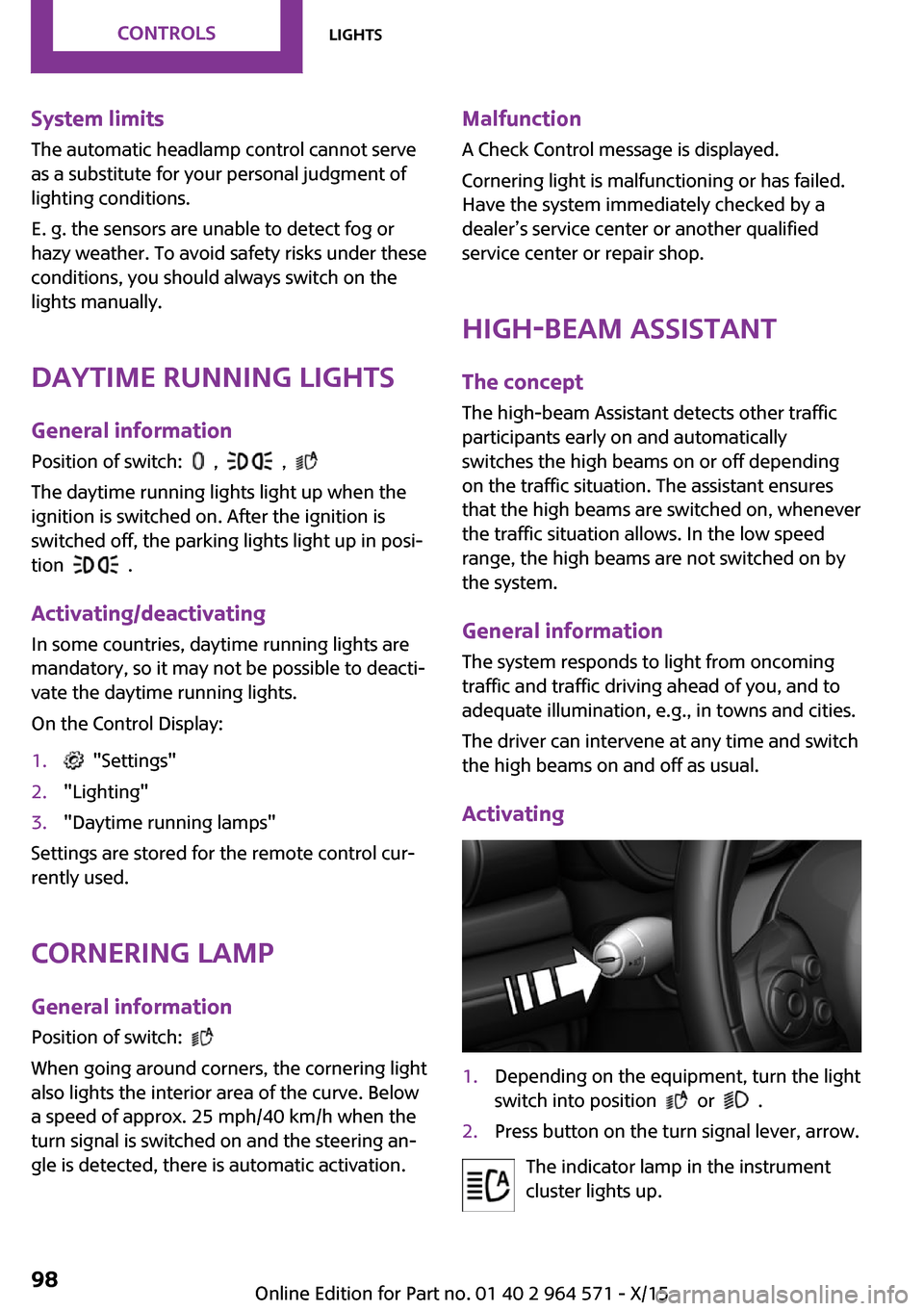
Activating
1.Depending on the equipment, turn the light
switch into position or .
2.Press button on the turn signal lever, arrow.
The indicator lamp in the instrument
cluster lights up.
Seite 98CONTROLSLights98
Online Edition for Part no. 01 40 2 964 571 - X/15
Page 99 of 246
When the low beams are on, the lights are au‐
tomatically brightened or dimmed.
The blue indicator lamp in the instru‐
ment cluster lights up when the system
switches on the high beams.
Deactivating
The High-beam Assistant is deactivated when
manually switching the high beams on and off,
refer to page 71.
To reactivate the High-beam Assistant, press
the button on the turn signal lever.
System limits
The High-beam Assistant cannot serve as a
substitute for the driver's personal judgment of
when to use the high beams. Therefore, man‐
ually switch off the high beams in situations
where required to avoid a safety risk.
The system is not fully functional in the follow‐
ing situations, and driver intervention may be
necessary:
▷In very unfavorable weather conditions,
such as fog or heavy precipitation.
▷When detecting poorly-lit road users such
as pedestrians, cyclists, horseback riders
and wagons; when driving close to train or
ship traffic; and at animal crossings.
▷In tight curves, on hilltops or in depressions,
in cross traffic or half-obscured oncoming
traffic on highways.
▷In poorly-lit towns and cities and in the
presence of highly reflective signs.
▷When the windshield behind the interior
mirror is fogged over, dirty or covered with
stickers, etc.
Fog lights
Front fog lights
The low beams must be switched on.
Press button. The green indicator lamp
lights up.
If the automatic headlight control, refer to
page 97, is activated, the low beams will come
on automatically when you switch on the front
fog lights.
When the high beams or headlight flasher are
activated, the front fog lights are not switched
on.
Rear fog lights
The low beams or front fog lights must be
switched on.
Press button. The yellow indicator
lamp lights up.
If the automatic headlight control, refer to
page 97, is activated, the low beams will come
on automatically when you switch on the rear
fog lights.
Instrument lighting
Adjusting
The parking lights or low beams
must be switched on to adjust
the brightness.
Adjust the brightness with the
thumbwheel.
Interior lights
General information
The interior lights, footwell lights, access lights
and courtesy lights are controlled automati‐
cally.
Thumb wheel for the instrument lighting con‐
trols brightness of some of these features.
Seite 99LightsCONTROLS99
Online Edition for Part no. 01 40 2 964 571 - X/15
Page 120 of 246

Activating SPORT
Turn Driving Dynamics Control to the left until
SPORT is displayed in the instrument cluster.
Configuring SPORT
Depending on your vehicle's optional features,
when the display is activated on the Control
Display, the SPORT driving mode can be config‐
ured for individual specifications.
Activating SPORT.
Select "Configure SPORT".
Configure the program.
SPORT can also be configured before it is acti‐
vated:
1. "Settings"2."Driving mode"3."Configure SPORT"
This configuration is retrieved when SPORT is
activated.
Configuring driving program
Settings can be made for the following driving
programs in Driving mode:
▷GREEN, refer to page 119.▷SPORT, refer to page 119.
Displays
Program selection
With Driving Dynamics Control
turned on a list of programs is
displayed and can be selected.
Selected program
The instrument cluster displays
the selected program.
Display on the onboard monitor
Program changes can be displayed on the on‐
board monitor.
1. "Settings"2."Control display"3."Driving mode info"
Drive-off assistant
The concept
This system supports driving off on inclines. The
parking brake is not required.
Driving off with the drive-off assistant
1.Hold the vehicle in place with the foot
brake.
2.Release the foot brake and drive off with‐
out delay.
After the foot brake is released, the vehicle is
held in place for approx. 2 seconds.
For vehicles with respective equipment ver‐
sions, the possible holding duration amounts to
2 minutes.
Seite 120CONTROLSDriving stability control systems120
Online Edition for Part no. 01 40 2 964 571 - X/15
Page 132 of 246
With front PDC: to reduce false alarms, switch
off automatic PDC activation on obstacle detec‐
tion, for example in car washes, refer to
page 130.
Malfunction
A Check Control message, refer to page 80, is
displayed in the instrument cluster.
Red symbol is displayed, and the range
of the sensors is dimmed on the Control
Display.
PDC has failed. Have the system checked.
Rearview camera
The concept
The rearview camera provides assistance in
parking and maneuvering backwards. The area
behind the vehicle is shown on the Control Dis‐
play.
Information
WARNING
The system does not relieve from the per‐
sonal responsibility to correctly assess the traf‐
fic situation. There is risk of an accident. Adjust
the driving style to the traffic conditions. Watch
traffic and vehicle surroundings closely and ac‐
tively interfere in the respective situations.◀
Overview
Button in the vehicle
Rearview camera
Camera
The camera lens is located between the license
plate lights.
The image quality may be impaired by dirt.
Clean the camera lens, refer to page 224.
Switching on/off
Switching on automatically
With the engine running, engage lever in posi‐
tion P R.
Automatic deactivation during forward
travel
The system switches off when a certain driving
distance or speed is exceeded.
Switch the system back on if needed.
Switching on/off manually
Press button.
▷On: the LED lights up.▷Off: the LED goes out.
The PDC is shown on the Control Display.
The rearview camera image is displayed when
the reverse gear is engaged by pressing the
button.
Seite 132CONTROLSDriving comfort132
Online Edition for Part no. 01 40 2 964 571 - X/15
Page 133 of 246
Switching the view via the onboard
monitor
With PDC activated:
"Rear view camera"
The rearview camera image is displayed.
Display on the Control Display
Functional requirement
▷The rearview camera is switched on.▷Split doors are completely closed.
Activating the assistance functions
More than one assistance function can be ac‐
tive at the same time.
▷Parking aid lines
"Parking aid lines"
Lanes and turning radius are indicated.
▷Obstacle marking
"Obstacle marking"
Spatially-shaped markings are displayed.
Pathway lines
Pathway lines can be superimposed on the im‐
age of the rearview camera.
Pathway lines help you to estimate the space
required when parking and maneuvering on
level roads.
Pathway lines depend on the current steering
angle and are continuously adjusted to the
steering wheel movements.
Turning circle lines
Turning circle lines can be superimposed on the
image of the rearview camera.
Turning circle lines show the course of the
smallest possible turning radius on a level road.
Only one turning radius line is displayed after
the steering wheel is turned past a certain an‐
gle.
Obstacle marking
Obstacle markings can be faded into the image
of the rearview camera.
Their colored margins of the obstacle markings
match the markings of the PDC.
Seite 133Driving comfortCONTROLS133
Online Edition for Part no. 01 40 2 964 571 - X/15