brake light MINI COOPER 2004 Owners Manual
[x] Cancel search | Manufacturer: MINI, Model Year: 2004, Model line: COOPER, Model: MINI COOPER 2004Pages: 152, PDF Size: 1.53 MB
Page 5 of 152
3
OVERVIEW REPAIRS OPERATION CONTROLS DATA INDEX
Driving:
Ignition lock41
Starting the engine41
Switching off the engine43
Parking brake43
Manual transmission44
Continuously Variable automatic
Transmission (CVT)45
Parking lamps/Low beams48
Turn signal indicator/Headlamp
flasher49
Instrument lighting49
Fog lamps49
Interior lamps50
Washer/wiper system50
Cruise control52
Everything under control:
Odometer54
Tachometer54
Fuel gauge54
Coolant temperature gauge55
Service interval display56
Clock56
Onboard computer57
Technology for safety and driving
convenience:
All Season traction Control (ASC)59
Dynamic Stability Control (DSC)60
Antilock Brake System (ABS)61
Flat Tire Monitor62
Park Distance Control (PDC)64
Airbags65
Controlling the climate for pleasant
driving:
Air conditioning system67
Automatic climate control70
Interior conveniences:
Glove compartment73
Ashtray, beverage holders74
Cigarette lighter, 12 V power supply74
Loading and transporting cargo:
Cargo area75
Loading cargo76
Roof-mounted luggage rack78
OPERATION, CARE, MAINTENANCE
Special operating instructions:
Break-in procedures82
General driving notes83
Refueling84
Fuel specifications85
Brake system86
Wheels and tires:
Tire inflation pressure87
Tire coding89
Tire condition91
Wheel and tire replacement92
Run Flat tires93
Snow chains94
ProCarManuals.com
Page 17 of 152
15
OVERVIEW REPAIRS OPERATION CONTROLS DATA INDEX
INDICATOR AND WARNING LAMPS
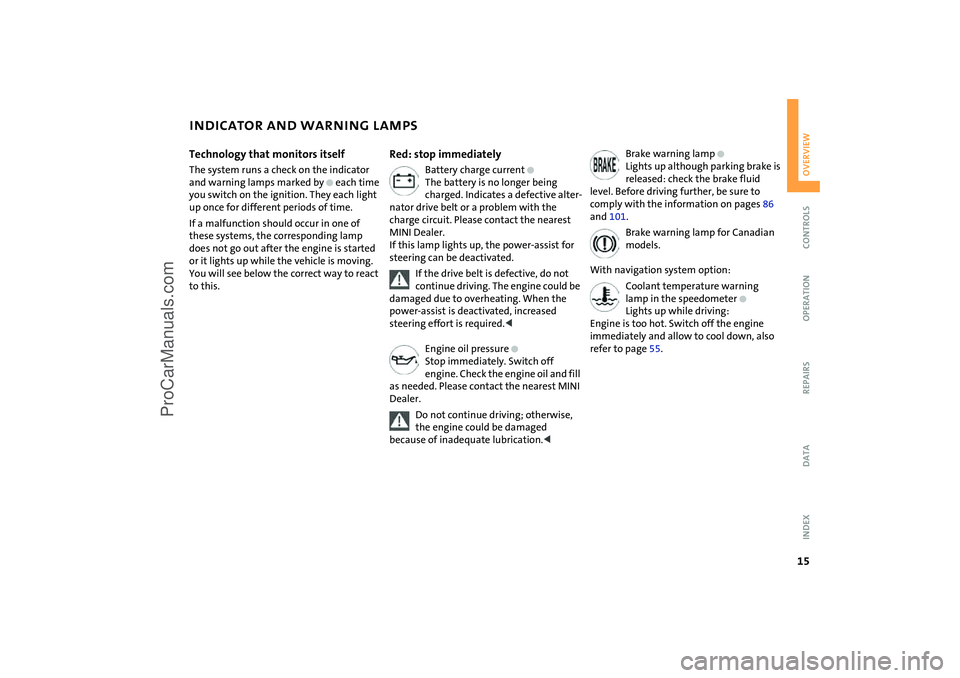
Technology that monitors itself
The system runs a check on the indicator
and warning lamps marked by
+
each time
you switch on the ignition. They each light
up once for different periods of time.
If a malfunction should occur in one of
these systems, the corresponding lamp
does not go out after the engine is started
or it lights up while the vehicle is moving.
You will see below the correct way to react
to this.
Red: stop immediately
Battery charge current
+
The battery is no longer being
charged. Indicates a defective alter-
nator drive belt or a problem with the
charge circuit. Please contact the nearest
MINI Dealer.
If this lamp lights up, the power-assist for
steering can be deactivated.
If the drive belt is defective, do not
continue driving. The engine could be
damaged due to overheating. When the
power-assist is deactivated, increased
steering effort is required.
<
Engine oil pressure
+
Stop immediately. Switch off
engine. Check the engine oil and fill
as needed. Please contact the nearest MINI
Dealer.
Do not continue driving; otherwise,
the engine could be damaged
because of inadequate lubrication.
<
Brake warning lamp
+
Lights up although parking brake is
released: check the brake fluid
level. Before driving further, be sure to
comply with the information on pages 86
and 101.
Brake warning lamp for Canadian
models.
With navigation system option:
Coolant temperature warning
lamp in the speedometer
+
Lights up while driving:
Engine is too hot. Switch off the engine
immediately and allow to cool down, also
refer to page 55.
ProCarManuals.com
Page 18 of 152
16
INDICATOR AND WARNING LAMPS
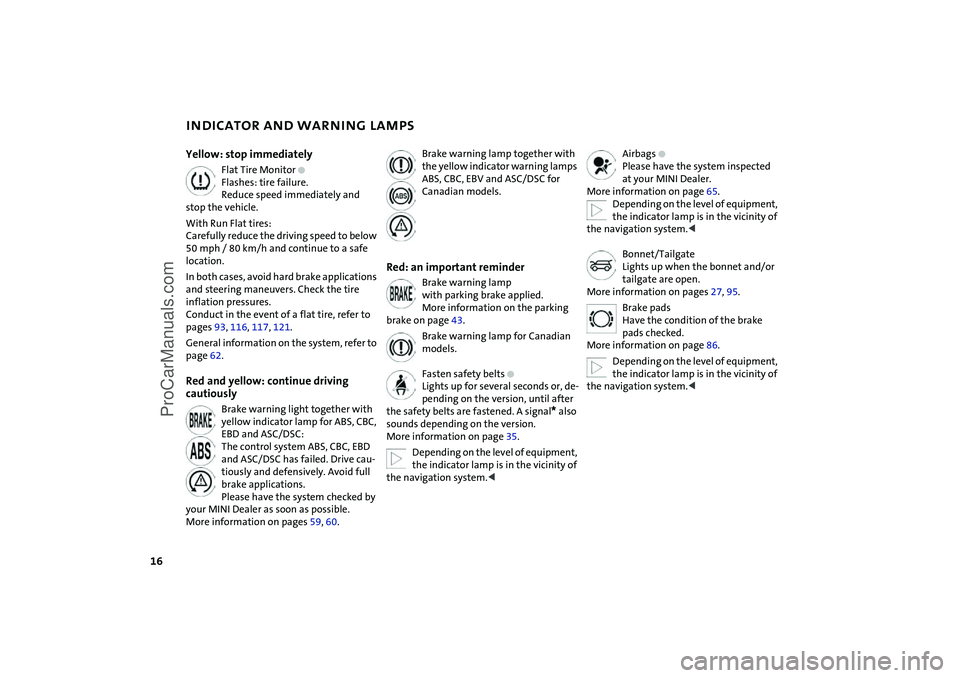
Yellow: stop immediately
Flat Tire Monitor
+
Flashes: tire failure.
Reduce speed immediately and
stop the vehicle.
With Run Flat tires:
Carefully reduce the driving speed to below
50 mph / 80 km/h and continue to a safe
location.
In both cases, avoid hard brake applications
and steering maneuvers. Check the tire
inflation pressures.
Conduct in the event of a flat tire, refer to
pages 93, 116, 117, 121.
General information on the system, refer to
page 62.
Red and yellow: continue driving
cautiously
Brake warning light together with
yellow indicator lamp for ABS, CBC,
EBD and ASC/DSC:
The control system ABS, CBC, EBD
and ASC/DSC has failed. Drive cau-
tiously and defensively. Avoid full
brake applications.
Please have the system checked by
your MINI Dealer as soon as possible.
More information on pages 59, 60.
Brake warning lamp together with
the yellow indicator warning lamps
ABS, CBC, EBV and ASC/DSC for
Canadian models.
Red: an important reminder
Brake warning lamp
with parking brake applied.
More information on the parking
brake on page 43.
Brake warning lamp for Canadian
models.
Fasten safety belts
+
Lights up for several seconds or, de-
pending on the version, until after
the safety belts are fastened. A signal
*
also
sounds depending on the version.
More information on page 35.
Depending on the level of equipment,
the indicator lamp is in the vicinity of
the navigation system.
<
Airbags
+
Please have the system inspected
at your MINI Dealer.
More information on page 65.
Depending on the level of equipment,
the indicator lamp is in the vicinity of
the navigation system.
<
Bonnet/Tailgate
Lights up when the bonnet and/or
tailgate are open.
More information on pages 27, 95.
Brake pads
Have the condition of the brake
pads checked.
More information on page 86.
Depending on the level of equipment,
the indicator lamp is in the vicinity of
the navigation system.
<
ProCarManuals.com
Page 19 of 152
17
OVERVIEW REPAIRS OPERATION CONTROLS DATA INDEX
INDICATOR AND WARNING LAMPS
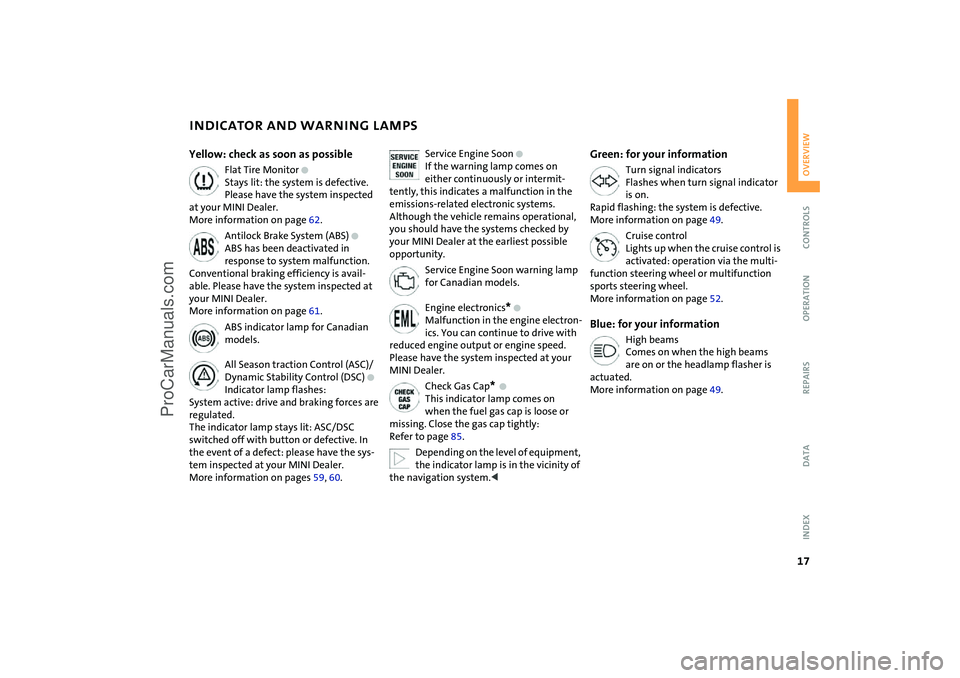
Yellow: check as soon as possible
Flat Tire Monitor
+
Stays lit: the system is defective.
Please have the system inspected
at your MINI Dealer.
More information on page 62.
Antilock Brake System (ABS)
+
ABS has been deactivated in
response to system malfunction.
Conventional braking efficiency is avail-
able. Please have the system inspected at
your MINI Dealer.
More information on page 61.
ABS indicator lamp for Canadian
models.
All Season traction Control (ASC)/
Dynamic Stability Control (DSC)
+
Indicator lamp flashes:
System active: drive and braking forces are
regulated.
The indicator lamp stays lit: ASC/DSC
switched off with button or defective. In
the event of a defect: please have the sys-
tem inspected at your MINI Dealer.
More information on pages 59, 60.
Service Engine Soon
+
If the warning lamp comes on
either continuously or intermit-
tently, this indicates a malfunction in the
emissions-related electronic systems.
Although the vehicle remains operational,
you should have the systems checked by
your MINI Dealer at the earliest possible
opportunity.
Service Engine Soon warning lamp
for Canadian models.
Engine electronics
*
+
Malfunction in the engine electron-
ics. You can continue to drive with
reduced engine output or engine speed.
Please have the system inspected at your
MINI Dealer.
Check Gas Cap
*
+
This indicator lamp comes on
when the fuel gas cap is loose or
missing. Close the gas cap tightly:
Refer to page 85.
Depending on the level of equipment,
the indicator lamp is in the vicinity of
the navigation system.
<
Green: for your information
Turn signal indicators
Flashes when turn signal indicator
is on.
Rapid flashing: the system is defective.
More information on page 49.
Cruise control
Lights up when the cruise control is
activated: operation via the multi-
function steering wheel or multifunction
sports steering wheel.
More information on page 52.
Blue: for your information
High beams
Comes on when the high beams
are on or the headlamp flasher is
actuated.
More information on page 49.
ProCarManuals.com
Page 45 of 152
43
OVERVIEW REPAIRS OPERATIONCONTROLS DATA INDEX
SWITCHING OFF THE ENGINE PARKING BRAKE
You should never remove the ignition
key when the vehicle is in motion, as
the steering lock could engage.
When you leave the vehicle, always remove
the ignition key and engage the steering
lock.
When you park on downward slopes,
engage the parking brake.<
Manual transmissionTurn the ignition key to position 1 or 0.Continuously Variable automatic
Transmission (CVT)Engage selector lever position P, turn the
ignition key to position 1 or 0.
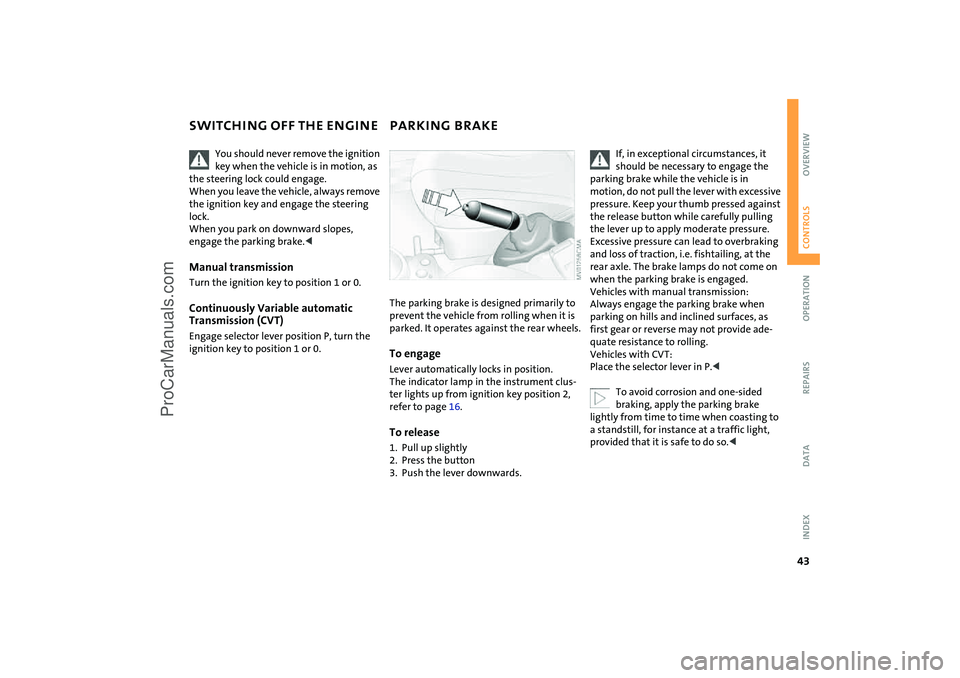
The parking brake is designed primarily to
prevent the vehicle from rolling when it is
parked. It operates against the rear wheels.To engageLever automatically locks in position.
The indicator lamp in the instrument clus-
ter lights up from ignition key position 2,
refer to page 16.To release1. Pull up slightly
2. Press the button
3. Push the lever downwards.
If, in exceptional circumstances, it
should be necessary to engage the
parking brake while the vehicle is in
motion, do not pull the lever with excessive
pressure. Keep your thumb pressed against
the release button while carefully pulling
the lever up to apply moderate pressure.
Excessive pressure can lead to overbraking
and loss of traction, i.e. fishtailing, at the
rear axle. The brake lamps do not come on
when the parking brake is engaged.
Vehicles with manual transmission:
Always engage the parking brake when
parking on hills and inclined surfaces, as
first gear or reverse may not provide ade-
quate resistance to rolling.
Vehicles with CVT:
Place the selector lever in P.<
To avoid corrosion and one-sided
braking, apply the parking brake
lightly from time to time when coasting to
a standstill, for instance at a traffic light,
provided that it is safe to do so.<
ProCarManuals.com
Page 46 of 152
44
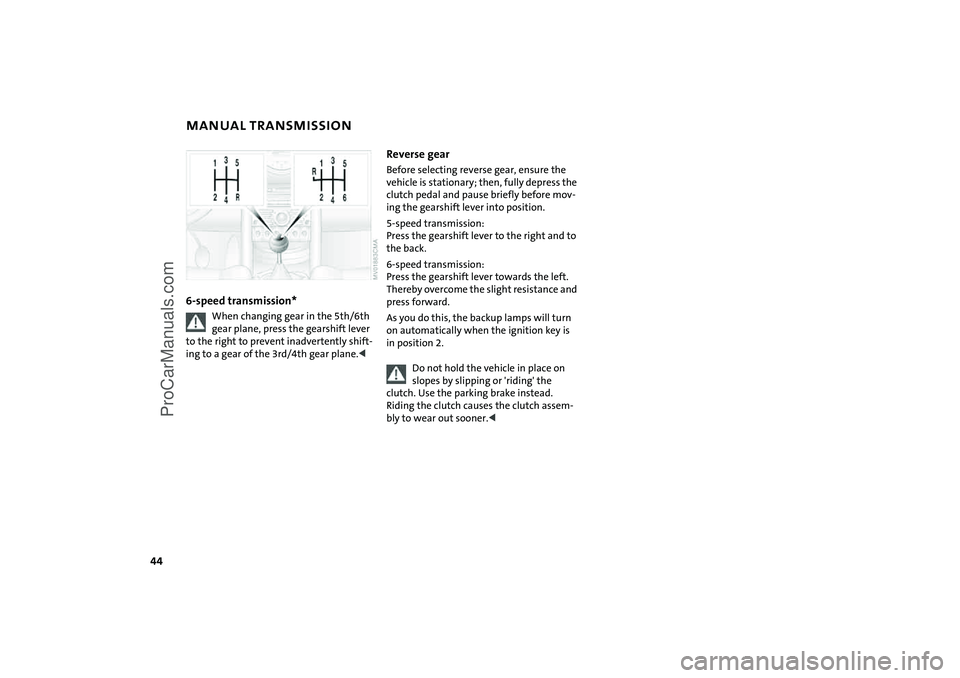
MANUAL TRANSMISSION 6-speed transmission*
When changing gear in the 5th/6th
gear plane, press the gearshift lever
to the right to prevent inadvertently shift-
ing to a gear of the 3rd/4th gear plane.<
Reverse gearBefore selecting reverse gear, ensure the
vehicle is stationary; then, fully depress the
clutch pedal and pause briefly before mov-
ing the gearshift lever into position.
5-speed transmission:
Press the gearshift lever to the right and to
the back.
6-speed transmission:
Press the gearshift lever towards the left.
Thereby overcome the slight resistance and
press forward.
As you do this, the backup lamps will turn
on automatically when the ignition key is
in position 2.
Do not hold the vehicle in place on
slopes by slipping or 'riding' the
clutch. Use the parking brake instead.
Riding the clutch causes the clutch assem-
bly to wear out sooner.<
ProCarManuals.com
Page 63 of 152

61
OVERVIEW REPAIRS OPERATIONCONTROLS DATA INDEX
ANTILOCK BRAKE SYSTEM (ABS) The concept The ABS keeps the wheels from locking
while braking, thereby enhancing active
driving safety.
ABS also includes Electronic Brake Force
Distribution (EBD).Braking with ABSTo achieve optimal performance from ABS
when reacting to critical situations, you
should apply maximum pressure to the
brake pedal – panic stop.
Since the vehicle remains maneuverable,
you can still go around any obstacles with
the smallest possible steering movements.
Pulsation of the brake pedal in conjunction
with the sound of hydraulic regulation indi-
cates to you that you are driving at the limit
and reminds you to readapt your vehicle's
speed to road surface conditions.
Cornering Brake Control (CBC)Cornering Brake Control (CBC) is an
enhancement of ABS that improves vehicle
stability especially when braking during
cornering.
When the vehicle is being braked, the rear
wheels are relieved from load, and this can
cause the vehicle to oversteer in curves.
CBC counteracts this by making use of uni-
lateral braking pressure to generate a stabi-
lizing counter torque while braking outside
of the ABS control range.Electronic Brake Force Distribution
(EBD)In order to achieve a short braking distance
when the vehicle is fully loaded, your vehi-
cle is equipped with relatively large brakes
on the rear axle. EBV continuously moni-
tors the speeds of the rear wheels in rela-
tion to the front wheels in order to prevent
overbraking of the rear wheels even when
the vehicle has a light load. If the rear
wheels tend to lock, the EBV controls their
slip, ensuring operating stability.
ProCarManuals.com
Page 65 of 152

63
OVERVIEW REPAIRS OPERATIONCONTROLS DATA INDEX
FLAT TIRE MONITORFlat tireIndicator lamp:
The indicator lamp in the display
elements flashes. In addition, an
acoustic signal sounds.
1. Reduce speed and stop the vehicle with
caution. Avoid hard brake applications
and steering maneuvers
2. Determine which tire is damaged
If this cannot be determined, con-
tact your MINI Dealer.<
3. Replace the damaged tire, refer to
Changing tires on page 117, or repair the
flat tire using the MINI Moblity System,
refer to page 121.
Vehicles with Run Flat tires:
1. Reduce vehicle speed carefully to under
50 mph / 80 km/h. Avoid hard brake
applications and steering maneuvers.
Do not exceed a speed of 50 mph /
80 km/h
Since Run Flat tires are reinforced
on the flanks, it is usually not pos-
sible to detect a loss of pressure from
the outside, refer to Run Flat tires on
page 93.<
2. To continue driving, follow the instruc-
tions on driving with damaged tires on
page 93.System malfunctionIndicator lamp:
The symbol in the instrument clus-
ter lights up. The Flat Tire Monitor
is malfunctioning or out of order.
Please contact your MINI Dealer.
ProCarManuals.com
Page 85 of 152

83
OVERVIEW REPAIRSOPERATIONCONTROLS DATA INDEX
GENERAL DRIVING NOTESParking the vehicle Condensation forms in the air conditioner
system during operation, and then exits
under the vehicle. Traces of condensed
water on the ground are therefore normal.Brakes
Do not rest your foot on the brake
pedal while driving. Even light but
consistent pedal pressure can lead to high
temperatures, brake wear and possibly
even brake failure.<
Hydroplaning
When driving on wet or slushy roads,
reduce road speed. If you do not, a
wedge of water can form between tires and
road surface. This phenomenon is charac-
terized by a partial or complete loss of con-
tact between the tires and the road surface.
The ultimate results are loss of steering and
braking control.<
Driving through water
Do not drive through water on the
road if it is deeper than 1 ft / 30 cm,
and then only at walking speed at the
most. Otherwise, the vehicle's engine, the
electrical systems and the transmission
may be damaged.<
Clothes hooks
When suspending clothing from the
hooks, ensure that they will not
obstruct the driver's vision. Do not hang
heavy objects on the hooks. If you do so,
they could cause personal injury during
braking or evasive maneuvers.<
High temperatures
High temperatures occur in any vehi-
cle equipped with a catalytic con-
verter. Do not remove the heat protection
plates fitted in the area of the exhaust sys-
tem and do not apply body-cavity pro-
tectant to this area. When driving, standing
at idle, and parking the vehicle, take care to
avoid contact between the hot exhaust sys-
tem and flammable materials, e.g. hay,
grass, leaves, etc. Such contact could lead
to a fire resulting in serious personal injury
and property damage.<
ProCarManuals.com
Page 88 of 152
86
BRAKE SYSTEMBrake fluid levelIf the brake fluid level is too low and brake
pedal travel has become longer, there may
be a defect in one of the brake system's
hydraulic circuits.
Proceed to the nearest MINI Dealer.
Higher brake application pressure
may be necessary under these conditions,
there may be a slight pull to one side, and
brake pedal travel may be longer. Please
remember to adapt your driving style
accordingly.
vehicle is not used at all, and in operating
conditions where brake applications are
less frequent, there is an increased ten-
dency for corrosion of the brake rotors and
accumulation of contamination on the
brake pads. This occurs because the mini-
mal pressure that must be exerted by the
pads to clean the rotors by brake applica-
tions is not reached.
Corrosion on brake rotors is signaled by a
running or pulsation during braking; even
extended subsequent braking will not cure
this phenomenon.
It is a good idea to periodically dry the
brakes with a gentle application when driv-
ing in rain and on wet roads. Monitor traffic
conditions to ensure that this maneuver
does not endanger other road users. The
resulting heat dries the brake rotor and the
brake pads. Then if braking effect is
needed, it is immediately available.
Extended or steep mountain descents
should be driven in the gear or in the driv-
ing position in which only minimal periodic
brake application is required. This helps
avoid placing excessive loads on the brake
system. Stay within the allowable speed
range, refer to page 54.
Do not coast with the clutch pressed
or with the transmission or selector
lever in Neutral. Do not coast with the
engine switched off. The engine provides
no braking effect when the transmission is
in Neutral, and there is no power-assist for
braking when the engine is switched off.<
Brake padsBrake pad sensors in the left brake pads of
the front axle and in the right brake pads of
the rear axle monitor the brake pad condi-
tion. When the brake pads reach the wear
limit, the brake wear warning lights up,
refer to page 16.
For your own safety: use brake pads
which the manufacturer of your MINI
has approved for your particular vehicle
model. The manufacturer of your MINI can-
not evaluate non-approved brake pads to
determine if they are suitable for use, and
therefore cannot ensure the operating
safety of the vehicle in the event of their
use.<
ProCarManuals.com