flat tire MINI COOPER 2007 Owners Manual
[x] Cancel search | Manufacturer: MINI, Model Year: 2007, Model line: COOPER, Model: MINI COOPER 2007Pages: 148, PDF Size: 2.54 MB
Page 14 of 148
Cockpit
12
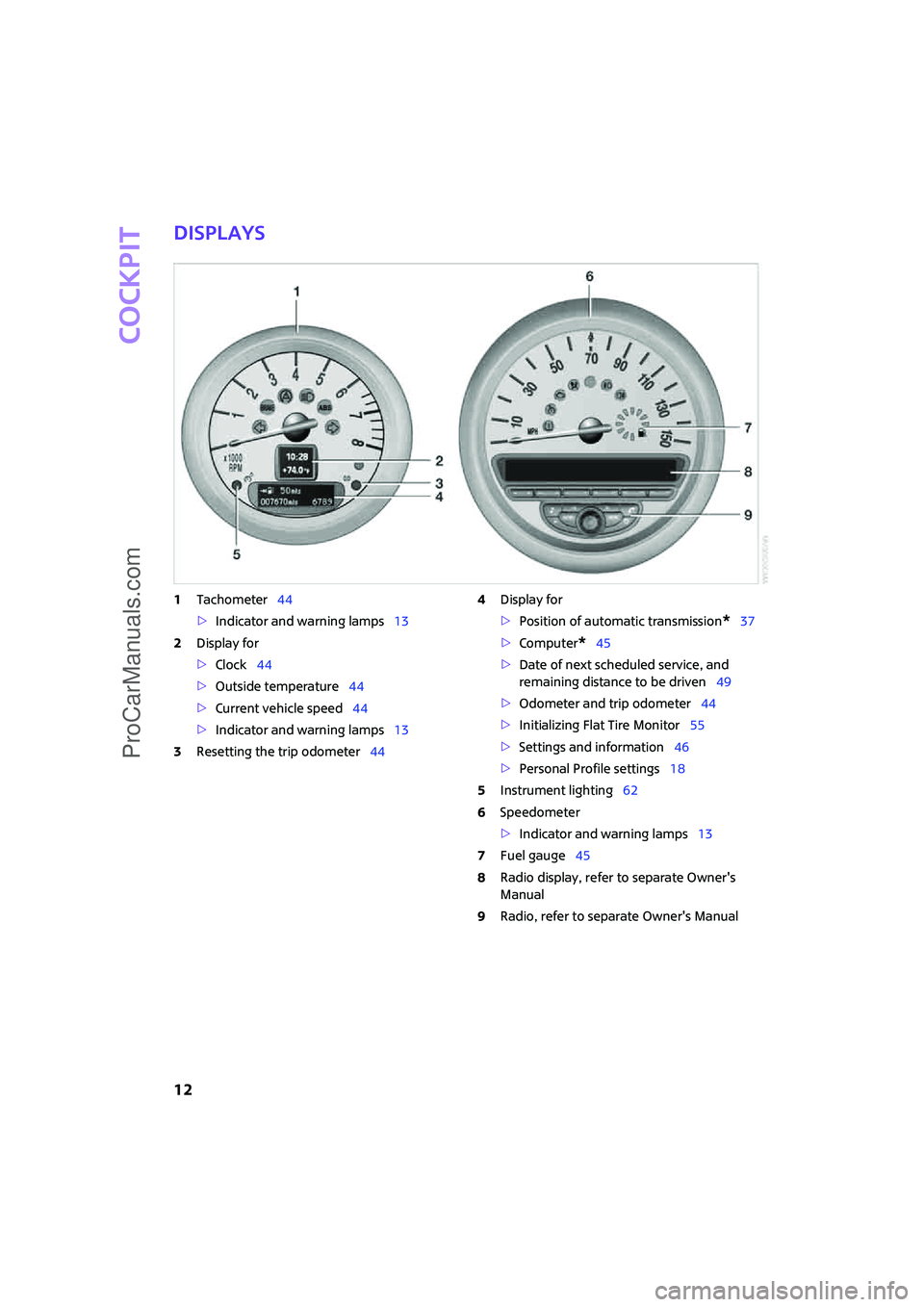
Displays
1Tachometer44
>Indicator and warning lamps13
2Display for
>Clock44
>Outside temperature44
>Current vehicle speed44
>Indicator and warning lamps13
3Resetting the trip odometer444Display for
>Position of automatic transmission
*37
>Computer
*45
>Date of next scheduled service, and
remaining distance to be driven49
>Odometer and trip odometer44
>Initializing Flat Tire Monitor55
>Settings and information46
>Personal Profile settings18
5Instrument lighting62
6Speedometer
>Indicator and warning lamps13
7Fuel gauge45
8Radio display, refer to separate Owner's
Manual
9Radio, refer to separate Owner's Manual
ProCarManuals.com
Page 48 of 148

Everything under control
46
Current fuel consumption
Displays the current fuel consumption to allow
you to see whether your current driving style is
conducive to fuel economy with minimum
exhaust emissions.
Average speed
Periods with the vehicle parked and the engine
switched off are not included in the calculations
of average speed.To reset average speed: press the button in the
turn indicator lever for approx. 2 seconds.
Current vehicle speed
To have the current speed shown in the upper
display for the outside temperature and time.
Press and hold the button in the turn indicator
lever until the display changes.
The outside temperature then appears in the
bottom display of the computer.
Settings and information
Operating principle
Certain settings and information are only avail-
able when the ignition is switched on and the
vehicle is at a standstill.
1Button for:
>Selecting display
>Setting values
>Confirming selected display or set values
>Calling up computer information45
2Calling up Check Control51
3Displaying vehicle check524Initializing Flat Tire Monitor55
5Setting formats and units of measure, reset-
ting to factory settings48
ProCarManuals.com
Page 57 of 148

ReferenceAt a glance Controls Driving tips Mobility
55
Malfunction in the driving stability
control systems
The warning lamps come on. ASC or DSC
is malfunctioning.
The vehicle remains operational. Have
the system checked as soon as possible.
Drive cautiously and think well ahead,
otherwise unstable driving conditions
could result.<
Hill Start Assist*
Hill Start Assist is a component of DSC and assists
you in comfortably driving off on inclines. It is
not necessary to use the parking brake for this.
1.Hold the MINI with the brake.
2.Release the brake and immediately drive
off.
Hill Start Assist holds the car in place for approx.
2 seconds after the brake is released.
Depending on vehicle load and road incli-
nation, the car may roll backwards a little
during this time span. Drive off immediately
after releasing the brake. Otherwise, Hill Start
Assist will no longer hold the car in place after
approx. 2 seconds and the car will start to roll
backwards.<
Flat Tire Monitor FTM*
The concept
The Flat Tire Monitor monitors tire pressures
while the car is being driven. The system reports
any significant loss of pressure in one tire in rela-
tion to another.
If a tire loses pressure, its rolling radius changes,
and this in turn alters the speed of rotation. This
change is detected and is reported as a flat tire.
Functional requirement
In order to assure the reliable reporting of a flat
tire, the system must be initialized for the cor-
rect tire inflation pressure.Each time you correct the pressure in a
tire, or change a wheel or tire, the system
must be reinitialized.<
System limitations
The Flat Tire Monitor is unable to warn the
driver of sudden, severe tire damage
caused by external factors, nor can it identify the
gradual loss of pressure that will inevitably occur
in all four tires over a lengthy period of time.<
In the following situations, the system could be
delayed or malfunction:
>System has not been initialized
>Driving on snowy or slippery road surface
>Performance-oriented style of driving: slip in
the drive wheels, high lateral acceleration
>Snow chains are attached
When the vehicle is driven with a space-saver
spare tire
*, the Flat Tire Monitor cannot func-
tion.
Initializing the system
The initialization is completed during driv-
ing, which can be interrupted at any time.
When driving resumes, the initialization is con-
tinued automatically.
Do not initialize the system if you are driving
with snow chains or a space-saver spare tire
*.<
1.Start the engine, but do not start driving.
2.Briefly press the button in the turn indicator
lever repeatedly until "SET/INFO" is dis-
played.
3.Press and hold the button until the display
changes.
ProCarManuals.com
Page 58 of 148
Technology for driving comfort and safety
56
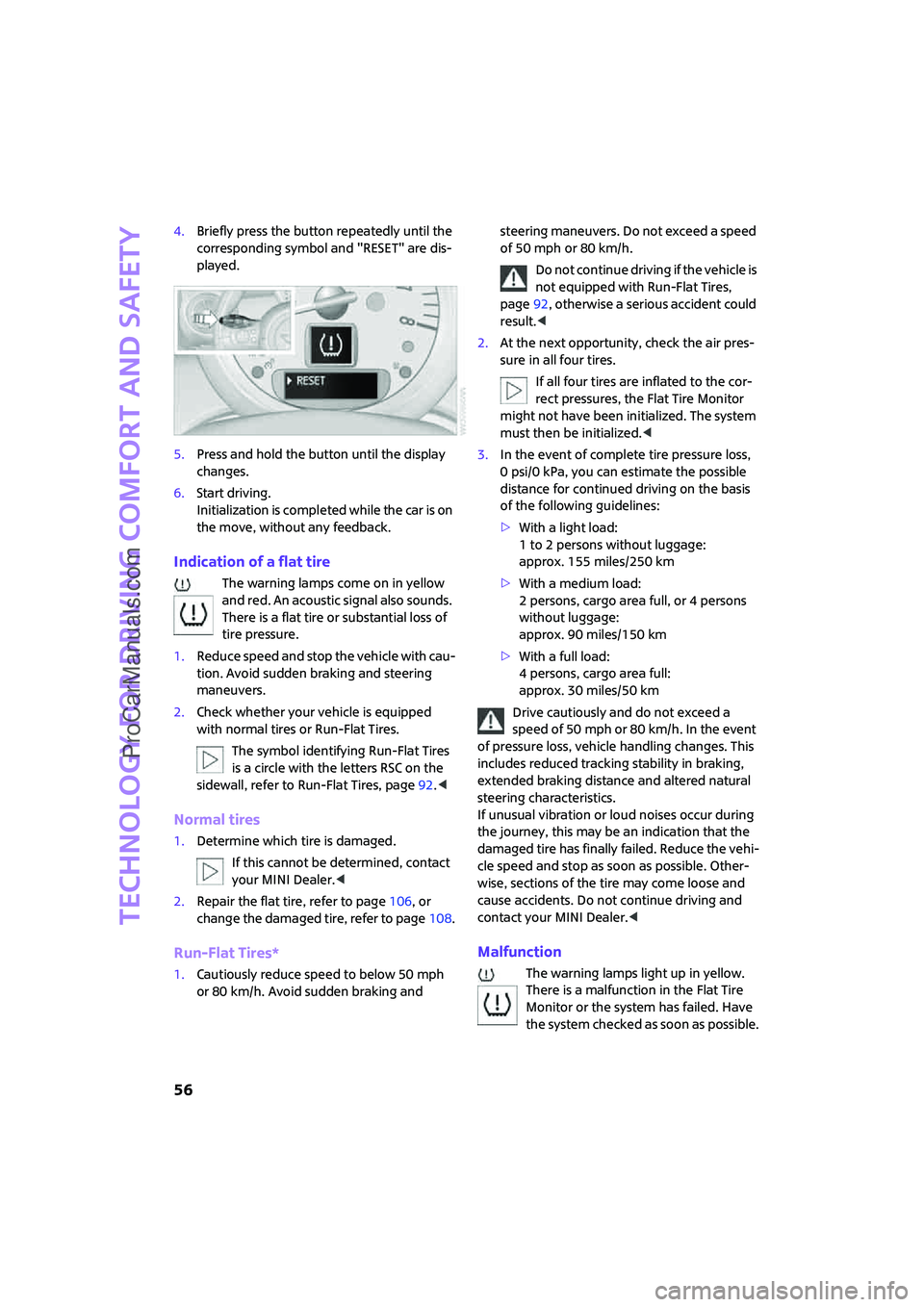
4.Briefly press the button repeatedly until the
corresponding symbol and "RESET" are dis-
played.
5.Press and hold the button until the display
changes.
6.Start driving.
Initialization is completed while the car is on
the move, without any feedback.
Indication of a flat tire
The warning lamps come on in yellow
and red. An acoustic signal also sounds.
There is a flat tire or substantial loss of
tire pressure.
1.Reduce speed and stop the vehicle with cau-
tion. Avoid sudden braking and steering
maneuvers.
2.Check whether your vehicle is equipped
with normal tires or Run-Flat Tires.
The symbol identifying Run-Flat Tires
is a circle with the letters RSC on the
sidewall, refer to Run-Flat Tires, page92.<
Normal tires
1.Determine which tire is damaged.
If this cannot be determined, contact
your MINI Dealer.<
2.Repair the flat tire, refer to page106, or
change the damaged tire, refer to page108.
Run-Flat Tires*
1.Cautiously reduce speed to below 50 mph
or 80 km/h. Avoid sudden braking and steering maneuvers. Do not exceed a speed
of 50 mph or 80 km/h.
Do not continue driving if the vehicle is
not equipped with Run-Flat Tires,
page92, otherwise a serious accident could
result.<
2.At the next opportunity, check the air pres-
sure in all four tires.
If all four tires are inflated to the cor-
rect pressures, the Flat Tire Monitor
might not have been initialized. The system
must then be initialized.<
3.In the event of complete tire pressure loss,
0 psi/0 kPa, you can estimate the possible
distance for continued driving on the basis
of the following guidelines:
>With a light load:
1 to 2 persons without luggage:
approx. 155 miles/250 km
>With a medium load:
2 persons, cargo area full, or 4 persons
without luggage:
approx. 90 miles/150 km
>With a full load:
4 persons, cargo area full:
approx. 30 miles/50 km
Drive cautiously and do not exceed a
speed of 50 mph or 80 km/h. In the event
of pressure loss, vehicle handling changes. This
includes reduced tracking stability in braking,
extended braking distance and altered natural
steering characteristics.
If unusual vibration or loud noises occur during
the journey, this may be an indication that the
damaged tire has finally failed. Reduce the vehi-
cle speed and stop as soon as possible. Other-
wise, sections of the tire may come loose and
cause accidents. Do not continue driving and
contact your MINI Dealer.<
Malfunction
The warning lamps light up in yellow.
There is a malfunction in the Flat Tire
Monitor or the system has failed. Have
the system checked as soon as possible.
ProCarManuals.com
Page 88 of 148

Wheels and tires
86
Wheels and tires
Tire inflation pressures
Information for your safety
It is not merely the tires' service life, but also
driving comfort and, to a great extent, driving
safety that depend on the condition of the tires
and the maintenance of the specified tire pres-
sure.
Checking pressure
Check the tire inflation pressure regularly
and correct it, if necessary: at least twice a
month and before starting long trips. If you fail
to observe this precaution you may be driving
on tires with incorrect tire pressures, a condition
that can not only compromise your vehicle's
driving stability, but also lead to tire damage and
the risk of an accident. Do not drive with
deflated, i.e. flat tires, except when using Run-
Flat Tires. A flat tire will seriously impair your
vehicle's handling and braking response.
Attempts to drive on a flat tire can lead to loss of
control over the vehicle.<
Check the tire inflation pressures only on cold
tires. This means after a maximum of 1.25 miles/
2 km driving or when the vehicle has been
parked for at least 2 hours. When tires are warm,
the tire inflation pressure is higher.
Checking the inflation pressure on the
space-saver spare tire*
A valve extension for checking the inflation pres-
sure is located behind the bumper.After correcting the tire inflation pressure,
reinitialize the Flat Tire Monitor,
page55.<
Inflation pressure specifications
The tables below provide all the correct inflation
pressures for the specified tire sizes at ambient
temperature.
The tire inflation pressures apply to the
tire sizes approved and the tire brands
recommended by the manufacturer of your
MINI. Your MINI Dealer will be glad to advise
you.<
For correct identification of the right tire infla-
tion pressures, observe the following:
>Tire sizes for your vehicle
>Load conditions
>Maximum allowable driving speed
Tire inflation pressures for driving up to
100 mph or 160 km/h
For normal driving up to 100 mph or 160 km/h
and to achieve optimum driving comfort, adjust
pressures to the respective tire inflation pres-
sures listed on the following pages in the col-
umns for traveling speeds up to a maximum of
100 mph or 160 km/h.
These tire inflation pressures can also be found
on the driver's-side door post when the driver's
door is open.
The maximum permissible speed for these
tire pressures is 100 mph or 160 km/h. Do
ProCarManuals.com
Page 89 of 148
ReferenceAt a glance Controls Driving tips Mobility
87
not exceed this speed, otherwise tire damage
and accidents could occur.<
Tire inflation pressures for driving above
100 mph or 160 km/h
In order to drive at maximum speeds in
excess of 100 mph or 160 km/h, adjust
pressures to the respective tire inflation pres-
sures listed on the following pages in the col-
umns for traveling speeds including those
exceeding 100 mph or 160 km/h. Otherwise tire
damage and accidents could occur.<
Observe all national and local maximum speed
limits, otherwise violations of the laws could
occur.
ProCarManuals.com
Page 90 of 148
Wheels and tires
88
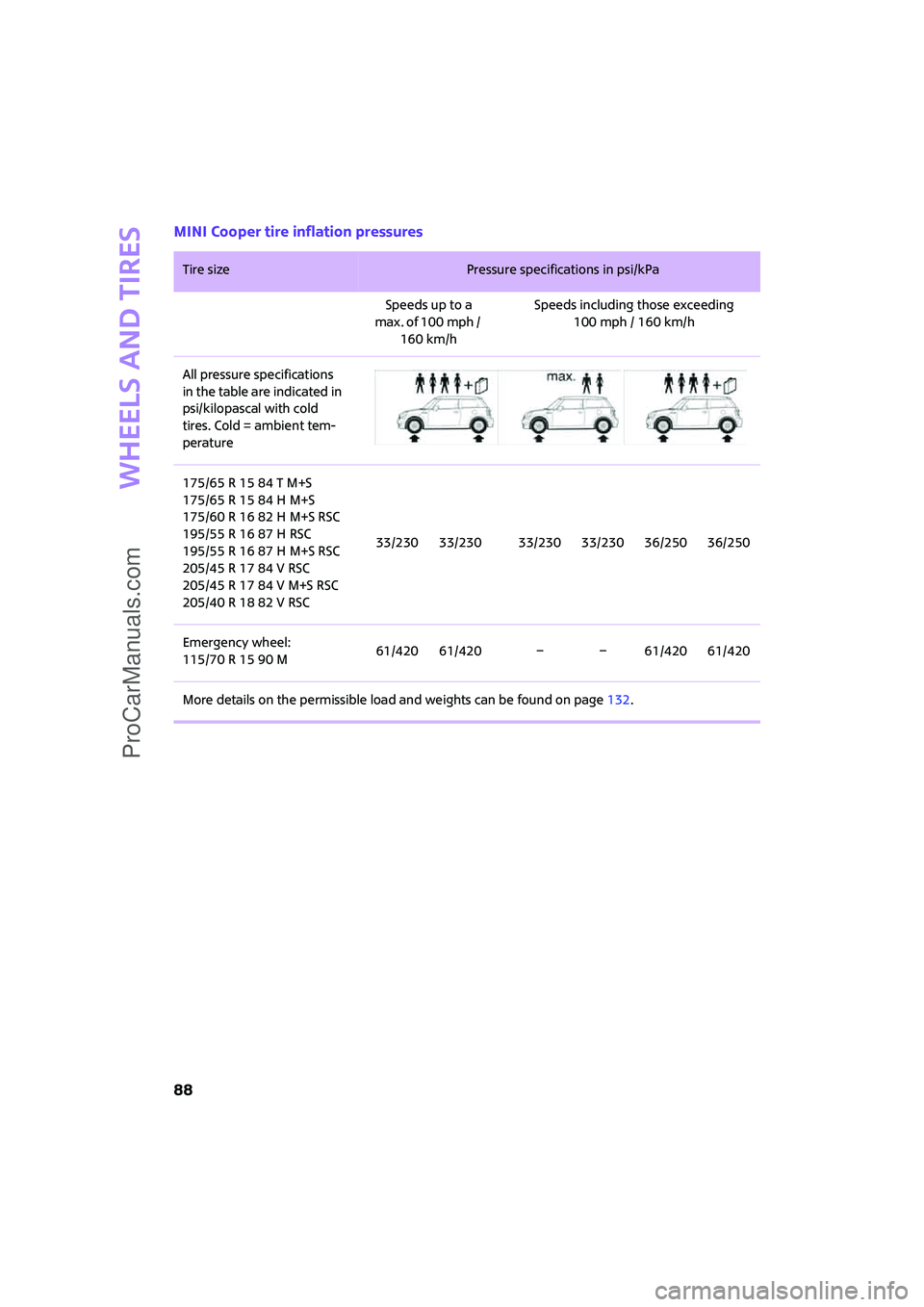
MINI Cooper tire inflation pressures
Tire size Pressure specifications in psi/kPa
Speeds up to a
max. of 100 mph /
160 km/hSpeeds including those exceeding
100 mph / 160 km/h
All pressure specifications
in the table are indicated in
psi/kilopascal with cold
tires. Cold = ambient tem-
perature
175/65 R 15 84 T M+S
175/65 R 15 84 H M+S
175/60 R 16 82 H M+S RSC
195/55 R 16 87 H RSC
195/55 R 16 87 H M+S RSC
205/45 R 17 84 V RSC
205/45 R 17 84 V M+S RSC
205/40 R 18 82 V RSC33/230 33/230 33/230 33/230 36/250 36/250
Emergency wheel:
115/70 R 15 90 M61/420 61/420 – – 61/420 61/420
More details on the permissible load and weights can be found on page132.
ProCarManuals.com
Page 91 of 148
ReferenceAt a glance Controls Driving tips Mobility
89
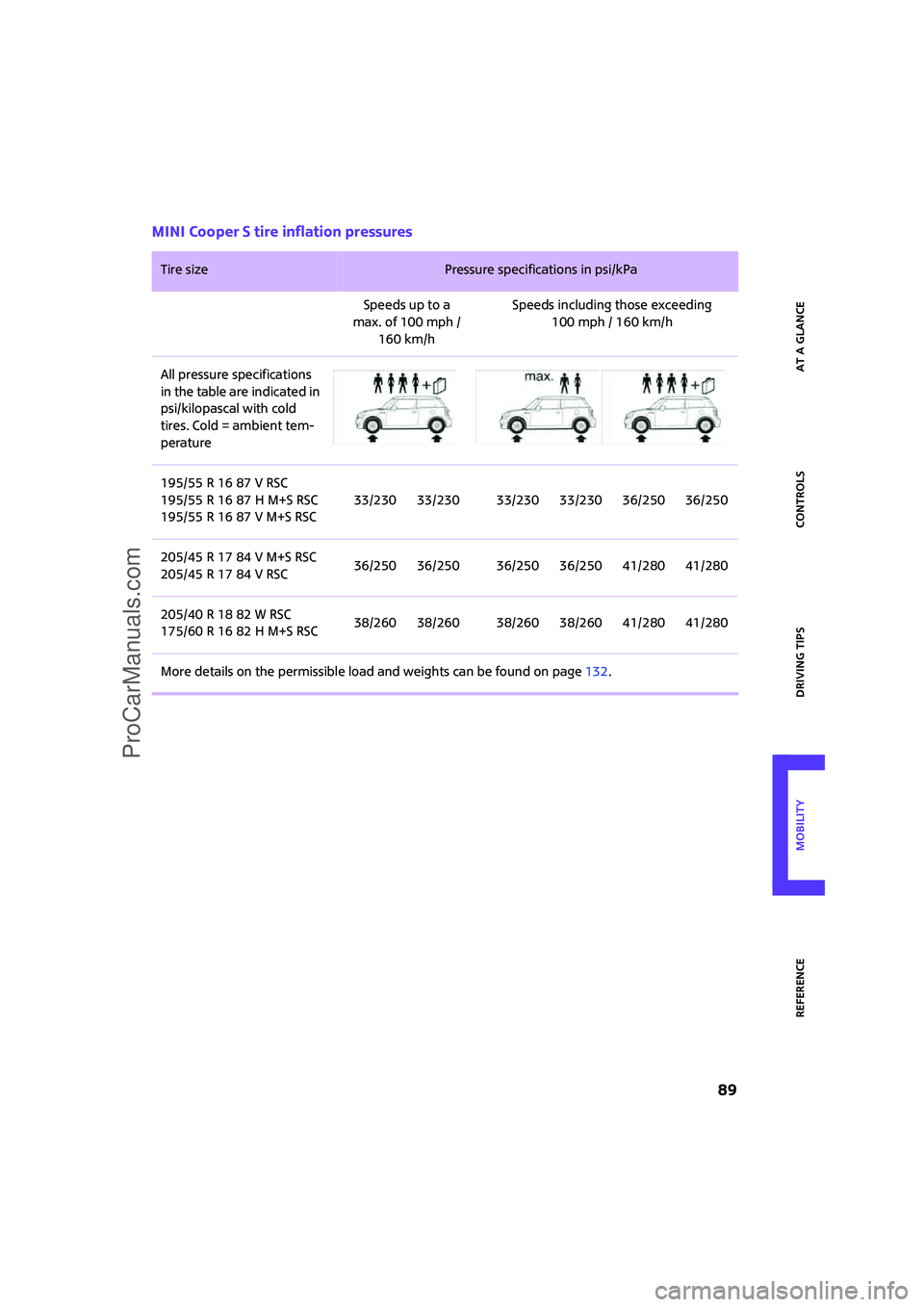
MINI Cooper S tire inflation pressures
Tire size Pressure specifications in psi/kPa
Speeds up to a
max. of 100 mph /
160 km/hSpeeds including those exceeding
100 mph / 160 km/h
All pressure specifications
in the table are indicated in
psi/kilopascal with cold
tires. Cold = ambient tem-
perature
195/55 R 16 87 V RSC
195/55 R 16 87 H M+S RSC
195/55 R 16 87 V M+S RSC33/230 33/230 33/230 33/230 36/250 36/250
205/45 R 17 84 V M+S RSC
205/45 R 17 84 V RSC36/250 36/250 36/250 36/250 41/280 41/280
205/40 R 18 82 W RSC
175/60 R 16 82 H M+S RSC38/260 38/260 38/260 38/260 41/280 41/280
More details on the permissible load and weights can be found on page132.
ProCarManuals.com
Page 93 of 148

ReferenceAt a glance Controls Driving tips Mobility
91
meet under the Federal Motor Vehicle Safety
Standard No. 109. Grades B and A represent
higher levels of performance on the laboratory
test wheel than the minimum required by law.
The temperature grade for this tire is
established for a tire that is properly
inflated and not overloaded. Excessive speed,
underinflation, or excessive loading, either sep-
arately or in combination, can cause heat
buildup and possible tire failure.<
RSC – Run-Flat Tires
You will recognize Run-Flat Tires by a circular
symbol containing the letters RSC on the side of
the tire, page92.
M+S
Winter and all-season tires.
These have better winter properties than sum-
mer tires.
XL
Designation for specially reinforced tires.
Tire condition
Inspect your tires regularly for tread wear, signs
of damage and for foreign objects lodged in the
tread. Check the tread depth.
Tread depth
The tread depth should not drop below 1/8 in/
3 mm, although, for example, European legisla-
tion only specifies a minimum tread depth of
1/16 in/1.6 mm. At tread depths below 1/8 in/
3 mm there is an increased risk of high-speed
hydroplaning, even when only small amounts of
water are present on the road surface.
Winter tires
When winter tires wear down past a tread depth
of 1/6 in/4 mm, they become perceptibly less
suitable for winter conditions. In the interest of
safety, new tires should be installed.
Minimum tread depth
Wear indicators in the base of the tread groove
are distributed around the tire's circumference;
the letters TWI, for Tread Wear Indicator, on the
tire's sidewalls identify tires that incorporate
these wear indicators. When tire tread is worn
down to the level of the wear indicators, the
remaining tread depth is 1/16 in/1.6 mm.
Tire damage
Please note that low-profile tires cause wheels,
tires and suspension parts to be more suscepti-
ble to road hazard and consequential damages.
Unusual vibrations encountered during normal
vehicle operation can indicate tire failure or
some other vehicle defect. This can, for exam-
ple, be caused by driving over curbs. The same
applies to any other abnormal road behavior,
such as pulling severely to the right or left.
In these cases, reduce speed immediately
and have wheels and tires thoroughly
checked. To do so, drive carefully to the nearest
MINI Dealer or tire shop that works according to
MINI repair procedures with correspondingly
trained personnel. If necessary, have the vehicle
towed there.
Tire damage can be extremely dangerous for
vehicle occupants and other road users.<
Tire age
The manufacturing date of tires is contained in
the tire coding:
DOT ... 4706 means that the tire was manufac-
tured in week 47 of 2006.
For various reasons, such as the development of
brittleness, the manufacturer of your MINI rec-
ommends tire replacement after no more than
ProCarManuals.com
Page 94 of 148

Wheels and tires
92
6 years, regardless of the actual wear of the
tires.
Run-Flat Tires*
The symbol identifying Run-Flat Tires is a circle
with the letters RSC on the sidewall.
Run-Flat Tires comprise a conditionally self-sup-
porting tire and a special rim. The reinforcement
in the sidewalls ensures that the tire can con-
tinue to be used subject to certain restrictions,
even if depressurized.
For information on continuing to drive with a flat
tire, refer to Indication of a flat tire, page56.
New wheels and tires
Have new wheels and tires mounted only
by your MINI Dealer or a specialized tire
shop that has specially trained personnel work-
ing in accordance with the specifications of the
MINI manufacturer. If this work is not carried out
properly, there is a danger of subsequent dam-
age and related safety hazards. Make sure that
the new wheels are balanced.<
Retreaded tires
The manufacturer of your MINI recom-
mends that you avoid using retreaded
tires, as this could impair driving safety. The
causes for this include potentially different tire
casing structures and often wide variations in
tire age, which can result in a limited service
life.<
Correct wheels and tires
The manufacturer of your MINI recom-
mends mounting only wheels and tires
that it has specifically approved for use on your
particular model. Although other wheels and
tires may theoretically have the same dimen-
sions, variations in factors such as manufactur-
ing tolerances can result in contact between tire
and bodywork, ultimately leading to serious
accidents. The manufacturer of your MINI can-
not evaluate non-approved wheels and tires to
determine if they are suited for use, and there-
fore cannot ensure the operating safety of the
vehicle if they are mounted.<
Your MINI Dealer will be glad to inform you
about the correct wheel and tire combination for
your vehicle.
The correct combination of wheels and tires is
also necessary to ensure reliable operation of
various vehicle systems such as ABS and DSC.
To maintain good handling and vehicle
response, use only tires of a single brand and
tread configuration. After a tire has been dam-
aged, mount the previous wheel and tire combi-
nation again as soon as possible.
Recommended tire brands
For each tire size, the manufacturer of your MINI
recommends certain tire brands. They are
marked with a clearly visible MINI designation
on the sidewall of the tire.
When properly used, these tires meet the high-
est standards in terms of safety and handling
characteristics.
ProCarManuals.com