phone MINI COOPER 2007 Owners Manual
[x] Cancel search | Manufacturer: MINI, Model Year: 2007, Model line: COOPER, Model: MINI COOPER 2007Pages: 148, PDF Size: 2.54 MB
Page 7 of 148
ReferenceAt a glance Controls Driving tips Mobility
5
The individual vehicle
The manufacturer of your MINI is the Bayerische
Motoren Werke Aktiengesellschaft, BMW AG.
When you ordered your MINI, you chose various
items of equipment. This Owner's Manual
describes the entire array of options and equip-
ment that the manufacturer of your MINI makes
available with a specific model range.
Bear in mind that the manual may contain infor-
mation on accessories and equipment that you
have not specified for your own vehicle. Sections
describing options and special equipment are
marked by asterisks
* to assist you in identifying
possible differences between the descriptions in
this manual and your own vehicle's equipment.
If your MINI features equipment not described in
this Owner's Manual, observe the enclosed Sup-
plementary Owner's Manuals.
Editorial notice
The manufacturer pursues a policy of continu-
ous, ongoing development that is conceived to
ensure that MINI vehicles continue to embody
the highest quality and safety standards com-
bined with advanced, state-of-the-art technol-
ogy. For this reason, it is possible in exceptional
cases that features described in this Owner's
Manual could differ from those on your vehicle.
For your safety
Maintenance and repair
Advanced technology, e.g. the use of
modern materials and powerful electron-
ics, requires specially adapted maintenance and
repair methods. Therefore, have the necessary
work on your MINI only carried out by a MINI
Dealer or a workshop that has specially trained
personnel working in accordance with the spec-
ifications of the MINI manufacturer. If this work
is not carried out properly, there is a danger of
subsequent damage and related safety haz-
ards.<
Parts and accessories
For your own safety, use genuine parts
and accessories approved by the manu-
facturer of the MINI.
When you purchase accessories tested
and approved by the manufacturer of the MINI
and Original MINI Parts, you simultaneously
acquire the assurance that they have been thor-
oughly tested by the manufacturer of the MINI
to ensure optimum performance when installed
on your vehicle.
The manufacturer of the MINI warrants these
parts to be free from defects in material and
workmanship.
The manufacturer of the MINI will not accept any
liability for damage resulting from installation of
parts and accessories not approved by the man-
ufacturer of the MINI.
The manufacturer of the MINI cannot test every
product made by other manufacturers to verify
i f i t c a n b e u s e d o n a M I N I s a f e l y a n d w i t h o u t r i s k
to either the vehicle, its operation, or its occu-
pants.
Original MINI Parts, MINI Accessories and other
products approved by the manufacturer of the
MINI, together with professional advice on using
these items, are available from all MINI Dealers.
Installation and operation of non-MINI
approved accessories such as alarms, radios,
amplifiers, radar detectors, wheels, suspension
components, brake dust shields, telephones,
ProCarManuals.com
Page 8 of 148
Notes
6
including operation of any mobile phone from
within the vehicle without using an externally
mounted antenna, or transceiver equipment, for
instance, CBs, walkie-talkies, ham radio or simi-
lar accessories, may cause extensive damage to
the vehicle, compromise its safety, interfere with
the vehicle's electrical system or affect the valid-
ity of the MINI Limited Warranty. See your MINI
Dealer for additional information.<
Maintenance, replacement, or repair of
the emission control devices and systems
may be performed by any automotive repair
establishment or individual using any certified
automotive part.<
California Proposition 65 warning
California law requires us to issue the following
warning:
Engine exhaust and a wide variety of
automobile components and parts,
including components found in the interior fur-
nishings in a vehicle, contain or emit chemicals
known to the State of California to cause cancer
and birth defects and reproductive harm. In
addition, certain fluids contained in vehicles and
certain products of component wear contain or
emit chemicals known to the State of California
to cause cancer and birth defects or other repro-
ductive harm.
Battery posts, terminals and related accessories
contain lead and lead compounds. Wash your
hands after handling.
Used engine oil contains chemicals that have
caused cancer in laboratory animals. Always
protect your skin by washing thoroughly with
soap and water.<
Service and warranty
We recommend that you read this publication
thoroughly.
Your MINI is covered by the following warran-
ties:
>New Vehicle Limited Warranty
>Rust Perforation Limited Warranty
>Federal Emissions System Defect Warranty
>Federal Emissions Performance Warranty
>California Emission Control System Limited
Warranty
Detailed information about these warranties is
listed in the Service and Warranty Information
Booklet for US models or in the Warranty and
Service Guide Booklet for Canadian models.
Reporting safety defects
For US customers
The following applies only to vehicles owned
and operated in the US.
If you believe that your vehicle has a defect
which could cause a crash or could cause injury
or death, you should immediately inform the
National Highway Traffic Safety Administration,
NHTSA, in addition to notifying MINI of North
America, LLC, P.O. Box 1227, Westwood, New
Jersey 07675-1227, Telephone 1-800-831-
1117.
If NHTSA receives similar complaints, it may
open an investigation, and if it finds that a safety
defect exists in a group of vehicles, it may order
a recall and remedy campaign. However, NHTSA
cannot become involved in individual problems
between you, your dealer, or MINI of North
America, LLC.
To contact NHTSA, you may call the Vehicle
Safety Hotline toll-free at 1-888-327-4236
(TTY: 1-800-424-9153);
go to http://www.safercar.gov; or write to:
Administrator, NHTSA, 400 Seventh Street, SW.,
Washington, DC 20590. You can also obtain
ProCarManuals.com
Page 13 of 148

Reference
At a glance Controls Driving tips Mobility
11
1Folding exterior mirrors in and out*31
6Ignition lock35
7Buttons
* on right of steering wheelButtons
* on left of steering wheel
8Horn: the entire surface
9Adjusting the steering wheel32
10Releasing the bonnet94 2
Parking lamps59
Low beams59
Automatic headlamp control
*59
Turn signals39
High beams, headlamp flasher61
Roadside parking lamps
*61
Computer
*45
3Tachometer12
Instrument lighting62
4
Wiper system40
5Switching the ignition on/off and
starting/stopping the engine35
Continuing cruise control
*42
Storing speed and accelerating or
decelerating
Activating/deactivating cruise
control
*42
Telephone*:
>Press: accepting and ending a
call, starting dialing
* of
selected phone number and
redialing if no phone number is
selected
>Press longer: redialing
Volume
Activating/deactivating voice com-
mand system
*
Changing radio station
Selecting music track
Scrolling through phone book and
lists with stored phone numbers
ProCarManuals.com
Page 17 of 148
Reference
At a glance Controls Driving tips Mobility
15
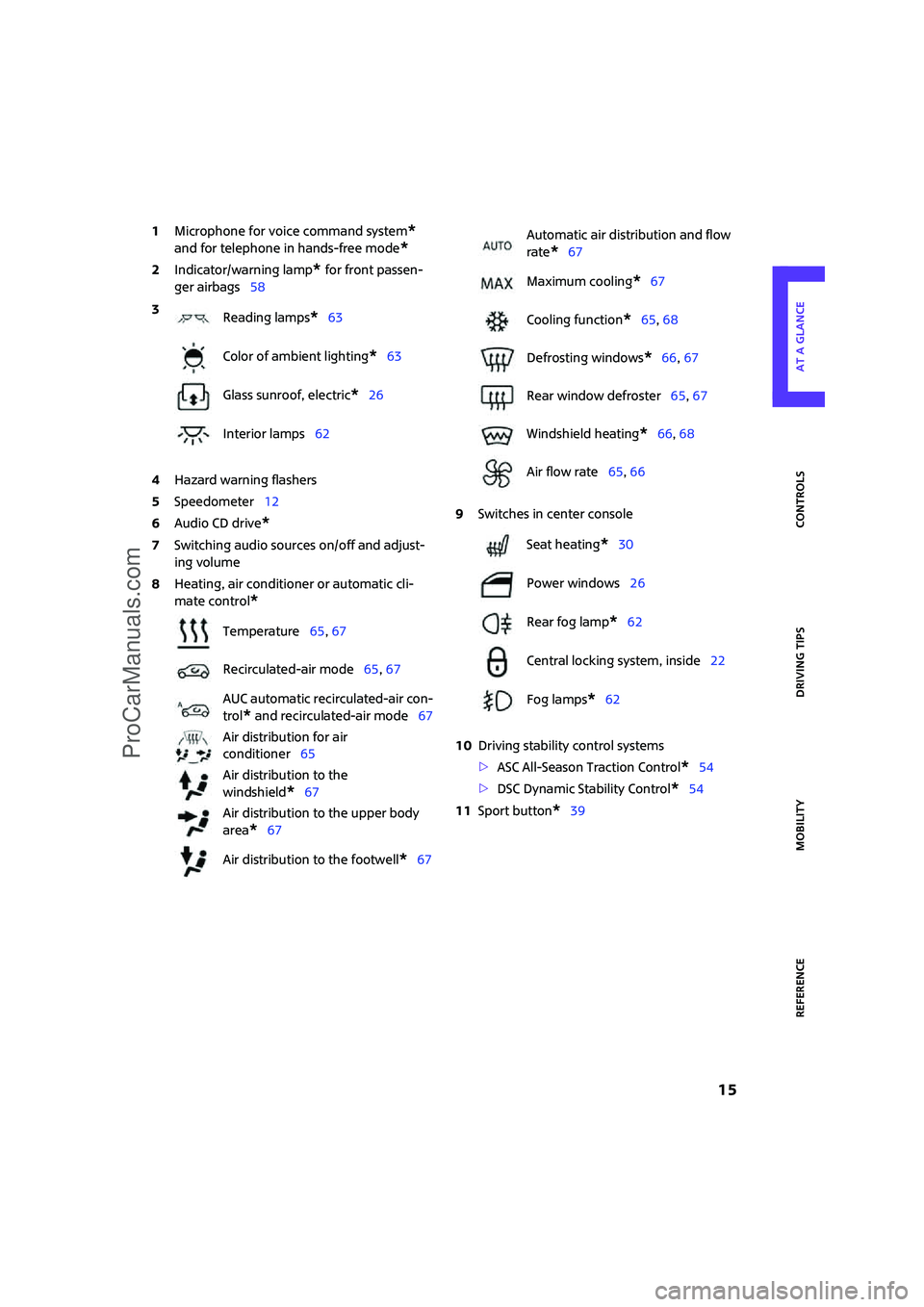
1Microphone for voice command system*
and for telephone in hands-free mode*
2Indicator/warning lamp* for front passen-
ger airbags58
4Hazard warning flashers
5Speedometer12
6Audio CD drive
*
7Switching audio sources on/off and adjust-
ing volume
8Heating, air conditioner or automatic cli-
mate control
*
9Switches in center console
10Driving stability control systems
>ASC All-Season Traction Control
*54
>DSC Dynamic Stability Control
*54
11Sport button
*39 3
Reading lamps
*63
Color of ambient lighting
*63
Glass sunroof, electric
*26
Interior lamps62
Temperature65, 67
Recirculated-air mode65, 67
AUC automatic recirculated-air con-
trol
* and recirculated-air mode67
Air distribution for air
conditioner65
Air distribution to the
windshield
*67
Air distribution to the upper body
area
*67
Air distribution to the footwell
*67
Automatic air distribution and flow
rate
*67
Maximum cooling
*67
Cooling function
*65, 68
Defrosting windows
*66, 67
Rear window defroster65, 67
Windshield heating
*66, 68
Air flow rate65, 66
Seat heating
*30
Power windows26
Rear fog lamp
*62
Central locking system, inside22
Fog lamps
*62
ProCarManuals.com
Page 73 of 148
ReferenceAt a glance Controls Driving tips Mobility
71
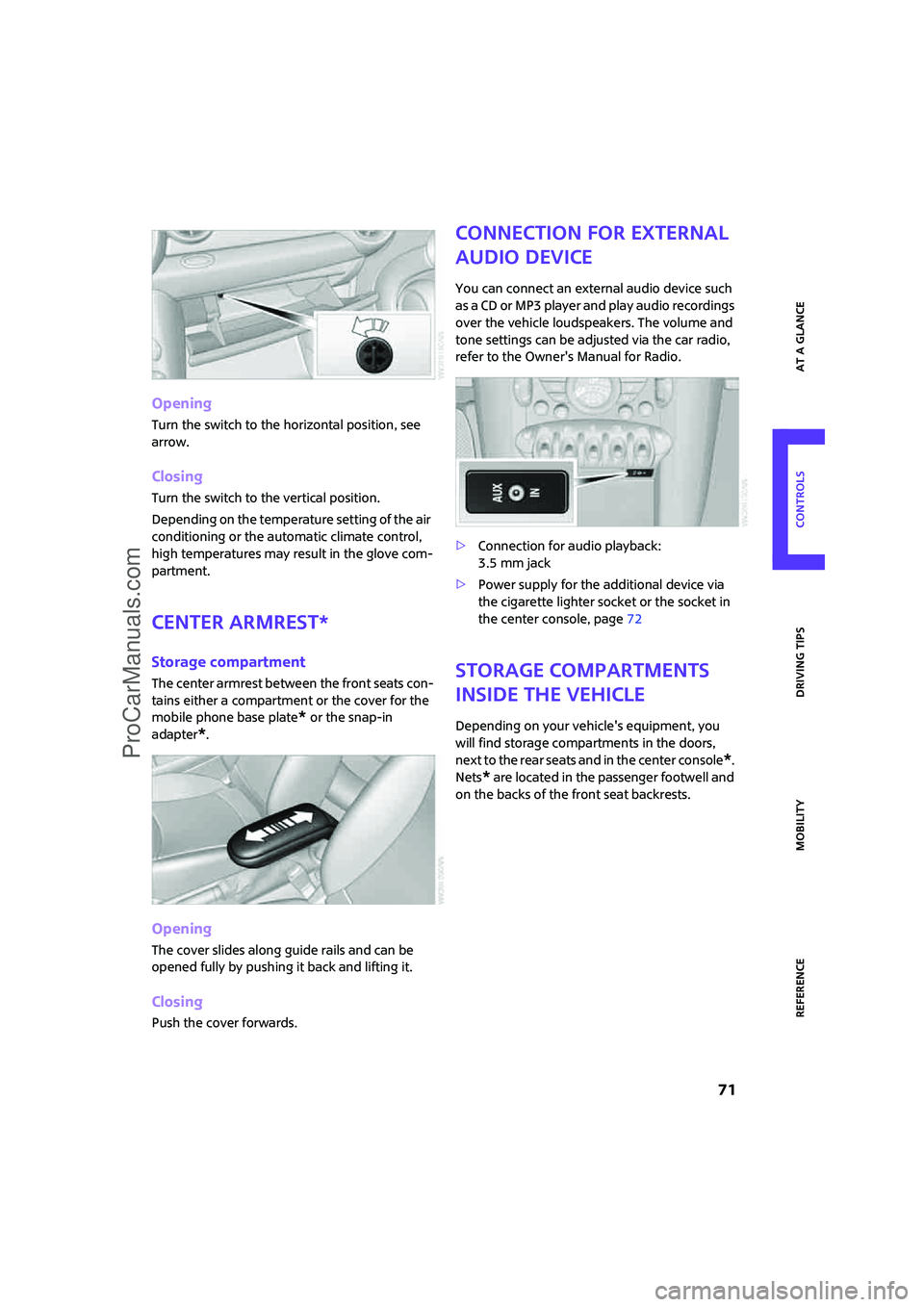
Opening
Turn the switch to the horizontal position, see
arrow.
Closing
Turn the switch to the vertical position.
Depending on the temperature setting of the air
conditioning or the automatic climate control,
high temperatures may result in the glove com-
partment.
Center armrest*
Storage compartment
The center armrest between the front seats con-
tains either a compartment or the cover for the
mobile phone base plate
* or the snap-in
adapter
*.
Opening
The cover slides along guide rails and can be
opened fully by pushing it back and lifting it.
Closing
Push the cover forwards.
Connection for external
audio device
You can connect an external audio device such
as a CD or MP3 player and play audio recordings
over the vehicle loudspeakers. The volume and
tone settings can be adjusted via the car radio,
refer to the Owner's Manual for Radio.
>Connection for audio playback:
3.5 mm jack
>Power supply for the additional device via
the cigarette lighter socket or the socket in
the center console, page72
Storage compartments
inside the vehicle
Depending on your vehicle's equipment, you
will find storage compartments in the doors,
next to the rear seats and in the center console
*.
Nets
* are located in the passenger footwell and
on the backs of the front seat backrests.
ProCarManuals.com
Page 78 of 148
Things to remember when driving
76
Things to remember when driving
Break-in period
Moving parts need breaking-in time to adjust to
each other. Please follow the instructions below
in order to achieve the optimal service life and
economy of operation for your vehicle.
Engine and differential
Always obey all official speed limits.
Up to 1,200 miles/2,000 km
Drive at varying engine and road speeds, but do
not exceed the following:
>4,500/min or 100 mph/160 km/h
Avoid full-throttle operation and use of the
transmission's kick-down mode.
After driving 1,200 miles/2,000 km
Engine and vehicle speeds can be gradually
increased.
Tires
Due to technical factors associated with their
manufacture, tires do not achieve their full trac-
tion potential until after an initial break-in
period. Therefore, drive cautiously during the
first 200 miles/300 km.
Brake system
Brakes require an initial break-in period of
approx. 300 miles/500 km to achieve optimized
contact and wear patterns between brake pads
and rotors. Drive cautiously during this break-in
period.
Clutch
The function of the clutch reaches its optimal
level only after a distance driven of approx.
300 miles/500 km. During this break-in period,
engage the clutch gently.
Following part replacement
The same break-in procedures should be
observed if any of the components mentioned
above have to be renewed in the course of the
vehicle's operating life.
General driving notes
Close the tailgate
Drive the vehicle only when the tailgate is
closed. Otherwise, exhaust fumes could
penetrate the interior of the vehicle.<
If special circumstances make it absolutely nec-
essary to drive with the tailgate open:
1.Close all windows and the glass sunroof.
2.Increase the air flow rate of the air condi-
tioner or automatic climate control consid-
erably, page65 or66.
Hot exhaust system
In all vehicles, extremely high tempera-
tures are generated in the exhaust sys-
tem. Do not remove the heat shields installed
adjacent to various sections of the exhaust sys-
tem, and never apply undercoating to them.
When driving, standing at idle and while park-
ing, take care to avoid possible contact between
the hot exhaust system and any highly flamma-
ble materials such as hay, leaves, grass, etc. Such
contact could lead to a fire, with the risk of seri-
ous personal injuries and property damage. Do
not touch hot exhaust tail pipes. Otherwise
there is a risk of burns.<
Mobile phones in the vehicle
The manufacturer of your MINI recom-
mends that you do not use mobile
devices, e.g. mobile phones, inside the vehicle
without directly connecting them to an outside
antenna. Otherwise, the vehicle electronics and
mobile communications device can influence
one another. In addition, there is no assurance
ProCarManuals.com
Page 114 of 148
Giving and receiving assistance
112
Giving and receiving assistance
Roadside Assistance
The Roadside Assistance service is there to assist
you around the clock in the event of a break-
down, including on weekends and public holi-
days.
The phone numbers of the Roadside Assistance
in your home country can be found in the Con-
tact brochure.
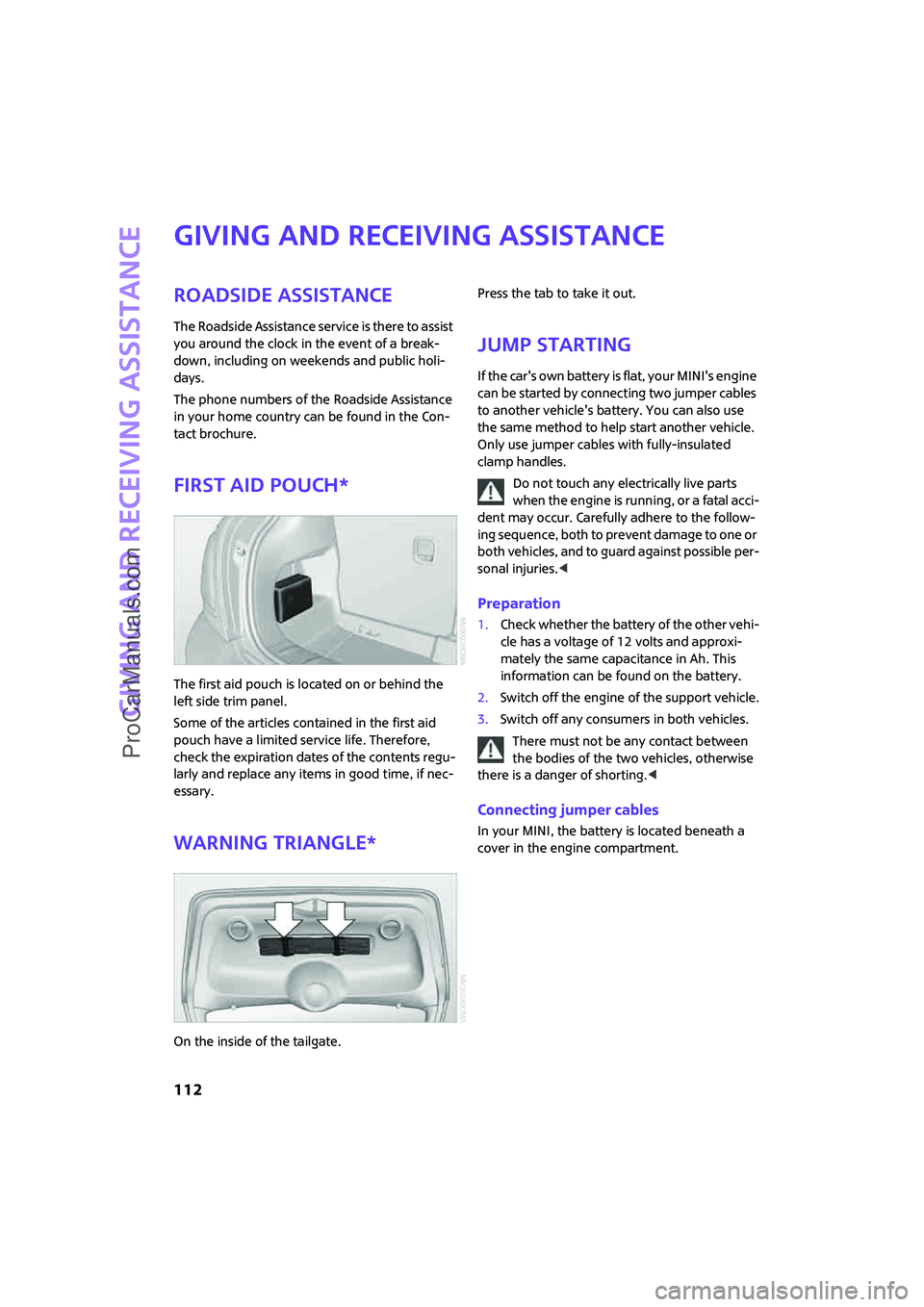
First aid pouch*
The first aid pouch is located on or behind the
left side trim panel.
Some of the articles contained in the first aid
pouch have a limited service life. Therefore,
check the expiration dates of the contents regu-
larly and replace any items in good time, if nec-
essary.
Warning triangle*
On the inside of the tailgate.Press the tab to take it out.
Jump starting
If the car's own battery is flat, your MINI's engine
can be started by connecting two jumper cables
to another vehicle's battery. You can also use
the same method to help start another vehicle.
Only use jumper cables with fully-insulated
clamp handles.
Do not touch any electrically live parts
when the engine is running, or a fatal acci-
dent may occur. Carefully adhere to the follow-
ing sequence, both to prevent damage to one or
both vehicles, and to guard against possible per-
sonal injuries.<
Preparation
1.Check whether the battery of the other vehi-
cle has a voltage of 12 volts and approxi-
mately the same capacitance in Ah. This
information can be found on the battery.
2.Switch off the engine of the support vehicle.
3.Switch off any consumers in both vehicles.
There must not be any contact between
the bodies of the two vehicles, otherwise
there is a danger of shorting.<
Connecting jumper cables
In your MINI, the battery is located beneath a
cover in the engine compartment.
ProCarManuals.com
Page 137 of 148
ReferenceAt a glance Controls Driving tips Mobility
135
Battery111
– charging111
– disposal26,111
– jump starting112
– temporary power failure111
Battery renewal
– remote control26
Being towed114
Belts, refer to Safety belts30
Belt tensioner, refer to Safety
belts30
Beverage holders, refer to Cup
holders72
Blower, refer to Air flow
rate65,66
Bonnet94
Bottle holders, refer to Cup
holders72
Brake fluid, refer to Service
requirements49
Brake lamps
– replacing bulb105
Brake pads, breaking in76
Brake rotors77
– brakes76
– breaking in76
Brakes
– ABS54
– breaking in76
– MINI Maintenance System98
– parking brake37
– service requirements49
Brakes, refer to Braking
safely77
Brake system76
– breaking in76
– disc brakes77
– MINI Maintenance System98
Breakdown service, refer to
Roadside Assistance112
Breaking in the clutch76
Break-in period76
Bulb changing, refer to Lamps
and bulbs102
Button for starting the
engine35
Buttons on the steering
wheel11C
California Proposition 65
warning6
Can holders, refer to Cup
holders72
Capacities133
Car battery, refer to Vehicle
battery111
Car care100
Car-care products, refer to
Suitable car-care
products100
Care100
Cargo, securing80
Cargo area78
– capacity132
– convenient access24
– cover78
– lamp62
– lid, refer to Tailgate23
– opening from outside23
Cargo area, expanding78
Cargo loading
– securing cargo80
– stowing cargo79
– vehicle78
Car jack
– jacking points110
Car key, refer to Key/remote
control18
Carpets, care101
Car phone
– installation location, refer to
Center armrest71
– refer to separate Owner's
Manual
Car wash78
Car wash, refer to Care100
Catalytic converter, refer to
Hot exhaust system76
CBS Condition Based
Service98
CDs/DVDs, care101
Cell phones, use inside the car,
refer to Mobile phone in the
vehicle76
Center armrest71
Center brake lamp106Center console, refer to
Around the center
console14
Central locking system19
– convenient access24
– from inside22
– from outside19
Changing bulbs102
Changing wheels108
Chassis number, refer to
Engine compartment95
Check Control51
Child's seats33
Child-restraint fixing system
LATCH34
Child-restraint systems33
Chock, folding
– space-saver spare tire108
Chrome parts, care100
Chrome parts, refer to
Care100
Cigarette lighter72
Cleaning headlamps41
– washer fluid42
Clock44
– 12h/24h mode47
– setting time50
Closing
– from inside22
– from outside19
Clothes hooks72
Cockpit10
Cold start, refer to Starting the
engine36
Comfort access, refer to
Convenient access24
Comfort area, refer to Around
the center console14
Compartment for remote
control, refer to Ignition
lock35
Computer45
Condensation, refer to When
the vehicle is parked77
Configuring settings, refer to
Personal Profile18
Confirmation signals for
vehicle locking/unlocking20
ProCarManuals.com
Page 141 of 148
ReferenceAt a glance Controls Driving tips Mobility
139
Locking and unlocking doors
– confirmation signals20
– from inside22
– from outside19
Low beams59
– automatic59
– replacing bulb103
Lower back support, refer to
Lumbar support29
Luggage compartment, refer
to Cargo area23
Luggage compartment lid,
refer to Tailgate23
Luggage rack, refer to Roof-
mounted luggage rack80
Lumbar support29
M
M+S tires, refer to Winter
tires93
Maintenance, refer to Service
Booklet
Maintenance system98
Malfunction warnings, refer to
Check Control51
Manual air distribution65
Manual mode
– automatic transmission with
Steptronic38
Manual operation
– door lock21
– fuel filler door84
– tailgate23
– transmission lock, automatic
transmission39
Manual transmission37
Master key, refer to Integrated
key/remote control18
Maximum cooling67
Maximum speed
– with winter tires93
Medical assistance, refer to
First aid pouch112
Microfilter
– for air conditioner66
– for automatic climate
control68
– MINI Maintenance System98Microfilter/activated-charcoal
filter
– MINI Maintenance System98
Microphone for telephone14
MINI Internet page4
MINI Maintenance System98
Mirror dimming feature32
Mirrors31
– exterior mirrors31
– heating31
– interior rearview mirror32
Mobile phone
– installation location, refer to
Center armrest71
– refer to separate Owner's
Manual
Mobile phone, installation
location, refer to Center
armrest71
Mobile phone, refer to the
separate Owner's Manual
Mobile phones in the
vehicle76
Mobility System106
Modifications, technical, refer
to For your own safety5
Monitoring system for tire
pressures, refer to Flat Tire
Monitor55
Multifunctional steering
wheel, refer to Buttons on
the steering wheel11
Multifunction switch
– refer to Turn signals/
headlamp flasher39
– refer to Wiper system40
N
Neck support, refer to Head
restraints30
Nets, refer to Storage
compartments71
New tires92
Number of cylinders, refer to
Engine data130
Nylon rope, refer to Tow
rope114
O
OBD socket, refer to Socket for
Onboard Diagnosis98
Octane ratings, refer to Fuel
specifications85
Odometer44
Oil, refer to Engine oil95
Oil consumption95
Oil level95
Old batteries, refer to
Disposal111
Onboard tool kit102
Opening and closing
– convenient access24
– from inside22
– from outside19
– using the door lock21
– via the remote control19
Opening and unlocking
– from inside22
Outlets
– refer to Ventilation68
Outlets, refer to Air vents64
Output, refer to Engine
data130
Outside-air mode
– automatic climate control67
Outside temperature
display44
– changing the unit of
measure47
– on computer47
Overheated engine, refer to
Coolant temperature44
P
Paintwork, care100
Parking
– vehicle36
Parking aid, refer to PDC Park
Distance Control53
Parking brake37
Parking lamps, replacing
bulb104
Parking lamps/low beams59
Parts and accessories, refer to
Your individual vehicle5
ProCarManuals.com
Page 143 of 148
ReferenceAt a glance Controls Driving tips Mobility
141
Service, refer to Roadside
Assistance112
Service car, refer to Roadside
Assistance112
Service data in the remote
control98
Service Interval Display, refer
to Condition Based Service
CBS98
Service requirement display,
refer to Condition Based
Service CBS98
Service requirements49
Settings
– clock, 12h/24h mode47
Shifting gears
– automatic transmission with
Steptronic38
– manual transmission37
Shiftlock
– automatic transmission, refer
to Changing selector lever
positions38
Side airbags57
Side turn signal indicator
– replacing bulb105
Side windows, refer to
Windows26
Signal horn, refer to Horn10
Sitting safely28
– airbags28
– safety belts28
– with head restraint28
Size, refer to Dimensions131
Sliding/tilt sunroof
– refer to Glass sunroof,
electric26
Slot for remote control35
Smokers' package, refer to
Ashtray72
Snap-in adapter, refer to
Center armrest storage
compartment71
Snow chains93
Socket, refer to Connecting
electrical appliances72
Socket for Onboard Diagnosis
OBD98Space-saver spare tire
– changing tires108
– inflation pressure86
Spare fuses111
Special oils, refer to Approved
engine oils96
Speed130
– with winter tires93
Speed control, refer to Cruise
control42
Speedometer12
Split rear seat backrest, refer to
Expanding the cargo area78
Sport button39
Stability control, refer to
Driving stability control
systems53
Start/stop button35
– starting the engine36
– switching off the engine36
Starting, refer to Starting the
engine36
Starting assistance, refer to
Jump starting112
Starting difficulties, refer to
Special starting
conditions36
Starting the engine
– start/stop button35
Start-off assistance, refer to
– ASC54
– Hill Start Assist55
Start-off assistance, refer to
DSC54
Status of this Owner's Manual
at time of printing5
Steering wheel32
– adjustment32
– buttons on steering wheel11
– lock35
– shift paddles38
Steptronic, refer to Automatic
transmission with
Steptronic37
Storage compartment, front
passenger side72
Storage compartments71Storage space
– cargo area78
– storage compartments71
Storing the vehicle101
Storing tires93
Stowage, refer to Storage
compartments71
Summer tires, refer to Wheels
and tires86
Switches, refer to Cockpit10
Switching off
– engine36
Switching off the engine
– start/stop button35
Switching the cooling function
on and off68
Symbols4T
Tachometer44
Tailgate23
– convenient access24
– emergency operation, refer
to Opening manually23
– opening/closing23
– opening from outside23
– opening manually23
– unlocking with remote
control21
Tail lamps105
– replacing bulb105
Tank volume, refer to
Capacities133
Technical data130
Technical modifications5
Telephone
– installation location, refer to
Center armrest71
– refer to separate Owner's
Manual
Telephone call, refer to the
Owner's Manual for the
telephone
Temperature display
– ice warning44
– outside temperature44
– setting the units47
ProCarManuals.com