steering MINI COOPER 2009 User Guide
[x] Cancel search | Manufacturer: MINI, Model Year: 2009, Model line: COOPER, Model: MINI COOPER 2009Pages: 160, PDF Size: 2.84 MB
Page 66 of 160
Technology for driving comfort and safety
64
Airbags
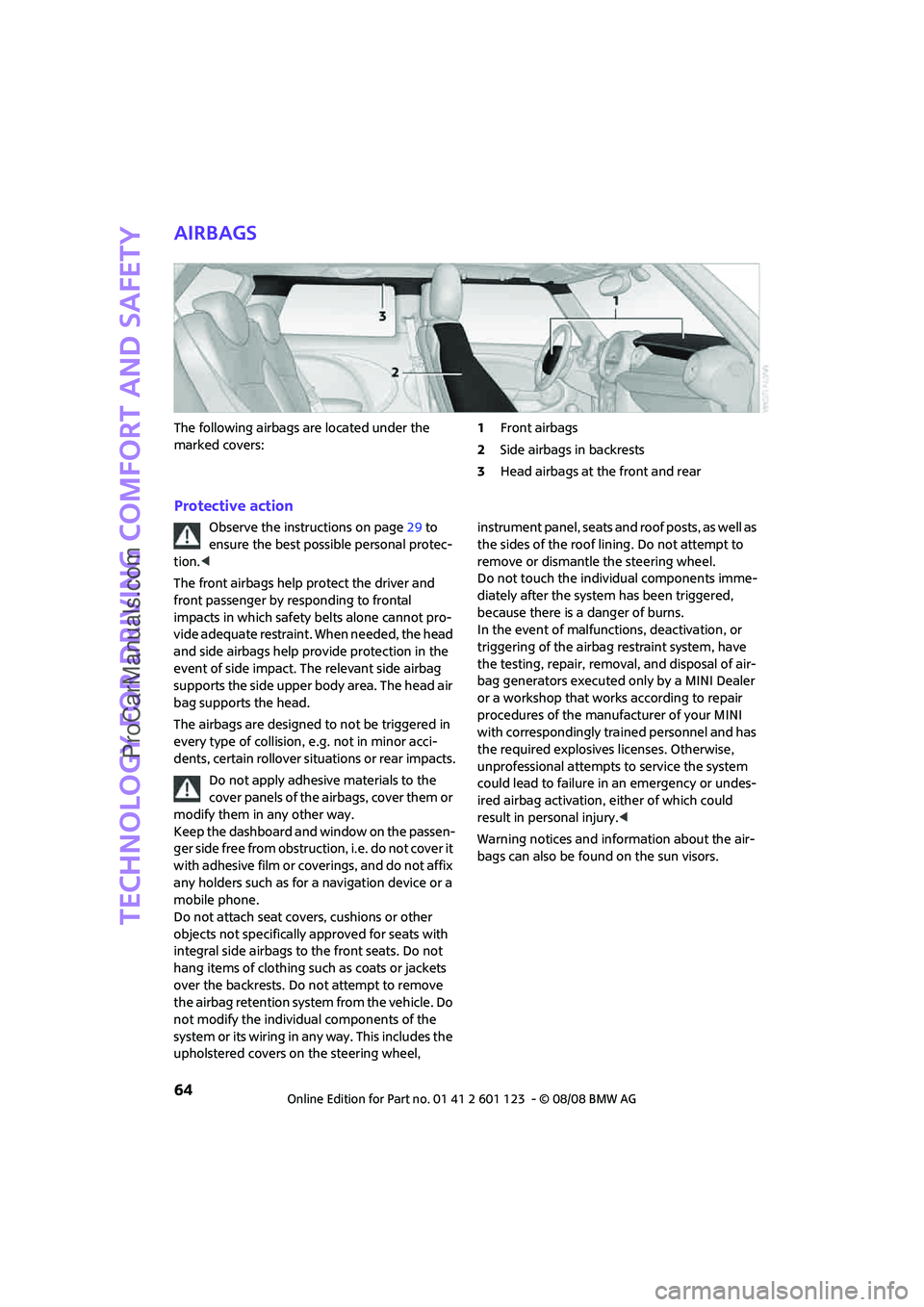
The following airbags are located under the
marked covers:1Front airbags
2Side airbags in backrests
3Head airbags at the front and rear
Protective action
Observe the instructions on page29 to
ensure the best possible personal protec-
tion.<
The front airbags help protect the driver and
front passenger by responding to frontal
impacts in which safety belts alone cannot pro-
vide adequate restraint. When needed, the head
and side airbags help provide protection in the
event of side impact. The relevant side airbag
supports the side upper body area. The head air
bag supports the head.
The airbags are designed to not be triggered in
every type of collision, e.g. not in minor acci-
dents, certain rollover situations or rear impacts.
Do not apply adhesive materials to the
cover panels of the airbags, cover them or
modify them in any other way.
Keep the dashboard and window on the passen-
ger side free from obstruction, i.e. do not cover it
with adhesive film or coverings, and do not affix
any holders such as for a navigation device or a
mobile phone.
Do not attach seat covers, cushions or other
objects not specifically approved for seats with
integral side airbags to the front seats. Do not
hang items of clothing such as coats or jackets
over the backrests. Do not attempt to remove
the airbag retention system from the vehicle. Do
not modify the individual components of the
system or its wiring in any way. This includes the
upholstered covers on the steering wheel, instrument panel, seats and roof posts, as well as
the sides of the roof lining. Do not attempt to
remove or dismantle the steering wheel.
Do not touch the individual components imme-
diately after the system has been triggered,
because there is a danger of burns.
In the event of malfunctions, deactivation, or
triggering of the airbag restraint system, have
the testing, repair, removal, and disposal of air-
bag generators executed only by a MINI Dealer
or a workshop that works according to repair
procedures of the manufacturer of your MINI
with correspondingly trained personnel and has
the required explosives licenses. Otherwise,
unprofessional attempts to service the system
could lead to failure in an emergency or undes-
ired airbag activation, either of which could
result in personal injury.<
Warning notices and information about the air-
bags can also be found on the sun visors.
ProCarManuals.com
Page 87 of 160

REFERENCEAT A GLANCE CONTROLS DRIVING TIPS MOBILITY
85
The risk of hydroplaning increases with declining
tread depth on the tires, refer also to Tread
depth on page100.
Driving through water
Drive through water on the road only if it is
not deeper than 1 ft/30 cm, and then only
at walking speed at the most. Otherwise, the
vehicle's engine, the electrical systems and the
transmission may be damaged.<
Parking brake on inclines
On inclines, do not hold the vehicle with
the clutch; use the parking brake. Other-
wise greater clutch wear will result.<
For information on driving off using Hill Start
Assist
*, refer to page58.
Braking safely
Your MINI is equipped with ABS. If you are in a
situation which requires full braking, it is best to
brake using maximum brake pressure. Since the
vehicle maintains steering responsiveness, you
can still avoid possible obstacles with a mini-
mum of steering effort.
The pulsation of the brake pedal, together with
the sound of hydraulic regulation, indicates that
ABS is actively taking effect.
Driving in wet conditions
When roads are wet or there is heavy rain, briefly
exert gentle pressure on the brake pedal every
few miles. Monitor traffic conditions to ensure
that this maneuver does not endanger other
road users. The heat generated in this process
helps dry the pads and rotors to ensure that
Then full braking force will be immediately avail-
able when it is needed.
Hills
To prevent overheating and the resulting
reduced efficiency of the brake system,
drive long or steep downhill gradients in the
gear in which the least braking is required. Even
light but consistent brake pressure can lead to
high temperatures, brake wear and possibly
even brake failure.
This strategy helps you avoid placing excessive
loads on the brake system. Downshifting in man-
ual mode of the automatic transmission, page40.
Never drive with the clutch held down,
with the transmission in neutral or with
the engine switched off; otherwise, engine brak-
ing action will not be present or there will be no
power assistance to the brakes or steering.
Never allow floor mats, carpets or any other
objects to protrude into the area around the
pedals, otherwise pedal function could be
impaired.<
Corrosion on brake rotors
When the vehicle is driven only occasionally,
during extended periods when the vehicle is not
used at all, and in operating conditions where
brake applications are less frequent, there is an
increased tendency for corrosion to form on
rotors, while contaminants accumulate on the
brake pads. This occurs because the minimum
pressure which must be exerted by the pads
during brake applications to clean the rotors is
not reached.
Should corrosion form on the brake rotors, the
brakes will tend to respond with a pulsating effect
that even extended application will fail to cure.
When the vehicle is parked
Condensation forms while the automatic climate
control is in operation, and then exits under the
vehicle. Traces of condensed water under the
vehicle are therefore normal.
In the MINI Cooper S, the coolant pump may
continue to run for some time after the engine is
switched off. This will generate noise in the
engine compartment.
Before driving into a car wash
Avoid car washes with tracks higher than
4 in/10 cm, otherwise the chassis could be
damaged.<
For general information about vehicle care for
your MINI, refer to the chapter beginning on
page109.
ProCarManuals.com
Page 90 of 160
Things to remember when driving
88
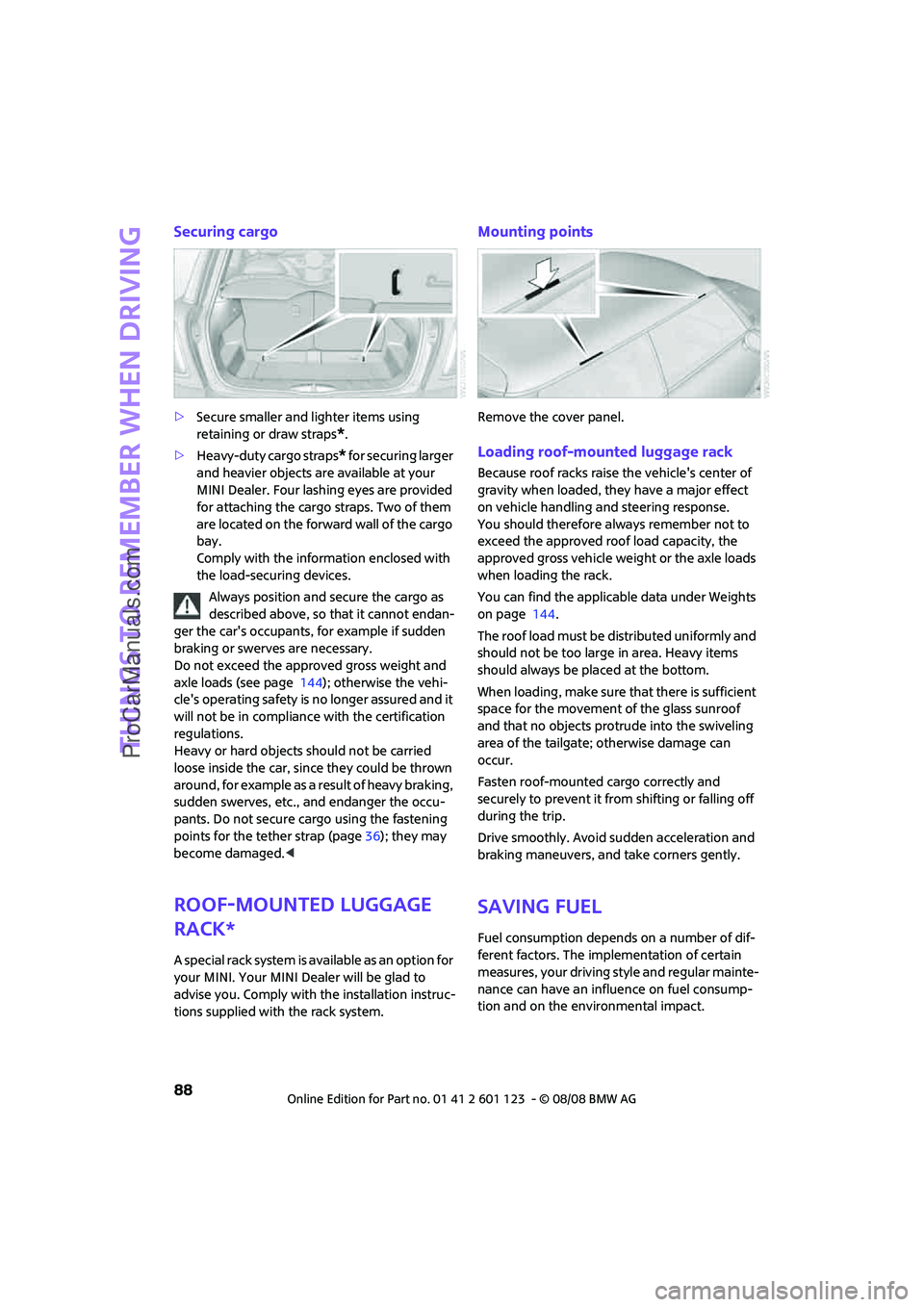
Securing cargo
>Secure smaller and lighter items using
retaining or draw straps
*.
>Heavy-duty cargo straps
* for securing larger
and heavier objects are available at your
MINI Dealer. Four lashing eyes are provided
for attaching the cargo straps. Two of them
are located on the forward wall of the cargo
bay.
Comply with the information enclosed with
the load-securing devices.
Always position and secure the cargo as
described above, so that it cannot endan-
ger the car's occupants, for example if sudden
braking or swerves are necessary.
Do not exceed the approved gross weight and
axle loads (see page 144); otherwise the vehi-
cle's operating safety is no longer assured and it
will not be in compliance with the certification
regulations.
Heavy or hard objects should not be carried
loose inside the car, since they could be thrown
around, for example as a result of heavy braking,
sudden swerves, etc., and endanger the occu-
pants. Do not secure cargo using the fastening
points for the tether strap (page36); they may
become damaged.<
Roof-mounted luggage
rack*
A special rack system is available as an option for
your MINI. Your MINI Dealer will be glad to
advise you. Comply with the installation instruc-
tions supplied with the rack system.
Mounting points
Remove the cover panel.
Loading roof-mounted luggage rack
Because roof racks raise the vehicle's center of
gravity when loaded, they have a major effect
on vehicle handling and steering response.
You should therefore always remember not to
exceed the approved roof load capacity, the
approved gross vehicle weight or the axle loads
when loading the rack.
You can find the applicable data under Weights
on page 144.
The roof load must be distributed uniformly and
should not be too large in area. Heavy items
should always be placed at the bottom.
When loading, make sure that there is sufficient
space for the movement of the glass sunroof
and that no objects protrude into the swiveling
area of the tailgate; otherwise damage can
occur.
Fasten roof-mounted cargo correctly and
securely to prevent it from shifting or falling off
during the trip.
Drive smoothly. Avoid sudden acceleration and
braking maneuvers, and take corners gently.
Saving fuel
Fuel consumption depends on a number of dif-
ferent factors. The implementation of certain
measures, your driving style and regular mainte-
nance can have an influence on fuel consump-
tion and on the environmental impact.
ProCarManuals.com
Page 119 of 160
REFERENCEAT A GLANCE CONTROLS DRIVING TIPS MOBILITY
117
Rear fog lamp*
21 watt bulb, P 21 W
Access to the lamp via the back or underside of
the bumper.
The illustration shows the fog lamp in the
bumper of the MINI Cooper.
1.Screw out the bulb holder counterclockwise.
2.Screw out and replace the bulb.
3.To insert the new bulb and bulb holder, pro-
ceed in reverse order.
License plate lamps
5 watt bulb, C 5 W
1.Using a screwdriver, push the lamp to the
left in the tab of the lamp housing, arrow1.
2.Remove the lamp, arrow 2.
3.Replace the bulb.
4.Insert the lamp.
Center brake lamp
This lamp uses LED technology for operation. In
the event of a malfunction, contact your MINI
Dealer or a workshop that has specially trained
personnel working in accordance with the spec-
ifications of your MINI manufacturer.
Repairing a flat tire
Safety measures in the event of a break-
down:
Park the vehicle as far as possible from moving
traffic and switch on the hazard warning flash-
ers.
Turn the steering wheel until the front wheels
are in the straight-ahead position and engage
the steering wheel lock. Engage the parking
brake and shift into 1st or reverse gear or place
the selector lever in position P.
All passengers should be outside the vehicle and
in a safe place, e.g. behind a guardrail.
Erect a warning triangle or warning flasher at the
appropriate distance if necessary. Comply with
all safety guidelines and regulations.<
In the event of a flat tire, different procedures
should be followed depending on the equip-
ment included in your vehicle:
>MINI Mobility System, refer to the following
section
>Run-Flat Tires, page101
>Tire change with space-saver spare tire,
page119
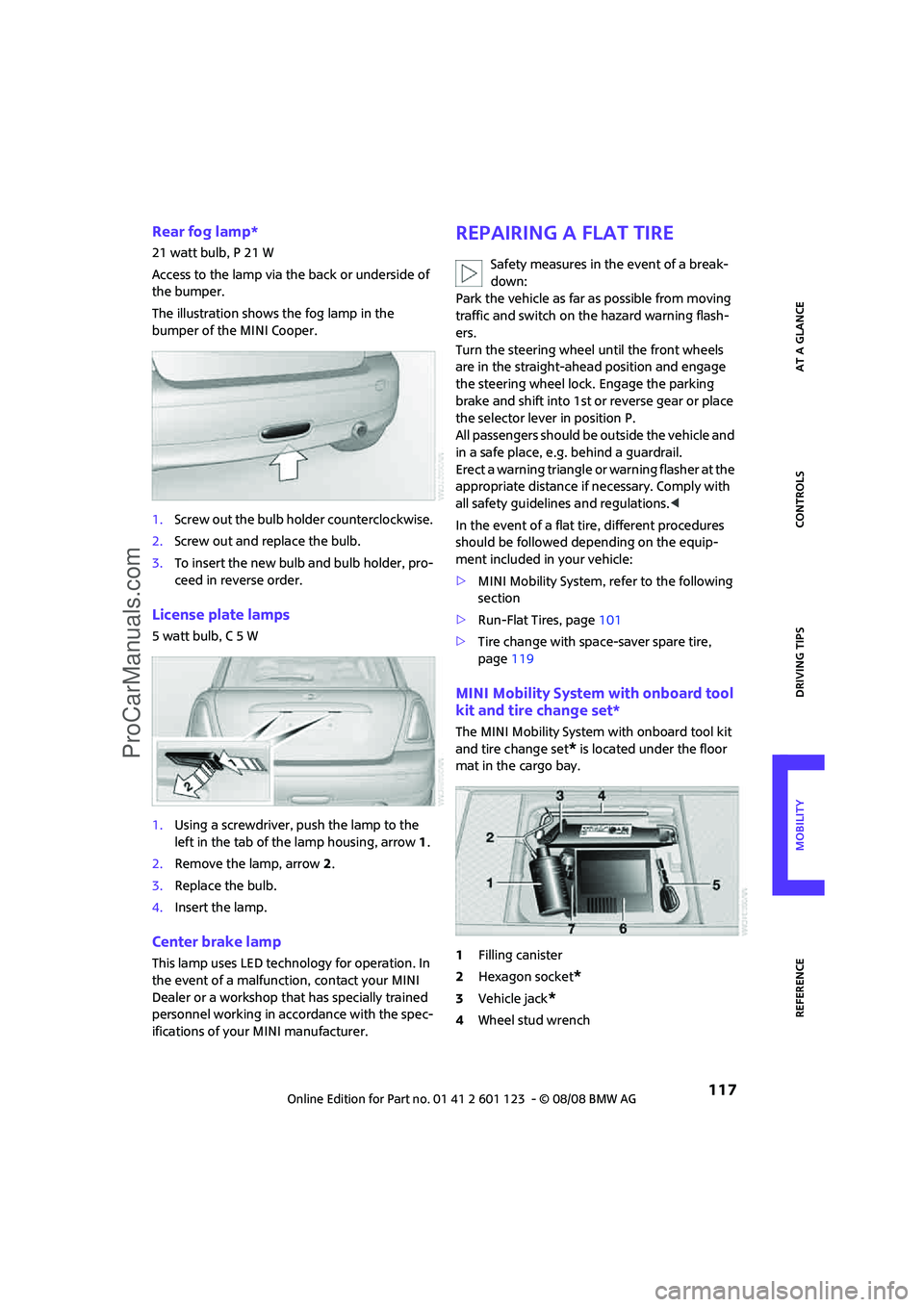
MINI Mobility System with onboard tool
kit and tire change set*
The MINI Mobility System with onboard tool kit
and tire change set
* is located under the floor
mat in the cargo bay.
1Filling canister
2Hexagon socket
*
3Vehicle jack*
4Wheel stud wrench
ProCarManuals.com
Page 122 of 160
Replacing components
120
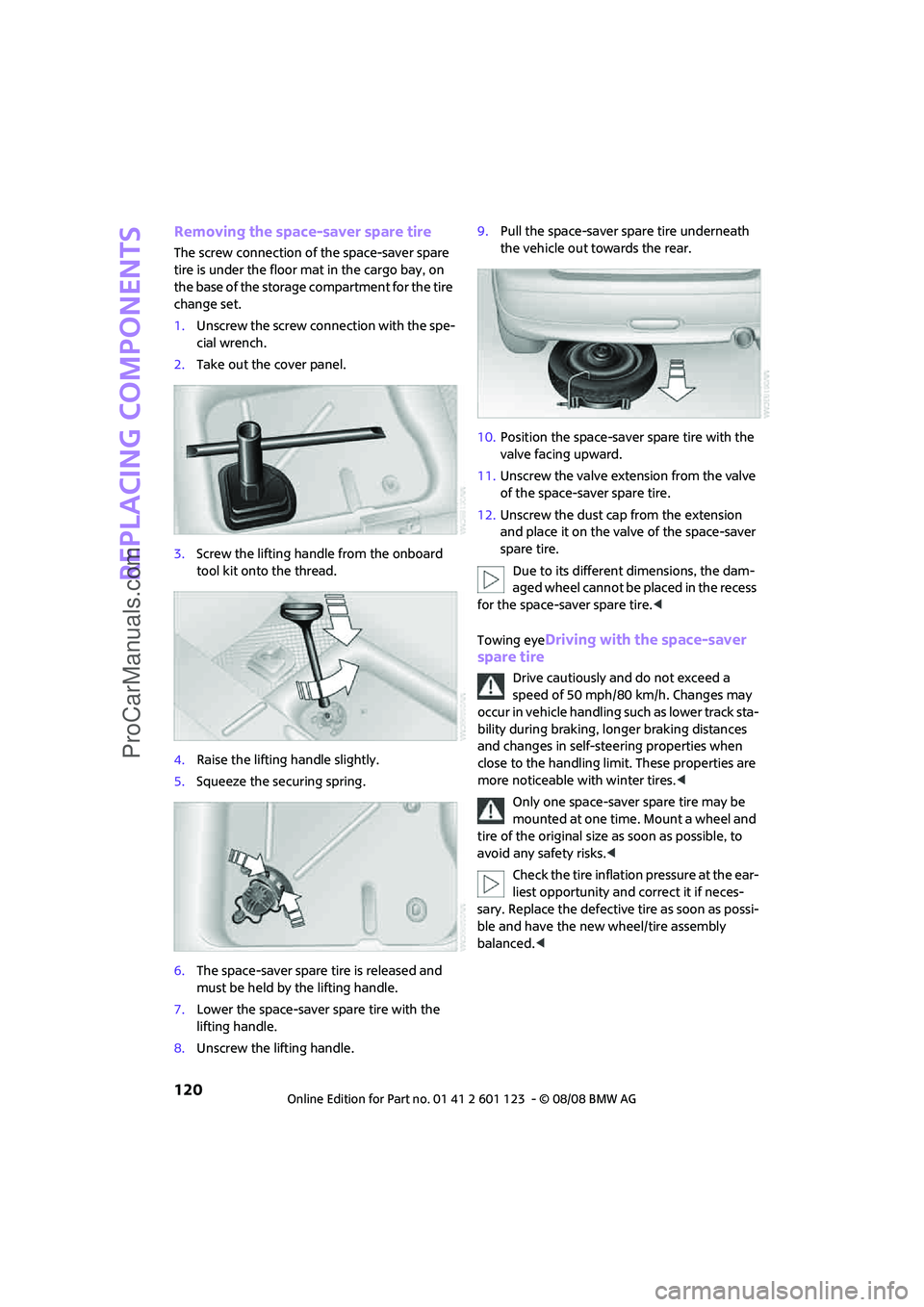
Removing the space-saver spare tire
The screw connection of the space-saver spare
tire is under the floor mat in the cargo bay, on
the base of the storage compartment for the tire
change set.
1.Unscrew the screw connection with the spe-
cial wrench.
2.Take out the cover panel.
3.Screw the lifting handle from the onboard
tool kit onto the thread.
4.Raise the lifting handle slightly.
5.Squeeze the securing spring.
6.The space-saver spare tire is released and
must be held by the lifting handle.
7.Lower the space-saver spare tire with the
lifting handle.
8.Unscrew the lifting handle.9.Pull the space-saver spare tire underneath
the vehicle out towards the rear.
10.Position the space-saver spare tire with the
valve facing upward.
11.Unscrew the valve extension from the valve
of the space-saver spare tire.
12.Unscrew the dust cap from the extension
and place it on the valve of the space-saver
spare tire.
Due to its different dimensions, the dam-
aged wheel cannot be placed in the recess
for the space-saver spare tire.<
Towing eye
Driving with the space-saver
spare tire
Drive cautiously and do not exceed a
speed of 50 mph/80 km/h. Changes may
occur in vehicle handling such as lower track sta-
bility during braking, longer braking distances
and changes in self-steering properties when
close to the handling limit. These properties are
more noticeable with winter tires.<
Only one space-saver spare tire may be
mounted at one time. Mount a wheel and
tire of the original size as soon as possible, to
avoid any safety risks.<
Check the tire inflation pressure at the ear-
liest opportunity and correct it if neces-
sary. Replace the defective tire as soon as possi-
ble and have the new wheel/tire assembly
balanced.<
ProCarManuals.com
Page 127 of 160
REFERENCEAT A GLANCE CONTROLS DRIVING TIPS MOBILITY
125
Using a tow fitting
The screw-in tow fitting must always be carried
in the car. It can be screwed in at the front or
rear of the MINI.
It is stored in the onboard tool kit in the cargo
bay underneath the cover on the right-hand
side, page113.
Use only the tow fitting provided with the
vehicle and screw it all the way in. Use the
tow fitting for towing on paved roads only. Avoid
lateral loading of the tow fitting, e.g. do not lift
the vehicle by the tow fitting. Otherwise the tow
fitting and the vehicle could be damaged.<
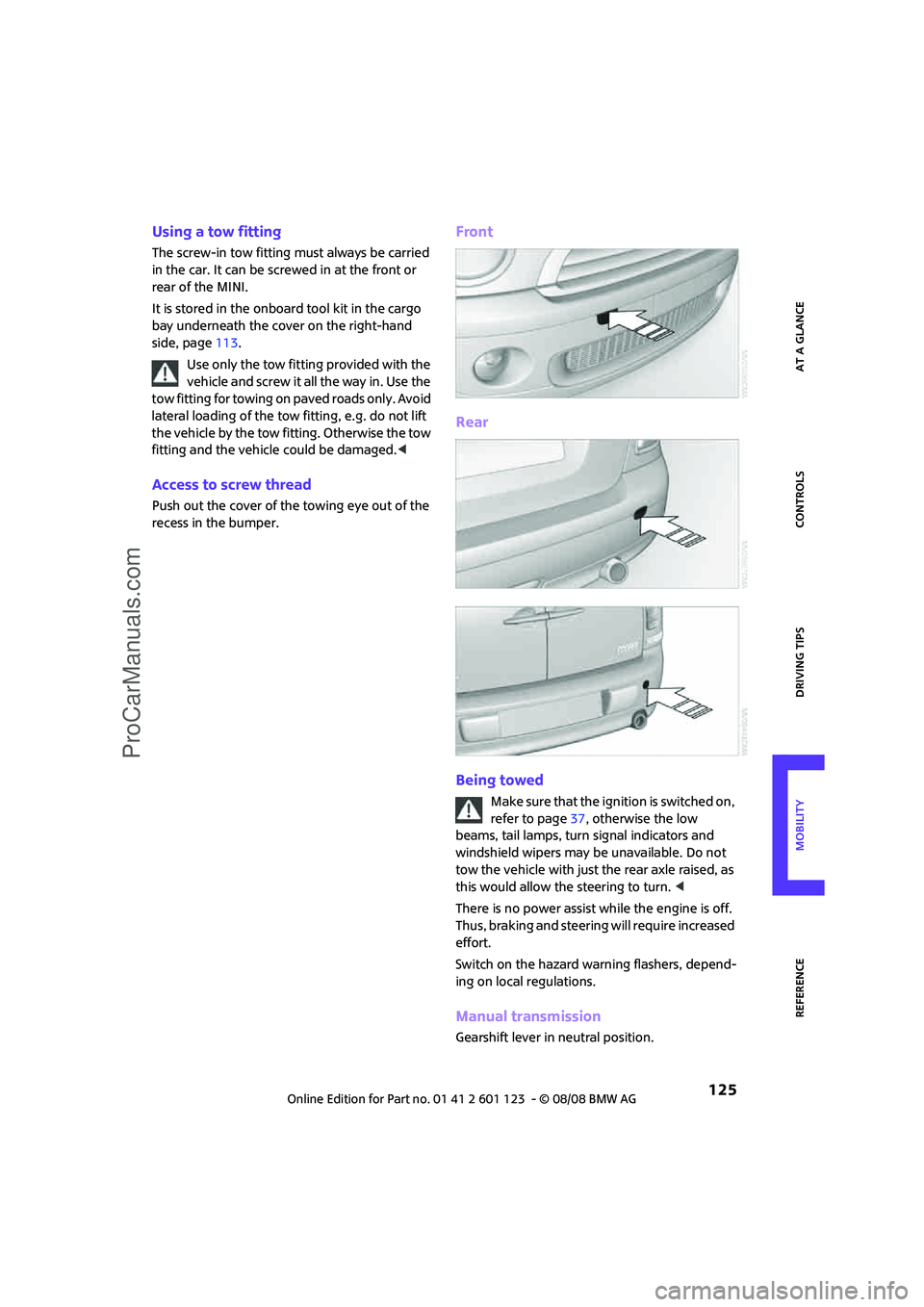
Access to screw thread
Push out the cover of the towing eye out of the
recess in the bumper.
Front
Rear
Being towed
M a k e s u r e t h a t t h e i g n it i o n is s w it c h e d o n ,
refer to page37, otherwise the low
beams, tail lamps, turn signal indicators and
windshield wipers may be unavailable. Do not
tow the vehicle with just the rear axle raised, as
this would allow the steering to turn. <
There is no power assist while the engine is off.
Thus, braking and steering will require increased
effort.
Switch on the hazard warning flashers, depend-
ing on local regulations.
Manual transmission
Gearshift lever in neutral position.
ProCarManuals.com
Page 132 of 160

Indicator and warning lamps
130
Window washer fluid level too low Add washer fluid as soon as possible,
page44.
Lights up in yellow:
The engine will start the next time the
start/stop button is touched, possibly
without the brake or clutch being
depressed
Remote control malfunctioning or, in
cars with convenient access, not
detectedThe engine cannot be started. Have
the remote control checked, if neces-
sary.
Battery in remote control discharged Use the remote control for a longer
journey or, in cars with convenient
access, replace the battery.
Belt tensioners and/or airbag system
failedHave the system checked immedi-
ately. Fasten the safety belts anyway.
Power steering failed You can continue your journey, but
moderate your speed and exercise
due caution. Steering response will be
markedly different. Have the system
checked without delay.
Lights up:
Emergency calling system failed or
malfunctioningHave the system checked as soon as
possible.
Lights up in red:
Engine malfunction
Stop the car and switch off the
engine. You cannot continue your
journey. Contact your MINI Dealer.
Lights up in yellow:
Full engine power no longer available You can continue your journey, but
moderate your speed and exercise
due caution. Have the engine
checked as soon as possible.
12Cause What to do
ProCarManuals.com
Page 139 of 160

REFERENCEAT A GLANCE CONTROLS DRIVING TIPS MOBILITY
137
Selector lever position P not engaged.
Ignition cannot be switched offEngage selector lever position P when
you wish to switch off the ignition,
page37.
Lights up in red:
Electric steering wheel lock malfunc-
tioningThe engine can no longer be started. If
applicable, do not switch off the
engine. Contact your MINI Dealer.
Lights up in yellow:
Electric steering wheel lock engaged Move the steering wheel before start-
ing the engine.
Cruise control system failed Have the system checked.
Park Distance Control failed Have the system checked.
Bulb of exterior lighting system failed Have the exterior lighting checked as
soon as possible.
Low-beam headlamp or fog lamp
failedHave the lamps checked as soon as
possible.
High-beam headlamp failed Have the high-beam headlamps
checked.
Rear fog lamp failed Have the rear fog lamp checked.
Headlamp beam throw adjustment
system failedHave the headlamp beam throw
adjustment system checked.
Coolant level too low Add coolant immediately, page105.
Engine oil pressure too low Stop immediately and switch off the
engine. You cannot continue your
journey. Contact your MINI Dealer.
12Cause What to do
ProCarManuals.com
Page 149 of 160
REFERENCEAT A GLANCE CONTROLS DRIVING TIPS MOBILITY
147
Blower, refer to Air flow
rate73,75
Bonnet103
Bottle holders, refer to Cup
holders81
Brake Assist57
Brake fluid, refer to Service
requirements52
Brake lamps
– replacing bulbs in MINI116
Brake pads, breaking in84
Brake rotors85
– brakes84
– breaking in84
Brake system84
– breaking in84
– disc brakes85
– MINI Maintenance
System107
Brakes
– ABS57
– breaking in84
– MINI Maintenance
System107
– parking brake39
– service requirements52
Brakes, refer to Braking
safely85
Breakdown service, refer to
Roadside Assistance123
Break-in period84
Breaking in the clutch84
Bulb changing, refer to Lamps
and bulbs113
Button for starting the
engine37
Buttons on the steering
wheel11
C
California Proposition 65
warning5
Can holders, refer to Cup
holders81
Capacities144
Car battery, refer to Vehicle
battery122
Car care109Car key, refer to Keys/remote
controls18
Car phone
– installation location, refer to
Center armrest79
– refer to separate Owner's
Manual
Car wash85
Car wash, care109
Car washes109
Care109
– Car washes109
– Car-care products109
– CD/DVD drives111
– High-pressure washers109
– internal111
– Leather111
– Manual washing110
– Upholstery and fabrics111
– Windows110
– Wiper blades110
Cargo area
– capacity144
Cargo bay86
– convenient access26
– cover86
– lamp70
– opening from outside23
Cargo bay, expanding86
Cargo bay lamp70
Cargo bay lid, refer to
Tailgate23
Cargo loading87
– securing cargo88
– stowing cargo87
– vehicle86
Cargo, securing88
Carpets, care111
Catalytic converter, refer to
Hot exhaust system84
Center armrest79
Center brake lamp117
Center console, refer to
Around the center
console14
Central locking system19
– convenient access25
– from inside22
– from outside19Changing bulbs
113
Changing wheels119
Chassis number, refer to
Engine compartment104
Check Control54
Child's seats35
Child-restraint fixing system
LATCH36
Child-restraint systems35
Chock, folding
– space-saver spare tire119
Chrome parts, care110
Chrome parts, refer to
Care109
Cigarette lighter81
Cleaning headlamps43
– washer fluid44
Clock47
– 12h/24h mode50
– setting time53
Closing
– from inside22
– from outside19
Clothes hooks80
Cockpit10
Cold start, refer to Starting the
engine38
Comfort access
– what to observe before
entering a car wash26
Comfort access, refer to
Convenient access25
Comfort area, refer to Around
the center console14
Compartment for remote
control, refer to Ignition
lock37
Computer48
Condensation, refer to When
the vehicle is parked85
Condition Based Service
CBS107
Configuring settings, refer to
Personal Profile18
Confirmation signals for
vehicle locking/unlocking20
Connecting vacuum cleaner,
refer to Connecting electrical
appliances81
ProCarManuals.com
Page 152 of 160
From A to Z
150
Head restraints31
– sitting safely29
Headlamp control,
automatic67
Headlamp flasher41
– indicator lamp11,128
Headlamps
– replacing bulb114
Headlamps, care110
Heated
– mirrors33
– rear window73,76
– seats32
Heating72
– mirrors33
– rear window73,76
– seats32
Heavy loads, refer to Stowing
cargo87
Height adjustment
– seats30
– steering wheel34
Height, refer to
Dimensions143
High beams69
– headlamp flasher69
– indicator lamp128
– replacing bulb114
High water, refer to Driving
through water85
Hill Start Assist58
Hills85
Holders for cups81
Homepage4
Horn10
Hot exhaust system84
Hydroplaning84
I
Ice warning47
Icy roads, refer to Outside
temperature warning47
Ignition37
– switched off37
– switched on37
Ignition key position 1, refer to
Radio readiness37Ignition key position 2, refer to
Ignition on37
Ignition key, refer to
Integrated key/remote
control18
Ignition lock37
Imprint2
Indicator and warning
lamps13,128
– Tire Pressure Monitor TPM62
Indicator lighting, refer to
Instrument lighting70
Individual air distribution74
Individual settings, refer to
Personal Profile18
Inflation pressure monitoring,
refer to Tire Pressure Monitor
TPM61
Initializing
– Flat Tire Monitor FTM59
– glass sunroof, electric27
Instrument cluster, refer to
Displays12
Instrument lighting70
Instrument panel, refer to
Cockpit10
Instrument panel, refer to
Displays12
Integrated key18
Integrated universal remove
control77
Interior lamps70
– remote control21
Interior rearview mirror33
– automatic dimming
feature33
Interlock40
Intermittent mode of the
wipers42
Internet page4
J
Jacking points121
Jets, refer to Window washer
nozzles44
Jump starting123
Jumpering, refer to Jump
starting123
K
Key Memory, refer to Personal
Profile18
Key, refer to Keys/remote
controls18
Keyless go, refer to Convenient
access25
Keyless opening and closing,
refer to Convenient
access25
Kick-down40
– automatic transmission with
Steptronic40
Knock control93
L
Lamps and bulbs, replacing
bulbs113
Lamps, refer to Parking lamps/
Low beams67
Lashing eyes, refer to Securing
cargo88
LATCH child-restraint fixing
system36
Leather care111
LEDs light-emitting diodes114
Length, refer to
Dimensions143
License plate lamp
– replacing bulbs in MINI117
Light switch67
Light-alloy wheels, care110
Light-emitting diodes
LEDs114
Lighter81
– socket81
Lighting
– lamps and bulbs113
– of the instruments70
– of vehicle, refer to Lamps67
Limit138
Load87
Load securing equipment,
refer to Securing cargo88
Lock buttons of doors, refer to
Locking22
ProCarManuals.com