warning light MINI COOPER 2009 User Guide
[x] Cancel search | Manufacturer: MINI, Model Year: 2009, Model line: COOPER, Model: MINI COOPER 2009Pages: 160, PDF Size: 2.84 MB
Page 62 of 160
Technology for driving comfort and safety
60
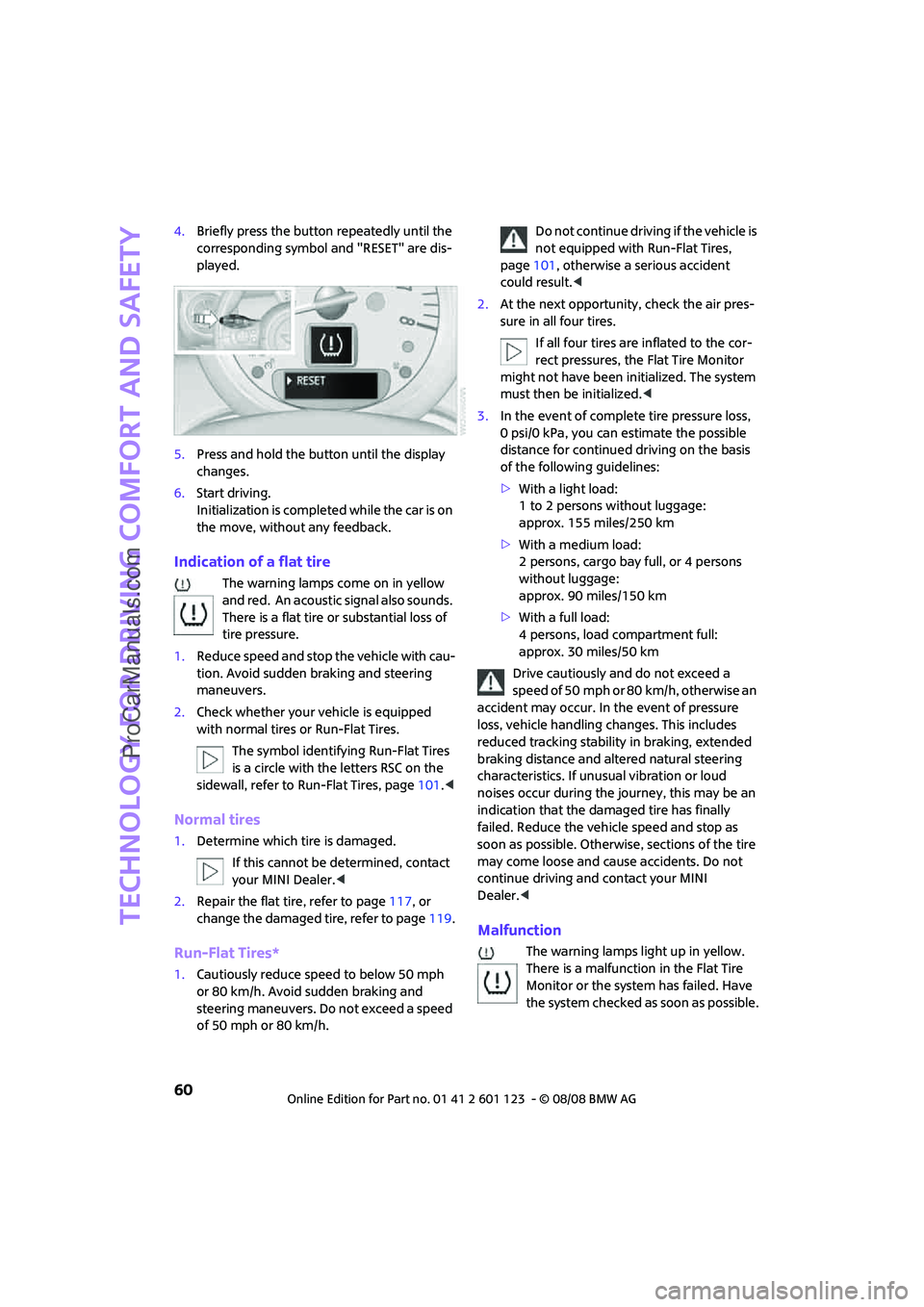
4.Briefly press the button repeatedly until the
corresponding symbol and "RESET" are dis-
played.
5.Press and hold the button until the display
changes.
6.Start driving.
Initialization is completed while the car is on
the move, without any feedback.
Indication of a flat tire
The warning lamps come on in yellow
and red. An acoustic signal also sounds.
There is a flat tire or substantial loss of
tire pressure.
1.Reduce speed and stop the vehicle with cau-
tion. Avoid sudden braking and steering
maneuvers.
2.Check whether your vehicle is equipped
with normal tires or Run-Flat Tires.
The symbol identifying Run-Flat Tires
is a circle with the letters RSC on the
sidewall, refer to Run-Flat Tires, page101.<
Normal tires
1.Determine which tire is damaged.
If this cannot be determined, contact
your MINI Dealer.<
2.Repair the flat tire, refer to page117, or
change the damaged tire, refer to page119.
Run-Flat Tires*
1.Cautiously reduce speed to below 50 mph
or 80 km/h. Avoid sudden braking and
steering maneuvers. Do not exceed a speed
of 50 mph or 80 km/h.Do not continue driving if the vehicle is
not equipped with Run-Flat Tires,
page101, otherwise a serious accident
could result.<
2.At the next opportunity, check the air pres-
sure in all four tires.
If all four tires are inflated to the cor-
rect pressures, the Flat Tire Monitor
might not have been initialized. The system
must then be initialized.<
3.In the event of complete tire pressure loss,
0 psi/0 kPa, you can estimate the possible
distance for continued driving on the basis
of the following guidelines:
>With a light load:
1 to 2 persons without luggage:
approx. 155 miles/250 km
>With a medium load:
2 persons, cargo bay full, or 4 persons
without luggage:
approx. 90 miles/150 km
>With a full load:
4 persons, load compartment full:
approx. 30 miles/50 km
Drive cautiously and do not exceed a
speed of 50 mph or 80 km/h, otherwise an
accident may occur. In the event of pressure
loss, vehicle handling changes. This includes
reduced tracking stability in braking, extended
braking distance and altered natural steering
characteristics. If unusual vibration or loud
noises occur during the journey, this may be an
indication that the damaged tire has finally
failed. Reduce the vehicle speed and stop as
soon as possible. Otherwise, sections of the tire
may come loose and cause accidents. Do not
continue driving and contact your MINI
Dealer.<
Malfunction
The warning lamps light up in yellow.
There is a malfunction in the Flat Tire
Monitor or the system has failed. Have
the system checked as soon as possible.
ProCarManuals.com
Page 64 of 160
Technology for driving comfort and safety
62
6.Start driving.
After driving a few minutes, the set inflation
pressures in the tires are accepted as the tar-
get values to be monitored. The system
reset is completed during your drive, and
c a n b e i n t e r r u p t e d a t a n y t i m e . W h e n d r i v i n g
resumes, the reset is continued automati-
cally. The indicator lamp goes out after the
system reset is completed.
Message for low tire inflation pressure
The warning lamps come on in yellow
and red. An acoustic signal also sounds.
There is a flat tire or substantial loss of
tire pressure.
1.Reduce speed and stop the vehicle with cau-
tion. Avoid sudden braking and steering
maneuvers.
2.Check whether your vehicle is equipped
with normal tires or Run-Flat Tires.
The symbol identifying Run-Flat Tires
is a circle with the letters RSC on the
sidewall, refer to the Owner's Manual for Ve-
hicle.<
Normal tires
1.Determine which tire is damaged.
If this cannot be determined, contact
your MINI Dealer.<
2.Repair the flat tire or change the damaged
tire, refer to page119.
Run-Flat Tires*
1.Cautiously reduce speed to below 50 mph/
80 km/h. Avoid sudden braking and steering
maneuvers. Do not exceed a speed of
50 mph/80 km/h.
Do not continue driving if the vehicle is
not equipped with Run-Flat Tires, oth-
erwise a serious accident could result.<
2.In the event of complete tire pressure loss,
0 psi/0 kPa, you can estimate the possible distance for continued driving on the basis
of the following guidelines:
>With a light load:
1 to 2 persons without luggage:
approx. 155 miles/250 km
>With a medium load:
2 persons, cargo bay full, or 4 persons
without luggage:
approx. 90 miles/150 km
>With a full load:
4 persons, load compartment full:
approx. 30 miles/50 km
Drive cautiously and do not exceed a
speed of 50 mph/80 km/h, otherwise an
accident may occur. In the event of pressure
loss, vehicle handling changes. This includes
reduced tracking stability in braking, extended
braking distance and altered natural steering
characteristics. If unusual vibration or loud
noises occur during the journey, this may be an
indication that the damaged tire has finally
failed. Reduce the vehicle speed and stop as
soon as possible. Otherwise, sections of the
tire may come loose and cause accidents. Do
not continue driving and contact your MINI
Dealer.<
Malfunction
The small warning lamp flashes in yel-
low and then lights up continuously; the
larger warning lamp comes on in yel-
low.
On the onboard monitor, the tires are shown in
gray and a message appears. No punctures can
be detected.
This type of message is shown in the following
situations:
>If there is a malfunction
Have the system checked.
>If a wheel without TPM electronics has been
mounted
>If TPM is temporarily malfunctioning due to
other systems or devices using the same
radio frequency.
ProCarManuals.com
Page 110 of 160

Maintenance
108
Exhaust emission values
The warning lamps come on. The
exhaust emission values have turned
poor and there is a danger of engine
damage. You can continue your jour-
ney, but moderate your speed and exercise due
caution. Have the car checked as soon as possi-
ble.
Under certain circumstances, one of the lamps
will flash or light up continuously. This indicates
excessive misfiring or a malfunction in the
engine. If this happens, reduce your speed and
visit the nearest MINI Dealer as soon as possible.
Severe misfiring can quickly lead to serious dam-
age of emissions-related components, espe-
cially the catalytic converter. In addition,
mechanical engine components can become
damaged.
If the fuel filler cap is not properly tightened, the
OBD system may conclude that fuel vapors are
escaping, causing an indicator to light up. If the
filler cap is then tightened, the indicator should
go out within a few days.
Event data recorders
Your vehicle may be equipped with one or sev-
eral measuring or diagnostic modules or a
device for recording or sending certain vehicle
data or information.
ProCarManuals.com
Page 130 of 160

Indicator and warning lamps
128
Indicator and warning lamps
Indicator and warning lamps can light up in var-
ious combinations and colors in indicator area 1
or2. See the table for information on causes and
how to react. Note whether a lamp comes on
alone or in combination with another. Some
lamps can light up in different colors. Corre-
sponding distinctions are made in the text.
12Cause What to do
Turn signals
High beams/headlamp flasher
switched on
Fog lamps switched on
Rear fog lamp switched on
Fasten safety belts Fasten your safety belt, refer also to
page32.
Indication in US models
Parking brake applied Release the parking brake.
Indication in Canadian models
Parking brake applied Release the parking brake.
Danger of icy roads Drive cautiously, refer also to page47.
ProCarManuals.com
Page 132 of 160

Indicator and warning lamps
130
Window washer fluid level too low Add washer fluid as soon as possible,
page44.
Lights up in yellow:
The engine will start the next time the
start/stop button is touched, possibly
without the brake or clutch being
depressed
Remote control malfunctioning or, in
cars with convenient access, not
detectedThe engine cannot be started. Have
the remote control checked, if neces-
sary.
Battery in remote control discharged Use the remote control for a longer
journey or, in cars with convenient
access, replace the battery.
Belt tensioners and/or airbag system
failedHave the system checked immedi-
ately. Fasten the safety belts anyway.
Power steering failed You can continue your journey, but
moderate your speed and exercise
due caution. Steering response will be
markedly different. Have the system
checked without delay.
Lights up:
Emergency calling system failed or
malfunctioningHave the system checked as soon as
possible.
Lights up in red:
Engine malfunction
Stop the car and switch off the
engine. You cannot continue your
journey. Contact your MINI Dealer.
Lights up in yellow:
Full engine power no longer available You can continue your journey, but
moderate your speed and exercise
due caution. Have the engine
checked as soon as possible.
12Cause What to do
ProCarManuals.com
Page 134 of 160

Indicator and warning lamps
132
Indication in Canadian models
Parking brake applied
Indication in US models
Lights up in red:
Brake fluid level too low Brake pedal travel may be markedly
longer. Stop immediately. Contact the
nearest MINI Dealer.
Lights up in yellow:
Hill Start Assist failed. The car will not
be held in place after the brake is
releasedHave the system checked as soon as
possible.
Indication in Canadian models
Lights up in red:
Brake fluid level too low Brake pedal travel may be markedly
longer. Stop immediately. Contact the
nearest MINI Dealer.
Lights up in yellow:
Hill Start Assist failed. The car will not
be held in place after the brake is
releasedHave the system checked as soon as
possible.
Indication in US models
Brake pads worn Have the condition of the brake pads
checked without delay.
Indication in Canadian models
Brake pads worn Have the condition of the brake pads
checked without delay.
12Cause What to do
ProCarManuals.com
Page 138 of 160
Indicator and warning lamps
136
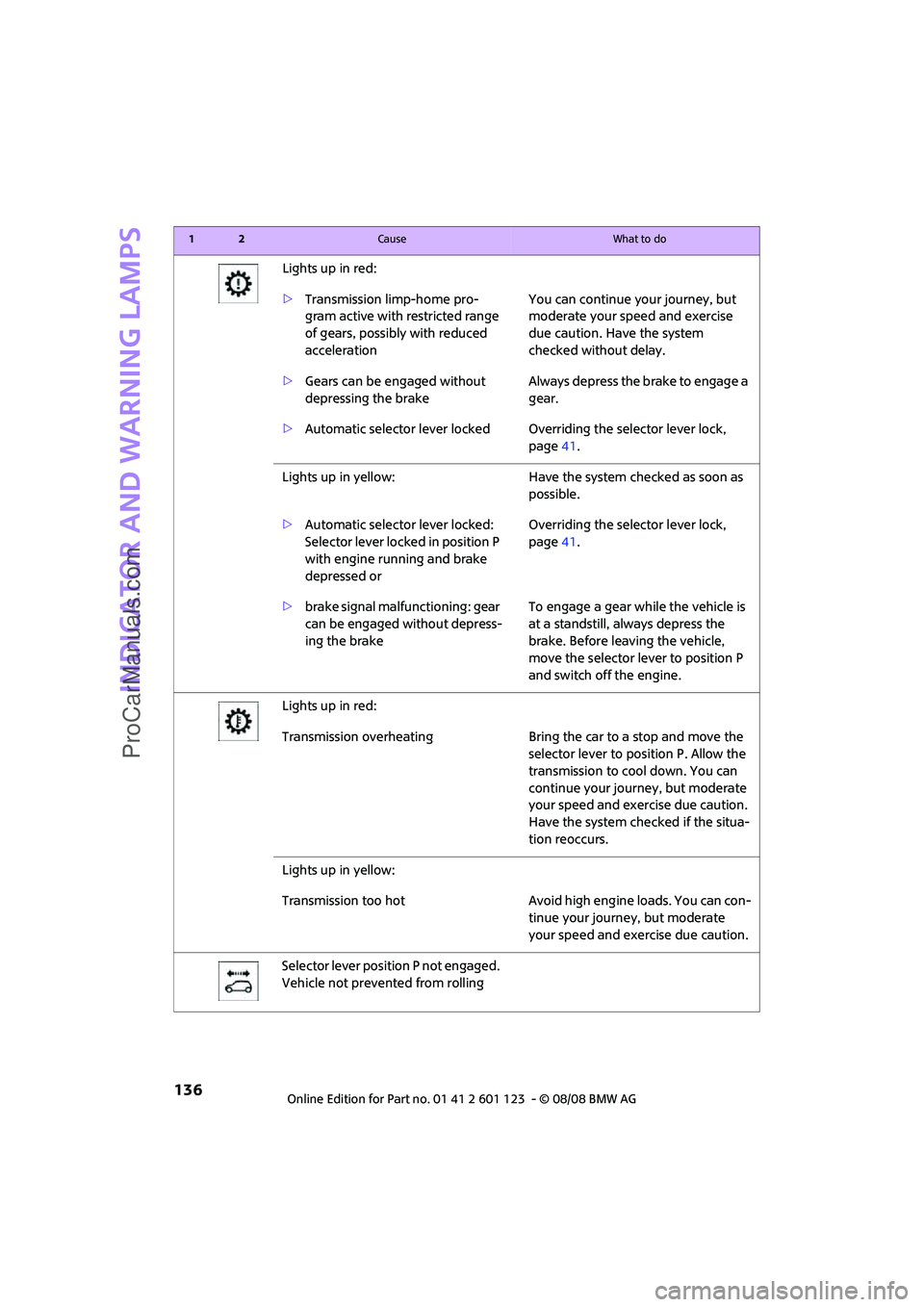
Lights up in red:
>Transmission limp-home pro-
gram active with restricted range
of gears, possibly with reduced
accelerationYou can continue your journey, but
moderate your speed and exercise
due caution. Have the system
checked without delay.
>Gears can be engaged without
depressing the brakeAlways depress the brake to engage a
gear.
>Automatic selector lever locked Overriding the selector lever lock,
page41.
Lights up in yellow: Have the system checked as soon as
possible.
>Automatic selector lever locked:
Selector lever locked in position P
with engine running and brake
depressed orOverriding the selector lever lock,
page41.
>brake signal malfunctioning: gear
can be engaged without depress-
ing the brakeTo engage a gear while the vehicle is
at a standstill, always depress the
brake. Before leaving the vehicle,
move the selector lever to position P
and switch off the engine.
Lights up in red:
Transmission overheating Bring the car to a stop and move the
selector lever to position P. Allow the
transmission to cool down. You can
continue your journey, but moderate
your speed and exercise due caution.
Have the system checked if the situa-
tion reoccurs.
Lights up in yellow:
Transmission too hot Avoid high engine loads. You can con-
tinue your journey, but moderate
your speed and exercise due caution.
Selector lever position P not engaged.
Vehicle not prevented from rolling
12Cause What to do
ProCarManuals.com
Page 140 of 160
Indicator and warning lamps
138
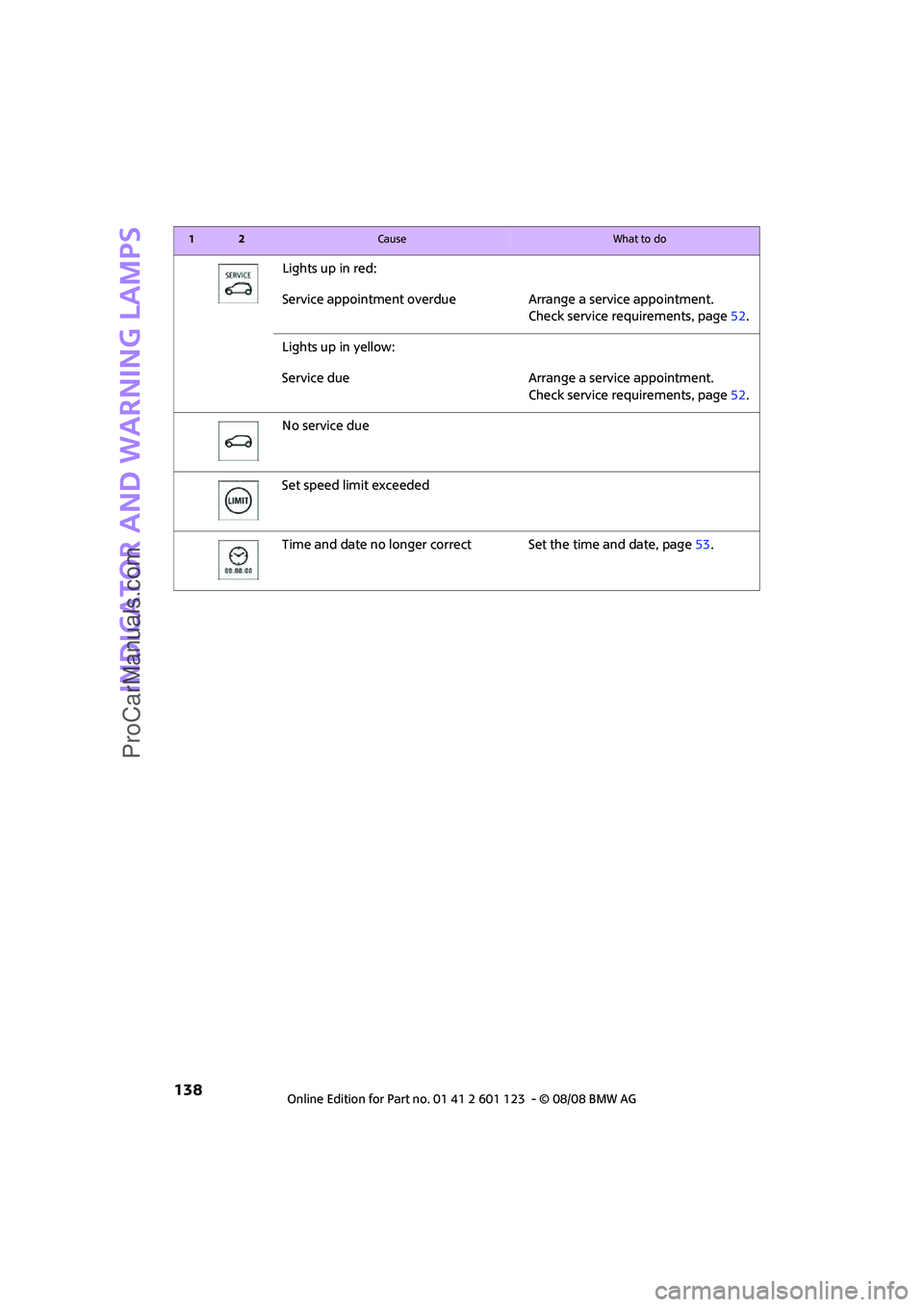
Lights up in red:
Service appointment overdue Arrange a service appointment.
Check service requirements, page52.
Lights up in yellow:
Service due Arrange a service appointment.
Check service requirements, page52.
No service due
Set speed limit exceeded
Time and date no longer correct Set the time and date, page53.
12Cause What to do
ProCarManuals.com
Page 148 of 160
From A to Z
146
From A to Z
INDEX
A
Accessories, refer to Your
individual vehicle4
Activated-charcoal filter for
automatic climate control76
Additives
– coolant105
– engine oil105
Adjusting temperature inside
the car, refer to Air
conditioner73
Adjusting temperature inside
the car, refer to Automatic
climate control74
Air conditioner72
Air conditioning mode
– air conditioner73
– automatic climate control74
– ventilation76
Air distribution
– automatic75
– individual74
– manual74
Air flow rate73,75
– air conditioning system73
– automatic climate control75
– heating, ventilation73
Air outlets, refer to Air vents72
Air pressure, checking, refer to
Tire inflation pressure94
Air recirculation, refer to
Recirculated-air
mode73,75
Air supply
– air conditioner73
– automatic climate control74
– ventilation76
Air vents72
Airbags64
– sitting safely29
– warning lamp66
Airing, refer to Ventilation76AKI, refer to Fuel
specifications93
Alarm system24
All-season tires, refer to Winter
tires102
Ambient air, refer to
Recirculated-air
mode73,75
Ambient lighting71
Antenna, care109
Antifreeze
– coolant105
– washer fluid44
Antilock Brake System ABS57
Anti-theft alarm system, refer
to Alarm system24
Anti-theft system19
Approved axle loads, refer to
Weights144
Approved engine oils105
Approved gross vehicle
weight, refer to Weights144
Armrest, refer to Center
armrest79
Arrival time
– computer49
Ashtray81
Assistant systems, refer to
– Dynamic Stability Control
DSC57
AUC Automatic recirculated-
air control75
Audio device, external79
AUTO program for automatic
climate control75
Automatic
– air distribution75
– air flow rate75
– cruise control45
– headlamp control67
Automatic climate control72
– automatic air distribution75Automatic recirculated-air
control AUC75
Automatic transmission with
Steptronic39
– interlock40
– overriding selector lever
lock41
– shiftlock40
– sport program40
AUX-In, refer to External audio
device79
Average fuel consumption48
– setting the units50
Average speed49
Axle loads, refer to
Weights144B
Background lighting, refer to
Ambient lighting71
Backrests, refer to Seats29
Backup lamps
– replacing bulb116
– replacing bulbs in MINI116
Band-aids, refer to First aid
pouch123
Bar, refer to Tow-starting,
towing away126
Battery122
– charging122
– disposal27,122
– jump starting123
– temporary power failure122
Battery renewal
– remote control27
Being towed125
Belt tensioner, refer to Safety
belts32
Belts, refer to Safety belts32
Beverage holders, refer to Cup
holders81
ProCarManuals.com
Page 149 of 160
REFERENCEAT A GLANCE CONTROLS DRIVING TIPS MOBILITY
147
Blower, refer to Air flow
rate73,75
Bonnet103
Bottle holders, refer to Cup
holders81
Brake Assist57
Brake fluid, refer to Service
requirements52
Brake lamps
– replacing bulbs in MINI116
Brake pads, breaking in84
Brake rotors85
– brakes84
– breaking in84
Brake system84
– breaking in84
– disc brakes85
– MINI Maintenance
System107
Brakes
– ABS57
– breaking in84
– MINI Maintenance
System107
– parking brake39
– service requirements52
Brakes, refer to Braking
safely85
Breakdown service, refer to
Roadside Assistance123
Break-in period84
Breaking in the clutch84
Bulb changing, refer to Lamps
and bulbs113
Button for starting the
engine37
Buttons on the steering
wheel11
C
California Proposition 65
warning5
Can holders, refer to Cup
holders81
Capacities144
Car battery, refer to Vehicle
battery122
Car care109Car key, refer to Keys/remote
controls18
Car phone
– installation location, refer to
Center armrest79
– refer to separate Owner's
Manual
Car wash85
Car wash, care109
Car washes109
Care109
– Car washes109
– Car-care products109
– CD/DVD drives111
– High-pressure washers109
– internal111
– Leather111
– Manual washing110
– Upholstery and fabrics111
– Windows110
– Wiper blades110
Cargo area
– capacity144
Cargo bay86
– convenient access26
– cover86
– lamp70
– opening from outside23
Cargo bay, expanding86
Cargo bay lamp70
Cargo bay lid, refer to
Tailgate23
Cargo loading87
– securing cargo88
– stowing cargo87
– vehicle86
Cargo, securing88
Carpets, care111
Catalytic converter, refer to
Hot exhaust system84
Center armrest79
Center brake lamp117
Center console, refer to
Around the center
console14
Central locking system19
– convenient access25
– from inside22
– from outside19Changing bulbs
113
Changing wheels119
Chassis number, refer to
Engine compartment104
Check Control54
Child's seats35
Child-restraint fixing system
LATCH36
Child-restraint systems35
Chock, folding
– space-saver spare tire119
Chrome parts, care110
Chrome parts, refer to
Care109
Cigarette lighter81
Cleaning headlamps43
– washer fluid44
Clock47
– 12h/24h mode50
– setting time53
Closing
– from inside22
– from outside19
Clothes hooks80
Cockpit10
Cold start, refer to Starting the
engine38
Comfort access
– what to observe before
entering a car wash26
Comfort access, refer to
Convenient access25
Comfort area, refer to Around
the center console14
Compartment for remote
control, refer to Ignition
lock37
Computer48
Condensation, refer to When
the vehicle is parked85
Condition Based Service
CBS107
Configuring settings, refer to
Personal Profile18
Confirmation signals for
vehicle locking/unlocking20
Connecting vacuum cleaner,
refer to Connecting electrical
appliances81
ProCarManuals.com