window MINI COOPER 2009 User Guide
[x] Cancel search | Manufacturer: MINI, Model Year: 2009, Model line: COOPER, Model: MINI COOPER 2009Pages: 160, PDF Size: 2.84 MB
Page 76 of 160
Climate
74
Air distribution
Direct the flow of air to the win-
dows , to the upper body area
or to the footwell . Interme-
diate settings are possible.
Windshield heating*
The windshield heating is switched
off automatically after a short time.
Defrosting windows and removing
condensation
1.Set air flow rate to the maximum level.
2.Set air distribution to position .
Condensation is removed from the windows
more quickly when the cooling function
* is
also activated.
3.Set to the highest temperature, red.
4.Deactivate recirculated-air mode.
5.Turn on windshield heating if necessary.
6.Turn on rear window defroster if necessary.
Microfilter
The microfilter captures dust and pollen. The
microfilter is changed by your MINI Dealer dur-
ing routine maintenance work.
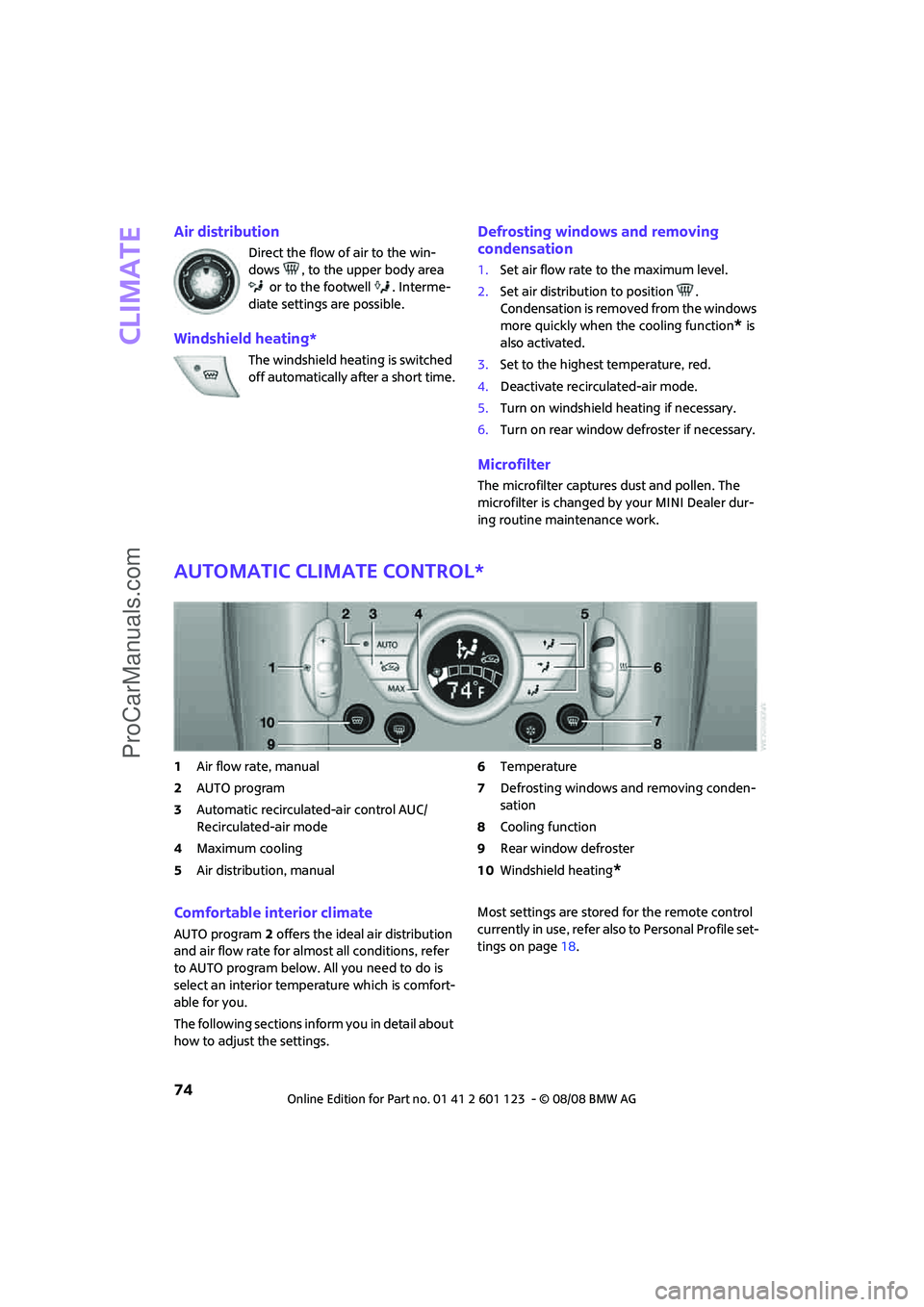
Automatic climate control*
1Air flow rate, manual
2AUTO program
3Automatic recirculated-air control AUC/
Recirculated-air mode
4Maximum cooling
5Air distribution, manual6Temperature
7Defrosting windows and removing conden-
sation
8Cooling function
9Rear window defroster
10Windshield heating
*
Comfortable interior climate
AUTO program2 offers the ideal air distribution
and air flow rate for almost all conditions, refer
to AUTO program below. All you need to do is
select an interior temperature which is comfort-
able for you.
The following sections inform you in detail about
how to adjust the settings.Most settings are stored for the remote control
currently in use, refer also to Personal Profile set-
tings on page18.
ProCarManuals.com
Page 77 of 160

REFERENCEAT A GLANCE CONTROLS DRIVING TIPS MOBILITY
75
Air flow rate, manual
Press the – button to reduce air flow. Press
the + button to increase it.
You can reactivate the automatic mode
for the air flow rate with the AUTO button.
The air flow rate is lowered or switched off
entirely to save on battery power. The display
remains the same.
Switching the system on/off
Reduce the air flow by pressing the – button
repeatedly until the system is switched off. All
indicators go out.
Press the AUTO button to switch the automatic
climate control back on.
AUTO program
The AUTO program adjusts the air
distribution to the windshield and
side windows, towards the upper body area and
into the footwell for you. The air flow rate and
your temperature specifications will be adapted
to outside influences in accordance with sea-
sonal changes, e.g. sunlight.
The cooling function is automatically switched
on along with the AUTO program.
Automatic recirculated-air control AUC/
Recirculated-air mode
Switch on the desired operating
mode by pressing the button
repeatedly.
Display of operating modes
No display: outside air flows in continuously.
AUC mode: a sensor detects pollutants in
the outside air. If necessary, the system
blocks the supply of outside air and recir-
culates the inside air. As soon as the concentra-
tion of pollutants in the outside air has
decreased sufficiently, the system automatically
switches back to outside air supply.
At outside temperatures below approx. 417/
+56, the AUC mode may be restricted due to
the increased risk of window condensation.Recirculated-air mode: the supply of out-
side air is permanently shut off. The sys-
tem then recirculates the air currently
within the vehicle.
If condensation starts to form on the
inside window surfaces, press the AUTO
button or switch off the recirculated-air mode
and, if necessary, increase the air flow rate.
The recirculated-air mode should not be used
over an extended period of time, otherwise the
air quality inside the car will deteriorate contin-
uously.<
Maximum cooling
At outside temperatures above
327/06 and when the engine is
running, you obtain a maximum
cooling effect as soon as possible.
The automatic climate control goes into recircu-
lated-air mode at the lowest temperature. Air
flows at maximum rate from the vents for the
upper body area. You should therefore open
them for maximum cooling.
Air distribution, manual
The flow of air is directed to the
windows, to the upper body area or
to the footwell as selected.
You can switch the automatic air
distribution back on by pressing the AUTO but-
ton.
Temperature
Set the desired temperature individually.
The automatic climate control achieves
this temperature as quickly as possible
regardless of the season, using maximum
cooling or heating power if necessary, and then
maintains it.
If you switch between different tempera-
ture settings in quick succession, the auto-
matic climate control does not have enough
time to achieve the set temperature.<
ProCarManuals.com
Page 78 of 160

Climate
76
Rear window defroster
The defroster is switched off auto-
matically after a certain time.
Depending on your vehicle's equip-
ment, the upper wires serve as an
antenna and are not part of the rear window
defroster.
Defrosting windows and removing
condensation
Quickly removes ice and condensa-
tion from the windshield and front
side windows.
For this purpose, also switch on the
cooling function.
The windshield heating
* is switched on auto-
matically.
Windshield heating*
The windshield heating is switched
off automatically after a certain
time.
Cooling function
When the cooling function is on,
the air is cooled, dried, then
reheated according to the temper-
ature setting. This function is only
available while the engine is running.
The cooling function helps prevent condensa-
tion on the windows or removes it quickly.
Depending on the weather, the windshield may
fog over briefly when the engine is started. The
recirculated-air mode may be switched on auto-
matically.
The cooling function is automatically switched
on along with the AUTO program. The passenger
compartment can only be cooled while the
engine is running.
Microfilter/activated-charcoal filter
The microfilter captures dust and pollen. The
activated-charcoal filter provides additional pro-
tection by filtering gaseous pollutants from the
outside air. Your MINI Dealer replaces this com-
bined filter as a standard part of your scheduled
maintenance.
You can call up further information in the service
requirements display, page52.
Ventilation
1Knob for continuous opening and closing
2Jet for direction of air flow
Opening/closing
Turn the knob.
Direction of air flow
Swivel the entire jet.
ProCarManuals.com
Page 86 of 160

Things to remember when driving
84
Things to remember when driving
Break-in period
Moving parts need breaking-in time to adjust to
each other. Please follow the instructions below
in order to achieve the optimal service life and
economy of operation for your vehicle.
Engine and differential
Always obey all official speed limits.
Up to 1,200 miles/2,000 km
Drive at varying engine and road speeds, but do
not exceed the following:
>Gasoline engine
4,500 rpm or 100 mph/160 km/h
Avoid full-throttle operation and use of the
transmission's kick-down mode.
After driving 1,200 miles/2,000 km
Engine and vehicle speeds can be gradually
increased.
Tires
Due to technical factors associated with their
manufacture, tires do not achieve their full trac-
tion potential until after an initial break-in
period. Therefore, drive cautiously during the
first 200 miles/300 km.
Brake system
Brakes require an initial break-in period of
approx. 300 miles/500 km to achieve optimized
contact and wear patterns between brake pads
and rotors. Drive cautiously during this break-in
period.
Clutch
The function of the clutch reaches its optimal
level only after a distance driven of approx.
300 miles/500 km. During this break-in period,
engage the clutch gently.
Following part replacement
The same break-in procedures should be
observed if any of the components mentioned
above have to be renewed in the course of the
vehicle's operating life.
General driving notes
Close the tailgate
Drive the vehicle only when the tailgate is
closed. Otherwise, exhaust fumes could
penetrate the interior of the vehicle.<
If special circumstances make it absolutely nec-
essary to drive with the tailgate open:
1.Close all windows and the glass sunroof.
2.Switch off the recirculated-air mode and sig-
nificantly increase the air flow rate of the air
conditioner or automatic climate control,
page73 or75.
Hot exhaust system
In all vehicles, extremely high tempera-
tures are generated in the exhaust system.
Do not remove the heat shields installed adjacent
to various sections of the exhaust system, and
never apply undercoating to them. When driving,
standing at idle and while parking, take care to
avoid possible contact between the hot exhaust
system and any highly flammable materials such
as hay, leaves, grass, etc. Such contact could lead
to a fire, with the risk of serious personal injuries
and property damage. Do not touch hot exhaust
tail pipes. Otherwise there is a risk of burns.<
Hydroplaning
When driving on wet or slushy roads,
reduce road speed. If you do not, a wedge
of water can form between tires and road sur-
face. This situation, known as hydroplaning, can
cause partial or complete loss of tire contact
with the road surface, so that the car cannot be
steered or braked properly.<
ProCarManuals.com
Page 106 of 160
Under the bonnet
104
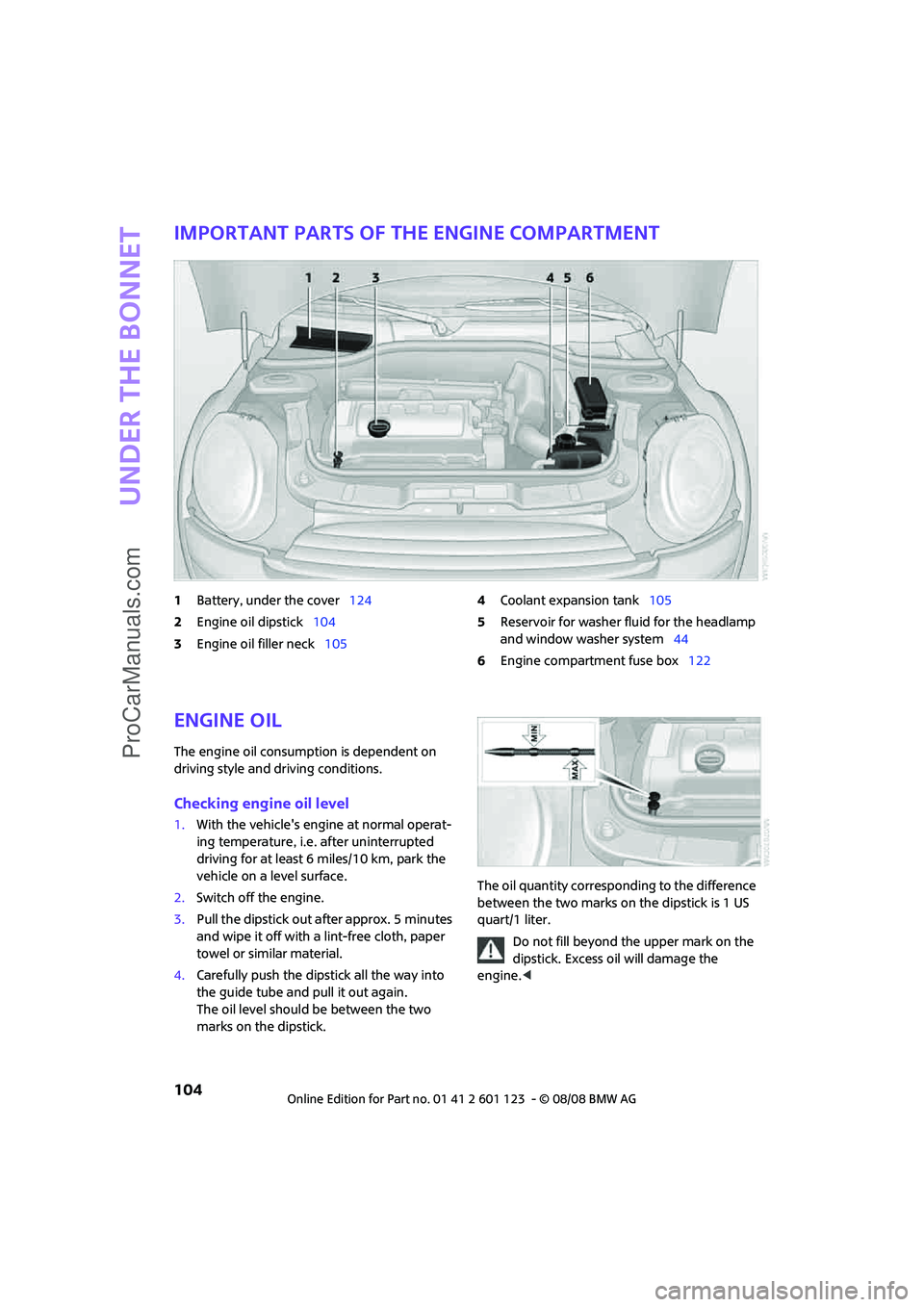
Important parts of the engine compartment
1Battery, under the cover124
2Engine oil dipstick104
3Engine oil filler neck1054Coolant expansion tank105
5Reservoir for washer fluid for the headlamp
and window washer system44
6Engine compartment fuse box122
Engine oil
The engine oil consumption is dependent on
driving style and driving conditions.
Checking engine oil level
1.With the vehicle's engine at normal operat-
ing temperature, i.e. after uninterrupted
driving for at least 6 miles/10 km, park the
vehicle on a level surface.
2.Switch off the engine.
3.Pull the dipstick out after approx. 5 minutes
and wipe it off with a lint-free cloth, paper
towel or similar material.
4.Carefully push the dipstick all the way into
the guide tube and pull it out again.
The oil level should be between the two
marks on the dipstick.The oil quantity corresponding to the difference
between the two marks on the dipstick is 1 US
quart/1 liter.
Do not fill beyond the upper mark on the
dipstick. Excess oil will damage the
engine.<
ProCarManuals.com
Page 111 of 160
REFERENCEAT A GLANCE CONTROLS DRIVING TIPS MOBILITY
109
Care
Car-care products
Regular cleaning and care helps to maintain the
value of your MINI.
The manufacturer of your MINI recommends
using manufacturer-approved products to clean
and care for your vehicle.
MINI Service would be pleased to advise you on
cleaning and care products and services for your
MINI.
The ingredients of original MINI CareProd-
ucts have been tested, and the products
have been tested in the laboratory and in prac-
tice. They offer optimum care and protection for
your vehicle.<
Do not use any cleansers containing alco-
hol or solvents as these may cause dam-
age.<
Cleaning agents may contain hazardous
or health-damaging substances. Follow
the warning and hazard instructions on the
packaging. For interior cleaning, always open
the doors or windows of the vehicle.
Do not use any products that are not intended
for cleaning the vehicle.<
External care
Washing your vehicle
Especially during the winter months the
vehicle should be frequently washed. Dirt
and road salt can damage the vehicle.<
After washing the vehicle, apply the
brakes briefly to dry them, otherwise
water can reduce braking efficiency over the
short term and the brake rotors can corrode.<
Car washes
Preference should be given to cloth car washes.Do not use high-pressure car washes
because drops of water can penetrate
around the windows.<
Before driving into the car wash, check if the sys-
tem is suitable for your MINI. Observe the fol-
lowing points:
>Dimensions of the vehicle, page143
>If necessary: Fold in the outside mirrors
(page 33)
>Maximum permissible tire width
Preparations for driving into the car wash:
>Unscrew the rod antenna.
>Deactivate the rain sensor
* to prevent unin-
tentional wiping.
>Deactivate the rear windshield wiper and
protect it from damage. Ask the car wash
operator about measures that can be taken
to protect the wipers.
>Remove additional detachable body com-
ponents such as spoilers or telephone
antennas that could be damaged.
Automatic transmission
Before driving into the car wash, make sure that
the vehicle can roll:
1.Place the remote control, even with conve-
nient access, in the ignition lock.
2.Move the selector lever to position N.
3.Release the parking brake.
4.Switch off the engine.
5.Insert the remote control in the ignition lock
so that the vehicle can roll.
Steam jets/high-pressure washers
When using steam jets or high-pressure
washers, ensure that you maintain a suffi-
cient distance to the vehicle and do not exceed a
maximum temperature of 1407/606.
If the distance is too close, the pressure too high,
or the temperature too high, parts of the vehicle
can be damaged, or water can penetrate.
ProCarManuals.com
Page 112 of 160
Care
110
Observe the operating instructions for high-
pressure washers.<
Do not spray sensors such as Park Dis-
tance Control with high-pressure washers
for a long time or at a distance of less than
1 ft/30 cm.<
Manual washing
Use a great deal of water and, if necessary, car
shampoo when washing your car by hand. Clean
the vehicle with a sponge or a washing brush
applying a slight amount of pressure.
Before cleaning the windshield, deacti-
vate the rain sensor or turn off the ignition
to prevent unintentional wiping.<
Observe local regulations regarding wash-
ing vehicles by hand.<
Headlamps
Do not wipe dry and do not use abrasive or cor-
rosive cleaning agents. Remove dirt and con-
tamination, such as insects, by soaking with
shampoo and then washing with plenty of
water.
Do not remove accumulated ice and snow with
an ice scraper; use window de-icers instead.
Windows
Clean the outside and inside of the windows and
mirrors with a window cleaner.
Do not clean the mirrors with cleaners
containing quartz.<
Wiper blades
Clean with soapy water and change regularly to
prevent the formation of streaks
Wax, preservatives and dirt on the win-
dows cause streaks when the windshield
wipers are on, and can cause premature wear of
the wiper blades and interfere with the rain sen-
sor.<
Paintwork, care
Regular care contributes greatly to driving safety
and value retention.In some regions, environmental factors can
affect the vehicle paintwork and damage it. It is
therefore important to adjust the frequency and
extent of vehicle care correspondingly.
Immediately remove aggressive materials such
as spilled fuel, oil, grease, brake fluid, tree sap or
bird droppings to prevent damage to the paint-
work.
Removing paintwork damage
Depending on the severity of the damage,
immediately repair stone damage or
scratches to prevent rusting.<
The manufacturer of the MINI recommends
repairing paint damage professionally according
to factory specifications with original MINI
paints.
Preservation
Preservation is necessary when water no longer
beads on the clean paint surface. To preserve
the paint, only use preservatives that contain
carnauba or synthetic waxes.
Rubber seals
Only treat with water or rubber care products.
Do not use silicon sprays or other silicon-
containing care products on rubber seals,
otherwise noise and damage could occur.<
Chrome parts*
Carefully clean vehicle parts such as the radiator
grill and door handles with copious quantities of
water and, if necessary, a shampoo additive,
especially when contaminated with road salt.
For additional treatment, use chrome polish.
Light-alloy wheels*
The system produces brake dust that collects on
the light alloy wheels. Clean them regularly with
acid-free wheel cleaner.
Do not use aggressive, acid-containing
highly alkaline or abrasive cleansers or
steam jets above 1407/606 as they may
cause damage.<
ProCarManuals.com
Page 132 of 160

Indicator and warning lamps
130
Window washer fluid level too low Add washer fluid as soon as possible,
page44.
Lights up in yellow:
The engine will start the next time the
start/stop button is touched, possibly
without the brake or clutch being
depressed
Remote control malfunctioning or, in
cars with convenient access, not
detectedThe engine cannot be started. Have
the remote control checked, if neces-
sary.
Battery in remote control discharged Use the remote control for a longer
journey or, in cars with convenient
access, replace the battery.
Belt tensioners and/or airbag system
failedHave the system checked immedi-
ately. Fasten the safety belts anyway.
Power steering failed You can continue your journey, but
moderate your speed and exercise
due caution. Steering response will be
markedly different. Have the system
checked without delay.
Lights up:
Emergency calling system failed or
malfunctioningHave the system checked as soon as
possible.
Lights up in red:
Engine malfunction
Stop the car and switch off the
engine. You cannot continue your
journey. Contact your MINI Dealer.
Lights up in yellow:
Full engine power no longer available You can continue your journey, but
moderate your speed and exercise
due caution. Have the engine
checked as soon as possible.
12Cause What to do
ProCarManuals.com
Page 146 of 160

Technical data
144
Weights
Never exceed either the approved axle loads or
the gross vehicle weight.
Capacities
MINI COOPERMINI COOPER SJOHN COOPER WORKS
Curb weight, ready for travel, with all optional extras
>Manual transmission lbs/kg 2,546/1,155 2,668/1,210 2,701/1,225
>Automatic transmis-
sion lbs/kg 2,634/1,195 2,723/1,235 –
Approved gross weight
>Manual transmission lbs/kg 3,362/1,525 3,483/1,580 3,516/1,595
>Automatic transmis-
sion lbs/kg 3,450/1,565 3,538/1,605 –
Approved front axle load lbs/kg 1,929/875 1,984/900 1,918/870
Approved rear axle load lbs/kg 1,653/750 1,664/755 1,675/760
Approved roof load
capacitylbs/kg 165/75 165/75 165/75
Cargo bay capacity cu ft/
Liters5.7 - 24.0/
160 - 6805.7 - 24.0/
160 - 6805.7 - 24.0/
160 - 680
US gal/US quartsLitersNotes
Fuel tank 13.2/– approx. 50 Fuel grade: page93
including reserve of 2.1/– approx. 8
Window washer system incl.
headlamp washer system –/4.8 approx. 4.5 For more details: page44
ProCarManuals.com
Page 149 of 160
REFERENCEAT A GLANCE CONTROLS DRIVING TIPS MOBILITY
147
Blower, refer to Air flow
rate73,75
Bonnet103
Bottle holders, refer to Cup
holders81
Brake Assist57
Brake fluid, refer to Service
requirements52
Brake lamps
– replacing bulbs in MINI116
Brake pads, breaking in84
Brake rotors85
– brakes84
– breaking in84
Brake system84
– breaking in84
– disc brakes85
– MINI Maintenance
System107
Brakes
– ABS57
– breaking in84
– MINI Maintenance
System107
– parking brake39
– service requirements52
Brakes, refer to Braking
safely85
Breakdown service, refer to
Roadside Assistance123
Break-in period84
Breaking in the clutch84
Bulb changing, refer to Lamps
and bulbs113
Button for starting the
engine37
Buttons on the steering
wheel11
C
California Proposition 65
warning5
Can holders, refer to Cup
holders81
Capacities144
Car battery, refer to Vehicle
battery122
Car care109Car key, refer to Keys/remote
controls18
Car phone
– installation location, refer to
Center armrest79
– refer to separate Owner's
Manual
Car wash85
Car wash, care109
Car washes109
Care109
– Car washes109
– Car-care products109
– CD/DVD drives111
– High-pressure washers109
– internal111
– Leather111
– Manual washing110
– Upholstery and fabrics111
– Windows110
– Wiper blades110
Cargo area
– capacity144
Cargo bay86
– convenient access26
– cover86
– lamp70
– opening from outside23
Cargo bay, expanding86
Cargo bay lamp70
Cargo bay lid, refer to
Tailgate23
Cargo loading87
– securing cargo88
– stowing cargo87
– vehicle86
Cargo, securing88
Carpets, care111
Catalytic converter, refer to
Hot exhaust system84
Center armrest79
Center brake lamp117
Center console, refer to
Around the center
console14
Central locking system19
– convenient access25
– from inside22
– from outside19Changing bulbs
113
Changing wheels119
Chassis number, refer to
Engine compartment104
Check Control54
Child's seats35
Child-restraint fixing system
LATCH36
Child-restraint systems35
Chock, folding
– space-saver spare tire119
Chrome parts, care110
Chrome parts, refer to
Care109
Cigarette lighter81
Cleaning headlamps43
– washer fluid44
Clock47
– 12h/24h mode50
– setting time53
Closing
– from inside22
– from outside19
Clothes hooks80
Cockpit10
Cold start, refer to Starting the
engine38
Comfort access
– what to observe before
entering a car wash26
Comfort access, refer to
Convenient access25
Comfort area, refer to Around
the center console14
Compartment for remote
control, refer to Ignition
lock37
Computer48
Condensation, refer to When
the vehicle is parked85
Condition Based Service
CBS107
Configuring settings, refer to
Personal Profile18
Confirmation signals for
vehicle locking/unlocking20
Connecting vacuum cleaner,
refer to Connecting electrical
appliances81
ProCarManuals.com