door lock MINI COOPER 2010 User Guide
[x] Cancel search | Manufacturer: MINI, Model Year: 2010, Model line: COOPER, Model: MINI COOPER 2010Pages: 174, PDF Size: 2.82 MB
Page 34 of 174
Opening and closing
32
After switching off the ignition
When the ignition is switched off, the windows
can still be operated for approx. 1 minute as
long as no door is opened.
Take the key with you when you leave the
car; otherwise, children could operate the
electric windows and possibly injure them-
selves.<
MINI: Pinch protection system
This function does not apply to the MINI Con-
vertible.
If the closing force exceeds a specific value as a
window closes, the closing action is interrupted
and the window reopens slightly.
Even though there is the pinch protection
system, always ensure that the window's
travel path is clear; otherwise, the safety system
might fail to detect certain kinds of obstructions,
such as thin objects, and the window would con-
tinue closing.
Do not install any accessories that might inter-
fere with window movement. Otherwise, the
pinch protection system could be impaired.<
Closing without pinch protection
If there is an external danger, or if ice on the win-
dows, etc., prevents you from closing the win-
dows normally, the window can be closed man-
ually.
1.Press the switch upward and hold it there.
Pinch protection is limited and the window
reopens slightly if the closing force exceeds
a certain value.
2.Press the switch upward again within
approx. 4 seconds and hold it there. The
window closes without pinch protection.
Convertible top with
integrated sliding
sunroof
To conserve battery power, if possible
operate the convertible top only while the
engine is running.Prior to closing the convertible top, check for
and remove all debris from the windshield
frame; otherwise, the closing of the top may be
hampered.<
Opening and closing the sliding sunroof
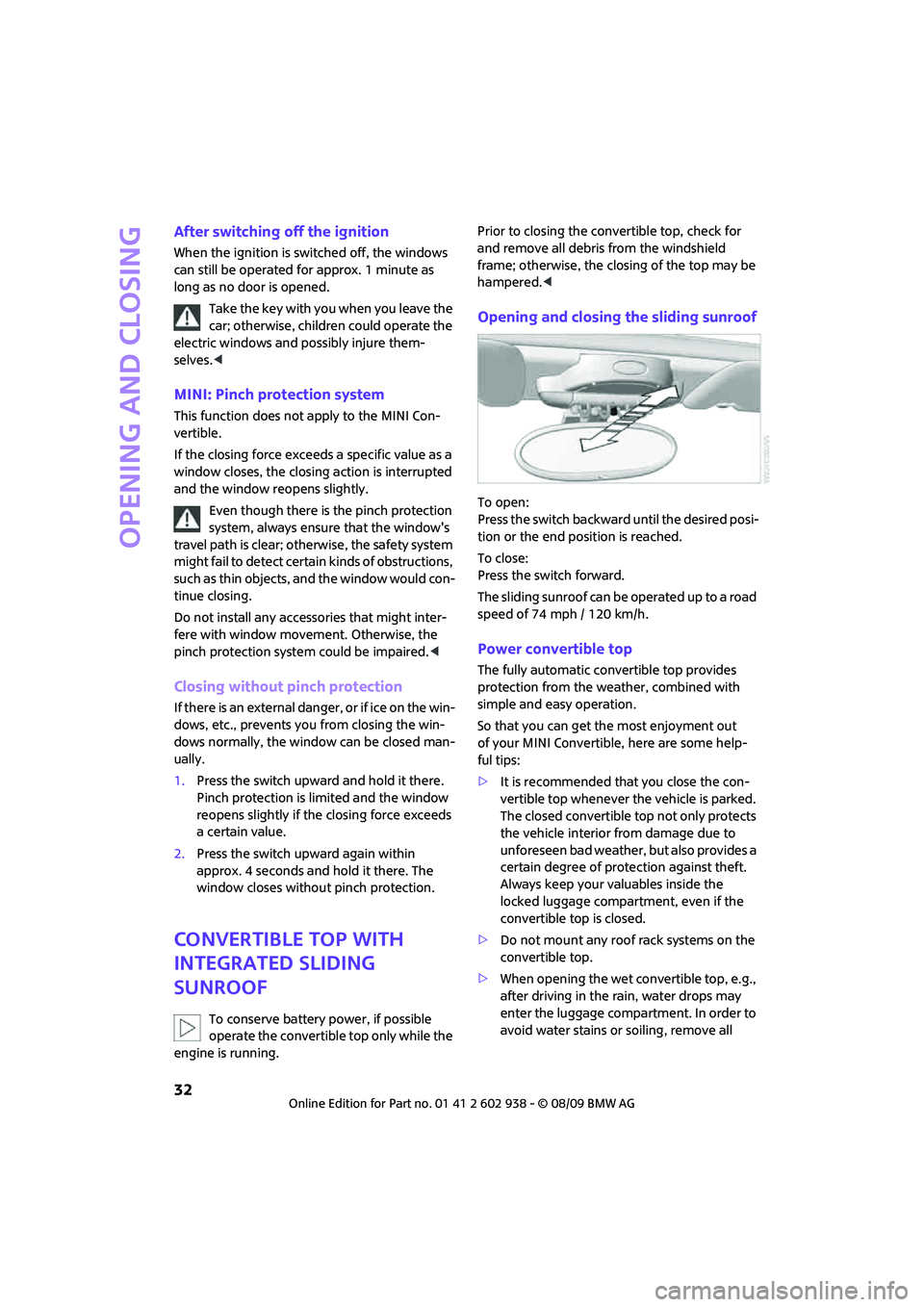
To open:
Press the switch backward until the desired posi-
tion or the end position is reached.
To close:
Press the switch forward.
The sliding sunroof can be operated up to a road
speed of 74 mph / 120 km/h.
Power convertible top
The fully automatic convertible top provides
protection from the weather, combined with
simple and easy operation.
So that you can get the most enjoyment out
of your MINI Convertible, here are some help-
ful tips:
>It is recommended that you close the con-
vertible top whenever the vehicle is parked.
The closed convertible top not only protects
the vehicle interior from damage due to
unforeseen bad weather, but also provides a
certain degree of protection against theft.
Always keep your valuables inside the
locked luggage compartment, even if the
convertible top is closed.
>Do not mount any roof rack systems on the
convertible top.
>When opening the wet convertible top, e.g.,
after driving in the rain, water drops may
enter the luggage compartment. In order to
avoid water stains or soiling, remove all
Page 36 of 174
Opening and closing
34
The automatic movement is immediately inter-
rupted when the button for the convertible top
operation is released. The procedure can be
continued in the desired direction by pressing
the appropriate button.
If the opening or closing procedure is inter-
rupted by releasing the respective button, the
convertible top stays in its current position for
several seconds before it slowly moves into a
more stable position. The procedure can be con-
tinued by pressing the appropriate button.
The opening and closing procedure is also inter-
rupted in case of a mechanical blockage. In this
case, in order to operate the convertible top
again:
1.Turn off the ignition and then switch it on
again.
2.Press the button to continue the procedure
in the desired direction.
Opening and closing procedure
Do not interrupt and restart the closing
procedure several times one after
another, or the convertible top mechanism
could be damaged.<
If the convertible top can be moved in only
one direction after several consecutive
attempts to operate it, the convertible top sys-
tem has overheated. Allow the system to cool
down for approx. 4 minutes.<
If the battery was disconnected, e.g. for
changing batteries or vehicle storage,
reinitialize the power windows, refer to page31.
Otherwise, the windows cannot be lowered or
the convertible top cannot be opened.<
Convenient operation
For convenient operation using the remote con-
trol, refer to page21; for operation via the door
lock, refer to page24.
Manual closing in the event of an
electrical malfunction
Only close the convertible top manually if
it is absolutely necessary. Never open it
manually. Improper handling of the convertible
top can result in damage. The closing procedure
must be completely finished. Otherwise, dam-
age or injury could result.<
Before closing
1.Remove allen key and screwdriver from
vehicle tools, refer to page125.
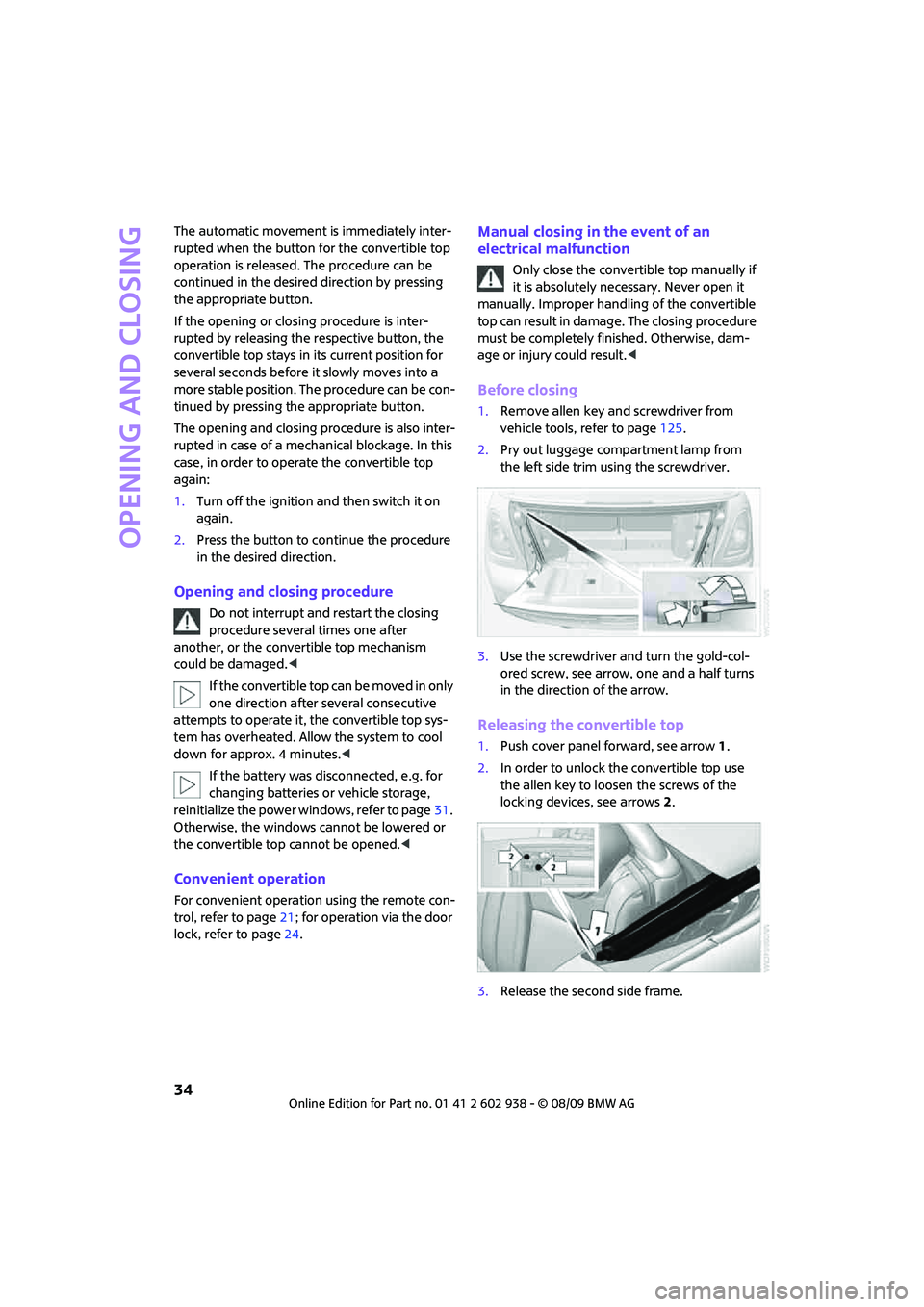
2.Pry out luggage compartment lamp from
the left side trim using the screwdriver.
3.Use the screwdriver and turn the gold-col-
ored screw, see arrow, one and a half turns
in the direction of the arrow.
Releasing the convertible top
1.Push cover panel forward, see arrow1.
2.In order to unlock the convertible top use
the allen key to loosen the screws of the
locking devices, see arrows 2.
3.Release the second side frame.
Page 45 of 174
REFERENCEAT A GLANCE CONTROLS DRIVING TIPS MOBILITY
43
Transporting children safely
The right place for
children
Do not leave children unattended in the
vehicle; otherwise, they could endanger
themselves and/or other persons by opening the
doors, for example.<
Children should always sit in the rear
Accident research has shown that the safest
place for children is on the rear seat.
Only transport children under the age of
13 or smaller than 5 ft/150 cm in the rear
in a child restraint system suitable for their age,
weight and size. Otherwise, there is an
increased risk of injury in the event of an
accident.<
Children 13 years of age or older must be buck-
led in with a safety belt as soon as there no
longer is any child restraint system that is appro-
priate for their age, size and weight.
Only install child seats in the rear when the
rear seat backrest is folded all the way
back and engaged. Otherwise, there is an
increased risk of injury in the event of an
accident.<
Exception for front passenger seat
Front passenger airbags
Should it be necessary to use a child
restraint system on the front passenger
seat, the front and side airbags must be deacti-
vated. Otherwise, there is an increased risk of
injury to the child if the airbags deploy, even if
the child is seated in a child restraint system.<
For more information on automatic deactivation
of the front passenger airbags, refer to page73.
Child restraint systems,
installation
Observe the child restraint system manu-
facturer's instructions when selecting,
installing and using child restraint systems. Oth-
erwise, the protective effect may be dimin-
ished.<
On the front passenger seat
After installing a child restraint system on
the front passenger seat, make sure that
the front and side airbags for the front passen-
ger are deactivated; otherwise, there is an
increased risk of injury if the airbags deploy.<
Seat position
Before installing a child restraint system, move
the front passenger seat as far back and up
*
as possible to obtain the best possible position
for the belt. Do not change the seat position
after this.
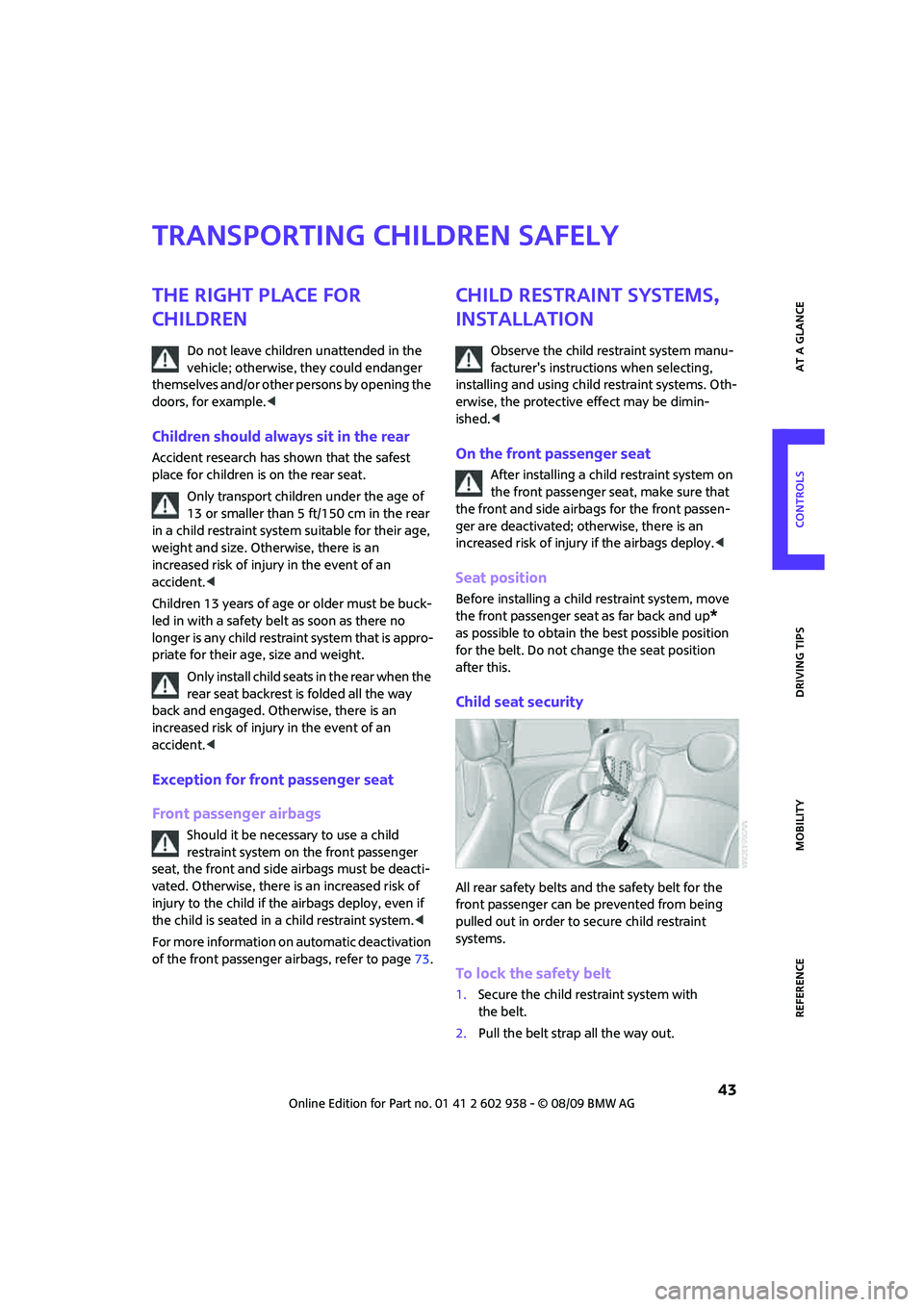
Child seat security
All rear safety belts and the safety belt for the
front passenger can be prevented from being
pulled out in order to secure child restraint
systems.
To lock the safety belt
1.Secure the child restraint system with
the belt.
2.Pull the belt strap all the way out.
Page 48 of 174

Driving
46
Driving
Ignition lock
Inserting the key into the ignition lock
Insert the key all the way into the ignition lock.
Radio readiness
Individual electrical consumers can operate.
Removing the key from the ignition lock
Press in the key briefly. It is ejected slightly.
At the same time:
>The ignition is switched off if it was on
beforehand.
Automatic transmission
You cannot take out the key unless the selector
lever is in the P position: interlock.
Start/stop button
Press the start/stop button to switch radio readi-
ness or the ignition on and off. Do not depress
the brake or clutch while doing so.When you press the start/stop button and
depress the clutch if the car has manual
transmission or the brake if the car has auto-
matic transmission, the engine starts.<
Radio readiness
Individual electrical consumers can operate. The
time and outside temperature are displayed in
the tachometer.
Radio readiness is switched off automatically:
>When the key is removed from the
ignition lock
>When using Comfort Access
* by pushing the
button on the door handle or the but-
ton on the remote control, refer to Locking
on page29
>After a certain has elapsed
Ignition on
Most indicator and warning lamps in indicator
area 1, page13, light up for varying lengths
of time.
When the engine is off, switch off the igni-
tion and any unnecessary electrical con-
sumers in order to preserve the battery.<
Radio readiness and ignition off
All indicator and warning lamps in the displays
go out.
The ignition automatically turns off
* when the
driver's door is opened. Pressing the start/stop
button again switches the ignition back on.
The ignition is not switched off in situations such
as the following:
>The clutch or brake is depressed
>The low beams are switched on
Page 60 of 174

Controls overview
58
Settings and information
Operating principle
Certain settings and information are only avail-
able when the ignition is switched on, the vehi-
cle is at a standstill and the doors are closed.
1Button for:
>Selecting display
>Setting values
>Confirming selected display or set values
>Calling up computer information56
2Calling up Check Control62
3Displaying vehicle check63
4Initializing the Flat Tire Monitor67
Resetting the Tire Pressure Monitor69
5Setting formats and units of measure, reset-
ting to factory settings606Adjusting settings
>Confirmation signals when locking and
unlocking the vehicle23
>Response during unlocking
procedure21
>Automatic locking25
>Pathway lighting75
>Daytime running lights76
>Triple turn signal activation50
7Setting the time62
8Setting the date62
9Exiting the menu
Page 77 of 174

REFERENCEAT A GLANCE CONTROLS DRIVING TIPS MOBILITY
75
Lamps
Parking lamps/low beams
0Lamps off and daytime running lights
1Parking lamps and daytime running lights
2Low-beam headlamps and welcome lamps
3Automatic headlamp control
*, daytime run-
ning lights and welcome lamps
When you open the driver's door with the igni-
tion switched off, the exterior lighting is auto-
matically switched off if the light switch is in
position 0, 2 or 3.
Switch on the parking lamps if necessary, switch
position 1.
Parking lamps
Turn the light switch to position 1.
The front, rear and side vehicle lighting is
switched on.
Activation of lights on one side of the vehicle for
parking, page77.
The parking lamps will discharge the bat-
tery. Therefore, do not leave them on for
unduly long periods of time; otherwise, the bat-
tery might not have enough power to start the
engine.<
Low beams
Turn the light switch to position 2.
The low beams come on when the ignition is on.
Automatic headlamp control*
When the switch is in position3, the low beams
are switched on and off automatically depend-
ing on ambient light conditions, e.g. in a tunnel,
in twilight, or if there is precipitation.
The headlamps may also come on when the sun
is sitting low on a blue sky.
When driving into tunnels with bright overhead
lights, there may be a delay before the head-
lamps come on.
The low beams remain switched on indepen-
dent of the ambient lighting conditions when
you switch on the fog lamps
*.
If the daytime running lights are activated,
page76, the low beams are always switched on
with the light switch in position 3 and the igni-
tion on. The exterior lamps are automatically
switched off after the vehicle is parked.
The automatic headlamp control cannot
serve as a substitute for your personal
judgment in determining when the lamps
should be switched on in response to ambient
lighting conditions. For example, the system
cannot detect fog or hazy weather. To avoid
safety risks, you should respond to these kinds
of low-visibility situations by switching the head-
lamps on manually.<
Welcome lamps
If you leave the light switch in the low beam or
automatic headlamp control position when you
switch off the ignition, the parking lamps and
interior lamps come on for a certain time as soon
as the vehicle is unlocked.
Pathway lighting
If you activate the headlamp flasher after
switching off the ignition with the lamps
switched off, the low beams come on and
remain on for a certain time.
The setting is stored for the remote control in
use, refer to Personal Profile, page20.
Page 90 of 174
Practical interior accessories
88
Apple iPod/iPhone
To connect the device, use the special cable
adapter for the Apple iPod/iPhone, available
from your dealer. The cable adapter is required
for a flawless connection.
For additional information, contact your
MINI dealer or visit the Internet at
www.MINI.com/usb
To play audio tracks over the vehicle's loud-
speaker system, connect the iPod to ports
1and2.
The iPod/iPhone's menu structure is supported
by the USB audio interface.
USB device
To play audio tracks over the vehicle's loud-
speaker system, connect the USB device to
port2.
Notes
Do not expose the audio device to
extreme environmental conditions, e. g.
very high temperatures, refer to the operating
instructions of the audio device. Otherwise, the
audio device may become damaged, which
could compromise safety while driving.<
>The USB audio interface supplies the con-
nected audio devices with power, provided
that this is supported by the audio device.
Therefore, do not connect the USB audio
device to the power socket in the vehicle
during operation.
>Do not forcibly connect the plug to the USB
interface.
>Do not connect devices such as fans or
lamps to the USB audio interface.
>Do not connect USB hard disks.
>Do not use the USB audio interface to charge
external devices.
Storage compartments
In the vehicle interior
Depending on your vehicle's equipment, you
will find storage compartments in the doors,
next to the rear seats and in the center console
*.
The map compartments in the MINI Convertible
are located next to the rear seats.
Nets
* are located in the passenger footwell and
on the backs of the front seat backrests.
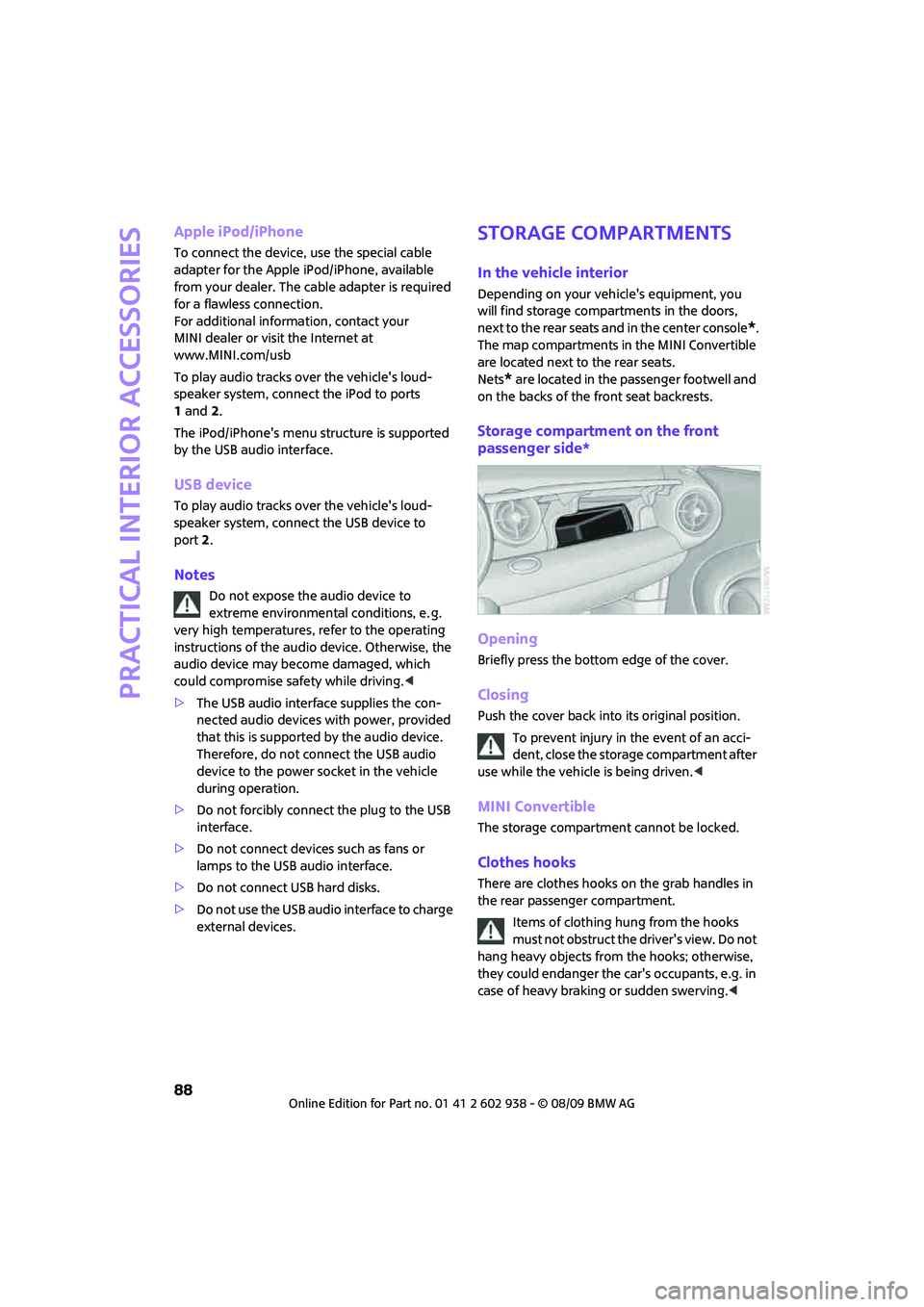
Storage compartment on the front
passenger side*
Opening
Briefly press the bottom edge of the cover.
Closing
Push the cover back into its original position.
To prevent injury in the event of an acci-
dent, close the storage compartment after
use while the vehicle is being driven.<
MINI Convertible
The storage compartment cannot be locked.
Clothes hooks
There are clothes hooks on the grab handles in
the rear passenger compartment.
Items of clothing hung from the hooks
must not obstruct the driver's view. Do not
hang heavy objects from the hooks; otherwise,
they could endanger the car's occupants, e.g. in
case of heavy braking or sudden swerving.<
Page 123 of 174
REFERENCEAT A GLANCE CONTROLS DRIVING TIPS MOBILITY
121
Care
Car-care products
Regular cleaning and care helps to maintain the
value of your MINI.
The manufacturer of your MINI recommends
using manufacturer-approved products to clean
and care for your vehicle.
MINI Service would be pleased to advise you
on cleaning and care products and services for
your MINI.
The ingredients of original MINI CareProd-
ucts have been tested, and the products
have been tested in the laboratory and in prac-
tice. They offer optimum care and protection for
your vehicle.<
Do not use any cleansers containing
alcohol or solvents as these may cause
damage.<
Cleaning agents may contain hazardous
or health-damaging substances. Follow
the warning and hazard instructions on the
packaging. For interior cleaning, always open
the doors or windows of the vehicle.
Do not use any products that are not intended
for cleaning the vehicle.<
External care
Washing your vehicle
Especially during the winter months the
vehicle should be frequently washed. Dirt
and road salt can damage the vehicle.<
After washing the vehicle, apply the
brakes briefly to dry them; otherwise,
water can reduce braking efficiency over the
short term and the brake rotors can corrode.<
Car washes
Preference should be given to cloth car washes.
Do not use automatic high-pressure car
washes; otherwise, water may drip into
the vehicle around the windows.<
Before driving into the car wash, check if the sys-
tem is suitable for your MINI. Observe the fol-
lowing points:
>Dimensions of the vehicle, page155
>If necessary: Fold in the outside mirrors,
page 41.
>Maximum permissible tire width
Avoid car washes with tracks higher than
4 in/10 cm; otherwise, the chassis could
be damaged.<
Preparations for driving into the car wash:
>Unscrew the rod antenna.
>Deactivate the rain sensor
* to prevent unin-
tentional wiping.
>Deactivate the rear window wiper
* and pro-
tect it from damage. Ask the car wash oper-
ator about measures that can be taken to
protect the wipers.
>Remove additional attachments, e.g. spoil-
ers or telephone antennas, if there is a pos-
sibility that they could be damaged.
Automatic transmission
Before driving into the car wash, make sure that
the vehicle can roll:
1.Place the remote control, even with Comfort
Access, in the ignition lock.
2.Move the selector lever to position N.
3.Release the parking brake.
4.Switch off the engine.
5.Insert the remote control in the ignition lock
so that the vehicle can roll.
Page 143 of 174

REFERENCEAT A GLANCE CONTROLS DRIVING TIPS MOBILITY
141
Lights up briefly:
Approx. 2.1 US gallons/8 l of fuel
remain in the tank
Remains on:
Cruising range is no more than
30 miles/50 km, page56
Engine refuses to start Depress the brake or clutch in order to
start the engine, page46.
Ignition switched on and driver's
door openSwitch off the ignition, page46, or
close the driver's door.
Lamps still on
Roadside parking lamps on
Door open
Bonnet open
Tailgate open
Luggage compartment roller cover
in the MINI ConvertibleConvertible top cannot be activated.
Bring cargo bay cover in required
position, refer to page95.
Lights up in red:
Convertible top not locked Convertible top cannot be activated.
Complete open/close of convertible
top before continuing drive, refer to
page33.
12Cause What to do
Page 164 of 174
From A to Z
162
Consumption, refer to Average
fuel consumption56
Control Display
– settings58
Controls and displays10
Convenient access, refer to
Comfort Access28
Convenient operation
– convertible top24
– windows22
Convenient start, refer to
Starting the engine47
Convertible top32
Coolant118
– checking level118
– filling118
Coolant temperature55
Cooling fluid, refer to
Coolant118
Cooling, maximum83
Copyright2
Cruising range56
Cupholders89
Curb weight, refer to
Weights157
Current fuel consumption56
D
Dashboard instruments, refer
to Displays12
Dashboard lighting, refer to
Instrument lighting78
Dashboard, refer to Cockpit10
Data154
– capacities158
– dimensions155
– engine154
– weights157
Data recorders120
Date
– setting62
Daytime running lights76
DBC Dynamic Brake Control,
refer to Brake Assist65
Deactivating front passenger
airbags73Deadlocking, refer to
Locking22
Defect
– door lock24
– fuel filler flap102
Defogging windows82,83
Defrost position, refer to
Defrosting windows82,83
Defrosting windows82,83
Defrosting windows and
removing condensation
– air conditioner82
– automatic climate control83
Differential, breaking in92
Digital clock55
Dimensions155
Dipstick, engine oil117
Directional indicators, refer to
Turn signals50
Displacement, refer to Engine
data154
Display lighting, refer to
Instrument lighting78
Displays12
– instrument combination12
Displays and controls10
Displays, care124
Disposal
– of coolant118
– remote control battery30
– vehicle battery135
Distance remaining to service,
refer to Service
requirements60
Distance warning, refer to Park
Distance Control PDC64
Diving stability control
systems64
Door key, refer to Integrated
key/remote control
20
Door lock24
Door lock, confirmation
signals23
Doors, manual operation24
DOT Quality Grades112
Drinks holders, refer to
Cupholders89Drive-off assistant, refer to Hill
Assist66
Driving dynamics control, refer
to Sport button67
Driving lamps, refer to Parking
lamps/low beams75
Driving notes92
Driving off on inclines, refer to
Hill Assist66
Driving through water93
Driving tips, refer to Driving
notes92
Dry air, refer to Cooling
function84
DTC Dynamic Traction Control
DTC66
Dynamic Brake Control DBC,
refer to Brake Assist65
Dynamic Stability Control
DSC65
Dynamic Traction Control66
E
Electric power windows
– initializing31
Electrical malfunction
– convertible top34
– door lock24
– fuel filler flap102
– trunk lid26
Electronic brake-force
distribution65
Electronic Stability Program
ESP, refer to Dynamic
Stability Control DSC65
Emergency operation, refer to
Manual operation
– convertible top34
– door lock24
– fuel filler flap102
– transmission lock, automatic
transmission50
– trunk lid26
Emergency services, refer to
Roadside Assistance136