low beam MINI COOPER 2010 Owners Manual
[x] Cancel search | Manufacturer: MINI, Model Year: 2010, Model line: COOPER, Model: MINI COOPER 2010Pages: 174, PDF Size: 2.82 MB
Page 12 of 174

Cockpit
10
Cockpit
Around the steering wheel: Controls and displays
1Adjusting the exterior mirrors, folding them
in and out
*41
2
Parking lamps75
Low beams75
Automatic headlamp control
*75
Turn signals50
High beams77
Headlamp flasher50
Roadside parking lamps
*77
Computer
*56
Page 48 of 174

Driving
46
Driving
Ignition lock
Inserting the key into the ignition lock
Insert the key all the way into the ignition lock.
Radio readiness
Individual electrical consumers can operate.
Removing the key from the ignition lock
Press in the key briefly. It is ejected slightly.
At the same time:
>The ignition is switched off if it was on
beforehand.
Automatic transmission
You cannot take out the key unless the selector
lever is in the P position: interlock.
Start/stop button
Press the start/stop button to switch radio readi-
ness or the ignition on and off. Do not depress
the brake or clutch while doing so.When you press the start/stop button and
depress the clutch if the car has manual
transmission or the brake if the car has auto-
matic transmission, the engine starts.<
Radio readiness
Individual electrical consumers can operate. The
time and outside temperature are displayed in
the tachometer.
Radio readiness is switched off automatically:
>When the key is removed from the
ignition lock
>When using Comfort Access
* by pushing the
button on the door handle or the but-
ton on the remote control, refer to Locking
on page29
>After a certain has elapsed
Ignition on
Most indicator and warning lamps in indicator
area 1, page13, light up for varying lengths
of time.
When the engine is off, switch off the igni-
tion and any unnecessary electrical con-
sumers in order to preserve the battery.<
Radio readiness and ignition off
All indicator and warning lamps in the displays
go out.
The ignition automatically turns off
* when the
driver's door is opened. Pressing the start/stop
button again switches the ignition back on.
The ignition is not switched off in situations such
as the following:
>The clutch or brake is depressed
>The low beams are switched on
Page 77 of 174

REFERENCEAT A GLANCE CONTROLS DRIVING TIPS MOBILITY
75
Lamps
Parking lamps/low beams
0Lamps off and daytime running lights
1Parking lamps and daytime running lights
2Low-beam headlamps and welcome lamps
3Automatic headlamp control
*, daytime run-
ning lights and welcome lamps
When you open the driver's door with the igni-
tion switched off, the exterior lighting is auto-
matically switched off if the light switch is in
position 0, 2 or 3.
Switch on the parking lamps if necessary, switch
position 1.
Parking lamps
Turn the light switch to position 1.
The front, rear and side vehicle lighting is
switched on.
Activation of lights on one side of the vehicle for
parking, page77.
The parking lamps will discharge the bat-
tery. Therefore, do not leave them on for
unduly long periods of time; otherwise, the bat-
tery might not have enough power to start the
engine.<
Low beams
Turn the light switch to position 2.
The low beams come on when the ignition is on.
Automatic headlamp control*
When the switch is in position3, the low beams
are switched on and off automatically depend-
ing on ambient light conditions, e.g. in a tunnel,
in twilight, or if there is precipitation.
The headlamps may also come on when the sun
is sitting low on a blue sky.
When driving into tunnels with bright overhead
lights, there may be a delay before the head-
lamps come on.
The low beams remain switched on indepen-
dent of the ambient lighting conditions when
you switch on the fog lamps
*.
If the daytime running lights are activated,
page76, the low beams are always switched on
with the light switch in position 3 and the igni-
tion on. The exterior lamps are automatically
switched off after the vehicle is parked.
The automatic headlamp control cannot
serve as a substitute for your personal
judgment in determining when the lamps
should be switched on in response to ambient
lighting conditions. For example, the system
cannot detect fog or hazy weather. To avoid
safety risks, you should respond to these kinds
of low-visibility situations by switching the head-
lamps on manually.<
Welcome lamps
If you leave the light switch in the low beam or
automatic headlamp control position when you
switch off the ignition, the parking lamps and
interior lamps come on for a certain time as soon
as the vehicle is unlocked.
Pathway lighting
If you activate the headlamp flasher after
switching off the ignition with the lamps
switched off, the low beams come on and
remain on for a certain time.
The setting is stored for the remote control in
use, refer to Personal Profile, page20.
Page 80 of 174

Lamps
78
MINI Convertible
>Turn on fog lamps:
Press the button upwards.
>Turn on rear fog lamp:
Press the button downwards.
When turning the lamps off, push the respective
button again upwards or downwards.
Fog lamps*
The parking lamps or low beams must be
switched on for the fog lamps to operate. The
green indicator lamp comes on when the fog
lamps are switched on.
Depending on your vehicle's equipment, the fog
lamps are switched off when you activate the
headlamp flasher or switch on the high beams.
If the automatic headlamp control is acti-
vated, the low beams will come on auto-
matically when you switch on the fog lamps.<
Rear fog lamp*
The low beams or parking lamps with fog lamps
must be switched on. The yellow indicator lamp
comes on when the rear fog lamp is switched on.
Instrument lighting
You can adjust the brightness of the instrument
lighting only when the parking lamps or the low
beams are on.
Increasing brightness
Press and hold the button until the desired
brightness is reached.
Reducing brightness
Press the button briefly.
The brightness decreases every time the button
is pressed briefly.
Interior lamps
The interior lamps, the footwell lamps* and the
cargo bay lamp are controlled automatically.
To avoid draining the battery, all lamps
inside the car are switched off about
8 minutes after the ignition is switched off, refer
to Start/stop button on page46.<
Switching interior lamps on/off manually
To switch the interior lamps on/off.
Press the switch.
To switch off the interior lamps permanently,
press the button for about 3 seconds.
Page 128 of 174

Replacing components
126
When working on electrical systems,
always begin by switching off the con-
sumer in question; otherwise, short circuits
could result. To avoid possible injury or equip-
ment damage when replacing bulbs, observe
any instructions provided by the bulb manufac-
turer.<
Caring for headlamps, refer to page122.
For any bulb replacement not described
below, contact a MINI dealer or a work-
shop that has specially trained personnel work-
ing in accordance with the specifications of the
MINI manufacturer.<
For checking and adjusting headlamp aim,
please contact your MINI dealer.<
Light-emitting diodes LEDs
Light-emitting diodes installed behind translu-
cent lenses serve as the light sources for many of
the controls and displays in your vehicle. These
light-emitting diodes are related to conven-
tional laser diodes, and legislation defines them
as Class 1 light-emitting diodes.
Do not remove the covers or expose the
eyes directly to the unfiltered light source
for several hours; otherwise, this could cause
irritation of the retina.<
Xenon lamps*
The service life of these bulbs is very long and
the probability of failure very low, provided that
they are not switched on and off an excessive
number of times. If a xenon lamp fails neverthe-
less, switch on the fog lamps and continue the
journey with great care, provided that local leg-
islation does not prohibit this.
Have any work on the xenon lamp system,
including bulb replacement, carried out
only by a MINI dealer or a workshop that has
specially trained personnel working in accor-
dance with the specifications of the MINI manu-
facturer. Due to high voltage, there is a risk of
fatal injury if work on the xenon lamps is carried
out improperly.<
Halogen low beams and high beams
H13 bulb, 60/55 watts
The H13 bulb is pressurized. Therefore,
wear safety glasses and protective gloves.
Otherwise, there is a risk of injury if the bulb is
damaged.<
Be careful when installing the cover; oth-
erwise, leaks could occur and cause dam-
age to the headlamp system.<
Accessing the lamp from the engine
compartment
The low-beam/high-beam bulb can be changed
from the engine compartment.
Removing the cover:
1.Press the tab.
2.Flip open the cover and take it out of the
holder.
Follow the same steps in reverse order to reat-
tach the cover.
Be careful when installing the cover; oth-
erwise, leaks could occur and cause dam-
age to the headlamp system.<
Page 140 of 174
Giving and receiving assistance
138
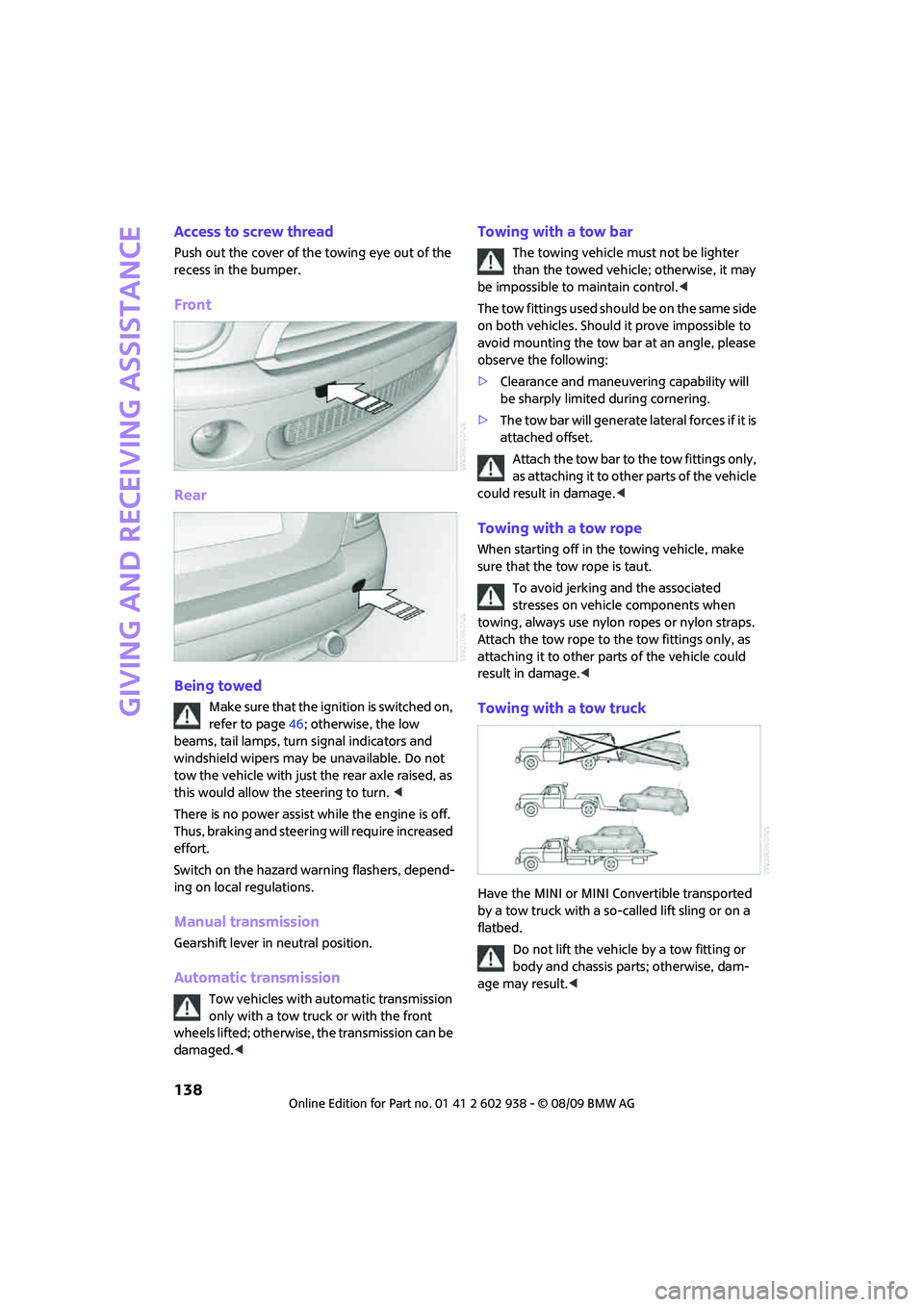
Access to screw thread
Push out the cover of the towing eye out of the
recess in the bumper.
Front
Rear
Being towed
Make sure that the ignition is switched on,
refer to page46; otherwise, the low
beams, tail lamps, turn signal indicators and
windshield wipers may be unavailable. Do not
tow the vehicle with just the rear axle raised, as
this would allow the steering to turn. <
There is no power assist while the engine is off.
Thus, braking and steering will require increased
effort.
Switch on the hazard warning flashers, depend-
ing on local regulations.
Manual transmission
Gearshift lever in neutral position.
Automatic transmission
Tow vehicles with automatic transmission
only with a tow truck or with the front
wheels lifted; otherwise, the transmission can be
damaged.<
Towing with a tow bar
The towing vehicle must not be lighter
than the towed vehicle; otherwise, it may
be impossible to maintain control.<
The tow fittings used should be on the same side
on both vehicles. Should it prove impossible to
avoid mounting the tow bar at an angle, please
observe the following:
>Clearance and maneuvering capability will
be sharply limited during cornering.
>The tow bar will generate lateral forces if it is
attached offset.
Attach the tow bar to the tow fittings only,
as attaching it to other parts of the vehicle
could result in damage.<
Towing with a tow rope
When starting off in the towing vehicle, make
sure that the tow rope is taut.
To avoid jerking and the associated
stresses on vehicle components when
towing, always use nylon ropes or nylon straps.
Attach the tow rope to the tow fittings only, as
attaching it to other parts of the vehicle could
result in damage.<
Towing with a tow truck
Have the MINI or MINI Convertible transported
by a tow truck with a so-called lift sling or on a
flatbed.
Do not lift the vehicle by a tow fitting or
body and chassis parts; otherwise, dam-
age may result.<
Page 148 of 174

Indicator and warning lamps
146
Indication* in Canadian models
Vehicle electronics failed You cannot continue your journey.
Contact your MINI dealer.
Indication
* in Canadian models
Vehicle electronics failed You cannot continue your journey.
Contact your MINI dealer.
Lights up in red: Have the system in question checked
without delay.
>Starter failed or The engine cannot be restarted.
>ignition malfunctioning. Engine
restart only possible when brake
is depressed or
>lighting system failed. Low
beams/tail lamps and brake
lamps still operational. All other
lamps failedDepress the brake to start the engine
again.
Lights up in yellow:
>Control of the brake lamps
failed or
>fuel supply malfunctioningYou can continue your journey, but
moderate your speed and exercise
due caution. Have the system in ques-
tion checked without delay.
>Drive malfunctioningYou can continue your journey, but
moderate your speed and exercise
due caution. Transmission limp-home
program active with restricted range
of gears. Have the system checked
immediately.
Flashing:
Dynamic Stability Control DSC or
Dynamic Traction Control DTC is con-
trolling drive and braking forces, refer
also to page64
12Cause What to do
Page 152 of 174
Indicator and warning lamps
150
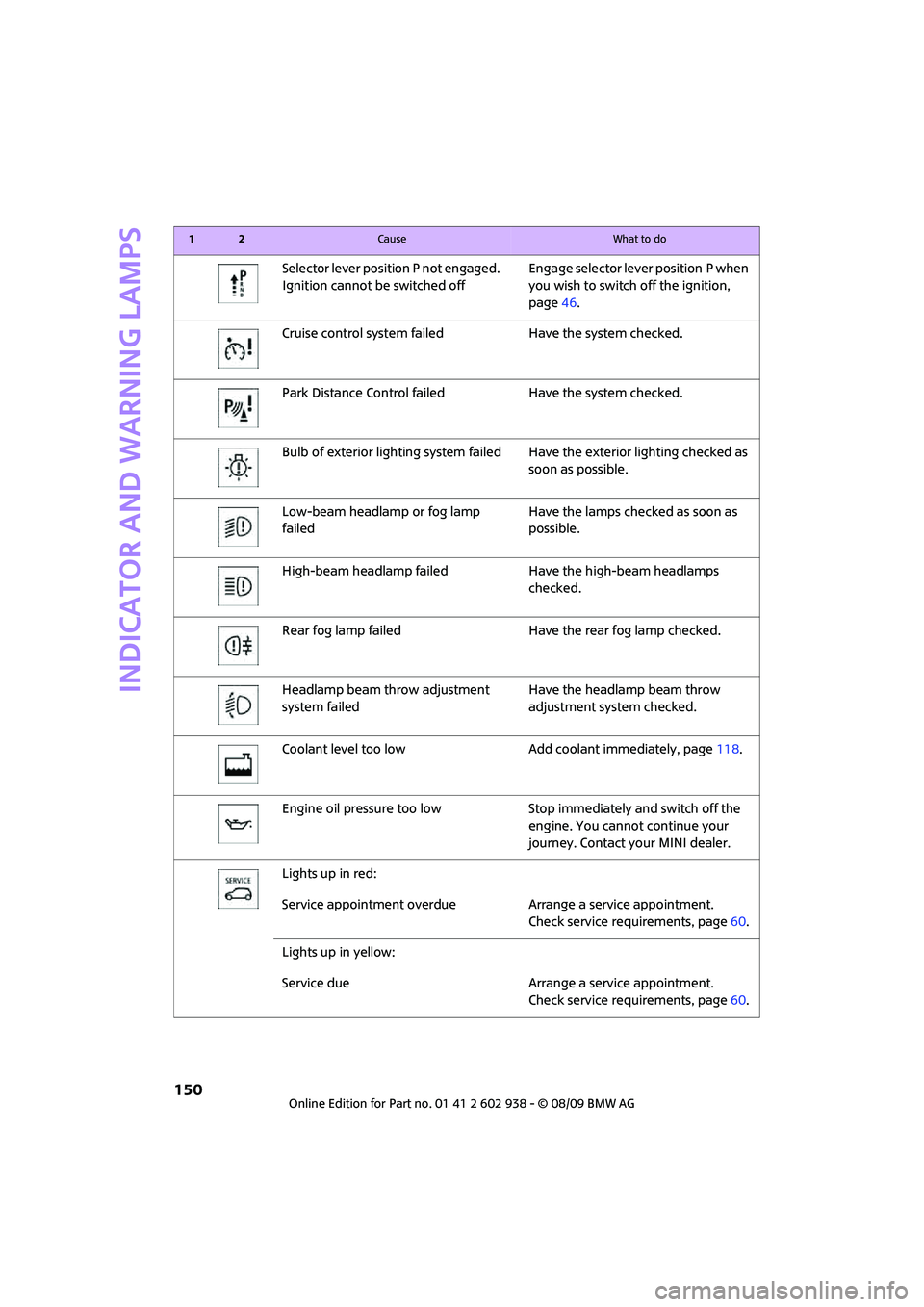
Selector lever position P not engaged.
Ignition cannot be switched offEngage selector lever position P when
you wish to switch off the ignition,
page46.
Cruise control system failed Have the system checked.
Park Distance Control failed Have the system checked.
Bulb of exterior lighting system failed Have the exterior lighting checked as
soon as possible.
Low-beam headlamp or fog lamp
failedHave the lamps checked as soon as
possible.
High-beam headlamp failed Have the high-beam headlamps
checked.
Rear fog lamp failed Have the rear fog lamp checked.
Headlamp beam throw adjustment
system failedHave the headlamp beam throw
adjustment system checked.
Coolant level too low Add coolant immediately, page118.
Engine oil pressure too low Stop immediately and switch off the
engine. You cannot continue your
journey. Contact your MINI dealer.
Lights up in red:
Service appointment overdue Arrange a service appointment.
Check service requirements, page60.
Lights up in yellow:
Service due Arrange a service appointment.
Check service requirements, page60.
12Cause What to do
Page 164 of 174
From A to Z
162
Consumption, refer to Average
fuel consumption56
Control Display
– settings58
Controls and displays10
Convenient access, refer to
Comfort Access28
Convenient operation
– convertible top24
– windows22
Convenient start, refer to
Starting the engine47
Convertible top32
Coolant118
– checking level118
– filling118
Coolant temperature55
Cooling fluid, refer to
Coolant118
Cooling, maximum83
Copyright2
Cruising range56
Cupholders89
Curb weight, refer to
Weights157
Current fuel consumption56
D
Dashboard instruments, refer
to Displays12
Dashboard lighting, refer to
Instrument lighting78
Dashboard, refer to Cockpit10
Data154
– capacities158
– dimensions155
– engine154
– weights157
Data recorders120
Date
– setting62
Daytime running lights76
DBC Dynamic Brake Control,
refer to Brake Assist65
Deactivating front passenger
airbags73Deadlocking, refer to
Locking22
Defect
– door lock24
– fuel filler flap102
Defogging windows82,83
Defrost position, refer to
Defrosting windows82,83
Defrosting windows82,83
Defrosting windows and
removing condensation
– air conditioner82
– automatic climate control83
Differential, breaking in92
Digital clock55
Dimensions155
Dipstick, engine oil117
Directional indicators, refer to
Turn signals50
Displacement, refer to Engine
data154
Display lighting, refer to
Instrument lighting78
Displays12
– instrument combination12
Displays and controls10
Displays, care124
Disposal
– of coolant118
– remote control battery30
– vehicle battery135
Distance remaining to service,
refer to Service
requirements60
Distance warning, refer to Park
Distance Control PDC64
Diving stability control
systems64
Door key, refer to Integrated
key/remote control
20
Door lock24
Door lock, confirmation
signals23
Doors, manual operation24
DOT Quality Grades112
Drinks holders, refer to
Cupholders89Drive-off assistant, refer to Hill
Assist66
Driving dynamics control, refer
to Sport button67
Driving lamps, refer to Parking
lamps/low beams75
Driving notes92
Driving off on inclines, refer to
Hill Assist66
Driving through water93
Driving tips, refer to Driving
notes92
Dry air, refer to Cooling
function84
DTC Dynamic Traction Control
DTC66
Dynamic Brake Control DBC,
refer to Brake Assist65
Dynamic Stability Control
DSC65
Dynamic Traction Control66
E
Electric power windows
– initializing31
Electrical malfunction
– convertible top34
– door lock24
– fuel filler flap102
– trunk lid26
Electronic brake-force
distribution65
Electronic Stability Program
ESP, refer to Dynamic
Stability Control DSC65
Emergency operation, refer to
Manual operation
– convertible top34
– door lock24
– fuel filler flap102
– transmission lock, automatic
transmission50
– trunk lid26
Emergency services, refer to
Roadside Assistance136
Page 166 of 174
From A to Z
164
Glove compartment86
Grills, refer to Air vents80
Gross vehicle weight, refer to
Weights157
H
Halogen lamps
– replacing bulb126
Handbrake, refer to Parking
brake47
Hands-free system14
Hazard warning flashers14
Head airbags72
Head restraints39
– sitting safely37
Headlamp control,
automatic75
Headlamp flasher50
– indicator lamp11,140
Headlamps
– replacing bulb126
Headlamps, care122
Heated
– mirrors41
– rear window81,83
– seats40
Heating80
– mirrors41
– rear window81,83
– seats40
Heavy loads, refer to Stowing
cargo96
Height adjustment
– seats38
– steering wheel42
Height, refer to
Dimensions155
High beams77
– headlamp flasher77
– indicator lamp140
– replacing bulb126
High water, refer to Driving
through water93
Hill Assist66
Hills93
Holders for cups89
Homepage4Horn10
Hot exhaust system92
Hydroplaning92
I
Ice warning55
Icy roads, refer to Outside
temperature warning55
Ignition46
– switched off46
– switched on46
Ignition key position 1, refer to
Radio readiness46
Ignition key position 2, refer to
Ignition on46
Ignition key, refer to
Integrated key/remote
control20
Ignition lock46
Imprint2
Indicator and warning
lamps13,140
– Tire Pressure Monitor TPM70
Indicator lighting, refer to
Instrument lighting78
Individual air distribution82
Individual settings, refer to
Personal Profile20
Inflation pressure monitoring,
refer to Tire Pressure Monitor
TPM69
Initializing
– Flat Tire Monitor FTM67
– glass sunroof, electric30
Instrument cluster, refer to
Displays12
Instrument lighting78
Instrument panel, refer to
Cockpit10
Instrument panel, refer to
Displays12
Integrated key20
Integrated universal remote
control85
Interior lamps78
– remote control23Interior rearview mirror41
– automatic dimming
feature42
Interlock48
Intermittent mode of the
wipers51
Internet page4
J
Jacking points134
Jets, refer to Window washer
nozzles53
Jumpering, refer to Jump-
starting136
Jump-starting136
K
Key Memory, refer to Personal
Profile20
Key, refer to Keys/remote
controls20
Keyless go, refer to Comfort
Access28
Keyless opening and closing,
refer to Comfort Access28
Kickdown49
– automatic transmission with
Steptronic49
Knock control103
L
Lamps and bulbs, replacing
bulbs125
Lamps, refer to Parking lamps/
Low beams75
Lashing eyes, refer to Securing
cargo96
LATCH child-restraint fixing
system44
Leather care123
LEDs light-emitting diodes126
Length, refer to
Dimensions155
License plate lamp
– bulb replacement129