phone MINI COOPER 2010 Owners Manual
[x] Cancel search | Manufacturer: MINI, Model Year: 2010, Model line: COOPER, Model: MINI COOPER 2010Pages: 174, PDF Size: 2.82 MB
Page 7 of 174
REFERENCEAT A GLANCE CONTROLS DRIVING TIPS MOBILITY
5
For your safety
Maintenance and repair
Advanced technology, e.g. the use of
modern materials and powerful electron-
ics, requires specially adapted maintenance and
repair methods. Therefore, have the necessary
work on your MINI only carried out by a MINI
dealer or a workshop that has specially trained
personnel working in accordance with the spec-
ifications of the MINI manufacturer. If this work
is not carried out properly, there is a danger
of subsequent damage and related safety
hazards.<
Parts and accessories
For your own safety, use genuine parts
and accessories approved by the manu-
facturer of the MINI.
When you purchase accessories tested and
approved by the manufacturer of the MINI and
Original MINI Parts, you simultaneously acquire
the assurance that they have been thoroughly
tested by the manufacturer of the MINI to
ensure optimum performance when installed on
your vehicle.
The manufacturer of the MINI warrants these
parts to be free from defects in material and
workmanship.
The manufacturer of the MINI will not accept any
liability for damage resulting from installation of
parts and accessories not approved by the man-
ufacturer of the MINI.
The manufacturer of the MINI cannot test every
product made by other manufacturers to verify
i f i t c a n b e u s e d o n a M I N I s a f e l y a n d w i t h o u t r i s k
to either the vehicle, its operation, or its occu-
pants.
Original MINI Parts, MINI Accessories and other
products approved by the manufacturer of the
MINI, together with professional advice on using
these items, are available from all MINI dealers.
Installation and operation of accessories that
have not been approved by the manufacturer of
your MINI, such as alarms, radios, amplifiers,
radar detectors, wheels, suspension compo-nents, brake dust shields, telephones, including
operation of any mobile phone from within the
vehicle without using an externally mounted
antenna, or transceiver equipment, for instance,
CBs, walkie-talkies, ham radios or similar acces-
sories, may cause extensive damage to the vehi-
cle, compromise its safety, interfere with the
vehicle's electrical system or affect the validity of
the MINI Limited Warranty. See your MINI dealer
for additional information.<
Maintenance, replacement, or repair of
the emission control devices and systems
may be performed by any automotive repair
establishment or individual using any certified
automotive part.
warning:
Engine exhaust and a wide variety of
automobile components and parts,
including components found in the interior fur-
nishings in a vehicle, contain or emit chemicals
known to the State of California to cause cancer
and birth defects and reproductive harm. In
addition, certain fluids contained in vehicles and
certain products of component wear contain or
emit chemicals known to the State of California
to cause cancer and birth defects or other repro-
ductive harm.
Battery posts, terminals and related accessories
contain lead and lead compounds. Wash your
hands after handling.
Used engine oil contains chemicals that have
caused cancer in laboratory animals. Always
protect your skin by washing thoroughly with
soap and water.<
Page 8 of 174
Notes
6
Service and warranty
We recommend that you read this publication
thoroughly.
Your MINI is covered by the following war-
ranties:
>New Vehicle Limited Warranty
>Rust Perforation Limited Warranty
>Federal Emissions System Defect Warranty
>Federal Emissions Performance Warranty
>California Emission Control System Limited
Warranty
Detailed information about these warranties is
listed in the Service and Warranty Information
Booklet for US models or in the Warranty and
Service Guide Booklet for Canadian models.
Reporting safety defects
For US customers
The following applies only to vehicles owned
and operated in the US.
If you believe that your vehicle has a defect
which could cause a crash or could cause injury
or death, you should immediately inform the
National Highway Traffic Safety Administration,
NHTSA, in addition to notifying MINI of
North America, LLC, P.O. Box 1227,
Westwood, New Jersey 07675-1227,
Telephone 1-800-831-1117.
If NHTSA receives similar complaints, it may
open an investigation, and if it finds that a safety
defect exists in a group of vehicles, it may order
a recall and remedy campaign. However, NHTSA
cannot become involved in individual problems
between you, your dealer, or MINI of North
America, LLC.
To contact NHTSA, you may call the Vehicle
Safety Hotline toll-free at 1-888-327-4236
(TTY: 1-800-424-9153);
go to http://www.safercar.gov; or write to:
Administrator, NHTSA, 400 Seventh Street, SW.,
Washington, DC 20590. You can also obtain other information about motor vehicle safety
from http://www.safercar.gov
For Canadian customers
Canadian customers who wish to report a
safety-related defect to Transport Canada,
Defect Investigations and Recalls, may call
1-800-333-0510 toll-free from anywhere in
Canada or 1-613-993-9851 from the Ottawa
region and from other countries, or contact
Transport Canada by mail at: Transport Canada,
ASFAD, Place de Ville, Tower C, 330 Sparks
Street, Ottawa, ON, K1A 0N5.
You can also obtain other information about
motor vehicle safety from http://www.tc.gc.ca
Page 13 of 174

REFERENCE
AT A GLANCE CONTROLS DRIVING TIPS MOBILITY
11
3Always Open Timer57
7Ignition lock46
8Buttons
* on steering wheel
9Horn: the entire surface
10Adjusting the steering wheel42
11Releasing the bonnet116 4Tachometer12
Instrument lighting78
Resetting the trip odometer55
5
Wiper system51
6Switching the ignition on/off and
starting/stopping the engine46
Continuing cruise control
*53
Right:
Storing speed and accelerating or
decelerating
Left:
Increase or reduce volume
Activating/deactivating cruise
control
*54
Telephone
*:
Accepting and ending a call, start-
ing dialing
* of selected phone
number and redialing if no phone
number is selected
Activating/deactivating voice acti-
vation system
*
Changing radio station
Selecting music track
Scrolling through phone book and
lists with stored phone numbers
Page 17 of 174
REFERENCE
AT A GLANCE CONTROLS DRIVING TIPS MOBILITY
15
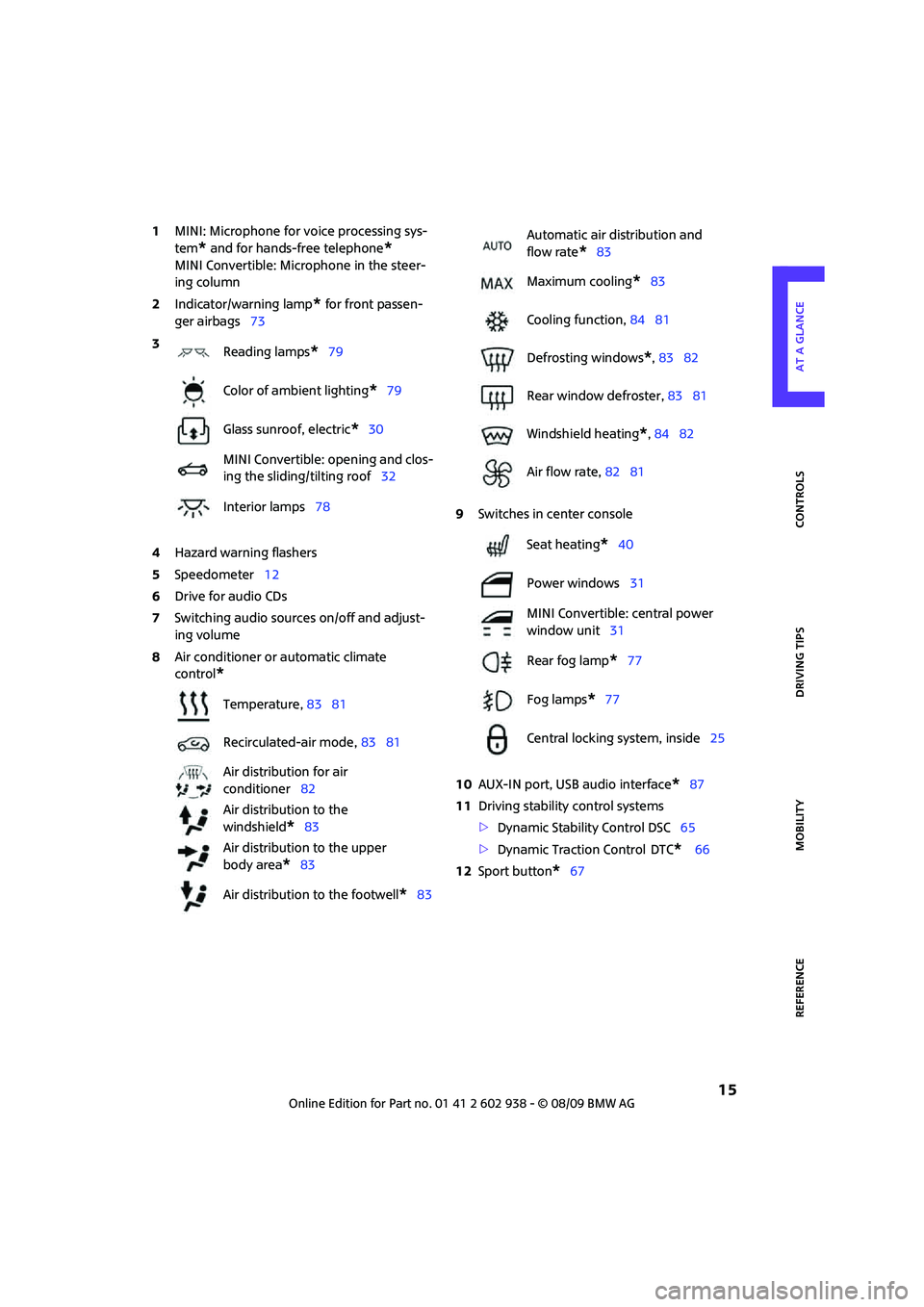
1MINI: Microphone for voice processing sys-
tem
* and for hands-free telephone*
MINI Convertible: Microphone in the steer-
ing column
2Indicator/warning lamp
* for front passen-
ger airbags73
4Hazard warning flashers
5Speedometer12
6Drive for audio CDs
7Switching audio sources on/off and adjust-
ing volume
8Air conditioner or automatic climate
control
*
9Switches in center console
10AUX-IN port, USB audio interface
*87
11Driving stability control systems
>Dynamic Stability Control DSC65
>Dynamic Traction Control
DTC* 66
12Sport button
*67 3
Reading lamps
*79
Color of ambient lighting
*79
Glass sunroof, electric
*30
MINI Convertible: opening and clos-
ing the sliding/tilting roof32
Interior lamps78
Temperature, 83 81
Recirculated-air mode, 83 81
Air distribution for air
conditioner82
Air distribution to the
windshield
*83
Air distribution to the upper
body area
*83
Air distribution to the footwell
*83
Automatic air distribution and
flow rate
*83
Maximum cooling
*83
Cooling function, 84 81
Defrosting windows
*, 83 82
Rear window defroster, 83 81
Windshield heating
*, 84 82
Air flow rate, 82 81
Seat heating
*40
Power windows31
MINI Convertible: central power
window unit31
Rear fog lamp
*77
Fog lamps
*77
Central locking system, inside25
Page 74 of 174
Technology for driving comfort and safety
72
Airbags
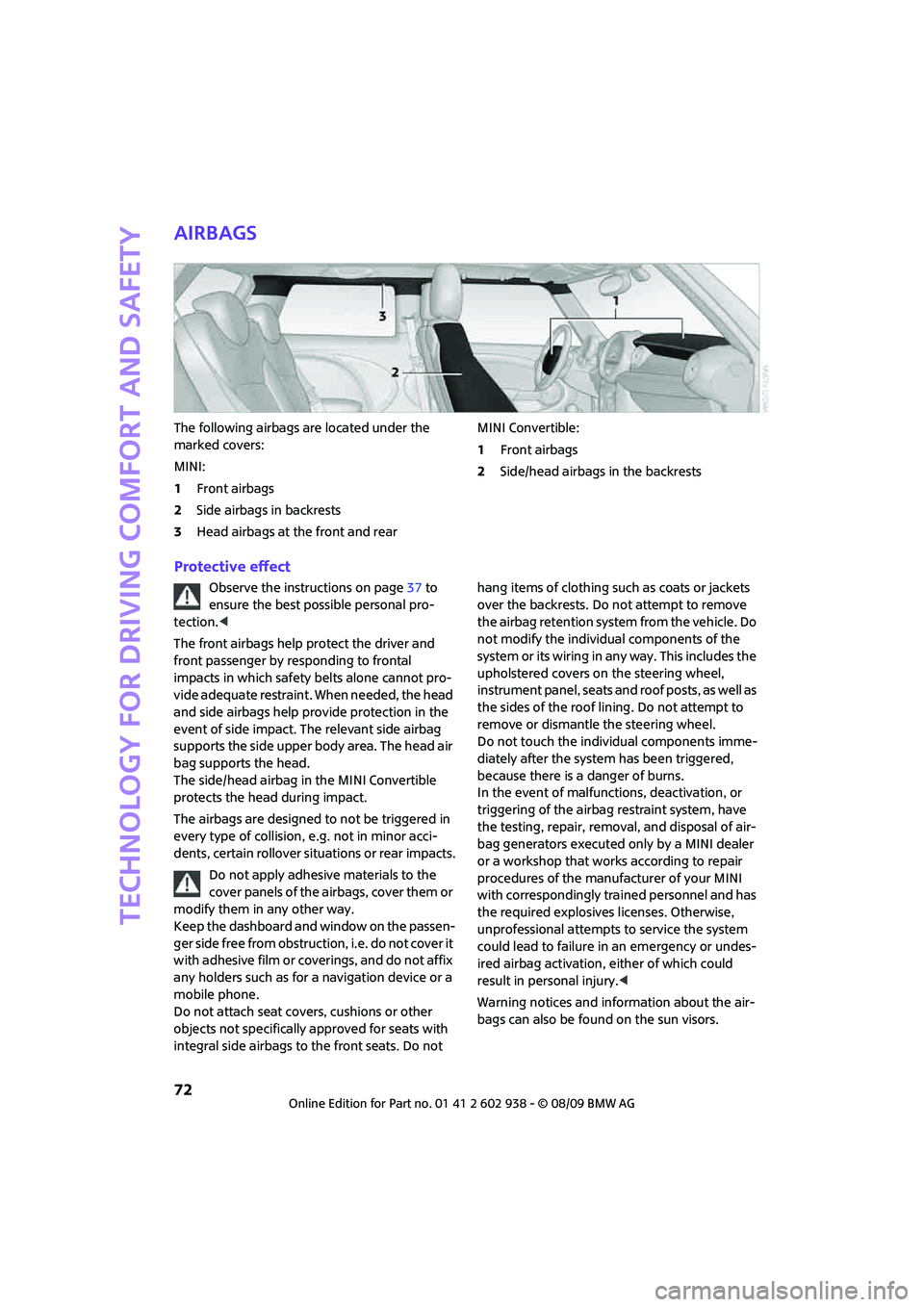
The following airbags are located under the
marked covers:
MINI:
1Front airbags
2Side airbags in backrests
3Head airbags at the front and rearMINI Convertible:
1Front airbags
2Side/head airbags in the backrests
Protective effect
Observe the instructions on page37 to
ensure the best possible personal pro-
tection.<
The front airbags help protect the driver and
front passenger by responding to frontal
impacts in which safety belts alone cannot pro-
vide adequate restraint. When needed, the head
and side airbags help provide protection in the
event of side impact. The relevant side airbag
supports the side upper body area. The head air
bag supports the head.
The side/head airbag in the MINI Convertible
protects the head during impact.
The airbags are designed to not be triggered in
every type of collision, e.g. not in minor acci-
dents, certain rollover situations or rear impacts.
Do not apply adhesive materials to the
cover panels of the airbags, cover them or
modify them in any other way.
Keep the dashboard and window on the passen-
ger side free from obstruction, i.e. do not cover it
with adhesive film or coverings, and do not affix
any holders such as for a navigation device or a
mobile phone.
Do not attach seat covers, cushions or other
objects not specifically approved for seats with
integral side airbags to the front seats. Do not hang items of clothing such as coats or jackets
over the backrests. Do not attempt to remove
the airbag retention system from the vehicle. Do
not modify the individual components of the
system or its wiring in any way. This includes the
upholstered covers on the steering wheel,
instrument panel, seats and roof posts, as well as
the sides of the roof lining. Do not attempt to
remove or dismantle the steering wheel.
Do not touch the individual components imme-
diately after the system has been triggered,
because there is a danger of burns.
In the event of malfunctions, deactivation, or
triggering of the airbag restraint system, have
the testing, repair, removal, and disposal of air-
bag generators executed only by a MINI dealer
or a workshop that works according to repair
procedures of the manufacturer of your MINI
with correspondingly trained personnel and has
the required explosives licenses. Otherwise,
unprofessional attempts to service the system
could lead to failure in an emergency or undes-
ired airbag activation, either of which could
result in personal injury.<
Warning notices and information about the air-
bags can also be found on the sun visors.
Page 89 of 174

REFERENCEAT A GLANCE CONTROLS DRIVING TIPS MOBILITY
87
To prevent injury in the event of an acci-
dent, close the glove compartment after
use while the vehicle is being driven.<
MINI Convertible: Locking
Use the integrated key to lock the remote con-
trol system, refer to page20.
Ventilation*
Depending on your vehicle's equipment, it may
be possible to ventilate the glove compartment.
Opening
Rotate the switch in the direction of the arrow.
Closing
Rotate the switch in the opposite direction of the
arrow until it is in the vertical position.
Depending on the temperature setting of the air
conditioning or the automatic climate control,
high temperatures may result in the glove com-
partment.
Center armrest*
Storage compartment
The center armrest between the front seats con-
tains either a compartment or the cover for the
mobile phone base plate
* or the snap-in
adapter
*.
Opening
The cover slides along guide rails and can be
opened fully by pushing it back and lifting it.
Closing
Push the cover forwards.
Connection for external
audio device
>iPods/iPhones or USB devices such as MP3
players and USB memory sticks: Connect via
the USB audio interface.
>iPhone/mobile phone music players: Con-
nect via the snap-in adapter
*, refer to the
separate Owner's Manual. Playback is only
possible if there is no device connected to
the USB audio interface.
Connecting via the USB audio interface
1Connection for audio playback:
TRS connector 1/8 in/3.5 mm
2USB interface
*
Page 90 of 174
Practical interior accessories
88
Apple iPod/iPhone
To connect the device, use the special cable
adapter for the Apple iPod/iPhone, available
from your dealer. The cable adapter is required
for a flawless connection.
For additional information, contact your
MINI dealer or visit the Internet at
www.MINI.com/usb
To play audio tracks over the vehicle's loud-
speaker system, connect the iPod to ports
1and2.
The iPod/iPhone's menu structure is supported
by the USB audio interface.
USB device
To play audio tracks over the vehicle's loud-
speaker system, connect the USB device to
port2.
Notes
Do not expose the audio device to
extreme environmental conditions, e. g.
very high temperatures, refer to the operating
instructions of the audio device. Otherwise, the
audio device may become damaged, which
could compromise safety while driving.<
>The USB audio interface supplies the con-
nected audio devices with power, provided
that this is supported by the audio device.
Therefore, do not connect the USB audio
device to the power socket in the vehicle
during operation.
>Do not forcibly connect the plug to the USB
interface.
>Do not connect devices such as fans or
lamps to the USB audio interface.
>Do not connect USB hard disks.
>Do not use the USB audio interface to charge
external devices.
Storage compartments
In the vehicle interior
Depending on your vehicle's equipment, you
will find storage compartments in the doors,
next to the rear seats and in the center console
*.
The map compartments in the MINI Convertible
are located next to the rear seats.
Nets
* are located in the passenger footwell and
on the backs of the front seat backrests.
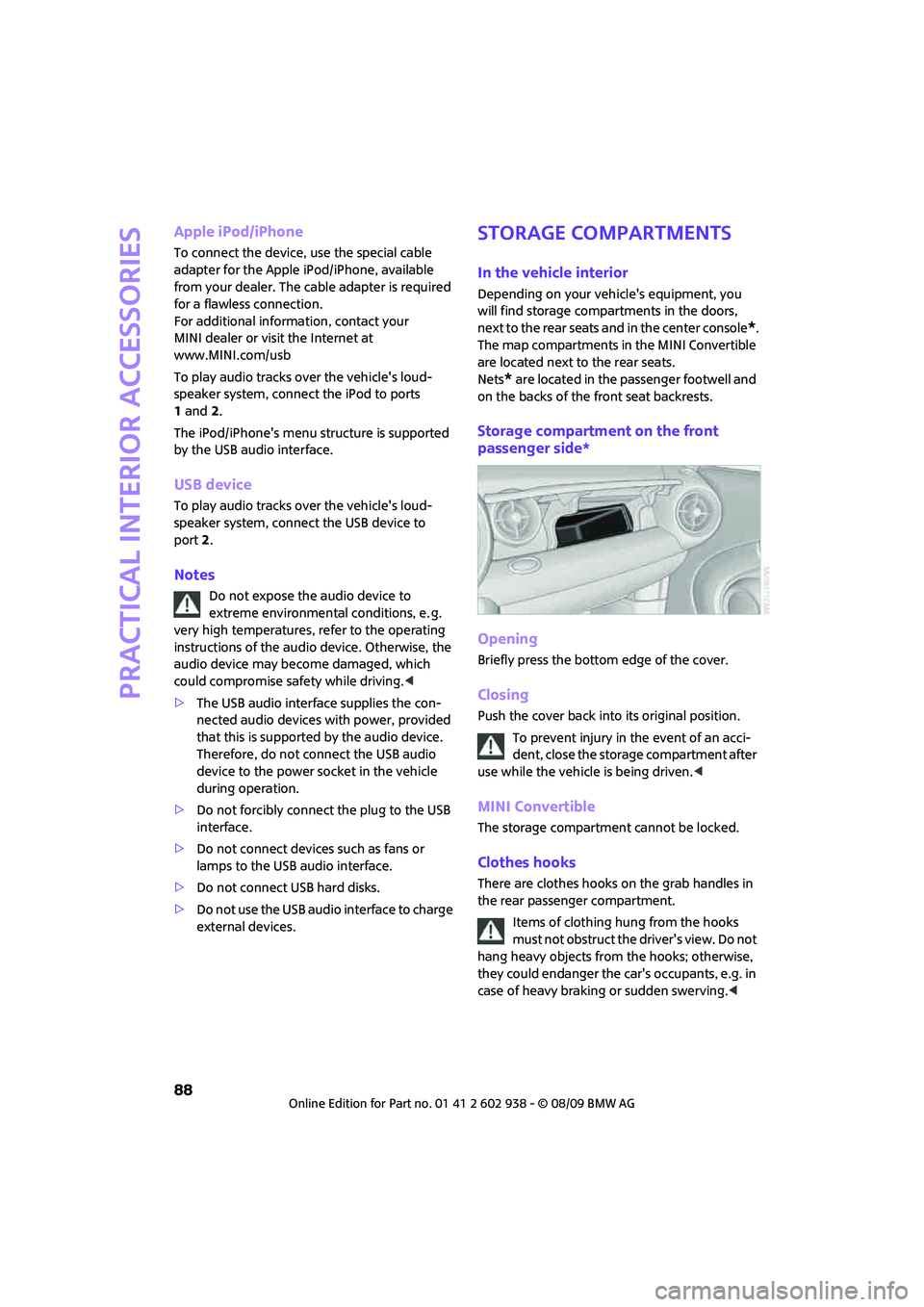
Storage compartment on the front
passenger side*
Opening
Briefly press the bottom edge of the cover.
Closing
Push the cover back into its original position.
To prevent injury in the event of an acci-
dent, close the storage compartment after
use while the vehicle is being driven.<
MINI Convertible
The storage compartment cannot be locked.
Clothes hooks
There are clothes hooks on the grab handles in
the rear passenger compartment.
Items of clothing hung from the hooks
must not obstruct the driver's view. Do not
hang heavy objects from the hooks; otherwise,
they could endanger the car's occupants, e.g. in
case of heavy braking or sudden swerving.<
Page 123 of 174
REFERENCEAT A GLANCE CONTROLS DRIVING TIPS MOBILITY
121
Care
Car-care products
Regular cleaning and care helps to maintain the
value of your MINI.
The manufacturer of your MINI recommends
using manufacturer-approved products to clean
and care for your vehicle.
MINI Service would be pleased to advise you
on cleaning and care products and services for
your MINI.
The ingredients of original MINI CareProd-
ucts have been tested, and the products
have been tested in the laboratory and in prac-
tice. They offer optimum care and protection for
your vehicle.<
Do not use any cleansers containing
alcohol or solvents as these may cause
damage.<
Cleaning agents may contain hazardous
or health-damaging substances. Follow
the warning and hazard instructions on the
packaging. For interior cleaning, always open
the doors or windows of the vehicle.
Do not use any products that are not intended
for cleaning the vehicle.<
External care
Washing your vehicle
Especially during the winter months the
vehicle should be frequently washed. Dirt
and road salt can damage the vehicle.<
After washing the vehicle, apply the
brakes briefly to dry them; otherwise,
water can reduce braking efficiency over the
short term and the brake rotors can corrode.<
Car washes
Preference should be given to cloth car washes.
Do not use automatic high-pressure car
washes; otherwise, water may drip into
the vehicle around the windows.<
Before driving into the car wash, check if the sys-
tem is suitable for your MINI. Observe the fol-
lowing points:
>Dimensions of the vehicle, page155
>If necessary: Fold in the outside mirrors,
page 41.
>Maximum permissible tire width
Avoid car washes with tracks higher than
4 in/10 cm; otherwise, the chassis could
be damaged.<
Preparations for driving into the car wash:
>Unscrew the rod antenna.
>Deactivate the rain sensor
* to prevent unin-
tentional wiping.
>Deactivate the rear window wiper
* and pro-
tect it from damage. Ask the car wash oper-
ator about measures that can be taken to
protect the wipers.
>Remove additional attachments, e.g. spoil-
ers or telephone antennas, if there is a pos-
sibility that they could be damaged.
Automatic transmission
Before driving into the car wash, make sure that
the vehicle can roll:
1.Place the remote control, even with Comfort
Access, in the ignition lock.
2.Move the selector lever to position N.
3.Release the parking brake.
4.Switch off the engine.
5.Insert the remote control in the ignition lock
so that the vehicle can roll.
Page 138 of 174

Giving and receiving assistance
136
Giving and receiving assistance
Roadside Assistance
The Roadside Assistance service is there to assist
you around the clock in the event of a break-
down, including on weekends and public
holidays.
The phone numbers of the Roadside Assistance
in your home country can be found in the Con-
tact brochure.
First aid pouch*
Some of the articles contained in the first aid
pouch have a limited service life. Therefore,
check the expiration dates of the contents regu-
larly and replace any items in good time, if nec-
essary.
By way of example, the illustration shows the
cargo bay in the MINI.
The first aid pouch is located on the cargo bay
floor by the left side trim panel.
Warning triangle*
MINI
On the inside of the tailgate.
Press the tab to take it out.
MINI Convertible
The warning triangle is located at the bottom of
the luggage compartment floor.
Jump-starting
If the car's own battery is flat, your MINI's engine
can be started by connecting two jumper cables
to another vehicle's battery. You can also use
the same method to help start another vehicle.
Only use jumper cables with fully-insulated
clamp handles.
Do not touch any electrically live parts
when the engine is running, or a fatal acci-
dent may occur. Carefully adhere to the follow-
ing sequence, both to prevent damage to one or
both vehicles, and to guard against possible per-
sonal injuries.<
Preparation
1.Check whether the battery of the other vehi-
cle has a voltage of 12 volts and approxi-
mately the same capacitance in Ah. This
information can be found on the battery.
2.Switch off the engine of the support vehicle.
3.Switch off any consumers in both vehicles.
Page 163 of 174
REFERENCEAT A GLANCE CONTROLS DRIVING TIPS MOBILITY
161
Bottle holders, refer to
Cupholders89
Brake Assist65
Brake fluid, refer to Service
requirements60
Brake lamps
– replacing bulbs129
Brake pads, breaking in92
Brake rotors93
– brakes92
– breaking in92
Brake system92
– breaking in92
– disc brakes93
– MINI Maintenance
System119
Brakes
– ABS65
– breaking in92
– MINI Maintenance
System119
– parking brake47
– service requirements60
Brakes, refer to Braking
safely93
Breakdown service, refer to
Roadside Assistance136
Break-in period92
Breaking in the clutch92
Bulb changing, refer to Lamps
and bulbs125
Button for starting the
engine46
Buttons on the steering
wheel11
C
California Proposition 65
warning5
Can holders, refer to
Cupholders89
Capacities158
Car battery, refer to Vehicle
battery135
Car care121
Car key, refer to Keys/remote
controls20Car phone
– installation location, refer to
Center armrest87
– refer to separate Owner's
Manual
Car wash, care121
Car washes121
Care121
– car washes121
– car-care products121
– CD/DVD drives124
– external121
– high-pressure washers122
– internal123
– leather123
– manual washing122
– upholstery and fabrics123
– windows122
– wiper blades122
Cargo area
– capacity157
Cargo bay94
– Comfort Access29
– cover94
– lamp78
– opening from outside26
Cargo bay, expanding94
Cargo bay lamp78
Cargo bay lid, refer to
Tailgate26
Cargo loading95
– securing cargo96
– stowing cargo96
– vehicle94
Cargo, securing96
Carpets, care123
Catalytic converter, refer to
Hot exhaust system92
Center armrest87
Center brake lamp129
Center console, refer to
Around the center
console14
Central locking system21
– Comfort Access28
– from inside25
– from outside21
Changing bulbs
125
Changing wheels132Chassis number, refer to
Engine compartment117
Check Control62
Child restraint systems43
Child seats43
Child-restraint fixing system
LATCH44
Chock, folding
– space-saver spare tire132
Chrome parts, care123
Chrome parts, refer to
Care121
Cigarette lighter89
Cleaning headlamps52
– washer fluid53
Clock55
– 12h/24h mode59
– setting time62
Closing
– from inside25
– from outside21
Clothes hooks88
Cockpit10
Cold start, refer to Starting the
engine47
Comfort Access28
– replacing the battery30
– what to observe before
entering a car wash29
Comfort area, refer to Around
the center console14
Compartment for remote
control, refer to Ignition
lock46
Computer56
Condensation, refer to When
the vehicle is parked93
Condition Based Service
CBS119
Configuring settings, refer to
Personal Profile20
Confirmation signals for
vehicle locking/unlocking23
Connecting vacuum cleaner,
refer to Connecting electrical
appliances89
Consumption indicator
– average fuel consumption56