warning lights MINI COOPER 2010 Owners Manual
[x] Cancel search | Manufacturer: MINI, Model Year: 2010, Model line: COOPER, Model: MINI COOPER 2010Pages: 174, PDF Size: 2.82 MB
Page 23 of 174

REFERENCEAT A GLANCE CONTROLS DRIVING TIPS MOBILITY
21
>Response of the central locking system
when the car is being unlocked21
>Automatic locking of the vehicle25
>Triple turn signal activation50
>Settings for the displays in the speedometer
and tachometer:
>12h/24h mode of the clock, refer to For-
mats and units of measure59
>Date format, refer to Formats and units
of measure59
>Units of measure for fuel consumption,
distance covered/remaining distances
and temperature, refer to Formats and
units of measure59
>Light settings:
>Pathway lighting75
>Daytime running lights76
>Automatic climate control
*: activating/
deactivating the AUTO program, setting the
temperature, air volume and air
distribution82
>Entertainment:
>Audio volume, refer to separate Owner's
Manual
>Speed-dependent volume, refer to sepa-
rate Owner's Manual
Central locking system
The concept
The central locking system is ready for operation
whenever the driver's door is closed.
The system simultaneously engages and
releases the locks on the following:
>Doors
>Tailgate
>Fuel filler flap
Operating from outside
>Via the remote control
>Via the door lock
*
>In cars with Comfort Access*, via the door
handles on the driver's and passenger's
sides.
The anti-theft system is also operated at the
same time. It prevents the doors from being
unlocked using the lock buttons or door han-
dles. The remote control can also be used to
switch on/off the welcome lamps and interior
lamps. The alarm system
* is also activated or
deactivated, page27.
Operating from inside
Button for central locking system, page25.
In the event of a sufficiently severe accident, the
central locking system unlocks automatically. In
addition, the hazard warning flashers and inte-
rior lamps come on.
Opening and closing:
from outside
Persons or animals in a parked vehicle
could lock the doors from the inside. Take
the key with you when you leave the vehicle
so that the vehicle can be opened from the
outside.<
Using the remote control
Unlocking
Press the button.
The welcome lamps and interior lamps come on.
Unlocking mode
You can also set which parts of the car are
unlocked. The setting is stored for the remote
control in use.
Page 56 of 174

Driving
54
Activating
1Resuming cruise control
2Activating/deactivating cruise control
3Maintaining, storing and increasing speed
4Maintaining, storing and decreasing speed
Indicator lamp in the speedometer lights up. The
cruise control system is ready and can be acti-
vated.
Activating/deactivating cruise control
Press button 2.
In addition, the system is automatically deacti-
vated:
>When the brakes are applied
>When the clutch is depressed
>When the automatic transmission is in selec-
tion lever position N
>When the driving stability control system is
active
Cruise control is not deactivated by depressing
the accelerator pedal. Once the accelerator
pedal is released, the stored speed is achieved
again and maintained.
The stored speed is cleared when the ignition is
switched off.
Maintaining current speed
Press button3.
The system maintains and stores the current
vehicle speed.
If, on a downhill grade, the engine braking effect
is not sufficient, the controlled speed may be
exceeded. On uphill grades vehicle speed may
drop if the engine output is insufficient.
Increasing speed
Press button3 repeatedly until the desired
speed is reached. Every time you press the but-
ton, the speed increases by approx. 1 mph or
approx. 2 km/h.
Accelerating using the button
Press and hold button3.
The vehicle accelerates without pressure on the
accelerator pedal. After the button is released,
the driving speed is maintained and stored.
Decreasing speed
Press button4 repeatedly until the desired
speed is reached.
The functions here are the same as for increas-
ing the speed or accelerating, except that the
speed will be decreased.
Resuming a speed stored beforehand
Press button 1.
The last speed stored is achieved again and
maintained.
The stored speed is cleared when the ignition is
switched off.
Display in tachometer*
Selected speed is displayed briefly.
If --- mph or --- km/h is displayed briefly in
the tachometer, the conditions necessary
for operation may not be fulfilled.<
Malfunction
The warning lamp in the tachometer
lights up if the system fails.
Page 57 of 174

REFERENCEAT A GLANCE CONTROLS DRIVING TIPS MOBILITY
55
Controls overview
Odometer, outside
temperature display,
clock
1Outside temperature display and clock or
current speed
2Odometer and trip odometer
3Resetting the trip odometer
Units of measure
Select the respective units of measure, miles or
km for the odometer as well as 7 or 6 for the
outside temperature, page59.
Outside temperature display, time
Setting the time, refer to page62.
Outside temperature warning
When the displayed temperature sinks to
approx. +377/+36, a signal sounds and a
warning lamp lights up. There is an increased
risk of black ice.
Black ice can also form at temperatures
above +377/+36. Therefore, drive
carefully, e.g. on bridges and sections of road in
the shade; otherwise, there is an increased acci-
dent risk.<
Current vehicle speed
To have the current speed shown in the upper
display otherwise serving for the outside tem-
perature display and clock.1.Press the button in the turn indicator lever
repeatedly until the current speed appears
in the lower display.
2.Wait for the speed display to automatically
move to the upper display.
The outside temperature then appears in the
lower display.
Odometer and trip odometer
Resetting the trip odometer
With the ignition switched on, press knob 3 in
the tachometer.
When the vehicle is parked
To display the time, outside temperature and
odometer briefly after the key is removed from
the ignition lock:
Press knob 3 in the tachometer.
Tachometer
Never operate the engine with the needle in the
red overspeed zone of the gauge. In this range,
the fuel supply is interrupted to protect the
engine.
Coolant temperature
A warning lamp will come on if the coolant, and
therefore the engine, becomes too hot.
Check coolant level, refer to page118.
Page 73 of 174

REFERENCEAT A GLANCE CONTROLS DRIVING TIPS MOBILITY
71
Malfunction
The small warning lamp flashes in yel-
low and then lights up continuously; the
larger warning lamp comes on in yel-
low. No punctures can be detected.
This type of message is shown in the following
situations:
>If there is a malfunction.
Have the system checked.
>If a wheel without TPM electronics has been
mounted.
>If TPM is temporarily malfunctioning due to
other systems or devices using the same
radio frequency.
Message for unsuccessful system reset
Both warning lamps come on in yellow.
The system is not reset after a tire has
been changed, for example.
Check the tire inflation pressure and
reset the system, page69.
Declaration according to NHTSA/
FMVSS 138 Tire Pressure Monitoring
Systems
Each tire, including the spare, should be che-
cked monthly when cold and inflated to the
inflation pressure recommended by the vehicle
manufacturer on the vehicle placard or tire infla-
tion pressure label. If your vehicle has tires of a
different size than the size indicated on the vehi-
cle placard or tire inflation pressure label, you
should determine the proper tire inflation pres-
sure for those tires. As an added safety feature,
your vehicle has been equipped with a tire pres-
sure monitoring system TPMS that illuminates a
low tire pressure telltale when one or more of
your tires are significantly under-inflated.
Accordingly, when the low tire pressure telltale
illuminates, you should stop and check your tires
as soon as possible, and inflate them to the
proper pressure. Driving on a significantly
under-inflated tire causes the tire to overheat
and can lead to tire failure. Underinflation also
reduces fuel efficiency and tire tread life, and
may affect the vehicle's handling and stopping
ability. Please note that the TPMS is not a substi-tute for proper tire maintenance, and it is the
driver's responsibility to maintain correct tire
pressure, even if underinflation has not reached
the level at which the TPMS low tire pressure tell-
tale illuminates.
The TPMS malfunction indicator is combined
with the low tire pressure telltale. When the sys-
tem detects a malfunction, the telltale will flash
for approximately one minute and then remain
continuously lit. This sequence will continue
upon subsequent vehicle startups as long as the
malfunction exists. When the malfunction indi-
cator is illuminated, the system may not be able
to detect or signal low tire pressure as intended.
TPMS malfunctions may occur for a variety of
reasons, including the installation of replace-
ment or alternate tires or wheels on the vehicle
that prevent the TPMS from functioning prop-
erly. Always check the TPMS malfunction telltale
after replacing one or more tires or wheels on
your vehicle to ensure that the replacement or
alternate tires and wheels allow the TPMS to
continue to function properly.
Page 144 of 174

Indicator and warning lamps
142
Sliding/tilting sunroof or soft top of
MINI ConvertibleExcessive vehicle speed, activation
not possible, reduce speed and con-
tinue activation.
Lights up in red:
Control system for convertible top
failed!Position of convertible top and locking
mechanism not recognized. If con-
vertible top securely locked, drive
may be continued. Manually close
convertible top/sliding roof, refer to
page34. Have your MINI Service
inspect the system.
Lights up in yellow:
Drive of convertible top overheated! Let drive of convertible top cool down,
refer to page34.
Sliding/tilting sunroof or soft top of
MINI ConvertibleControl system of convertible top/tilt
roof malfunctioning. Close convertible
top/tilt roof manually, refer to
page34. Contact your MINI Service.
Tailgate of MINI Convertible not
closedClose the tailgate.
Gas cap missing or loose Make sure that the gas cap is correctly
positioned and close it until it audibly
clicks. Do not jam the strap between
the gas cap and the vehicle.
Window washer fluid level too low Add washer fluid as soon as possible,
page53.
Lights up in red:
Service due Arrange a service appointment.
Check service requirements,
page119.
Lights up in yellow:
The engine will start the next time the
start/stop button is touched, possibly
without the brake or clutch being
depressed
12Cause What to do
Page 146 of 174

Indicator and warning lamps
144
Lights up in red:
Engine overheating Carefully bring the car to a stop,
switch off the engine and allow it to
cool down. Do not open the bonnet;
otherwise, there is a risk of injury from
scalding. Contact your MINI dealer.
Lights up in yellow:
Engine too hot Continue driving at more moderate
speed so that the engine can cool
down. Have the engine checked with-
out delay if the situation reoccurs.
Lights up in red:
Battery is no longer being charged.
Alternator malfunctionSwitch off all unnecessary electrical
consumers. Have the battery checked
without delay.
Lights up in yellow:
Battery charge level very low, battery
aged or not securely connectedHave the battery checked as soon as
possible.
Indication in US models
Parking brake applied
Indication in Canadian models
Parking brake applied
12Cause What to do
Page 148 of 174

Indicator and warning lamps
146
Indication* in Canadian models
Vehicle electronics failed You cannot continue your journey.
Contact your MINI dealer.
Indication
* in Canadian models
Vehicle electronics failed You cannot continue your journey.
Contact your MINI dealer.
Lights up in red: Have the system in question checked
without delay.
>Starter failed or The engine cannot be restarted.
>ignition malfunctioning. Engine
restart only possible when brake
is depressed or
>lighting system failed. Low
beams/tail lamps and brake
lamps still operational. All other
lamps failedDepress the brake to start the engine
again.
Lights up in yellow:
>Control of the brake lamps
failed or
>fuel supply malfunctioningYou can continue your journey, but
moderate your speed and exercise
due caution. Have the system in ques-
tion checked without delay.
>Drive malfunctioningYou can continue your journey, but
moderate your speed and exercise
due caution. Transmission limp-home
program active with restricted range
of gears. Have the system checked
immediately.
Flashing:
Dynamic Stability Control DSC or
Dynamic Traction Control DTC is con-
trolling drive and braking forces, refer
also to page64
12Cause What to do
Page 150 of 174

Indicator and warning lamps
148
Vehicles with Flat Tire Monitor*
Light up in yellow and red:
>Tire damageCarefully bring the car to a stop.
Observe the information starting on
page67.
>Flat Tire Monitor not initializedInitialize Flat Tire Monitor, page67.
Light up in yellow:
Flat Tire Monitor failed. Punctures are
not indicatedHave the system checked.
Vehicles with Tire Pressure Monitor
*
Light up in yellow and red:
There is a flat tire or substantial loss
in tire pressureCarefully bring the car to a stop.
Observe the information starting on
page69.
Vehicles with Tire Pressure Monitor
*
Light up in yellow:
Tire Pressure Monitor not initializedCheck the inflation pressure and reset
the system, page70.
The small lamp flashes yellow and
then stays on, the large lamp lights
up in yellow:
>Tire Pressure Monitor failed.
Punctures are not indicatedHave the system checked.
>Wheel mounted without TPM
electronicsHave the system checked.
>The TPM is temporarily malfunc-
tioning due to other systems or
devices using the same radio fre-
quency.
12Cause What to do
Page 152 of 174
Indicator and warning lamps
150
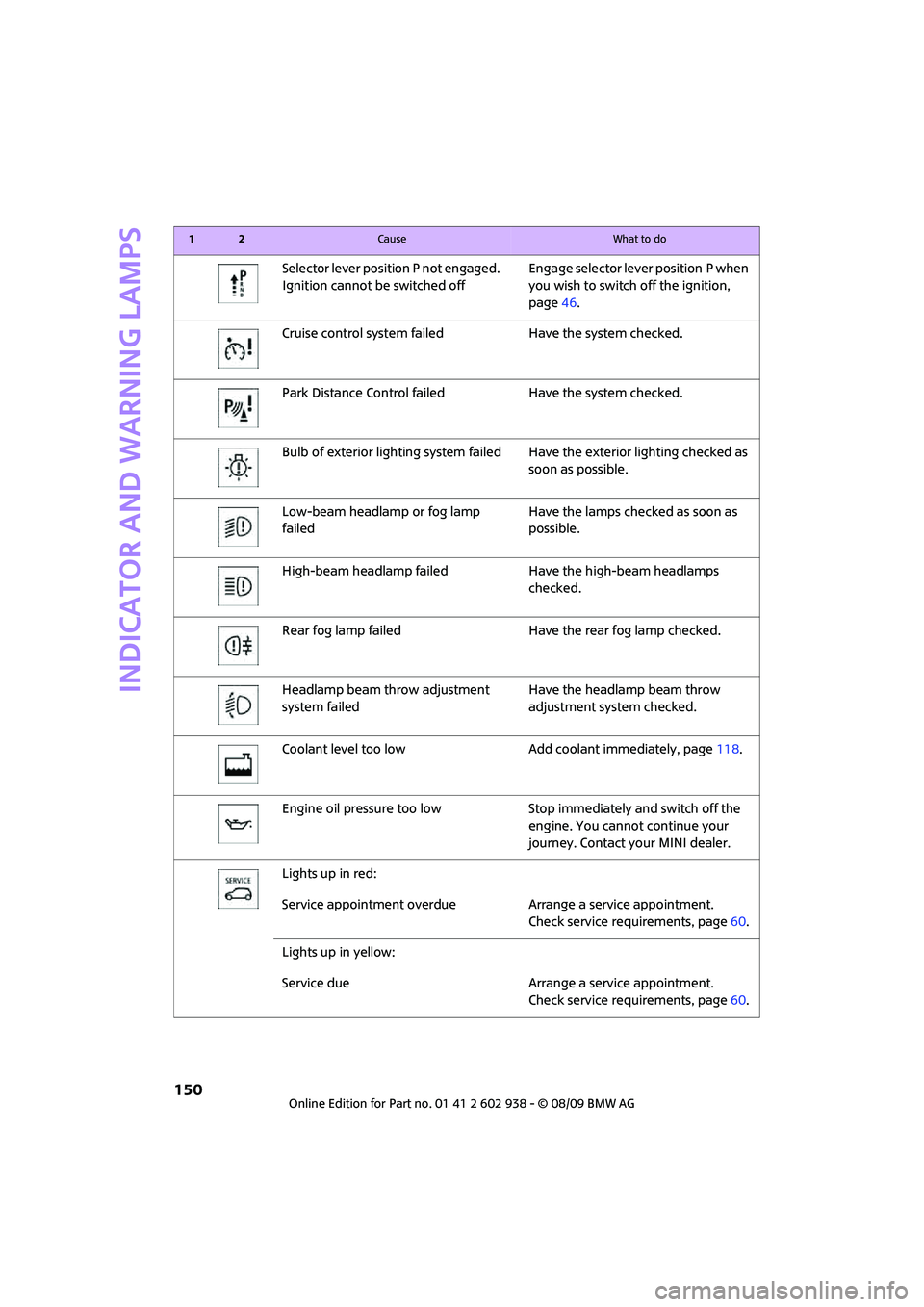
Selector lever position P not engaged.
Ignition cannot be switched offEngage selector lever position P when
you wish to switch off the ignition,
page46.
Cruise control system failed Have the system checked.
Park Distance Control failed Have the system checked.
Bulb of exterior lighting system failed Have the exterior lighting checked as
soon as possible.
Low-beam headlamp or fog lamp
failedHave the lamps checked as soon as
possible.
High-beam headlamp failed Have the high-beam headlamps
checked.
Rear fog lamp failed Have the rear fog lamp checked.
Headlamp beam throw adjustment
system failedHave the headlamp beam throw
adjustment system checked.
Coolant level too low Add coolant immediately, page118.
Engine oil pressure too low Stop immediately and switch off the
engine. You cannot continue your
journey. Contact your MINI dealer.
Lights up in red:
Service appointment overdue Arrange a service appointment.
Check service requirements, page60.
Lights up in yellow:
Service due Arrange a service appointment.
Check service requirements, page60.
12Cause What to do
Page 164 of 174
From A to Z
162
Consumption, refer to Average
fuel consumption56
Control Display
– settings58
Controls and displays10
Convenient access, refer to
Comfort Access28
Convenient operation
– convertible top24
– windows22
Convenient start, refer to
Starting the engine47
Convertible top32
Coolant118
– checking level118
– filling118
Coolant temperature55
Cooling fluid, refer to
Coolant118
Cooling, maximum83
Copyright2
Cruising range56
Cupholders89
Curb weight, refer to
Weights157
Current fuel consumption56
D
Dashboard instruments, refer
to Displays12
Dashboard lighting, refer to
Instrument lighting78
Dashboard, refer to Cockpit10
Data154
– capacities158
– dimensions155
– engine154
– weights157
Data recorders120
Date
– setting62
Daytime running lights76
DBC Dynamic Brake Control,
refer to Brake Assist65
Deactivating front passenger
airbags73Deadlocking, refer to
Locking22
Defect
– door lock24
– fuel filler flap102
Defogging windows82,83
Defrost position, refer to
Defrosting windows82,83
Defrosting windows82,83
Defrosting windows and
removing condensation
– air conditioner82
– automatic climate control83
Differential, breaking in92
Digital clock55
Dimensions155
Dipstick, engine oil117
Directional indicators, refer to
Turn signals50
Displacement, refer to Engine
data154
Display lighting, refer to
Instrument lighting78
Displays12
– instrument combination12
Displays and controls10
Displays, care124
Disposal
– of coolant118
– remote control battery30
– vehicle battery135
Distance remaining to service,
refer to Service
requirements60
Distance warning, refer to Park
Distance Control PDC64
Diving stability control
systems64
Door key, refer to Integrated
key/remote control
20
Door lock24
Door lock, confirmation
signals23
Doors, manual operation24
DOT Quality Grades112
Drinks holders, refer to
Cupholders89Drive-off assistant, refer to Hill
Assist66
Driving dynamics control, refer
to Sport button67
Driving lamps, refer to Parking
lamps/low beams75
Driving notes92
Driving off on inclines, refer to
Hill Assist66
Driving through water93
Driving tips, refer to Driving
notes92
Dry air, refer to Cooling
function84
DTC Dynamic Traction Control
DTC66
Dynamic Brake Control DBC,
refer to Brake Assist65
Dynamic Stability Control
DSC65
Dynamic Traction Control66
E
Electric power windows
– initializing31
Electrical malfunction
– convertible top34
– door lock24
– fuel filler flap102
– trunk lid26
Electronic brake-force
distribution65
Electronic Stability Program
ESP, refer to Dynamic
Stability Control DSC65
Emergency operation, refer to
Manual operation
– convertible top34
– door lock24
– fuel filler flap102
– transmission lock, automatic
transmission50
– trunk lid26
Emergency services, refer to
Roadside Assistance136