buttons MINI COOPER 2011 User Guide
[x] Cancel search | Manufacturer: MINI, Model Year: 2011, Model line: COOPER, Model: MINI COOPER 2011Pages: 210, PDF Size: 3.19 MB
Page 120 of 210
COMMUNICATIONSTelephone
118
Telephone
Overview
The concept
Mobile phones or other external devices, e.g.
audio players, can be connected to the vehicle
via Bluetooth.
Bluetooth® is a registered trademark of
Bluetooth® SIG, Inc.
Your MINI is equipped with a complete mobile
phone preparation. After a suitable mobile
phone is paired with the vehicle once, the
mobile phone can be controlled via the radio,
the buttons
* on the steering wheel, and by
voice
*.
It may be necessary for some functions to be
activated by the mobile phone provider. Only make entries when traffic conditions
permit. Do not hold the mobile phone in
your hand while you are driving; use the hands-
free system instead. If you do not observe this
precaution, your being distracted can endanger
vehicle occupants and other road users. <
Snap-in adapter*
The snap-in adapter, refer to page129, makes it
possible to:
> Accommodate the mobile phone.
> Recharge its battery.
> Connect it to an exte rnal antenna of the
vehicle.
This assures a better network connection
and constant sound quality.
A mobile phone that is connected to the vehicle
should not be operated via the mobile phone
keypad; otherwise, ma lfunctions may occur.
Suitable mobile phones
For precise information as to which mobile
phones and external devices with Bluetooth
interfaces are supported by the mobile phone
preparation, go to ww w.mini.com/connectivity.
*
Page 121 of 210

TelephoneCOMMUNICATIONS
119
Operating the mobile phone via the radio
To open the menu show above, refer to
page124.
1 Making and receiving phone calls 124
> "#": dial phone number
> "A-Z": phone book
> "TOP8": most frequently dialed phone
numbers
> "LAST8": last phone numbers dialed
> "CALLS": accepted calls
> "MISSED": missed calls
2 Marking to select a function
3 Reception of the mobile phone network:
Flashes when a call is being made 4
Pairing a new mobile phone, delete pairing
data of a mobile ph one, or switching
Bluetooth on/off 120
5 Time
6 Backspace
7 Function buttons for confirming the
functions displayed above them
8 Redialing, answering a ca ll, starting to dial,
ending a call, and switching to the phone
menu
9 Selecting and confirming function
>Turn: to select a function or number
> Press: to activate a function or number
Page 123 of 210

TelephoneCOMMUNICATIONS
121
Preparation on the radio display
3.MENU Press the button.
4.
Press the button.
5. Press the button.
6. Press the button.
Turn the right rotary knob to display the Blue-
tooth name of your vehicle on the display.
Preparation with mobile phone
7. Other operations must be performed on the
mobile phone and differ depending on the
type of mobile phone, refer to Owner's
Manual for the mobile phone, e.g. under
Connecting or pairing Bluetooth device.
The Bluetooth name of the vehicle appears
on the mobile phone display.
8. Select the Bluetooth name of the vehicle on
the mobile phone display.
Pairing
The mobile phone or the radio display will
prompt you to enter the same Bluetooth
passkey.
Depending on the mobile phone, you have
approx. 30 seconds to enter the Bluetooth
passkey using the mobile phone and the radio
display. If the Bluetooth passkey can be entered using
the radio, then the following appears on the
display:
:
9.
Enter the Bluetooth passkey using the
number buttons of the mobile phone.
10. Press the button to enter the
Bluetooth passkey using the radio.
11. Using the function buttons 0-9, enter the
same Bluetooth passke y that was entered
into the mobile phone.
To delete the last digit:
Press the button.
12. Press the button to confirm the
Bluetooth passkey.
The following display will appear after a few
seconds:
13. Press the button if necessary.
The following display will appear after the
mobile phone is paired:
If the pairing was successful, the mobile phone
appears at the top of the list of mobile phones.
If the pairing was not successful: What to do if…,
refer to page 123.
Page 126 of 210
COMMUNICATIONSTelephone
124
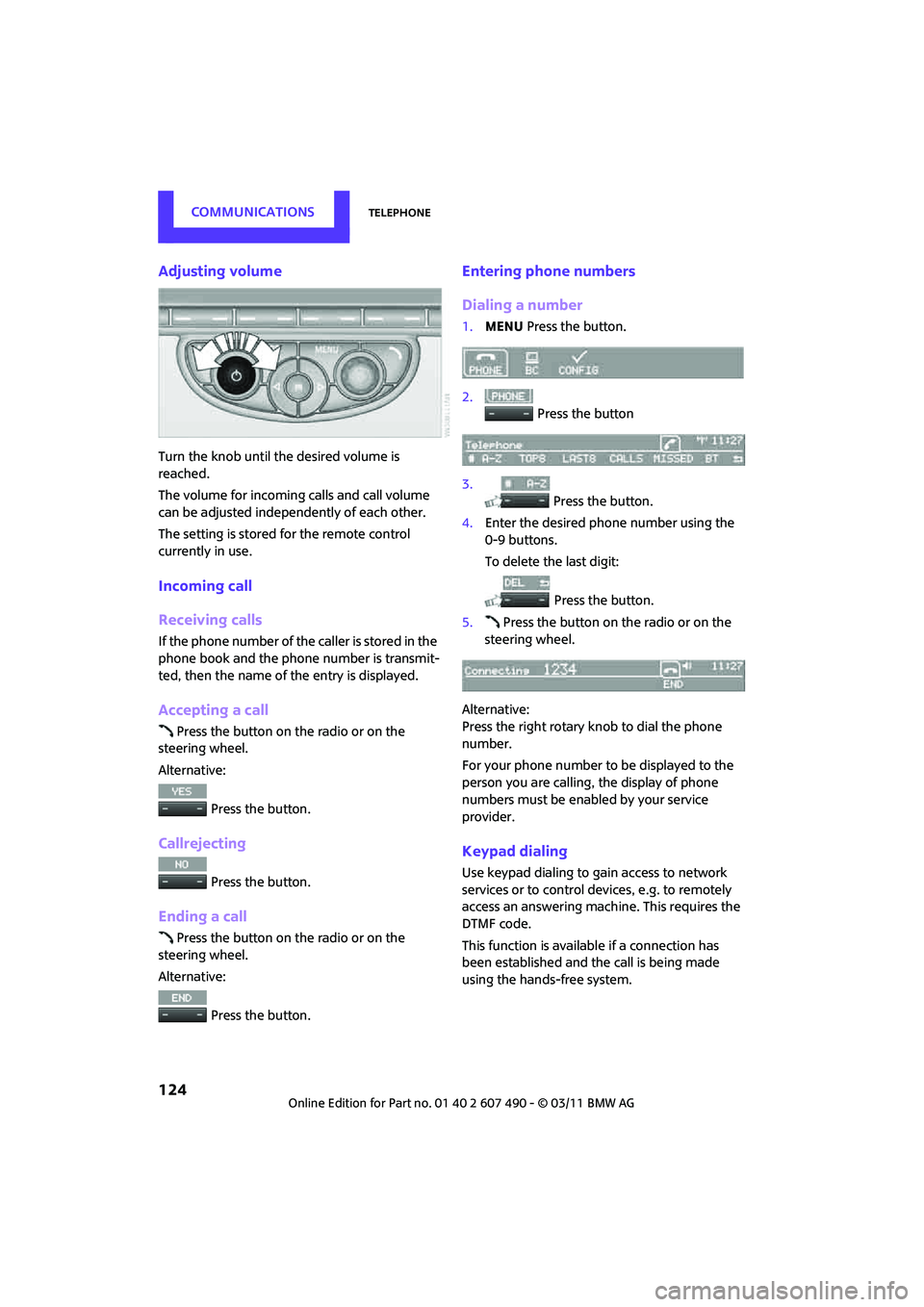
Adjusting volume
Turn the knob until the desired volume is
reached.
The volume for incoming calls and call volume
can be adjusted independently of each other.
The setting is stored for the remote control
currently in use.
Incoming call
Receiving calls
If the phone number of the caller is stored in the
phone book and the phone number is transmit-
ted, then the name of the entry is displayed.
Accepting a call
Press the button on the radio or on the
steering wheel.
Alternative:
Press the button.
Callrejecting
Press the button.
Ending a call
Press the button on the radio or on the
steering wheel.
Alternative:
Press the button.
Entering phone numbers
Dialing a number
1.MENU Press the button.
2. Press the button
3. Press the button.
4. Enter the desired phone number using the
0-9 buttons.
To delete the last digit:
Press the button.
5. Press the button on the radio or on the
steering wheel.
Alternative:
Press the right rotary knob to dial the phone
number.
For your phone number to be displayed to the
person you are calling, the display of phone
numbers must be enabled by your service
provider.
Keypad dialing
Use keypad dialing to gain access to network
services or to control de vices, e.g. to remotely
access an answering machine. This requires the
DTMF code.
This function is available if a connection has
been established and the call is being made
using the hands-free system.
Page 127 of 210

TelephoneCOMMUNICATIONS
125
1. Press the button.
2. Enter the desired code using the 0-9
buttons.
3.
If needed, press and hold the but-
ton on the right or left side to enter special
characters.
Dialing a phone number from the phone
book or from phone numbers stored in a
list
Phone numbers dialed, incoming calls, and
phone book entries are stored in lists when the
mobile phone is connected to the vehicle via
Bluetooth. If the caller is entered in the phone
book, then the name of the entry is displayed
instead of the phone number.
Select the desired name from the list and estab-
lish the connection.
There are five available lists:
> "A-Z"
The entries of the phone book, the SIM
card
*, or the mobile phone, composed of a
name and phone number, are sorted alpha-
betically.
> "TOP8"
The Top 8 list automatically stores the eight
phone numbers of the phone book that are
dialed the most frequently.
> "LAST8"
The last eight phone numbers you have
dialed are stored automatically. The phone
number dialed last appears at the top of the
list.
> "CALLS"
The phone numbers of the last eight
accepted calls are stored. This requires the
phone number of the caller to have been
transmitted. >
"MISSED"
The phone numbers of the last eight calls
that were not accepted are stored. This
requires the phone number of the caller to
have been transmitted.
Dialing a phone number from the phone
book
The A-Z list is available fo r phone book entries. If
entries with different names, but the same
phone number are transferred from the mobile
phone to the vehicle, only one entry is displayed.
The displays of the phone book entries on the
radio display can differ fr om the displays on the
mobile phone display, e.g. sequence of the first
and last names.
1. MENU Press the button.
2. Press the button.
3. Press the button.
The arrows indicate that
additional letters can be displayed.
Turn the right rotary knob to display
additional letters.
4. Turn the right rotary knob to select the first
letters of the desired entry.
5. Press the button if so desired.
The phone number is dialed.
To display all entries:
1. Turn the right rotary knob to select the first
letters of the desired entry and press the
right rotary knob.
2. Turn the right rotary knob to select the
desired entry and pre ss the right rotary
knob.
Page 128 of 210

COMMUNICATIONSTelephone
126
The phone number is dialed.
The phone number can also be dialed using the
buttons on the steering wheel or radio: Press the button.
Editing and dialing a phone number
from the phone book
The phone number of an entry can be edited
before a call. This change is not stored in the
phone book.
1. Select an entry.
2. Press the button.
3. Press the button to delete a digit.
4. Enter additional digits using the 0-9 buttons.
5. Press the right rotary knob to dial the phone
number.
Dialing a phone number from the phone
book using buttons on the steering
wheel
1. Press and hold the button to display the
telephone menu.
2. Use the arrow buttons on the steering wheel
to scroll through the phone book.
3. Press and hold the button to dial the
phone number.
Dialing a phone number stored in a list
To select an entry and establish a connection:
1. MENU Press the button
2. Press the button.
3. Press the desired button to select
one of the four lists.
4. Turn the right rotary knob to select an entry
and press the right rotary knob to dial the
phone number.
Deleting an individual entry
1.Select the desired entry from the list.
2. Press the button.
Displaying call duration
To display the duration during a call:
Press the button.
Hands-free system
General information
Calls being conducted using the hands-free
system can be continued using the mobile
phone and vice versa.
From the mobile phone to the hands-
free system
Calls that have been initiated from outside the
Bluetooth range of the ve hicle can be continued
using the hands-free system if the ignition is
switched on.
Depending on the mobile phone, the call is
automatically switched to hands-free mode.
If the switch does not occur automatically, then
follow the instructions that appear on the
display of the mobile phone, also refer to the
Owner's Manual for the mobile phone.
From hands-free system to mobile
phone
Calls being conducted using the hands-free
system can also be cont inued using the mobile
phone if so desired, de pending on the mobile
phone.
At this point, follow the instructions that appear
on the display of the mobile phone, also refer to
the Owner's Manual for the mobile phone.
Page 131 of 210
TelephoneCOMMUNICATIONS
129
Displaying phone numbers
1.MENU Press the button.
2. Press the button.
3. Turn the right rotary knob until the desired
phone number is displayed.
Snap-in adapter*
Installation location
In the center armrest.
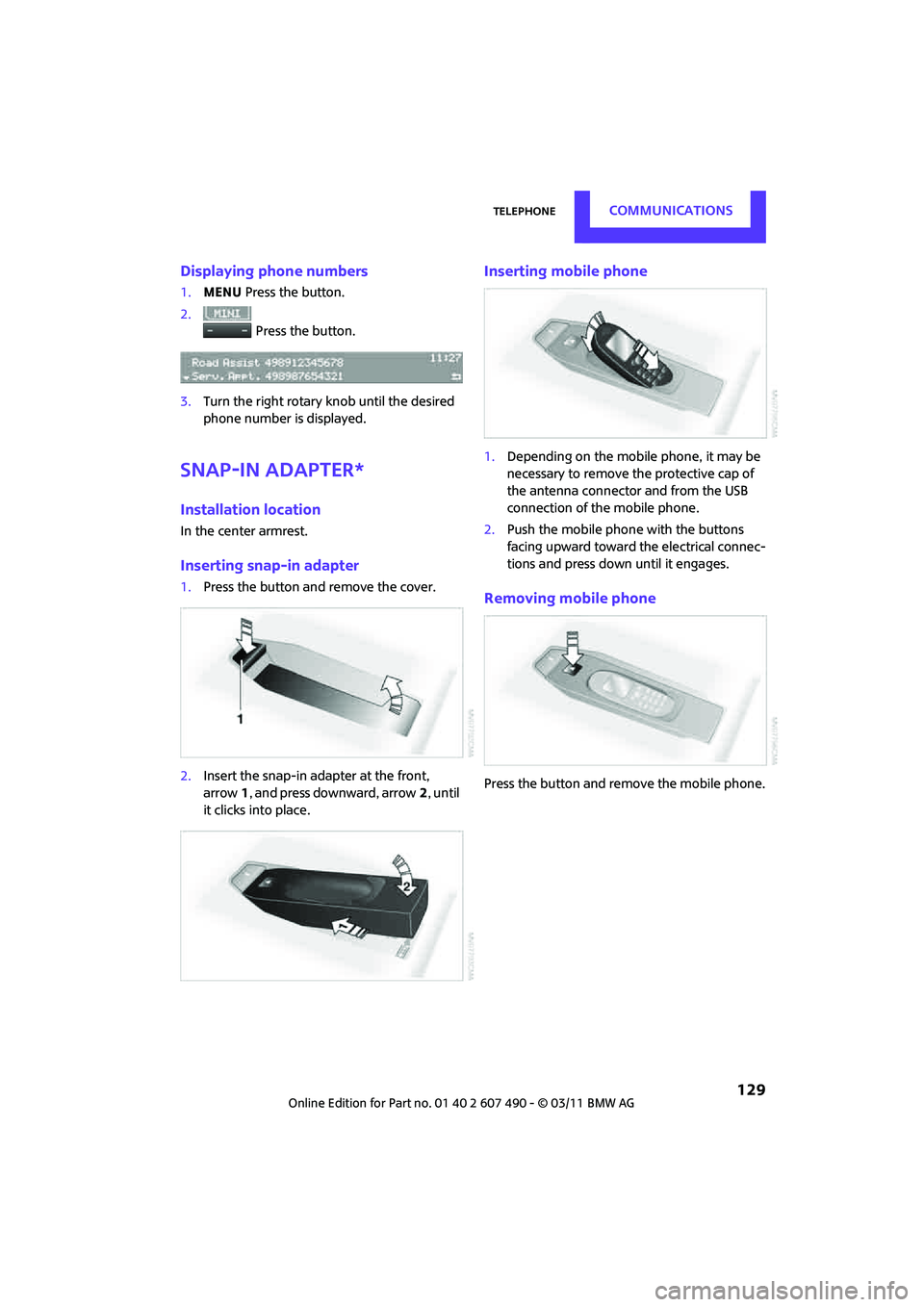
Inserting snap-in adapter
1. Press the button an d remove the cover.
2. Insert the snap-in adapter at the front,
arrow 1, and press downward, arrow 2, until
it clicks into place.
Inserting mobile phone
1. Depending on the mobile phone, it may be
necessary to remove the protective cap of
the antenna connector and from the USB
connection of the mobile phone.
2. Push the mobile phone with the buttons
facing upward toward the electrical connec-
tions and press down until it engages.
Removing mobile phone
Press the button and remove the mobile phone.
Page 197 of 210
Everything from A to ZREFERENCE
195
Base plate for telephone or mobile phone
– refer to Snap-in adapter 129
Battery 167
– charging 168
– disposal 30,168
– jump-starting 169
– temporary power failure 168
Battery renewal
– remote control 30
Being towed 171
Bell
– volume 106
Belts, refer to Safety belts 40
Belt tensioner, refer to Safety belts 40
Beverage holders, refer to Cupholders 93
Black ice, refer to External
temperature warning 57
Blower, refer to Air flow rate 85,87
Bluetooth, activating/ deactivating 120
Bottle holders, refer to
Cupholders 93
Brake Assist 67
Brake fluid, refer to Service
requirements 62
Brake lamps
– replacing bulbs 162
Brake pads, breaking in 96
Brake rotors 98
– brakes 96
– breaking in 96
Brakes
– ABS 67
– breaking in 96
– MINI Maintenance
System 151
– parking brake 48
– service requirements 62
Brakes, refer to Braking safely 97 Brake system
96
– breaking in 96
– disc brakes 98
– MINI Maintenance
System 151
Breakdown service, refer to Roadside Assistance 169
Breaking in the clutch 96
Break-in period 96
Bulb changing, refer to Lamps
and bulbs 158
Button for starting the engine 46
Buttons on the steering wheel 11
C
California Proposition 65
warning 5
Call
– accepting 124
– ending 124
– rejecting 124
Calling, refer to Phone
numbers, dialing 124
Can holders, refer to Cupholders 93
Capacities 193
Car battery, refer to Vehicle
battery 167
Car care 153
Care 153
– car-care products 153
– car washes 153
– CD/DVD drives 156
– external 153
– high-pressure washers 154
– internal 155
– leather 155
– manual washing 154
– upholstery and fabrics 155
– windows 154
– wiper blades 154
Cargo, securing 101 Cargo area
98
– capacity 191
– Comfort Access 29
– cover 98
– lamp 82
– opening from outside 26
Cargo area, expanding 98
Cargo area lamp 82
Cargo area lid, refer to Liftgate 26
Cargo loading 100
– securing cargo 101
– stowing cargo 101
– vehicle 98
Car key, refer to Keys/remote controls 20
Carpets, care 156
Car phone
– installation location, refer to
Center armrest 92
– refer to separate Owner's Manual
Car phone, refer to Telephone 118
Car wash, care 153
Car washes 153
Catalytic converter, refer to Hot exhaust system 96
CD player 111
– changing the track 112
– fast forward/reverse 112
– playing a track 112
– ran
dom order 112
– starting 111
– volume 106
Center armrest 92
Center brake lamp 163
Center console, refer to Around the center
console 14
Central locking system 21
– Comfort Access 28
– from inside 25
– from outside 21
Changing bulbs 158
Changing wheels 165
Page 201 of 210
Everything from A to ZREFERENCE
199
Indicator and warning lamps 13,173
– Tire Pressure Monitor TPM 73
Indicator lighting, refer to
Instrument lighting 82
Individual air distribution 86
Individual settings, refer to
Personal Profile 20
Inflation pressure monitoring, refer to Tire Pressure Monitor
TPM 72
Initializing
– Flat Tire Monitor FTM 70
– glass roof, electric 31
Instrument cluster, refer to Displays 12
Instrument lighting 82
Instrument panel, refer to Cockpit 10
Instrument panel, refer to Displays 12
Integrated key 20
Integrated universal remote control 89
Interior lamps 82
– remote control 23
Interior rearview mirror 42
– automatic dimming
feature 42
Interlock 49
Intermittent mode of the wipers 52
Internet page 4
J
Jacking points 167
Jets, refer to Window washer nozzles 53
Jumpering, refer to Jump- starting 169
Jump-starting 169
K
Key, refer to Keys/remote
controls 20
Keyless-Go, refer to Comfort Access 28
Keyless opening and closing,
refer to Comfort Access 28
Key Memory, refer to Personal Profile 20
Keypad dialing 124
Kickdown 49
– automatic transmission with
Steptronic 49
Knock control 133
L
Lamps, refer to Parking lamps/
Low beams 78
Lamps and bulbs, replacing bulbs 158
Lashing eyes, refer to Securing cargo 101
LATCH child restraint fixing
system 44
Leather care 155
LEDs light-emitting diodes 159
Length, refer to Dimensions 189
License plate lamp
– bulb replacement 162
Liftgate 26
– Comfort Access 29
– emergency operation 26
– manually releasing 26
– opening/closing 26
– opening from outside 26
– unlocking with remote
control 24
Light alloy wheels, care 155
Light-emitting diodes
LEDs 159
Lighter 93
– socket 93 Lighting
– lamps and bulbs
158
– of the instruments 82
– of vehicle, refer to Lamps 78
Light switch 78
Limit 185
Listening to test scan
– Radio MINI Boost CD 108
Load 100
Load securing equipment,
refer to Securing cargo 101
Lock buttons of doors, refer to
Locking 25
Locking
– adjusting confirmation signal 23
– from inside 25
– from outside 22
– without remote control, refer
to Comfort Access 28
Locking and unlocking doors
– confirmation signals 23
– from inside 25
– from outside 21
Longlife oils
– approved motor oils 149
Low beams 78
– automatic 78
– replacing bulb 159
Lower back suppo rt, refer to
Lumbar support 39
Luggage compartment
– emergency operation, refer
to
Manual unlocking 26
– increasing the capacity 99
– opening from the inside 26
Luggage compartment, refer to Cargo area 26
Luggage compartment lid,
refer to Liftgate 26
Luggage rack, re fer to Roof-
mounted luggage rack 102
Lumbar support 39
Page 202 of 210

REFERENCEEverything from A to Z
200
M
M+S tires, refer to Winter tires 145
Maintenance, refer to Service and Warranty Information
Booklet for US models and
Service Guide Booklet for
Canadian models
Maintenance system 151
Malfunction
– convertible top 34
– liftgate 26
Malfunction warn ings, refer to
Check Control 64
Manual air distribution 86
Manual mode
– automatic transmission with Steptronic 49
Manual operation
– door lock 25
– fuel filler flap 132
– liftgate 26
– power convertible top 34
– transmission lock, automatic
transmission 50
Manual station search 107
Manual transmission 48
Manual washing 154
Master key, refer to Integrated
key/remote control 20
Maximum cooling 87
Maximum speed
– with winter tires 145
Medical assistance, refer to First aid pouch 169
Microfilter
– for air conditioner 86
– for automatic climate
control 88
– MINI Maintenance System 151
Microfilter/activated-charcoal filter
– MINI Maintenance
System 151
Microphone for telephone 14MINI Internet page
4
MINI Maintenance System 151
Mirror dimming feature 42
Mirrors 41
– exterior mirrors 41
– heating 41
– interior rearview mirror 42
Mobile phone
– adjusting volume 124
– connecting, refer to Mobile
phone, pairing 120
– installation location, refer to Center armrest 92
– pairing 120
– refer to separate Owner's Manual
– What to do if… 123
Mobile phone, installation location, refer to Center
armrest 92
Mobil
e phone, refer to
separate Owner's Manual
Mobility System 163
Modifications, technical, refer to For your own safety 5
Monitoring syst em for tire
pressures, refer to Flat Tire
Monitor 69
MP3 111
Multifunctional steering
wheel, refer to Buttons on
the steering wheel 11
Multifunction switch
– refer to Turn signals/ headlamp flasher 51
– refer to Wiper system 52
Music tracks
– playing a track 112
– random order 112
N
Neck support, refer to Head
restraints 39
Nets, refer to Storage
compartments 92
New tires 144 Number of cylinders, refer to
Engine data 188
Number of safety belts 37
Nylon rope, refer to Tow
rope 172
O
OBD socket, refer to Socket for
On-Board Diagnosis 152
Octane ratings, refer to Fuel specifications 133
Odometer 56
Oil, refer to Engine oil 147
Oil consumption 147
Oil level 147
Oil types 148
Old batteries, refer to Disposal 168
Onboard vehicle toolkit 157
Opening and closing
– Comfort Access 28
– from inside 25
– from outside 21
– using the door lock 24
– using the remote control 21
Opening and unlocking
– from inside 25
Outlets
– refer to Ventilation 88
Outlets, refer to Air vents 84
Output, refer to Engine data 188
Outside-air mode
– automatic climate control 87
Overheated engine, refer to
Coolant temperature 149
P
Paintwork, care155
Park Distance Control PDC 66
Parking
– vehicle 47
Parking aid, refer to Park
Distance Control PDC 66
Parking brake 48