transmission MINI COOPER 2011 User Guide
[x] Cancel search | Manufacturer: MINI, Model Year: 2011, Model line: COOPER, Model: MINI COOPER 2011Pages: 210, PDF Size: 3.19 MB
Page 74 of 210
CONTROLSTechnology for driving comfort and safety
72
Tire Pressure Monitor
TPM*
The concept
Measuring the inflation pressure in the four
mounted tires. The system notifies you if there is
a significant loss of pressu re in one or more tires.
Functional requirement
The system must have been reset while the
inflation pressure was correct; otherwise, reli-
able signaling of a flat tire is not ensured.
Always use wheels with TPM electronics to
ensure that the system will operate properly.
Reset the system again af ter each correction of
the tire inflation pressure and after every tire or
wheel change.
System limitations
Sudden, serious tire damage caused by
external influences cannot be indicated in
advance. <
The system does not operate correctly if it has
not been reset. For exampl e, a flat tire may be
indicated despite correct tire inflation pressures.
The system is inactive an d cannot indicate a flat
tire:
> If a wheel without TPM electronics, e.g. a
compact spare wheel
*, is mounted.
> Interference with TPM by other systems or
devices with the sa me transmission
frequency.
Resetting the system
Reset the system again af ter each correction of
the tire inflation pressure and after every tire or
wheel change.
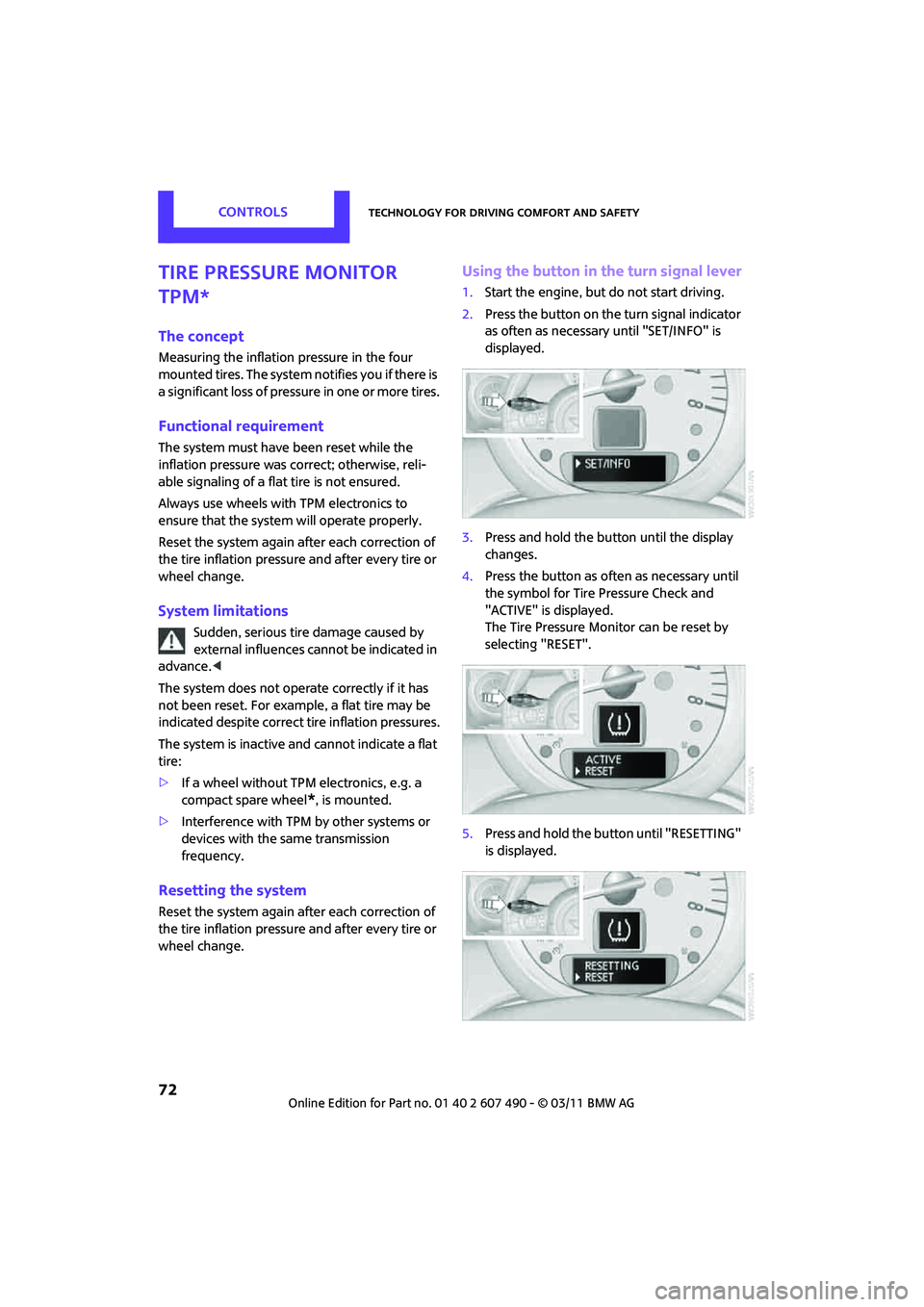
Using the button in the turn signal lever
1. Start the engine, but do not start driving.
2. Press the button on the turn signal indicator
as often as necessary until "SET/INFO" is
displayed.
3. Press and hold the button until the display
changes.
4. Press the button as often as necessary until
the symbol for Tire Pressure Check and
"ACTIVE" is displayed.
The Tire Pressure Monitor can be reset by
selecting "RESET".
5. Press and hold the button until "RESETTING"
is displayed.
Page 91 of 210

Practical interior accessoriesCONTROLS
89
Practical interior accessories
Integrated universal
remote control*
The concept
The integrated universal remote control can
replace as many as three hand-held transmitters
for various remote-controlled devices, such as
garage and gate openers and lighting systems.
The integrated universal remote control regis-
ters and stores signals from the original hand-
held transmitters.
The signal of an original hand-held transmitter
can be programmed on one of the three mem-
ory buttons 1. The system in question can then
be operated by means of the programmed
memory button 1. The LED 2 flashes to confirm
transmission of the signal.
If you decide to sell your vehicle one day, in the
interest of your own secu rity, remember to clear
the stored programs before the vehicle leaves
your possession, page 90.
To prevent possible damage or injury,
before programming or using the inte-
grated universal remote control, always inspect
the immediate area to make certain that no
people, animals or objects are within the travel
range of the device. Comply also with the safety
instructions supplied with the original hand-held
transmitter. <
Checking compatibility
If this symbol appears on the package
or in the instructions supplied with the
original hand-held transmitter, you can
assume that the radio re mote control device is
compatible with the inte grated universal remote
control.
For additional information, please contact your
MINI dealer or call: 1-800-355-3515. You can also obtain information on the
Internet at:
www.homelink.com
HomeLink is a registered trademark of Johnson
Controls, Inc.
Programming
1
Memory buttons
2 LED
Fixed-code hand-held transmitters
1.Switch on the ignition, page 46.
2. When starting operation for the first time:
press both outer memory buttons 1 for
approx. 20 seconds until the LED 2 flashes
rapidly. All stored programs are cleared.
3. Hold the original hand-held transmitter at a
distance of approx. 1 in/2.5 cm to 3 in/8 cm
from the memory buttons 1.
The required distance between the
hand-held transmitter and the mem-
ory buttons 1 depends on the system of the
respective original hand-held transmitter
used. <
4. Simultaneously press the transmit key on
the original hand-held transmitter and the
desired memory button 1 on the integrated
universal remote control. The LED 2 flashes
slowly at first. As soon as the LED 2 flashes
rapidly, release both buttons. If the LED 2
does not flash rapidly after approx.
Page 98 of 210
DRIVING TIPSThings to remember when driving
96
Things to remember when driving
Break-in period
Moving parts need breaking-in time to adjust to
each other. Please follow the instructions below
in order to achieve the optimal service life and
economy of operation for your vehicle.
Engine and differential
Always obey all official speed limits.
Up to 1,200 miles/2,000 km
Drive at varying engine and road speeds, but do
not exceed the following:
> Gasoline engine
4,500 rpm or 100 mph/160 km/h
Avoid full-throttle operation and use of the
transmission's kickdown mode.
After driving 1,200 miles/2,000 km
Engine and vehicle speeds can be gradually
increased.
Tires
Due to technical factors associated with their
manufacture, tires do not achieve their full
traction potential until af ter an initial break-in
period. Therefore, drive cautiously during the
first 200 miles/300 km.
Brake system
Brakes require an initial break-in period of
approx. 300 miles/500 km to achieve optimized
contact and wear patterns between brake pads
and rotors. Drive cautiously during this break-in
period.
Clutch
The function of the clutch reaches its optimal
level only after a distan ce driven of approx.
300 miles/500 km. During this break-in period,
engage the clutch gently.
Following part replacement
The same break-in procedures should be
observed if any of the components mentioned
above have to be renewed in the course of the
vehicle's operating life.
General driving notes
Close the liftgate
Only drive with the liftgate closed. Failure
to do so may endanger passengers or
other road users or may damage the vehicle in
the event of an accident or a braking and eva-
sive maneuver. In addi tion, exhaust gas may
flow into the passenger compartment. <
If special circumstances make it absolutely
necessary to drive with the liftgate open:
1. Close all windows and the glass roof
*.
2. Switch off the recirculated-air mode and sig-
nificantly increase the air flow rate of the air
conditioner or automa tic climate control,
page 85 or 87.
Hot exhaust system
As in all vehicles, extremely high tempera-
tures are generated on the exhaust sys-
tem. Do not remove the heat shields installed
adjacent to various sections of the exhaust sys-
tem, and never apply undercoating to them.
Make sure that when driving, idling or when
parking, no easily flamma ble materials, such as
hay, leaves, grass, etc. come into contact with
the hot exhaust system. Such contact could lead
to a fire, with the risk of serious personal injuries
and property damage. Do not touch hot exhaust
tail pipes. Otherwise, there is a risk of burns. <
Page 99 of 210

Things to remember when drivingDRIVING TIPS
97
Hydroplaning
When driving on wet or slushy roads,
reduce road speed. If you do not, a wedge
of water can form betw een tires and road sur-
face. This situation, known as hydroplaning, can
cause partial or complete loss of tire contact
with the road surface, so that the car cannot be
steered or braked properly. <
The risk of hydroplaning increases with declining
tread depth on the tires, refer also to Tread
depth on page 143.
Driving through water
Drive through water on the road only if it is
not deeper than 1 ft/30 cm, and then only
at walking speed at the most. Otherwise, the
vehicle's engine, the electrical systems and the
transmission may be damaged. <
Parking brake on inclines
On inclines, do not hold the vehicle with
the clutch; use the parking brake. Other-
wise, greater clutch wear will result. <
For information on drivin g off using Hill Assist,
refer to page 69.
Braking safely
Your MINI is equipped with ABS. If you are in a
situation which requires full braking, it is best to
brake using maximum brake pressure. Since the
vehicle maintains steeri ng responsiveness, you
can still avoid possible obstacles with a mini-
mum of steering effort.
The pulsation of the brake pedal, together with
the sound of hydraulic regulation, indicates that
ABS is functioning properly.
Objects in the move ment range of the
pedals
Keep floor mats, carpet, and other objects
out of the movement range of the pedals;
otherwise, they may inhibit the function of the
pedals during driving.
Do not place additional floor mats onto an
existing one or onto other objects. Only use floor mats that
have been approved for
the vehicle and can be appropriately fastened.
Make sure that the floo r mats are securely fas-
tened again after they have been removed, e.g.
for cleaning. <
Driving in wet conditions
When roads are wet or ther e is heavy rain, briefly
exert gentle pressure on the brake pedal every
few miles. Monitor traffic conditions to ensure
that this maneuver does not endanger other
road users. The heat generated in this process
helps dry the pads and rotors to ensure that
Then full braking force will be immediately
available when it is needed.
Hills
To prevent overheatin g and the resulting
reduced efficiency of the brake system,
drive long or steep downhill gradients in the
gear in which the least braking is required. Even
light but consistent brake pressure can lead to
high temperatures, brake wear and possibly
even brake failure. <
You can increase the engine's braking effect
by shifting down, all the way to first gear if
necessary. This strategy helps you avoid placing
excessive loads on the brake system. Downshift-
ing in manual mo de of the automatic transmis-
sion, page 49.
Never drive with the clutch held down,
with the transmission in neutral or with
the engine switched off; otherwise, engine brak-
ing action will not be present or there will be no
power assistance to th e brakes or steering.
Never allow floor mats, carpets or any other
objects to protrude into the area around the
pedals; otherwise, pedal function could be
impaired. <
Page 155 of 210

CareMOBILITY
153
Care
Car-care products
Regular cleaning and care helps to maintain the
value of your MINI.
The manufacturer of your MINI recommends
using manufacturer-approved products to clean
and care for your vehicle.
Your MINI dealer would be pleased to advise
you on cleaning and care products and services
for your MINI.The ingredients of original MINI Care
Products have been tested, and the
products have been tested in the laboratory
and in practice. They offer optimum care and
protection for your vehicle. <
Do not use any cleansers containing
alcohol or solvents as these may cause
damage. <
Cleaning agents may contain hazardous
or health-damaging substances. Follow
the warning and hazard instructions on the
packaging. For interior cleaning, always open
the doors or windows of the vehicle.
Do not use any products that are not intended
for cleaning the vehicle. <
External care
Washing your vehicle
Especially during the winter months the
vehicle should be frequently washed.
Dirt and road salt can damage the vehicle. <
After washing the vehicle, apply the
brakes briefly to dry them; otherwise,
water can reduce brakin g efficiency over the
short term and the brake rotors can corrode. <
Car washes
Preference should be given to cloth car washes.
Do not use automatic high-pressure car
washes; otherwise, water may drip into
the vehicle around the windows. <
Before driving into the car wash, check if the
system is suitable for your MINI. Observe the
following points:
> Vehicle dimensions, page 189
> If necessary: fold in the outside mirrors,
page 41
> Maximum permissible tire width
Avoid car washes with tracks higher than
4 in/10 cm; otherwise, the chassis could
be damaged. <
Preparations for driving into the car wash:
> Unscrew the rod antenna.
> Deactivate the rain sensor
* to prevent
unintentional wiping.
> Deactivate the rear window wiper
* and
protect it from damage. Ask the car wash
operator about measures that can be taken
to protect the wipers.
> Remove addition al attachments, e.g. spoil-
ers or telephone antennas, if there is a
possibility that they could be damaged.
> Inserting the remote control into the ignition
lock.
Automatic transmission
Before driving into the ca r wash, make sure that
the vehicle can roll:
1. Place the remote control, even with Comfort
Access, in the ig nition lock.
2. Move the selector lever to position N.
3. Release the parking brake.
4. Switch off the engine.
5. Insert the remote control in the ignition lock
so that the vehicle can roll.
Page 173 of 210
Giving and receiving assistanceMOBILITY
171
Tow-starting, towing
away
Observe the applicable laws and regula-
tions for tow-starting and towing
vehicles. <
Do not transport an y passengers other
than the driver in a vehicle that is being
towed. <
Using a tow fitting
The screw-in tow fitting must always be carried
in the car. It can be screwed in at the front or
rear of the MINI.
It is stored in the onbo ard vehicle toolkit in the
cargo area underneath the cover on the right-
hand side, page 157.
Use only the tow fitting provided with the
vehicle and screw it all the way in. Use the
tow fitting for towing on paved roads only. Avoid
lateral loading of the tow fitting, e.g. do not lift
the vehicle by the tow fitting. Otherwise, the tow
fitting and the vehicle could be damaged. <
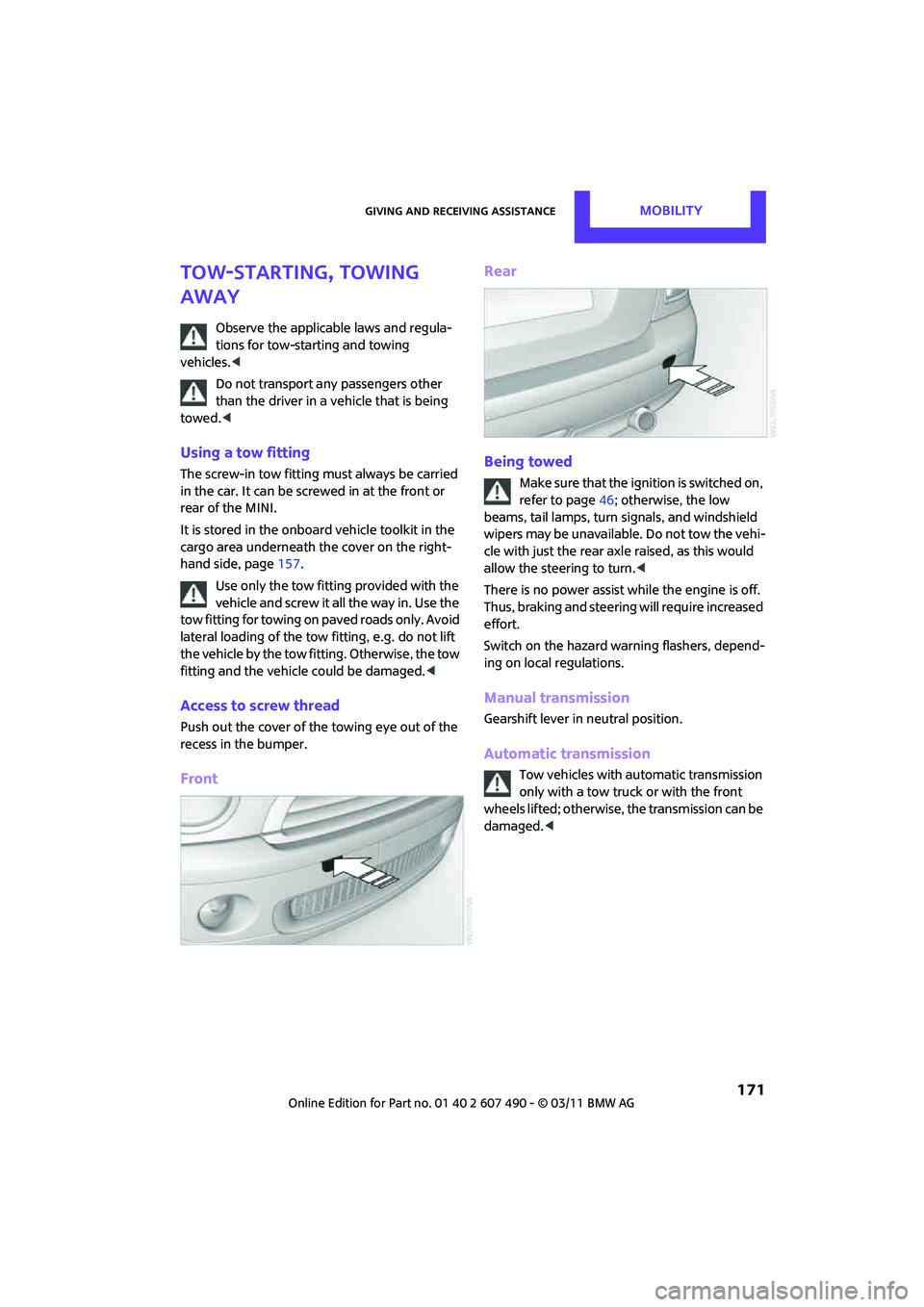
Access to screw thread
Push out the cover of the towing eye out of the
recess in the bumper.
Front Rear
Being towed
Make sure that the ignition is switched on,
refer to page
46; otherwise, the low
beams, tail lamps, turn signals, and windshield
wipers may be unavailable. Do not tow the vehi-
cle with just the rear ax le raised, as this would
allow the steering to turn. <
There is no power assist while the engine is off.
Thus, braking and steering will require increased
effort.
Switch on the hazard warning flashers, depend-
ing on local regulations.
Manual transmission
Gearshift lever in neutral position.
Automatic transmission
Tow vehicles with automatic transmission
only with a tow truck or with the front
wheels lifted; otherwise, the transmission can be
damaged. <
Page 174 of 210

MOBILITYGiving and receiving assistance
172
Towing with a tow bar
The towing vehicle must not be lighter
than the towed vehicle; otherwise, it may
be impossible to maintain control. <
The tow fittings used should be on the same side
on both vehicles. Should it prove impossible to
avoid mounting the tow bar at an angle, please
observe the following:
> Clearance and maneuver ing capability will
be sharply limited during cornering.
> The tow bar will generate lateral forces if it is
attached offset.
Only attach the tow bar to the tow fittings,
as attachment to other vehicle parts can
lead to damage. <
Towing with a tow rope
When starting off in the towing vehicle, make
sure that the tow rope is taut.
To avoid jerking and the associated
stresses on vehicle components when
towing, always use nylon ropes or nylon straps.
Attach the tow rope to the tow fittings only, as
attaching it to other pa rts of the vehicle could
result in damage. <
Towing with a tow truck
Have the MINI or MINI Convertible transported
by a tow truck with a so-called lift sling or on a
flatbed.
Do not lift the vehicle by a tow fitting or
body and chassis parts; otherwise, dam-
age may result. <
Tow-starting
Avoid tow-starting the vehicle whenever possi-
ble; instead, jump-start the engine, page 169.
Vehicles with a catalyti c converter should only
be tow-started when the engine is cold, vehicles
with an automatic transmission cannot be tow-
started at all.
1. Switch on hazard warning flashers, comply
with local regulations.
2. Switch on the ignition, page 46.
3. Shift into 3rd gear.
4. Have the vehicle tow-started with the clutch
completely depressed and then slowly
release the clutch. After the engine starts,
immediately depress the clutch completely
again.
5. Stop at a suitable lo cation, remove the tow
bar or rope and switch off the hazard
warning flashers.
6. Have the vehicle checked.
Page 181 of 210

Indicator and warning lampsMOBILITY
179
Indication in US models
Vehicle electronics failedYou cannot continue your journey.
Contact your MINI dealer.
Indication
* in Canadian models
Vehicle electronics failed You cannot continue your journey.
Contact your MINI dealer.
Lights up in red: Have the system in question checked
without delay.
> Starter failed or The engine cannot be restarted.
> Ignition malfunctioning. Engine
restart only possible when brake
is depressed or
> Lighting system failed. Low
beams/tail lamps and brake
lamps still operational. All other
lamps failed Depress the brake to start the engine
again.
Lights up in yellow:
> Control of the brake lamps failed
or
> Fuel supply malfunctioning You can continue your journey, but
moderate your speed and exercise
due caution. Have the system in
question checked without delay.
> Drive malfunctioning You can continue your journey, but
moderate your speed and exercise
due caution. Transmission limp-home
program active with restricted range
of gears. Have the system checked
immediately.
Flashing:
Dynamic Stability Control DSC or
Dynamic Traction Control DTC is
controlling drive an d braking forces,
refer also to page 67
12Cause What to do
Page 185 of 210

Indicator and warning lampsMOBILITY
183
Lights up in red:
>Transmission limp-home pro-
gram active with restricted range
of gears, possibly with reduced
acceleration You can continue your journey, but
moderate your speed and exercise
due caution. Have the system
checked without delay.
> Gears can be engaged without
depressing the brake Always depress the brake to engage a
gear.
> Automatic selector lever locked Manually releasing the selector lever
lock, page50.
Lights up in yellow: Have the system checked as soon as
possible.
> Automatic selector lever locked:
Selector lever locked in position P
with engine running and brake
depressed or Manually releasing the selector lever
lock, page
50.
> Brake signal malfunctioning: gear
can be engaged without depress-
ing the brake To engage a gear while the vehicle is
at a standstill, always depress the
brake. Before leaving the vehicle,
move the selector lever to position P
and switch off the engine.
Lights up in red:
Transmission overheating Bring the car to a stop and move the
selector lever to position P. Allow the
transmission to cool down. You can
continue your journey, but moderate
your speed and exercise due caution.
Have the system checked if the
situation reoccurs.
Lights up in yellow:
Transmission too hot Avoid high engine loads. You can
continue your journey, but moderate
your speed and exercise due caution.
Selector lever position P not engaged.
Vehicle not prevented from rolling
12Cause What to do
Page 193 of 210
Technical dataREFERENCE
191
Weights
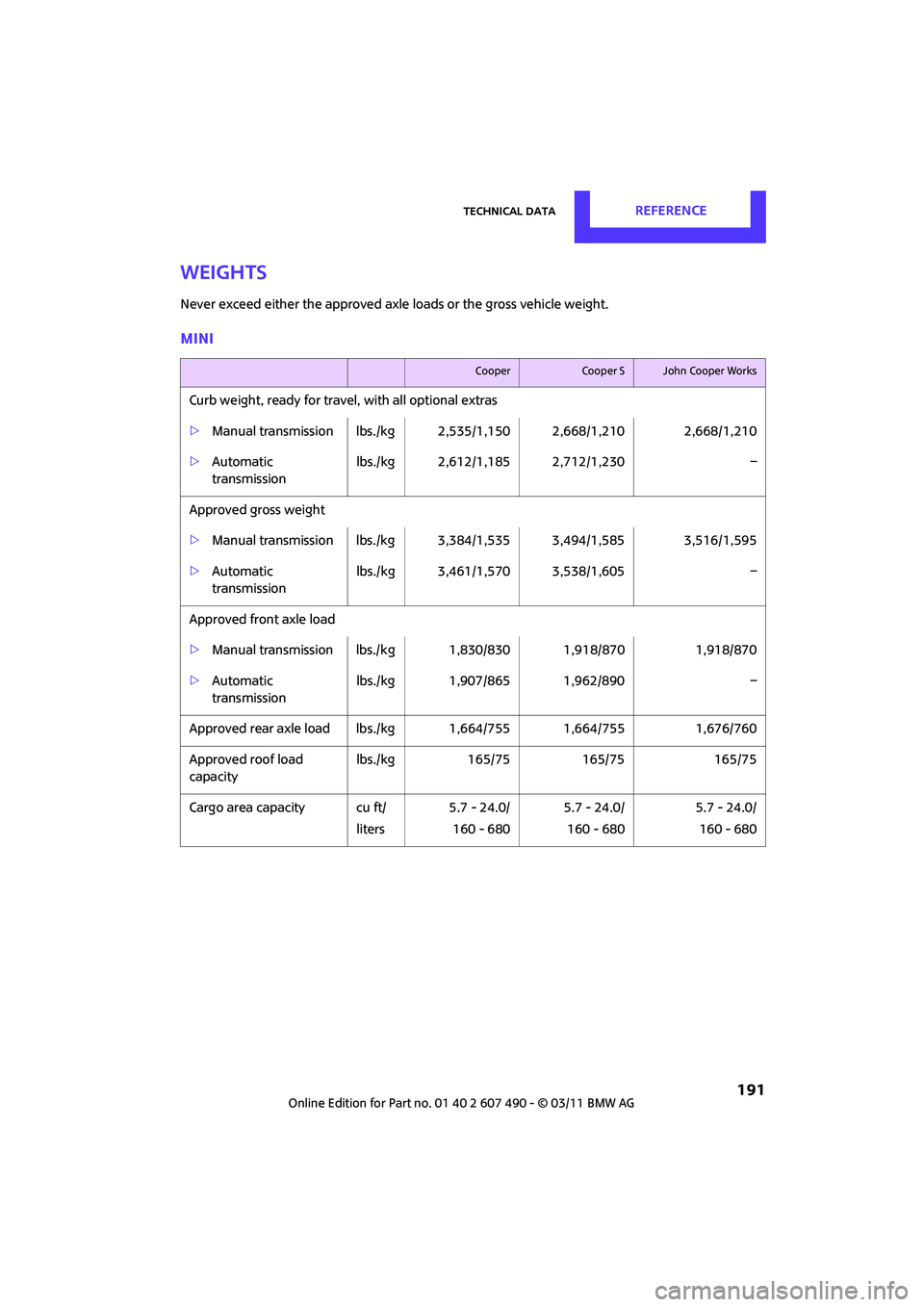
Never exceed either the approved axle loads or the gross vehicle weight.
MINI
CooperCooper SJohn Cooper Works
Curb weight, ready for travel, with all optional extras
>Manual transmission lbs./kg 2 ,535/1,150 2,668/1,210 2,668/1,210
> Automatic
transmission lbs./kg 2,612/1,185 2,712/1,230
–
Approved gross weight
> Manual transmission lbs./kg 3 ,384/1,535 3,494/1,585 3,516/1,595
> Automatic
transmission lbs./kg 3,461/1,570 3,538/1,605
–
Approved front axle load
> Manual transmission lbs./k g 1,830/830 1,918/870 1,918/870
> Automatic
transmission lbs./kg 1,907/865 1,962/890
–
Approved rear axle load lb s./kg 1,664/755 1,664/755 1,676/760
Approved roof load
capacity lbs./kg
165/75 165/75 165/75
Cargo area capacity cu ft/ liters5.7 - 24.0/
160 - 680 5.7 - 24.0/
160 - 680 5.7 - 24.0/
160 - 680