flat tire MINI COOPER 2011 Owner's Manual
[x] Cancel search | Manufacturer: MINI, Model Year: 2011, Model line: COOPER, Model: MINI COOPER 2011Pages: 210, PDF Size: 3.19 MB
Page 159 of 210
Replacing componentsMOBILITY
157
Replacing components
Onboard vehicle toolkit
Your vehicle comes with an onboard vehicle
toolkit that varies with the equipment version; it
is stored underneath the flat load floor.
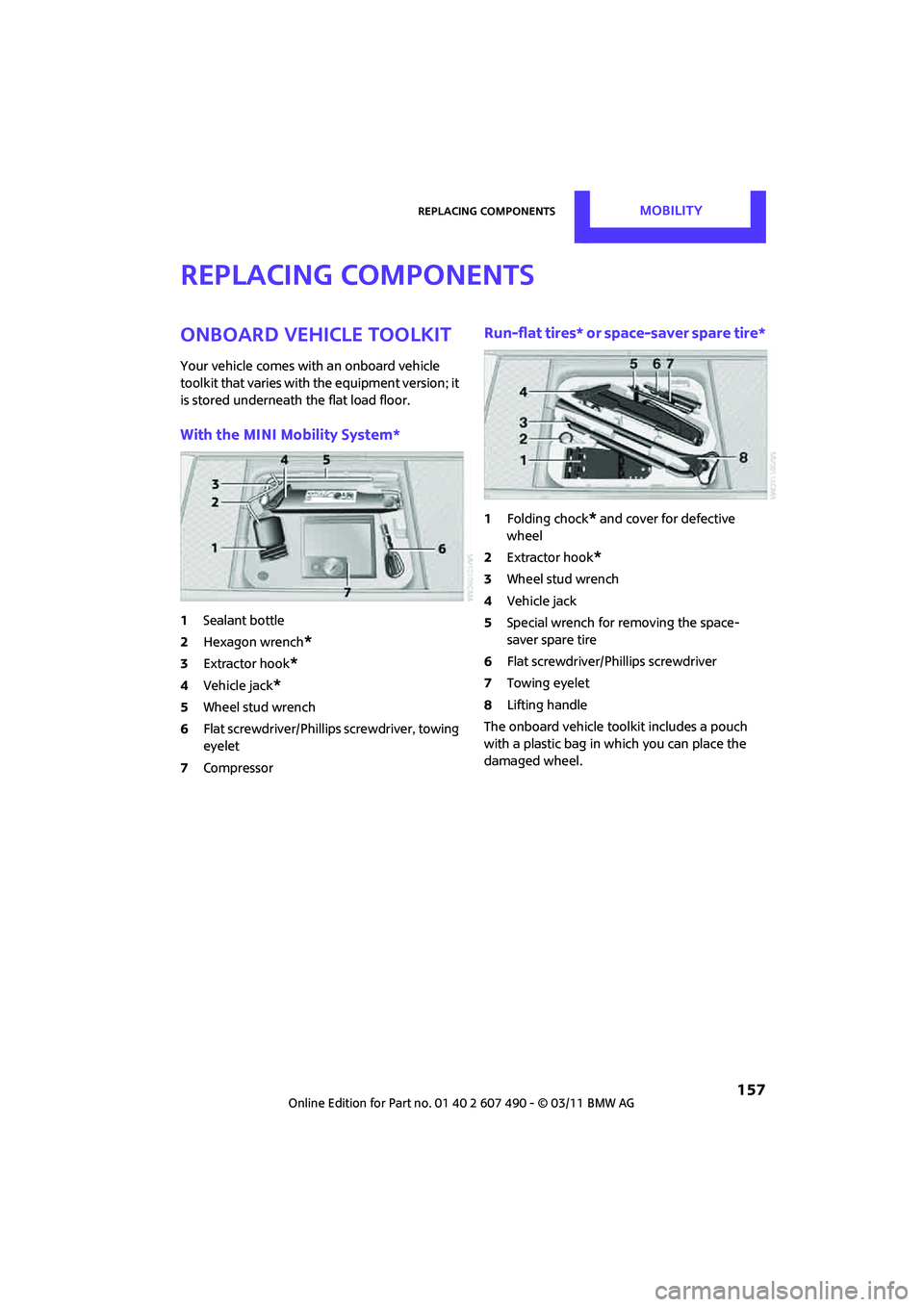
With the MINI Mobility System*
1Sealant bottle
2 Hexagon wrench
*
3Extractor hook*
4Vehicle jack*
5Wheel stud wrench
6 Flat screwdriver/Phillips screwdriver, towing
eyelet
7 Compressor
Run-flat tires* or space-saver spare tire*
1Folding chock* and cover for defective
wheel
2 Extractor hook
*
3Wheel stud wrench
4 Vehicle jack
5 Special wrench for removing the space-
saver spare tire
6 Flat screwdriver/Phillips screwdriver
7 Towing eyelet
8 Lifting handle
The onboard vehicle tool kit includes a pouch
with a plastic bag in which you can place the
damaged wheel.
Page 165 of 210
Replacing componentsMOBILITY
163
Center brake lamp
This lamp uses LED technology for operation. In
the event of a malfunction, contact your MINI
dealer or a workshop that has specially trained
personnel working in accordance with the
specifications of your MINI manufacturer.
Repairing a flat tire
Safety measures in the event of a break-
down:
Park the vehicle as far as possible from moving
traffic and switch on th e hazard warning flash-
ers.
Turn the steering wheel until the front wheels
are in the straight-ahead position and engage
the steering wheel lock. Engage the parking
brake and shift into 1st or reverse gear or place
the selector lever in position P.
All passengers should be outside the vehicle and
in a safe place, e.g. behind a guardrail.
Erect a warning triangle or warning flasher at the
appropriate distance if necessary. Comply with
all safety guidelines and regulations. <
In the event of a flat tire, different procedures
should be followed depending on the equip-
ment included in your vehicle:
> MINI Mobility System, refer to the following
section
> Run-flat tires, page 165
> Tire change with space-saver spare tire,
page 165
MINI Mobility System*
Preparations
Use of the MINI Mobility System may be ineffec-
tive if the tire puncture measures approx. 1/8 in/
4 mm or more. Contact the nearest MINI dealer
if the tire cannot be made drivable with the
Mobility System. Do not remove foreign bodies which have
penetrated the tire if possible.
Follow the instructions on using the Mobil-
ity System found on the compressor and
the sealant bottle. <
Remove the adhesive label for the speed limit
from the sealant bottle and affix it to the
steering wheel.
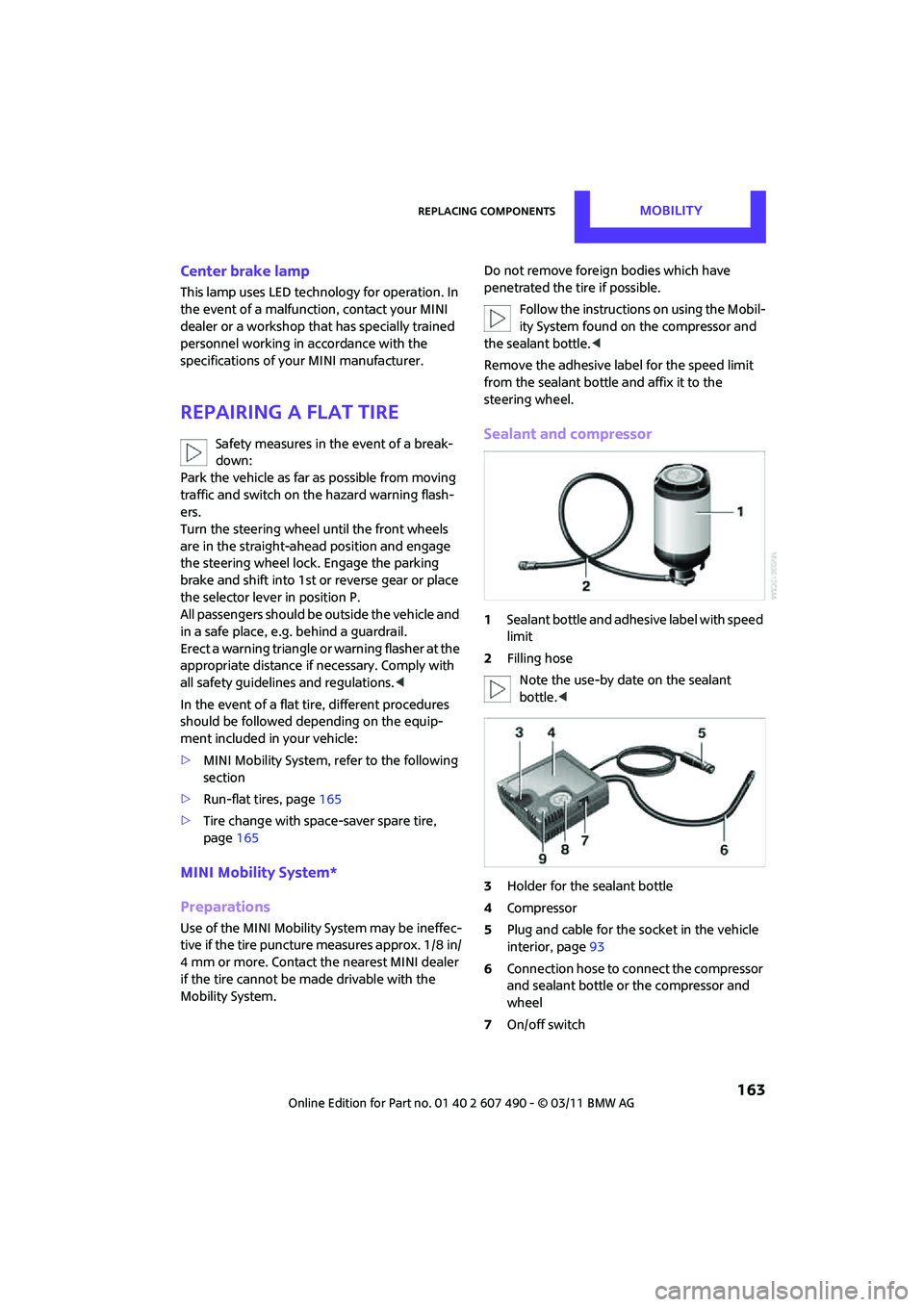
Sealant and compressor
1 Sealant bottle and adhesi ve label with speed
limit
2 Filling hose
Note the use-by date on the sealant
bottle. <
3 Holder for the sealant bottle
4 Compressor
5 Plug and cable for the socket in the vehicle
interior, page 93
6 Connection hose to connect the compressor
and sealant bottle or the compressor and
wheel
7 On/off switch
Page 166 of 210
MOBILITYReplacing components
164
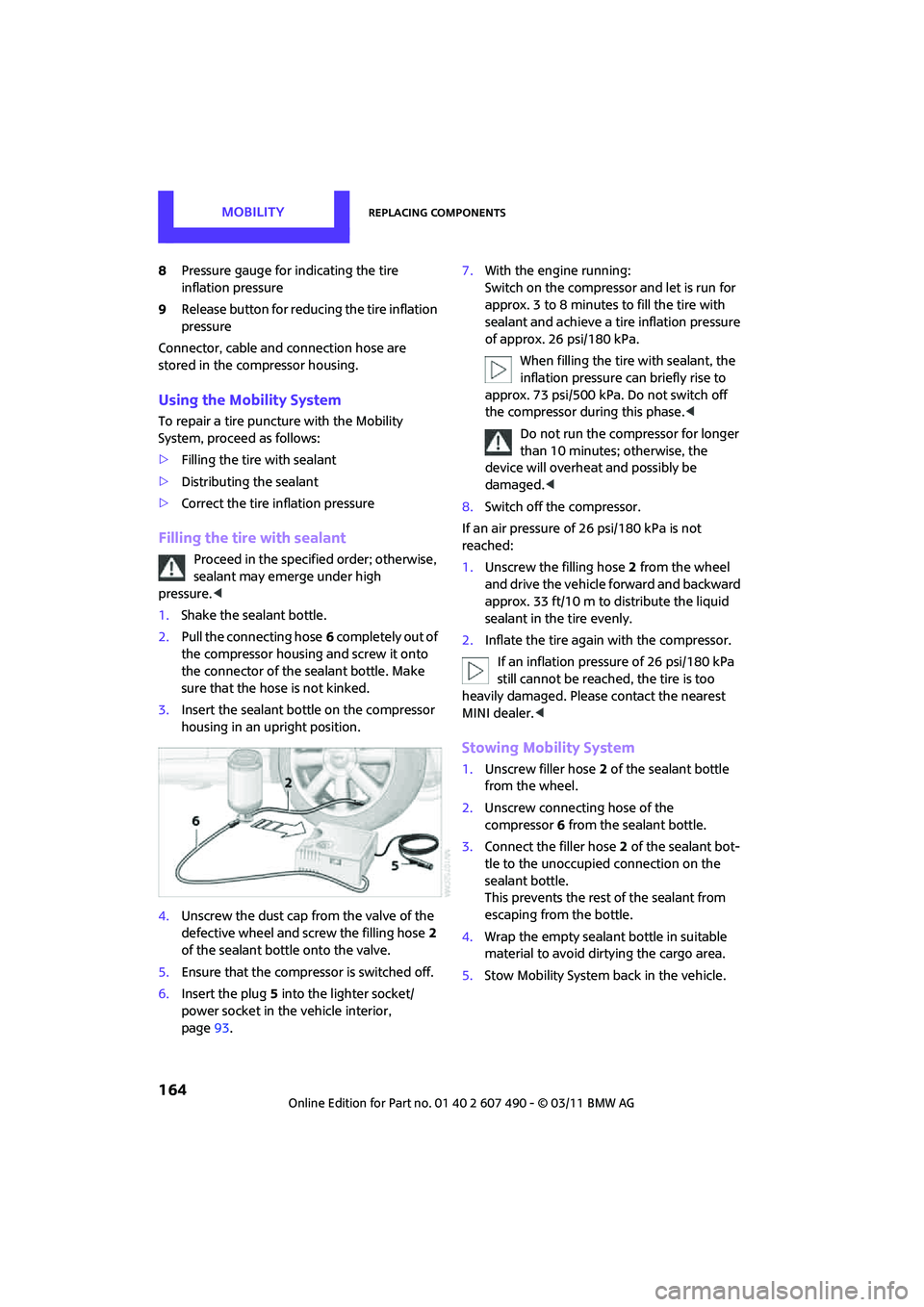
8Pressure gauge for indicating the tire
inflation pressure
9 Release button for reduci ng the tire inflation
pressure
Connector, cable and connection hose are
stored in the compressor housing.
Using the Mobility System
To repair a tire puncture with the Mobility
System, proceed as follows:
> Filling the tire with sealant
> Distributing the sealant
> Correct the tire inflation pressure
Filling the tire with sealant
Proceed in the specified order; otherwise,
sealant may emerge under high
pressure. <
1. Shake the sealant bottle.
2. Pull the connecting hose 6 completely out of
the compressor housing and screw it onto
the connector of the sealant bottle. Make
sure that the hose is not kinked.
3. Insert the sealant bo ttle on the compressor
housing in an upright position.
4. Unscrew the dust cap from the valve of the
defective wheel and screw the filling hose 2
of the sealant bottle onto the valve.
5. Ensure that the compre ssor is switched off.
6. Insert the plug 5 into the lighter socket/
power socket in the vehicle interior,
page 93. 7.
With the engine running:
Switch on the compressor and let is run for
approx. 3 to 8 minutes to fill the tire with
sealant and achieve a ti re inflation pressure
of approx. 26 psi/180 kPa.
When filling the tire with sealant, the
inflation pressure can briefly rise to
approx. 73 psi/500 kPa. Do not switch off
the compressor during this phase. <
Do not run the compressor for longer
than 10 minutes; otherwise, the
device will overheat and possibly be
damaged. <
8. Switch off the compressor.
If an air pressure of 26 psi/180 kPa is not
reached:
1. Unscrew the filling hose 2 from the wheel
and drive the vehicle forward and backward
approx. 33 ft/10 m to distribute the liquid
sealant in the tire evenly.
2. Inflate the tire again with the compressor.
If an inflation pressure of 26 psi/180 kPa
still cannot be reached, the tire is too
heavily damaged. Please contact the nearest
MINI dealer. <
Stowing Mobility System
1.Unscrew filler hose 2 of the sealant bottle
from the wheel.
2. Unscrew connecting hose of the
compressor 6 from the sealant bottle.
3. Connect the filler hose 2 of the sealant bot-
tle to the unoccupied connection on the
sealant bottle.
This prevents the rest of the sealant from
escaping from the bottle.
4. Wrap the empty sealant bottle in suitable
material to avoid dirtying the cargo area.
5. Stow Mobility System back in the vehicle.
Page 167 of 210
Replacing componentsMOBILITY
165
Distributing the sealant
Immediate drive approx. 3.1 miles/5 km so that
the sealant evenly distributes itself.Do not exceed speeds of 50 mph/
80 km/h.
If possible, do not drop below 10 mph/
20 km/h.<
Adjusting the tire pressure
1. After driving approx. 3.1 miles/5 km or
10 minutes, stop at a suitable location.
2. Screw the connection hose 6 of the
compressor directly onto the tire valve.
3. Insert the plug 5 into the power socket in
the vehicle interior.
4. Correct inflation pressu re to 26 psi/180 kPa.
With the engine running:
> To increase the inflatio n pressure: switch on
the compressor. To check the current infla-
tion pressure, switch off the compressor.
Do not run the compressor for longer
than 10 minutes; otherwise, the
device will overheat and possibly be
damaged. <
> To decrease the inflation pressure: press the
release button 9.
If the tire cannot ma intain the inflation
pressure, drive the vehicle again, refer to
Distributing the sealan t. Then repeat steps
1to4.
If an inflation pressure of 26 psi/180 kPa still
cannot be reached, the tire is too heavily dam-
aged. Contact the nearest MINI dealer. <
Driving on
Do not exceed the permitted maximum
speed of 50 mph/80 km/h; doing so may
result in an accident. <
Replace the defective tire as soon as possible
and have the new wheel/tire assembly
balanced.
Have the Mobility System refilled.
Changing wheels
Run-flat tires*
Tire change for run-flat tires:
> Prepare for tire change, page 166
> Jack up vehicle, page 167
> Tighten lug bolts, page 167
Space-saver spare tire*
Tire change with space-saver spare tire:
>Remove the space-saver spare tire,
page 165
> Prepare for tire change, page 166
> Jack up vehicle, page 167
> Mount space-saver spare tire, page 167
> Tighten lug bolts, page 167
> Drive with space-saver spare tire, page 166
Removing the space-saver spare tire
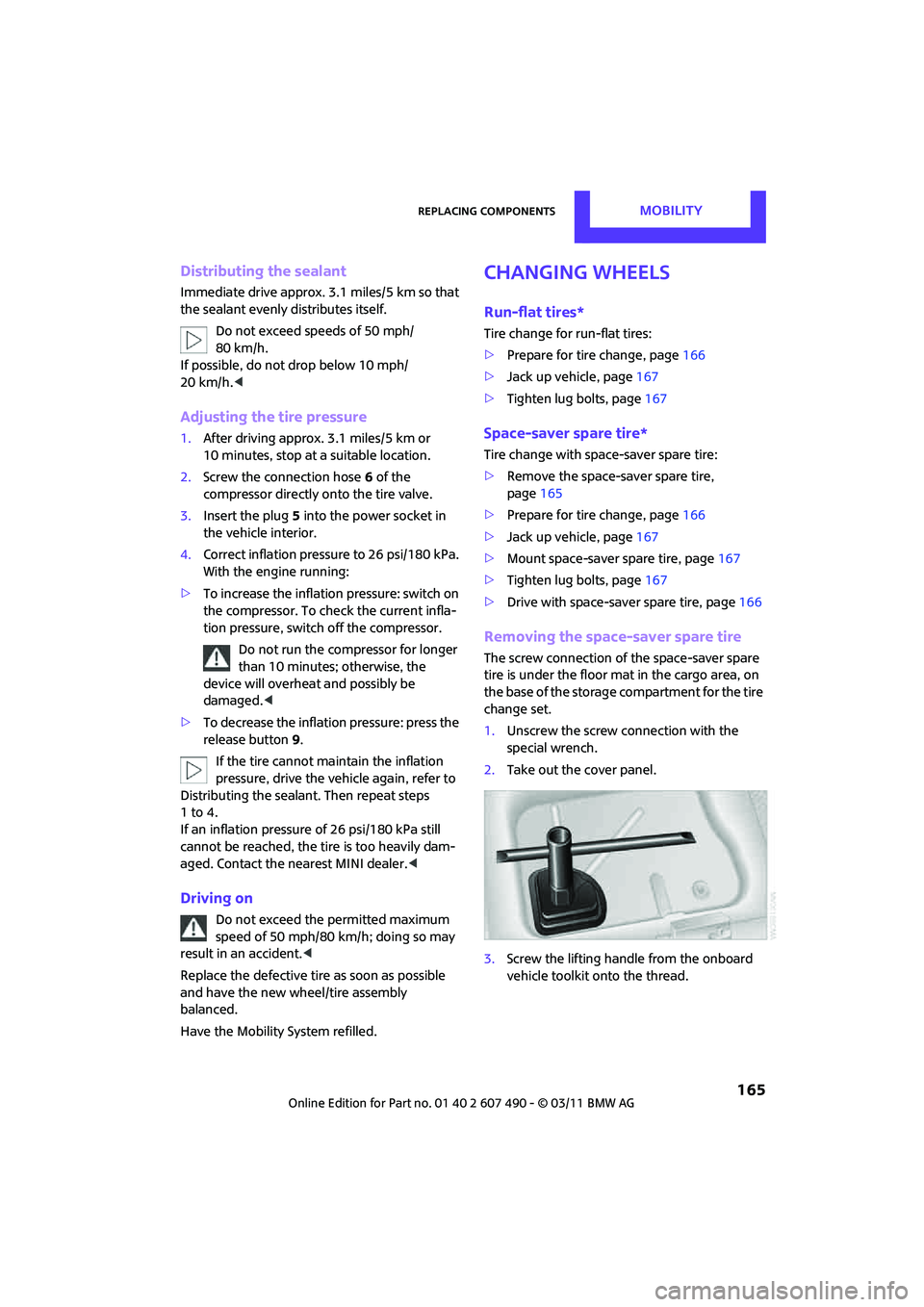
The screw connection of the space-saver spare
tire is under the floor mat in the cargo area, on
the base of the storage compartment for the tire
change set.
1. Unscrew the screw connection with the
special wrench.
2. Take out the cover panel.
3. Screw the lifting handle from the onboard
vehicle toolkit onto the thread.
Page 168 of 210

MOBILITYReplacing components
166
4.Raise the lifting handle slightly.
5. Squeeze the securing spring.
6. The space-saver spare tire is released and
must be held by the lifting handle.
7. Lower the space-saver spare tire with the
lifting handle.
8. Unscrew the lifting handle.
9. Pull the space-saver spare tire underneath
the vehicle out toward the rear.
10. Position the space-save r spare tire with the
valve facing upward.
11. Unscrew the valve extension from the valve
of the space-saver spare tire. 12.
Unscrew the dust cap from the extension
and place it on the valve of the space-saver
spare tire.
Due to its different dimensions, the
damaged wheel cannot be placed in the
recess for the space-saver spare tire. <
Driving with the space-saver spare tire
Drive cautiously and do not exceed a
speed of 50 mph/80 km/h. Changes may
occur in vehicle handling such as lower track
stability during braking, longer braking dis-
tances and changes in self-steering properties
when close to the handling limit. These proper-
ties are more noticeable with winter tires. <
Only one space-saver spare tire may be
mounted at one time. Mount a wheel and
tire of the original size as soon as possible, to
avoid any safety risks. <
Check the tire inflat ion pressure at the
earliest opportunity and correct it if
necessary. Replace the defe ctive tire as soon as
possible and have the ne w wheel/tire assembly
balanced. <
Preparing for a tire change
Observe the safety precautions regarding
flat tires on page 163.<
Additional safety measures when chang-
ing tires:
Only change the tire wh en parked on a surface
that is level, firm and not slippery.
The vehicle or the jack could slip sideways on
soft or slippery support surfaces, such as snow,
ice, flagstones, etc.
Do not use a wooden block or similar object as a
support base for the jack, as this would prevent
it from extending to its full support height and
reduce its load-carrying capacity.
Do not lie under the vehicle or start the engine
when the vehicle is supported by the jack; other-
wise, there is a risk of fatal injury. <
Page 182 of 210
MOBILITYIndicator and warning lamps
180
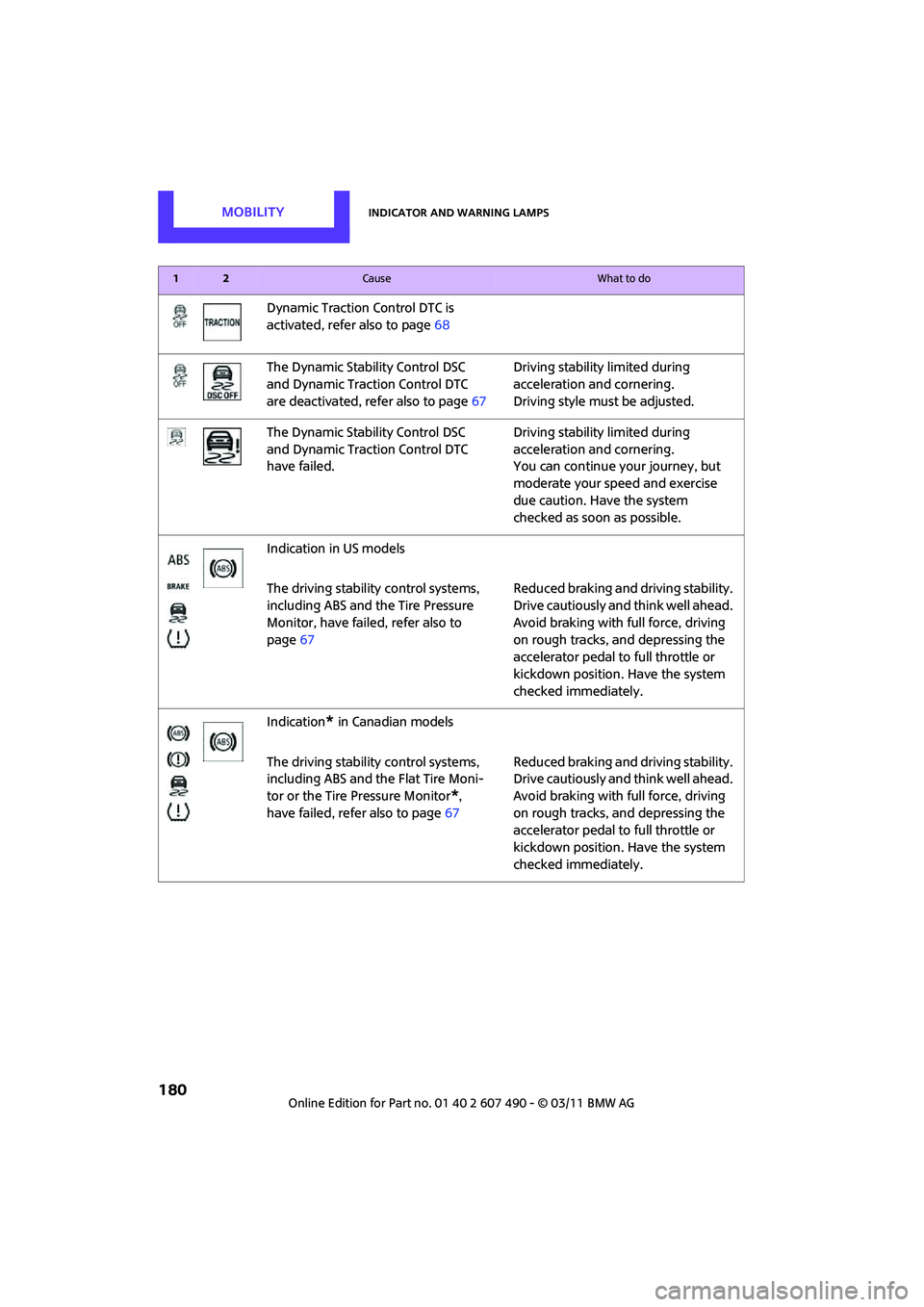
Dynamic Traction Control DTC is
activated, refer also to page68
The Dynamic Stability Control DSC
and Dynamic Traction Control DTC
are deactivated, refer also to page 67Driving stability limited during
acceleration and cornering.
Driving style must be adjusted.
The Dynamic Stability Control DSC
and Dynamic Traction Control DTC
have failed. Driving stability limited during
acceleration and cornering.
You can continue your journey, but
moderate your speed and exercise
due caution. Have the system
checked as soon as possible.
Indication in US models
The driving stability control systems,
including ABS and the Tire Pressure
Monitor, have failed, refer also to
page 67 Reduced braking and driving stability.
Drive cautiously and think well ahead.
Avoid braking with full force, driving
on rough tracks, and depressing the
accelerator pedal to full throttle or
kickdown position. Have the system
checked immediately.
Indication
* in Canadian models
The driving stability control systems,
including ABS and the Flat Tire Moni-
tor or the Tire Pressure Monitor
*,
have failed, refer also to page 67Reduced braking and driving stability.
Drive cautiously and think well ahead.
Avoid braking with full force, driving
on rough tracks, and depressing the
accelerator pedal to full throttle or
kickdown position. Have the system
checked immediately.
12Cause What to do
Page 183 of 210

Indicator and warning lampsMOBILITY
181
Vehicles with Flat Tire Monitor*
Light up in yellow and red:
>Tire damage Carefully bring the car to a stop.
Observe the information starting on
page
69.
> Flat Tire Monitor not initialized Initialize Flat Tire Monitor, page
70.
Light up in yellow:
Flat Tire Monitor failed. Punctures are
not indicated Have the system checked.
Vehicles with Tire Pressure Monitor
*
Light up in yellow and red:
There is a flat tire or substantial loss
in tire pressure Carefully bring the car to a stop.
Observe the information starting on
page
72.
12Cause What to do
Page 184 of 210
MOBILITYIndicator and warning lamps
182
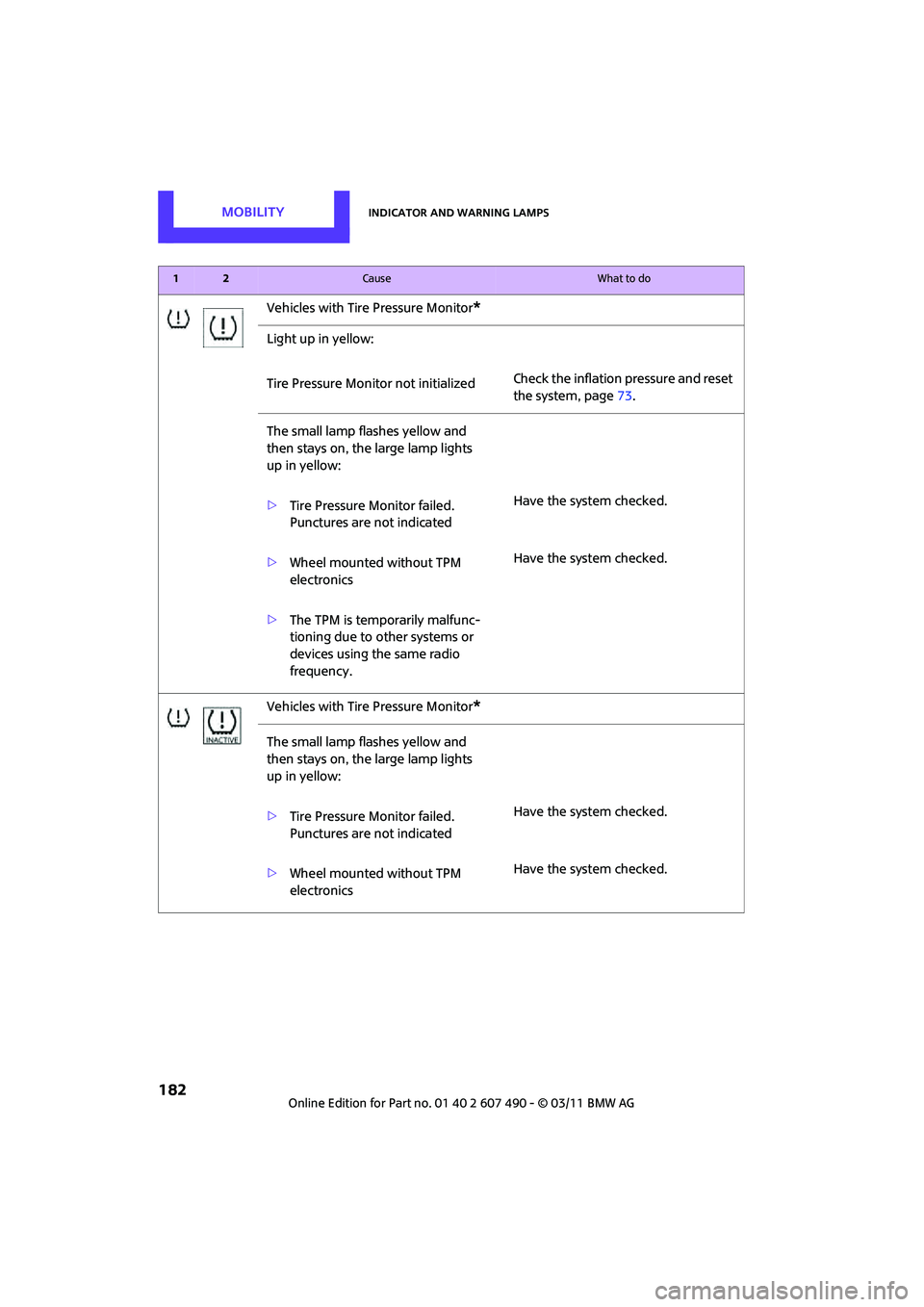
Vehicles with Tire Pressure Monitor*
Light up in yellow:
Tire Pressure Monitor not initializedCheck the inflation pressure and reset
the system, page
73.
The small lamp flashes yellow and
then stays on, the large lamp lights
up in yellow:
> Tire Pressure Monitor failed.
Punctures are not indicated Have the system checked.
> Wheel mounted without TPM
electronics Have the system checked.
> The TPM is temporarily malfunc-
tioning due to other systems or
devices using the same radio
frequency.
Vehicles with Tire Pressure Monitor
*
The small lamp flashes yellow and
then stays on, the large lamp lights
up in yellow:
> Tire Pressure Monitor failed.
Punctures are not indicated Have the system checked.
> Wheel mounted without TPM
electronics Have the system checked.
12Cause What to do
Page 196 of 210

194
REFERENCEEverything from A to Z
Everything from A to Z
INDEX
A
ABS Antilock Brake System67
Accessories, refer to Your individual vehicle 4
Acknowledgment signals for
locking/unlocking vehicle 23
Activated-charcoa l filter for
automatic climate control 88
Adaptive Light Control 80
Additives
– coolant 149
– engine oil 149
Adjusting temperature inside the car, refer to Air
conditioner 85
Adjusting temperature inside the car, refer to Automatic
climate control 86
Airbags 75
– sitting safely 37
– warning lamp 77
Air conditioner 84
Air conditioning mode
– air conditioner 85
– automatic cl imate control86
– ventilation 88
Air distribution
– automatic 87
– individual 86
– manual 86
Air flow rate 85,87
– air conditioning system 85
– automatic cl imate control87
– heating, ventilation 85
Airing, refer to Ventilation88
Air outlets, refer to Air vents 84
Air pressure, checking, refer to
Tire inflation pressure 134Air recirculation, refer to
Recirculated-air
mode 85,87
Air supply
– air conditioner 85
– automatic climate control 86
– ventilation 88
Air vents 84
AKI, refer to Fuel grade 133
Alarm system 27
All-season tires, refer to Winter tires 145
Always Open Timer 58
Ambient air, refer to Recirculated-air
mode 85,87
Ambient lighting 83
Antenna, care 153
Antifreeze
– coolant 14
9
– washer fluid 53
Antilock Brake System ABS 67
Anti-theft alarm system, refer
to Alarm system 27
Anti-theft system 21
Approved axle loads, refer to
Weights 191
Approved engine oils 149
Approved gross vehicle
weight, refer to Weights 191
Armrest, refer to Center armrest 92
Ashtray 93
Assistant systems, refer to
– Dynamic Stability Control
DSC 67
Audio device, external 91Automatic
– air distribution
87
– air flow rate 87
– cruise control 54
– headlamp control 78
Automatic climate control 84
– automatic air distribution 87
Automatic station search 107
Automatic station storage 108
Automatic transmission with Steptronic 48
– interlock 49
– overriding selector lever lock 50
– shiftlock 49
– sport program 49
AUTO program for automatic climate control 87
Auto radio, refer to Radio MINI Boost CD 106
AUX-IN, refer to External audio device 91
AUX In connection 106
Average fuel consumption 57
– setting the units 61
Average speed 57
Axle loads, refer to Weights 191
B
Background lighting, refer to
Ambient lighting 83
Backrests, refer to Seats 38
Backup lamps
– replacing bulb 161,162
Band-aids, refer to First aid pouch 169
Bar, refer to Tow-starting, towing away 172
Page 199 of 210

Everything from A to ZREFERENCE
197
Drinks holders, refer to Cupholders 93
Drive-off assistan t, refer to Hill
Assist 69
Driving dynamics control, refer to Sport button 69
Driving lamps, refer to Parking
lamps/low beams 78
Driving notes 96
Driving off on inclines, refer to
Hill Assist 69
Driving stability control systems 67
Driving through water 97
Driving tips, refer to Driving notes 96
Dry air, refer to Cooling function 88
DSC Dynamic Stability
Control 67
DTC Dynamic Traction Control 68
Dynamic Brake Control DBC, refer to Brake Assist 67
Dynamic Stability Control
DSC 67
Dynamic Traction Control DTC 68
E
Eject button 112
Electrical malfunction
– convertible top 34
– door lock 25
– fuel filler flap 132
– liftgate 26
Electric power windows
– initializing 31
Electronic brake-force distribution 67
Electronic Stability Program
ESP, refer to Dynamic
Stability Control DSC 67Emergency operation, refer to
Manual operation
– convertible top 34
– door lock 25
– fuel filler flap 132
– liftgate 26
– transmission lock, automatic
transmission 50
Emergency services, refer to Roadside Assistance 169
Engine
– breaking in 96
– data 188
– overheated, refer to Coolant temperature 149
– speed 188
– starting 47
– starting, Comfort Access 28
– switching off 47
Engine compartment 147
Engine coolant, refer to Coolant 149
Engine oil
– adding 148
– additives, refer to Approved
engine oils 149
– alternative oil types 149
– approved engine oils 149
– capacity 148
– checking level 147
– dipstick 147
– intervals between changes, refer to Service
requirements 62
– MINI Maintenance System 151
Engine oil level, checking 147
Engine output, refer to Engine data 188
Engine starting, refer to Starting the engine 47
ESP Electronic Stability
Program, refer to Dynamic
Stability Control DSC 67
Exhaust system, refer to Hot
exhaust system 96 Exterior mirrors
41
– adjusting 41
– automatic heating 41
– folding in and out 41
External audio
device91,106
External temperature display
– change units of measure 61
– in the on-board computer 61
Eyes
– for tow-starting and towing
away 171
– for tying down loads 101
F
Failure messages, refer to
Check Control 64
Failure of an electrical consumer 168
Fastening safety be lts, refer to
Safety belts 40
Fast forward
– CD 112
Fault messages, refer to Check
Control 64
Filter
– microfilter/activated- charcoal filter for automatic
climate control 88
– microfilter for air
conditioner 86
Fine wood, care 156
First aid pouch 169
Fixture for remote control, refer to Ignition lock 46
Flash when locking/
unlocking 23
Flat tire
– run-flat tires 144
– Tire Pressure Monitor TPM 72
Flat Tire Monitor FTM 69
– indicating a flat tire 71
– initializing the system 70
– snow chains 70
– system limits 70
Flat tires, refer to Tire condition 143