radio MINI COOPER 2011 Owner's Guide
[x] Cancel search | Manufacturer: MINI, Model Year: 2011, Model line: COOPER, Model: MINI COOPER 2011Pages: 210, PDF Size: 3.19 MB
Page 122 of 210

COMMUNICATIONSTelephone
120
10Switching displays 124
> "PHONE": telephone
> "COMP": computer
> "CONFIG": adjusting
11 Radio on/off, volume
>Press: to switch radio on/off
> Turn: adjusting volume 124
12 Ejecting CD
This symbol appears on the radio display
when a phone call is being made with the
hands-free system.
Pairing/unpairing mobile
phone
Overview
The pairing data of four mobile phones can be
stored simultaneously in the vehicle. When the
engine is running or the ignition is switched on,
each paired mobile phone is automatically
detected as soon as it is present in the passenger
compartment.
Requirements
> Suitable mobile ph one, refer to page118.
> Mobile phone operational.
> Bluetooth activated in vehicle, refer to
page 120, and in the mobile phone.
> Bluetooth presets in the mobile phone are
required, e.g. connection not confirmed or
visible, refer to Owner's Manual for the
mobile phone.
> A number with at least 4 and at most
16 digits has been established as the Blue-
tooth passkey. Only required once for
pairing.
> Ignition switched on.
Activating/deactivating Bluetooth link
Bluetooth is not permitted everywhere. Comply
with all safety guidelines and regulations.
To deactivate the Bluetooth connection:
1.MENU Press the button.
2. Press the button.
3. Press the button.
4. Press the button.
5. Press the button.
To reactivate the Bluetooth connection:
1. Press the button.
2. Press the button.
Pairing and connecting
Only pair the mobile phone when the
vehicle is stopped; otherwise, inattention
may lead to endangerment of passengers or
other road users. <
Switching on ignition
1.Insert the remote control as far as possible
into the ignition lock.
2. Switch on the ignition; to do so, press the
Start/Stop button without stepping on the
brake or clutch pedal.
Page 123 of 210

TelephoneCOMMUNICATIONS
121
Preparation on the radio display
3.MENU Press the button.
4.
Press the button.
5. Press the button.
6. Press the button.
Turn the right rotary knob to display the Blue-
tooth name of your vehicle on the display.
Preparation with mobile phone
7. Other operations must be performed on the
mobile phone and differ depending on the
type of mobile phone, refer to Owner's
Manual for the mobile phone, e.g. under
Connecting or pairing Bluetooth device.
The Bluetooth name of the vehicle appears
on the mobile phone display.
8. Select the Bluetooth name of the vehicle on
the mobile phone display.
Pairing
The mobile phone or the radio display will
prompt you to enter the same Bluetooth
passkey.
Depending on the mobile phone, you have
approx. 30 seconds to enter the Bluetooth
passkey using the mobile phone and the radio
display. If the Bluetooth passkey can be entered using
the radio, then the following appears on the
display:
:
9.
Enter the Bluetooth passkey using the
number buttons of the mobile phone.
10. Press the button to enter the
Bluetooth passkey using the radio.
11. Using the function buttons 0-9, enter the
same Bluetooth passke y that was entered
into the mobile phone.
To delete the last digit:
Press the button.
12. Press the button to confirm the
Bluetooth passkey.
The following display will appear after a few
seconds:
13. Press the button if necessary.
The following display will appear after the
mobile phone is paired:
If the pairing was successful, the mobile phone
appears at the top of the list of mobile phones.
If the pairing was not successful: What to do if…,
refer to page 123.
Page 124 of 210
COMMUNICATIONSTelephone
122
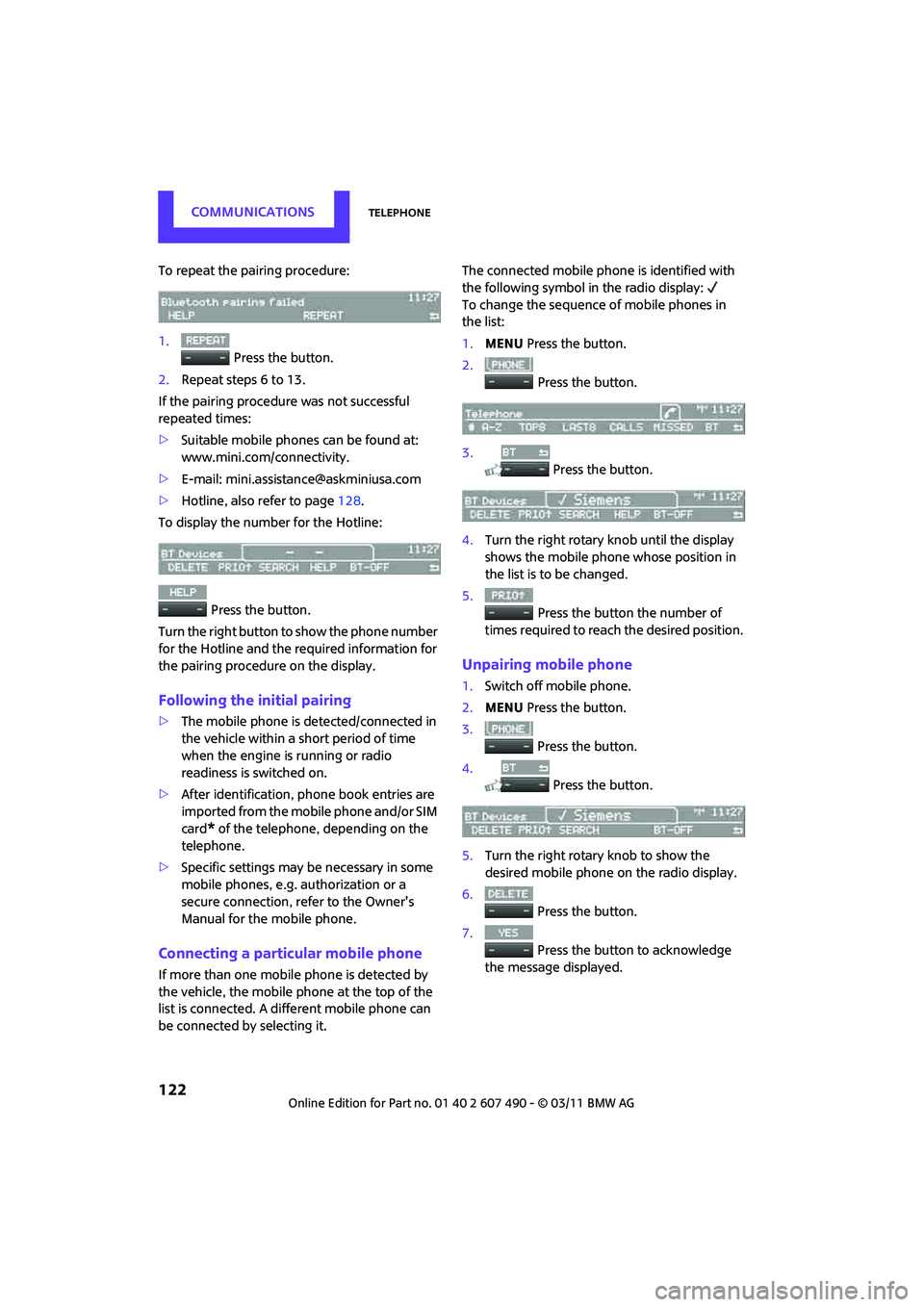
To repeat the pairing procedure:
1. Press the button.
2. Repeat steps 6 to 13.
If the pairing procedure was not successful
repeated times:
> Suitable mobile phones can be found at:
www.mini.com/connectivity.
> E-mail: mini.assistan [email protected]
> Hotline, also refer to page 128.
To display the number for the Hotline:
Press the button.
Turn the right button to show the phone number
for the Hotline and the re quired information for
the pairing procedure on the display.
Following the initial pairing
> The mobile phone is detected/connected in
the vehicle within a short period of time
when the engine is running or radio
readiness is switched on.
> After identification, phone book entries are
imported from the mobile phone and/or SIM
card
* of the telephone, depending on the
telephone.
> Specific settings may be necessary in some
mobile phones, e.g. authorization or a
secure connection, re fer to the Owner's
Manual for the mobile phone.
Connecting a particular mobile phone
If more than one mobile phone is detected by
the vehicle, the mobile phone at the top of the
list is connected. A different mobile phone can
be connected by selecting it. The connected mobile phone is identified with
the following symbol in the radio display:
To change the sequence of mobile phones in
the list:
1.
MENU Press the button.
2. Press the button.
3. Press the button.
4. Turn the right rotary knob until the display
shows the mobile phone whose position in
the list is to be changed.
5. Press the button the number of
times required to reach the desired position.
Unpairing mobile phone
1. Switch off mobile phone.
2. MENU Press the button.
3. Press the button.
4. Press the button.
5. Turn the right rotary knob to show the
desired mobile phone on the radio display.
6. Press the button.
7. Press the button to acknowledge
the message displayed.
Page 125 of 210

TelephoneCOMMUNICATIONS
123
What to do if…
For information on suitable mobile phones, refer
to page118.
The mobile phone could not be paired or
connected.
> Is Bluetooth activated in the vehicle and in
the mobile phone? Activate Bluetooth in the
vehicle and in the mobile phone.
> Do the Bluetooth passkeys on the mobile
phone and the vehicle match? Enter the
same passkey on the mobile phone and via
the radio.
> Is the passkey input taking longer than
30 seconds? Repeat the pairing procedure.
> Are too many Bluetooth devices connected
to the mobile phone? If so, delete the con-
nections with other devices on the mobile
phone.
> Is the mobile phone in power economy
m o d e o r d o e s i t o n l y h av e a s m al l am o u n t o f
battery charge remaining? Charge the
mobile phone in the snap-in adapter
* or via
a charging cable.
> Depending on the mobile phone, it may only
be possible to connect one device to the
vehicle. Unpair the connected device from
the vehicle and only pair and connect one
device.
> Is the mobile phone no longer responding?
Switch the mobile ph one off and back on
again. Repeat the pairing procedure.
> Delete connection to the mobile phone and,
if necessary, to the radio and try again.
Phone book entries are not displayed, not all of
them are displayed, or they are displayed
incompletely.
> The transfer of phone book entries has not
yet completed.
> It is possible that only the phone book
entries of the mobile phone or the SIM card
*
are transferred.
> It may not be possible to display phone book
entries with special characters. >
The number of phone book entries to be
stored is too high.
> The data volume of the phone book entry is
too great, e.g. due to additionally stored
information such as notes? Reduce the data
volume.
The telephone connection quality is low.
> Depending on the mobile phone, it is possi-
ble to adjust the strength of the Bluetooth
signal.
> Insert the mobile phone into the snap-in
adapter
* or place it in the vicinity of the
center console.
> Adjust the volume of the microphone and
speaker separately.
If you have gone through all items in the list and
still cannot activate the desired function please
contact the Hotline or your MINI dealer.
Operation
Overview
The following functions can be operated using
the radio:
> Accepting/refusing a call
> Dialing phone numbers
> Dialing a phone number from the phone
book
> Dialing a stored phone number, e.g. from
the list of accepted calls
> Ending a call
When the ignition is switched off and radio
readiness switched on, e. g. after removal of the
infrared remote control, an ongoing conversa-
tion can be continued for a maximum of
25 minutes using the hands-free system.
Page 126 of 210
COMMUNICATIONSTelephone
124
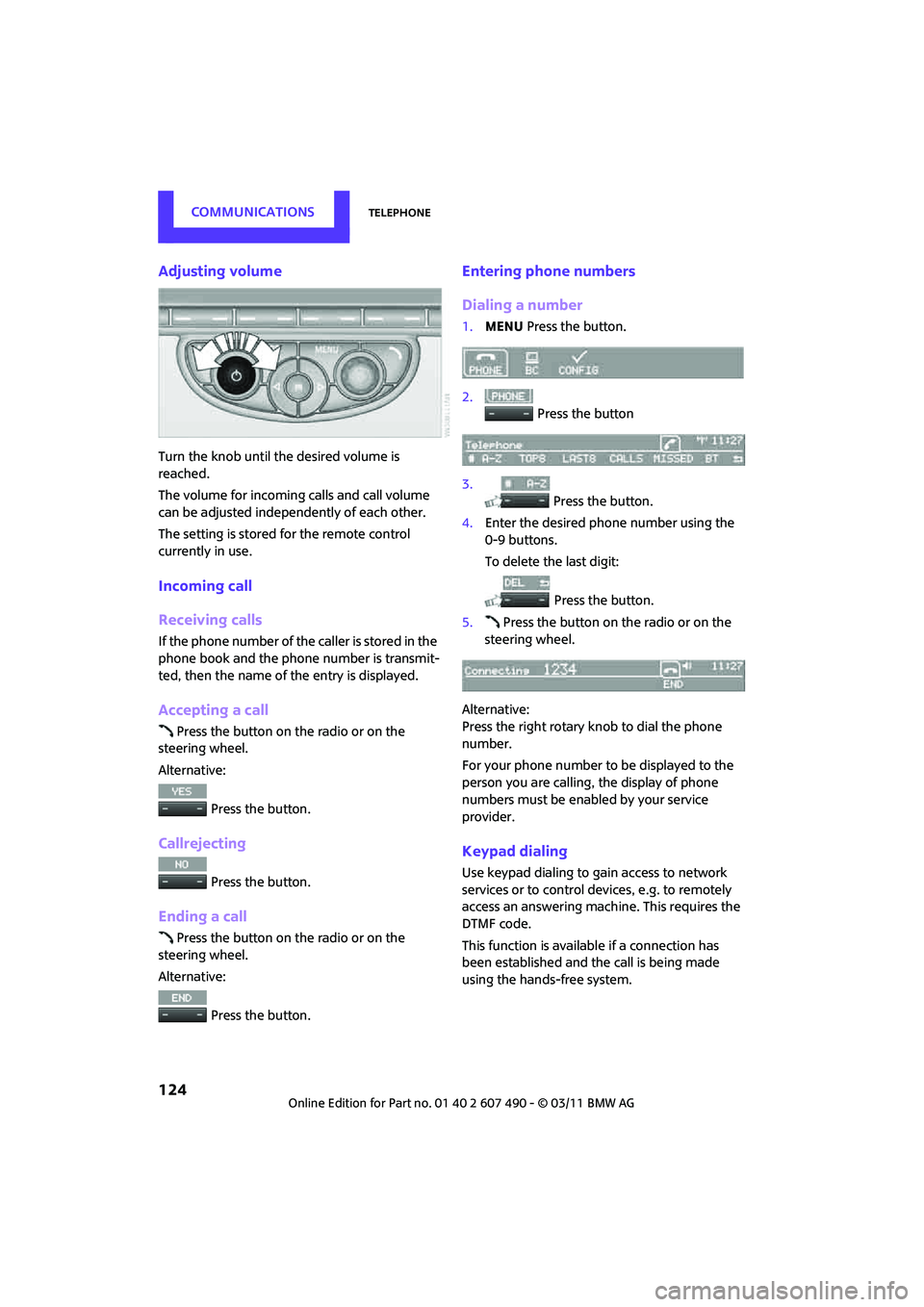
Adjusting volume
Turn the knob until the desired volume is
reached.
The volume for incoming calls and call volume
can be adjusted independently of each other.
The setting is stored for the remote control
currently in use.
Incoming call
Receiving calls
If the phone number of the caller is stored in the
phone book and the phone number is transmit-
ted, then the name of the entry is displayed.
Accepting a call
Press the button on the radio or on the
steering wheel.
Alternative:
Press the button.
Callrejecting
Press the button.
Ending a call
Press the button on the radio or on the
steering wheel.
Alternative:
Press the button.
Entering phone numbers
Dialing a number
1.MENU Press the button.
2. Press the button
3. Press the button.
4. Enter the desired phone number using the
0-9 buttons.
To delete the last digit:
Press the button.
5. Press the button on the radio or on the
steering wheel.
Alternative:
Press the right rotary knob to dial the phone
number.
For your phone number to be displayed to the
person you are calling, the display of phone
numbers must be enabled by your service
provider.
Keypad dialing
Use keypad dialing to gain access to network
services or to control de vices, e.g. to remotely
access an answering machine. This requires the
DTMF code.
This function is available if a connection has
been established and the call is being made
using the hands-free system.
Page 127 of 210

TelephoneCOMMUNICATIONS
125
1. Press the button.
2. Enter the desired code using the 0-9
buttons.
3.
If needed, press and hold the but-
ton on the right or left side to enter special
characters.
Dialing a phone number from the phone
book or from phone numbers stored in a
list
Phone numbers dialed, incoming calls, and
phone book entries are stored in lists when the
mobile phone is connected to the vehicle via
Bluetooth. If the caller is entered in the phone
book, then the name of the entry is displayed
instead of the phone number.
Select the desired name from the list and estab-
lish the connection.
There are five available lists:
> "A-Z"
The entries of the phone book, the SIM
card
*, or the mobile phone, composed of a
name and phone number, are sorted alpha-
betically.
> "TOP8"
The Top 8 list automatically stores the eight
phone numbers of the phone book that are
dialed the most frequently.
> "LAST8"
The last eight phone numbers you have
dialed are stored automatically. The phone
number dialed last appears at the top of the
list.
> "CALLS"
The phone numbers of the last eight
accepted calls are stored. This requires the
phone number of the caller to have been
transmitted. >
"MISSED"
The phone numbers of the last eight calls
that were not accepted are stored. This
requires the phone number of the caller to
have been transmitted.
Dialing a phone number from the phone
book
The A-Z list is available fo r phone book entries. If
entries with different names, but the same
phone number are transferred from the mobile
phone to the vehicle, only one entry is displayed.
The displays of the phone book entries on the
radio display can differ fr om the displays on the
mobile phone display, e.g. sequence of the first
and last names.
1. MENU Press the button.
2. Press the button.
3. Press the button.
The arrows indicate that
additional letters can be displayed.
Turn the right rotary knob to display
additional letters.
4. Turn the right rotary knob to select the first
letters of the desired entry.
5. Press the button if so desired.
The phone number is dialed.
To display all entries:
1. Turn the right rotary knob to select the first
letters of the desired entry and press the
right rotary knob.
2. Turn the right rotary knob to select the
desired entry and pre ss the right rotary
knob.
Page 128 of 210

COMMUNICATIONSTelephone
126
The phone number is dialed.
The phone number can also be dialed using the
buttons on the steering wheel or radio: Press the button.
Editing and dialing a phone number
from the phone book
The phone number of an entry can be edited
before a call. This change is not stored in the
phone book.
1. Select an entry.
2. Press the button.
3. Press the button to delete a digit.
4. Enter additional digits using the 0-9 buttons.
5. Press the right rotary knob to dial the phone
number.
Dialing a phone number from the phone
book using buttons on the steering
wheel
1. Press and hold the button to display the
telephone menu.
2. Use the arrow buttons on the steering wheel
to scroll through the phone book.
3. Press and hold the button to dial the
phone number.
Dialing a phone number stored in a list
To select an entry and establish a connection:
1. MENU Press the button
2. Press the button.
3. Press the desired button to select
one of the four lists.
4. Turn the right rotary knob to select an entry
and press the right rotary knob to dial the
phone number.
Deleting an individual entry
1.Select the desired entry from the list.
2. Press the button.
Displaying call duration
To display the duration during a call:
Press the button.
Hands-free system
General information
Calls being conducted using the hands-free
system can be continued using the mobile
phone and vice versa.
From the mobile phone to the hands-
free system
Calls that have been initiated from outside the
Bluetooth range of the ve hicle can be continued
using the hands-free system if the ignition is
switched on.
Depending on the mobile phone, the call is
automatically switched to hands-free mode.
If the switch does not occur automatically, then
follow the instructions that appear on the
display of the mobile phone, also refer to the
Owner's Manual for the mobile phone.
From hands-free system to mobile
phone
Calls being conducted using the hands-free
system can also be cont inued using the mobile
phone if so desired, de pending on the mobile
phone.
At this point, follow the instructions that appear
on the display of the mobile phone, also refer to
the Owner's Manual for the mobile phone.
Page 129 of 210

TelephoneCOMMUNICATIONS
127
Operation by voice*
The concept
>The mobile phone can be operated without
removing your hand from the steering
wheel.
> In many cases, the entry process is sup-
ported by means of announcements or
questions.
> {...} Verbal instructions to use with the voice
activation system.
> {{...}} Indicates responses of the voice
activation system.
Voice commands
Activating voice activation system
1. Briefly press the button on the steering
wheel.
An acoustic signal in dicates that commands
can be spoken aloud. Display on the radio:
2. Say the command.
Finishing voice input
Press the button on the steering wheel
briefly
or
Possible commands
Having possible commands read aloud
Press the button on the steering wheel.
Possible commands are read aloud.
Each digit can be spoken individually or com-
bined into a sequence to accelerate the entry
process.
Using alternative commands
There are often a number of commands to run a
function, e.g.:
Example: dialing phone numbers
1. Briefly press the button on the steering
wheel.
2. {Dial number }
3. The system replies: {{Please say the
number }}
4. For example: {123 456 7890 }
5. The system replies: {{123 456 7890. }}
6. {Dial }
The system replies: {{Dialing number}}
Calling
Dialing phone numbers
The connection to the desired subscriber is
established.
Correcting phone number
Digit sequences can be de leted after the system
has repeated the digits.
The command can be repeated as often as
necessary.
Deleting phone number
All digits entered up to this point are deleted.
{
Cancel }.
{ Help }.
{Dial name } or {Name }.
1. {Dial number }.
2. Say the phone number.
3. {Dial }.
{ Correct number }.
{ Delete }.
Page 158 of 210

MOBILITYCare
156
Especially when the leather has a light color, it
should be cleaned regularly since it tends to get
heavily soiled.
Treat the leather twice a year using a leather
lotion since dirt and grease will gradually attack
the leather's protective layer.
Carpets/floor mats*
Keep floor mats, carpet, and other objects
out of the movement range of the pedals;
otherwise, they may inhibit the function of the
pedals during driving.
Do not place additional floor mats onto an
existing one or onto other objects.
Only use floor mats that have been approved for
the vehicle and can be appropriately fastened.
Make sure that the floo r mats are securely fas-
tened again after they ha ve been removed, e.g.
for cleaning. <
Floor mats can be removed to be cleaned.
If the carpets are very di rty, clean with a microfi-
ber cloth and water or an interior cleaner. When
doing so, rub forward and back in the driving
direction; otherwise, the carpet may become
matted.
Interior plastic parts
These include:
> Plastic surfaces
> Lamp glass
> Display panes
> Mat parts
Only clean with water an d, if necessary, solvent-
free plastic cleaners.
Do not use solvents such as alcohol, lac-
quer thinner, cold cleaners, fuel, or similar,
as these will damage the surfaces. <
Decorative strips*
Only clean decorative strips with moist cloths.
Wipe dry with a soft cloth.
Safety belts
Dirty belt straps impede the reeling action and
thus have a negative impact on safety.
Do not clean chemically, as this may
destroy the webbing. <
Displays
To clean displays such as radios or display ele-
ments, use a display cleaning cloth or a soft,
non-scratching, lint-free cloth.
Avoid pressing too hard when cleaning
the display as this can cause damage. <
Do not use chemical or abrasive house-
hold cleaning agents. Keep fluids of any
kind away from the device. Surfaces or electrical
components may otherwise become corroded
or damaged. <
CD/DVD drives
Do not use cleaning CDs as this could
damage parts of the drive. <
Vehicle storage
If you are not going to drive your car for more
than three months, please ask for advice from
your MINI dealer or a workshop that works
according to MINI manufacturer specifications.
Page 170 of 210

MOBILITYReplacing components
168
Battery replacement
Only use vehicle batteries that have been
approved for your vehicle by the manu-
facturer; otherwise, the vehicle could be dam-
aged and systems or func tions may not be fully
available. <
After a battery replacement, have the battery
registered on the vehicle by your dealer to
ensure that all comfort functions are fully
available.
Charging the battery
Only charge the battery in the vehicle when
the engine is off. Connections, refer to Jump-
starting on page 169.
Disposal
After replacing old ba tteries, return the
used batteries to your MINI dealer or to a
recycling center. Maintain the battery in an
upright position for transport and storage.
Always secure the battery against tipping over
during transport. <
Power failure
After a temporary power loss, some equipment
may not be fully function al and may require ini-
tialization. Individual settings are also lost and
must be reprogrammed:
> Time and date
These values must be updated, page 63.
> Radio
In some cases, statio ns may have to be
stored again, page 108.
> Glass roof
*, electric
It may only be possible to raise the roof, if
applicable. The system must be initialized.
Contact your near est MINI dealer.
Fuses
Do not attempt to repair a blown fuse or
replace it with a fuse of a different color or
Ampere rating. To do this could cause a fire in
the vehicle resulting from a circuit overload.
Have the fuse changed only by a MINI dealer or
a workshop that has specially trained personnel
working in accordance with the specifications of
the MINI manufacturer. <
A fuse allocation diagram is located on the inside
of the fuse box cover panels.
In the engine compartment
Opening the cover
Press the latch.
In the vehicle interior
On the right side of the footwell.
Opening the cover
Press out at the recess.